Solved Updated 24H2 to 26100.5074 Now Can't Connect to Other Computer


I am running build 26100.4946 Windows 11 Pro on both my main PC and the NUC media server. They have needed the correct Windows credentials being available within the Manager, as noted.
This was not needed on the media server when using the N54L, but that was running Windows 10 Pro.
 

My Computers

System One System Two

  • OS
    Windows 11 Pro build 25H2
    Computer type
    PC/Desktop
    Manufacturer/Model
    Home brew
    CPU
    Intel 265k
    Motherboard
    Gigabyte Z890 Aorus Elite
    Memory
    32GB DDR5 Corsair Dominator 7200Mhz
    Graphics Card(s)
    FE Edition 4080
    Sound Card
    onboard
    Monitor(s) Displays
    Acer 32" 4k IPS monitor
    Screen Resolution
    4k
    Hard Drives
    Various NVME and two SSD's
    PSU
    Antec ATX 3.1 1200w
    Case
    Meshify 2 XL
    Cooling
    Corsair Nautilus 360 AIO
    Keyboard
    Mechanical blue switch
    Mouse
    G502 Lightspeed Wireless
    Internet Speed
    FTTP 500Mb
    Browser
    Edge
    Antivirus
    Microsoft
  • Operating System
    Windows 11 Pro 24h2
    Computer type
    PC/Desktop
    Manufacturer/Model
    NUC N100 type model and System 3 but an N150 CPU
    CPU
    Alder Lake 3.4Ghz 4 Core
    Motherboard
    built in SOC
    Memory
    16GB DDR4 3200Ghz
    Graphics card(s)
    Internal GPU to the CPU
    Sound Card
    nah
    Monitor(s) Displays
    Samsung Syncmaster 913n VGA but used headless mainly.
    Screen Resolution
    1280x1024
    Hard Drives
    NVME 512GB and a SATA SSD at 1TB
    PSU
    I reckon so, external type
    Case
    yup it has one of those
    Cooling
    probably
    Keyboard
    only attached for rare local access
    Mouse
    not really needed but attached. Old Logitech, with a ball...!
    Internet Speed
    FTTC 500GB.
    Browser
    Edge
I say again, Each computer should have a credential for each of the other computers
I deleted and re-created the credentials on ALL my machines, it made zero difference.

As a test i switched from PIN login to Password, all local accounts.

My PC's all have static IP's from my router (also rebooted as a test), i also have HOSTS file resembling the static IP in each machine.

All machines shared folders have read permissions set for "Everyone" and also full permissions for myself.

I have Computer Browser service disabled on all but the main computer so this is the Master Browser. All relevant other services confirmed as active.
 

My Computers

System One System Two

  • OS
    Windows 11 Enterprise 25H2 26200 7462
    Computer type
    PC/Desktop
    Manufacturer/Model
    Custom Build
    CPU
    Intel XEON E5-2699 v3
    Motherboard
    ASUS X99-A
    Memory
    64GB Teamgroup UD4-3600
    Graphics Card(s)
    NVIDIA GeForce GTX 1080 Ti
    Sound Card
    Integrated
    Monitor(s) Displays
    ACER X34 Predator
    Screen Resolution
    3440 x 1440
    Hard Drives
    Crucial CT1000P 3P SSD8 1TB
    Crucial CT1000 BX500 SSD 1TB
    PSU
    GameMax Pro
    Case
    Fractal Design
    Cooling
    Corsair H110iGT + 6 140mm Fans
    Keyboard
    Corsair K4
    Mouse
    G-Skill G502
    Internet Speed
    300MBs
    Browser
    Chrome
    Antivirus
    OEM
    Other Info
    ASUS RT-AC87U Router
  • Operating System
    25H2 26200.5074
    Computer type
    Laptop
    Manufacturer/Model
    ASUS X555LA
    Memory
    8GB
    Browser
    Chrome
    Antivirus
    OEM
Hello everyone !

Exactly the same as everyone here : after updating ALL my PC's to 26100.5074 : "some" of my network shares are destroyed.
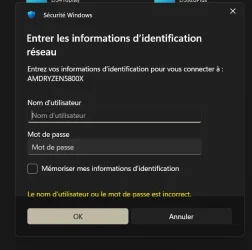
I'm on a home private network (wi-fi and ethernet are bridged, speed at 10Gbs, excellent Netgear managed switches) using 8 PC's, all on Windows 24H2 26100.5074, all using the same Microsoft account with the same pw. Three PC's, out of eight, are no longer reachable -"among themselves"-, they are encountering credential prompts. The error message points to "non identified username or pw" even when the correct credentials are entered (see my file credentials.jpg, in French but very easy to understand/translate).
These three PC's have "some" common points :
- identical motherboard Asus Rog Strix X570 gaming-E, last beta bios 5041 (back to bios 5031 does not solve the problem !!) ;
- all with AMD processors : either Ryzen 9 3900X, 9 5950X or 7 5800X.
I'm expecting Microsoft to quickly solve this VERY annoying problem.
I tried ALL the "classical" network help proposed solutions : full reinitiation of the network, gpedit modifications, all windows credentials deletion, using the Administrator account with the same pw, opening the windows sessions using the Microsoft account common pw, not the PIN....... NOTHING works !!!
After resoration back to a previous 24H2 26100.4770 version, which fortunately was recorded on backup images, NO LONGER ANY PROBLEM OF NETWORK SHARE for all these PC's connections.
Thanks for any new clever help !!
 

Attachments

  • credentials.webp
    credentials.webp
    21.4 KB · Views: 3

My Computer

System One

  • OS
    Windows 11
    Computer type
    PC/Desktop
    Manufacturer/Model
    Home made
    CPU
    Ryzen 9 3900X
    Motherboard
    Asus ROG Strix X570-E Gaming
    Memory
    64Go Corsair SK Hynix
    Graphics Card(s)
    Radeon RX5700 XT
    Sound Card
    Realtek from motherboard
    Monitor(s) Displays
    Iiyama ProLIte XUB2792QSU
    Screen Resolution
    2560x1440
    Hard Drives
    NVMe Samsung SSD 980 Pro 500GB (system disk)
    PSU
    Seasonic Focus
    Case
    Cooler Master
    Cooling
    Cooler Master Liquid
    Keyboard
    Logitech K360
    Mouse
    Logitech MX Anywhere 2
    Internet Speed
    300Mo/s
    Browser
    Firefox
    Antivirus
    Microsoft Defender
Hello everyone !

Exactly the same as everyone here : after updating ALL my PC's to 26100.5074 : "some" of my network shares are destroyed.
I'm on a home private network (wi-fi and ethernet are bridged, speed at 10Gbs, excellent Netgear managed switches) using 8 PC's, all on Windows 24H2 26100.5074, all using the same Microsoft account with the same pw. Three PC's, out of eight, are no longer reachable -"among themselves"-, they are encountering credential prompts. The error message points to "non identified username or pw" even when the correct credentials are entered (see my file credentials.jpg, in French but very easy to understand/translate).
These three PC's have "some" common points :
- identical motherboard Asus Rog Strix X570 gaming-E, last beta bios 5041 (back to bios 5031 does not solve the problem !!) ;
- all with AMD processors : either Ryzen 9 3900X, 9 5950X or 7 5800X.
I'm expecting Microsoft to quickly solve this VERY annoying problem.
I tried ALL the "classical" network help proposed solutions : full reinitiation of the network, gpedit modifications, all windows credentials deletion, using the Administrator account with the same pw, opening the windows sessions using the Microsoft account common pw, not the PIN....... NOTHING works !!!
After resoration back to a previous 24H2 26100.4770 version, which fortunately was recorded on backup images, NO LONGER ANY PROBLEM OF NETWORK SHARE for all these PC's connections.
Thanks for any new clever help !!
The affected machines here are Dell with Intel processors so it doesn't look like AMD factors into it. Hopefully Microsoft will fix this very soon.
 

My Computer

System One

  • OS
    Windows 11 25H2
    Computer type
    PC/Desktop
    Manufacturer/Model
    Dell
    CPU
    12th Gen i9 -12900K
    Memory
    64GB
    Graphics Card(s)
    Intel UHD Graphics
    Monitor(s) Displays
    Dual Dell U2717D
    Screen Resolution
    2560x1440
    Hard Drives
    2TB Lexar SSD, 2TB Crucial SSD, 2TB Kingston SSD
Hello everyone !

Exactly the same as everyone here : after updating ALL my PC's to 26100.5074 : "some" of my network shares are destroyed.
I'm on a home private network (wi-fi and ethernet are bridged, speed at 10Gbs, excellent Netgear managed switches) using 8 PC's, all on Windows 24H2 26100.5074, all using the same Microsoft account with the same pw. Three PC's, out of eight, are no longer reachable -"among themselves"-, they are encountering credential prompts. The error message points to "non identified username or pw" even when the correct credentials are entered (see my file credentials.jpg, in French but very easy to understand/translate).
These three PC's have "some" common points :
- identical motherboard Asus Rog Strix X570 gaming-E, last beta bios 5041 (back to bios 5031 does not solve the problem !!) ;
- all with AMD processors : either Ryzen 9 3900X, 9 5950X or 7 5800X.
I'm expecting Microsoft to quickly solve this VERY annoying problem.
I tried ALL the "classical" network help proposed solutions : full reinitiation of the network, gpedit modifications, all windows credentials deletion, using the Administrator account with the same pw, opening the windows sessions using the Microsoft account common pw, not the PIN....... NOTHING works !!!
After resoration back to a previous 24H2 26100.4770 version, which fortunately was recorded on backup images, NO LONGER ANY PROBLEM OF NETWORK SHARE for all these PC's connections.
Thanks for any new clever help !!


I can't help you beyond what I and others have written in similar threads. But, have you considered now backing up your Windows 11 images and also use a utility to restrict MS updates..?
I am using one that will prevent for two years any feature updates, but still allow security ones. That can be reverted at any point, but MS feature updates can seem to break more things at times than resolve.
 

My Computers

System One System Two

  • OS
    Windows 11 Pro build 25H2
    Computer type
    PC/Desktop
    Manufacturer/Model
    Home brew
    CPU
    Intel 265k
    Motherboard
    Gigabyte Z890 Aorus Elite
    Memory
    32GB DDR5 Corsair Dominator 7200Mhz
    Graphics Card(s)
    FE Edition 4080
    Sound Card
    onboard
    Monitor(s) Displays
    Acer 32" 4k IPS monitor
    Screen Resolution
    4k
    Hard Drives
    Various NVME and two SSD's
    PSU
    Antec ATX 3.1 1200w
    Case
    Meshify 2 XL
    Cooling
    Corsair Nautilus 360 AIO
    Keyboard
    Mechanical blue switch
    Mouse
    G502 Lightspeed Wireless
    Internet Speed
    FTTP 500Mb
    Browser
    Edge
    Antivirus
    Microsoft
  • Operating System
    Windows 11 Pro 24h2
    Computer type
    PC/Desktop
    Manufacturer/Model
    NUC N100 type model and System 3 but an N150 CPU
    CPU
    Alder Lake 3.4Ghz 4 Core
    Motherboard
    built in SOC
    Memory
    16GB DDR4 3200Ghz
    Graphics card(s)
    Internal GPU to the CPU
    Sound Card
    nah
    Monitor(s) Displays
    Samsung Syncmaster 913n VGA but used headless mainly.
    Screen Resolution
    1280x1024
    Hard Drives
    NVME 512GB and a SATA SSD at 1TB
    PSU
    I reckon so, external type
    Case
    yup it has one of those
    Cooling
    probably
    Keyboard
    only attached for rare local access
    Mouse
    not really needed but attached. Old Logitech, with a ball...!
    Internet Speed
    FTTC 500GB.
    Browser
    Edge
Been highly annoyed by the last two Windows updates, adding my two cents here.
I have 5 machines at home, all of which follow the same issues listed below.
Their a mixture of Intel and AMD systems, latest firmware, latest Secure boot keys.

WHAT WORKS:
Computer A (build 26100.6584) > Computer B (build 26100.4946)
Computer B (build 26100.4946) > Computer A (build 26100.6584)

So as long as one machine doesn't have the latest updates from today
or last patches a few weeks ago, it works.

WHAT FAILS:
Computer A (build 26100.6584) > Computer B (build 26100.6584)
Computer B (build 26100.6584) > Computer A (build 26100.6584)

If both machines are on the latest updates as of today or from
a week or two ago, doesn't work.

Both computers have a local account with the same profile name
and password. When trying to open a network share, opens without
any issues.

After update (KB5065426) (26100.6584), when trying to access network share.
Prompted to enter username and password. Entering in the good username and password
just recycles the prompt and isn't accepted.

Setting security to low in the GPOs doesn't fix anything either.
____________________

In the event viewer you can see failures on both machines with the latest patches giving
a generic login failure

An account failed to log on.

Subject:
Security ID: NULL SID
Account Name: -
Account Domain: -
Logon ID: 0x0

Logon Type: 3

Account For Which Logon Failed:
Security ID: NULL SID
Account Name: GenXI
Account Domain: GENXIROG

Failure Information:
Failure Reason: An Error occured during Logon.
Status: 0xC000006D
Sub Status: 0x0

Process Information:
Caller Process ID: 0x0
Caller Process Name: -

Network Information:
Workstation Name: GENXIROG
Source Network Address: 192.168.50.7
Source Port: 35055

Detailed Authentication Information:
Logon Process: NtLmSsp
Authentication Package: NTLM
Transited Services: -
Package Name (NTLM only): -
Key Length: 0
 

My Computers

System One System Two

  • OS
    Windows 11
    Computer type
    PC/Desktop
    Manufacturer/Model
    Custom
    CPU
    Intel 14700KF
    Motherboard
    Z790 AORUS Elite X WIFI7 z790
    Memory
    G.SKILL Trident Z5 RGB 64GB) DDR5 6400MT
    Graphics Card(s)
    MSI 5080 Suprim
    Monitor(s) Displays
    3
    Hard Drives
    - Crucial T500 2TB (OS) 7400 MB/s
    - Corsair MP600 PRO XT 1TB (Games) 7100 MB/s
    - Sabrent Rocket 4.0 1TB (Storage) 5000 MB/s
    PSU
    Seasonic Focus GX 1000w
    Case
    Gemmetric Futrue M5
    Cooling
    DeepCool ASSASSIN IV Premium
    Internet Speed
    3GB Fiber
  • Operating System
    Windows 11
    Computer type
    PC/Desktop
    Manufacturer/Model
    Custom
    CPU
    AMD 7950X
    Motherboard
    X670E GAMING PLUS WIFI
    Memory
    CORSAIR Dominator Titanium 64GB
    Graphics card(s)
    Asus Tuf 5070 OC
    Monitor(s) Displays
    2
    Hard Drives
    - Crucial T700 1TB (OS) 11700 MB/s
    - Crucial T500 2TB 7400 MB/s
    - Sabrent Rocket 4.0 1TB (Storage) 5000 MB/s
    PSU
    ASUS ROG Thor 850w Plat
    Case
    NZXT H6 flow
    Cooling
    DeepCool ASSASSIN IV Premium
    Internet Speed
    3GB Fiber
  • Like
Reactions: HTA
I was hoping this would be fixed today but it wasn't. Maybe next time...
 

My Computer

System One

  • OS
    Windows 11 25H2
    Computer type
    PC/Desktop
    Manufacturer/Model
    Dell
    CPU
    12th Gen i9 -12900K
    Memory
    64GB
    Graphics Card(s)
    Intel UHD Graphics
    Monitor(s) Displays
    Dual Dell U2717D
    Screen Resolution
    2560x1440
    Hard Drives
    2TB Lexar SSD, 2TB Crucial SSD, 2TB Kingston SSD
I confirmed that after 26100.6584 today update, the network connection total deficiency between "some (-microsoft lock mystery)" Windows 24H2 PC's is indeed not yet solved !!
Still expecting a quick Microsoft solution, after all their worldwide advertised updates/release previews..... a small fix would be welcome.
Computers networks are sometimes crucial for some people/compagnies......not to be forgotten, please.
 

My Computer

System One

  • OS
    Windows 11
    Computer type
    PC/Desktop
    Manufacturer/Model
    Home made
    CPU
    Ryzen 9 3900X
    Motherboard
    Asus ROG Strix X570-E Gaming
    Memory
    64Go Corsair SK Hynix
    Graphics Card(s)
    Radeon RX5700 XT
    Sound Card
    Realtek from motherboard
    Monitor(s) Displays
    Iiyama ProLIte XUB2792QSU
    Screen Resolution
    2560x1440
    Hard Drives
    NVMe Samsung SSD 980 Pro 500GB (system disk)
    PSU
    Seasonic Focus
    Case
    Cooler Master
    Cooling
    Cooler Master Liquid
    Keyboard
    Logitech K360
    Mouse
    Logitech MX Anywhere 2
    Internet Speed
    300Mo/s
    Browser
    Firefox
    Antivirus
    Microsoft Defender
Can this issue be fixed just by uninstalling KB5065426 and KB5064081, or do I need to perform a System Restore?
 

My Computer

System One

  • OS
    Windows 11
Hello everyone !

Exactly the same as everyone here : after updating ALL my PC's to 26100.5074 : "some" of my network shares are destroyed.
I'm on a home private network (wi-fi and ethernet are bridged, speed at 10Gbs, excellent Netgear managed switches) using 8 PC's, all on Windows 24H2 26100.5074, all using the same Microsoft account with the same pw. Three PC's, out of eight, are no longer reachable -"among themselves"-, they are encountering credential prompts. The error message points to "non identified username or pw" even when the correct credentials are entered (see my file credentials.jpg, in French but very easy to understand/translate).
These three PC's have "some" common points :
- identical motherboard Asus Rog Strix X570 gaming-E, last beta bios 5041 (back to bios 5031 does not solve the problem !!) ;
- all with AMD processors : either Ryzen 9 3900X, 9 5950X or 7 5800X.
I'm expecting Microsoft to quickly solve this VERY annoying problem.
I tried ALL the "classical" network help proposed solutions : full reinitiation of the network, gpedit modifications, all windows credentials deletion, using the Administrator account with the same pw, opening the windows sessions using the Microsoft account common pw, not the PIN....... NOTHING works !!!
After resoration back to a previous 24H2 26100.4770 version, which fortunately was recorded on backup images, NO LONGER ANY PROBLEM OF NETWORK SHARE for all these PC's connections.
Thanks for any new clever help !!
Do you mean it was fixed by "System Restore"?
 

My Computer

System One

  • OS
    Windows 11
Do you mean it was fixed by "System Restore"?


I read this...

After resoration back to a previous 24H2 26100.4770 version, which fortunately was recorded on backup images, NO LONGER ANY PROBLEM OF NETWORK SHARE for all these PC's connections.


....as meaning they used something like Macrium Reflect Backup to previously create an image and then restore that as the Operating System.
There are plenty of YT tutorials etc if you are not familiar with that type of utility.
 

My Computers

System One System Two

  • OS
    Windows 11 Pro build 25H2
    Computer type
    PC/Desktop
    Manufacturer/Model
    Home brew
    CPU
    Intel 265k
    Motherboard
    Gigabyte Z890 Aorus Elite
    Memory
    32GB DDR5 Corsair Dominator 7200Mhz
    Graphics Card(s)
    FE Edition 4080
    Sound Card
    onboard
    Monitor(s) Displays
    Acer 32" 4k IPS monitor
    Screen Resolution
    4k
    Hard Drives
    Various NVME and two SSD's
    PSU
    Antec ATX 3.1 1200w
    Case
    Meshify 2 XL
    Cooling
    Corsair Nautilus 360 AIO
    Keyboard
    Mechanical blue switch
    Mouse
    G502 Lightspeed Wireless
    Internet Speed
    FTTP 500Mb
    Browser
    Edge
    Antivirus
    Microsoft
  • Operating System
    Windows 11 Pro 24h2
    Computer type
    PC/Desktop
    Manufacturer/Model
    NUC N100 type model and System 3 but an N150 CPU
    CPU
    Alder Lake 3.4Ghz 4 Core
    Motherboard
    built in SOC
    Memory
    16GB DDR4 3200Ghz
    Graphics card(s)
    Internal GPU to the CPU
    Sound Card
    nah
    Monitor(s) Displays
    Samsung Syncmaster 913n VGA but used headless mainly.
    Screen Resolution
    1280x1024
    Hard Drives
    NVME 512GB and a SATA SSD at 1TB
    PSU
    I reckon so, external type
    Case
    yup it has one of those
    Cooling
    probably
    Keyboard
    only attached for rare local access
    Mouse
    not really needed but attached. Old Logitech, with a ball...!
    Internet Speed
    FTTC 500GB.
    Browser
    Edge
I read this...


....as meaning they used something like Macrium Reflect Backup to previously create an image and then restore that as the Operating System.
There are plenty of YT tutorials etc if you are not familiar with that type of utility.
omg............Thank you..........>_<

Does this mean that once KB5065426 or KB5064081 is installed even once, it cannot be fixed by uninstalling or using System Restore?
 

My Computer

System One

  • OS
    Windows 11
omg............Thank you..........>_<

Does this mean that once KB5065426 or KB5064081 is installed even once, it cannot be fixed by uninstalling or using System Restore?


I really do not know how successful or not it would be by doing that in this instance.
There is also a restore option, if available, that you refer to........ I have used that one with success with a different update.

When you do get to the point of resolving your issues you might then consider the use of something like Macrium.
Perhaps even start using that now, before making any changes, in my experience things do not always improve....!
At least make a restore point and label it meaningfully.

But...... Still have a concern regarding Windows updates and what you might need to do about them, in case this simply occurs again for you, without resolve.

for now I have deferred Windows updates.

Good luck.
 

My Computers

System One System Two

  • OS
    Windows 11 Pro build 25H2
    Computer type
    PC/Desktop
    Manufacturer/Model
    Home brew
    CPU
    Intel 265k
    Motherboard
    Gigabyte Z890 Aorus Elite
    Memory
    32GB DDR5 Corsair Dominator 7200Mhz
    Graphics Card(s)
    FE Edition 4080
    Sound Card
    onboard
    Monitor(s) Displays
    Acer 32" 4k IPS monitor
    Screen Resolution
    4k
    Hard Drives
    Various NVME and two SSD's
    PSU
    Antec ATX 3.1 1200w
    Case
    Meshify 2 XL
    Cooling
    Corsair Nautilus 360 AIO
    Keyboard
    Mechanical blue switch
    Mouse
    G502 Lightspeed Wireless
    Internet Speed
    FTTP 500Mb
    Browser
    Edge
    Antivirus
    Microsoft
  • Operating System
    Windows 11 Pro 24h2
    Computer type
    PC/Desktop
    Manufacturer/Model
    NUC N100 type model and System 3 but an N150 CPU
    CPU
    Alder Lake 3.4Ghz 4 Core
    Motherboard
    built in SOC
    Memory
    16GB DDR4 3200Ghz
    Graphics card(s)
    Internal GPU to the CPU
    Sound Card
    nah
    Monitor(s) Displays
    Samsung Syncmaster 913n VGA but used headless mainly.
    Screen Resolution
    1280x1024
    Hard Drives
    NVME 512GB and a SATA SSD at 1TB
    PSU
    I reckon so, external type
    Case
    yup it has one of those
    Cooling
    probably
    Keyboard
    only attached for rare local access
    Mouse
    not really needed but attached. Old Logitech, with a ball...!
    Internet Speed
    FTTC 500GB.
    Browser
    Edge
Checking in, after the update which decided to install itself and just prompt me to reboot, even though I have the option unchecked for get latest updates as soon as available (just seems to get ignored). I have no issue logging in to Windows (local account) but I do have issues connecting to an SMB share on another machine.

I've tried the registry fixes already, no dice.
Went through the usual diagnostics too, unshare/reshare, change password on the share PC etc.

Ironically, I can connect to the SMB share on my Fedora machine with no issues whatsoever!
Looks like I'm going to have to revert back to a reflect image and hide/block yet another update!

Can anyone advise why these updates keep getting forced through to my machines?
 

My Computers

System One System Two

  • OS
    Windows 11
    Computer type
    PC/Desktop
    Manufacturer/Model
    Custom
    CPU
    14700K
    Motherboard
    Asus Strix Z790-F Wi-Fi II
    Memory
    64GB G.Skill Trident Z Neo
    Graphics Card(s)
    MSI 4080 Suprim X
    Monitor(s) Displays
    LG Ultragear Ultrawide
    Screen Resolution
    3440x1440
    Hard Drives
    Firecuda 530 1TB
    Firecuda 530 4TB
    PSU
    BeQuiet Dark Power Pro 13
    Case
    Lian Li O11 Vision Compact
    Cooling
    EK Nucleus CR360 Dark
    Keyboard
    Steelseries Apex Pro TKL 2023
    Mouse
    Logitech G502 X Plus
    Internet Speed
    1GB
    Browser
    Edge
  • Operating System
    Windows 11
    Computer type
    PC/Desktop
    Manufacturer/Model
    NUC 13 Extreme
    CPU
    13700K
    Motherboard
    Intel Compute i7
    Memory
    64GB Crucial 5200MT/s
    Graphics card(s)
    ProArt 4070 Super
    Hard Drives
    Samsung 990 Pro
    WD Black SN850X 4TB
    2x Samsung 870 QVO 8TB
Checking in, after the update which decided to install itself and just prompt me to reboot, even though I have the option unchecked for get latest updates as soon as available (just seems to get ignored). I have no issue logging in to Windows (local account) but I do have issues connecting to an SMB share on another machine.

I've tried the registry fixes already, no dice.
Went through the usual diagnostics too, unshare/reshare, change password on the share PC etc.

Ironically, I can connect to the SMB share on my Fedora machine with no issues whatsoever!
Looks like I'm going to have to revert back to a reflect image and hide/block yet another update!

Can anyone advise why these updates keep getting forced through to my machines?
That's what's happening here too. Two of the machines won't talk to each other but both can talk to a third one, and the third one can talk to them all. All on the same build.
 

My Computer

System One

  • OS
    Windows 11 25H2
    Computer type
    PC/Desktop
    Manufacturer/Model
    Dell
    CPU
    12th Gen i9 -12900K
    Memory
    64GB
    Graphics Card(s)
    Intel UHD Graphics
    Monitor(s) Displays
    Dual Dell U2717D
    Screen Resolution
    2560x1440
    Hard Drives
    2TB Lexar SSD, 2TB Crucial SSD, 2TB Kingston SSD
That's what's happening here too. Two of the machines won't talk to each other but both can talk to a third one, and the third one can talk to them all. All on the same build.
Luckily enough I have Rustdesk running on that machine, it's connected to a very noisy samsung book duo, so it's in another room away from my main setup. I just find it really ironic that Fedora Linux is happily allowing me to connect to it's SMB from this Windows install, but I can't connect to an SMB on another Windows machine.

When they screw up, they do it good!
 

My Computers

System One System Two

  • OS
    Windows 11
    Computer type
    PC/Desktop
    Manufacturer/Model
    Custom
    CPU
    14700K
    Motherboard
    Asus Strix Z790-F Wi-Fi II
    Memory
    64GB G.Skill Trident Z Neo
    Graphics Card(s)
    MSI 4080 Suprim X
    Monitor(s) Displays
    LG Ultragear Ultrawide
    Screen Resolution
    3440x1440
    Hard Drives
    Firecuda 530 1TB
    Firecuda 530 4TB
    PSU
    BeQuiet Dark Power Pro 13
    Case
    Lian Li O11 Vision Compact
    Cooling
    EK Nucleus CR360 Dark
    Keyboard
    Steelseries Apex Pro TKL 2023
    Mouse
    Logitech G502 X Plus
    Internet Speed
    1GB
    Browser
    Edge
  • Operating System
    Windows 11
    Computer type
    PC/Desktop
    Manufacturer/Model
    NUC 13 Extreme
    CPU
    13700K
    Motherboard
    Intel Compute i7
    Memory
    64GB Crucial 5200MT/s
    Graphics card(s)
    ProArt 4070 Super
    Hard Drives
    Samsung 990 Pro
    WD Black SN850X 4TB
    2x Samsung 870 QVO 8TB
Hello to all following this thread. I believe I have the fix for those experiencing this issue since installing the 26100.5074 (KB5064081) preview build or 26100.6584 (KB5065426) that was released to the public yesterday. This also affects RDP Remote Desktop. (Trying to list as many related terms as possible for SEO).

Take a look in your System Event Log on the target machine and see if you see the following error when you try to connect remotely:
Code:
LSA(LsaSrv) Event ID 6167 "There is a partial mismatch in the machine ID. This indicates that the ticket has either been manipulated or it belongs to a different boot session. Failing authentication."

If you're getting the above, download PsGetSid, included with PsTools and check the SID on all affected machines. They should all be different, but if any of them match each other, that is what's causing this issue to occur. This update seems to change the way auth hashes are mapped, and instead of using hostnames, it is now using the SID.

The SID can be changed using a utility called SIDCHG, which is not technically free, but they do allow for a 30-day evaluation using a trial key on that page that they appear to update monthly. It does it fairly nondestructively, moreso than sysprep, but it will wipe any credentials stored in your vault, and could affect some licensed software and the like, it may need to be reactivated (i.e. Adobe products).

sysprep /generalize will also accomplish an SID change, but will wipe a lot more (drivers, computer name, any encrypted files, some settings, and like above will also wipe vault credentials and can affect software activation etc.

For this reason, if you're having this issue across only 2 machines, you could always just change 1 instead of both, and choose to do it on the one that has less potential things to have to set back up (although depending on how you ended up with duplicate SIDs in the first place, not changing all affected PCs could lead to this happening again in the future if another new PC is introduced with that same SID).

In my case, the issue was occurring across 4 identical PCs that came from the same OEM at the same time. Not sure what they did in their imaging process to cause it, but all 4 did have identical SIDs. Properly sysprepped images should not have this happen, but this could definitely result from things like drive clones and restoring a different PC from anothers' full-drive backup.
 

My Computer

System One

  • OS
    Windows 11
Hello to all following this thread. I believe I have the fix for those experiencing this issue since installing the 26100.5074 (KB5064081) preview build or 26100.6584 (KB5065426) that was released to the public yesterday. This also affects RDP Remote Desktop. (Trying to list as many related terms as possible for SEO).

Take a look in your System Event Log on the target machine and see if you see the following error when you try to connect remotely:
Code:
LSA(LsaSrv) Event ID 6167 "There is a partial mismatch in the machine ID. This indicates that the ticket has either been manipulated or it belongs to a different boot session. Failing authentication."
I think you just hit the nail on the head, all my systems are clones!
 

My Computers

System One System Two

  • OS
    Windows 11 Enterprise 25H2 26200 7462
    Computer type
    PC/Desktop
    Manufacturer/Model
    Custom Build
    CPU
    Intel XEON E5-2699 v3
    Motherboard
    ASUS X99-A
    Memory
    64GB Teamgroup UD4-3600
    Graphics Card(s)
    NVIDIA GeForce GTX 1080 Ti
    Sound Card
    Integrated
    Monitor(s) Displays
    ACER X34 Predator
    Screen Resolution
    3440 x 1440
    Hard Drives
    Crucial CT1000P 3P SSD8 1TB
    Crucial CT1000 BX500 SSD 1TB
    PSU
    GameMax Pro
    Case
    Fractal Design
    Cooling
    Corsair H110iGT + 6 140mm Fans
    Keyboard
    Corsair K4
    Mouse
    G-Skill G502
    Internet Speed
    300MBs
    Browser
    Chrome
    Antivirus
    OEM
    Other Info
    ASUS RT-AC87U Router
  • Operating System
    25H2 26200.5074
    Computer type
    Laptop
    Manufacturer/Model
    ASUS X555LA
    Memory
    8GB
    Browser
    Chrome
    Antivirus
    OEM
Hello to all following this thread. I believe I have the fix for those experiencing this issue since installing the 26100.5074 (KB5064081) preview build or 26100.6584 (KB5065426) that was released to the public yesterday. This also affects RDP Remote Desktop. (Trying to list as many related terms as possible for SEO).

Take a look in your System Event Log on the target machine and see if you see the following error when you try to connect remotely:
Code:
LSA(LsaSrv) Event ID 6167 "There is a partial mismatch in the machine ID. This indicates that the ticket has either been manipulated or it belongs to a different boot session. Failing authentication."
I've spent hours researching the fix for this issue on my systems and this IS the cure for me. Many thanks.
 

My Computers

System One System Two

  • OS
    Windows 11 Enterprise 25H2 26200 7462
    Computer type
    PC/Desktop
    Manufacturer/Model
    Custom Build
    CPU
    Intel XEON E5-2699 v3
    Motherboard
    ASUS X99-A
    Memory
    64GB Teamgroup UD4-3600
    Graphics Card(s)
    NVIDIA GeForce GTX 1080 Ti
    Sound Card
    Integrated
    Monitor(s) Displays
    ACER X34 Predator
    Screen Resolution
    3440 x 1440
    Hard Drives
    Crucial CT1000P 3P SSD8 1TB
    Crucial CT1000 BX500 SSD 1TB
    PSU
    GameMax Pro
    Case
    Fractal Design
    Cooling
    Corsair H110iGT + 6 140mm Fans
    Keyboard
    Corsair K4
    Mouse
    G-Skill G502
    Internet Speed
    300MBs
    Browser
    Chrome
    Antivirus
    OEM
    Other Info
    ASUS RT-AC87U Router
  • Operating System
    25H2 26200.5074
    Computer type
    Laptop
    Manufacturer/Model
    ASUS X555LA
    Memory
    8GB
    Browser
    Chrome
    Antivirus
    OEM

Latest Support Threads

Back
Top Bottom