Solved Updated 24H2 to 26100.5074 Now Can't Connect to Other Computer


Hello to all following this thread. I believe I have the fix for those experiencing this issue since installing the 26100.5074 (KB5064081) preview build or 26100.6584 (KB5065426) that was released to the public yesterday. This also affects RDP Remote Desktop. (Trying to list as many related terms as possible for SEO).

Take a look in your System Event Log on the target machine and see if you see the following error when you try to connect remotely:
Code:
LSA(LsaSrv) Event ID 6167 "There is a partial mismatch in the machine ID. This indicates that the ticket has either been manipulated or it belongs to a different boot session. Failing authentication."

If you're getting the above, download PsGetSid, included with PsTools and check the SID on all affected machines. They should all be different, but if any of them match each other, that is what's causing this issue to occur. This update seems to change the way auth hashes are mapped, and instead of using hostnames, it is now using the SID.

The SID can be changed using a utility called SIDCHG, which is not technically free, but they do allow for a 30-day evaluation using a trial key on that page that they appear to update monthly. It does it fairly nondestructively, moreso than sysprep, but it will wipe any credentials stored in your vault, and could affect some licensed software and the like, it may need to be reactivated (i.e. Adobe products).

sysprep /generalize will also accomplish an SID change, but will wipe a lot more (drivers, computer name, any encrypted files, some settings, and like above will also wipe vault credentials and can affect software activation etc.

For this reason, if you're having this issue across only 2 machines, you could always just change 1 instead of both, and choose to do it on the one that has less potential things to have to set back up (although depending on how you ended up with duplicate SIDs in the first place, not changing all affected PCs could lead to this happening again in the future if another new PC is introduced with that same SID).

In my case, the issue was occurring across 4 identical PCs that came from the same OEM at the same time. Not sure what they did in their imaging process to cause it, but all 4 did have identical SIDs. Properly sysprepped images should not have this happen, but this could definitely result from things like drive clones and restoring a different PC from anothers' full-drive backup.

Bless You!! I've been working at this for a while and thought it could be connected to the machines being cloned, but couldn't figure it out. Now we can get the network back to normal. Thank You Again!!!
 

My Computer

System One

  • OS
    Windows 11 25H2
    Computer type
    PC/Desktop
    Manufacturer/Model
    Dell
    CPU
    12th Gen i9 -12900K
    Memory
    64GB
    Graphics Card(s)
    Intel UHD Graphics
    Monitor(s) Displays
    Dual Dell U2717D
    Screen Resolution
    2560x1440
    Hard Drives
    2TB Lexar SSD, 2TB Crucial SSD, 2TB Kingston SSD
Does anyone know how to fix this issue?
 

My Computer

System One

  • OS
    Windows 11 | 24H2
    Computer type
    Laptop
    Manufacturer/Model
    N.A.V.E ESTELAR | GM5AG0O
    CPU
    Intel® Core™ i7-12700H (24 MB, 4.70 GHz)
    Motherboard
    FCBGA1744
    Memory
    DDR5 24GB '4800 MHz
    Graphics Card(s)
    GeForce RTX™ 3060 6GB
    Monitor(s) Displays
    Acer Predator 27" XB273 Gx 240Hz
    Screen Resolution
    Full HD 144Hz / Adaptive Sync
    Hard Drives
    NVME 1 TB PCIe 4.0
    NVME 512 GB PCIe 4.0
    PSU
    200W
    Mouse
    Logitech G305
    Internet Speed
    700MB
    Browser
    Brave
    Antivirus
    Kaspersky Total Security

My Computers

System One System Two

  • OS
    Windows 11 Enterprise 25H2 26200 7462
    Computer type
    PC/Desktop
    Manufacturer/Model
    Custom Build
    CPU
    Intel XEON E5-2699 v3
    Motherboard
    ASUS X99-A
    Memory
    64GB Teamgroup UD4-3600
    Graphics Card(s)
    NVIDIA GeForce GTX 1080 Ti
    Sound Card
    Integrated
    Monitor(s) Displays
    ACER X34 Predator
    Screen Resolution
    3440 x 1440
    Hard Drives
    Crucial CT1000P 3P SSD8 1TB
    Crucial CT1000 BX500 SSD 1TB
    PSU
    GameMax Pro
    Case
    Fractal Design
    Cooling
    Corsair H110iGT + 6 140mm Fans
    Keyboard
    Corsair K4
    Mouse
    G-Skill G502
    Internet Speed
    300MBs
    Browser
    Chrome
    Antivirus
    OEM
    Other Info
    ASUS RT-AC87U Router
  • Operating System
    25H2 26200.5074
    Computer type
    Laptop
    Manufacturer/Model
    ASUS X555LA
    Memory
    8GB
    Browser
    Chrome
    Antivirus
    OEM

My Computer

System One

  • OS
    Windows 11
    Computer type
    PC/Desktop
    Manufacturer/Model
    Home made
    CPU
    Ryzen 9 3900X
    Motherboard
    Asus ROG Strix X570-E Gaming
    Memory
    64Go Corsair SK Hynix
    Graphics Card(s)
    Radeon RX5700 XT
    Sound Card
    Realtek from motherboard
    Monitor(s) Displays
    Iiyama ProLIte XUB2792QSU
    Screen Resolution
    2560x1440
    Hard Drives
    NVMe Samsung SSD 980 Pro 500GB (system disk)
    PSU
    Seasonic Focus
    Case
    Cooler Master
    Cooling
    Cooler Master Liquid
    Keyboard
    Logitech K360
    Mouse
    Logitech MX Anywhere 2
    Internet Speed
    300Mo/s
    Browser
    Firefox
    Antivirus
    Microsoft Defender

My Computer

System One

  • OS
    Windows 11 25H2
    Computer type
    PC/Desktop
    Manufacturer/Model
    Dell
    CPU
    12th Gen i9 -12900K
    Memory
    64GB
    Graphics Card(s)
    Intel UHD Graphics
    Monitor(s) Displays
    Dual Dell U2717D
    Screen Resolution
    2560x1440
    Hard Drives
    2TB Lexar SSD, 2TB Crucial SSD, 2TB Kingston SSD
My problem computers were cloned too.
 

My Computer

System One

  • OS
    Windows 11 25H2
    Computer type
    PC/Desktop
    Manufacturer/Model
    Dell
    CPU
    12th Gen i9 -12900K
    Memory
    64GB
    Graphics Card(s)
    Intel UHD Graphics
    Monitor(s) Displays
    Dual Dell U2717D
    Screen Resolution
    2560x1440
    Hard Drives
    2TB Lexar SSD, 2TB Crucial SSD, 2TB Kingston SSD
I'm incredibly grateful I found this thread before I reached my breaking point. Like many others, I tried every possible fix, especially since it was clear the issue only appeared between cloned machines. I ended up running the trial version of the SID changer utility mentioned in earlier posts - worked flawlessly. No activation errors from any programs, and the only hiccup thus far was with my Outlook profile, which was easily resolved. Stratesave... YEAH BABY !
 

My Computer

System One

  • OS
    Windows 11, latest xxH2 that doesn't break stuff
    Computer type
    PC/Desktop
    Manufacturer/Model
    Lenovo "E-waste" P410 ThinkStation yesterday's enterprise class
    CPU
    any E5 Xeon V3 or V4
    Memory
    32gb ECC 2Rx8 DDR4 2400T
    Graphics Card(s)
    either GT 1030 DDR5 or Quadro M2000
  • Like
Reactions: HTA
Hello to all following this thread. I believe I have the fix for those experiencing this issue since installing the 26100.5074 (KB5064081) preview build or 26100.6584 (KB5065426) that was released to the public yesterday. This also affects RDP Remote Desktop. (Trying to list as many related terms as possible for SEO).

(…)

In my case, the issue was occurring across 4 identical PCs that came from the same OEM at the same time. Not sure what they did in their imaging process to cause it, but all 4 did have identical SIDs. Properly sysprepped images should not have this happen, but this could definitely result from things like drive clones and restoring a different PC from anothers' full-drive backup.
Interestingly, the Wikipedia article on SIDs (link jumps to the article’s relevant section) had this to say about duplicated ones:
A common method of mass-producing Windows PCs is to install Windows on a template machine, and duplicate its disk sector by sector to other identical machines. As a result, these mass-produced machines are identical in every respect, including their SIDs.

Microsoft engineer Mark Russinovich is the creator of a utility called NewSID, the purpose of which is to solve "The SID Duplication Problem." Microsoft has retired the utility on November 2, 2009, because, Mark and the Windows security team have concluded that duplicate SIDs do not pose any problem whatsoever.
 

My Computer

System One

  • OS
    macOS Sequoia
    Computer type
    Laptop
    Manufacturer/Model
    Apple
    CPU
    M1 Max Apple Silicon
    Memory
    32 GB
  • Haha
Reactions: HTA
"Microsoft engineer Mark Russinovich is the creator of a utility called NewSID, the purpose of which is to solve "The SID Duplication Problem." Microsoft has retired the utility on November 2, 2009, because, Mark and the Windows security team have concluded that duplicate SIDs do not pose any problem whatsoever."

This seems like it's quite a problem. I wonder if Microsoft will fix it.
 

My Computer

System One

  • OS
    Windows 11 25H2
    Computer type
    PC/Desktop
    Manufacturer/Model
    Dell
    CPU
    12th Gen i9 -12900K
    Memory
    64GB
    Graphics Card(s)
    Intel UHD Graphics
    Monitor(s) Displays
    Dual Dell U2717D
    Screen Resolution
    2560x1440
    Hard Drives
    2TB Lexar SSD, 2TB Crucial SSD, 2TB Kingston SSD

My Computer

System One

  • OS
    Windows 11 25H2
    Computer type
    PC/Desktop
    Manufacturer/Model
    Dell
    CPU
    12th Gen i9 -12900K
    Memory
    64GB
    Graphics Card(s)
    Intel UHD Graphics
    Monitor(s) Displays
    Dual Dell U2717D
    Screen Resolution
    2560x1440
    Hard Drives
    2TB Lexar SSD, 2TB Crucial SSD, 2TB Kingston SSD
"Microsoft engineer Mark Russinovich is the creator of a utility called NewSID, the purpose of which is to solve "The SID Duplication Problem." Microsoft has retired the utility on November 2, 2009, because, Mark and the Windows security team have concluded that duplicate SIDs do not pose any problem whatsoever."

This seems like it's quite a problem. I wonder if Microsoft will fix it.
I haven't yet hit this problem, but you can still find NEWSID for download at various sites.

Here's one of the many sites I see it on: NewSID
 

My Computers

System One System Two

  • OS
    Win 11 Pro 25H2, Build 26200.8524
    Computer type
    PC/Desktop
    Manufacturer/Model
    Home Brew
    CPU
    Intel Core i5 14500
    Motherboard
    Gigabyte B760M G P WIFI
    Memory
    64GB DDR4
    Graphics Card(s)
    GeForce RTX 4060
    Sound Card
    Chipset Realtek
    Monitor(s) Displays
    LG 45" Ultragear, Acer 24" 1080p
    Screen Resolution
    5120x1440, 1920x1080
    Hard Drives
    Crucial P310 2TB 2280 PCIe Gen4 3D NAND NVMe M.2 SSD (O/S)
    Silicon Power 2TB US75 NVMe PCIe Gen4 M.2 2280 SSD (backup)
    Crucial BX500 2TB 3D NAND (2nd backup)
    Seagate 4TB Ironwolf, rotating HDD archive files
    External off-line backup Drives: 2 NVMe 4TB drives in external enclosures
    PSU
    Thermaltake Toughpower GF3 750W
    Case
    LIAN LI LANCOOL 216 E-ATX PC Case
    Cooling
    Lots of fans!
    Keyboard
    Microsoft Comfort Curve 2000
    Mouse
    Logitech G305
    Internet Speed
    Verizon FiOS 1GB
    Browser
    Firefox
    Antivirus
    Malware Bytes & Windows Defender Security
  • Operating System
    Win 11 Pro 25H2, Build 26200.8524
    Computer type
    PC/Desktop
    Manufacturer/Model
    Home Brew
    CPU
    Intel Core i5 14400
    Motherboard
    Gigabyte B760M DS3H AX
    Memory
    32GB DDR5
    Graphics card(s)
    Intel 700 Embedded GPU
    Sound Card
    Realtek Embedded
    Monitor(s) Displays
    27" HP 1080p
    Screen Resolution
    1920x1080
    Hard Drives
    Crucial P310 2TB 2280 PCIe Gen4 eD NAND PCIe SSD
    Samsung EVO 990 2TB NVMe Gen4 SSD
    Samsung 2TB SATA SSD
    PSU
    Thermaltake Smart BM3 650W
    Case
    Okinos Micro ATX Case
    Cooling
    Fans
    Keyboard
    Microsoft Comfort Curve 2000
    Mouse
    Logitech G305
    Internet Speed
    Verizon FiOS 1GB
    Browser
    Firefox
    Antivirus
    Malware Bytes & Windows Defender Security
  • Like
Reactions: HTA

My Computer

System One

  • OS
    Windows 11 25H2
    Computer type
    PC/Desktop
    Manufacturer/Model
    Dell
    CPU
    12th Gen i9 -12900K
    Memory
    64GB
    Graphics Card(s)
    Intel UHD Graphics
    Monitor(s) Displays
    Dual Dell U2717D
    Screen Resolution
    2560x1440
    Hard Drives
    2TB Lexar SSD, 2TB Crucial SSD, 2TB Kingston SSD
I haven't yet hit this problem, but you can still find NEWSID for download at various sites.

Here's one of the many sites I see it on: NewSID
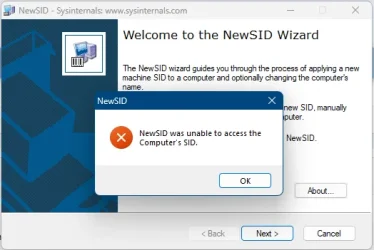
So I downloaded it copied the .exe file from inside the .zip file and then ran the .exe file and was told it can't access my SID. Humm...what's that mean?


1757859318673.webp
 

My Computer

System One

  • OS
    Windows 11 Pro 23H2
    Computer type
    PC/Desktop
    Manufacturer/Model
    MinisForum
    CPU
    Intel(R) Core(TM) i9-12900HK
    Memory
    32gb
    Graphics Card(s)
    Intel(R) Iris(R) Xe Graphics
    Sound Card
    Realtek 888
    Monitor(s) Displays
    Acer
    Screen Resolution
    1920x1080
    Hard Drives
    1TB SSD
    Keyboard
    Logitech
    Mouse
    Logitech MX Master 2X
    Internet Speed
    1GB
    Browser
    Firefox
    Antivirus
    Windows Defender
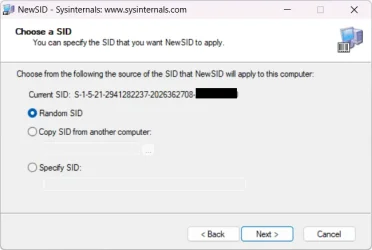
I have no idea, I just ran it here, it found my SID just fine. Since it says it couldn't access it, my guess is you didn't run it as Admin.

1757861621929.webp
 

My Computers

System One System Two

  • OS
    Win 11 Pro 25H2, Build 26200.8524
    Computer type
    PC/Desktop
    Manufacturer/Model
    Home Brew
    CPU
    Intel Core i5 14500
    Motherboard
    Gigabyte B760M G P WIFI
    Memory
    64GB DDR4
    Graphics Card(s)
    GeForce RTX 4060
    Sound Card
    Chipset Realtek
    Monitor(s) Displays
    LG 45" Ultragear, Acer 24" 1080p
    Screen Resolution
    5120x1440, 1920x1080
    Hard Drives
    Crucial P310 2TB 2280 PCIe Gen4 3D NAND NVMe M.2 SSD (O/S)
    Silicon Power 2TB US75 NVMe PCIe Gen4 M.2 2280 SSD (backup)
    Crucial BX500 2TB 3D NAND (2nd backup)
    Seagate 4TB Ironwolf, rotating HDD archive files
    External off-line backup Drives: 2 NVMe 4TB drives in external enclosures
    PSU
    Thermaltake Toughpower GF3 750W
    Case
    LIAN LI LANCOOL 216 E-ATX PC Case
    Cooling
    Lots of fans!
    Keyboard
    Microsoft Comfort Curve 2000
    Mouse
    Logitech G305
    Internet Speed
    Verizon FiOS 1GB
    Browser
    Firefox
    Antivirus
    Malware Bytes & Windows Defender Security
  • Operating System
    Win 11 Pro 25H2, Build 26200.8524
    Computer type
    PC/Desktop
    Manufacturer/Model
    Home Brew
    CPU
    Intel Core i5 14400
    Motherboard
    Gigabyte B760M DS3H AX
    Memory
    32GB DDR5
    Graphics card(s)
    Intel 700 Embedded GPU
    Sound Card
    Realtek Embedded
    Monitor(s) Displays
    27" HP 1080p
    Screen Resolution
    1920x1080
    Hard Drives
    Crucial P310 2TB 2280 PCIe Gen4 eD NAND PCIe SSD
    Samsung EVO 990 2TB NVMe Gen4 SSD
    Samsung 2TB SATA SSD
    PSU
    Thermaltake Smart BM3 650W
    Case
    Okinos Micro ATX Case
    Cooling
    Fans
    Keyboard
    Microsoft Comfort Curve 2000
    Mouse
    Logitech G305
    Internet Speed
    Verizon FiOS 1GB
    Browser
    Firefox
    Antivirus
    Malware Bytes & Windows Defender Security

My Computer

System One

  • OS
    macOS Sequoia
    Computer type
    Laptop
    Manufacturer/Model
    Apple
    CPU
    M1 Max Apple Silicon
    Memory
    32 GB
This seems like it's quite a problem. I wonder if Microsoft will fix it.
There’s nothing to fix. The supported method for cloning Windows is to sysprep the installation first, which preps all kinds of things for cloning, not just the machine SID.
 

My Computer

System One

  • OS
    Windows 11 Pro 25H2
    Computer type
    PC/Desktop
    Manufacturer/Model
    Intel NUC12WSHi7
    CPU
    12th Gen Core i7-1260P
    Motherboard
    NUC12WSBi7
    Memory
    64 GB Micron PC4-25600
    Graphics Card(s)
    Intel Iris Xe Graphics
    Sound Card
    on-board Realtek HD Audio
    Monitor(s) Displays
    Dell U3219Q
    Screen Resolution
    3840 x 2160
    Hard Drives
    Samsung SSD 990 PRO 1TB
    Crucial MX500 2 TB
    Antivirus
    Microsoft Defender

My Computer

System One

  • OS
    Windows 11 Pro 23H2
    Computer type
    PC/Desktop
    Manufacturer/Model
    MinisForum
    CPU
    Intel(R) Core(TM) i9-12900HK
    Memory
    32gb
    Graphics Card(s)
    Intel(R) Iris(R) Xe Graphics
    Sound Card
    Realtek 888
    Monitor(s) Displays
    Acer
    Screen Resolution
    1920x1080
    Hard Drives
    1TB SSD
    Keyboard
    Logitech
    Mouse
    Logitech MX Master 2X
    Internet Speed
    1GB
    Browser
    Firefox
    Antivirus
    Windows Defender
There’s nothing to fix. The supported method for cloning Windows is to sysprep the installation first, which preps all kinds of things for cloning, not just the machine SID.
So, which cloning software uses that sysprep mechanism?
 

My Computer

System One

  • OS
    macOS Sequoia
    Computer type
    Laptop
    Manufacturer/Model
    Apple
    CPU
    M1 Max Apple Silicon
    Memory
    32 GB

My Computers

System One System Two

  • OS
    Win 11 Pro 25H2, Build 26200.8524
    Computer type
    PC/Desktop
    Manufacturer/Model
    Home Brew
    CPU
    Intel Core i5 14500
    Motherboard
    Gigabyte B760M G P WIFI
    Memory
    64GB DDR4
    Graphics Card(s)
    GeForce RTX 4060
    Sound Card
    Chipset Realtek
    Monitor(s) Displays
    LG 45" Ultragear, Acer 24" 1080p
    Screen Resolution
    5120x1440, 1920x1080
    Hard Drives
    Crucial P310 2TB 2280 PCIe Gen4 3D NAND NVMe M.2 SSD (O/S)
    Silicon Power 2TB US75 NVMe PCIe Gen4 M.2 2280 SSD (backup)
    Crucial BX500 2TB 3D NAND (2nd backup)
    Seagate 4TB Ironwolf, rotating HDD archive files
    External off-line backup Drives: 2 NVMe 4TB drives in external enclosures
    PSU
    Thermaltake Toughpower GF3 750W
    Case
    LIAN LI LANCOOL 216 E-ATX PC Case
    Cooling
    Lots of fans!
    Keyboard
    Microsoft Comfort Curve 2000
    Mouse
    Logitech G305
    Internet Speed
    Verizon FiOS 1GB
    Browser
    Firefox
    Antivirus
    Malware Bytes & Windows Defender Security
  • Operating System
    Win 11 Pro 25H2, Build 26200.8524
    Computer type
    PC/Desktop
    Manufacturer/Model
    Home Brew
    CPU
    Intel Core i5 14400
    Motherboard
    Gigabyte B760M DS3H AX
    Memory
    32GB DDR5
    Graphics card(s)
    Intel 700 Embedded GPU
    Sound Card
    Realtek Embedded
    Monitor(s) Displays
    27" HP 1080p
    Screen Resolution
    1920x1080
    Hard Drives
    Crucial P310 2TB 2280 PCIe Gen4 eD NAND PCIe SSD
    Samsung EVO 990 2TB NVMe Gen4 SSD
    Samsung 2TB SATA SSD
    PSU
    Thermaltake Smart BM3 650W
    Case
    Okinos Micro ATX Case
    Cooling
    Fans
    Keyboard
    Microsoft Comfort Curve 2000
    Mouse
    Logitech G305
    Internet Speed
    Verizon FiOS 1GB
    Browser
    Firefox
    Antivirus
    Malware Bytes & Windows Defender Security
Can anyone explain how to use sysprep to fix a system that's a copy of one that's been in use for years?

As for newsid, Sysinternals stopped supporting it back in 2021, and their web site says Microsoft has disavowed it.


As for the suggested alternative, sidchg, go to their web site and look at the numerous things it changes and the conditions it imposes to make those changes, including disabling Bitlocker and decrypting drives before using it. It's a non-starter for me.


I had a PC made from spare parts that I thought would be nice to configure as a ready-to-go backup PC after I built my new one, but dealing with either of those programs is beyond what I'm comfortable doing. I'll just restore an image of my main PC to it if the time should ever come, that is, unless someone can instruct me on how to use sysprep, because it seemed to me it's for use on fresh installs.

ETA: I see I've posted to a different thread on this subject than the one last week. Off to review what's been said here. :)

ETA2: OK, having reviewed the thread, I have nothing to add or change to my post.
 

My Computer

System One

  • OS
    Windows 11
Back
Top Bottom