Solved Upgrade question (s)


If you delete all partitions the installer will automatically convert from MBR to GPT or vice versa as needed. To create an UEFI boot installation the USB must be GPT and UEFI mode bootable. Similarly, to create a Legacy BIOS (unsupported) installation the USB must be MBR and Legacy mode bootable and of course bypass compatibility check.
That'd be convenient. I hope that it's true.
 

My Computers My Computers

  • At a glance

    Windows 11 26200.8728Amd Threadripper 7970X128GB (4 X 32) G.Skill DDR5 6400 (RDIMM)Gigabyte RTX 4090 OC
    OS
    Windows 11 26200.8728
    Computer type
    PC/Desktop
    Manufacturer/Model
    homebuilt
    CPU
    Amd Threadripper 7970X
    Motherboard
    Gigabyte TRX50 Aero D Rev. 1.0
    Memory
    128GB (4 X 32) G.Skill DDR5 6400 (RDIMM)
    Graphics Card(s)
    Gigabyte RTX 4090 OC
    Sound Card
    none (USB to speakers), Realtek
    Monitor(s) Displays
    Innocn 32" OLED
    Screen Resolution
    3840 X 2160 @ 60Hz
    Hard Drives
    Crucial T700 2TB M.2 NVME SSD
    WD 4TB Blue SATA SSD
    Seagate 18TB IronWolf Pro
    PSU
    BeQuiet! Straight Power 12 1500W
    Case
    Lian Li 011 Dynamic Evo XL
    Cooling
    SilverStone Technology XE360-TR5, with 3 Phanteks T30 fans
    Keyboard
    Cherry KC 500 MX LP (mechanical)
    Mouse
    Logitech M500s (wired)
    Internet Speed
    2000/250 Mbps (down/up)
    Other Info
    xFinity gateway
  • At a glance

    windows 11 26200.8728Intel I9-13900K64GB G.Skill DDR5-6000Gigabyte RTX 3090 ti
    Operating System
    windows 11 26200.8728
    Computer type
    PC/Desktop
    Manufacturer/Model
    homebuilt
    CPU
    Intel I9-13900K
    Motherboard
    Asus RoG Strix Z690-E
    Memory
    64GB G.Skill DDR5-6000
    Graphics card(s)
    Gigabyte RTX 3090 ti
    Sound Card
    built in Realtek
    Monitor(s) Displays
    Philips 27E1N8900 27" OLED
    Screen Resolution
    3840 X 2160 @60Hz
    Hard Drives
    WDC SN850 1TB
    8TB Seagate Ironwolf
    4TB Seagate Ironwolf
    PSU
    eVGA SuperNOVA 1300 GT
    Case
    Lian Li 011 Dynamic Evo
    Cooling
    Corsair iCUE H150i ELITE CAPELLIX Liquid CPU Cooler
    Keyboard
    Cherry Streaming (wired)
    Mouse
    Logitech M500s (wired)
"To create an UEFI boot installation the USB must be GPT and UEFI mode bootable"

Sorry to have you guys drag me around. I thought I had created a bootable USB using the Media Creation Tool.
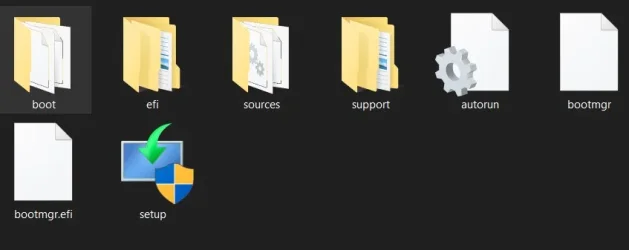
This is what I ended up on my USB.

I thought there was an additional step, but when I opened the MCT it downloaded and verified the Win info so I thought I might be good to go.

I didn't see an option to create a USB that was UEFI bootable. Am I missing something?
 

Attachments

  • Screenshot 2025-08-19 165555.webp
    Screenshot 2025-08-19 165555.webp
    12.3 KB · Views: 1

My Computer My Computer

At a glance

Windows 11Intel i5 940016GB tforceGeForce GTX950 SSC
OS
Windows 11
Computer type
PC/Desktop
Manufacturer/Model
Home built
CPU
Intel i5 9400
Motherboard
Gigabyte B365M D3SH WIFI
Memory
16GB tforce
Graphics Card(s)
GeForce GTX950 SSC
Monitor(s) Displays
View Sonic VX 3216 32" curved screen
Screen Resolution
1920 x 1080
Hard Drives
Crucial 250GB, Western Digital 6TB
PSU
MSI MAG A1000GL PCIE5
Cooling
standard Intel fan
Keyboard
Microsoft 3000 version 2
Mouse
Microsoft 3000
Internet Speed
symmetrical 50Mb fiber feed
Browser
Edge and Chrome
Antivirus
using Windows Defender
"To create an UEFI boot installation the USB must be GPT and UEFI mode bootable"

Sorry to have you guys drag me around. I thought I had created a bootable USB using the Media Creation Tool.
This is what I ended up on my USB.

I thought there was an additional step, but when I opened the MCT it downloaded and verified the Win info so I thought I might be good to go.

I didn't see an option to create a USB that was UEFI bootable. Am I missing something?
Looks normal.

Have you tried booting from it?
 

My Computers My Computers

  • At a glance

    Windows 11 26200.8728Amd Threadripper 7970X128GB (4 X 32) G.Skill DDR5 6400 (RDIMM)Gigabyte RTX 4090 OC
    OS
    Windows 11 26200.8728
    Computer type
    PC/Desktop
    Manufacturer/Model
    homebuilt
    CPU
    Amd Threadripper 7970X
    Motherboard
    Gigabyte TRX50 Aero D Rev. 1.0
    Memory
    128GB (4 X 32) G.Skill DDR5 6400 (RDIMM)
    Graphics Card(s)
    Gigabyte RTX 4090 OC
    Sound Card
    none (USB to speakers), Realtek
    Monitor(s) Displays
    Innocn 32" OLED
    Screen Resolution
    3840 X 2160 @ 60Hz
    Hard Drives
    Crucial T700 2TB M.2 NVME SSD
    WD 4TB Blue SATA SSD
    Seagate 18TB IronWolf Pro
    PSU
    BeQuiet! Straight Power 12 1500W
    Case
    Lian Li 011 Dynamic Evo XL
    Cooling
    SilverStone Technology XE360-TR5, with 3 Phanteks T30 fans
    Keyboard
    Cherry KC 500 MX LP (mechanical)
    Mouse
    Logitech M500s (wired)
    Internet Speed
    2000/250 Mbps (down/up)
    Other Info
    xFinity gateway
  • At a glance

    windows 11 26200.8728Intel I9-13900K64GB G.Skill DDR5-6000Gigabyte RTX 3090 ti
    Operating System
    windows 11 26200.8728
    Computer type
    PC/Desktop
    Manufacturer/Model
    homebuilt
    CPU
    Intel I9-13900K
    Motherboard
    Asus RoG Strix Z690-E
    Memory
    64GB G.Skill DDR5-6000
    Graphics card(s)
    Gigabyte RTX 3090 ti
    Sound Card
    built in Realtek
    Monitor(s) Displays
    Philips 27E1N8900 27" OLED
    Screen Resolution
    3840 X 2160 @60Hz
    Hard Drives
    WDC SN850 1TB
    8TB Seagate Ironwolf
    4TB Seagate Ironwolf
    PSU
    eVGA SuperNOVA 1300 GT
    Case
    Lian Li 011 Dynamic Evo
    Cooling
    Corsair iCUE H150i ELITE CAPELLIX Liquid CPU Cooler
    Keyboard
    Cherry Streaming (wired)
    Mouse
    Logitech M500s (wired)
Not yet bobkn still getting there albeit slowly in order. I did click on startup, and it wanted to start down the path, but I cancelled it till I'm ready. I hope I'm ok with this USB startup disk.
Need to do my C: drive backup
 

My Computer My Computer

At a glance

Windows 11Intel i5 940016GB tforceGeForce GTX950 SSC
OS
Windows 11
Computer type
PC/Desktop
Manufacturer/Model
Home built
CPU
Intel i5 9400
Motherboard
Gigabyte B365M D3SH WIFI
Memory
16GB tforce
Graphics Card(s)
GeForce GTX950 SSC
Monitor(s) Displays
View Sonic VX 3216 32" curved screen
Screen Resolution
1920 x 1080
Hard Drives
Crucial 250GB, Western Digital 6TB
PSU
MSI MAG A1000GL PCIE5
Cooling
standard Intel fan
Keyboard
Microsoft 3000 version 2
Mouse
Microsoft 3000
Internet Speed
symmetrical 50Mb fiber feed
Browser
Edge and Chrome
Antivirus
using Windows Defender
If you delete all partitions the installer will automatically convert from MBR to GPT or vice versa as needed.
True
To create an UEFI boot installation the USB must be GPT and UEFI mode bootable.
Not necessary. A MBR Fat32 can be UEFI boot able
Similarly, to create a Legacy BIOS (unsupported) installation the USB must be MBR and Legacy mode bootable and of course bypass compatibility check.
MBR Yes, bypass compatibility check, No


People, you are understanding all wrong

To be Legacy boot able, basically, the installation drive must be set as active.
To be UEFI boot able, basically, the boot manager must be on a Fat32 partition

The Win 10 & 11 USB installation drive created by MCT is Legacy and UEFI boot able.
The partition is set as active and it is Fat32 formatted.
 

My Computers My Computers

  • At a glance

    Windows 11 Pro - Windows 7 HP 64 - Lubuntui5 6600K - 800MHz to 4400MHz4+4G GSkill DDR4 3000IG - Intel 530
    OS
    Windows 11 Pro - Windows 7 HP 64 - Lubuntu
    Computer type
    PC/Desktop
    Manufacturer/Model
    custom build
    CPU
    i5 6600K - 800MHz to 4400MHz
    Motherboard
    GA-Z170-HD3P
    Memory
    4+4G GSkill DDR4 3000
    Graphics Card(s)
    IG - Intel 530
    Monitor(s) Displays
    Samsung 226BW
    Screen Resolution
    1680x1050
    Hard Drives
    (1) -1 SM951 – 128GB M.2 AHCI PCIe SSD drive for Win 11
    (2) -1 WD SATA 3 - 1T for Data
    (3) -1 WD SATA 3 - 1T for backup
    (4) -1 BX500 SSD - 256G for Windows 7 and Lubuntu
    PSU
    Thermaltake 450W TR2 gold
    Keyboard
    Old and good Chicony mechanical keyboard
    Mouse
    Logitech mX performance - 9 buttons (had to disable some)
    Internet Speed
    500 Mb/s
    Browser
    Firefox 64
  • At a glance

    Windows 11 Proi7-4500U 800- 3000MHz(4+4)G DDR3 1600IG intel 4400 + NVIDIA GeForce GT 745M
    Operating System
    Windows 11 Pro
    Computer type
    Laptop
    Manufacturer/Model
    Asus Q550LF
    CPU
    i7-4500U 800- 3000MHz
    Motherboard
    Asus Q550LF
    Memory
    (4+4)G DDR3 1600
    Graphics card(s)
    IG intel 4400 + NVIDIA GeForce GT 745M
    Sound Card
    Realtek
    Monitor(s) Displays
    LG Display LP156WF4-SPH1
    Screen Resolution
    1920 x 1080
    Hard Drives
    BX500 120G SSD for Windows and programs
    & 1T HDD for data
    Internet Speed
    500 Mb/s
    Browser
    Firefox 64
You can neither clean install nor boot Windows 11 on a disk that uses the MBR partition style so, if the disk in question is currently using MBR, you do need to convert that one to GPT first. If you try to install Windows 11 on a MBR disk it will complain that "This PC must support Secure Boot". Secure Boot is a UEFI feature so this feature can only be supported if the boot mode is set to UEFI (UEFI, not UEFI+Legacy/CSM) in the UEFI firmware settings (BIOS settings), but UEFI boot requires GPT. So, that's why you can't use MBR for this specific purpose.

Here is the "full" explanation:


My Computers My Computers

  • At a glance

    11 Homei7 13650HX16GB DDR5GeForce RTX 4060 Mobile
    OS
    11 Home
    Computer type
    Laptop
    Manufacturer/Model
    Asus TUF Gaming F16 (2024)
    CPU
    i7 13650HX
    Memory
    16GB DDR5
    Graphics Card(s)
    GeForce RTX 4060 Mobile
    Sound Card
    Eastern Electric MiniMax DAC Supreme; Emotiva UMC-200; Astell & Kern AK240
    Monitor(s) Displays
    Sony Bravia XR-55X90J
    Screen Resolution
    3840×2160
    Hard Drives
    512GB SSD internal
    37TB external
    PSU
    Li-ion
    Cooling
    2× Arc Flow Fans, 4× exhaust vents, 5× heatpipes
    Keyboard
    Logitech K800
    Mouse
    Logitech G402
    Internet Speed
    30Mbit/s up, 500Mbit/s down
    Browser
    FF
    Antivirus
    What's an antivirus?
  • At a glance

    11 Homei5 1135G716GB DDR4Intel Iris Xe
    Operating System
    11 Home
    Computer type
    Laptop
    Manufacturer/Model
    Medion S15450
    CPU
    i5 1135G7
    Memory
    16GB DDR4
    Graphics card(s)
    Intel Iris Xe
    Sound Card
    Eastern Electric MiniMax DAC Supreme; Emotiva UMC-200; Astell & Kern AK240
    Monitor(s) Displays
    Sony Bravia XR-55X90J
    Screen Resolution
    3840×2160
    Hard Drives
    2TB SSD internal
    37TB external
    PSU
    Li-ion
    Keyboard
    Logitech K800
    Mouse
    Logitech G402
    Internet Speed
    30Mbit/s up, 500Mbit/s down
    Browser
    FF
I have a computer with Windows 10 Pro that I plan to upgrade to Windows 11 Pro sometime in the next few months. I noticed that the C: drive was MBR. I did the following to convert it to GPT:
Code:
PowerShell (Admin)
MBR2GPT /validate /allowFullOS /disk:0
MBR2GPT /convert /allowFullOS /disk:0

After it was done I rebooted. It appeared to boot OK.

Note, not trusting this I first backed up my computer in case there was a problem.
 

My Computers My Computers

  • At a glance

    Windows 11 Pro 25H2 (26200.6901)AMD Ryzen 7 6800H with Radeon 680M GPU (486MB...Crucial DDR5-4800 (2400MHz) 32GB (2 x 16GB)NVIDIA RTX 3060 Laptop (6GB RAM)
    OS
    Windows 11 Pro 25H2 (26200.6901)
    Computer type
    Laptop
    Manufacturer/Model
    ASUS TUF Gaming A15 (2022)
    CPU
    AMD Ryzen 7 6800H with Radeon 680M GPU (486MB RAM)
    Memory
    Crucial DDR5-4800 (2400MHz) 32GB (2 x 16GB)
    Graphics Card(s)
    NVIDIA RTX 3060 Laptop (6GB RAM)
    Sound Card
    n/a
    Monitor(s) Displays
    15.6-inch
    Screen Resolution
    1920x1080 300Hz
    Hard Drives
    2 x Samsung 990 Evo Plus (2TB M.2 NVME SSD)
    PSU
    n/a
    Mouse
    Wireless Mouse M510
    Internet Speed
    2100Mbps/300Mbps
    Browser
    Firefox
    Antivirus
    Malwarebytes
  • At a glance

    Windows 11 Pro 25H2 (26200.8246)AMD Ryzen 7 5700X3DG.SKILL Flare X 32GB (2x16GB) DDR4ASUS ROG-STRIX-RTX3060TI-08G-V2-GAMING (RTX 3...
    Operating System
    Windows 11 Pro 25H2 (26200.8246)
    Computer type
    PC/Desktop
    Manufacturer/Model
    Custom build
    CPU
    AMD Ryzen 7 5700X3D
    Motherboard
    ASUS ROG Strix B550-F Gaming WiFi II
    Memory
    G.SKILL Flare X 32GB (2x16GB) DDR4
    Graphics card(s)
    ASUS ROG-STRIX-RTX3060TI-08G-V2-GAMING (RTX 3060-Ti, 8GB RAM)
    Monitor(s) Displays
    Samsung G50D IPS 27"
    Screen Resolution
    1440p/180Hz
    Hard Drives
    SAMSUNG 990 EVO Plus (2TB] M.2 NVME SSD
    SAMSUNG 990 EVO Plus (4TB) M.2 NVME SSD
    PSU
    Corsair RM750x (750 watts)
    Case
    Cooler Master MasterCase 5
    Cooling
    Scythe Mugen 6
    Keyboard
    Logitech K520 (MK540 keyboard/mouse combo)
    Mouse
    Logitech M310 (MK540 keyboard/mouse combo)
    Internet Speed
    2100 Mbps down / 300 Mbps up
    Browser
    Firefox, Edge, Chrome
    Antivirus
    Malwarebytes (Premium)
    Other Info
    ASUS Blu-ray Burner BW-16D1HT (SATA) || Western Digital Easystore 20TB USB 3.0 external hard drive used with Acronis True Image 2025 backup software || HP OfficeJet Pro 6975 Printer/Scanner
True

Not necessary. A MBR Fat32 can be UEFI boot able

MBR Yes, bypass compatibility check, No


People, you are understanding all wrong

To be Legacy boot able, basically, the installation drive must be set as active.
To be UEFI boot able, basically, the boot manager must be on a Fat32 partition

The Win 10 & 11 USB installation drive created by MCT is Legacy and UEFI boot able.
The partition is set as active and it is Fat32 formatted.
Officially Windows 11 demand a GPT UEFI mode installation, so unless you bypass compatibility check, you cannot install Windows 11 using an MBR Legacy BIOS USB flash drive. That's what I said, not that you cannot boot one.
 

My Computers My Computers

  • At a glance

    Windows 11 Pro 23H2 (5699), 25H2 (8655)Mobile DualCore Intel Core 2 Duo T7250, 2000 MHz4GBMobile Intel(R) GMA 4500M (Mobile 4 series)
    OS
    Windows 11 Pro 23H2 (5699), 25H2 (8655)
    Computer type
    Laptop
    Manufacturer/Model
    Acer Extensa 5630EZ
    CPU
    Mobile DualCore Intel Core 2 Duo T7250, 2000 MHz
    Motherboard
    Acer Extensa 5630
    Memory
    4GB
    Graphics Card(s)
    Mobile Intel(R) GMA 4500M (Mobile 4 series)
    Sound Card
    Realtek ALC268 @ Intel 82801IB ICH9 - High Definition Audio Controller
    Monitor(s) Displays
    1
    Screen Resolution
    1280x800
    Hard Drives
    Samsung SSD 850 EVO 250GB SATA Device (250 GB, SATA-III)
    Internet Speed
    VDSL 50 Mbps
    Browser
    MICROSOFT EDGE
    Antivirus
    WINDOWS DEFENDER
    Other Info
    Legacy MBR installation, no TPM, no Secure Boot, no WDDM 2.0 graphics drivers, no SSE4.2, cannot get more unsupported ;) This is only my test laptop. I had installed Windows 11 here before upgrading my main PC. For my main PC I use everyday see my 2nd system specs.
  • At a glance

    Windows 11 Pro v25H2 (build 26200.8655)Intel Core-i7 3770 3.40GHz s1155 (3rd generat...2x Kingston Hyper-X Blu 8GB DDR3-1600GIGABYTE GeForce RTX 3050 WINDFORCE OC V2 6GB...
    Operating System
    Windows 11 Pro v25H2 (build 26200.8655)
    Computer type
    PC/Desktop
    Manufacturer/Model
    Custom-built PC
    CPU
    Intel Core-i7 3770 3.40GHz s1155 (3rd generation)
    Motherboard
    Asus P8H61 s1155 ATX
    Memory
    2x Kingston Hyper-X Blu 8GB DDR3-1600
    Graphics card(s)
    GIGABYTE GeForce RTX 3050 WINDFORCE OC V2 6GB (GV-N3050WF2OCV2-6GD)
    Sound Card
    Realtek HD audio (ALC887)
    Monitor(s) Displays
    Sony Bravia KDL-19L4000 19" LCD TV via VGA
    Screen Resolution
    1440x900 32-bit 60Hz
    Hard Drives
    WD Blue SA510 2.5 1000GB SSD as system disk, Western Digital Caviar Purple 4TB SATA III (WD40PURZ) as second
    PSU
    Thermaltake Litepower RGB 550W Full Wired
    Case
    SUPERCASE MIDI-TOWER
    Cooling
    Deepcool Gamma Archer CPU cooler, 1x 8cm fan at the back
    Keyboard
    Mitsumi 101-key PS/2
    Mouse
    Sunnyline OptiEye PS/2
    Internet Speed
    100Mbps
    Browser
    Microsoft Edge, Mozilla Firefox
    Antivirus
    Microsoft Windows Defender
    Other Info
    Legacy BIOS (MBR) installation, no TPM, no Secure Boot, WDDM 3.0 graphics drivers, WEI score 7.4
I have a computer with Windows 10 Pro that I plan to upgrade to Windows 11 Pro sometime in the next few months. I noticed that the C: drive was MBR. I did the following to convert it to GPT:
Code:
PowerShell (Admin)
MBR2GPT /validate /allowFullOS /disk:0
MBR2GPT /convert /allowFullOS /disk:0

After it was done I rebooted. It appeared to boot OK.

Note, not trusting this I first backed up my computer in case there was a problem.
When you convert online a Legacy-MBR drive to UEFI-GPT using MBR2GPT /convert /allowFullOS /disk:0, it will create a new EFI Fat32 partition for the boot manager, leaving the System partition useless.
If you convert offline a Legacy-MBR drive to UEFI-GPT using MBR2GPT /convert /disk:0, it will convert the System partition into EFI Fat32 partition for the boot manager.
 

My Computers My Computers

  • At a glance

    Windows 11 Pro - Windows 7 HP 64 - Lubuntui5 6600K - 800MHz to 4400MHz4+4G GSkill DDR4 3000IG - Intel 530
    OS
    Windows 11 Pro - Windows 7 HP 64 - Lubuntu
    Computer type
    PC/Desktop
    Manufacturer/Model
    custom build
    CPU
    i5 6600K - 800MHz to 4400MHz
    Motherboard
    GA-Z170-HD3P
    Memory
    4+4G GSkill DDR4 3000
    Graphics Card(s)
    IG - Intel 530
    Monitor(s) Displays
    Samsung 226BW
    Screen Resolution
    1680x1050
    Hard Drives
    (1) -1 SM951 – 128GB M.2 AHCI PCIe SSD drive for Win 11
    (2) -1 WD SATA 3 - 1T for Data
    (3) -1 WD SATA 3 - 1T for backup
    (4) -1 BX500 SSD - 256G for Windows 7 and Lubuntu
    PSU
    Thermaltake 450W TR2 gold
    Keyboard
    Old and good Chicony mechanical keyboard
    Mouse
    Logitech mX performance - 9 buttons (had to disable some)
    Internet Speed
    500 Mb/s
    Browser
    Firefox 64
  • At a glance

    Windows 11 Proi7-4500U 800- 3000MHz(4+4)G DDR3 1600IG intel 4400 + NVIDIA GeForce GT 745M
    Operating System
    Windows 11 Pro
    Computer type
    Laptop
    Manufacturer/Model
    Asus Q550LF
    CPU
    i7-4500U 800- 3000MHz
    Motherboard
    Asus Q550LF
    Memory
    (4+4)G DDR3 1600
    Graphics card(s)
    IG intel 4400 + NVIDIA GeForce GT 745M
    Sound Card
    Realtek
    Monitor(s) Displays
    LG Display LP156WF4-SPH1
    Screen Resolution
    1920 x 1080
    Hard Drives
    BX500 120G SSD for Windows and programs
    & 1T HDD for data
    Internet Speed
    500 Mb/s
    Browser
    Firefox 64
HDMI great video link thanks.
I did read that I should not have a dual boot system to do this conversion.
My dual boot is Windows 10 or Macrium is that an issue.

My original confusion was when to run the conversion I was worried that if I ran the conversion that I would not be able to boot into Windows 10 to do the upgrade. The video cleared that for me.
 

My Computer My Computer

At a glance

Windows 11Intel i5 940016GB tforceGeForce GTX950 SSC
OS
Windows 11
Computer type
PC/Desktop
Manufacturer/Model
Home built
CPU
Intel i5 9400
Motherboard
Gigabyte B365M D3SH WIFI
Memory
16GB tforce
Graphics Card(s)
GeForce GTX950 SSC
Monitor(s) Displays
View Sonic VX 3216 32" curved screen
Screen Resolution
1920 x 1080
Hard Drives
Crucial 250GB, Western Digital 6TB
PSU
MSI MAG A1000GL PCIE5
Cooling
standard Intel fan
Keyboard
Microsoft 3000 version 2
Mouse
Microsoft 3000
Internet Speed
symmetrical 50Mb fiber feed
Browser
Edge and Chrome
Antivirus
using Windows Defender
Had I seen this OP earlier I would have suggested checking to see that all the stand offs are in the right places and all extra stand offs be removed. Safest way is to remove all drives other than the drive you wish to upgrade. It helps to know your activation key but this is not entirely essential. Hopefully you have a backup copy in working order and any personal files archived to a separate drive that is already disconnected. Myself, I would not bother with upgrading my existing Windows 10 to Win 11. Instead I would install a separate OS because I've seen these sorts of things go sideways so many times. My experience has been that MS won't help you if the upgrade fails and the system won't let you roll back to Win 10. No, you are on your own.

So why not start with a nice, new, fresh installation instead? Just a suggestion. User preference prevails, of course. :-)
 

My Computer My Computer

At a glance

WIN 11, WIN 10, WIN 8.1, WIN 7 U, WIN 7 PRO, ...Intel i7 6900K and i9-7960X / AMD 3800X (8 core)128 GB CORSAIR DOMINATOR PLATINUM (B DIE)NVIDIA 1070 and RTX 3070
OS
WIN 11, WIN 10, WIN 8.1, WIN 7 U, WIN 7 PRO, WIN 7 HOME (32 Bit), LINUX MINT
Computer type
PC/Desktop
Manufacturer/Model
DIY, ASUS, and DELL
CPU
Intel i7 6900K and i9-7960X / AMD 3800X (8 core)
Motherboard
ASUS X99E-WS USB 3.1 and ASUS X299 SAGE
Memory
128 GB CORSAIR DOMINATOR PLATINUM (B DIE)
Graphics Card(s)
NVIDIA 1070 and RTX 3070
Sound Card
Crystal Sound (onboard)
Monitor(s) Displays
single Samsung 30" 4K and 8" aux monitor
Screen Resolution
4K and something equally attrocious. I'll be working on this.
Hard Drives
A, B, C, D, E, F, G, H, I, J, K, L, M, N, O, P, Q, R, S, T, U, V, W

Ports X, Y, and Z are reserved for USB access and removable drives.

Drive types consist of the following: Various mechanical hard drives bearing the brand names, Seagate, Toshiba, and Western Digital. Various NVMe drives bearing the brand names Kingston, Intel, Silicon Power, Crucial, Western Digital, and Team Group. Various SATA SSDs bearing various different brand names.

RAID arrays included:

LSI RAID 10 (WD Velociraptors) 1115.72 GB
LSI RAID 10 (WD SSDS) 463.80 GB

INTEL RAID 0 (KINGSTON HYPER X) System 447.14 GB
INTEL RAID 1 TOSHIBA ENTERPRIZE class Data 2794.52 GB
INTEL RAID 1 SEAGATE HYBRID 931.51 GB
PSU
SEVERAL. I prefer my Corsair Platinum HX1000i but I also like EVGA power supplies
Case
ThermalTake Level 10 GT (among others)
Cooling
Noctua is my favorite and I use it in my main. I also own various other coolers.
Keyboard
all kinds.
Mouse
all kinds
Internet Speed
360 mbps - 1 gbps (depending)
Browser
FIREFOX
Antivirus
KASPERSKY (no apologies)
Other Info
Gave Dell touch screen with Windows 11 to daughter and got me an OTVOC. Being a PC builder I own many desktop PCs as well. I am a father of five providing PCs, laptops, and tablets for all my family, most of which I have modified, rebuilt, or simply built from scratch. I do not own a cell phone, never have, never will.
Scannerman good point about the standoffs I'll check that before installing the new to me motherboard. I'm almost done doing my image and have already created the rescue USB. Getting very close.
All my data is on a separate drive that yes I intend to physically disconnect before starting.
Just in case I did print out the licensing information.
 

My Computer My Computer

At a glance

Windows 11Intel i5 940016GB tforceGeForce GTX950 SSC
OS
Windows 11
Computer type
PC/Desktop
Manufacturer/Model
Home built
CPU
Intel i5 9400
Motherboard
Gigabyte B365M D3SH WIFI
Memory
16GB tforce
Graphics Card(s)
GeForce GTX950 SSC
Monitor(s) Displays
View Sonic VX 3216 32" curved screen
Screen Resolution
1920 x 1080
Hard Drives
Crucial 250GB, Western Digital 6TB
PSU
MSI MAG A1000GL PCIE5
Cooling
standard Intel fan
Keyboard
Microsoft 3000 version 2
Mouse
Microsoft 3000
Internet Speed
symmetrical 50Mb fiber feed
Browser
Edge and Chrome
Antivirus
using Windows Defender
Image done, rescue USB complete. Downloaded and printed out my motherboard manual. One part that caught my attention is resetting the CMOS to factory defaults. What do you think?
 

My Computer My Computer

At a glance

Windows 11Intel i5 940016GB tforceGeForce GTX950 SSC
OS
Windows 11
Computer type
PC/Desktop
Manufacturer/Model
Home built
CPU
Intel i5 9400
Motherboard
Gigabyte B365M D3SH WIFI
Memory
16GB tforce
Graphics Card(s)
GeForce GTX950 SSC
Monitor(s) Displays
View Sonic VX 3216 32" curved screen
Screen Resolution
1920 x 1080
Hard Drives
Crucial 250GB, Western Digital 6TB
PSU
MSI MAG A1000GL PCIE5
Cooling
standard Intel fan
Keyboard
Microsoft 3000 version 2
Mouse
Microsoft 3000
Internet Speed
symmetrical 50Mb fiber feed
Browser
Edge and Chrome
Antivirus
using Windows Defender
Image done, rescue USB complete. Downloaded and printed out my motherboard manual. One part that caught my attention is resetting the CMOS to factory defaults. What do you think?
Resetting the CMOS is a rather drastic measure but the choice is yours. I'd try it without that reset first. You did all the right steps to prepare your system in case of a failure. If you aren't at the stage where you want to run an operating system try it without resetting the BIOS first and see what your BIOS says first.
 

My Computer My Computer

At a glance

WIN 11, WIN 10, WIN 8.1, WIN 7 U, WIN 7 PRO, ...Intel i7 6900K and i9-7960X / AMD 3800X (8 core)128 GB CORSAIR DOMINATOR PLATINUM (B DIE)NVIDIA 1070 and RTX 3070
OS
WIN 11, WIN 10, WIN 8.1, WIN 7 U, WIN 7 PRO, WIN 7 HOME (32 Bit), LINUX MINT
Computer type
PC/Desktop
Manufacturer/Model
DIY, ASUS, and DELL
CPU
Intel i7 6900K and i9-7960X / AMD 3800X (8 core)
Motherboard
ASUS X99E-WS USB 3.1 and ASUS X299 SAGE
Memory
128 GB CORSAIR DOMINATOR PLATINUM (B DIE)
Graphics Card(s)
NVIDIA 1070 and RTX 3070
Sound Card
Crystal Sound (onboard)
Monitor(s) Displays
single Samsung 30" 4K and 8" aux monitor
Screen Resolution
4K and something equally attrocious. I'll be working on this.
Hard Drives
A, B, C, D, E, F, G, H, I, J, K, L, M, N, O, P, Q, R, S, T, U, V, W

Ports X, Y, and Z are reserved for USB access and removable drives.

Drive types consist of the following: Various mechanical hard drives bearing the brand names, Seagate, Toshiba, and Western Digital. Various NVMe drives bearing the brand names Kingston, Intel, Silicon Power, Crucial, Western Digital, and Team Group. Various SATA SSDs bearing various different brand names.

RAID arrays included:

LSI RAID 10 (WD Velociraptors) 1115.72 GB
LSI RAID 10 (WD SSDS) 463.80 GB

INTEL RAID 0 (KINGSTON HYPER X) System 447.14 GB
INTEL RAID 1 TOSHIBA ENTERPRIZE class Data 2794.52 GB
INTEL RAID 1 SEAGATE HYBRID 931.51 GB
PSU
SEVERAL. I prefer my Corsair Platinum HX1000i but I also like EVGA power supplies
Case
ThermalTake Level 10 GT (among others)
Cooling
Noctua is my favorite and I use it in my main. I also own various other coolers.
Keyboard
all kinds.
Mouse
all kinds
Internet Speed
360 mbps - 1 gbps (depending)
Browser
FIREFOX
Antivirus
KASPERSKY (no apologies)
Other Info
Gave Dell touch screen with Windows 11 to daughter and got me an OTVOC. Being a PC builder I own many desktop PCs as well. I am a father of five providing PCs, laptops, and tablets for all my family, most of which I have modified, rebuilt, or simply built from scratch. I do not own a cell phone, never have, never will.
Conversion completed successfully as in the video and received the same error message about the ReAgent.xml.
Tried to reboot unsuccessfully: stops at Verifying DMI Pool Data.
Correct me if I'm wrong but since my old system doesn't have the Bios option to change to UEFI that will stop it from booting. If that is the issue I guess, it's time to remove the old motherboard and install the new to me board. If that's the case after installing the newer motherboard go into new firmware and change to UEFI start up.
 

My Computer My Computer

At a glance

Windows 11Intel i5 940016GB tforceGeForce GTX950 SSC
OS
Windows 11
Computer type
PC/Desktop
Manufacturer/Model
Home built
CPU
Intel i5 9400
Motherboard
Gigabyte B365M D3SH WIFI
Memory
16GB tforce
Graphics Card(s)
GeForce GTX950 SSC
Monitor(s) Displays
View Sonic VX 3216 32" curved screen
Screen Resolution
1920 x 1080
Hard Drives
Crucial 250GB, Western Digital 6TB
PSU
MSI MAG A1000GL PCIE5
Cooling
standard Intel fan
Keyboard
Microsoft 3000 version 2
Mouse
Microsoft 3000
Internet Speed
symmetrical 50Mb fiber feed
Browser
Edge and Chrome
Antivirus
using Windows Defender
Conversion completed successfully as in the video and received the same error message about the ReAgent.xml.
Tried to reboot unsuccessfully: stops at Verifying DMI Pool Data.
Correct me if I'm wrong but since my old system doesn't have the Bios option to change to UEFI that will stop it from booting. If that is the issue I guess, it's time to remove the old motherboard and install the new to me board. If that's the case after installing the newer motherboard go into new firmware and change to UEFI start up.
It's a little sketchy but there's a good chance it will boot. This is why I like to work with clean installations. You never know what level of corruption you're messing with when you switch your OS over to a new system board. You could wind up patching ad infinitum. You definitely want UEFI to run a legit Win 11 OS.
 

My Computer My Computer

At a glance

WIN 11, WIN 10, WIN 8.1, WIN 7 U, WIN 7 PRO, ...Intel i7 6900K and i9-7960X / AMD 3800X (8 core)128 GB CORSAIR DOMINATOR PLATINUM (B DIE)NVIDIA 1070 and RTX 3070
OS
WIN 11, WIN 10, WIN 8.1, WIN 7 U, WIN 7 PRO, WIN 7 HOME (32 Bit), LINUX MINT
Computer type
PC/Desktop
Manufacturer/Model
DIY, ASUS, and DELL
CPU
Intel i7 6900K and i9-7960X / AMD 3800X (8 core)
Motherboard
ASUS X99E-WS USB 3.1 and ASUS X299 SAGE
Memory
128 GB CORSAIR DOMINATOR PLATINUM (B DIE)
Graphics Card(s)
NVIDIA 1070 and RTX 3070
Sound Card
Crystal Sound (onboard)
Monitor(s) Displays
single Samsung 30" 4K and 8" aux monitor
Screen Resolution
4K and something equally attrocious. I'll be working on this.
Hard Drives
A, B, C, D, E, F, G, H, I, J, K, L, M, N, O, P, Q, R, S, T, U, V, W

Ports X, Y, and Z are reserved for USB access and removable drives.

Drive types consist of the following: Various mechanical hard drives bearing the brand names, Seagate, Toshiba, and Western Digital. Various NVMe drives bearing the brand names Kingston, Intel, Silicon Power, Crucial, Western Digital, and Team Group. Various SATA SSDs bearing various different brand names.

RAID arrays included:

LSI RAID 10 (WD Velociraptors) 1115.72 GB
LSI RAID 10 (WD SSDS) 463.80 GB

INTEL RAID 0 (KINGSTON HYPER X) System 447.14 GB
INTEL RAID 1 TOSHIBA ENTERPRIZE class Data 2794.52 GB
INTEL RAID 1 SEAGATE HYBRID 931.51 GB
PSU
SEVERAL. I prefer my Corsair Platinum HX1000i but I also like EVGA power supplies
Case
ThermalTake Level 10 GT (among others)
Cooling
Noctua is my favorite and I use it in my main. I also own various other coolers.
Keyboard
all kinds.
Mouse
all kinds
Internet Speed
360 mbps - 1 gbps (depending)
Browser
FIREFOX
Antivirus
KASPERSKY (no apologies)
Other Info
Gave Dell touch screen with Windows 11 to daughter and got me an OTVOC. Being a PC builder I own many desktop PCs as well. I am a father of five providing PCs, laptops, and tablets for all my family, most of which I have modified, rebuilt, or simply built from scratch. I do not own a cell phone, never have, never will.
Ok I'm going to switch out the motherboards, and see what happens.
 

My Computer My Computer

At a glance

Windows 11Intel i5 940016GB tforceGeForce GTX950 SSC
OS
Windows 11
Computer type
PC/Desktop
Manufacturer/Model
Home built
CPU
Intel i5 9400
Motherboard
Gigabyte B365M D3SH WIFI
Memory
16GB tforce
Graphics Card(s)
GeForce GTX950 SSC
Monitor(s) Displays
View Sonic VX 3216 32" curved screen
Screen Resolution
1920 x 1080
Hard Drives
Crucial 250GB, Western Digital 6TB
PSU
MSI MAG A1000GL PCIE5
Cooling
standard Intel fan
Keyboard
Microsoft 3000 version 2
Mouse
Microsoft 3000
Internet Speed
symmetrical 50Mb fiber feed
Browser
Edge and Chrome
Antivirus
using Windows Defender
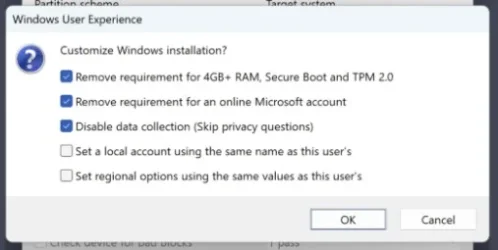
The motherboard has the capability of running Windows 11. There is one issue; It seems that it doesn't have TPM onboard. The manual only point to a TPM 2.0 header. (1 x Trusted Platform Module (TPM) header (2x6 pin, for the GC-TPM2.0_Smodule only) So it must have an additional TPM module attached to that header. Without it you can't install Windows 11. Manual; https://www.gigabyte.com/in/Motherboard/B365M-DS3H-WIFI-rev-1x/support#support-manual. I have looked in the manual and went through all of the BIOS settings; no mention of TPM or PTT. So that TPM 2.0 module must be there. It is possible to install Windows 11 anyway; Use Rufus and install the Win11 ISO onto a USB stick. At the start Rufus give you the option to Bypass the TPM requirements. (turn on the first option, see attached file; a screenshot)

The CPU is on the Windows 11 CPU support list. Windows processor requirements Windows 11 supported Intel processors. It has and UEFI BIOS, so that's alright.

 

Attachments

  • rufus skip.webp
    rufus skip.webp
    12.2 KB · Views: 0

My Computers My Computers

  • At a glance

    Win 11 Pro "25H2" Build 26200.8653, Zorin OS ProIntel® Core™ i7-12700KF 12th Gen. (S1700)32GB DDR5 5600-36 Vengeance (2x16)PCIe4.0 Asus NVIDIA RTX3060Ti
    OS
    Win 11 Pro "25H2" Build 26200.8653, Zorin OS Pro
    Computer type
    PC/Desktop
    Manufacturer/Model
    Self built
    CPU
    Intel® Core™ i7-12700KF 12th Gen. (S1700)
    Motherboard
    ASUS Prime Z690-A, BIOS v4505 (Z690 Intel Chipset)
    Memory
    32GB DDR5 5600-36 Vengeance (2x16)
    Graphics Card(s)
    PCIe4.0 Asus NVIDIA RTX3060Ti
    Sound Card
    Onboard; Realtek
    Monitor(s) Displays
    34" LG 34UC79G-B Curved 21:9 144Hz
    Screen Resolution
    2560x1080 (No HDR)
    Hard Drives
    250Gb Samsung 870PRO NVMe (Win 11 Pro)
    1Tb Samsung 980PRO NVMe
    1Tb Samsung 970EVO NVMe
    2Tb Samsung 990PRO NVMe with heatsink.
    4Tb WDC WD40EZRZ Blue SATA (Int.)
    4Tb WDC WD40EZRZ Blue SATA (Int.)
    3Tb WDC WD30EFRZ Red SATA (Int.)
    256Gb Samsung 840PRO SSD (RHEL 9,5)
    256Gb Samsung 850PRO SSD (Zorin OS Pro 18)
    PSU
    Coolermaster 850W V2 Gold with internal 12cm exaust fan
    Case
    Be-Quiet Pure Base 600.
    Cooling
    3x Be-Quiet! 12/14cm "Silent Wings 4" casefans, 1x Arctic Freezer i35 CPU towerblock with fan.
    Keyboard
    Steelseries APEX 7 keyboard.
    Mouse
    Logitech G-502 Hero
    Internet Speed
    1Gb
    Browser
    Brave
    Antivirus
    F-Secure
    Other Info
    No Noise system.
    256Gb Kingston Travler USB 3.0 drive.
    64Gb Sandisk USB 3.2 drive. (Ventoy)
    8Gb Philips USB 3.0 drive. (Win. Inst.)
    8Gb Philips USB 3.0 drive. (Rescue disk)
    2Tb WD USB 3.0 Passport drive.
    USB Ext. 500Gb WD SATA drive.
    External USB 3.0 C.A. CD/DVD* burner.
  • At a glance

    Windows 11 Pro 25H2Intel® Core™ i7-6700K 6th Gen. (S1151)32Gb DDR4 2400 Corsair Vengeance (4x8)ASUS GeForce GTX1080
    Operating System
    Windows 11 Pro 25H2
    Computer type
    PC/Desktop
    Manufacturer/Model
    Selfbuild
    CPU
    Intel® Core™ i7-6700K 6th Gen. (S1151)
    Motherboard
    ASUS Maximus VIII Ranger (Intel Chipset Z170)
    Memory
    32Gb DDR4 2400 Corsair Vengeance (4x8)
    Graphics card(s)
    ASUS GeForce GTX1080
    Sound Card
    Onboard; Realtek
    Monitor(s) Displays
    LG IPS277L 27" WideLED, IPS
    Screen Resolution
    1920x1080
    Hard Drives
    Samsung 850 Pro SSD
    PSU
    Zalman ZM600-HP with internal exhaust fan. Heatpipes & Modular cables.
    Case
    Cooler Master Aero
    Cooling
    Scythe Mugen 4 dual fan towerblock.
    Keyboard
    Red Dragon
    Mouse
    Red Dragon
    Internet Speed
    1Gb
    Browser
    Chrome
    Antivirus
    F-Secure
The motherboard has the capability of running Windows 11. There is one issue; It seems that it doesn't have TPM onboard. The manual only point to a TPM 2.0 header. (1 x Trusted Platform Module (TPM) header (2x6 pin, for the GC-TPM2.0_Smodule only) So it must have an additional TPM module attached to that header. Without it you can't install Windows 11. Manual; https://www.gigabyte.com/in/Motherboard/B365M-DS3H-WIFI-rev-1x/support#support-manual. I have looked in the manual and went through all of the BIOS settings; no mention of TPM or PTT. So that TPM 2.0 module must be there. It is possible to install Windows 11 anyway; Use Rufus and install the Win11 ISO onto a USB stick. At the start Rufus give you the option to Bypass the TPM requirements. (turn on the first option, see attached file; a screenshot)

The CPU is on the Windows 11 CPU support list. Windows processor requirements Windows 11 supported Intel processors. It has and UEFI BIOS, so that's alright.
PTT (intel firmware TPM) is present. See page 33 of the downloadable English manual.
 

My Computers My Computers

  • At a glance

    Windows 11 26200.8728Amd Threadripper 7970X128GB (4 X 32) G.Skill DDR5 6400 (RDIMM)Gigabyte RTX 4090 OC
    OS
    Windows 11 26200.8728
    Computer type
    PC/Desktop
    Manufacturer/Model
    homebuilt
    CPU
    Amd Threadripper 7970X
    Motherboard
    Gigabyte TRX50 Aero D Rev. 1.0
    Memory
    128GB (4 X 32) G.Skill DDR5 6400 (RDIMM)
    Graphics Card(s)
    Gigabyte RTX 4090 OC
    Sound Card
    none (USB to speakers), Realtek
    Monitor(s) Displays
    Innocn 32" OLED
    Screen Resolution
    3840 X 2160 @ 60Hz
    Hard Drives
    Crucial T700 2TB M.2 NVME SSD
    WD 4TB Blue SATA SSD
    Seagate 18TB IronWolf Pro
    PSU
    BeQuiet! Straight Power 12 1500W
    Case
    Lian Li 011 Dynamic Evo XL
    Cooling
    SilverStone Technology XE360-TR5, with 3 Phanteks T30 fans
    Keyboard
    Cherry KC 500 MX LP (mechanical)
    Mouse
    Logitech M500s (wired)
    Internet Speed
    2000/250 Mbps (down/up)
    Other Info
    xFinity gateway
  • At a glance

    windows 11 26200.8728Intel I9-13900K64GB G.Skill DDR5-6000Gigabyte RTX 3090 ti
    Operating System
    windows 11 26200.8728
    Computer type
    PC/Desktop
    Manufacturer/Model
    homebuilt
    CPU
    Intel I9-13900K
    Motherboard
    Asus RoG Strix Z690-E
    Memory
    64GB G.Skill DDR5-6000
    Graphics card(s)
    Gigabyte RTX 3090 ti
    Sound Card
    built in Realtek
    Monitor(s) Displays
    Philips 27E1N8900 27" OLED
    Screen Resolution
    3840 X 2160 @60Hz
    Hard Drives
    WDC SN850 1TB
    8TB Seagate Ironwolf
    4TB Seagate Ironwolf
    PSU
    eVGA SuperNOVA 1300 GT
    Case
    Lian Li 011 Dynamic Evo
    Cooling
    Corsair iCUE H150i ELITE CAPELLIX Liquid CPU Cooler
    Keyboard
    Cherry Streaming (wired)
    Mouse
    Logitech M500s (wired)
Fighting with the new to me motherboard. The system started up rather slowly, and I was able to get into the UEFI settings. I enabled the PTT, and trusted computing. I tried to restart but the system is in some sort of loop: watching the CPU fan and other cycle on and off. Will not let me into the BIOS. If I wait long enough the startup shut down loop stops but I still have no video to see what is going on. Maybe I should try the clear the CMOS.
The cpu has a graphic processor, but I installed an older graphics card that now let me see what is going on. Trying to find optimized defaults before I go any further. Found optimized default setting and now running SFC
 
Last edited:

My Computer My Computer

At a glance

Windows 11Intel i5 940016GB tforceGeForce GTX950 SSC
OS
Windows 11
Computer type
PC/Desktop
Manufacturer/Model
Home built
CPU
Intel i5 9400
Motherboard
Gigabyte B365M D3SH WIFI
Memory
16GB tforce
Graphics Card(s)
GeForce GTX950 SSC
Monitor(s) Displays
View Sonic VX 3216 32" curved screen
Screen Resolution
1920 x 1080
Hard Drives
Crucial 250GB, Western Digital 6TB
PSU
MSI MAG A1000GL PCIE5
Cooling
standard Intel fan
Keyboard
Microsoft 3000 version 2
Mouse
Microsoft 3000
Internet Speed
symmetrical 50Mb fiber feed
Browser
Edge and Chrome
Antivirus
using Windows Defender
Back
Top Bottom