Solved Upgrade_failure_info_bat not creating zip file


Tscan

Member
Local time
1:49 AM
Posts
31
OS
Windows 11
Brand new MSI desktop. It will not update to 2025-11 Preview Update (KB5070311) (26200.7309). It stops at 41% install and then I get 'Failed to install 0x800f0983'.

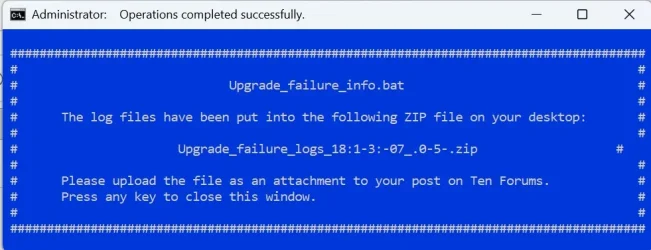
I tried running the bat file and when it's done running, it says a "zip file' was created to my desktop but there is no zip file on my desktop. What am I doing wrong?

Thanks in advance
 
Windows Build/Version
25H2 (Build 26200.7171)

Attachments

My Computer

System One

  • OS
    Windows 11
    Computer type
    PC/Desktop
    Manufacturer/Model
    MSI
    CPU
    Ryzen 9 9900X
    Motherboard
    MSI Pro BG50 VC WiFi (MS-7E18)
    Memory
    32 GB
    Graphics Card(s)
    RTX 5080
    Monitor(s) Displays
    LG LSAG 700
There should be a pop up when the script completes.


This was the result on my computer today:

Code:
 #######################################################################################
 #                                                                                     #
 #                             Upgrade_failure_info.bat                                #
 #                                                                                     #
 #      The log files have been put into the following ZIP file on your desktop:       #
 #                                                                                     #
 #                      Upgrade_failure_logs_2025-12-04_16-24-11.zip                   #
 #                                                                                     #
 #      Please upload the file as an attachment to your post on Ten Forums.            #
 #      Press any key to close this window.                                            #
 #                                                                                     #
 #######################################################################################


Download and install:


Copy and paste the following ZIP file on your desktop: Upgrade_failure_logs_2025-12-04_16-24-11.zip (the file that appears in your pop up message)
 

My Computer

System One

  • OS
    Windows 10
    Computer type
    Laptop
    Manufacturer/Model
    HP
    CPU
    Intel(R) Core(TM) i7-4800MQ CPU @ 2.70GHz
    Motherboard
    Product : 190A Version : KBC Version 94.56
    Memory
    16 GB Total: Manufacturer : Samsung MemoryType : DDR3 FormFactor : SODIMM Capacity : 8GB Speed : 1600
    Graphics Card(s)
    NVIDIA Quadro K3100M; Intel(R) HD Graphics 4600
    Sound Card
    IDT High Definition Audio CODEC; PNP Device ID HDAUDIO\FUNC_01&VEN_111D&DEV_76E0
    Hard Drives
    Model Hitachi HTS727575A9E364
    Antivirus
    Microsoft Defender
    Other Info
    Mobile Workstation
There should be a pop up when the script completes.


This was the result on my computer today:

Code:
 #######################################################################################
 #                                                                                     #
 #                             Upgrade_failure_info.bat                                #
 #                                                                                     #
 #      The log files have been put into the following ZIP file on your desktop:       #
 #                                                                                     #
 #                      Upgrade_failure_logs_2025-12-04_16-24-11.zip                   #
 #                                                                                     #
 #      Please upload the file as an attachment to your post on Ten Forums.            #
 #      Press any key to close this window.                                            #
 #                                                                                     #
 #######################################################################################


Download and install:


Copy and paste the following ZIP file on your desktop: Upgrade_failure_logs_2025-12-04_16-24-11.zip (the file that appears in your pop up message)
Thanks for the reply. I'm getting the same prompt.

UGF.webp

Still no zip file.

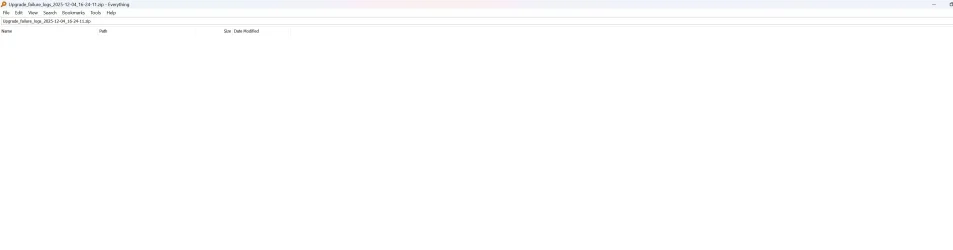
Nothing shows up in a search for that file either:

Everything.webp
 

My Computer

System One

  • OS
    Windows 11
    Computer type
    PC/Desktop
    Manufacturer/Model
    MSI
    CPU
    Ryzen 9 9900X
    Motherboard
    MSI Pro BG50 VC WiFi (MS-7E18)
    Memory
    32 GB
    Graphics Card(s)
    RTX 5080
    Monitor(s) Displays
    LG LSAG 700
The pop up does not have a date?

18:1 - 3: -07_.0-5.zip

1) What everything search results appear entering only: upgrade_failure_logs


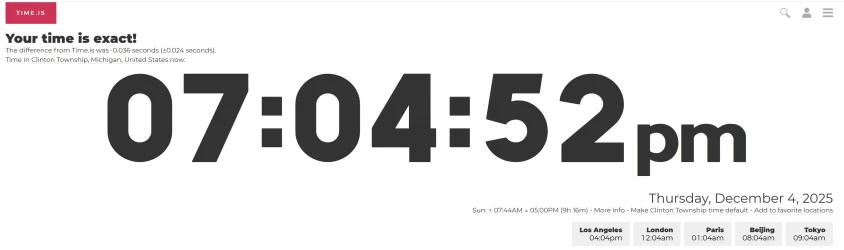
2) Open the website: time.is > post a share link


3) Run the V2 log collector > post a share link

 
Last edited:

My Computer

System One

  • OS
    Windows 10
    Computer type
    Laptop
    Manufacturer/Model
    HP
    CPU
    Intel(R) Core(TM) i7-4800MQ CPU @ 2.70GHz
    Motherboard
    Product : 190A Version : KBC Version 94.56
    Memory
    16 GB Total: Manufacturer : Samsung MemoryType : DDR3 FormFactor : SODIMM Capacity : 8GB Speed : 1600
    Graphics Card(s)
    NVIDIA Quadro K3100M; Intel(R) HD Graphics 4600
    Sound Card
    IDT High Definition Audio CODEC; PNP Device ID HDAUDIO\FUNC_01&VEN_111D&DEV_76E0
    Hard Drives
    Model Hitachi HTS727575A9E364
    Antivirus
    Microsoft Defender
    Other Info
    Mobile Workstation
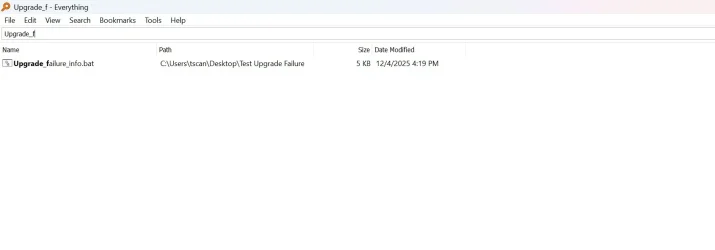
A search only shows the downloaded bat file

Fail.webp

Time.webp
 

My Computer

System One

  • OS
    Windows 11
    Computer type
    PC/Desktop
    Manufacturer/Model
    MSI
    CPU
    Ryzen 9 9900X
    Motherboard
    MSI Pro BG50 VC WiFi (MS-7E18)
    Memory
    32 GB
    Graphics Card(s)
    RTX 5080
    Monitor(s) Displays
    LG LSAG 700
Please run these scripts > post share links


1) Tuneup plus:


2) Diskparinfo


3) V2 (see prior post edit)
 

My Computer

System One

  • OS
    Windows 10
    Computer type
    Laptop
    Manufacturer/Model
    HP
    CPU
    Intel(R) Core(TM) i7-4800MQ CPU @ 2.70GHz
    Motherboard
    Product : 190A Version : KBC Version 94.56
    Memory
    16 GB Total: Manufacturer : Samsung MemoryType : DDR3 FormFactor : SODIMM Capacity : 8GB Speed : 1600
    Graphics Card(s)
    NVIDIA Quadro K3100M; Intel(R) HD Graphics 4600
    Sound Card
    IDT High Definition Audio CODEC; PNP Device ID HDAUDIO\FUNC_01&VEN_111D&DEV_76E0
    Hard Drives
    Model Hitachi HTS727575A9E364
    Antivirus
    Microsoft Defender
    Other Info
    Mobile Workstation
Microsoft Windows 11 Home Version 25H2 (OS Build 26200.7171)

==================================================================

Started on Thu 12/04/2025 at 19:19:35.85

[SFC /ScanNow]

Beginning system scan. This process will take some time.

Results:

Windows Resource Protection did not find any integrity violations.

==================================================================

Started on Thu 12/04/2025 at 19:20:47.23

[DISM /online /cleanup-image /ScanHealth]

Deployment Image Servicing and Management tool
Version: 10.0.26100.5074

Image Version: 10.0.26200.7171

No component store corruption detected.

The operation completed successfully.

==================================================================

Started on Thu 12/04/2025 at 19:23:55.76

[DISM /online /cleanup-image /RestoreHealth]

Deployment Image Servicing and Management tool
Version: 10.0.26100.5074

Image Version: 10.0.26200.7171

The restore operation completed successfully.

The operation completed successfully.

==================================================================

The second "SFC /ScanNow" was skipped, as the first output the following:

Windows Resource Protection did not find any integrity violations.

==================================================================

Started on Thu 12/04/2025 at 19:30:44.27

[ChkDsk /Scan]

The type of the file system is NTFS.
Volume label is Windows.

Stage 1: Examining basic file system structure ...
833024 file records processed.
File verification completed.
Phase duration (File record verification): 4.10 seconds.
82993 large file records processed.
Phase duration (Orphan file record recovery): 33.18 milliseconds.
0 bad file records processed.
Phase duration (Bad file record checking): 0.03 milliseconds.

Stage 2: Examining file name linkage ...
28443 reparse records processed.
1282484 index entries processed.
Index verification completed.
Phase duration (Index verification): 10.34 seconds.
0 unindexed files scanned.
Phase duration (Orphan reconnection): 1.00 seconds.
0 unindexed files recovered to lost and found.
Phase duration (Orphan recovery to lost and found): 0.07 milliseconds.
28443 reparse records processed.
Phase duration (Reparse point and Object ID verification): 43.83 milliseconds.

Stage 3: Examining security descriptors ...
Security descriptor verification completed.
Phase duration (Security descriptor verification): 54.25 milliseconds.
224731 data files processed.
Phase duration (Data attribute verification): 0.04 milliseconds.
CHKDSK is verifying Usn Journal...
37242496 USN bytes processed.
Usn Journal verification completed.
Phase duration (USN journal verification): 63.37 milliseconds.

Windows has scanned the file system and found no problems.

No further action is required.

1923499007 KB total disk space.
565227816 KB in 466575 files.
551664 KB in 224732 indexes.
0 KB in bad sectors.
1006067 KB in use by the system.
65536 KB occupied by the log file.
1356713460 KB available on disk.

4096 bytes in each allocation unit.
480874751 total allocation units on disk.
339178365 allocation units available on disk.
Total duration: 15.64 seconds (15648 ms).

==================================================================

Started on Thu 12/04/2025 at 19:31:05.66


==================================================================

[Set AutoReboot = False]

==================================================================


==================================================================


==================================================================

[Set DebugInfoType = 7]

==================================================================


==================================================================

[WMIC PageFile list]


==================================================================


==================================================================

[Set AutomaticManagedPagefile = True]

==================================================================


==================================================================

[BcdEdit /enum {badmemory}]

RAM Defects
-----------
identifier {badmemory}

==================================================================

Finished on Thu 12/04/2025 at 19:31:07.20
It took 11 minutes and 32 seconds to complete the operations.
 

Attachments

My Computer

System One

  • OS
    Windows 11
    Computer type
    PC/Desktop
    Manufacturer/Model
    MSI
    CPU
    Ryzen 9 9900X
    Motherboard
    MSI Pro BG50 VC WiFi (MS-7E18)
    Memory
    32 GB
    Graphics Card(s)
    RTX 5080
    Monitor(s) Displays
    LG LSAG 700
V2 Log
 

Attachments

My Computer

System One

  • OS
    Windows 11
    Computer type
    PC/Desktop
    Manufacturer/Model
    MSI
    CPU
    Ryzen 9 9900X
    Motherboard
    MSI Pro BG50 VC WiFi (MS-7E18)
    Memory
    32 GB
    Graphics Card(s)
    RTX 5080
    Monitor(s) Displays
    LG LSAG 700
1) Please add WMIC:


2) Rerun Tuneup plus > post a share link


3) Post a website link for MSI that has BIOS and drivers: PRO B650-VC WIFI III (MS-7E18)


4) Turn off Windows fast startup


5) Create a new restore point:

 
Last edited:

My Computer

System One

  • OS
    Windows 10
    Computer type
    Laptop
    Manufacturer/Model
    HP
    CPU
    Intel(R) Core(TM) i7-4800MQ CPU @ 2.70GHz
    Motherboard
    Product : 190A Version : KBC Version 94.56
    Memory
    16 GB Total: Manufacturer : Samsung MemoryType : DDR3 FormFactor : SODIMM Capacity : 8GB Speed : 1600
    Graphics Card(s)
    NVIDIA Quadro K3100M; Intel(R) HD Graphics 4600
    Sound Card
    IDT High Definition Audio CODEC; PNP Device ID HDAUDIO\FUNC_01&VEN_111D&DEV_76E0
    Hard Drives
    Model Hitachi HTS727575A9E364
    Antivirus
    Microsoft Defender
    Other Info
    Mobile Workstation
Code:
    Disk 0 : SSD. It has 5 partition(s). Model: WD Green SN3000 2TB

    The script has found the above 1 storage device(s) in total.
=======================================================================

Microsoft DiskPart version 10.0.26100.1150

Copyright (C) Microsoft Corporation.
On computer: MSIDESKTOP

  Disk ###  Status         Size     Free     Dyn  Gpt
  --------  -------------  -------  -------  ---  ---
  Disk 0    Online         1863 GB      0 B        *

  Volume ###  Ltr  Label        Fs     Type        Size     Status     Info
  ----------  ---  -----------  -----  ----------  -------  ---------  --------
  Volume 0     C   Windows      NTFS   Partition   1834 GB  Healthy    Boot   
  Volume 1         SYSTEM       FAT32  Partition    100 MB  Healthy    System 
  Volume 2         WinRE tools  NTFS   Partition    800 MB  Healthy    Hidden 
  Volume 3         BIOS_RVY     NTFS   Partition     27 GB  Healthy    Hidden 

Disk 0 is now the selected disk.

WD Green SN3000 2TB
Disk ID: {B1ACCD26-CE0A-4480-B044-B6B27F6849B0}
Type   : NVMe
Status : Online
Path   : 0
Target : 0
LUN ID : 0
Location Path : PCIROOT(0)#PCI(0102)#PCI(0000)#NVME(P00T00L00)
Current Read-only State : No
Read-only  : No
Boot Disk  : Yes
Pagefile Disk  : Yes
Hibernation File Disk  : No
Crashdump Disk  : Yes
Clustered Disk  : No

  Volume ###  Ltr  Label        Fs     Type        Size     Status     Info
  ----------  ---  -----------  -----  ----------  -------  ---------  --------
  Volume 0     C   Windows      NTFS   Partition   1834 GB  Healthy    Boot   
  Volume 1         SYSTEM       FAT32  Partition    100 MB  Healthy    System 
  Volume 2         WinRE tools  NTFS   Partition    800 MB  Healthy    Hidden 
  Volume 3         BIOS_RVY     NTFS   Partition     27 GB  Healthy    Hidden 

  Partition ###  Type              Size     Offset
  -------------  ----------------  -------  -------
  Partition 1    System             100 MB  1024 KB
  Partition 2    Reserved           128 MB   101 MB
  Partition 3    Primary           1834 GB   229 MB
  Partition 4    Recovery           800 MB  1834 GB
  Partition 5    Recovery            27 GB  1835 GB

Partition 1 is now the selected partition.

Partition 1
Type    : c12a7328-f81f-11d2-ba4b-00a0c93ec93b
Hidden  : Yes
Required: No
Attrib  : 0000000000000000
Offset in Bytes: 1048576

  Volume ###  Ltr  Label        Fs     Type        Size     Status     Info
  ----------  ---  -----------  -----  ----------  -------  ---------  --------
* Volume 1         SYSTEM       FAT32  Partition    100 MB  Healthy    System 

Partition 2 is now the selected partition.

Partition 2
Type    : e3c9e316-0b5c-4db8-817d-f92df00215ae
Hidden  : Yes
Required: No
Attrib  : 0000000000000000
Offset in Bytes: 105906176

There is no volume associated with this partition.

Partition 3 is now the selected partition.

Partition 3
Type    : ebd0a0a2-b9e5-4433-87c0-68b6b72699c7
Hidden  : No
Required: No
Attrib  : 0000000000000000
Offset in Bytes: 240123904

  Volume ###  Ltr  Label        Fs     Type        Size     Status     Info
  ----------  ---  -----------  -----  ----------  -------  ---------  --------
* Volume 0     C   Windows      NTFS   Partition   1834 GB  Healthy    Boot   

Partition 4 is now the selected partition.

Partition 4
Type    : de94bba4-06d1-4d40-a16a-bfd50179d6ac
Hidden  : Yes
Required: Yes
Attrib  : 0X8000000000000001
Offset in Bytes: 1969903108096

  Volume ###  Ltr  Label        Fs     Type        Size     Status     Info
  ----------  ---  -----------  -----  ----------  -------  ---------  --------
* Volume 2         WinRE tools  NTFS   Partition    800 MB  Healthy    Hidden 

Partition 5 is now the selected partition.

Partition 5
Type    : de94bba4-06d1-4d40-a16a-bfd50179d6ac
Hidden  : Yes
Required: Yes
Attrib  : 0X8000000000000001
Offset in Bytes: 1970741968896

  Volume ###  Ltr  Label        Fs     Type        Size     Status     Info
  ----------  ---  -----------  -----  ----------  -------  ---------  --------
* Volume 3         BIOS_RVY     NTFS   Partition     27 GB  Healthy    Hidden 

===============================================================================

Windows Recovery Environment (Windows RE) and system reset configuration
Information:

    Windows RE status:         Enabled
    Windows RE location:       \\?\GLOBALROOT\device\harddisk0\partition4\Recovery\WindowsRE
    Boot Configuration Data (BCD) identifier: 9707408e-effd-11ee-9276-c939bb94c12a
    Recovery image location:   
    Recovery image index:      0
    Custom image location:     
    Custom image index:        0

REAGENTC.EXE: Operation Successful.
    
===============================================================================

Firmware Boot Manager
---------------------
identifier              {fwbootmgr}
displayorder            {bootmgr}
timeout                 1

Windows Boot Manager
--------------------
identifier              {bootmgr}
device                  partition=\Device\HarddiskVolume1
path                    \EFI\Microsoft\Boot\bootmgfw.efi
description             Windows Boot Manager
locale                  en-US
inherit                 {globalsettings}
default                 {current}
resumeobject            {9707408c-effd-11ee-9276-c939bb94c12a}
displayorder            {current}
toolsdisplayorder       {memdiag}
timeout                 30

Windows Boot Loader
-------------------
identifier              {current}
device                  partition=C:
path                    \Windows\system32\winload.efi
description             Windows 11
locale                  en-US
inherit                 {bootloadersettings}
recoverysequence        {9707408e-effd-11ee-9276-c939bb94c12a}
displaymessageoverride  Recovery
recoveryenabled         Yes
isolatedcontext         Yes
allowedinmemorysettings 0x15000075
osdevice                partition=C:
systemroot              \Windows
resumeobject            {9707408c-effd-11ee-9276-c939bb94c12a}
nx                      OptIn
bootmenupolicy          Standard

Windows Boot Loader
-------------------
identifier              {9707408e-effd-11ee-9276-c939bb94c12a}
device                  ramdisk=[\Device\HarddiskVolume4]\Recovery\WindowsRE\Winre.wim,{9707408f-effd-11ee-9276-c939bb94c12a}
path                    \windows\system32\winload.efi
description             Windows Recovery Environment
locale                  en-us
inherit                 {bootloadersettings}
displaymessage          Recovery
osdevice                ramdisk=[\Device\HarddiskVolume4]\Recovery\WindowsRE\Winre.wim,{9707408f-effd-11ee-9276-c939bb94c12a}
systemroot              \windows
nx                      OptIn
bootmenupolicy          Standard
winpe                   Yes

Resume from Hibernate
---------------------
identifier              {9707408c-effd-11ee-9276-c939bb94c12a}
device                  partition=C:
path                    \Windows\system32\winresume.efi
description             Windows Resume Application
locale                  en-US
inherit                 {resumeloadersettings}
recoverysequence        {9707408e-effd-11ee-9276-c939bb94c12a}
recoveryenabled         Yes
isolatedcontext         Yes
allowedinmemorysettings 0x15000075
filedevice              partition=C:
custom:21000026         partition=C:
filepath                \hiberfil.sys
bootmenupolicy          Standard
debugoptionenabled      No

Windows Memory Tester
---------------------
identifier              {memdiag}
device                  partition=\Device\HarddiskVolume1
path                    \EFI\Microsoft\Boot\memtest.efi
description             Windows Memory Diagnostic
locale                  en-US
inherit                 {globalsettings}
badmemoryaccess         Yes

EMS Settings
------------
identifier              {emssettings}
bootems                 No

Debugger Settings
-----------------
identifier              {dbgsettings}
debugtype               Local

RAM Defects
-----------
identifier              {badmemory}

Global Settings
---------------
identifier              {globalsettings}
inherit                 {dbgsettings}
                        {emssettings}
                        {badmemory}

Boot Loader Settings
--------------------
identifier              {bootloadersettings}
inherit                 {globalsettings}
                        {hypervisorsettings}

Hypervisor Settings
-------------------
identifier              {hypervisorsettings}
hypervisordebugtype     Serial
hypervisordebugport     1
hypervisorbaudrate      115200

Resume Loader Settings
----------------------
identifier              {resumeloadersettings}
inherit                 {globalsettings}

Device options
--------------
identifier              {9707408f-effd-11ee-9276-c939bb94c12a}
description             Windows Recovery
ramdisksdidevice        partition=\Device\HarddiskVolume4
ramdisksdipath          \Recovery\WindowsRE\boot.sdi
 

My Computer

System One

  • OS
    Windows 11
    Computer type
    PC/Desktop
    Manufacturer/Model
    MSI
    CPU
    Ryzen 9 9900X
    Motherboard
    MSI Pro BG50 VC WiFi (MS-7E18)
    Memory
    32 GB
    Graphics Card(s)
    RTX 5080
    Monitor(s) Displays
    LG LSAG 700
Please see the edits to post #9
 

My Computer

System One

  • OS
    Windows 10
    Computer type
    Laptop
    Manufacturer/Model
    HP
    CPU
    Intel(R) Core(TM) i7-4800MQ CPU @ 2.70GHz
    Motherboard
    Product : 190A Version : KBC Version 94.56
    Memory
    16 GB Total: Manufacturer : Samsung MemoryType : DDR3 FormFactor : SODIMM Capacity : 8GB Speed : 1600
    Graphics Card(s)
    NVIDIA Quadro K3100M; Intel(R) HD Graphics 4600
    Sound Card
    IDT High Definition Audio CODEC; PNP Device ID HDAUDIO\FUNC_01&VEN_111D&DEV_76E0
    Hard Drives
    Model Hitachi HTS727575A9E364
    Antivirus
    Microsoft Defender
    Other Info
    Mobile Workstation
Code:
Event[6331]
  Log Name: System
  Source: Microsoft-Windows-WindowsUpdateClient
  Date: 2025-12-03T16:19:32.8640000Z
  Event ID: 20
  Task: Windows Update Agent
  Level: Error
  Opcode: Installation 
  Keyword: Installation,Failure,
  User: S-1-5-18
  User Name: NT AUTHORITY\SYSTEM
  Computer: MSIDesktop
  Description:
Installation Failure: Windows failed to install the following update with error 0x800F0983: 2025-11 Preview Update (KB5070311) (26200.7309).


Code:
Event[6618]
  Log Name: System
  Source: Microsoft-Windows-WindowsUpdateClient
  Date: 2025-12-03T18:36:11.9480000Z
  Event ID: 20
  Task: Windows Update Agent
  Level: Error
  Opcode: Installation 
  Keyword: Installation,Failure,
  User: S-1-5-18
  User Name: NT AUTHORITY\SYSTEM
  Computer: MSIDesktop
  Description:
Installation Failure: Windows failed to install the following update with error 0x800F0983: 2025-11 Preview Update (KB5070311) (26200.7309).


Code:
Event[6762]
  Log Name: System
  Source: Microsoft-Windows-WindowsUpdateClient
  Date: 2025-12-04T14:12:34.3400000Z
  Event ID: 20
  Task: Windows Update Agent
  Level: Error
  Opcode: Installation 
  Keyword: Installation,Failure,
  User: S-1-5-18
  User Name: NT AUTHORITY\SYSTEM
  Computer: MSIDesktop
  Description:
Installation Failure: Windows failed to install the following update with error 0x800F0983: 2025-11 Preview Update (KB5070311) (26200.7309).
Computer: MSIDesktop
Description:
Installation Failure: Windows failed to install the following update with error 0x800F0983: 2025-11 Preview Update (KB5070311) (26200.7309).
[/CODE]


Code:
Event[6592]
  Log Name: System
  Source: Microsoft-Windows-TPM-WMI
  Date: 2025-12-03T18:18:38.2940000Z
  Event ID: 1801
  Task: N/A
  Level: Error
  Opcode: Info 
  Keyword: N/A
  User: S-1-5-18
  User Name: NT AUTHORITY\SYSTEM
  Computer: MSIDesktop
  Description:
Secure Boot CA/keys need to be updated. This device signature information is included here.
DeviceAttributes: BaseBoardManufacturer:Micro-Star International Co., Ltd.;FirmwareManufacturer:American Megatrends International, LLC.;FirmwareVersion:1.H9;OEMModelBaseBoard:PRO B650-VC WIFI III (MS-7E18);OEMManufacturerName:Micro-Star International Co., Ltd.;OSArchitecture:amd64;
BucketId: 59f32ad4fc012449607e4def498f90e51ca2b6a29eaa53bac433d93a57f1477b
BucketConfidenceLevel:
UpdateType: 0
HResult: The operation completed successfully.


Code:
Event[2938]
  Log Name: System
  Source: Microsoft-Windows-Kernel-Power
  Date: 2025-11-27T08:07:14.0050000Z
  Event ID: 41
  Task: N/A
  Level: Critical
  Opcode: Info 
  Keyword: N/A
  User: S-1-5-18
  User Name: NT AUTHORITY\SYSTEM
  Computer: MSIDesktop
  Description:
The system has rebooted without cleanly shutting down first. This error could be caused if the system stopped responding, crashed, or lost power unexpectedly.


Code:
Event[2919]
  Log Name: System
  Source: EventLog
  Date: 2025-11-27T08:07:21.9750000Z
  Event ID: 6008
  Task: None
  Level: Error
  Opcode: N/A
  Keyword: Classic,
  User: N/A
  User Name: N/A
  Computer: MSIDesktop
  Description:
The previous system shutdown at 11:21:07 PM on ?11/?26/?2025 was unexpected.


Code:
Event[2904]
  Log Name: System
  Source: Microsoft-Windows-Kernel-Boot
  Date: 2025-11-27T08:07:11.0670000Z
  Event ID: 29
  Task: N/A
  Level: Error
  Opcode: Info 
  Keyword: N/A
  User: S-1-5-18
  User Name: NT AUTHORITY\SYSTEM
  Computer: MSIDesktop
  Description:
Windows failed fast startup with error status 0xC00000D4.


Code:
Event[2683]
  Log Name: System
  Source: Ntfs
  Date: 2025-11-26T20:55:50.5670000Z
  Event ID: 50
  Task: N/A
  Level: Warning
  Opcode: N/A
  Keyword: Classic,
  User: N/A
  User Name: N/A
  Computer: MSIDesktop
  Description:
{Delayed Write Failed} Windows was unable to save all the data for the file E:\Pics\Dakota Lyn IR Savvy Suxx BBC-Crazy Bl ..  Take Turns Riding A Massive Cock Blacked Pics. The data has been lost. This error may be caused by a failure of your computer hardware or network connection. Please try to save this file elsewhere.

Event[2684]
  Log Name: System
  Source: Ntfs
  Date: 2025-11-26T20:55:50.5670000Z
  Event ID: 50
  Task: N/A
  Level: Warning
  Opcode: N/A
  Keyword: Classic,
  User: N/A
  User Name: N/A
  Computer: MSIDesktop
  Description:
{Delayed Write Failed} Windows was unable to save all the data for the file E:\$Mft. The data has been lost. This error may be caused by a failure of your computer hardware or network connection. Please try to save this file elsewhere.


Code:
Event[2680]
  Log Name: System
  Source: Ntfs
  Date: 2025-11-26T20:55:50.5660000Z
  Event ID: 50
  Task: N/A
  Level: Warning
  Opcode: N/A
  Keyword: Classic,
  User: N/A
  User Name: N/A
  Computer: MSIDesktop
  Description:
{Delayed Write Failed} Windows was unable to save all the data for the file E:\$Extend\$ObjId:$O:$INDEX_ALLOCATION. The data has been lost. This error may be caused by a failure of your computer hardware or network connection. Please try to save this file elsewhere.

Event[2681]
  Log Name: System
  Source: Ntfs
  Date: 2025-11-26T20:55:50.5660000Z
  Event ID: 50
  Task: N/A
  Level: Warning
  Opcode: N/A
  Keyword: Classic,
  User: N/A
  User Name: N/A
  Computer: MSIDesktop
  Description:
{Delayed Write Failed} Windows was unable to save all the data for the file E:\Pics. The data has been lost. This error may be caused by a failure of your computer hardware or network connection. Please try to save this file elsewhere.
 

My Computer

System One

  • OS
    Windows 10
    Computer type
    Laptop
    Manufacturer/Model
    HP
    CPU
    Intel(R) Core(TM) i7-4800MQ CPU @ 2.70GHz
    Motherboard
    Product : 190A Version : KBC Version 94.56
    Memory
    16 GB Total: Manufacturer : Samsung MemoryType : DDR3 FormFactor : SODIMM Capacity : 8GB Speed : 1600
    Graphics Card(s)
    NVIDIA Quadro K3100M; Intel(R) HD Graphics 4600
    Sound Card
    IDT High Definition Audio CODEC; PNP Device ID HDAUDIO\FUNC_01&VEN_111D&DEV_76E0
    Hard Drives
    Model Hitachi HTS727575A9E364
    Antivirus
    Microsoft Defender
    Other Info
    Mobile Workstation
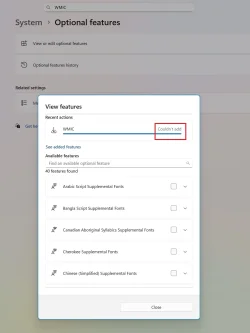
WTF

WMIC_No.webp

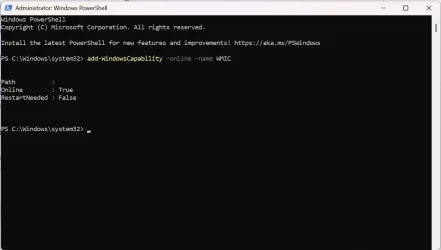
EDIT

Installed WMIC (I think) using Power Shell

PS.webp
 
Last edited:

My Computer

System One

  • OS
    Windows 11
    Computer type
    PC/Desktop
    Manufacturer/Model
    MSI
    CPU
    Ryzen 9 9900X
    Motherboard
    MSI Pro BG50 VC WiFi (MS-7E18)
    Memory
    32 GB
    Graphics Card(s)
    RTX 5080
    Monitor(s) Displays
    LG LSAG 700
Please open administrative command prompt and type or copy and paste:

wmic /?

DISM /Online /Add-Capability /CapabilityName:WMIC~~~~

Post share links.


Open administrative PS and copy and paste:

GCI -Path 'c:\windows\logs\cbs\*.*', 'c:\windows\inf\setupapi.dev.log' | Compress-Archive -destination (join-path ([environment]::GetFolderPath('Desktop')) \CBS.zip)

GCI -Path 'c:\windows\logs\cbs\*.*', 'C:\$WINDOWS.~BT\Sources\Panther\setupact.log' | Compress-Archive -destination (join-path ([environment]::GetFolderPath('Desktop')) \Logs.zip) -update

Post share links.


Search for > post share links

C:\Windows\Logs\CBS\CBS.log

C:\Windows\Logs\CBS\CbsPersist
 

My Computer

System One

  • OS
    Windows 10
    Computer type
    Laptop
    Manufacturer/Model
    HP
    CPU
    Intel(R) Core(TM) i7-4800MQ CPU @ 2.70GHz
    Motherboard
    Product : 190A Version : KBC Version 94.56
    Memory
    16 GB Total: Manufacturer : Samsung MemoryType : DDR3 FormFactor : SODIMM Capacity : 8GB Speed : 1600
    Graphics Card(s)
    NVIDIA Quadro K3100M; Intel(R) HD Graphics 4600
    Sound Card
    IDT High Definition Audio CODEC; PNP Device ID HDAUDIO\FUNC_01&VEN_111D&DEV_76E0
    Hard Drives
    Model Hitachi HTS727575A9E364
    Antivirus
    Microsoft Defender
    Other Info
    Mobile Workstation
If WMIC was added then rerun tuneup plus > post a share link
 

My Computer

System One

  • OS
    Windows 10
    Computer type
    Laptop
    Manufacturer/Model
    HP
    CPU
    Intel(R) Core(TM) i7-4800MQ CPU @ 2.70GHz
    Motherboard
    Product : 190A Version : KBC Version 94.56
    Memory
    16 GB Total: Manufacturer : Samsung MemoryType : DDR3 FormFactor : SODIMM Capacity : 8GB Speed : 1600
    Graphics Card(s)
    NVIDIA Quadro K3100M; Intel(R) HD Graphics 4600
    Sound Card
    IDT High Definition Audio CODEC; PNP Device ID HDAUDIO\FUNC_01&VEN_111D&DEV_76E0
    Hard Drives
    Model Hitachi HTS727575A9E364
    Antivirus
    Microsoft Defender
    Other Info
    Mobile Workstation
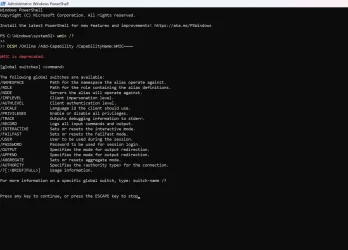
I don't know if it's installed or not.

PS_WMIC.webp

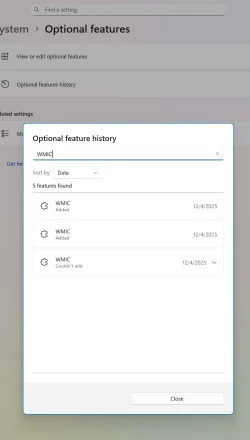
Looks like it's been added twice.
WMIC_Added.webp
 

My Computer

System One

  • OS
    Windows 11
    Computer type
    PC/Desktop
    Manufacturer/Model
    MSI
    CPU
    Ryzen 9 9900X
    Motherboard
    MSI Pro BG50 VC WiFi (MS-7E18)
    Memory
    32 GB
    Graphics Card(s)
    RTX 5080
    Monitor(s) Displays
    LG LSAG 700
Please continue with posts #14 and #15 steps.
 

My Computer

System One

  • OS
    Windows 10
    Computer type
    Laptop
    Manufacturer/Model
    HP
    CPU
    Intel(R) Core(TM) i7-4800MQ CPU @ 2.70GHz
    Motherboard
    Product : 190A Version : KBC Version 94.56
    Memory
    16 GB Total: Manufacturer : Samsung MemoryType : DDR3 FormFactor : SODIMM Capacity : 8GB Speed : 1600
    Graphics Card(s)
    NVIDIA Quadro K3100M; Intel(R) HD Graphics 4600
    Sound Card
    IDT High Definition Audio CODEC; PNP Device ID HDAUDIO\FUNC_01&VEN_111D&DEV_76E0
    Hard Drives
    Model Hitachi HTS727575A9E364
    Antivirus
    Microsoft Defender
    Other Info
    Mobile Workstation
Code:
 Microsoft Windows 11 Home  Version 25H2 (OS Build 26200.7171)
 
==================================================================

    Started on Thu 12/04/2025 at 20:38:01.90
    
        [SFC /ScanNow]
    
Beginning system scan.  This process will take some time.

Results:
 
Windows Resource Protection did not find any integrity violations.
 
==================================================================

    Started on Thu 12/04/2025 at 20:38:59.72

        [DISM /online /cleanup-image /ScanHealth]

Deployment Image Servicing and Management tool
Version: 10.0.26100.5074

Image Version: 10.0.26200.7171
 
No component store corruption detected.

The operation completed successfully.
 
==================================================================

    Started on Thu 12/04/2025 at 20:41:11.31

        [DISM /online /cleanup-image /RestoreHealth]

Deployment Image Servicing and Management tool
Version: 10.0.26100.5074

Image Version: 10.0.26200.7171
 
The restore operation completed successfully.

The operation completed successfully.
 
==================================================================

The second "SFC /ScanNow" was skipped, as the first output the following:

Windows Resource Protection did not find any integrity violations.
 
==================================================================

    Started on Thu 12/04/2025 at 20:50:18.00

        [ChkDsk /Scan] 
 
The type of the file system is NTFS.
Volume label is Windows.
 
Stage 1: Examining basic file system structure ...
1138688 file records processed.                                                       
File verification completed.
Phase duration (File record verification): 4.76 seconds.
86866 large file records processed.                                   
Phase duration (Orphan file record recovery): 34.46 milliseconds.
0 bad file records processed.                                     
Phase duration (Bad file record checking): 0.03 milliseconds.
 
Stage 2: Examining file name linkage ...
29324 reparse records processed.                                     
1618448 index entries processed.                                                       
Index verification completed.
Phase duration (Index verification): 10.94 seconds.
0 unindexed files scanned.                                       
Phase duration (Orphan reconnection): 1.43 seconds.
0 unindexed files recovered to lost and found.                   
Phase duration (Orphan recovery to lost and found): 0.31 milliseconds.
29324 reparse records processed.                                     
Phase duration (Reparse point and Object ID verification): 45.66 milliseconds.
 
Stage 3: Examining security descriptors ...
Security descriptor verification completed.
Phase duration (Security descriptor verification): 51.95 milliseconds.
239881 data files processed.                                           
Phase duration (Data attribute verification): 0.04 milliseconds.
CHKDSK is verifying Usn Journal...
37417472 USN bytes processed.                                                           
Usn Journal verification completed.
Phase duration (USN journal verification): 70.01 milliseconds.

Windows has scanned the file system and found no problems.

No further action is required.
 
1923499007 KB total disk space.
563104292 KB in 470797 files.
604788 KB in 239882 indexes.
0 KB in bad sectors.
1312287 KB in use by the system.
65536 KB occupied by the log file.
1358477640 KB available on disk.
 
4096 bytes in each allocation unit.
480874751 total allocation units on disk.
339619410 allocation units available on disk.
Total duration: 17.34 seconds (17348 ms).
 
==================================================================
 
    Started on Thu 12/04/2025 at 20:50:43.99
 
AutoReboot   
 
TRUE       
 
==================================================================
 
        [Set AutoReboot = False]
 
Updating property(s) of '\\MSIDESKTOP\ROOT\CIMV2:Win32_OSRecoveryConfiguration.Name="Microsoft Windows 11 Home|C:\\Windows|\\Device\\Harddisk0\\Partition3"'
Property(s) update successful.
==================================================================
 
AutoReboot   
 
FALSE       
 
==================================================================
 
DebugInfoType   
 
3             
 
==================================================================

        [Set DebugInfoType = 7]

Updating property(s) of '\\MSIDESKTOP\ROOT\CIMV2:Win32_OSRecoveryConfiguration.Name="Microsoft Windows 11 Home|C:\\Windows|\\Device\\Harddisk0\\Partition3"'
Property(s) update successful.
==================================================================
 
DebugInfoType   
 
7             
 
==================================================================

        [WMIC PageFile list]

AllocatedBaseSize=6400
CurrentUsage=51
Description=C:\pagefile.sys
InstallDate=20250424151051.565225-240
Name=C:\pagefile.sys
PeakUsage=86
Status=
TempPageFile=FALSE
 
==================================================================
 
AutomaticManagedPagefile   
 
TRUE                     
 
==================================================================

        [Set AutomaticManagedPagefile = True]

Updating property(s) of '\\MSIDESKTOP\ROOT\CIMV2:Win32_ComputerSystem.Name="MSIDESKTOP"'
Property(s) update successful.
==================================================================
 
AutomaticManagedPagefile   
 
TRUE                     
 
==================================================================

        [BcdEdit /enum {badmemory}]

RAM Defects
-----------
identifier              {badmemory}
 
==================================================================

    Finished on Thu 12/04/2025 at 20:50:45.43
    It took 12 minutes and 44 seconds to complete the operations.
 

Attachments

My Computer

System One

  • OS
    Windows 11
    Computer type
    PC/Desktop
    Manufacturer/Model
    MSI
    CPU
    Ryzen 9 9900X
    Motherboard
    MSI Pro BG50 VC WiFi (MS-7E18)
    Memory
    32 GB
    Graphics Card(s)
    RTX 5080
    Monitor(s) Displays
    LG LSAG 700
Tuneup plus has completed all steps confirming that WMIC has been added.


Post results for:
dism /online /get-capabilities | findstr WMIC
 

My Computer

System One

  • OS
    Windows 10
    Computer type
    Laptop
    Manufacturer/Model
    HP
    CPU
    Intel(R) Core(TM) i7-4800MQ CPU @ 2.70GHz
    Motherboard
    Product : 190A Version : KBC Version 94.56
    Memory
    16 GB Total: Manufacturer : Samsung MemoryType : DDR3 FormFactor : SODIMM Capacity : 8GB Speed : 1600
    Graphics Card(s)
    NVIDIA Quadro K3100M; Intel(R) HD Graphics 4600
    Sound Card
    IDT High Definition Audio CODEC; PNP Device ID HDAUDIO\FUNC_01&VEN_111D&DEV_76E0
    Hard Drives
    Model Hitachi HTS727575A9E364
    Antivirus
    Microsoft Defender
    Other Info
    Mobile Workstation
Continue with these steps:


1) Open administrative PS and copy and paste:

GCI -Path 'c:\windows\logs\cbs\*.*', 'c:\windows\inf\setupapi.dev.log' | Compress-Archive -destination (join-path ([environment]::GetFolderPath('Desktop')) \CBS.zip)

GCI -Path 'c:\windows\logs\cbs\*.*', 'C:\$WINDOWS.~BT\Sources\Panther\setupact.log' | Compress-Archive -destination (join-path ([environment]::GetFolderPath('Desktop')) \Logs.zip) -update

Post share links.


2) Search for > post share links

C:\Windows\Logs\CBS\CBS.log

C:\Windows\Logs\CBS\CbsPersist


3) Download to a new desktop folder:


My Computer

System One

  • OS
    Windows 10
    Computer type
    Laptop
    Manufacturer/Model
    HP
    CPU
    Intel(R) Core(TM) i7-4800MQ CPU @ 2.70GHz
    Motherboard
    Product : 190A Version : KBC Version 94.56
    Memory
    16 GB Total: Manufacturer : Samsung MemoryType : DDR3 FormFactor : SODIMM Capacity : 8GB Speed : 1600
    Graphics Card(s)
    NVIDIA Quadro K3100M; Intel(R) HD Graphics 4600
    Sound Card
    IDT High Definition Audio CODEC; PNP Device ID HDAUDIO\FUNC_01&VEN_111D&DEV_76E0
    Hard Drives
    Model Hitachi HTS727575A9E364
    Antivirus
    Microsoft Defender
    Other Info
    Mobile Workstation

Latest Support Threads

Back
Top Bottom