Upgraded to Windows11, pc freezing and crashing since


Any chance there a results for post #23:

Run gather_additional_dump_files > post a share link
1763148887701.webp

i've just started up a mc and shut it down to see if the errors persist, and they do not. No freezes so far which is awesome. However, this is popping up on every start up now. This a problem? I will run gather_Additional_Dump_Files and edit this message in just a moment.

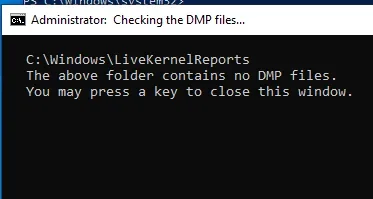
Here is what I got after following post #23
1763149622097.webp
 
Last edited:

My Computer

System One

  • OS
    windows 11
    Computer type
    PC/Desktop
    CPU
    i5 12400f
    Motherboard
    asus h670 plus d4
Not having live kernal reports now is optimal.

The files were requested before the clean install.

If they are not available we will do without them.
 

My Computer

System One

  • OS
    Windows 10
    Computer type
    Laptop
    Manufacturer/Model
    HP
    CPU
    Intel(R) Core(TM) i7-4800MQ CPU @ 2.70GHz
    Motherboard
    Product : 190A Version : KBC Version 94.56
    Memory
    16 GB Total: Manufacturer : Samsung MemoryType : DDR3 FormFactor : SODIMM Capacity : 8GB Speed : 1600
    Graphics Card(s)
    NVIDIA Quadro K3100M; Intel(R) HD Graphics 4600
    Sound Card
    IDT High Definition Audio CODEC; PNP Device ID HDAUDIO\FUNC_01&VEN_111D&DEV_76E0
    Hard Drives
    Model Hitachi HTS727575A9E364
    Antivirus
    Microsoft Defender
    Other Info
    Mobile Workstation
Not having live kernal reports now is optimal.

The files were requested before the clean install.

If they are not available we will do without them.
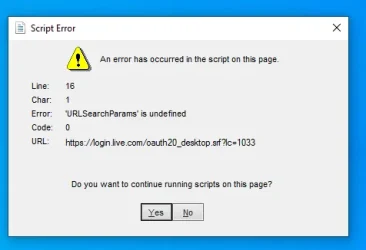
since the issue was resolved last thursday i have been turning on and leaving my pc running youtube playlists during the day to see if there would be any freezes, crashes, failures, etc.

no issues have occurred except that random script error that showed up on friday, but that went away when resetting the pc and has not shown back up since. and so far, both chkdsk and sfc /scannow still come back clean every time as well. i have been checking them after starting up and before shutting down, nothing has shown up.

should i wait a few more days to see if anything randomly comes back up, or does the problem seem to be resolved?
 

My Computer

System One

  • OS
    windows 11
    Computer type
    PC/Desktop
    CPU
    i5 12400f
    Motherboard
    asus h670 plus d4
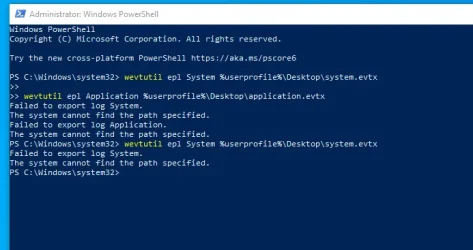
Please post script share links for these:


a) V2


b) Open administrative command prompt and copy and paste:

wevtutil epl System %userprofile%\Desktop\system.evtx

wevtutil epl Application %userprofile%\Desktop\application.evtx


c) If the above Open administrative command prompt fail then open command prompt on boot and run:


wevtutil epl System %userprofile%\Desktop\system.evtx

wevtutil epl Application %userprofile%\Desktop\application.evtx
 

My Computer

System One

  • OS
    Windows 10
    Computer type
    Laptop
    Manufacturer/Model
    HP
    CPU
    Intel(R) Core(TM) i7-4800MQ CPU @ 2.70GHz
    Motherboard
    Product : 190A Version : KBC Version 94.56
    Memory
    16 GB Total: Manufacturer : Samsung MemoryType : DDR3 FormFactor : SODIMM Capacity : 8GB Speed : 1600
    Graphics Card(s)
    NVIDIA Quadro K3100M; Intel(R) HD Graphics 4600
    Sound Card
    IDT High Definition Audio CODEC; PNP Device ID HDAUDIO\FUNC_01&VEN_111D&DEV_76E0
    Hard Drives
    Model Hitachi HTS727575A9E364
    Antivirus
    Microsoft Defender
    Other Info
    Mobile Workstation
Please post script share links for these:


a) V2


b) Open administrative command prompt and copy and paste:

wevtutil epl System %userprofile%\Desktop\system.evtx

wevtutil epl Application %userprofile%\Desktop\application.evtx


c) If the above Open administrative command prompt fail then open command prompt on boot and run:


wevtutil epl System %userprofile%\Desktop\system.evtx

wevtutil epl Application %userprofile%\Desktop\application.evtx

1763429419903.webp

does powershell work the same as command prompt? if yes, i am reading the link for step c currently
 

My Computer

System One

  • OS
    windows 11
    Computer type
    PC/Desktop
    CPU
    i5 12400f
    Motherboard
    asus h670 plus d4
If the command line failed with command prompt on boot then post share links with this method:


My Computer

System One

  • OS
    Windows 10
    Computer type
    Laptop
    Manufacturer/Model
    HP
    CPU
    Intel(R) Core(TM) i7-4800MQ CPU @ 2.70GHz
    Motherboard
    Product : 190A Version : KBC Version 94.56
    Memory
    16 GB Total: Manufacturer : Samsung MemoryType : DDR3 FormFactor : SODIMM Capacity : 8GB Speed : 1600
    Graphics Card(s)
    NVIDIA Quadro K3100M; Intel(R) HD Graphics 4600
    Sound Card
    IDT High Definition Audio CODEC; PNP Device ID HDAUDIO\FUNC_01&VEN_111D&DEV_76E0
    Hard Drives
    Model Hitachi HTS727575A9E364
    Antivirus
    Microsoft Defender
    Other Info
    Mobile Workstation
If the command line failed with command prompt on boot then post share links with this method:


tried multiple times to get into command prompt via booting and the damn insufferable computer will not under any circumstances make things simple. it will not recognize my password even after resetting it, so it wont work and im getting tired of bashing my head into a wall. literally nothing about this entire damn process can be simple and not an enormous pain in the ass.

Here are the logs.


My Computer

System One

  • OS
    windows 11
    Computer type
    PC/Desktop
    CPU
    i5 12400f
    Motherboard
    asus h670 plus d4
Today is 11/18.

The logs reported one unexpected shutdown and restart on Sunday 11/16 approximately 754 -755 AM.

Code:
11/16/2025 7:54:57 AM
The system has rebooted without cleanly shutting down first. This error could be caused if the system stopped responding, crashed, or lost power unexpectedly.

Code:
11/16/2025 7:55:01 AM
The previous system shutdown at 7:52:25 AM on ‎11/‎15/‎2025 was unexpected.
 

My Computer

System One

  • OS
    Windows 10
    Computer type
    Laptop
    Manufacturer/Model
    HP
    CPU
    Intel(R) Core(TM) i7-4800MQ CPU @ 2.70GHz
    Motherboard
    Product : 190A Version : KBC Version 94.56
    Memory
    16 GB Total: Manufacturer : Samsung MemoryType : DDR3 FormFactor : SODIMM Capacity : 8GB Speed : 1600
    Graphics Card(s)
    NVIDIA Quadro K3100M; Intel(R) HD Graphics 4600
    Sound Card
    IDT High Definition Audio CODEC; PNP Device ID HDAUDIO\FUNC_01&VEN_111D&DEV_76E0
    Hard Drives
    Model Hitachi HTS727575A9E364
    Antivirus
    Microsoft Defender
    Other Info
    Mobile Workstation
Today is 11/18.

The logs reported one unexpected shutdown and restart on Sunday 11/16 approximately 754 -755 AM.

Code:
11/16/2025 7:54:57 AM
The system has rebooted without cleanly shutting down first. This error could be caused if the system stopped responding, crashed, or lost power unexpectedly.

Code:
11/16/2025 7:55:01 AM
The previous system shutdown at 7:52:25 AM on ‎11/‎15/‎2025 was unexpected.
lovely, well i did not notice that. what does that mean and what can i do about it?
 

My Computer

System One

  • OS
    windows 11
    Computer type
    PC/Desktop
    CPU
    i5 12400f
    Motherboard
    asus h670 plus d4
Continuing monitoring to see if there is more than one unexpected shutdown and restart.
 

My Computer

System One

  • OS
    Windows 10
    Computer type
    Laptop
    Manufacturer/Model
    HP
    CPU
    Intel(R) Core(TM) i7-4800MQ CPU @ 2.70GHz
    Motherboard
    Product : 190A Version : KBC Version 94.56
    Memory
    16 GB Total: Manufacturer : Samsung MemoryType : DDR3 FormFactor : SODIMM Capacity : 8GB Speed : 1600
    Graphics Card(s)
    NVIDIA Quadro K3100M; Intel(R) HD Graphics 4600
    Sound Card
    IDT High Definition Audio CODEC; PNP Device ID HDAUDIO\FUNC_01&VEN_111D&DEV_76E0
    Hard Drives
    Model Hitachi HTS727575A9E364
    Antivirus
    Microsoft Defender
    Other Info
    Mobile Workstation
Continuing monitoring to see if there is more than one unexpected shutdown and restart.
how long should i continue monitoring before updating on here again?
 

My Computer

System One

  • OS
    windows 11
    Computer type
    PC/Desktop
    CPU
    i5 12400f
    Motherboard
    asus h670 plus d4
This process typically takes observation (the longer the monitoring the better the testing conditions).

There should be no unexpected shutdown and restarts.
 

My Computer

System One

  • OS
    Windows 10
    Computer type
    Laptop
    Manufacturer/Model
    HP
    CPU
    Intel(R) Core(TM) i7-4800MQ CPU @ 2.70GHz
    Motherboard
    Product : 190A Version : KBC Version 94.56
    Memory
    16 GB Total: Manufacturer : Samsung MemoryType : DDR3 FormFactor : SODIMM Capacity : 8GB Speed : 1600
    Graphics Card(s)
    NVIDIA Quadro K3100M; Intel(R) HD Graphics 4600
    Sound Card
    IDT High Definition Audio CODEC; PNP Device ID HDAUDIO\FUNC_01&VEN_111D&DEV_76E0
    Hard Drives
    Model Hitachi HTS727575A9E364
    Antivirus
    Microsoft Defender
    Other Info
    Mobile Workstation
This process typically takes observation (the longer the monitoring the better the testing conditions).

There should be no unexpected shutdown and restarts.

just got a BSOD, at the bottom is said "stop code memory management"
 

My Computer

System One

  • OS
    windows 11
    Computer type
    PC/Desktop
    CPU
    i5 12400f
    Motherboard
    asus h670 plus d4
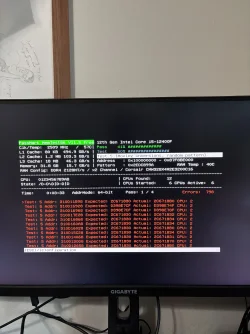
Run Memtest86+ for 8 or more passes > take pictures > post images or share links

Memtest86+ | The Open-Source Memory Testing Tool

Just 1 error is a test fail and testing can be aborted.

The more the passes the better the testing conditions.

It sometimes takes passes into the 20's to detect malfunctioning RAM.

The RAM can be tested all at one time or one at a time in the same DIMM.

Memtest86+ | The Open-Source Memory Testing Tool

MemTest86+ - Test RAM


Code:
Event[3110]:
  Log Name: System
  Source: Microsoft-Windows-WER-SystemErrorReporting
  Date: 2025-11-21T07:41:39.0120000Z
  Event ID: 1001
  Task: N/A
  Level: Error
  Opcode: N/A
  Keyword: Classic
  User: N/A
  User Name: N/A
  Computer: DESKTOP-74R88ET
  Description:
The computer has rebooted from a bugcheck.  The bugcheck was: 0x0000001a (0x0000000000041792, 0xfffff681097fe0a8, 0x0000000000000004, 0x0000000000000000). A dump was saved in: C:\Windows\MEMORY.DMP. Report Id: 81a01567-6480-4f5b-abdd-7648b6973060.


Code:
Event[3014]:
  Log Name: System
  Source: Microsoft-Windows-WHEA-Logger
  Date: 2025-11-21T05:55:25.6330000Z
  Event ID: 3
  Task: N/A
  Level: Information
  Opcode: Info
  Keyword: WHEA Error Event Logs
  User: S-1-5-19
  User Name: NT AUTHORITY\LOCAL SERVICE
  Computer: DESKTOP-74R88ET
  Description:
A hardware event has occurred. An informational record describing the condition is contained in the data section of this event.


Code:
Event[2886]:
  Log Name: System
  Source: Microsoft-Windows-WHEA-Logger
  Date: 2025-11-20T06:00:51.0910000Z
  Event ID: 3
  Task: N/A
  Level: Information
  Opcode: Info
  Keyword: WHEA Error Event Logs
  User: S-1-5-19
  User Name: NT AUTHORITY\LOCAL SERVICE
  Computer: DESKTOP-74R88ET
  Description:
A hardware event has occurred. An informational record describing the condition is contained in the data section of this event.
 

My Computer

System One

  • OS
    Windows 10
    Computer type
    Laptop
    Manufacturer/Model
    HP
    CPU
    Intel(R) Core(TM) i7-4800MQ CPU @ 2.70GHz
    Motherboard
    Product : 190A Version : KBC Version 94.56
    Memory
    16 GB Total: Manufacturer : Samsung MemoryType : DDR3 FormFactor : SODIMM Capacity : 8GB Speed : 1600
    Graphics Card(s)
    NVIDIA Quadro K3100M; Intel(R) HD Graphics 4600
    Sound Card
    IDT High Definition Audio CODEC; PNP Device ID HDAUDIO\FUNC_01&VEN_111D&DEV_76E0
    Hard Drives
    Model Hitachi HTS727575A9E364
    Antivirus
    Microsoft Defender
    Other Info
    Mobile Workstation
Run Memtest86+ for 8 or more passes > take pictures > post images or share links

Memtest86+ | The Open-Source Memory Testing Tool

Just 1 error is a test fail and testing can be aborted.

The more the passes the better the testing conditions.

It sometimes takes passes into the 20's to detect malfunctioning RAM.

The RAM can be tested all at one time or one at a time in the same DIMM.

Memtest86+ | The Open-Source Memory Testing Tool

MemTest86+ - Test RAM


Code:
Event[3110]:
  Log Name: System
  Source: Microsoft-Windows-WER-SystemErrorReporting
  Date: 2025-11-21T07:41:39.0120000Z
  Event ID: 1001
  Task: N/A
  Level: Error
  Opcode: N/A
  Keyword: Classic
  User: N/A
  User Name: N/A
  Computer: DESKTOP-74R88ET
  Description:
The computer has rebooted from a bugcheck.  The bugcheck was: 0x0000001a (0x0000000000041792, 0xfffff681097fe0a8, 0x0000000000000004, 0x0000000000000000). A dump was saved in: C:\Windows\MEMORY.DMP. Report Id: 81a01567-6480-4f5b-abdd-7648b6973060.


Code:
Event[3014]:
  Log Name: System
  Source: Microsoft-Windows-WHEA-Logger
  Date: 2025-11-21T05:55:25.6330000Z
  Event ID: 3
  Task: N/A
  Level: Information
  Opcode: Info
  Keyword: WHEA Error Event Logs
  User: S-1-5-19
  User Name: NT AUTHORITY\LOCAL SERVICE
  Computer: DESKTOP-74R88ET
  Description:
A hardware event has occurred. An informational record describing the condition is contained in the data section of this event.


Code:
Event[2886]:
  Log Name: System
  Source: Microsoft-Windows-WHEA-Logger
  Date: 2025-11-20T06:00:51.0910000Z
  Event ID: 3
  Task: N/A
  Level: Information
  Opcode: Info
  Keyword: WHEA Error Event Logs
  User: S-1-5-19
  User Name: NT AUTHORITY\LOCAL SERVICE
  Computer: DESKTOP-74R88ET
  Description:
A hardware event has occurred. An informational record describing the condition is contained in the data section of this event.

It failed, so is my RAM bad?
 

Attachments

  • IMG_1185.webp
    IMG_1185.webp
    1.1 MB · Views: 2

My Computer

System One

  • OS
    windows 11
    Computer type
    PC/Desktop
    CPU
    i5 12400f
    Motherboard
    asus h670 plus d4
Please replace the RAM with modules displayed on the Qualified Vendor List (QVL).

(The modules can be tested one at a time in the same DIMM to find the malfunctioning module)

(installing incompatible RAM creates instability)


Once you have confirmed computer stability / instability plan to upgrade to Windows 11.

After a successful upgrade then install drivers from the motherboard website > monitor computer stability / instability

Then install applications.

etc.
 

My Computer

System One

  • OS
    Windows 10
    Computer type
    Laptop
    Manufacturer/Model
    HP
    CPU
    Intel(R) Core(TM) i7-4800MQ CPU @ 2.70GHz
    Motherboard
    Product : 190A Version : KBC Version 94.56
    Memory
    16 GB Total: Manufacturer : Samsung MemoryType : DDR3 FormFactor : SODIMM Capacity : 8GB Speed : 1600
    Graphics Card(s)
    NVIDIA Quadro K3100M; Intel(R) HD Graphics 4600
    Sound Card
    IDT High Definition Audio CODEC; PNP Device ID HDAUDIO\FUNC_01&VEN_111D&DEV_76E0
    Hard Drives
    Model Hitachi HTS727575A9E364
    Antivirus
    Microsoft Defender
    Other Info
    Mobile Workstation
How come Memtest86 was used instead of the links for Memtest86+?
 

My Computer

System One

  • OS
    Windows 10
    Computer type
    Laptop
    Manufacturer/Model
    HP
    CPU
    Intel(R) Core(TM) i7-4800MQ CPU @ 2.70GHz
    Motherboard
    Product : 190A Version : KBC Version 94.56
    Memory
    16 GB Total: Manufacturer : Samsung MemoryType : DDR3 FormFactor : SODIMM Capacity : 8GB Speed : 1600
    Graphics Card(s)
    NVIDIA Quadro K3100M; Intel(R) HD Graphics 4600
    Sound Card
    IDT High Definition Audio CODEC; PNP Device ID HDAUDIO\FUNC_01&VEN_111D&DEV_76E0
    Hard Drives
    Model Hitachi HTS727575A9E364
    Antivirus
    Microsoft Defender
    Other Info
    Mobile Workstation
Please replace the RAM with modules displayed on the Qualified Vendor List (QVL).

(The modules can be tested one at a time in the same DIMM to find the malfunctioning module)

(installing incompatible RAM creates instability)


Once you have confirmed computer stability / instability plan to upgrade to Windows 11.

After a successful upgrade then install drivers from the motherboard website > monitor computer stability / instability

Then install applications.

etc.
I tested both of the sticks one at a time, they’re both bad. I have an old set of RAM that I recently upgraded from, threw them back in and am testing currently. 5 minutes in and on test 7, no failures so far. So it looks like the RAM was junk
 

My Computer

System One

  • OS
    windows 11
    Computer type
    PC/Desktop
    CPU
    i5 12400f
    Motherboard
    asus h670 plus d4
How come Memtest86 was used instead of the links for Memtest86+?
I tried for 30 minutes to get the + working and the usb would not show up as a boot option. Googled my issue and found someone else who had the same problem, the solution they were given was the use the normal memtest86 not the +
 

My Computer

System One

  • OS
    windows 11
    Computer type
    PC/Desktop
    CPU
    i5 12400f
    Motherboard
    asus h670 plus d4
Got a new graphics card and was forced to upgrade to windows 11. Ever since then the pc has been giving me hell.

When the computer is turned on after shut down or hibernation, it freezes within 5-15 seconds of starting up. If I use sfc /scannow the computer recognizes that there are corrupt files but refuses to fix them.

I am consistently getting the error code 0x800f0915
Suspected faulty SSD. Back up and replace the drive. Most likely a bad SSD, because it said "but was unable to fix some of them".

That happened with a piece-of-junk SSD that was in another PC of mine with Windows 10. Then I found what looks like the SMART reporting bad blocks already, when hardly used! That was after it became extremely slow on a reboot as well!
 

My Computers

System One System Two

  • OS
    Windows 11 Pro x64 24H2
    Computer type
    PC/Desktop
    CPU
    Ryzen 9 5900X
    Motherboard
    ASRock B550 PG Velocita (UEFI-BIOS 3.90)
    Memory
    64 GB G.Skill RipJaws V F4-3200C16D-64GVK
    Graphics Card(s)
    ASRock Steel Legend Arc B580 12 GB
    Monitor(s) Displays
    Alienware AW3423DWF OLED ultrawide
    Hard Drives
    Samsung 990 Pro 1 TB NVMe SSD
    PSU
    eVGA Supernova 750 G3
    Case
    Corsair 275R
    Internet Speed
    VTel FTTH 1 Gb down and 1 Gb up
  • Computer type
    PC/Desktop
    CPU
    Ryzen 7 5800X3D
    Motherboard
    Asus ROG Strix B550-F Gaming (UEFI-BIOS version 3607)
    Memory
    32 GB (2x16 GB G.Skill TridentZ Neo)
    Graphics card(s)
    Sapphire Nitro+ Radeon RX 6750 XT
    Hard Drives
    Samsung 970 Pro 512 GB NVMe SSD
    PSU
    Corsair RM850x
    Case
    Fractal Focus G
Back
Top Bottom