Upgrading Laptop From Home To Pro - Still Under Warranty


The Win 7 keys used to work for Win 10 (doesn't anymore) but never worked on Win 11.
Ah, ok. It's been a while; however, it was probably a Win 10 key I used as I have multiple keys for 7, 8, 10. That said, if the OP has a Windows 10 Pro key, that should work just as well.
 

My Computers My Computers

  • At a glance

    Windows 11 Pro 24H2 (Build 26100.4770)Intel Core 9 Ultra 285K64G (4x16) DDR5 Corsair RGB Dominator Platinu...Radeon (XFX Mercury) RX 9070XT OC (with Magne...
    OS
    Windows 11 Pro 24H2 (Build 26100.4770)
    Computer type
    PC/Desktop
    Manufacturer/Model
    Custom built
    CPU
    Intel Core 9 Ultra 285K
    Motherboard
    Gigabyte Aorus Z890 Xtreme AI Top
    Memory
    64G (4x16) DDR5 Corsair RGB Dominator Platinum (6400Mhz)
    Graphics Card(s)
    Radeon (XFX Mercury) RX 9070XT OC (with Magnetic Fans)
    Sound Card
    Onboard (DTS:X® Ultra Audio: ESS ES9280A DAC)
    Monitor(s) Displays
    27-inch Eizo Color Edge - CG2700X
    Screen Resolution
    3840 x 2160
    Hard Drives
    4 Samsung NVM 990 Pro drives: 1TB (OS), 2TB, 2 X 4TB.
    PSU
    Seasonic TX-1300 (1300 Watts)
    Case
    Cooler Master H500M
    Cooling
    Corsair Link Titan 280 RX RGB
    Keyboard
    Logitech Craft
    Mouse
    Logitech MX Master 3S
    Internet Speed
    1TB Download. 512mb Upload
    Browser
    Microsoft Edge Chromium
    Antivirus
    Windows Security
    Other Info
    System used for gaming, photography, music, school.
  • At a glance

    Windows 11 Pro 24H2 (Build 26100.4061)Intel Core i9-9900K32gig (4 x 8) Corsair Dominator Platinum DDR4...Radeon XFX Merc 7900XT (20gig)
    Operating System
    Windows 11 Pro 24H2 (Build 26100.4061)
    Computer type
    PC/Desktop
    Manufacturer/Model
    Custom built
    CPU
    Intel Core i9-9900K
    Motherboard
    Gigabyte Z390 Aorus Xtreme
    Memory
    32gig (4 x 8) Corsair Dominator Platinum DDR4 3600Mhz (B-Die)
    Graphics card(s)
    Radeon XFX Merc 7900XT (20gig)
    Sound Card
    Onboard
    Monitor(s) Displays
    24-Inch NEC PA242W
    Screen Resolution
    2880 x 1800
    Hard Drives
    2 X NVME, 1 X SATA SSD
    PSU
    EVGA Super Nova 1000 P2 (1000 Watt)
    Case
    Phantek Enthoo Luxe
    Cooling
    Corsair H115i Elite AIO Cooler
    Keyboard
    Logitech Keys
    Mouse
    Logitech MX Master 3
    Internet Speed
    1TB Download. 512mb Upload
    Browser
    Microsoft Edge Chromium
    Antivirus
    Windows Security
    Other Info
    Backup System
Ah, ok. It's been a while; however, it was probably a Win 10 key I used as I have multiple keys for 7, 8, 10. That said, if the OP has a Windows 10 Pro key, that should work just as well.
Yes, I have a Windows 10 key.
 

My Computers My Computers

  • At a glance

    Windows 11 Pro 64-bit / 24H2 / Build 26100.6584Intel(R) Core(TM) i7-13700, 16 Core(s)Total: 64.00 GBNVIDIA GeForce RTX 4060 Ti
    OS
    Windows 11 Pro 64-bit / 24H2 / Build 26100.6584
    Computer type
    PC/Desktop
    Manufacturer/Model
    Dell XPS 8960
    CPU
    Intel(R) Core(TM) i7-13700, 16 Core(s)
    Motherboard
    Dell Inc. Base Board.
    Memory
    Total: 64.00 GB
    Graphics Card(s)
    NVIDIA GeForce RTX 4060 Ti
    Sound Card
    Realtek Audio & Integrated NVIDIA High Definition Audio
    Monitor(s) Displays
    Three Dell Monitors
    Screen Resolution
    1920 x 1080
    Hard Drives
    1TB ATA
    1TB ATA
    2TB ATA
    2TB ATA
    Keyboard
    Dell Keyboard
    Mouse
    Wireless Mouse
    Internet Speed
    935 Mbs (Down) 31 Mbs (Up)
    Browser
    Google Chrome. Firefox. Opera.
    Antivirus
    Windows Defender
    Other Info
    TP-Link Gigabit PCI Express Adapter (Ethernet 802.3)
    Sophos TAP Adapter Provider (Ethernet 802.3)
  • At a glance

    Microsoft Windows 11 Home 64-bit. 22631 Multi...13th Gen Intel(R) Core(TM) i7-1355UTotal Memory: 16.00 GB Usable Memory: 15.69 GBIntel(R) Iris(R) Xe Graphics
    Operating System
    Microsoft Windows 11 Home 64-bit. 22631 Multiprocessor Free
    Computer type
    Laptop
    Manufacturer/Model
    Dell Inspiron 15-3530
    CPU
    13th Gen Intel(R) Core(TM) i7-1355U
    Motherboard
    Dell Inc. 0122F5
    Memory
    Total Memory: 16.00 GB Usable Memory: 15.69 GB
    Graphics card(s)
    Intel(R) Iris(R) Xe Graphics
    Sound Card
    (1) Intel® Smart Sound Technology for Bluetooth® Audio (2) Intel® Smart Sound Technology for USB Audio (3) Realtek Audio
    Monitor(s) Displays
    Integrated
    Screen Resolution
    1920 x 1080
    Hard Drives
    NVMe PC SN740 NVMe WD 512GB
    PSU
    Integrated
    Keyboard
    Integrated
    Mouse
    Integrated
    Internet Speed
    143 Mbs Down / 43 Mbs Up
    Browser
    Google Chrome . Firefox
    Antivirus
    Windows Defender
I hate sandbox. Contents disappear after powering off. I agree that a VM is MUCH more useful. If you want to go back to some point in time, create a snapshot (or checkpoint in Hyper-V terminology). But you are not forced to toss your work away after a reboot / power cycle. Also, bear in mind that Hyper-V is free and so is VMware Workstation Pro now.
I only really use Hyper-V for Windows Insider builds. It is so much more efficient than virtualbox or vmware as a rule (I do not play games where fancy graphics are needed).

Hyper-V is not so good for Linux builds that cannot act as an xrdp server as they only run in Hyper-V basic mode and do not get sound.

Of course, one has to understand that vms do have a potentially higher risk of infecting host OS than sandbox albeit risk is very low.

To this end, there is no substitute for a sound backup regime.
 

My Computer My Computer

At a glance

Windows 11 Pro + Win11 Canary VM.I9 13th gen i9-13900H 2.60 GHZ16 GB solderedIntegrated Intel Iris XE
OS
Windows 11 Pro + Win11 Canary VM.
Computer type
Laptop
Manufacturer/Model
ASUS Zenbook 14
CPU
I9 13th gen i9-13900H 2.60 GHZ
Motherboard
Yep, Laptop has one.
Memory
16 GB soldered
Graphics Card(s)
Integrated Intel Iris XE
Sound Card
Realtek built in
Monitor(s) Displays
laptop OLED screen
Screen Resolution
2880x1800 touchscreen
Hard Drives
1 TB NVME SSD (only weakness is only one slot)
PSU
Internal + 65W thunderbolt USB4 charger
Case
Yep, got one
Cooling
Stella Artois (UK pint cans - 568 ml) - extra cost.
Keyboard
Built in UK keybd
Mouse
Bluetooth , wireless dongled, wired
Internet Speed
900 mbs (ethernet), wifi 6 typical 350-450 mb/s both up and down
Browser
Edge
Antivirus
Defender
Other Info
TPM 2.0, 2xUSB4 thunderbolt, 1xUsb3 (usb a), 1xUsb-c, hdmi out, 3.5 mm audio out/in combo, ASUS backlit trackpad (inc. switchable number pad)

Macrium Reflect Home V8
Office 365 Family (6 users each 1TB onedrive space)
Hyper-V (a vm runs almost as fast as my older laptop)
For me, say every four to six months, I create a Windows USB and re-install windows. It tends to 'straighten' up my computer since I use it heavily and play a lot with installation and uninstallation of apps. Reinstalling Windows works well for me. Also, I use Rollback Pro to completely revert to previous states.

When upgrading to Windows 11, I used this link, Windows 11 Upgrade and used the Rufus method; all installation went well. Last night, it seems the system is kinda sluggish, so I went back to a state last week. Now am concerned about upgrading to 11 with an unsupported system. I don't want to buy a new computer at this time.

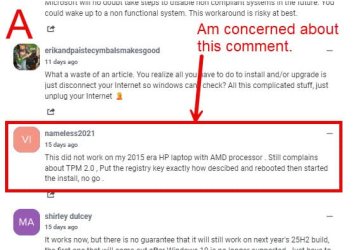
In the above link, I read some comments and the first attached image "A" kinda give me some concerns.

WinA.jpg

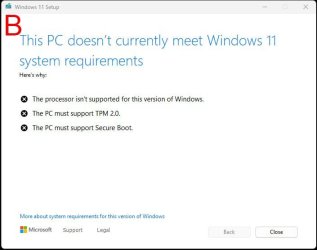
Image "B" was what come up when I turned on the computer, then I reverted to previous state.

WinB.jpg

I am just concerned about the integrity of upgrading to Windows 11 with unsupported system.

Cheers.
 

My Computers My Computers

  • At a glance

    Windows 11 Pro 64-bit / 24H2 / Build 26100.6584Intel(R) Core(TM) i7-13700, 16 Core(s)Total: 64.00 GBNVIDIA GeForce RTX 4060 Ti
    OS
    Windows 11 Pro 64-bit / 24H2 / Build 26100.6584
    Computer type
    PC/Desktop
    Manufacturer/Model
    Dell XPS 8960
    CPU
    Intel(R) Core(TM) i7-13700, 16 Core(s)
    Motherboard
    Dell Inc. Base Board.
    Memory
    Total: 64.00 GB
    Graphics Card(s)
    NVIDIA GeForce RTX 4060 Ti
    Sound Card
    Realtek Audio & Integrated NVIDIA High Definition Audio
    Monitor(s) Displays
    Three Dell Monitors
    Screen Resolution
    1920 x 1080
    Hard Drives
    1TB ATA
    1TB ATA
    2TB ATA
    2TB ATA
    Keyboard
    Dell Keyboard
    Mouse
    Wireless Mouse
    Internet Speed
    935 Mbs (Down) 31 Mbs (Up)
    Browser
    Google Chrome. Firefox. Opera.
    Antivirus
    Windows Defender
    Other Info
    TP-Link Gigabit PCI Express Adapter (Ethernet 802.3)
    Sophos TAP Adapter Provider (Ethernet 802.3)
  • At a glance

    Microsoft Windows 11 Home 64-bit. 22631 Multi...13th Gen Intel(R) Core(TM) i7-1355UTotal Memory: 16.00 GB Usable Memory: 15.69 GBIntel(R) Iris(R) Xe Graphics
    Operating System
    Microsoft Windows 11 Home 64-bit. 22631 Multiprocessor Free
    Computer type
    Laptop
    Manufacturer/Model
    Dell Inspiron 15-3530
    CPU
    13th Gen Intel(R) Core(TM) i7-1355U
    Motherboard
    Dell Inc. 0122F5
    Memory
    Total Memory: 16.00 GB Usable Memory: 15.69 GB
    Graphics card(s)
    Intel(R) Iris(R) Xe Graphics
    Sound Card
    (1) Intel® Smart Sound Technology for Bluetooth® Audio (2) Intel® Smart Sound Technology for USB Audio (3) Realtek Audio
    Monitor(s) Displays
    Integrated
    Screen Resolution
    1920 x 1080
    Hard Drives
    NVMe PC SN740 NVMe WD 512GB
    PSU
    Integrated
    Keyboard
    Integrated
    Mouse
    Integrated
    Internet Speed
    143 Mbs Down / 43 Mbs Up
    Browser
    Google Chrome . Firefox
    Antivirus
    Windows Defender
If your laptop is just some months old it is a Win 11 supported system unless it is an old computer just revamped.
Please edit your profile with ALL your hardware specs. It will help us to help you
 

My Computers My Computers

  • At a glance

    Windows 11 Pro - Windows 7 HP 64 - Lubuntui5 6600K - 800MHz to 4400MHz4+4G GSkill DDR4 3000IG - Intel 530
    OS
    Windows 11 Pro - Windows 7 HP 64 - Lubuntu
    Computer type
    PC/Desktop
    Manufacturer/Model
    custom build
    CPU
    i5 6600K - 800MHz to 4400MHz
    Motherboard
    GA-Z170-HD3P
    Memory
    4+4G GSkill DDR4 3000
    Graphics Card(s)
    IG - Intel 530
    Monitor(s) Displays
    Samsung 226BW
    Screen Resolution
    1680x1050
    Hard Drives
    (1) -1 SM951 – 128GB M.2 AHCI PCIe SSD drive for Win 11
    (2) -1 WD SATA 3 - 1T for Data
    (3) -1 WD SATA 3 - 1T for backup
    (4) -1 BX500 SSD - 256G for Windows 7 and Lubuntu
    PSU
    Thermaltake 450W TR2 gold
    Keyboard
    Old and good Chicony mechanical keyboard
    Mouse
    Logitech mX performance - 9 buttons (had to disable some)
    Internet Speed
    500 Mb/s
    Browser
    Firefox 64
  • At a glance

    Windows 11 Proi7-4500U 800- 3000MHz(4+4)G DDR3 1600IG intel 4400 + NVIDIA GeForce GT 745M
    Operating System
    Windows 11 Pro
    Computer type
    Laptop
    Manufacturer/Model
    Asus Q550LF
    CPU
    i7-4500U 800- 3000MHz
    Motherboard
    Asus Q550LF
    Memory
    (4+4)G DDR3 1600
    Graphics card(s)
    IG intel 4400 + NVIDIA GeForce GT 745M
    Sound Card
    Realtek
    Monitor(s) Displays
    LG Display LP156WF4-SPH1
    Screen Resolution
    1920 x 1080
    Hard Drives
    BX500 120G SSD for Windows and programs
    & 1T HDD for data
    Internet Speed
    500 Mb/s
    Browser
    Firefox 64
If you decide to move from home to pro Dru2 had placed the tutorial link in post #15.


This is a tutorial in case you want to return to home:


My Computer My Computer

At a glance

Windows 10Intel(R) Core(TM) i7-4800MQ CPU @ 2.70GHz16 GB Total: Manufacturer : Samsung MemoryTyp...NVIDIA Quadro K3100M; Intel(R) HD Graphics 4600
OS
Windows 10
Computer type
Laptop
Manufacturer/Model
HP
CPU
Intel(R) Core(TM) i7-4800MQ CPU @ 2.70GHz
Motherboard
Product : 190A Version : KBC Version 94.56
Memory
16 GB Total: Manufacturer : Samsung MemoryType : DDR3 FormFactor : SODIMM Capacity : 8GB Speed : 1600
Graphics Card(s)
NVIDIA Quadro K3100M; Intel(R) HD Graphics 4600
Sound Card
IDT High Definition Audio CODEC; PNP Device ID HDAUDIO\FUNC_01&VEN_111D&DEV_76E0
Hard Drives
Model Hitachi HTS727575A9E364
Antivirus
Microsoft Defender
Other Info
Mobile Workstation
If your laptop is just some months old it is a Win 11 supported system unless it is an old computer just revamped.
Please edit your profile with ALL your hardware specs. It will help us to help you
My bad. I'll do that as soon as possible.
I hesitated on doing them manually since I have more than one computer.
I checked on how it's done and see the link in the posts "My Computer>".
Thanks for the directive.
Cheers
 

My Computers My Computers

  • At a glance

    Windows 11 Pro 64-bit / 24H2 / Build 26100.6584Intel(R) Core(TM) i7-13700, 16 Core(s)Total: 64.00 GBNVIDIA GeForce RTX 4060 Ti
    OS
    Windows 11 Pro 64-bit / 24H2 / Build 26100.6584
    Computer type
    PC/Desktop
    Manufacturer/Model
    Dell XPS 8960
    CPU
    Intel(R) Core(TM) i7-13700, 16 Core(s)
    Motherboard
    Dell Inc. Base Board.
    Memory
    Total: 64.00 GB
    Graphics Card(s)
    NVIDIA GeForce RTX 4060 Ti
    Sound Card
    Realtek Audio & Integrated NVIDIA High Definition Audio
    Monitor(s) Displays
    Three Dell Monitors
    Screen Resolution
    1920 x 1080
    Hard Drives
    1TB ATA
    1TB ATA
    2TB ATA
    2TB ATA
    Keyboard
    Dell Keyboard
    Mouse
    Wireless Mouse
    Internet Speed
    935 Mbs (Down) 31 Mbs (Up)
    Browser
    Google Chrome. Firefox. Opera.
    Antivirus
    Windows Defender
    Other Info
    TP-Link Gigabit PCI Express Adapter (Ethernet 802.3)
    Sophos TAP Adapter Provider (Ethernet 802.3)
  • At a glance

    Microsoft Windows 11 Home 64-bit. 22631 Multi...13th Gen Intel(R) Core(TM) i7-1355UTotal Memory: 16.00 GB Usable Memory: 15.69 GBIntel(R) Iris(R) Xe Graphics
    Operating System
    Microsoft Windows 11 Home 64-bit. 22631 Multiprocessor Free
    Computer type
    Laptop
    Manufacturer/Model
    Dell Inspiron 15-3530
    CPU
    13th Gen Intel(R) Core(TM) i7-1355U
    Motherboard
    Dell Inc. 0122F5
    Memory
    Total Memory: 16.00 GB Usable Memory: 15.69 GB
    Graphics card(s)
    Intel(R) Iris(R) Xe Graphics
    Sound Card
    (1) Intel® Smart Sound Technology for Bluetooth® Audio (2) Intel® Smart Sound Technology for USB Audio (3) Realtek Audio
    Monitor(s) Displays
    Integrated
    Screen Resolution
    1920 x 1080
    Hard Drives
    NVMe PC SN740 NVMe WD 512GB
    PSU
    Integrated
    Keyboard
    Integrated
    Mouse
    Integrated
    Internet Speed
    143 Mbs Down / 43 Mbs Up
    Browser
    Google Chrome . Firefox
    Antivirus
    Windows Defender
If you decide to move from home to pro Dru2 had placed the tutorial link in post #15.


This is a tutorial in case you want to return to home:

The tutorial is to upgrade by purchasing a Windows 11 key or already owns a Windows 11 key.
In my situation, I have Windows 10 Pro key and need to upgrade to Windows 11 Pro.
The tutorial does not apply to me.

Cheers
 

My Computers My Computers

  • At a glance

    Windows 11 Pro 64-bit / 24H2 / Build 26100.6584Intel(R) Core(TM) i7-13700, 16 Core(s)Total: 64.00 GBNVIDIA GeForce RTX 4060 Ti
    OS
    Windows 11 Pro 64-bit / 24H2 / Build 26100.6584
    Computer type
    PC/Desktop
    Manufacturer/Model
    Dell XPS 8960
    CPU
    Intel(R) Core(TM) i7-13700, 16 Core(s)
    Motherboard
    Dell Inc. Base Board.
    Memory
    Total: 64.00 GB
    Graphics Card(s)
    NVIDIA GeForce RTX 4060 Ti
    Sound Card
    Realtek Audio & Integrated NVIDIA High Definition Audio
    Monitor(s) Displays
    Three Dell Monitors
    Screen Resolution
    1920 x 1080
    Hard Drives
    1TB ATA
    1TB ATA
    2TB ATA
    2TB ATA
    Keyboard
    Dell Keyboard
    Mouse
    Wireless Mouse
    Internet Speed
    935 Mbs (Down) 31 Mbs (Up)
    Browser
    Google Chrome. Firefox. Opera.
    Antivirus
    Windows Defender
    Other Info
    TP-Link Gigabit PCI Express Adapter (Ethernet 802.3)
    Sophos TAP Adapter Provider (Ethernet 802.3)
  • At a glance

    Microsoft Windows 11 Home 64-bit. 22631 Multi...13th Gen Intel(R) Core(TM) i7-1355UTotal Memory: 16.00 GB Usable Memory: 15.69 GBIntel(R) Iris(R) Xe Graphics
    Operating System
    Microsoft Windows 11 Home 64-bit. 22631 Multiprocessor Free
    Computer type
    Laptop
    Manufacturer/Model
    Dell Inspiron 15-3530
    CPU
    13th Gen Intel(R) Core(TM) i7-1355U
    Motherboard
    Dell Inc. 0122F5
    Memory
    Total Memory: 16.00 GB Usable Memory: 15.69 GB
    Graphics card(s)
    Intel(R) Iris(R) Xe Graphics
    Sound Card
    (1) Intel® Smart Sound Technology for Bluetooth® Audio (2) Intel® Smart Sound Technology for USB Audio (3) Realtek Audio
    Monitor(s) Displays
    Integrated
    Screen Resolution
    1920 x 1080
    Hard Drives
    NVMe PC SN740 NVMe WD 512GB
    PSU
    Integrated
    Keyboard
    Integrated
    Mouse
    Integrated
    Internet Speed
    143 Mbs Down / 43 Mbs Up
    Browser
    Google Chrome . Firefox
    Antivirus
    Windows Defender
Yes, I have a Windows 10 key.
If it's a Pro key, then the upgrade is simple.... use that key per the instructions in post #19.

If you need to rocket science it out, stay here.

Good luck.
 

My Computers My Computers

  • At a glance

    Windows 11 Pro 24H2 (Build 26100.4770)Intel Core 9 Ultra 285K64G (4x16) DDR5 Corsair RGB Dominator Platinu...Radeon (XFX Mercury) RX 9070XT OC (with Magne...
    OS
    Windows 11 Pro 24H2 (Build 26100.4770)
    Computer type
    PC/Desktop
    Manufacturer/Model
    Custom built
    CPU
    Intel Core 9 Ultra 285K
    Motherboard
    Gigabyte Aorus Z890 Xtreme AI Top
    Memory
    64G (4x16) DDR5 Corsair RGB Dominator Platinum (6400Mhz)
    Graphics Card(s)
    Radeon (XFX Mercury) RX 9070XT OC (with Magnetic Fans)
    Sound Card
    Onboard (DTS:X® Ultra Audio: ESS ES9280A DAC)
    Monitor(s) Displays
    27-inch Eizo Color Edge - CG2700X
    Screen Resolution
    3840 x 2160
    Hard Drives
    4 Samsung NVM 990 Pro drives: 1TB (OS), 2TB, 2 X 4TB.
    PSU
    Seasonic TX-1300 (1300 Watts)
    Case
    Cooler Master H500M
    Cooling
    Corsair Link Titan 280 RX RGB
    Keyboard
    Logitech Craft
    Mouse
    Logitech MX Master 3S
    Internet Speed
    1TB Download. 512mb Upload
    Browser
    Microsoft Edge Chromium
    Antivirus
    Windows Security
    Other Info
    System used for gaming, photography, music, school.
  • At a glance

    Windows 11 Pro 24H2 (Build 26100.4061)Intel Core i9-9900K32gig (4 x 8) Corsair Dominator Platinum DDR4...Radeon XFX Merc 7900XT (20gig)
    Operating System
    Windows 11 Pro 24H2 (Build 26100.4061)
    Computer type
    PC/Desktop
    Manufacturer/Model
    Custom built
    CPU
    Intel Core i9-9900K
    Motherboard
    Gigabyte Z390 Aorus Xtreme
    Memory
    32gig (4 x 8) Corsair Dominator Platinum DDR4 3600Mhz (B-Die)
    Graphics card(s)
    Radeon XFX Merc 7900XT (20gig)
    Sound Card
    Onboard
    Monitor(s) Displays
    24-Inch NEC PA242W
    Screen Resolution
    2880 x 1800
    Hard Drives
    2 X NVME, 1 X SATA SSD
    PSU
    EVGA Super Nova 1000 P2 (1000 Watt)
    Case
    Phantek Enthoo Luxe
    Cooling
    Corsair H115i Elite AIO Cooler
    Keyboard
    Logitech Keys
    Mouse
    Logitech MX Master 3
    Internet Speed
    1TB Download. 512mb Upload
    Browser
    Microsoft Edge Chromium
    Antivirus
    Windows Security
    Other Info
    Backup System
If it's a Pro key, then the upgrade is simple.... use that key per the instructions in post #19.

If you need to rocket science it out, stay here.

Good luck.
Sometimes, the English language gets the best of me.
What I have is the current Windows 10 Pro key.
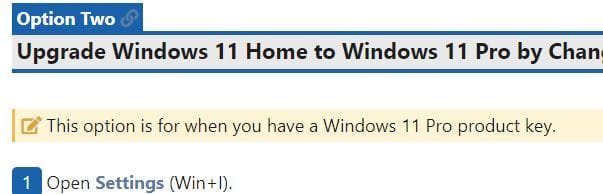
Here it mentions having a Windows 11 Pro key, guess going from 11 Home to 11 Pro.

Windows 11Key.JPG
 

My Computers My Computers

  • At a glance

    Windows 11 Pro 64-bit / 24H2 / Build 26100.6584Intel(R) Core(TM) i7-13700, 16 Core(s)Total: 64.00 GBNVIDIA GeForce RTX 4060 Ti
    OS
    Windows 11 Pro 64-bit / 24H2 / Build 26100.6584
    Computer type
    PC/Desktop
    Manufacturer/Model
    Dell XPS 8960
    CPU
    Intel(R) Core(TM) i7-13700, 16 Core(s)
    Motherboard
    Dell Inc. Base Board.
    Memory
    Total: 64.00 GB
    Graphics Card(s)
    NVIDIA GeForce RTX 4060 Ti
    Sound Card
    Realtek Audio & Integrated NVIDIA High Definition Audio
    Monitor(s) Displays
    Three Dell Monitors
    Screen Resolution
    1920 x 1080
    Hard Drives
    1TB ATA
    1TB ATA
    2TB ATA
    2TB ATA
    Keyboard
    Dell Keyboard
    Mouse
    Wireless Mouse
    Internet Speed
    935 Mbs (Down) 31 Mbs (Up)
    Browser
    Google Chrome. Firefox. Opera.
    Antivirus
    Windows Defender
    Other Info
    TP-Link Gigabit PCI Express Adapter (Ethernet 802.3)
    Sophos TAP Adapter Provider (Ethernet 802.3)
  • At a glance

    Microsoft Windows 11 Home 64-bit. 22631 Multi...13th Gen Intel(R) Core(TM) i7-1355UTotal Memory: 16.00 GB Usable Memory: 15.69 GBIntel(R) Iris(R) Xe Graphics
    Operating System
    Microsoft Windows 11 Home 64-bit. 22631 Multiprocessor Free
    Computer type
    Laptop
    Manufacturer/Model
    Dell Inspiron 15-3530
    CPU
    13th Gen Intel(R) Core(TM) i7-1355U
    Motherboard
    Dell Inc. 0122F5
    Memory
    Total Memory: 16.00 GB Usable Memory: 15.69 GB
    Graphics card(s)
    Intel(R) Iris(R) Xe Graphics
    Sound Card
    (1) Intel® Smart Sound Technology for Bluetooth® Audio (2) Intel® Smart Sound Technology for USB Audio (3) Realtek Audio
    Monitor(s) Displays
    Integrated
    Screen Resolution
    1920 x 1080
    Hard Drives
    NVMe PC SN740 NVMe WD 512GB
    PSU
    Integrated
    Keyboard
    Integrated
    Mouse
    Integrated
    Internet Speed
    143 Mbs Down / 43 Mbs Up
    Browser
    Google Chrome . Firefox
    Antivirus
    Windows Defender
The tutorial is to upgrade by purchasing a Windows 11 key or already owns a Windows 11 key.
In my situation, I have Windows 10 Pro key and need to upgrade to Windows 11 Pro.
The tutorial does not apply to me.

Cheers

Windows 10 > windows 11 is free

It can be a supported or an unsupported upgrade


Supported:


Unsupported:


My Computer My Computer

At a glance

Windows 10Intel(R) Core(TM) i7-4800MQ CPU @ 2.70GHz16 GB Total: Manufacturer : Samsung MemoryTyp...NVIDIA Quadro K3100M; Intel(R) HD Graphics 4600
OS
Windows 10
Computer type
Laptop
Manufacturer/Model
HP
CPU
Intel(R) Core(TM) i7-4800MQ CPU @ 2.70GHz
Motherboard
Product : 190A Version : KBC Version 94.56
Memory
16 GB Total: Manufacturer : Samsung MemoryType : DDR3 FormFactor : SODIMM Capacity : 8GB Speed : 1600
Graphics Card(s)
NVIDIA Quadro K3100M; Intel(R) HD Graphics 4600
Sound Card
IDT High Definition Audio CODEC; PNP Device ID HDAUDIO\FUNC_01&VEN_111D&DEV_76E0
Hard Drives
Model Hitachi HTS727575A9E364
Antivirus
Microsoft Defender
Other Info
Mobile Workstation
For some reason, Pro is cheaper than Home.

I'll only switch to Windows Enterprise if it's that inexpensive.
 

My Computer My Computer

At a glance

Microsoft Windows 11 HomeIntel Core i5-13490F2 x 16 Patriot Memory (PDP Systems) PSD516G56...GIGABYTE GeForce RTX 4070 WINDFORCE OC 12G (G...
OS
Microsoft Windows 11 Home
Computer type
PC/Desktop
Manufacturer/Model
MSI MS-7D98
CPU
Intel Core i5-13490F
Motherboard
MSI B760 GAMING PLUS WIFI
Memory
2 x 16 Patriot Memory (PDP Systems) PSD516G560081 6400MT (32-37-37-74); 1.35V)
Graphics Card(s)
GIGABYTE GeForce RTX 4070 WINDFORCE OC 12G (GV-N4070WF3OC-12GD)
Sound Card
Bluetooth Аудио
Monitor(s) Displays
INNOCN 15K1F
Screen Resolution
1920 x 1080
Hard Drives
WD_BLACK SN770 250GB
KINGSTON SNV2S1000G (ELFK0S.6)
PSU
Thermaltake Toughpower GF3 1000W
Case
CG560 - DeepCool
Cooling
ID-COOLING SE-224-XTS / 2 x 140Mm Fan - rear and top; 3 x 120Mm - front
Keyboard
Corsair K70 RGB TKL
Mouse
Corsair KATAR PRO XT
Internet Speed
100 Mbps
Browser
Firefox
Antivirus
Microsoft Defender Antivirus
Other Info
https://www.userbenchmark.com/UserRun/66553205
Hey folks, I have to stop here for now, and do what I was suggested to do, by Megahertz, in Post #25.

During the original post, I got my issues mixed up. I surely will straighten things up after getting my computer identities straighten out.
I really apologize for the mix up. When I get home, I'll put things in perspective.

Cheers


My Computers My Computers

  • At a glance

    Windows 11 Pro 64-bit / 24H2 / Build 26100.6584Intel(R) Core(TM) i7-13700, 16 Core(s)Total: 64.00 GBNVIDIA GeForce RTX 4060 Ti
    OS
    Windows 11 Pro 64-bit / 24H2 / Build 26100.6584
    Computer type
    PC/Desktop
    Manufacturer/Model
    Dell XPS 8960
    CPU
    Intel(R) Core(TM) i7-13700, 16 Core(s)
    Motherboard
    Dell Inc. Base Board.
    Memory
    Total: 64.00 GB
    Graphics Card(s)
    NVIDIA GeForce RTX 4060 Ti
    Sound Card
    Realtek Audio & Integrated NVIDIA High Definition Audio
    Monitor(s) Displays
    Three Dell Monitors
    Screen Resolution
    1920 x 1080
    Hard Drives
    1TB ATA
    1TB ATA
    2TB ATA
    2TB ATA
    Keyboard
    Dell Keyboard
    Mouse
    Wireless Mouse
    Internet Speed
    935 Mbs (Down) 31 Mbs (Up)
    Browser
    Google Chrome. Firefox. Opera.
    Antivirus
    Windows Defender
    Other Info
    TP-Link Gigabit PCI Express Adapter (Ethernet 802.3)
    Sophos TAP Adapter Provider (Ethernet 802.3)
  • At a glance

    Microsoft Windows 11 Home 64-bit. 22631 Multi...13th Gen Intel(R) Core(TM) i7-1355UTotal Memory: 16.00 GB Usable Memory: 15.69 GBIntel(R) Iris(R) Xe Graphics
    Operating System
    Microsoft Windows 11 Home 64-bit. 22631 Multiprocessor Free
    Computer type
    Laptop
    Manufacturer/Model
    Dell Inspiron 15-3530
    CPU
    13th Gen Intel(R) Core(TM) i7-1355U
    Motherboard
    Dell Inc. 0122F5
    Memory
    Total Memory: 16.00 GB Usable Memory: 15.69 GB
    Graphics card(s)
    Intel(R) Iris(R) Xe Graphics
    Sound Card
    (1) Intel® Smart Sound Technology for Bluetooth® Audio (2) Intel® Smart Sound Technology for USB Audio (3) Realtek Audio
    Monitor(s) Displays
    Integrated
    Screen Resolution
    1920 x 1080
    Hard Drives
    NVMe PC SN740 NVMe WD 512GB
    PSU
    Integrated
    Keyboard
    Integrated
    Mouse
    Integrated
    Internet Speed
    143 Mbs Down / 43 Mbs Up
    Browser
    Google Chrome . Firefox
    Antivirus
    Windows Defender
The easiest and most effective way to upgrade to Pro is to use a Pro key. If you're got a Windows 7 Pro license key you can install that key (provided that loophole isn't closed) and Windows 11 Home will become Windows 11 Pro. No hardware messing, no losing anything.
You could never use a W7/W8 key to activate Windows 11. You could only activate Windows 10 that way. Of course, once the PC had a digital licence for W10 you could upgrade to or clean install 11, the digital licence is valid for both. So are the keys, you can activate 11 with a W10 key (or 10 with an 11 key, they're all the same).

However, MS closed that loophole in October 2023.

Bree said:
I've now tested changing the installed key to a W7 Pro key after a clean install of Windows 10 Pro. That no longer activates.
Free Activation from Windows 7/8 key or upgrade to Windows 10/11 Ends - post #15
 

My Computers My Computers

  • At a glance

    Windows 11 HomeAMD Athlon Silver 3050U8GBRadeon Graphics
    OS
    Windows 11 Home
    Computer type
    Laptop
    Manufacturer/Model
    Acer Aspire 3 A315-23-R9VY
    CPU
    AMD Athlon Silver 3050U
    Memory
    8GB
    Graphics Card(s)
    Radeon Graphics
    Monitor(s) Displays
    laptop screen
    Screen Resolution
    1366x768 native resolution, up to 2560x1440 with Radeon Virtual Super Resolution
    Hard Drives
    1TB Samsung EVO 870 SSD (from April 2026: 250GB EVO 850)
    Internet Speed
    150 Mbps
    Browser
    Edge, Firefox
    Antivirus
    Defender
    Other Info
    UPDATE - 11 April 2026: due to lid hinges starting to break up this laptop has been retired from active duty. The OS with all software and files has been migrated to my System Seven in 'Other systems' to carry on as my general purpose 'main machine'.

    I've now clean installed 25H2 and used Garlin's scripts to update Secure Boot to CA 2023 and revoke the PCA 2011 certificates. It's new role is to test secure boot issues.

    Info for 2021-2026:
    fully 'Windows 11 ready' laptop. Windows 10 C: partition migrated from my old unsupported 'main machine' then upgraded to 11. A test migration ran Insider builds for 2 months. When 11 was released on 5th October 2021 it was re-imaged back to 10 and was offered the upgrade in Windows Update on 20th October. Windows Update offered the 22H2 Feature Update on 20th September 2022. It got the 23H2 Feature Update on 4th November 2023 through Windows Update, 24H2 on 3rd October 2024 through Windows Update by setting the Target Release Version for 24H2, and 25H2 on 30th September 2025 through Windows Update by setting the Target Release Version for 25H2.
  • At a glance

    Windows 11 ProIntel® Core™ i5-520M8GB(integrated graphics) Intel HD Graphics
    Operating System
    Windows 11 Pro
    Computer type
    Laptop
    Manufacturer/Model
    Dell Latitude E4310
    CPU
    Intel® Core™ i5-520M
    Motherboard
    0T6M8G
    Memory
    8GB
    Graphics card(s)
    (integrated graphics) Intel HD Graphics
    Screen Resolution
    1366x768
    Hard Drives
    500GB Crucial MX500 SSD
    Browser
    Firefox, Edge
    Antivirus
    Defender
    Other Info
    unsupported machine: Legacy bios, MBR, TPM 1.2, upgraded from W10 to W11 using W10/W11 hybrid install media workaround.

    In-place upgrade to 22H2 using ISO and a workaround.
    Feature Update to 23H2 by manually installing the Enablement Package.
    In-place upgrade to 24H2 using hybrid 23H2/24H2 install media.
    Upgraded to 25H2 by Enablement Package.

    Also running Insider Dev, and Canary builds and Windows 10 as native boot .vhdx.
  • My SYSTEM THREE is a Dell Latitude 5410, i7-10610U, 32GB RAM, 512GB NVMe ssd, supported device running Windows 11 Pro.

    My SYSTEM FOUR was a 2-in-1 convertible Lenovo Yoga 11e (1st gen) type 20DA, Celeron N2930, 8GB RAM, 256GB ssd. Unsupported device. This has now been sold. It has been replaced by my System Eight.

    My SYSTEM FIVE is a Dell Latitude 3190 2-in-1, Pentium Silver N5030, 8GB RAM, 1TB NVMe ssd, supported device running Windows 11 Pro, plus Insider Beta, Dev, and Canary builds (and a few others) as a native boot .vhdx.

    My SYSTEM SIX is a Dell Latitude 5550, Core Ultra 7 165H, 64GB RAM, 1TB NVMe SSD, supported device, Windows 11 Pro 24H2, Hyper-V host machine. Updated to 25H2 on 30th September 2025.

    My SYSTEM SEVEN is a Lenovo Thinkpad T580, Intel Core i7-8650U, 16GB RAM, 512GB NVMe SSD + 2nd 512GB NVMe SSD, a supported device for Windows 11. This is my current general purpose 'main machine'. The installed Windows 11 Home from my System One has been migrated to this machine.

    My SYSTEM EIGHT is a 2-in-1 convertible Lenovo Yoga 11e (5th gen) type 20LN, Celeron N4120, 8GB RAM, 512GB NVMe ssd, a supported device for Windows 11. Currently running Windows 11 Pro, plus Insider Dev, Beta, and Canary builds as native boot vhdx.
My Computers My Computers

  • At a glance

    Windows 11 Pro 24H2 (Build 26100.4770)Intel Core 9 Ultra 285K64G (4x16) DDR5 Corsair RGB Dominator Platinu...Radeon (XFX Mercury) RX 9070XT OC (with Magne...
    OS
    Windows 11 Pro 24H2 (Build 26100.4770)
    Computer type
    PC/Desktop
    Manufacturer/Model
    Custom built
    CPU
    Intel Core 9 Ultra 285K
    Motherboard
    Gigabyte Aorus Z890 Xtreme AI Top
    Memory
    64G (4x16) DDR5 Corsair RGB Dominator Platinum (6400Mhz)
    Graphics Card(s)
    Radeon (XFX Mercury) RX 9070XT OC (with Magnetic Fans)
    Sound Card
    Onboard (DTS:X® Ultra Audio: ESS ES9280A DAC)
    Monitor(s) Displays
    27-inch Eizo Color Edge - CG2700X
    Screen Resolution
    3840 x 2160
    Hard Drives
    4 Samsung NVM 990 Pro drives: 1TB (OS), 2TB, 2 X 4TB.
    PSU
    Seasonic TX-1300 (1300 Watts)
    Case
    Cooler Master H500M
    Cooling
    Corsair Link Titan 280 RX RGB
    Keyboard
    Logitech Craft
    Mouse
    Logitech MX Master 3S
    Internet Speed
    1TB Download. 512mb Upload
    Browser
    Microsoft Edge Chromium
    Antivirus
    Windows Security
    Other Info
    System used for gaming, photography, music, school.
  • At a glance

    Windows 11 Pro 24H2 (Build 26100.4061)Intel Core i9-9900K32gig (4 x 8) Corsair Dominator Platinum DDR4...Radeon XFX Merc 7900XT (20gig)
    Operating System
    Windows 11 Pro 24H2 (Build 26100.4061)
    Computer type
    PC/Desktop
    Manufacturer/Model
    Custom built
    CPU
    Intel Core i9-9900K
    Motherboard
    Gigabyte Z390 Aorus Xtreme
    Memory
    32gig (4 x 8) Corsair Dominator Platinum DDR4 3600Mhz (B-Die)
    Graphics card(s)
    Radeon XFX Merc 7900XT (20gig)
    Sound Card
    Onboard
    Monitor(s) Displays
    24-Inch NEC PA242W
    Screen Resolution
    2880 x 1800
    Hard Drives
    2 X NVME, 1 X SATA SSD
    PSU
    EVGA Super Nova 1000 P2 (1000 Watt)
    Case
    Phantek Enthoo Luxe
    Cooling
    Corsair H115i Elite AIO Cooler
    Keyboard
    Logitech Keys
    Mouse
    Logitech MX Master 3
    Internet Speed
    1TB Download. 512mb Upload
    Browser
    Microsoft Edge Chromium
    Antivirus
    Windows Security
    Other Info
    Backup System
For some reason, Pro is cheaper than Home.

I'll only switch to Windows Enterprise if it's that inexpensive.
I have always been curious about these cheap licenses.
So with this, you can simply do a clean installation and use the new key?
I am willing to get it and create a clean installation and go through the headache of reinstalling all my apps, or just transfer them all.
 
Last edited:

My Computers My Computers

  • At a glance

    Windows 11 Pro 64-bit / 24H2 / Build 26100.6584Intel(R) Core(TM) i7-13700, 16 Core(s)Total: 64.00 GBNVIDIA GeForce RTX 4060 Ti
    OS
    Windows 11 Pro 64-bit / 24H2 / Build 26100.6584
    Computer type
    PC/Desktop
    Manufacturer/Model
    Dell XPS 8960
    CPU
    Intel(R) Core(TM) i7-13700, 16 Core(s)
    Motherboard
    Dell Inc. Base Board.
    Memory
    Total: 64.00 GB
    Graphics Card(s)
    NVIDIA GeForce RTX 4060 Ti
    Sound Card
    Realtek Audio & Integrated NVIDIA High Definition Audio
    Monitor(s) Displays
    Three Dell Monitors
    Screen Resolution
    1920 x 1080
    Hard Drives
    1TB ATA
    1TB ATA
    2TB ATA
    2TB ATA
    Keyboard
    Dell Keyboard
    Mouse
    Wireless Mouse
    Internet Speed
    935 Mbs (Down) 31 Mbs (Up)
    Browser
    Google Chrome. Firefox. Opera.
    Antivirus
    Windows Defender
    Other Info
    TP-Link Gigabit PCI Express Adapter (Ethernet 802.3)
    Sophos TAP Adapter Provider (Ethernet 802.3)
  • At a glance

    Microsoft Windows 11 Home 64-bit. 22631 Multi...13th Gen Intel(R) Core(TM) i7-1355UTotal Memory: 16.00 GB Usable Memory: 15.69 GBIntel(R) Iris(R) Xe Graphics
    Operating System
    Microsoft Windows 11 Home 64-bit. 22631 Multiprocessor Free
    Computer type
    Laptop
    Manufacturer/Model
    Dell Inspiron 15-3530
    CPU
    13th Gen Intel(R) Core(TM) i7-1355U
    Motherboard
    Dell Inc. 0122F5
    Memory
    Total Memory: 16.00 GB Usable Memory: 15.69 GB
    Graphics card(s)
    Intel(R) Iris(R) Xe Graphics
    Sound Card
    (1) Intel® Smart Sound Technology for Bluetooth® Audio (2) Intel® Smart Sound Technology for USB Audio (3) Realtek Audio
    Monitor(s) Displays
    Integrated
    Screen Resolution
    1920 x 1080
    Hard Drives
    NVMe PC SN740 NVMe WD 512GB
    PSU
    Integrated
    Keyboard
    Integrated
    Mouse
    Integrated
    Internet Speed
    143 Mbs Down / 43 Mbs Up
    Browser
    Google Chrome . Firefox
    Antivirus
    Windows Defender
If you decide to move from home to pro Dru2 had placed the tutorial link in post #15.


This is a tutorial in case you want to return to home:

I have populated my computer specs.
 

My Computers My Computers

  • At a glance

    Windows 11 Pro 64-bit / 24H2 / Build 26100.6584Intel(R) Core(TM) i7-13700, 16 Core(s)Total: 64.00 GBNVIDIA GeForce RTX 4060 Ti
    OS
    Windows 11 Pro 64-bit / 24H2 / Build 26100.6584
    Computer type
    PC/Desktop
    Manufacturer/Model
    Dell XPS 8960
    CPU
    Intel(R) Core(TM) i7-13700, 16 Core(s)
    Motherboard
    Dell Inc. Base Board.
    Memory
    Total: 64.00 GB
    Graphics Card(s)
    NVIDIA GeForce RTX 4060 Ti
    Sound Card
    Realtek Audio & Integrated NVIDIA High Definition Audio
    Monitor(s) Displays
    Three Dell Monitors
    Screen Resolution
    1920 x 1080
    Hard Drives
    1TB ATA
    1TB ATA
    2TB ATA
    2TB ATA
    Keyboard
    Dell Keyboard
    Mouse
    Wireless Mouse
    Internet Speed
    935 Mbs (Down) 31 Mbs (Up)
    Browser
    Google Chrome. Firefox. Opera.
    Antivirus
    Windows Defender
    Other Info
    TP-Link Gigabit PCI Express Adapter (Ethernet 802.3)
    Sophos TAP Adapter Provider (Ethernet 802.3)
  • At a glance

    Microsoft Windows 11 Home 64-bit. 22631 Multi...13th Gen Intel(R) Core(TM) i7-1355UTotal Memory: 16.00 GB Usable Memory: 15.69 GBIntel(R) Iris(R) Xe Graphics
    Operating System
    Microsoft Windows 11 Home 64-bit. 22631 Multiprocessor Free
    Computer type
    Laptop
    Manufacturer/Model
    Dell Inspiron 15-3530
    CPU
    13th Gen Intel(R) Core(TM) i7-1355U
    Motherboard
    Dell Inc. 0122F5
    Memory
    Total Memory: 16.00 GB Usable Memory: 15.69 GB
    Graphics card(s)
    Intel(R) Iris(R) Xe Graphics
    Sound Card
    (1) Intel® Smart Sound Technology for Bluetooth® Audio (2) Intel® Smart Sound Technology for USB Audio (3) Realtek Audio
    Monitor(s) Displays
    Integrated
    Screen Resolution
    1920 x 1080
    Hard Drives
    NVMe PC SN740 NVMe WD 512GB
    PSU
    Integrated
    Keyboard
    Integrated
    Mouse
    Integrated
    Internet Speed
    143 Mbs Down / 43 Mbs Up
    Browser
    Google Chrome . Firefox
    Antivirus
    Windows Defender
Thanks, but that was discussed > here so I know that. The reply you quote is actually for the Win 10 key,,,,.


Thank you
Thanks, but that was discussed > here so I know that. The reply you quote is actually for the Win 10 key,,,,.


Thank you
The first issue I have is that the desktop not meet the requirements to upgrade from 10 Pro to 11 Pro. The Option #2 method would not work for me until I bypass the requirement restrictions for an upgrade.
 

My Computers My Computers

  • At a glance

    Windows 11 Pro 64-bit / 24H2 / Build 26100.6584Intel(R) Core(TM) i7-13700, 16 Core(s)Total: 64.00 GBNVIDIA GeForce RTX 4060 Ti
    OS
    Windows 11 Pro 64-bit / 24H2 / Build 26100.6584
    Computer type
    PC/Desktop
    Manufacturer/Model
    Dell XPS 8960
    CPU
    Intel(R) Core(TM) i7-13700, 16 Core(s)
    Motherboard
    Dell Inc. Base Board.
    Memory
    Total: 64.00 GB
    Graphics Card(s)
    NVIDIA GeForce RTX 4060 Ti
    Sound Card
    Realtek Audio & Integrated NVIDIA High Definition Audio
    Monitor(s) Displays
    Three Dell Monitors
    Screen Resolution
    1920 x 1080
    Hard Drives
    1TB ATA
    1TB ATA
    2TB ATA
    2TB ATA
    Keyboard
    Dell Keyboard
    Mouse
    Wireless Mouse
    Internet Speed
    935 Mbs (Down) 31 Mbs (Up)
    Browser
    Google Chrome. Firefox. Opera.
    Antivirus
    Windows Defender
    Other Info
    TP-Link Gigabit PCI Express Adapter (Ethernet 802.3)
    Sophos TAP Adapter Provider (Ethernet 802.3)
  • At a glance

    Microsoft Windows 11 Home 64-bit. 22631 Multi...13th Gen Intel(R) Core(TM) i7-1355UTotal Memory: 16.00 GB Usable Memory: 15.69 GBIntel(R) Iris(R) Xe Graphics
    Operating System
    Microsoft Windows 11 Home 64-bit. 22631 Multiprocessor Free
    Computer type
    Laptop
    Manufacturer/Model
    Dell Inspiron 15-3530
    CPU
    13th Gen Intel(R) Core(TM) i7-1355U
    Motherboard
    Dell Inc. 0122F5
    Memory
    Total Memory: 16.00 GB Usable Memory: 15.69 GB
    Graphics card(s)
    Intel(R) Iris(R) Xe Graphics
    Sound Card
    (1) Intel® Smart Sound Technology for Bluetooth® Audio (2) Intel® Smart Sound Technology for USB Audio (3) Realtek Audio
    Monitor(s) Displays
    Integrated
    Screen Resolution
    1920 x 1080
    Hard Drives
    NVMe PC SN740 NVMe WD 512GB
    PSU
    Integrated
    Keyboard
    Integrated
    Mouse
    Integrated
    Internet Speed
    143 Mbs Down / 43 Mbs Up
    Browser
    Google Chrome . Firefox
    Antivirus
    Windows Defender
Hello folks, I am going to clarify some things on my computer issues.

The title:

" Upgrading Laptop From Home To Pro - Still Under Warranty "

was all about my new Dell laptop with Windows 11 home, I was thinking of upgrading to Pro version. Through you'all supports, I decided to keep laptop to its Home version and not bother about the SandBox. So, the Dell laptop issue, in my opinion, has been resolved. During the forum chat, I may have unknowingly mixed up my Windows 11 thought into my desktop computer.
--------------------------------------------------------------------
So, the issue at hand now is just on my desktop computer:
- Windows 10 Pro
- Does not meet the requirements to upgrade to Windows 11
- Used the method I mentioned in Post #24
- Upgraded to Windows 11 pro
- I still have a disk image of the original Windows 10 Pro
- I still have a cloned disk of the Windows 10 Pro
- In my Computer System information, System One, the Windows 11 Pro there is the upgraded version

In Post #32, if the license for the $20 is trustworthy, I am willing to get it and start with a fresh 11 Pro, since I won't have the issue of not meeting the requirements. Is this deal a genuine key?
 

My Computers My Computers

  • At a glance

    Windows 11 Pro 64-bit / 24H2 / Build 26100.6584Intel(R) Core(TM) i7-13700, 16 Core(s)Total: 64.00 GBNVIDIA GeForce RTX 4060 Ti
    OS
    Windows 11 Pro 64-bit / 24H2 / Build 26100.6584
    Computer type
    PC/Desktop
    Manufacturer/Model
    Dell XPS 8960
    CPU
    Intel(R) Core(TM) i7-13700, 16 Core(s)
    Motherboard
    Dell Inc. Base Board.
    Memory
    Total: 64.00 GB
    Graphics Card(s)
    NVIDIA GeForce RTX 4060 Ti
    Sound Card
    Realtek Audio & Integrated NVIDIA High Definition Audio
    Monitor(s) Displays
    Three Dell Monitors
    Screen Resolution
    1920 x 1080
    Hard Drives
    1TB ATA
    1TB ATA
    2TB ATA
    2TB ATA
    Keyboard
    Dell Keyboard
    Mouse
    Wireless Mouse
    Internet Speed
    935 Mbs (Down) 31 Mbs (Up)
    Browser
    Google Chrome. Firefox. Opera.
    Antivirus
    Windows Defender
    Other Info
    TP-Link Gigabit PCI Express Adapter (Ethernet 802.3)
    Sophos TAP Adapter Provider (Ethernet 802.3)
  • At a glance

    Microsoft Windows 11 Home 64-bit. 22631 Multi...13th Gen Intel(R) Core(TM) i7-1355UTotal Memory: 16.00 GB Usable Memory: 15.69 GBIntel(R) Iris(R) Xe Graphics
    Operating System
    Microsoft Windows 11 Home 64-bit. 22631 Multiprocessor Free
    Computer type
    Laptop
    Manufacturer/Model
    Dell Inspiron 15-3530
    CPU
    13th Gen Intel(R) Core(TM) i7-1355U
    Motherboard
    Dell Inc. 0122F5
    Memory
    Total Memory: 16.00 GB Usable Memory: 15.69 GB
    Graphics card(s)
    Intel(R) Iris(R) Xe Graphics
    Sound Card
    (1) Intel® Smart Sound Technology for Bluetooth® Audio (2) Intel® Smart Sound Technology for USB Audio (3) Realtek Audio
    Monitor(s) Displays
    Integrated
    Screen Resolution
    1920 x 1080
    Hard Drives
    NVMe PC SN740 NVMe WD 512GB
    PSU
    Integrated
    Keyboard
    Integrated
    Mouse
    Integrated
    Internet Speed
    143 Mbs Down / 43 Mbs Up
    Browser
    Google Chrome . Firefox
    Antivirus
    Windows Defender
UPDATE

By the way, I switched my drive back to the cloned Windows 10.
The Windows 11 seems to be giving me some issues. Sometimes I get an "image" error or some apps jibrish showing with an error.

I believe the solution will be to have a clean 11 installation and either, re-install all apps or back them up and restore.
I just would feel better with 'clean' start.

Cheers
 

My Computers My Computers

  • At a glance

    Windows 11 Pro 64-bit / 24H2 / Build 26100.6584Intel(R) Core(TM) i7-13700, 16 Core(s)Total: 64.00 GBNVIDIA GeForce RTX 4060 Ti
    OS
    Windows 11 Pro 64-bit / 24H2 / Build 26100.6584
    Computer type
    PC/Desktop
    Manufacturer/Model
    Dell XPS 8960
    CPU
    Intel(R) Core(TM) i7-13700, 16 Core(s)
    Motherboard
    Dell Inc. Base Board.
    Memory
    Total: 64.00 GB
    Graphics Card(s)
    NVIDIA GeForce RTX 4060 Ti
    Sound Card
    Realtek Audio & Integrated NVIDIA High Definition Audio
    Monitor(s) Displays
    Three Dell Monitors
    Screen Resolution
    1920 x 1080
    Hard Drives
    1TB ATA
    1TB ATA
    2TB ATA
    2TB ATA
    Keyboard
    Dell Keyboard
    Mouse
    Wireless Mouse
    Internet Speed
    935 Mbs (Down) 31 Mbs (Up)
    Browser
    Google Chrome. Firefox. Opera.
    Antivirus
    Windows Defender
    Other Info
    TP-Link Gigabit PCI Express Adapter (Ethernet 802.3)
    Sophos TAP Adapter Provider (Ethernet 802.3)
  • At a glance

    Microsoft Windows 11 Home 64-bit. 22631 Multi...13th Gen Intel(R) Core(TM) i7-1355UTotal Memory: 16.00 GB Usable Memory: 15.69 GBIntel(R) Iris(R) Xe Graphics
    Operating System
    Microsoft Windows 11 Home 64-bit. 22631 Multiprocessor Free
    Computer type
    Laptop
    Manufacturer/Model
    Dell Inspiron 15-3530
    CPU
    13th Gen Intel(R) Core(TM) i7-1355U
    Motherboard
    Dell Inc. 0122F5
    Memory
    Total Memory: 16.00 GB Usable Memory: 15.69 GB
    Graphics card(s)
    Intel(R) Iris(R) Xe Graphics
    Sound Card
    (1) Intel® Smart Sound Technology for Bluetooth® Audio (2) Intel® Smart Sound Technology for USB Audio (3) Realtek Audio
    Monitor(s) Displays
    Integrated
    Screen Resolution
    1920 x 1080
    Hard Drives
    NVMe PC SN740 NVMe WD 512GB
    PSU
    Integrated
    Keyboard
    Integrated
    Mouse
    Integrated
    Internet Speed
    143 Mbs Down / 43 Mbs Up
    Browser
    Google Chrome . Firefox
    Antivirus
    Windows Defender

Latest Support Threads

Back
Top Bottom