

I discussed upgrading my other computer in the thread Stuck on upgrading CPU cooler. After I was done with that I upgraded my other computer.
I am not asking a question in this post. I am just documenting what I have done. If anyone has any questions or comments I will try to respond to them
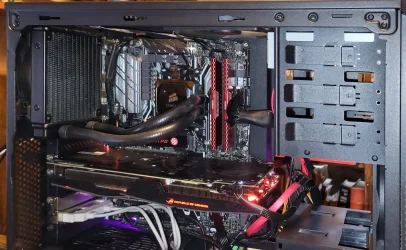
The computer called Lightning has had a long-convoluted history starting in 2009. It has had two other motherboards before 2024. It started with Windows 7 Ultimate (32-biit) but a clean install of Windows 7 Ultimate (64-biit) was done a few years later. In 2016 or 2017 it received a free upgrade to Windows 10 Professional (64-bit). BTW, keeping with its name the first version was hit by lightning in 2011 leading to a rebuilt in 2013.
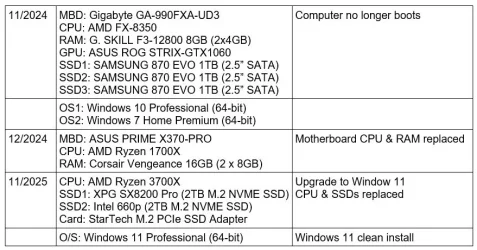
I had tried to clone the first two SSDs to the two new ones but that failed. I decided that was impossible anyways because I wanted to enable Secure Boot which wasn’t compatible with the way the computer was booting previously. Doing this also eliminated installing Windows 7 again which was OK.
Note I did a standard installation of Windows 11 with no workarounds except bypassing the requirement for a Microsoft account.
Get ready for upgrade (Computer Lightning)
I am not asking a question in this post. I am just documenting what I have done. If anyone has any questions or comments I will try to respond to them
The computer called Lightning has had a long-convoluted history starting in 2009. It has had two other motherboards before 2024. It started with Windows 7 Ultimate (32-biit) but a clean install of Windows 7 Ultimate (64-biit) was done a few years later. In 2016 or 2017 it received a free upgrade to Windows 10 Professional (64-bit). BTW, keeping with its name the first version was hit by lightning in 2011 leading to a rebuilt in 2013.
I had tried to clone the first two SSDs to the two new ones but that failed. I decided that was impossible anyways because I wanted to enable Secure Boot which wasn’t compatible with the way the computer was booting previously. Doing this also eliminated installing Windows 7 again which was OK.
Note I did a standard installation of Windows 11 with no workarounds except bypassing the requirement for a Microsoft account.
Get ready for upgrade (Computer Lightning)
- Replace Ryzen 1700X with Ryzen 3700X
- In BIOS reset TPM for new CPU
- Boot into Windows 10 to verify change
- Shut down computer
- Remove old SATA SSDs
- Install XPG M.2 NVME SSD
- Install StarTech M.2 PCIe SSD Adapter
- Install Intel M.2 NVME SSD
- Boot into BIOS
- Enable Secure Boot
- Shut down computer
- Download Media Creation Tool
- Run Media Creation Tool
- Create setup for Windows 11 25H2 on flash drive
- Note: network was connected
- Boot from Windows 11 25H2 on flash drive
- When the screen came up to select the country I entered the following:
SHIFT+F10
start ms-cxh:localonly
- A screen came up to create a local account
- After creating and answering three security questions I was taken to the desktop
- I installed the latest motherboard drivers from ASUS
- I installed the the Nvidia app which downloaded the latest graphics driver
- Since I was using a local account OneDrive was installed but not setup. I uninstalled OneDrive to keep it from taking over.
- Also, since I was using a local account BitLocker was only partially setup. I Disabled it in the Windows settings. Note BitLocker unencrypted my C: drive before it shut down.
- I will continue to reinstall all the software and games I had previously installed. That should take a few days.
Last edited:
My Computers
-
At a glance
Windows 11 Pro 25H2 (26200.6901)AMD Ryzen 7 6800H with Radeon 680M GPU (486MB...Crucial DDR5-4800 (2400MHz) 32GB (2 x 16GB)NVIDIA RTX 3060 Laptop (6GB RAM)- OS
- Windows 11 Pro 25H2 (26200.6901)
- Computer type
- Laptop
- Manufacturer/Model
- ASUS TUF Gaming A15 (2022)
- CPU
- AMD Ryzen 7 6800H with Radeon 680M GPU (486MB RAM)
- Memory
- Crucial DDR5-4800 (2400MHz) 32GB (2 x 16GB)
- Graphics Card(s)
- NVIDIA RTX 3060 Laptop (6GB RAM)
- Sound Card
- n/a
- Monitor(s) Displays
- 15.6-inch
- Screen Resolution
- 1920x1080 300Hz
- Hard Drives
- 2 x Samsung 990 Evo Plus (2TB M.2 NVME SSD)
- PSU
- n/a
- Mouse
- Wireless Mouse M510
- Internet Speed
- 2100Mbps/300Mbps
- Browser
- Firefox
- Antivirus
- Malwarebytes
-
At a glance
Windows 11 Pro 25H2 (26200.8246)AMD Ryzen 7 5700X3DG.SKILL Flare X 32GB (2x16GB) DDR4ASUS ROG-STRIX-RTX3060TI-08G-V2-GAMING (RTX 3...- Operating System
- Windows 11 Pro 25H2 (26200.8246)
- Computer type
- PC/Desktop
- Manufacturer/Model
- Custom build
- CPU
- AMD Ryzen 7 5700X3D
- Motherboard
- ASUS ROG Strix B550-F Gaming WiFi II
- Memory
- G.SKILL Flare X 32GB (2x16GB) DDR4
- Graphics card(s)
- ASUS ROG-STRIX-RTX3060TI-08G-V2-GAMING (RTX 3060-Ti, 8GB RAM)
- Monitor(s) Displays
- Samsung G50D IPS 27"
- Screen Resolution
- 1440p/180Hz
- Hard Drives
- SAMSUNG 990 EVO Plus (2TB] M.2 NVME SSD
SAMSUNG 990 EVO Plus (4TB) M.2 NVME SSD
- PSU
- Corsair RM750x (750 watts)
- Case
- Cooler Master MasterCase 5
- Cooling
- Scythe Mugen 6
- Keyboard
- Logitech K520 (MK540 keyboard/mouse combo)
- Mouse
- Logitech M310 (MK540 keyboard/mouse combo)
- Internet Speed
- 2100 Mbps down / 300 Mbps up
- Browser
- Firefox, Edge, Chrome
- Antivirus
- Malwarebytes (Premium)
- Other Info
- ASUS Blu-ray Burner BW-16D1HT (SATA) || Western Digital Easystore 20TB USB 3.0 external hard drive used with Acronis True Image 2025 backup software || HP OfficeJet Pro 6975 Printer/Scanner






