I'm using a Roccat Juke USB sound card on my Windows 11 PC and yesterday I removed it from a USB hub I was using and connected it directly to the back of the PC and now every time after turning on my PC or restarting there is no audio device detected. I fix it by going into device manager and disable then enable the Roccat Juke sound controller which has a yellow triangle next to it. Afterwards it works but I have to do this after every boot. I already reinstalled the driver, tried a different port and it's the same. Any ideas on a permanent fix?
I would uninstall the Roccat driver and then reinstall it with the sound card inserted into the desired USB port. Some drivers install to a specific port (that would be the one which the sound card is connected to at the time of installing.)
Normally on external sound cards you have a power light that is ON and fixed when connected to the PC and blinking when not.
If after starting the PC power led is fixed then it should be a driver problem. If it's blinking then you have a connection or hardware problem.
Edit: Sorry I didn't know about this audio interface. It seems to be a cheap one and I am not sure if it behaves as I described above! You can still check out and see.
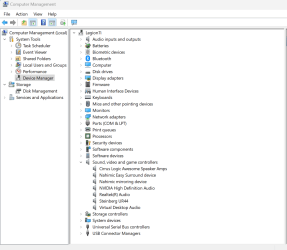
First thing to do is to open "Device manager" and to expand "Sound video and game controllers"
try removing it (uninstalling) by choosing: attempt to remove driver.
once this is done reboot and this time remove the device and first install the driver without the device connected.
After that connect the device and see if it's fixed.
Thanks for the replies. I already uninstalled and reinstalled the driver. It has a led on it which is lit when starting the PC. It works normally only after I disable and enable it in device manager or remove it and insert it back into the USB port.
Edit: Tried reinstalling again and it's the same. And the driver won't install without the sound card connected.
I would try GhostBuster, which is a Windows tool for removing "ghost" devices. A ghost device is where you originally plugged in an USB device on one port or hub, and then moved it to a different port or hub.
Windows is now confused to where the device actually lives. The goal is to have Windows treat it as a brand new device and re-discover it.
Thanks for the replies. I already uninstalled and reinstalled the driver. It has a led on it which is lit when starting the PC. It works normally only after I disable and enable it in device manager or remove it and insert it back into the USB port.
Edit: Tried reinstalling again and it's the same. And the driver won't install without the sound card connected.
Did you try to go into Windows Update > Advanced Options > Additional Options & check Optional Updates to see if Windows Update has a newer driver for you?
I use a driver updater program (like Auslogics Driver Updater) that every once in a while checks to see if there is a current, more compatible driver that is newer than the one I have installed. It very well could be that the driver that came with your audio USB card is outdated & needs to be updated. I have found that even if you went to the driver's homepage & redownload it from there it still might not be the right driver.
You can find out by downloading a driver updater program, installing it & running it. The driver updater will at least tell you if any of your drivers need updating under Windows. Windows Update does not always provide the latest & current drivers, I have found.
Thanks for the suggestions. I read here about custom Windows ISO "Windows X-Lite" so I reinstalled Windows and now it works. Seems like just changing a port messed up the registry or something.