User Accounts


timlab55

Well-known member
Member
Local time
3:01 AM
Posts
189
OS
Windows 11 Pro Build by Timlab55
When you right click on the start menu and type in "Netpliz" a box shows up to where a person can enter their password to log in automatically. In mine it shows me my user name, and then it has me assigned in the Group "Administrators;User". Am I an administrator or just a user? Last night I tried to tell UTX that I'm the administrator and it said "nope". So am I 100% a Administrator?
 

My Computer My Computer

At a glance

Windows 11 Pro Build by Timlab55Intel Core i9-11900K32.0GBIntel UHD Graphics 750 (ASUStek Computer Inc)...
OS
Windows 11 Pro Build by Timlab55
Computer type
PC/Desktop
CPU
Intel Core i9-11900K
Motherboard
ASUSTeK COMPUTER INC. ROG STRIX Z590-E GAMING WIFI (LGA1200)
Memory
32.0GB
Graphics Card(s)
Intel UHD Graphics 750 (ASUStek Computer Inc) 8176MB ATI Radeon RX 5500 XT (ASUStek Computer Inc)
Sound Card
N/A
Monitor(s) Displays
ASUS VE278 (1920x1080@60Hz) VX3418-2KPC (2560x1080@60Hz) LEN C27-20 (1920x1080@75Hz)
Hard Drives
931GB SanDisk SSD PLUS 1000GB (SATA (SSD)) 34 °C
476GB SanDisk SDSSDH3512G (SATA (SSD)) 29 °C
3726GB Western Digital WDC WD4003FFBX-68MU3N0 (SATA ) 35 °C
931GB Samsung SSD 980 PRO 1TB (Unknown (SSD))
29GB Samsung Flash Drive FIT USB Device (USB )
PSU
Corsair 850W
If you’re in the Admins group, you’re an admin.
 

My Computer My Computer

At a glance

Windows 11 Pro 25H212th Gen Core i7-1260P64 GB Micron PC4-25600Intel Iris Xe Graphics
OS
Windows 11 Pro 25H2
Computer type
PC/Desktop
Manufacturer/Model
Intel NUC12WSHi7
CPU
12th Gen Core i7-1260P
Motherboard
NUC12WSBi7
Memory
64 GB Micron PC4-25600
Graphics Card(s)
Intel Iris Xe Graphics
Sound Card
on-board Realtek HD Audio
Monitor(s) Displays
Dell U3219Q
Screen Resolution
3840 x 2160
Hard Drives
Samsung SSD 990 PRO 1TB
Crucial MX500 2 TB
Antivirus
Microsoft Defender
Thank You, but why was UTX telling me, "no"?
 

My Computer My Computer

At a glance

Windows 11 Pro Build by Timlab55Intel Core i9-11900K32.0GBIntel UHD Graphics 750 (ASUStek Computer Inc)...
OS
Windows 11 Pro Build by Timlab55
Computer type
PC/Desktop
CPU
Intel Core i9-11900K
Motherboard
ASUSTeK COMPUTER INC. ROG STRIX Z590-E GAMING WIFI (LGA1200)
Memory
32.0GB
Graphics Card(s)
Intel UHD Graphics 750 (ASUStek Computer Inc) 8176MB ATI Radeon RX 5500 XT (ASUStek Computer Inc)
Sound Card
N/A
Monitor(s) Displays
ASUS VE278 (1920x1080@60Hz) VX3418-2KPC (2560x1080@60Hz) LEN C27-20 (1920x1080@75Hz)
Hard Drives
931GB SanDisk SSD PLUS 1000GB (SATA (SSD)) 34 °C
476GB SanDisk SDSSDH3512G (SATA (SSD)) 29 °C
3726GB Western Digital WDC WD4003FFBX-68MU3N0 (SATA ) 35 °C
931GB Samsung SSD 980 PRO 1TB (Unknown (SSD))
29GB Samsung Flash Drive FIT USB Device (USB )
PSU
Corsair 850W
What is UTX?
How did you tell it that you're an Admin?
How did it say, "Nope"?


Denis
 

My Computer My Computer

At a glance

Windows 11 Home x64 Version 25H2 Build 26200....
OS
Windows 11 Home x64 Version 25H2 Build 26200.8037
Sorry that was (Intel Extreme Tuning Utility (XTU). I've been trying to get into it being admin, and no matter what I do, it wouldn't let me.
 

My Computer My Computer

At a glance

Windows 11 Pro Build by Timlab55Intel Core i9-11900K32.0GBIntel UHD Graphics 750 (ASUStek Computer Inc)...
OS
Windows 11 Pro Build by Timlab55
Computer type
PC/Desktop
CPU
Intel Core i9-11900K
Motherboard
ASUSTeK COMPUTER INC. ROG STRIX Z590-E GAMING WIFI (LGA1200)
Memory
32.0GB
Graphics Card(s)
Intel UHD Graphics 750 (ASUStek Computer Inc) 8176MB ATI Radeon RX 5500 XT (ASUStek Computer Inc)
Sound Card
N/A
Monitor(s) Displays
ASUS VE278 (1920x1080@60Hz) VX3418-2KPC (2560x1080@60Hz) LEN C27-20 (1920x1080@75Hz)
Hard Drives
931GB SanDisk SSD PLUS 1000GB (SATA (SSD)) 34 °C
476GB SanDisk SDSSDH3512G (SATA (SSD)) 29 °C
3726GB Western Digital WDC WD4003FFBX-68MU3N0 (SATA ) 35 °C
931GB Samsung SSD 980 PRO 1TB (Unknown (SSD))
29GB Samsung Flash Drive FIT USB Device (USB )
PSU
Corsair 850W
As far as I can make out
Intel Extreme Tuning Utility
is a conventional application so it ought to let you in as soon as you've given Windows Admin permission to proceed to run it.
- I notice that it refers to 'unlocked' processors and I don't know what that means.
- I could not find a user guide to the utility. Perhaps one was copied to the computer as part of the installation process.

I tried to tell UTX that I'm the administrator
What happens when you try?
- A standard Admin prompt?
- Some specialist Intel challenge?


Denis
 

My Computer My Computer

At a glance

Windows 11 Home x64 Version 25H2 Build 26200....
OS
Windows 11 Home x64 Version 25H2 Build 26200.8037
Unlock processors are processors that you can change their settings inside to either make it go faster or slower. In my case I'm trying to make mine go slower. It wasn't letting me undervolt my processor no matter what I did.
 

My Computer My Computer

At a glance

Windows 11 Pro Build by Timlab55Intel Core i9-11900K32.0GBIntel UHD Graphics 750 (ASUStek Computer Inc)...
OS
Windows 11 Pro Build by Timlab55
Computer type
PC/Desktop
CPU
Intel Core i9-11900K
Motherboard
ASUSTeK COMPUTER INC. ROG STRIX Z590-E GAMING WIFI (LGA1200)
Memory
32.0GB
Graphics Card(s)
Intel UHD Graphics 750 (ASUStek Computer Inc) 8176MB ATI Radeon RX 5500 XT (ASUStek Computer Inc)
Sound Card
N/A
Monitor(s) Displays
ASUS VE278 (1920x1080@60Hz) VX3418-2KPC (2560x1080@60Hz) LEN C27-20 (1920x1080@75Hz)
Hard Drives
931GB SanDisk SSD PLUS 1000GB (SATA (SSD)) 34 °C
476GB SanDisk SDSSDH3512G (SATA (SSD)) 29 °C
3726GB Western Digital WDC WD4003FFBX-68MU3N0 (SATA ) 35 °C
931GB Samsung SSD 980 PRO 1TB (Unknown (SSD))
29GB Samsung Flash Drive FIT USB Device (USB )
PSU
Corsair 850W
A screenshot or something would be handy, along with how you got there, if appropriate. I doubt the application simply says, “Nope,” although it would be hilarious.
 

My Computer My Computer

At a glance

Windows 11 Pro 25H212th Gen Core i7-1260P64 GB Micron PC4-25600Intel Iris Xe Graphics
OS
Windows 11 Pro 25H2
Computer type
PC/Desktop
Manufacturer/Model
Intel NUC12WSHi7
CPU
12th Gen Core i7-1260P
Motherboard
NUC12WSBi7
Memory
64 GB Micron PC4-25600
Graphics Card(s)
Intel Iris Xe Graphics
Sound Card
on-board Realtek HD Audio
Monitor(s) Displays
Dell U3219Q
Screen Resolution
3840 x 2160
Hard Drives
Samsung SSD 990 PRO 1TB
Crucial MX500 2 TB
Antivirus
Microsoft Defender
Nope, that was the very short answer. After me redoing windows and things, I might have to undervolt it (as long as I don't run Cinebench R23 to much. Makes my temps go up to 90c. Most of the time tho, my temps are cool. Plus I don't care to redo Windows again.
 

My Computer My Computer

At a glance

Windows 11 Pro Build by Timlab55Intel Core i9-11900K32.0GBIntel UHD Graphics 750 (ASUStek Computer Inc)...
OS
Windows 11 Pro Build by Timlab55
Computer type
PC/Desktop
CPU
Intel Core i9-11900K
Motherboard
ASUSTeK COMPUTER INC. ROG STRIX Z590-E GAMING WIFI (LGA1200)
Memory
32.0GB
Graphics Card(s)
Intel UHD Graphics 750 (ASUStek Computer Inc) 8176MB ATI Radeon RX 5500 XT (ASUStek Computer Inc)
Sound Card
N/A
Monitor(s) Displays
ASUS VE278 (1920x1080@60Hz) VX3418-2KPC (2560x1080@60Hz) LEN C27-20 (1920x1080@75Hz)
Hard Drives
931GB SanDisk SSD PLUS 1000GB (SATA (SSD)) 34 °C
476GB SanDisk SDSSDH3512G (SATA (SSD)) 29 °C
3726GB Western Digital WDC WD4003FFBX-68MU3N0 (SATA ) 35 °C
931GB Samsung SSD 980 PRO 1TB (Unknown (SSD))
29GB Samsung Flash Drive FIT USB Device (USB )
PSU
Corsair 850W
"Nope to a screenshot".
 

My Computer My Computer

At a glance

Windows 7
OS
Windows 7
timlab,

You seem to have accidentally overlooked the question in my post #6.
tried to tell UTX that I'm the administrator
What happens when you try?
- A standard Admin prompt?
- Some specialist Intel challenge?

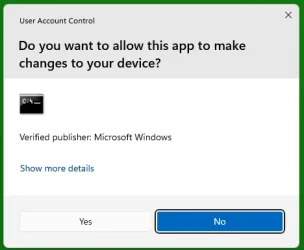
This is a standard Admin prompt for an Admin user doing something for which Admin privileges must be exercised:
Admin-ConsentUI.webp


Denis
 

Attachments

  • Admin-ConsentUI.webp
    Admin-ConsentUI.webp
    9.1 KB · Views: 1
Last edited:

My Computer My Computer

At a glance

Windows 11 Home x64 Version 25H2 Build 26200....
OS
Windows 11 Home x64 Version 25H2 Build 26200.8037
please try
open task manager
right click the start button and on that menu is task manager
at the top of the task manager window is 'start new task'

in the box enter the exe file name
xtu.exe (check the name from the program execute icon)

make sure that 'create this task with administrative privileges'
is marked/ticked

that should allow you to run the program with admin rights.

you can also in 'advanced power settings'
control panel > power options > change power plan settings > change advanced power plan settings
you can set the processor to a lesser percentage and disable turbo boost within that menu
please note you will need to enable the 'turbo boost' HIDDEN menu via the registry.
link removed .. no longer available ..

best of luck Steve ..
 
Last edited:

My Computers My Computers

  • At a glance

    Debian 13 KDE .. Windows 11 HomeRyzen 7 5825u64GB DDR4 3200Ryzen 7 5825u
    OS
    Debian 13 KDE .. Windows 11 Home
    Computer type
    PC/Desktop
    Manufacturer/Model
    HP 24" AiO
    CPU
    Ryzen 7 5825u
    Motherboard
    HP
    Memory
    64GB DDR4 3200
    Graphics Card(s)
    Ryzen 7 5825u
    Sound Card
    RealTek
    Monitor(s) Displays
    24" HP AiO
    Screen Resolution
    1920 x 1080 @60 Hz
    Hard Drives
    1TB WD Blue SN580 M2 SSD Partitioned.
    2x 1TB USB HDD External Backup/Storage.
    PSU
    90W external power brick
    Case
    24" All in One
    Cooling
    Default Air Cooling
    Keyboard
    HP WiFi UK extended
    Mouse
    HP WiFi 3 Button
    Internet Speed
    1GB full fibre
    Browser
    Edge & Firefox
    Antivirus
    AVG Internet Security/Windows Defender
    Other Info
    Mainly Open Source Software
  • At a glance

    Ubuntu 22.04.5 LTSi5 7200u16GB DDR4Intel
    Operating System
    Ubuntu 22.04.5 LTS
    Computer type
    Laptop
    Manufacturer/Model
    Dell 13" Latitude 2017
    CPU
    i5 7200u
    Motherboard
    Dell
    Memory
    16GB DDR4
    Graphics card(s)
    Intel
    Sound Card
    Intel
    Monitor(s) Displays
    13" Dell Laptop
    Hard Drives
    250GB Crucial 2.5" SSD
    Mouse
    Generic WiFi 3 button
    Internet Speed
    WiFi only
    Browser
    Firefox
    Antivirus
    ClamAV TK
    Other Info
    Mainly Open Source Software
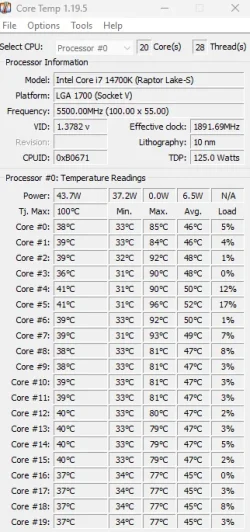
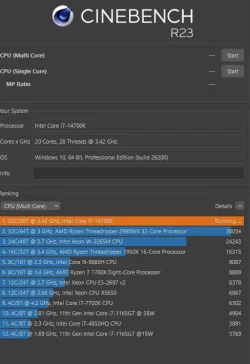
Thanks XxX. I will try this later, as my today is tie up with watching my cats. Here's my problem Xx. I have the I7-14700k chip sitting on top of an ASUS Z-790F motherboard with DDR5 (32GB) of ram. This is a very powerful CPU. Heck, when I don't do anything with any power settings, I can reach the top of Cinebench ladder. Impressed. But that cost me. All cores all when up 91c and close to 100c. As you can see I'm telling the truth. I just feel the temps are to high (maybe 80c, where the >90c are). I believe the cause of this are the turbo's because my fans take off like there is no tomorrow. But I also run into another problem is that I also have a PLEX server running as well. It's like I'm dam if I do and dam if I don't.
Your post, how can I save that to my computer for later reading/doing?
Any suggestions?
 

Attachments

  • Cinebench Test #1.webp
    Cinebench Test #1.webp
    44.5 KB · Views: 2
  • Cinebench Test.webp
    Cinebench Test.webp
    34 KB · Views: 1

My Computer My Computer

At a glance

Windows 11 Pro Build by Timlab55Intel Core i9-11900K32.0GBIntel UHD Graphics 750 (ASUStek Computer Inc)...
OS
Windows 11 Pro Build by Timlab55
Computer type
PC/Desktop
CPU
Intel Core i9-11900K
Motherboard
ASUSTeK COMPUTER INC. ROG STRIX Z590-E GAMING WIFI (LGA1200)
Memory
32.0GB
Graphics Card(s)
Intel UHD Graphics 750 (ASUStek Computer Inc) 8176MB ATI Radeon RX 5500 XT (ASUStek Computer Inc)
Sound Card
N/A
Monitor(s) Displays
ASUS VE278 (1920x1080@60Hz) VX3418-2KPC (2560x1080@60Hz) LEN C27-20 (1920x1080@75Hz)
Hard Drives
931GB SanDisk SSD PLUS 1000GB (SATA (SSD)) 34 °C
476GB SanDisk SDSSDH3512G (SATA (SSD)) 29 °C
3726GB Western Digital WDC WD4003FFBX-68MU3N0 (SATA ) 35 °C
931GB Samsung SSD 980 PRO 1TB (Unknown (SSD))
29GB Samsung Flash Drive FIT USB Device (USB )
PSU
Corsair 850W
Seems like you'll do anything but answer questions or post screenshots of what happens when you try to run whatever it is. As Steve would say, best of luck.
 

My Computer My Computer

At a glance

Windows 11 Pro 25H212th Gen Core i7-1260P64 GB Micron PC4-25600Intel Iris Xe Graphics
OS
Windows 11 Pro 25H2
Computer type
PC/Desktop
Manufacturer/Model
Intel NUC12WSHi7
CPU
12th Gen Core i7-1260P
Motherboard
NUC12WSBi7
Memory
64 GB Micron PC4-25600
Graphics Card(s)
Intel Iris Xe Graphics
Sound Card
on-board Realtek HD Audio
Monitor(s) Displays
Dell U3219Q
Screen Resolution
3840 x 2160
Hard Drives
Samsung SSD 990 PRO 1TB
Crucial MX500 2 TB
Antivirus
Microsoft Defender
Hey pseymour are you here to help or harass? I come here to seek answers to questions I have no clue about. I'm not here that often and my knowledge is very limited.
 

My Computer My Computer

At a glance

Windows 11 Pro Build by Timlab55Intel Core i9-11900K32.0GBIntel UHD Graphics 750 (ASUStek Computer Inc)...
OS
Windows 11 Pro Build by Timlab55
Computer type
PC/Desktop
CPU
Intel Core i9-11900K
Motherboard
ASUSTeK COMPUTER INC. ROG STRIX Z590-E GAMING WIFI (LGA1200)
Memory
32.0GB
Graphics Card(s)
Intel UHD Graphics 750 (ASUStek Computer Inc) 8176MB ATI Radeon RX 5500 XT (ASUStek Computer Inc)
Sound Card
N/A
Monitor(s) Displays
ASUS VE278 (1920x1080@60Hz) VX3418-2KPC (2560x1080@60Hz) LEN C27-20 (1920x1080@75Hz)
Hard Drives
931GB SanDisk SSD PLUS 1000GB (SATA (SSD)) 34 °C
476GB SanDisk SDSSDH3512G (SATA (SSD)) 29 °C
3726GB Western Digital WDC WD4003FFBX-68MU3N0 (SATA ) 35 °C
931GB Samsung SSD 980 PRO 1TB (Unknown (SSD))
29GB Samsung Flash Drive FIT USB Device (USB )
PSU
Corsair 850W
I come here to seek answers to questions
Then help those who seek to help you.
You have not responded to my posts #6, #11 and I cannot help you further without knowing the answers to those questions.


Denis
 

My Computer My Computer

At a glance

Windows 11 Home x64 Version 25H2 Build 26200....
OS
Windows 11 Home x64 Version 25H2 Build 26200.8037
I'm so sorry Try3, and now I will answer your questions. Since two days ago when I was trying to get UTX to work and believe me I tried everything I could think of, I decided to delete the darn program completely and never to return to it. At least that's now, and maybe down the road a little, I will install it and try it again. So I hope I did answer your question.
 

My Computer My Computer

At a glance

Windows 11 Pro Build by Timlab55Intel Core i9-11900K32.0GBIntel UHD Graphics 750 (ASUStek Computer Inc)...
OS
Windows 11 Pro Build by Timlab55
Computer type
PC/Desktop
CPU
Intel Core i9-11900K
Motherboard
ASUSTeK COMPUTER INC. ROG STRIX Z590-E GAMING WIFI (LGA1200)
Memory
32.0GB
Graphics Card(s)
Intel UHD Graphics 750 (ASUStek Computer Inc) 8176MB ATI Radeon RX 5500 XT (ASUStek Computer Inc)
Sound Card
N/A
Monitor(s) Displays
ASUS VE278 (1920x1080@60Hz) VX3418-2KPC (2560x1080@60Hz) LEN C27-20 (1920x1080@75Hz)
Hard Drives
931GB SanDisk SSD PLUS 1000GB (SATA (SSD)) 34 °C
476GB SanDisk SDSSDH3512G (SATA (SSD)) 29 °C
3726GB Western Digital WDC WD4003FFBX-68MU3N0 (SATA ) 35 °C
931GB Samsung SSD 980 PRO 1TB (Unknown (SSD))
29GB Samsung Flash Drive FIT USB Device (USB )
PSU
Corsair 850W
XxXxX - You asked me to try:
"please try
open task manager
right click the start button and on that menu is task manager
at the top of the task manager window is 'start new task'

in the box enter the exe file name
xtu.exe (check the name from the program execute icon)

make sure that 'create this task with administrative privileges'
is marked/ticked

that should allow you to run the program with admin rights."
I tried it, but no go. It still told me that I'm a dumb user when I know for a fact my account is Admin.

Sorry have to work on pic's to send to you.

Then you asked me to try the 2nd option:
"
you can also in 'advanced power settings'
control panel > power options > change power plan settings > change advanced power plan settings
you can set the processor to a lesser percentage and disable turbo boost within that menu
please note you will need to enable the 'turbo boost' HIDDEN menu via the registry."

I did this, love it, but two things. According to the article that I read, "Disable Turbo Boost", should only be use to figure out what is wrong. I tried all the other options, and again, that darn Turbo boost, made my temps go up to 100c. And the power I used was out of this world.

So that was a no go. Besides, that is for laptops and I'm on a PC.

I haven't given up hope yet, and I really thank you for telling me about it.
Dan
 

My Computer My Computer

At a glance

Windows 11 Pro Build by Timlab55Intel Core i9-11900K32.0GBIntel UHD Graphics 750 (ASUStek Computer Inc)...
OS
Windows 11 Pro Build by Timlab55
Computer type
PC/Desktop
CPU
Intel Core i9-11900K
Motherboard
ASUSTeK COMPUTER INC. ROG STRIX Z590-E GAMING WIFI (LGA1200)
Memory
32.0GB
Graphics Card(s)
Intel UHD Graphics 750 (ASUStek Computer Inc) 8176MB ATI Radeon RX 5500 XT (ASUStek Computer Inc)
Sound Card
N/A
Monitor(s) Displays
ASUS VE278 (1920x1080@60Hz) VX3418-2KPC (2560x1080@60Hz) LEN C27-20 (1920x1080@75Hz)
Hard Drives
931GB SanDisk SSD PLUS 1000GB (SATA (SSD)) 34 °C
476GB SanDisk SDSSDH3512G (SATA (SSD)) 29 °C
3726GB Western Digital WDC WD4003FFBX-68MU3N0 (SATA ) 35 °C
931GB Samsung SSD 980 PRO 1TB (Unknown (SSD))
29GB Samsung Flash Drive FIT USB Device (USB )
PSU
Corsair 850W
XxXxX - You asked me to try:
"please try
open task manager
right click the start button and on that menu is task manager
at the top of the task manager window is 'start new task'

in the box enter the exe file name
xtu.exe (check the name from the program execute icon)

make sure that 'create this task with administrative privileges'
is marked/ticked

that should allow you to run the program with admin rights."
I tried it, but no go. It still told me that I'm a dumb user when I know for a fact my account is Admin.

Sorry have to work on pic's to send to you.

Then you asked me to try the 2nd option:
"
you can also in 'advanced power settings'
control panel > power options > change power plan settings > change advanced power plan settings
you can set the processor to a lesser percentage and disable turbo boost within that menu
please note you will need to enable the 'turbo boost' HIDDEN menu via the registry."

I did this, love it, but two things. According to the article that I read, "Disable Turbo Boost", should only be use to figure out what is wrong. I tried all the other options, and again, that darn Turbo boost, made my temps go up to 100c. And the power I used was out of this world.

So that was a no go. Besides, that is for laptops and I'm on a PC.

I haven't given up hope yet, and I really thank you for telling me about it.
Dan
it makes no difference laptop or PC its Windows operating system commands.
to disable the Turbo Boost.
open the Windows registry
find this registry key

HKey Local Machine/system/current control set/control/power/power settings/54533251-82be-4824-96c1-47b60b740d00/be337238-0d82-4146-a960-4f3749d470c7
then in the right hand window change attributes from 1 to 2

this will enable the hidden turbo power settings in advanced power settings.
control panel > power options > change power plan settings > change advanced power plan settings

within advanced power plan settings window menu look for
'processor power management'

in the drop down menu
'processor performance boost mode'

within this menu you can set Turbo Boost to 'disable'

a restart of the system will be required for this to take affect.
best of luck Steve ..

ps. sorry about the web link it seems not to available anymore.
 

My Computers My Computers

  • At a glance

    Debian 13 KDE .. Windows 11 HomeRyzen 7 5825u64GB DDR4 3200Ryzen 7 5825u
    OS
    Debian 13 KDE .. Windows 11 Home
    Computer type
    PC/Desktop
    Manufacturer/Model
    HP 24" AiO
    CPU
    Ryzen 7 5825u
    Motherboard
    HP
    Memory
    64GB DDR4 3200
    Graphics Card(s)
    Ryzen 7 5825u
    Sound Card
    RealTek
    Monitor(s) Displays
    24" HP AiO
    Screen Resolution
    1920 x 1080 @60 Hz
    Hard Drives
    1TB WD Blue SN580 M2 SSD Partitioned.
    2x 1TB USB HDD External Backup/Storage.
    PSU
    90W external power brick
    Case
    24" All in One
    Cooling
    Default Air Cooling
    Keyboard
    HP WiFi UK extended
    Mouse
    HP WiFi 3 Button
    Internet Speed
    1GB full fibre
    Browser
    Edge & Firefox
    Antivirus
    AVG Internet Security/Windows Defender
    Other Info
    Mainly Open Source Software
  • At a glance

    Ubuntu 22.04.5 LTSi5 7200u16GB DDR4Intel
    Operating System
    Ubuntu 22.04.5 LTS
    Computer type
    Laptop
    Manufacturer/Model
    Dell 13" Latitude 2017
    CPU
    i5 7200u
    Motherboard
    Dell
    Memory
    16GB DDR4
    Graphics card(s)
    Intel
    Sound Card
    Intel
    Monitor(s) Displays
    13" Dell Laptop
    Hard Drives
    250GB Crucial 2.5" SSD
    Mouse
    Generic WiFi 3 button
    Internet Speed
    WiFi only
    Browser
    Firefox
    Antivirus
    ClamAV TK
    Other Info
    Mainly Open Source Software
Steve do you know about the Intel chip?
 

My Computer My Computer

At a glance

Windows 11 Pro Build by Timlab55Intel Core i9-11900K32.0GBIntel UHD Graphics 750 (ASUStek Computer Inc)...
OS
Windows 11 Pro Build by Timlab55
Computer type
PC/Desktop
CPU
Intel Core i9-11900K
Motherboard
ASUSTeK COMPUTER INC. ROG STRIX Z590-E GAMING WIFI (LGA1200)
Memory
32.0GB
Graphics Card(s)
Intel UHD Graphics 750 (ASUStek Computer Inc) 8176MB ATI Radeon RX 5500 XT (ASUStek Computer Inc)
Sound Card
N/A
Monitor(s) Displays
ASUS VE278 (1920x1080@60Hz) VX3418-2KPC (2560x1080@60Hz) LEN C27-20 (1920x1080@75Hz)
Hard Drives
931GB SanDisk SSD PLUS 1000GB (SATA (SSD)) 34 °C
476GB SanDisk SDSSDH3512G (SATA (SSD)) 29 °C
3726GB Western Digital WDC WD4003FFBX-68MU3N0 (SATA ) 35 °C
931GB Samsung SSD 980 PRO 1TB (Unknown (SSD))
29GB Samsung Flash Drive FIT USB Device (USB )
PSU
Corsair 850W

Latest Support Threads

Back
Top Bottom