USERS folder is being shared


JeffLeites

Well-known member
Local time
2:04 PM
Posts
44
OS
Windows 11
Somehow my USERS folder became a shared folder on my network. I can't unshare it.

I've tried Remove Access, on the Explorer drop down menu, Sharing in the properties window, and Computer Management/share which doesn't even give me a Stop Sharing option although that's is what are read.

How do I stop sharing it?
 

My Computer My Computer

At a glance

Windows 11
OS
Windows 11
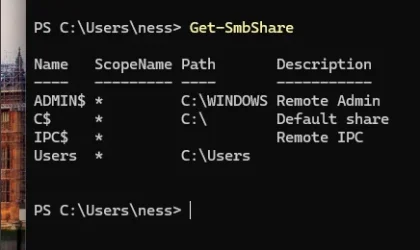
So if you open Powershell and type Get-SMBShare you see a share with the path C:\Users?

Like so?
1764870415472.webp

If this is the case you can just type, in an elevated powershell window. Remove-SMBShare -Name Users (Replace Users with whatever is listed for you)
 

My Computer My Computer

At a glance

Linux Mint
OS
Linux Mint
Computer type
Laptop
Manufacturer/Model
System76 Lemur Pro
Also check Settings | Network & Internet | Advanced network settings | Advanced sharing settings. If "Public folder sharing" is enabled, the Users folder will be shared.
 

My Computer My Computer

At a glance

Windows 11 Pro 25H212th Gen Core i7-1260P64 GB Micron PC4-25600Intel Iris Xe Graphics
OS
Windows 11 Pro 25H2
Computer type
PC/Desktop
Manufacturer/Model
Intel NUC12WSHi7
CPU
12th Gen Core i7-1260P
Motherboard
NUC12WSBi7
Memory
64 GB Micron PC4-25600
Graphics Card(s)
Intel Iris Xe Graphics
Sound Card
on-board Realtek HD Audio
Monitor(s) Displays
Dell U3219Q
Screen Resolution
3840 x 2160
Hard Drives
Samsung SSD 990 PRO 1TB
Crucial MX500 2 TB
Antivirus
Microsoft Defender
TNX neemobeer. I just tired that. The folders to be shared are on my Desktop. The only items that appeared were the two folders I wanted too share... no USERS. I went to my Notebook and opened the link to the shared folder on my Desktop, and guess what?! The USERS folder was gone from there too! I don't get it, maybe one of my earlier attempts had a delayed reaction. Never had problems like this in the old days when I was a mainframe COBOL programmer! :unsure:
 

My Computer My Computer

At a glance

Windows 11
OS
Windows 11
pseymour - You might be right, maybe I had set it up for Public sharing, and changed it to private in one of attempts to fix it, but didn't see the results right away. Thanks for the info.
 

My Computer My Computer

At a glance

Windows 11
OS
Windows 11
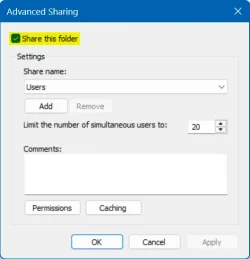
Quick fix: Right click on Users folder
users->Give access to->Advanced sharing ->Advanced Sharing, uncheck on Share this folder
NOTE: Any folder shared under Users will be unaccessible
2025-12-04_112935.webp
 

My Computers My Computers

  • At a glance

    Windows 11 Pro 25H2, Linux Mint 21.3Intel Core i9-14900K @5.8GHZ64GB (2XG Skill F5-6400J3239G32G) @6800Radeon (TM) RX 480 Graphics (8 GB)
    OS
    Windows 11 Pro 25H2, Linux Mint 21.3
    Computer type
    PC/Desktop
    Manufacturer/Model
    Self Build Feb.2024
    CPU
    Intel Core i9-14900K @5.8GHZ
    Motherboard
    MSI MAG Z790 Tomahawk Max WiFi 7
    Memory
    64GB (2XG Skill F5-6400J3239G32G) @6800
    Graphics Card(s)
    Radeon (TM) RX 480 Graphics (8 GB)
    Sound Card
    Intergrated Realtek
    Monitor(s) Displays
    Samsung
    Screen Resolution
    3840x2160
    Hard Drives
    1 - Crucial 705 1TB GEN5
    1 - Crucial 705 2TB GEN5
    2 - Crucial T500 2TB Gen4
    PSU
    750W EVGA-G3
    Case
    Antec NX410
    Cooling
    H2O Thermalright
    Keyboard
    Logitech K800
    Mouse
    Logitech Master 2S
    Internet Speed
    600 Mbps
    Browser
    Chrome
    Antivirus
    WD
  • At a glance

    Windows 11 Pro & Linux Mint X64Intel(R) Core(TM) i7-3770K CPU @ 4.20 GHz32.0GB Dual-Channel CMY16GX3M2A1600C9NVIDIA GeForce GT 740
    Operating System
    Windows 11 Pro & Linux Mint X64
    Computer type
    PC/Desktop
    Manufacturer/Model
    MSI Z77 MPower (MS-7751)
    CPU
    Intel(R) Core(TM) i7-3770K CPU @ 4.20 GHz
    Motherboard
    Z77 MPower (MS-7751)
    Memory
    32.0GB Dual-Channel CMY16GX3M2A1600C9
    Graphics card(s)
    NVIDIA GeForce GT 740
    Monitor(s) Displays
    40" Samsung
    Screen Resolution
    1920X1080
    Hard Drives
    WIN10 - 111GB Samsung SSD 840 Series
    WIN11 - 223GB Crucial CT240BX500SSD
    2X931GB Crucial CT1000BX500SSD1
    PSU
    Antec 850W
    Case
    Antec 900
    Cooling
    H20
    Keyboard
    Logitech K800 Wireless
    Mouse
    Logitech MX Master 2S
    Internet Speed
    100 Mbps
    Browser
    Chrome
    Antivirus
    Windows Defender
Somehow my USERS folder became a shared folder on my network.

It's probably because you shared another folder in your profile, like Documents. It's ancient Windows behavior to share USERS when you do this. I know I read a rationale for it, but that was 10-20 years ago, and I doubt it makes any more sense today.
 

My Computer My Computer

At a glance

Windows 11
OS
Windows 11
pseymour - You might be right, maybe I had set it up for Public sharing, and changed it to private in one of attempts to fix it, but didn't see the results right away. Thanks for the info.

After turning them off, reboot and check again.
 

My Computers My Computers

  • At a glance

    Windows 11 Pro 25H2 build: (26200.7623)32GB
    OS
    Windows 11 Pro 25H2 build: (26200.7623)
    Computer type
    Laptop
    Manufacturer/Model
    Microsoft Surface Pro
    Memory
    32GB
  • At a glance

    Microsoft 25H2 ProIntel Core Ultra 764GBIntel Integrated Graphics
    Operating System
    Microsoft 25H2 Pro
    Computer type
    Laptop
    Manufacturer/Model
    Dell Pro 14 - PC14250
    CPU
    Intel Core Ultra 7
    Memory
    64GB
    Graphics card(s)
    Intel Integrated Graphics
    Hard Drives
    Micron 1TB SSD
BTW, if you want to share a folder in your profile like Documents without sharing Users, open the Properties on that folder, navigate to the Sharing tab, and instead of clicking on the tempting "Share..." button, click on the foreboding "Advanced Sharing..." button, and click on its "Share this folder" button, for it is the droid you seek. Leave the sharing Permissions on "Everyone" but add "Change" or "Full Control" if you want the clients to be able to alter it. The existing NTFS permissions will govern the access and restrict to users with passwords.
 

My Computer My Computer

At a glance

Windows 11
OS
Windows 11
Back
Top Bottom