Solved Windows & User Folder Permanently stuck showing "Shared"


DiBBz

Member
Local time
1:36 PM
Posts
10
OS
Windows 11
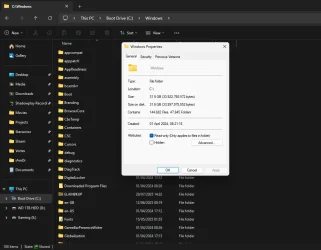
My windows folder and my user folder has a shared "Text & Icon" at the bottom of the explorer window when navigating through those directories. and i cant for the life of me get them to stop being shared amongst local network!

1754299986540.webp

Ive tried many things shared online to to resolve this. including going to control panel itself for network & homegroups but clicking advanced just brings me back to the new settings menu for "Network & Internet" > Advanced Network Settings > Advanced Sharing Settings.
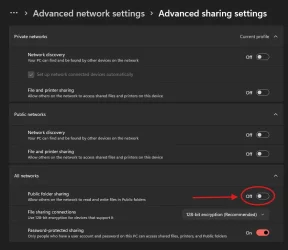
1754300276989.webp

the red area is mostly my cause for concern as it cannot be toggled. it just straight up refuses to turn on for me to try turn off again.

Part of me thinks this could be related to massgrave as i had to initially sign in when i build the PC a couple months ago. and even tho its shows as me not be apart of an org in the settings under account. it still has my email address showing as the org in "Winver" command. despite there being no other user accounts but mine on the PC right now. so im guessing massgrave had deleted and just migrated privileges to a local profile. even tho i still had to do some reg tweaks in order to access settings cause it was showing blocked by an org.

Does anyone have any advise on how to go about fixing this issue ?
 
Windows Build/Version
24H2 (26100. 4652)

My Computer

System One

  • OS
    Windows 11
    Computer type
    PC/Desktop
    CPU
    Ryzen 7 9800x3d
    Motherboard
    Gigabyte B650 EAGLE AX
    Memory
    Corsair Vengeance 32 GB (2 x 16 GB) DDR5-6000 CL30 Memory
    Graphics Card(s)
    RTX 2060 [SAVING FOR UPGRADE ATM]
    Monitor(s) Displays
    2x AOC
    Screen Resolution
    1080p
    Hard Drives
    Kingston 250gb 2.5" SSD
    Sabrent 1TB NVME
    WD 1TB HDD
    PSU
    NZXT C650 Gold Modular
    Case
    Lianli LANCOOL 216
    Cooling
    ARCTIC Liquid Freezer III 280
    Keyboard
    Corsair K70 LUX
    Mouse
    Corsair Katar
    Internet Speed
    Gigabit 1000mbps (UP & DOWN)
    Browser
    Brave
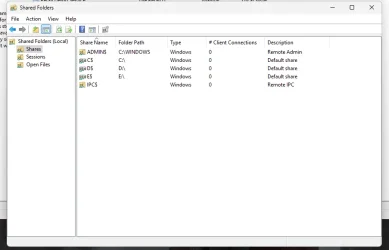
You can see anything that is being shared as well as turn off sharing for it. This article states it better than I could.
 

My Computers

System One System Two

  • OS
    Windows 11 Pro 25H2 26200.8655
    Computer type
    PC/Desktop
    Manufacturer/Model
    Dell Optiplex 7080
    CPU
    i9-10900 10 core 20 threads
    Motherboard
    DELL 0J37VM
    Memory
    32 gb
    Graphics Card(s)
    none-Intel UHD Graphics 630
    Sound Card
    Integrated Realtek
    Monitor(s) Displays
    Benq 27
    Screen Resolution
    2560x1440
    Hard Drives
    2x1tb Solidigm m.2 nvme /External drives 512gb Samsung m.2 sata+2tb Kingston m2.nvme
    PSU
    500w
    Case
    MT
    Cooling
    Dell Premium
    Keyboard
    Logitech wired
    Mouse
    Logitech wireless
    Internet Speed
    so slow I'm too embarrassed to tell
    Browser
    #1 Edge #2 Firefox
    Antivirus
    Defender+MWB Premium
  • Operating System
    Windows 11 Pro 24H2 26200.8457
    Computer type
    PC/Desktop
    Manufacturer/Model
    Beelink Mini PC SER5
    CPU
    AMD Ryzen 7 6800U
    Memory
    32 gb
    Graphics card(s)
    integrated
    Sound Card
    integrated
    Monitor(s) Displays
    Benq 27
    Screen Resolution
    2560x1440
    Hard Drives
    1TB Crucial nvme
    Keyboard
    Logitech wired
    Mouse
    Logitech wireless
    Internet Speed
    still too embarrassed to tell
    Browser
    Firefox
    Antivirus
    Defender
    Other Info
    System 3 is non compliant Dell 9020 i7-4770/24gb ram Win11 PRO 26200.8457
You can see anything that is being shared as well as turn off sharing for it. This article states it better than I could.
1754872509027.webp

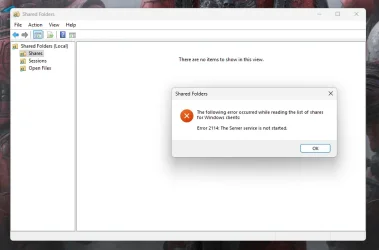
The plot thickens.

After starting the server services up which was disabled

1754872969468.webp

i dont think this is a permanent fix to my issue. as it will become shared again upon a PC restart right ?

:EDIT:

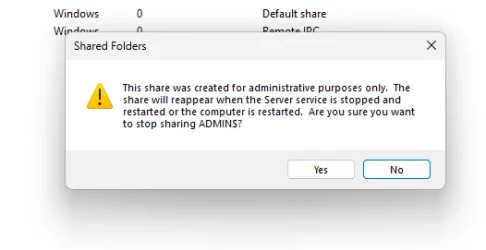
Also meant to add this
1754873371251.webp

i fee like this is a workaround attempt from massgrave but honestly i have no idea as im just spit balling at this point!
 

My Computer

System One

  • OS
    Windows 11
    Computer type
    PC/Desktop
    CPU
    Ryzen 7 9800x3d
    Motherboard
    Gigabyte B650 EAGLE AX
    Memory
    Corsair Vengeance 32 GB (2 x 16 GB) DDR5-6000 CL30 Memory
    Graphics Card(s)
    RTX 2060 [SAVING FOR UPGRADE ATM]
    Monitor(s) Displays
    2x AOC
    Screen Resolution
    1080p
    Hard Drives
    Kingston 250gb 2.5" SSD
    Sabrent 1TB NVME
    WD 1TB HDD
    PSU
    NZXT C650 Gold Modular
    Case
    Lianli LANCOOL 216
    Cooling
    ARCTIC Liquid Freezer III 280
    Keyboard
    Corsair K70 LUX
    Mouse
    Corsair Katar
    Internet Speed
    Gigabit 1000mbps (UP & DOWN)
    Browser
    Brave
I had no idea what massgrave was until I just looked it up and found that it illegally activates Microsoft products. . Sorry, but the forum rules prevent me from helping.
 

My Computers

System One System Two

  • OS
    Windows 11 Pro 25H2 26200.8655
    Computer type
    PC/Desktop
    Manufacturer/Model
    Dell Optiplex 7080
    CPU
    i9-10900 10 core 20 threads
    Motherboard
    DELL 0J37VM
    Memory
    32 gb
    Graphics Card(s)
    none-Intel UHD Graphics 630
    Sound Card
    Integrated Realtek
    Monitor(s) Displays
    Benq 27
    Screen Resolution
    2560x1440
    Hard Drives
    2x1tb Solidigm m.2 nvme /External drives 512gb Samsung m.2 sata+2tb Kingston m2.nvme
    PSU
    500w
    Case
    MT
    Cooling
    Dell Premium
    Keyboard
    Logitech wired
    Mouse
    Logitech wireless
    Internet Speed
    so slow I'm too embarrassed to tell
    Browser
    #1 Edge #2 Firefox
    Antivirus
    Defender+MWB Premium
  • Operating System
    Windows 11 Pro 24H2 26200.8457
    Computer type
    PC/Desktop
    Manufacturer/Model
    Beelink Mini PC SER5
    CPU
    AMD Ryzen 7 6800U
    Memory
    32 gb
    Graphics card(s)
    integrated
    Sound Card
    integrated
    Monitor(s) Displays
    Benq 27
    Screen Resolution
    2560x1440
    Hard Drives
    1TB Crucial nvme
    Keyboard
    Logitech wired
    Mouse
    Logitech wireless
    Internet Speed
    still too embarrassed to tell
    Browser
    Firefox
    Antivirus
    Defender
    Other Info
    System 3 is non compliant Dell 9020 i7-4770/24gb ram Win11 PRO 26200.8457
The sharing of fixed drives and the Windows folder isn't related to MassGrave. It's something Windows does by default. You can turn it off in an administrative PowerShell window...

Set-SmbServerConfiguration -AutoShareWorkstation $false

and restart.
 

My Computer

System One

  • OS
    Windows 11 Pro 25H2
    Computer type
    PC/Desktop
    Manufacturer/Model
    Intel NUC12WSHi7
    CPU
    12th Gen Core i7-1260P
    Motherboard
    NUC12WSBi7
    Memory
    64 GB Micron PC4-25600
    Graphics Card(s)
    Intel Iris Xe Graphics
    Sound Card
    on-board Realtek HD Audio
    Monitor(s) Displays
    Dell U3219Q
    Screen Resolution
    3840 x 2160
    Hard Drives
    Samsung SSD 990 PRO 1TB
    Crucial MX500 2 TB
    Antivirus
    Microsoft Defender
I had no idea what massgrave was until I just looked it up and found that it illegally activates Microsoft products. . Sorry, but the forum rules prevent me from helping.
i mean is in a grey area of sorts. not exactly illegal considering cheap keys are generally generated from MG, and there are a few contributors/devs to MG on here.

The sharing of fixed drives and the Windows folder isn't related to MassGrave. It's something Windows does by default. You can turn it off in an administrative PowerShell window...

Set-SmbServerConfiguration -AutoShareWorkstation $false

and restart.

cheers for the solution. It was just inherently odd for me as by default it shouldn't be on in the first place. so it was the only thing i could make a connection to.

After running it i got prompted for yes, yes to all, no, no to all, suspend. typed Y but no confirmation or anything after that, just a fresh new line. restarted and nothing happened. still showing the folders as shared.
 

My Computer

System One

  • OS
    Windows 11
    Computer type
    PC/Desktop
    CPU
    Ryzen 7 9800x3d
    Motherboard
    Gigabyte B650 EAGLE AX
    Memory
    Corsair Vengeance 32 GB (2 x 16 GB) DDR5-6000 CL30 Memory
    Graphics Card(s)
    RTX 2060 [SAVING FOR UPGRADE ATM]
    Monitor(s) Displays
    2x AOC
    Screen Resolution
    1080p
    Hard Drives
    Kingston 250gb 2.5" SSD
    Sabrent 1TB NVME
    WD 1TB HDD
    PSU
    NZXT C650 Gold Modular
    Case
    Lianli LANCOOL 216
    Cooling
    ARCTIC Liquid Freezer III 280
    Keyboard
    Corsair K70 LUX
    Mouse
    Corsair Katar
    Internet Speed
    Gigabit 1000mbps (UP & DOWN)
    Browser
    Brave
You may need to set AutoShareServer to false also. I’m not near a PC at the moment.
 

My Computer

System One

  • OS
    Windows 11 Pro 25H2
    Computer type
    PC/Desktop
    Manufacturer/Model
    Intel NUC12WSHi7
    CPU
    12th Gen Core i7-1260P
    Motherboard
    NUC12WSBi7
    Memory
    64 GB Micron PC4-25600
    Graphics Card(s)
    Intel Iris Xe Graphics
    Sound Card
    on-board Realtek HD Audio
    Monitor(s) Displays
    Dell U3219Q
    Screen Resolution
    3840 x 2160
    Hard Drives
    Samsung SSD 990 PRO 1TB
    Crucial MX500 2 TB
    Antivirus
    Microsoft Defender
You may need to set AutoShareServer to false also. I’m not near a PC at the moment.
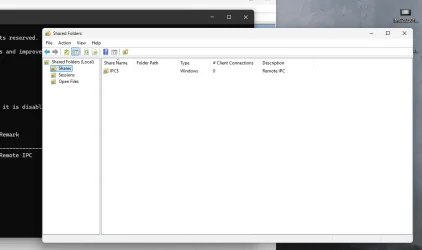
Re-enabled and started up the server service again.
1754937932129.webp
least its a start now.


only question is will this still persist after a restart.

:EDIT:


appears like all the folders go back to being shared again. tho its not really restart related its if the service for "server" gets disabled.
 

My Computer

System One

  • OS
    Windows 11
    Computer type
    PC/Desktop
    CPU
    Ryzen 7 9800x3d
    Motherboard
    Gigabyte B650 EAGLE AX
    Memory
    Corsair Vengeance 32 GB (2 x 16 GB) DDR5-6000 CL30 Memory
    Graphics Card(s)
    RTX 2060 [SAVING FOR UPGRADE ATM]
    Monitor(s) Displays
    2x AOC
    Screen Resolution
    1080p
    Hard Drives
    Kingston 250gb 2.5" SSD
    Sabrent 1TB NVME
    WD 1TB HDD
    PSU
    NZXT C650 Gold Modular
    Case
    Lianli LANCOOL 216
    Cooling
    ARCTIC Liquid Freezer III 280
    Keyboard
    Corsair K70 LUX
    Mouse
    Corsair Katar
    Internet Speed
    Gigabit 1000mbps (UP & DOWN)
    Browser
    Brave
Well I said to restart; then you’d know. :)
 

My Computer

System One

  • OS
    Windows 11 Pro 25H2
    Computer type
    PC/Desktop
    Manufacturer/Model
    Intel NUC12WSHi7
    CPU
    12th Gen Core i7-1260P
    Motherboard
    NUC12WSBi7
    Memory
    64 GB Micron PC4-25600
    Graphics Card(s)
    Intel Iris Xe Graphics
    Sound Card
    on-board Realtek HD Audio
    Monitor(s) Displays
    Dell U3219Q
    Screen Resolution
    3840 x 2160
    Hard Drives
    Samsung SSD 990 PRO 1TB
    Crucial MX500 2 TB
    Antivirus
    Microsoft Defender
Well I said to restart; then you’d know. :)
didnt have an entry for autoshareserver so had to make one in

HKEY_LOCAL_MACHINE\SYSTEM\CurrentControlSet\Services\LanmanServer\Parameters\
dword 32, then restarted PC, still nothing. The moment i disable the server services it just goes back to showing the windows folder as shared.
 

My Computer

System One

  • OS
    Windows 11
    Computer type
    PC/Desktop
    CPU
    Ryzen 7 9800x3d
    Motherboard
    Gigabyte B650 EAGLE AX
    Memory
    Corsair Vengeance 32 GB (2 x 16 GB) DDR5-6000 CL30 Memory
    Graphics Card(s)
    RTX 2060 [SAVING FOR UPGRADE ATM]
    Monitor(s) Displays
    2x AOC
    Screen Resolution
    1080p
    Hard Drives
    Kingston 250gb 2.5" SSD
    Sabrent 1TB NVME
    WD 1TB HDD
    PSU
    NZXT C650 Gold Modular
    Case
    Lianli LANCOOL 216
    Cooling
    ARCTIC Liquid Freezer III 280
    Keyboard
    Corsair K70 LUX
    Mouse
    Corsair Katar
    Internet Speed
    Gigabit 1000mbps (UP & DOWN)
    Browser
    Brave
The moment i disable the server services it just goes back to showing the windows folder as shared.
I'd be scanning for Malware personally.
 

My Computers

System One System Two

  • OS
    Windows 11 Enterprise 25H2 26200 7462
    Computer type
    PC/Desktop
    Manufacturer/Model
    Custom Build
    CPU
    Intel XEON E5-2699 v3
    Motherboard
    ASUS X99-A
    Memory
    64GB Teamgroup UD4-3600
    Graphics Card(s)
    NVIDIA GeForce GTX 1080 Ti
    Sound Card
    Integrated
    Monitor(s) Displays
    ACER X34 Predator
    Screen Resolution
    3440 x 1440
    Hard Drives
    Crucial CT1000P 3P SSD8 1TB
    Crucial CT1000 BX500 SSD 1TB
    PSU
    GameMax Pro
    Case
    Fractal Design
    Cooling
    Corsair H110iGT + 6 140mm Fans
    Keyboard
    Corsair K4
    Mouse
    G-Skill G502
    Internet Speed
    300MBs
    Browser
    Chrome
    Antivirus
    OEM
    Other Info
    ASUS RT-AC87U Router
  • Operating System
    25H2 26200.5074
    Computer type
    Laptop
    Manufacturer/Model
    ASUS X555LA
    Memory
    8GB
    Browser
    Chrome
    Antivirus
    OEM
I'd be scanning for Malware personally.
i have twice. done a full scan with malwarebytes and windows also. also completely went through making sure windows defender didnt have exclusions or anything like that. all came back clean
 

My Computer

System One

  • OS
    Windows 11
    Computer type
    PC/Desktop
    CPU
    Ryzen 7 9800x3d
    Motherboard
    Gigabyte B650 EAGLE AX
    Memory
    Corsair Vengeance 32 GB (2 x 16 GB) DDR5-6000 CL30 Memory
    Graphics Card(s)
    RTX 2060 [SAVING FOR UPGRADE ATM]
    Monitor(s) Displays
    2x AOC
    Screen Resolution
    1080p
    Hard Drives
    Kingston 250gb 2.5" SSD
    Sabrent 1TB NVME
    WD 1TB HDD
    PSU
    NZXT C650 Gold Modular
    Case
    Lianli LANCOOL 216
    Cooling
    ARCTIC Liquid Freezer III 280
    Keyboard
    Corsair K70 LUX
    Mouse
    Corsair Katar
    Internet Speed
    Gigabit 1000mbps (UP & DOWN)
    Browser
    Brave
i have twice. done a full scan with malwarebytes and windows also. also completely went through making sure windows defender didnt have exclusions or anything like that. all came back clean
There's no reason why the Windows folder should ever be shared.
 

My Computers

System One System Two

  • OS
    Windows 11 Enterprise 25H2 26200 7462
    Computer type
    PC/Desktop
    Manufacturer/Model
    Custom Build
    CPU
    Intel XEON E5-2699 v3
    Motherboard
    ASUS X99-A
    Memory
    64GB Teamgroup UD4-3600
    Graphics Card(s)
    NVIDIA GeForce GTX 1080 Ti
    Sound Card
    Integrated
    Monitor(s) Displays
    ACER X34 Predator
    Screen Resolution
    3440 x 1440
    Hard Drives
    Crucial CT1000P 3P SSD8 1TB
    Crucial CT1000 BX500 SSD 1TB
    PSU
    GameMax Pro
    Case
    Fractal Design
    Cooling
    Corsair H110iGT + 6 140mm Fans
    Keyboard
    Corsair K4
    Mouse
    G-Skill G502
    Internet Speed
    300MBs
    Browser
    Chrome
    Antivirus
    OEM
    Other Info
    ASUS RT-AC87U Router
  • Operating System
    25H2 26200.5074
    Computer type
    Laptop
    Manufacturer/Model
    ASUS X555LA
    Memory
    8GB
    Browser
    Chrome
    Antivirus
    OEM
There's no reason why the Windows folder should ever be shared.
Yes im aware hence the call for the help. part of me thought it was massgrave related as i was on windows 11 previously but license never wanted to carry over for some unknown reason, but pseymour says it isnt. but yea im not near enough technical to know exactly why it wont work. even tho i consider myself more tech savvy than the average person.

All i know is during the MG setup process i had to make a local account. it essentially signed me out and removed my initial setup profile as you cant bypass the sign in phase anymore not unless you have an old customized ISO for win11 for bypassing that phase. so part of me thought that the reason why its shared like that and its also the reason why i cannot toggle the "public folder sharing" option in the settings. i click it. and the button just jitters but still remains off.
 

My Computer

System One

  • OS
    Windows 11
    Computer type
    PC/Desktop
    CPU
    Ryzen 7 9800x3d
    Motherboard
    Gigabyte B650 EAGLE AX
    Memory
    Corsair Vengeance 32 GB (2 x 16 GB) DDR5-6000 CL30 Memory
    Graphics Card(s)
    RTX 2060 [SAVING FOR UPGRADE ATM]
    Monitor(s) Displays
    2x AOC
    Screen Resolution
    1080p
    Hard Drives
    Kingston 250gb 2.5" SSD
    Sabrent 1TB NVME
    WD 1TB HDD
    PSU
    NZXT C650 Gold Modular
    Case
    Lianli LANCOOL 216
    Cooling
    ARCTIC Liquid Freezer III 280
    Keyboard
    Corsair K70 LUX
    Mouse
    Corsair Katar
    Internet Speed
    Gigabit 1000mbps (UP & DOWN)
    Browser
    Brave
What do you see if you Right Click the Windows folder and select Properties >Sharing >Advanced Sharing?
 

My Computers

System One System Two

  • OS
    Windows 11 Enterprise 25H2 26200 7462
    Computer type
    PC/Desktop
    Manufacturer/Model
    Custom Build
    CPU
    Intel XEON E5-2699 v3
    Motherboard
    ASUS X99-A
    Memory
    64GB Teamgroup UD4-3600
    Graphics Card(s)
    NVIDIA GeForce GTX 1080 Ti
    Sound Card
    Integrated
    Monitor(s) Displays
    ACER X34 Predator
    Screen Resolution
    3440 x 1440
    Hard Drives
    Crucial CT1000P 3P SSD8 1TB
    Crucial CT1000 BX500 SSD 1TB
    PSU
    GameMax Pro
    Case
    Fractal Design
    Cooling
    Corsair H110iGT + 6 140mm Fans
    Keyboard
    Corsair K4
    Mouse
    G-Skill G502
    Internet Speed
    300MBs
    Browser
    Chrome
    Antivirus
    OEM
    Other Info
    ASUS RT-AC87U Router
  • Operating System
    25H2 26200.5074
    Computer type
    Laptop
    Manufacturer/Model
    ASUS X555LA
    Memory
    8GB
    Browser
    Chrome
    Antivirus
    OEM
What do you see if you Right Click the Windows folder and select Properties >Sharing >Advanced Sharing?
there are no share tabs on any folders or any drives.

1755036577767.webp
 

My Computer

System One

  • OS
    Windows 11
    Computer type
    PC/Desktop
    CPU
    Ryzen 7 9800x3d
    Motherboard
    Gigabyte B650 EAGLE AX
    Memory
    Corsair Vengeance 32 GB (2 x 16 GB) DDR5-6000 CL30 Memory
    Graphics Card(s)
    RTX 2060 [SAVING FOR UPGRADE ATM]
    Monitor(s) Displays
    2x AOC
    Screen Resolution
    1080p
    Hard Drives
    Kingston 250gb 2.5" SSD
    Sabrent 1TB NVME
    WD 1TB HDD
    PSU
    NZXT C650 Gold Modular
    Case
    Lianli LANCOOL 216
    Cooling
    ARCTIC Liquid Freezer III 280
    Keyboard
    Corsair K70 LUX
    Mouse
    Corsair Katar
    Internet Speed
    Gigabit 1000mbps (UP & DOWN)
    Browser
    Brave
There's no reason why the Windows folder should ever be shared.
It's like that by default, like I said above, for the Windows folder and fixed drives. You can disable these automatic shares with

Powershell:
Set-SmbServerConfiguration -AutoShareServer $false -AutoShareWorkstation $false
or setting the corresponding registry values.

As for this green arrow shared status... this seems to be some kind of bug, at least in 24H2; I haven't tried it with an older build yet. I have the shares disabled in a VM, and with the Server service enabled, the Shared state shows nothing. If I disable the Server service, the Shared state shows again, even though the folder is not shared. Doesn't really matter though, because with the Server service disabled, the shares are not accessible, even if they are present.
 

My Computer

System One

  • OS
    Windows 11 Pro 25H2
    Computer type
    PC/Desktop
    Manufacturer/Model
    Intel NUC12WSHi7
    CPU
    12th Gen Core i7-1260P
    Motherboard
    NUC12WSBi7
    Memory
    64 GB Micron PC4-25600
    Graphics Card(s)
    Intel Iris Xe Graphics
    Sound Card
    on-board Realtek HD Audio
    Monitor(s) Displays
    Dell U3219Q
    Screen Resolution
    3840 x 2160
    Hard Drives
    Samsung SSD 990 PRO 1TB
    Crucial MX500 2 TB
    Antivirus
    Microsoft Defender
It's like that by default, like I said above, for the Windows folder and fixed drives. You can disable these automatic shares with

Powershell:
Set-SmbServerConfiguration -AutoShareServer $false -AutoShareWorkstation $false
or setting the corresponding registry values.

As for this green arrow shared status... this seems to be some kind of bug, at least in 24H2; I haven't tried it with an older build yet. I have the shares disabled in a VM, and with the Server service enabled, the Shared state shows nothing. If I disable the Server service, the Shared state shows again, even though the folder is not shared. Doesn't really matter though, because with the Server service disabled, the shares are not accessible, even if they are present.
Appreciate the clarification, i couldn't for the life of me find anything related to it being a bug after many hours of searching on google before i came here to post the thread. but then again it doesn't seem like its a major thing that impacts ALOT of people. given this conundrum seems to have come to a close. im gonna say that this post has sealed the deal. :thumbsup:

Appreciate everyones time and input regarding this matter. Have a cookie 🍪
 

My Computer

System One

  • OS
    Windows 11
    Computer type
    PC/Desktop
    CPU
    Ryzen 7 9800x3d
    Motherboard
    Gigabyte B650 EAGLE AX
    Memory
    Corsair Vengeance 32 GB (2 x 16 GB) DDR5-6000 CL30 Memory
    Graphics Card(s)
    RTX 2060 [SAVING FOR UPGRADE ATM]
    Monitor(s) Displays
    2x AOC
    Screen Resolution
    1080p
    Hard Drives
    Kingston 250gb 2.5" SSD
    Sabrent 1TB NVME
    WD 1TB HDD
    PSU
    NZXT C650 Gold Modular
    Case
    Lianli LANCOOL 216
    Cooling
    ARCTIC Liquid Freezer III 280
    Keyboard
    Corsair K70 LUX
    Mouse
    Corsair Katar
    Internet Speed
    Gigabit 1000mbps (UP & DOWN)
    Browser
    Brave

Latest Support Threads

Back
Top Bottom