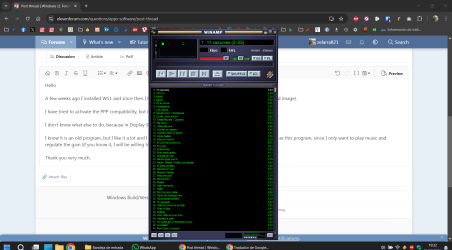
Very small view on a program


zelarra821

Active member
Member
Local time
9:14 AM
Posts
102
OS
Windows 11 Home 23H2
Hello

A few weeks ago I installed W11 and since then I have problems with a program, which looks very small (attached image).

I have tried to activate the PPP compatibility, but it does not work.

I don't know what else to do, because in Display Settings nothing changes either.

I know it is an old program, but I like it a lot and I would not like to change it, because there is nothing as simple as this program, since I only want to play music and regulate the gain (if you know it, I will be willing to give it a try).

Thank you very much.

1725212005966.png
 
Windows Build/Version
23H2

Attachments

  • 1725211990329.png
    1725211990329.png
    86.5 KB · Views: 3

My Computer My Computer

At a glance

Windows 11 Home 23H2***
OS
Windows 11 Home 23H2
Computer type
Laptop
Manufacturer/Model
*
CPU
*
Motherboard
*
Memory
*
Graphics Card(s)
*
Sound Card
*
Monitor(s) Displays
*
Screen Resolution
*
Hard Drives
*
PSU
*
Case
*
Cooling
*
Keyboard
*
Mouse
*
Internet Speed
*
Browser
*
Antivirus
*
Other Info
*
The WinAmp application is currently at version 5.9 and is supposed to be fully compatible with Windows 11. Maybe you only need to update.
 

My Computers My Computers

  • At a glance

    Windows 11 ProIntel Series 3 Core Ultra X9 388H64GB LPDDR5x 9600 MT/sIntel Arc graphics B390 Panther Lake
    OS
    Windows 11 Pro
    Computer type
    Laptop
    Manufacturer/Model
    Dell XPS 16 DA16260
    CPU
    Intel Series 3 Core Ultra X9 388H
    Memory
    64GB LPDDR5x 9600 MT/s
    Graphics Card(s)
    Intel Arc graphics B390 Panther Lake
    Monitor(s) Displays
    16" 3.2K Tandem OLED Infinity Edge
    Screen Resolution
    3200 x 2000 16:10 236 PPI
    Hard Drives
    1 Terabyte M.2 PCIe NVMe SSD
    Case
    Black Anodized Aluminum
    Cooling
    Vapor Chamber Cooling
    Mouse
    None
    Internet Speed
    942 Mbps Netgear Mesh + 2 Satellites
    Browser
    Microsoft Edge (Chromium)
    Antivirus
    Windows Security (Defender)
    Other Info
    NPU delivering 67 TOPS
    Microsoft 365 subscription
    Microsoft Office 365
    Microsoft OneDrive 1TB Cloud
    Microsoft Visual Studio
    Microsoft Visual Studio Code
    Microsoft Sysinternals Suite
    Microsoft BitLocker
    Microsoft Copilot
    Dell Support Assist
    Dell Command | Update
    Macrium Reflect X subscription
    1Password Password Manager
    Amazon Kindle for PC
    Lightroom/Photoshop subscription
    Interactive Brokers Trader Workstation
  • At a glance

    Windows 11 ProSnapdragon® X Elite (12 Core) with Hexagon NP...32GB LPDDR5x 8448 MT/sIntegrated Adreno GPU
    Operating System
    Windows 11 Pro
    Computer type
    Laptop
    Manufacturer/Model
    Microsoft Surface Laptop 7
    CPU
    Snapdragon® X Elite (12 Core) with Hexagon NPU delivering 45 TOPS
    Memory
    32GB LPDDR5x 8448 MT/s
    Graphics card(s)
    Integrated Adreno GPU
    Sound Card
    Omnisonic speakers with Dolby Atmos spatial sound
    Monitor(s) Displays
    13.8″ PixelSense Flow touchscreen 120 Hz 600 NIT
    Screen Resolution
    2304 × 1536 (201 PPI), 3:2 aspect ratio
    Hard Drives
    1 TB PCIe NVMe Gen 4 SSD
    Case
    Black Anodized Aluminum
    Cooling
    Vapor Chamber Cooling
    Mouse
    None
    Internet Speed
    942 Mbps Netgear Mesh + 2 Satellites
    Browser
    Microsoft Edge (Chromium)
    Antivirus
    Windows Security (Defender)
    Other Info
    Microsoft 365 subscription (Office)
    Microsoft Office 365
    Microsoft OneDrive 1TB Cloud
    Microsoft Visual Studio 2026
    Microsoft Visual Studio Code
    Interactive Brokers Trader Workstation
    Lightroom/Photoshop subscription
    1Password Password Manager
    Microsoft Sysinternals
    Amazon Kindle for PC
    Microsoft BitLocker
    Microsoft Copilot
use this external manifest to fix scaling. i've used it on a surface for photoshop when it looked the same as your program. 99% sure it will work for you too

Copy 'program.manifest'
rename copy to 'programname.exe.manifest'
move renamed copy to programs .exe installation folder (ie - C:\Program Files\Adobe\Photoshop\)
Run reg key to apply manifest scaling fix
 

Attachments

My Computer My Computer

At a glance

Windows 11 Pro
OS
Windows 11 Pro
What does "Run reg key" mean? The answer is:

A Windows manifest file is an XML document that describes the requirements and dependencies of a Windows application. It’s not a standalone executable file, but rather a companion file that provides metadata for the application. To run a Windows application that uses a manifest file, follow these steps:

  1. Ensure the application is properly installed: Make sure the application is installed correctly on your Windows system. If it’s a standalone executable, run the installer (.msi or .exe) to install the application.
  2. Verify the manifest file is present: Check if the manifest file (usually named app.manifest or assembly.manifest) is located in the same directory as the executable file or in a subfolder.
  3. Launch the application: Run the executable file (e.g., myapp.exe) as you would any other Windows application.
  4. Windows will load the manifest: During the application’s startup process, Windows will automatically load the manifest file and use its information to configure the application’s behavior and dependencies.
I tried it for Macrium reflect and it did nothing.
 

My Computer My Computer

At a glance

Win11 ProAMD Ryzen 5 5500U16 GBRadeon 2100
OS
Win11 Pro
Computer type
PC/Desktop
Manufacturer/Model
BeeLink SER Mini
CPU
AMD Ryzen 5 5500U
Motherboard
BeeLink SER
Memory
16 GB
Graphics Card(s)
Radeon 2100
Sound Card
none
Monitor(s) Displays
Primary: Phillips 4K; Secondary: LG 4K
Screen Resolution
Both 3860 x 2160
Hard Drives
C: NVme 500 GB Windows only
D: 128 GB NVme User data + Windows Temp via Junction Link
PSU
External
Case
Mini
Cooling
Internal fan
Keyboard
Logitech Wireless Lighted
Mouse
Kensington ExpertMouse wireless trackball
Internet Speed
500/500
Browser
Brave
Antivirus
Windows Defender
Hi, zelarra821
You may have already done this, but find the .exe file, right-click to properties, go to compatibility, and click "Change High DPI Settings." It will bring you to another dialog box. Check the box "High DPI Scaling Override." I had to do this with an old program when I changed to a 4K monitor. Good Luck!
 

My Computers My Computers

  • At a glance

    Windows 11 Pro Version 25H2 (OS Build 26200.9...i9 12th Generation64GBPNY 3060 12GB
    OS
    Windows 11 Pro Version 25H2 (OS Build 26200.9445)
    Computer type
    PC/Desktop
    Manufacturer/Model
    Dell 8950
    CPU
    i9 12th Generation
    Memory
    64GB
    Graphics Card(s)
    PNY 3060 12GB
    Monitor(s) Displays
    NEC EA27IU
    Screen Resolution
    3840X2160
    Hard Drives
    SSD internal, external drives
    Cooling
    Advanced Air Cooling
    Keyboard
    Microsoft
    Mouse
    Logitech
    Internet Speed
    High-Speed
    Browser
    MS Edge
    Antivirus
    Norton 360
  • At a glance

    Win 11 Pro 25H2 (OS Build 26200.9168)Intel Ultra 7 265 (20 cores) processor32GB DDR5 RamBuilt-in Intel UHD Graphics
    Operating System
    Win 11 Pro 25H2 (OS Build 26200.9168)
    Computer type
    PC/Desktop
    Manufacturer/Model
    Dell Tower ECT1250
    CPU
    Intel Ultra 7 265 (20 cores) processor
    Memory
    32GB DDR5 Ram
    Graphics card(s)
    Built-in Intel UHD Graphics
    Sound Card
    Built-in
    Screen Resolution
    1920X1080
    Hard Drives
    2TB internal SSD
    Case
    Tower
Neither the manifest file nor the DPI work (I've tried all three options: application, system, system -improved-).

I'm afraid I'll either stay as I am or update Winamp.
 

My Computer My Computer

At a glance

Windows 11 Home 23H2***
OS
Windows 11 Home 23H2
Computer type
Laptop
Manufacturer/Model
*
CPU
*
Motherboard
*
Memory
*
Graphics Card(s)
*
Sound Card
*
Monitor(s) Displays
*
Screen Resolution
*
Hard Drives
*
PSU
*
Case
*
Cooling
*
Keyboard
*
Mouse
*
Internet Speed
*
Browser
*
Antivirus
*
Other Info
*
Older apps like this early version of WinAmp are not DPI-aware. They were written in a custom UI, which can't be scaled up.

Manifests can only help apps written using a more modern programming style, where you're expected to handle different screen sizes. Back then, there wasn't a need.
 

My Computer My Computer

At a glance

Windows 7
OS
Windows 7
Neither the manifest file nor the DPI work (I've tried all three options: application, system, system -improved-).

I'm afraid I'll either stay as I am or update Winamp.


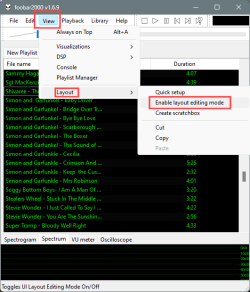
Might want to check out Foobar2000...


I also like simple interfaces.
You can edit the interface of Foobar2000.
I use a very basic interface...

Image1.png


Image1.png
 

My Computers My Computers

  • At a glance

    Win 11 Home ♦♦♦26300.9445 ♦♦♦♦♦♦♦26H2AMD Ryzen 7 3700XG.Skill (F4-3200C14D-16GTZKW)EVGA RTX 2070 (08G-P4-2171-KR)
    OS
    Win 11 Home ♦♦♦26300.9445 ♦♦♦♦♦♦♦26H2
    Computer type
    PC/Desktop
    Manufacturer/Model
    Built by Ghot® [May 2020]
    CPU
    AMD Ryzen 7 3700X
    Motherboard
    Asus Pro WS X570-ACE (BIOS 5302)
    Memory
    G.Skill (F4-3200C14D-16GTZKW)
    Graphics Card(s)
    EVGA RTX 2070 (08G-P4-2171-KR)
    Sound Card
    Realtek ALC1220P / ALC S1220A
    Monitor(s) Displays
    Dell U3011 30"
    Screen Resolution
    2560 x 1600
    Hard Drives
    2x Samsung 860 EVO 500GB,
    WD 4TB Black FZBX - SATA III,
    WD 8TB Black FZBX - SATA III,
    DRW-24B1ST CD/DVD Burner
    PSU
    PC Power & Cooling 750W Quad EPS12V
    Case
    Cooler Master ATCS 840 Tower
    Cooling
    CM Hyper 212 EVO (push/pull)
    Keyboard
    Ducky DK9008 Shine II Blue LED
    Mouse
    Logitech Optical M-100
    Internet Speed
    300/300
    Browser
    Firefox (latest)
    Antivirus
    Bitdefender Total Security
    Other Info
    Speakers: Klipsch Pro Media 2.1
  • At a glance

    Windows XP Pro 32bit w/SP3AMD Athlon 64 X2 5000+ (OC'd @ 3.2Ghz)TWIN2X2048-6400C4DHX (2 x 1GB, DDR2 800)EVGA 256-P2-N758-TR GeForce 8600GT SSC
    Operating System
    Windows XP Pro 32bit w/SP3
    Computer type
    PC/Desktop
    Manufacturer/Model
    Built by Ghot® (not in use)
    CPU
    AMD Athlon 64 X2 5000+ (OC'd @ 3.2Ghz)
    Motherboard
    ASUS M2N32-SLI Deluxe Wireless Edition
    Memory
    TWIN2X2048-6400C4DHX (2 x 1GB, DDR2 800)
    Graphics card(s)
    EVGA 256-P2-N758-TR GeForce 8600GT SSC
    Sound Card
    Onboard
    Monitor(s) Displays
    ViewSonic G90FB Black 19" Professional (CRT)
    Screen Resolution
    up to 2048 x 1536
    Hard Drives
    WD 36GB 10,000rpm Raptor SATA
    Seagate 80GB 7200rpm SATA
    Lite-On LTR-52246S CD/RW
    Lite-On LH-18A1P CD/DVD Burner
    PSU
    PC Power & Cooling Silencer 750 Quad EPS12V
    Case
    Generic Beige case, 80mm fans
    Cooling
    ZALMAN 9500A 92mm CPU Cooler
    Keyboard
    Logitech Classic Keybooard 200
    Mouse
    Logitech Optical M-BT96a
    Internet Speed
    300/300
    Browser
    Firefox 3.x ??
    Antivirus
    Symantec (Norton)
    Other Info
    Still assembled, still runs. Haven't turned it on for 15 years?
What does "Run reg key" mean? The answer is:

A Windows manifest file is an XML document that describes the requirements and dependencies of a Windows application. It’s not a standalone executable file, but rather a companion file that provides metadata for the application. To run a Windows application that uses a manifest file, follow these steps:

  1. Ensure the application is properly installed: Make sure the application is installed correctly on your Windows system. If it’s a standalone executable, run the installer (.msi or .exe) to install the application.
  2. Verify the manifest file is present: Check if the manifest file (usually named app.manifest or assembly.manifest) is located in the same directory as the executable file or in a subfolder.
  3. Launch the application: Run the executable file (e.g., myapp.exe) as you would any other Windows application.
  4. Windows will load the manifest: During the application’s startup process, Windows will automatically load the manifest file and use its information to configure the application’s behavior and dependencies.
I tried it for Macrium reflect and it did nothing.
Run reg key means after placing the .manifest file in the program exe directory and renaming it accordingly that THEN running the provided registry key will associate the .manifest scaling fix to the program exe… just like the directions say…

If you move it to, say, Photoshop install directory, you would name it “photoshop.exe.manifest” and then run the reg key. If your app has no scaling issues, this method will have no effect at all.

See:
 
Last edited:

My Computer My Computer

At a glance

Windows 11 Pro
OS
Windows 11 Pro
Might want to check out Foobar2000...
Is there a portable version?

Anyway, I'll try it tomorrow. It's already late here in Spain and I need to rest after the trip.

I'll let you know when I try it.

Thanks.
 

My Computer My Computer

At a glance

Windows 11 Home 23H2***
OS
Windows 11 Home 23H2
Computer type
Laptop
Manufacturer/Model
*
CPU
*
Motherboard
*
Memory
*
Graphics Card(s)
*
Sound Card
*
Monitor(s) Displays
*
Screen Resolution
*
Hard Drives
*
PSU
*
Case
*
Cooling
*
Keyboard
*
Mouse
*
Internet Speed
*
Browser
*
Antivirus
*
Other Info
*
I run version 3.8, Build 3660 and don't have this problem:
1725226537474.png

Click that top, left button (it looks like a sounds wave and is orange-ish). Select the different panes you want to present in Winamp. You just have on panel selected.
 

My Computers My Computers

  • At a glance

    Windows 11 Pro 25H2 RP channelRyzen 9 5900XCorsair Vengeance RGB PRO 64GB (2x32GB) DDR4 ...ASUS GeForce RTX 4070 Super OC 12GB DDR6 / ZO...
    OS
    Windows 11 Pro 25H2 RP channel
    Computer type
    PC/Desktop
    Manufacturer/Model
    Home built
    CPU
    Ryzen 9 5900X
    Motherboard
    MSI MPG X570S Edge Max WiFi
    Memory
    Corsair Vengeance RGB PRO 64GB (2x32GB) DDR4 3600 (PC4-28800) C18
    Graphics Card(s)
    ASUS GeForce RTX 4070 Super OC 12GB DDR6 / ZOTAC RTX 3060 Twin Edge OC 12GB GDDR6
    Sound Card
    Proprietary on MB / FiiO K5Pro DAC
    Monitor(s) Displays
    ViewSonic XG2530 25"/Benq XL2411P 24"/ ASUS VA24DQSB) 23.8"
    Screen Resolution
    1920x1080 240Hz/144Hz/60Hz (based on monitor setup above)
    Hard Drives
    SK hynix Gold P31 1TB PCIe NVMe Gen3 M.2 2280 Internal SSD
    ADATA XPG SX8200 Pro 1TB
    Samsung SSD 860 EVO 1TB 2.5 Inch SATA III Internal SSD
    PSU
    Corsair RM1000e
    Case
    Phanteks Enthoo Pro Full Tower Chassis with Window
    Cooling
    Corsair iCUE H60i RGB PRO XT Liquid CPU Cooler
    Keyboard
    Corsair K70
    Mouse
    Logitech MX Master 3
    Internet Speed
    ~950Mb/s download / ~700Mb/s upload
    Browser
    Edge (Chromium)
    Antivirus
    Norton 360
  • At a glance

    Windows 11 ProRyzen 7 3700X32MB DDR4I forget, but it's old. I can't see the need ...
    Operating System
    Windows 11 Pro
    Computer type
    PC/Desktop
    Manufacturer/Model
    Home Built
    CPU
    Ryzen 7 3700X
    Motherboard
    MSI B550 Gaming GEN3 Gaming Motherboard
    Memory
    32MB DDR4
    Graphics card(s)
    I forget, but it's old. I can't see the need to upgrade it.
    Sound Card
    Propietary
    Monitor(s) Displays
    ACER LED 24" (dual monitor setup)
    Screen Resolution
    1920X1080
    Hard Drives
    1TB Samsung SSD 3.5"
    Case
    Corsair
    Cooling
    Stock
    Keyboard
    Logitech
    Mouse
    Logitech
    Internet Speed
    ~750Mb/s download / ~750Mb/s upload
    Browser
    Edge
    Antivirus
    Defender and Malware Bytes
  • ASUS Vivobook 16X, 16" WUXGA(1920x1200) Business Laptop Computer, AMD Ryzen 7, 16GB DDR4 RAM, 1TB SSD, Windows 11 Pro, Wi-Fi 6, USB-C, Full-Sized Keyboard, Webcam, HDMI

My Computers My Computers

  • At a glance

    Windows 11 Pro
    OS
    Windows 11 Pro
    Computer type
    PC/Desktop
    Manufacturer/Model
    ASUS ROG Strix
  • At a glance

    Windows 11 Pro
    Operating System
    Windows 11 Pro
    Computer type
    Laptop
    Manufacturer/Model
    ASUS VivoBook
  • ASUS VivoBook 'Lite' ~ Windows 11 Home
Is there a portable version?


@Edwin beat me to it.

I installed the full version and the installation directory is only 12.4MB
It's a clean little program. Doesn't try to call home by itself, etc.


It also has visualizations plugin... all windows can be resized as well.

Image1.jpg


The visualization plugin has a LOT of options. Especially for the musically inclined.

Image1.png


Spanish Inquisition approved. :D

Foobar2000.png
 

My Computers My Computers

  • At a glance

    Win 11 Home ♦♦♦26300.9445 ♦♦♦♦♦♦♦26H2AMD Ryzen 7 3700XG.Skill (F4-3200C14D-16GTZKW)EVGA RTX 2070 (08G-P4-2171-KR)
    OS
    Win 11 Home ♦♦♦26300.9445 ♦♦♦♦♦♦♦26H2
    Computer type
    PC/Desktop
    Manufacturer/Model
    Built by Ghot® [May 2020]
    CPU
    AMD Ryzen 7 3700X
    Motherboard
    Asus Pro WS X570-ACE (BIOS 5302)
    Memory
    G.Skill (F4-3200C14D-16GTZKW)
    Graphics Card(s)
    EVGA RTX 2070 (08G-P4-2171-KR)
    Sound Card
    Realtek ALC1220P / ALC S1220A
    Monitor(s) Displays
    Dell U3011 30"
    Screen Resolution
    2560 x 1600
    Hard Drives
    2x Samsung 860 EVO 500GB,
    WD 4TB Black FZBX - SATA III,
    WD 8TB Black FZBX - SATA III,
    DRW-24B1ST CD/DVD Burner
    PSU
    PC Power & Cooling 750W Quad EPS12V
    Case
    Cooler Master ATCS 840 Tower
    Cooling
    CM Hyper 212 EVO (push/pull)
    Keyboard
    Ducky DK9008 Shine II Blue LED
    Mouse
    Logitech Optical M-100
    Internet Speed
    300/300
    Browser
    Firefox (latest)
    Antivirus
    Bitdefender Total Security
    Other Info
    Speakers: Klipsch Pro Media 2.1
  • At a glance

    Windows XP Pro 32bit w/SP3AMD Athlon 64 X2 5000+ (OC'd @ 3.2Ghz)TWIN2X2048-6400C4DHX (2 x 1GB, DDR2 800)EVGA 256-P2-N758-TR GeForce 8600GT SSC
    Operating System
    Windows XP Pro 32bit w/SP3
    Computer type
    PC/Desktop
    Manufacturer/Model
    Built by Ghot® (not in use)
    CPU
    AMD Athlon 64 X2 5000+ (OC'd @ 3.2Ghz)
    Motherboard
    ASUS M2N32-SLI Deluxe Wireless Edition
    Memory
    TWIN2X2048-6400C4DHX (2 x 1GB, DDR2 800)
    Graphics card(s)
    EVGA 256-P2-N758-TR GeForce 8600GT SSC
    Sound Card
    Onboard
    Monitor(s) Displays
    ViewSonic G90FB Black 19" Professional (CRT)
    Screen Resolution
    up to 2048 x 1536
    Hard Drives
    WD 36GB 10,000rpm Raptor SATA
    Seagate 80GB 7200rpm SATA
    Lite-On LTR-52246S CD/RW
    Lite-On LH-18A1P CD/DVD Burner
    PSU
    PC Power & Cooling Silencer 750 Quad EPS12V
    Case
    Generic Beige case, 80mm fans
    Cooling
    ZALMAN 9500A 92mm CPU Cooler
    Keyboard
    Logitech Classic Keybooard 200
    Mouse
    Logitech Optical M-BT96a
    Internet Speed
    300/300
    Browser
    Firefox 3.x ??
    Antivirus
    Symantec (Norton)
    Other Info
    Still assembled, still runs. Haven't turned it on for 15 years?
... there is nothing as simple as this program...
I beg to differ...

7763.jpg

Once you install and configure foobar just the way you like it, there's nothing more simple, consistently reliable, performance superior and tirelessly maintained and updated! Guaranteed!
Free too!!!
 

My Computers My Computers

  • At a glance

    Windows 11 Pro
    OS
    Windows 11 Pro
    Computer type
    PC/Desktop
    Manufacturer/Model
    ASUS ROG Strix
  • At a glance

    Windows 11 Pro
    Operating System
    Windows 11 Pro
    Computer type
    Laptop
    Manufacturer/Model
    ASUS VivoBook
  • ASUS VivoBook 'Lite' ~ Windows 11 Home
By editing the layout (GUI) you can make it as complicated or as simple as you want.

It even makes your music... sound better.
I mean just listen to this... :D


Image1.png


Now you gotta admit... that just sounds awesome. :-)
 

My Computers My Computers

  • At a glance

    Win 11 Home ♦♦♦26300.9445 ♦♦♦♦♦♦♦26H2AMD Ryzen 7 3700XG.Skill (F4-3200C14D-16GTZKW)EVGA RTX 2070 (08G-P4-2171-KR)
    OS
    Win 11 Home ♦♦♦26300.9445 ♦♦♦♦♦♦♦26H2
    Computer type
    PC/Desktop
    Manufacturer/Model
    Built by Ghot® [May 2020]
    CPU
    AMD Ryzen 7 3700X
    Motherboard
    Asus Pro WS X570-ACE (BIOS 5302)
    Memory
    G.Skill (F4-3200C14D-16GTZKW)
    Graphics Card(s)
    EVGA RTX 2070 (08G-P4-2171-KR)
    Sound Card
    Realtek ALC1220P / ALC S1220A
    Monitor(s) Displays
    Dell U3011 30"
    Screen Resolution
    2560 x 1600
    Hard Drives
    2x Samsung 860 EVO 500GB,
    WD 4TB Black FZBX - SATA III,
    WD 8TB Black FZBX - SATA III,
    DRW-24B1ST CD/DVD Burner
    PSU
    PC Power & Cooling 750W Quad EPS12V
    Case
    Cooler Master ATCS 840 Tower
    Cooling
    CM Hyper 212 EVO (push/pull)
    Keyboard
    Ducky DK9008 Shine II Blue LED
    Mouse
    Logitech Optical M-100
    Internet Speed
    300/300
    Browser
    Firefox (latest)
    Antivirus
    Bitdefender Total Security
    Other Info
    Speakers: Klipsch Pro Media 2.1
  • At a glance

    Windows XP Pro 32bit w/SP3AMD Athlon 64 X2 5000+ (OC'd @ 3.2Ghz)TWIN2X2048-6400C4DHX (2 x 1GB, DDR2 800)EVGA 256-P2-N758-TR GeForce 8600GT SSC
    Operating System
    Windows XP Pro 32bit w/SP3
    Computer type
    PC/Desktop
    Manufacturer/Model
    Built by Ghot® (not in use)
    CPU
    AMD Athlon 64 X2 5000+ (OC'd @ 3.2Ghz)
    Motherboard
    ASUS M2N32-SLI Deluxe Wireless Edition
    Memory
    TWIN2X2048-6400C4DHX (2 x 1GB, DDR2 800)
    Graphics card(s)
    EVGA 256-P2-N758-TR GeForce 8600GT SSC
    Sound Card
    Onboard
    Monitor(s) Displays
    ViewSonic G90FB Black 19" Professional (CRT)
    Screen Resolution
    up to 2048 x 1536
    Hard Drives
    WD 36GB 10,000rpm Raptor SATA
    Seagate 80GB 7200rpm SATA
    Lite-On LTR-52246S CD/RW
    Lite-On LH-18A1P CD/DVD Burner
    PSU
    PC Power & Cooling Silencer 750 Quad EPS12V
    Case
    Generic Beige case, 80mm fans
    Cooling
    ZALMAN 9500A 92mm CPU Cooler
    Keyboard
    Logitech Classic Keybooard 200
    Mouse
    Logitech Optical M-BT96a
    Internet Speed
    300/300
    Browser
    Firefox 3.x ??
    Antivirus
    Symantec (Norton)
    Other Info
    Still assembled, still runs. Haven't turned it on for 15 years?
I just tried foobar2000, and I like it so far, so I'm going to stick with this program.

Thanks a lot for the help.
 

My Computer My Computer

At a glance

Windows 11 Home 23H2***
OS
Windows 11 Home 23H2
Computer type
Laptop
Manufacturer/Model
*
CPU
*
Motherboard
*
Memory
*
Graphics Card(s)
*
Sound Card
*
Monitor(s) Displays
*
Screen Resolution
*
Hard Drives
*
PSU
*
Case
*
Cooling
*
Keyboard
*
Mouse
*
Internet Speed
*
Browser
*
Antivirus
*
Other Info
*

My Computers My Computers

  • At a glance

    Win 11 Home ♦♦♦26300.9445 ♦♦♦♦♦♦♦26H2AMD Ryzen 7 3700XG.Skill (F4-3200C14D-16GTZKW)EVGA RTX 2070 (08G-P4-2171-KR)
    OS
    Win 11 Home ♦♦♦26300.9445 ♦♦♦♦♦♦♦26H2
    Computer type
    PC/Desktop
    Manufacturer/Model
    Built by Ghot® [May 2020]
    CPU
    AMD Ryzen 7 3700X
    Motherboard
    Asus Pro WS X570-ACE (BIOS 5302)
    Memory
    G.Skill (F4-3200C14D-16GTZKW)
    Graphics Card(s)
    EVGA RTX 2070 (08G-P4-2171-KR)
    Sound Card
    Realtek ALC1220P / ALC S1220A
    Monitor(s) Displays
    Dell U3011 30"
    Screen Resolution
    2560 x 1600
    Hard Drives
    2x Samsung 860 EVO 500GB,
    WD 4TB Black FZBX - SATA III,
    WD 8TB Black FZBX - SATA III,
    DRW-24B1ST CD/DVD Burner
    PSU
    PC Power & Cooling 750W Quad EPS12V
    Case
    Cooler Master ATCS 840 Tower
    Cooling
    CM Hyper 212 EVO (push/pull)
    Keyboard
    Ducky DK9008 Shine II Blue LED
    Mouse
    Logitech Optical M-100
    Internet Speed
    300/300
    Browser
    Firefox (latest)
    Antivirus
    Bitdefender Total Security
    Other Info
    Speakers: Klipsch Pro Media 2.1
  • At a glance

    Windows XP Pro 32bit w/SP3AMD Athlon 64 X2 5000+ (OC'd @ 3.2Ghz)TWIN2X2048-6400C4DHX (2 x 1GB, DDR2 800)EVGA 256-P2-N758-TR GeForce 8600GT SSC
    Operating System
    Windows XP Pro 32bit w/SP3
    Computer type
    PC/Desktop
    Manufacturer/Model
    Built by Ghot® (not in use)
    CPU
    AMD Athlon 64 X2 5000+ (OC'd @ 3.2Ghz)
    Motherboard
    ASUS M2N32-SLI Deluxe Wireless Edition
    Memory
    TWIN2X2048-6400C4DHX (2 x 1GB, DDR2 800)
    Graphics card(s)
    EVGA 256-P2-N758-TR GeForce 8600GT SSC
    Sound Card
    Onboard
    Monitor(s) Displays
    ViewSonic G90FB Black 19" Professional (CRT)
    Screen Resolution
    up to 2048 x 1536
    Hard Drives
    WD 36GB 10,000rpm Raptor SATA
    Seagate 80GB 7200rpm SATA
    Lite-On LTR-52246S CD/RW
    Lite-On LH-18A1P CD/DVD Burner
    PSU
    PC Power & Cooling Silencer 750 Quad EPS12V
    Case
    Generic Beige case, 80mm fans
    Cooling
    ZALMAN 9500A 92mm CPU Cooler
    Keyboard
    Logitech Classic Keybooard 200
    Mouse
    Logitech Optical M-BT96a
    Internet Speed
    300/300
    Browser
    Firefox 3.x ??
    Antivirus
    Symantec (Norton)
    Other Info
    Still assembled, still runs. Haven't turned it on for 15 years?
Just for info...
The WinAmp Community Update Project (WACUP) is still going strong.
Decent player!

0007667.jpg
 

My Computers My Computers

  • At a glance

    Windows 11 Pro
    OS
    Windows 11 Pro
    Computer type
    PC/Desktop
    Manufacturer/Model
    ASUS ROG Strix
  • At a glance

    Windows 11 Pro
    Operating System
    Windows 11 Pro
    Computer type
    Laptop
    Manufacturer/Model
    ASUS VivoBook
  • ASUS VivoBook 'Lite' ~ Windows 11 Home
Thanks!!!!
 

My Computer My Computer

At a glance

Windows 11 Home 23H2***
OS
Windows 11 Home 23H2
Computer type
Laptop
Manufacturer/Model
*
CPU
*
Motherboard
*
Memory
*
Graphics Card(s)
*
Sound Card
*
Monitor(s) Displays
*
Screen Resolution
*
Hard Drives
*
PSU
*
Case
*
Cooling
*
Keyboard
*
Mouse
*
Internet Speed
*
Browser
*
Antivirus
*
Other Info
*
Back
Top Bottom