System View Reliability History in Windows 11

  • Thread starter Thread starter Brink
  • Start date Published: Start date Updated Updated:

Reliability_Monitor_banner.webp

This tutorial will show you how to view reliability history for your Windows 11 device.

The Reliability Monitor provides a system stability overview and details about events that impact reliability. It calculates the Stability Index shown in the System Stability Chart.

Reliability Monitor maintains up to a year of history for system stability and reliability events. The System Stability Chart displays a rolling graph organized by date.

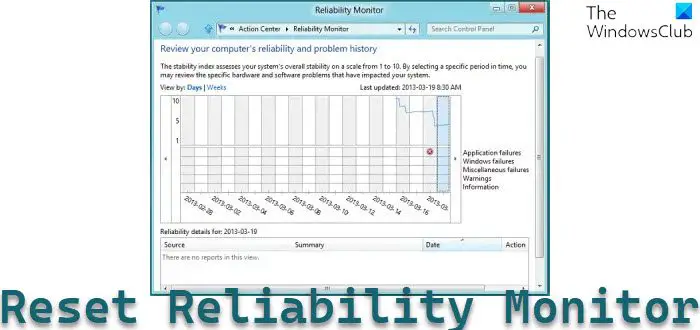
The top half of the System Stability Chart displays a graph of the Stability Index. In the lower half of the chart, five rows track Reliability Events that either contribute to the stability measurement for the system or provide related information about software installation and removal. When one or more Reliability Events of each type are detected, an icon appears in the column for that date.
  • For Software Installs and Uninstalls, an Information icon indicates a successful event of that type occurred, or a Warning icon indicates a failure of that type occurred.
  • For all other Reliability Event types, an Error icon indicates a failure of that type occurred.
If more than 30 days of data are available, you can use the scroll bar at the bottom of the System Stability Chart to find dates outside the visible range.

Based on data collected, each date in the System Stability Chart includes a graph point showing that day's System Stability Index rating. The System Stability Index is a number from 1 (least stable) to 10 (most stable) and is a weighted measurement derived from the number of specified failures seen over a rolling historical period. Reliability Events in the System Stability Report describe the specific failures. For more information about interpreting the System Stability report, see Use Reliability Monitor to Troubleshoot.
  • Recent failures are weighted more heavily than past failures, allowing an improvement over time to be reflected in an ascending System Stability Index once a reliability issue has been resolved.
  • Days when the system is powered off or in a sleep state are not used when calculating the System Stability Index.
  • If there is not enough data to calculate a steady System Stability Index, the graphed line will be dotted. When enough data has been recorded to generate a steady System Stability Index, the graphed line will be solid.
  • If there are any significant changes to the system time, an Information icon will appear on the graph for each day on which the system time was adjusted.
References:


Here's How:

1 Open the Control Panel (icons view), and click/tap on the Security and Maintenance icon.

2 Expand open Maintenance, and click/tap on the View reliability history link to open Reliability Monitor (perfmon /rel). (see screenshot below)

Reliability_history-1.png

3 Reliability Monitor will now start generating the report. (see screenshot below)

Reliability_history-2.png

7 After a short moment, you will see the reliability and problem history for your Windows device. (see screenshots below)

8 You can select how to View by (ex: "Days" or "Weeks") the history line graph.

9 You can click/tap on the back and forward arrow buttons to scroll through the history line graph.

10 You can click/tap on View all problem reports at the bottom to see them all at once instead of on the line graph.

11 You can click/tap on a day or week in the timeline to view details of it at the bottom.

12 You can either double click/tap on a source at the bottom or click/tap on View technical details for a source to see more details about it.

13 You can click/tap on Save reliability history at the bottom to save the reliability history as an .xml file to a location you select.

Reliability_history-3.png
Reliability_history-4.png

Reliability_history-5.png


That's it,
Shawn Brink


Last edited:
The linked microsoft docs article
says 'Applies To: Windows Server 2008, Windows Vista' (and nothing else)

I checked it on a W10 and a W11 machine, and as far as I can tell, everything is as this tutorial says. Just a curious remark.
 

My Computer My Computer

At a glance

Windows 10 Pro
OS
Windows 10 Pro
Hello @Haydon, :-)

I couldn't find updated reference material from Microsoft other than those back from Vista. It still applies, but it would be nice for newer info applying specifically for W11.
 

My Computers My Computers

  • At a glance

    Windows 11 Pro for WorkstationsIntel i7-8700K 5 GHz64 GB (4x16GB) G.SKILL TridentZ RGB DDR4 3600...ASUS ROG-STRIX-GTX1080TI-O11G-GAMING (11GB GD...
    OS
    Windows 11 Pro for Workstations
    Computer type
    PC/Desktop
    Manufacturer/Model
    Custom self build
    CPU
    Intel i7-8700K 5 GHz
    Motherboard
    ASUS ROG Maximus XI Formula Z390
    Memory
    64 GB (4x16GB) G.SKILL TridentZ RGB DDR4 3600 MHz (F4-3600C18D-32GTZR)
    Graphics Card(s)
    ASUS ROG-STRIX-GTX1080TI-O11G-GAMING (11GB GDDR5X)
    Sound Card
    Integrated Digital Audio (S/PDIF)
    Monitor(s) Displays
    2 x Samsung Odyssey G75 27"
    Screen Resolution
    2560x1440
    Hard Drives
    1TB Samsung 990 PRO M.2,
    4TB Samsung 990 PRO M.2,
    TerraMaster F8 SSD Plus NAS
    PSU
    Seasonic Prime Titanium 850W
    Case
    Thermaltake Core P3 wall mounted
    Cooling
    Corsair Hydro H115i
    Keyboard
    Amazon Basics Wired Full Keyboard MD005
    Mouse
    Logitech MX Master 4
    Internet Speed
    2 Gbps Download and 100 Mbps Upload
    Browser
    Chrome and Edge
    Antivirus
    Microsoft Defender
    Other Info
    Logitech Z625 speaker system,
    Logitech BRIO 4K Pro webcam,
    HP Color LaserJet Pro MFP M477fdn,
    CyberPower CP1500PFCLCD
    Galaxy S23 Plus phone
  • At a glance

    Windows 11 ProSnapdragon X Elite (12 core) 3.42 GHz16 GB LPDDR5x-7467 MHz
    Operating System
    Windows 11 Pro
    Computer type
    Laptop
    Manufacturer/Model
    Surface Laptop 7 Copilot+ PC
    CPU
    Snapdragon X Elite (12 core) 3.42 GHz
    Memory
    16 GB LPDDR5x-7467 MHz
    Monitor(s) Displays
    15" HDR
    Screen Resolution
    2496 x 1664
    Hard Drives
    1 TB SSD
    Internet Speed
    Wi-Fi 7 and Bluetooth 5.4
    Browser
    Chrome and Edge
    Antivirus
    Microsoft Defender
Yeah, thanks! I take this opportunity to say that your tutorials drive me to learn things out of curiosity (y) which is different from learning things out of concern that they might go wrong (n)
 

My Computer My Computer

At a glance

Windows 10 Pro
OS
Windows 10 Pro
@Brink
My reliability reporting is turned off in Maintenance (see screen attached) I may have disabled this in W10 and migrated to W11, services is on Auto, I don't remember how I disabled this. How to turn it on again?
Thanks
Hello Frank, :-)

It looks like it's most likely from using option 1 or 2 below to turn it off, but you can use the same to turn it back on if so.


My Computers My Computers

  • At a glance

    Windows 11 Pro for WorkstationsIntel i7-8700K 5 GHz64 GB (4x16GB) G.SKILL TridentZ RGB DDR4 3600...ASUS ROG-STRIX-GTX1080TI-O11G-GAMING (11GB GD...
    OS
    Windows 11 Pro for Workstations
    Computer type
    PC/Desktop
    Manufacturer/Model
    Custom self build
    CPU
    Intel i7-8700K 5 GHz
    Motherboard
    ASUS ROG Maximus XI Formula Z390
    Memory
    64 GB (4x16GB) G.SKILL TridentZ RGB DDR4 3600 MHz (F4-3600C18D-32GTZR)
    Graphics Card(s)
    ASUS ROG-STRIX-GTX1080TI-O11G-GAMING (11GB GDDR5X)
    Sound Card
    Integrated Digital Audio (S/PDIF)
    Monitor(s) Displays
    2 x Samsung Odyssey G75 27"
    Screen Resolution
    2560x1440
    Hard Drives
    1TB Samsung 990 PRO M.2,
    4TB Samsung 990 PRO M.2,
    TerraMaster F8 SSD Plus NAS
    PSU
    Seasonic Prime Titanium 850W
    Case
    Thermaltake Core P3 wall mounted
    Cooling
    Corsair Hydro H115i
    Keyboard
    Amazon Basics Wired Full Keyboard MD005
    Mouse
    Logitech MX Master 4
    Internet Speed
    2 Gbps Download and 100 Mbps Upload
    Browser
    Chrome and Edge
    Antivirus
    Microsoft Defender
    Other Info
    Logitech Z625 speaker system,
    Logitech BRIO 4K Pro webcam,
    HP Color LaserJet Pro MFP M477fdn,
    CyberPower CP1500PFCLCD
    Galaxy S23 Plus phone
  • At a glance

    Windows 11 ProSnapdragon X Elite (12 core) 3.42 GHz16 GB LPDDR5x-7467 MHz
    Operating System
    Windows 11 Pro
    Computer type
    Laptop
    Manufacturer/Model
    Surface Laptop 7 Copilot+ PC
    CPU
    Snapdragon X Elite (12 core) 3.42 GHz
    Memory
    16 GB LPDDR5x-7467 MHz
    Monitor(s) Displays
    15" HDR
    Screen Resolution
    2496 x 1664
    Hard Drives
    1 TB SSD
    Internet Speed
    Wi-Fi 7 and Bluetooth 5.4
    Browser
    Chrome and Edge
    Antivirus
    Microsoft Defender

My Computers My Computers

  • At a glance

    Windows 11 Home 25H2 build: 26200.8737Intel(R) Core(TM) Ultra 7 258V, 2200 Mhz, 8 C...32 GB LPDDR5X (soldered)Intel(R) Arc(TM) 140V GPU (16GB)
    OS
    Windows 11 Home 25H2 build: 26200.8737
    Computer type
    Laptop
    Manufacturer/Model
    Acer Swift A.I SF14-51T
    CPU
    Intel(R) Core(TM) Ultra 7 258V, 2200 Mhz, 8 Cores
    Motherboard
    Icefish_LNV, Version V1.15
    Memory
    32 GB LPDDR5X (soldered)
    Graphics Card(s)
    Intel(R) Arc(TM) 140V GPU (16GB)
    Sound Card
    RealTek + Intel Smart Sound
    Monitor(s) Displays
    14" IPS WUXGA
    Screen Resolution
    1920x1200x60Hz
    Hard Drives
    Micron_2550_MTFDKBA1T0TGE, NVMe Gen4, 1TB
    PSU
    45W USB-C GaN charger
    Case
    Full aluminum body
    Cooling
    1 fan
    Keyboard
    US with Backlight
    Mouse
    Precision Trackpad
    Internet Speed
    25 Mb/s 5G
    Browser
    Edge
    Antivirus
    Windows Defender
    Other Info
    BIOS Version/Date Insyde Corp. V1.15, 8/28/2025, Windows Hello IR camera with Facial recognition. Secure Boot 2026 KEK key installed
  • At a glance

    Windows 11 Home 25H2 build: 26200.8875Intel 12th Gen. i7 12700H, 14 cores, 2.3 GHz ...8GB LPDDR4 on board + 8GB LPDDR4 3200 MHz in ...Intel Iris Xe supports up to 4096 x 2304 @ 120Hz
    Operating System
    Windows 11 Home 25H2 build: 26200.8875
    Computer type
    Laptop
    Manufacturer/Model
    Asus Vivobook K3502Z S15 15" OLED
    CPU
    Intel 12th Gen. i7 12700H, 14 cores, 2.3 GHz (24M Cache, up to 4.7 GHz, 6P+8E cores)
    Motherboard
    Alder Lake-H, 1700-4700 MHz clock rate
    Memory
    8GB LPDDR4 on board + 8GB LPDDR4 3200 MHz in Dual Channel.
    Graphics card(s)
    Intel Iris Xe supports up to 4096 x 2304 @ 120Hz
    Sound Card
    Harman Kardon - DTS
    Monitor(s) Displays
    OLED 15.6inch 2.8K (2880 x 1620)
    Screen Resolution
    16:9 aspect ratio 0.2ms response time 120Hz refresh rate, 550nits
    Hard Drives
    512GB M.2 NVMe Gen4 PCIe 4.0 SSD, Micron_2450_MTFDKBA512TFK
    PSU
    90-Watt USB charger (Thunderbolt4)
    Case
    Metal lid, plastic case
    Cooling
    1 fan
    Keyboard
    With adjustable backlight
    Mouse
    Precision Trackpad
    Internet Speed
    ISP provides 15 mb/s WIFI LTE (4G), laptop WIFI 6 adapter.
    Browser
    Edge
    Antivirus
    Windows Defender
    Other Info
    BIOS American Megatrends International, LLC. 10.1.2.312, 13/03/2024. Network adapter: Intel Wi-Fi 6E AX211 160 MHz, Secure Boot 2026 KEK key installed
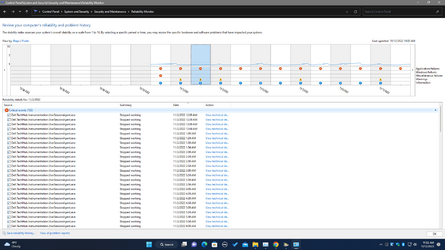
@Brink thank you so much for this guide. Is there any way to easily export all data directly from the Reliability Monitor? All I know to do is go though each instance and view technical details--copy data to clipboard for each instance. Attached is a screenshot showing over 110 critical error instances in one day. So going one by one would be more painful and tedious than a clean reinstall or image recovery.

Any way to export ALL events and details to save for debugging?

I have saved reliability history, but it only shows a tree xml view of events, and not the data included in the "technical details" of the logs.
 

Attachments

  • Screenshot (3).png
    Screenshot (3).png
    80.2 KB · Views: 184

My Computer My Computer

At a glance

Windows 11 Home, Version 22H2 Build 22621.819Intel(R) Core(TM) i7-12700, 2100 Mhz16GB DDR5, 1x16GB, at 4400MHz;AMD Radeon RX 6700XT
OS
Windows 11 Home, Version 22H2 Build 22621.819
Computer type
PC/Desktop
Manufacturer/Model
Dell XPS 8950
CPU
Intel(R) Core(TM) i7-12700, 2100 Mhz
Motherboard
Dell BaseBoard Product 0R6PCT
Memory
16GB DDR5, 1x16GB, at 4400MHz;
Graphics Card(s)
AMD Radeon RX 6700XT
Sound Card
Realtek Audio (Integrated is my guess)
Monitor(s) Displays
Samsung 23" LS24F352FFHNXZA Old HDMI
Screen Resolution
1920x1080 60Hz
Hard Drives
Kioxia KBG50ZNS256G 256 GB,
Raid w/
ST1000DM010-2EP102
1.0 TB Spinning Non SSD
PSU
750 W
Case
"750W Night Sky Bezel Chassis"
Cooling
Basis Fan, not upgraded to Increased Air or Water Cooling
Keyboard
Dell Wireless
Mouse
Logitech M310 Wireless USB w/ dongle
Internet Speed
ATT Fiber 300Mb
Browser
Prefer Chrome, but use Edge. I'm open to suggestions on this.
Antivirus
Windows Defender
Other Info
Killer E3100G 2.5 Gigabit Ethernet Controller
Killer(R) Wi-Fi 6E AX1675x 160MHz Wireless Network Adapter (210NGW)
w/ bluetooth

Bios 1.7 Dell -- w/errors of not started in past event log.
Hello @ddbbmm190010,

I'm not aware of a way to export all history at once either so far. :(
 

My Computers My Computers

  • At a glance

    Windows 11 Pro for WorkstationsIntel i7-8700K 5 GHz64 GB (4x16GB) G.SKILL TridentZ RGB DDR4 3600...ASUS ROG-STRIX-GTX1080TI-O11G-GAMING (11GB GD...
    OS
    Windows 11 Pro for Workstations
    Computer type
    PC/Desktop
    Manufacturer/Model
    Custom self build
    CPU
    Intel i7-8700K 5 GHz
    Motherboard
    ASUS ROG Maximus XI Formula Z390
    Memory
    64 GB (4x16GB) G.SKILL TridentZ RGB DDR4 3600 MHz (F4-3600C18D-32GTZR)
    Graphics Card(s)
    ASUS ROG-STRIX-GTX1080TI-O11G-GAMING (11GB GDDR5X)
    Sound Card
    Integrated Digital Audio (S/PDIF)
    Monitor(s) Displays
    2 x Samsung Odyssey G75 27"
    Screen Resolution
    2560x1440
    Hard Drives
    1TB Samsung 990 PRO M.2,
    4TB Samsung 990 PRO M.2,
    TerraMaster F8 SSD Plus NAS
    PSU
    Seasonic Prime Titanium 850W
    Case
    Thermaltake Core P3 wall mounted
    Cooling
    Corsair Hydro H115i
    Keyboard
    Amazon Basics Wired Full Keyboard MD005
    Mouse
    Logitech MX Master 4
    Internet Speed
    2 Gbps Download and 100 Mbps Upload
    Browser
    Chrome and Edge
    Antivirus
    Microsoft Defender
    Other Info
    Logitech Z625 speaker system,
    Logitech BRIO 4K Pro webcam,
    HP Color LaserJet Pro MFP M477fdn,
    CyberPower CP1500PFCLCD
    Galaxy S23 Plus phone
  • At a glance

    Windows 11 ProSnapdragon X Elite (12 core) 3.42 GHz16 GB LPDDR5x-7467 MHz
    Operating System
    Windows 11 Pro
    Computer type
    Laptop
    Manufacturer/Model
    Surface Laptop 7 Copilot+ PC
    CPU
    Snapdragon X Elite (12 core) 3.42 GHz
    Memory
    16 GB LPDDR5x-7467 MHz
    Monitor(s) Displays
    15" HDR
    Screen Resolution
    2496 x 1664
    Hard Drives
    1 TB SSD
    Internet Speed
    Wi-Fi 7 and Bluetooth 5.4
    Browser
    Chrome and Edge
    Antivirus
    Microsoft Defender
Hello, thank you for this tutorial @Brink

I am running Windows 11 Home 23H2 on my HP laptop

Is there a way to reset the Reliability Monitor?

Thank you
 

My Computer My Computer

At a glance

Windows 11 HomeIntel Core i7 1260P32 GBIntel Iris Xᵉ Graphics
OS
Windows 11 Home
Computer type
Laptop
Manufacturer/Model
HP Envy 17
CPU
Intel Core i7 1260P
Motherboard
Intel Integrated SoC
Memory
32 GB
Graphics Card(s)
Intel Iris Xᵉ Graphics
Sound Card
Realtek Audio
Monitor(s) Displays
17" 4K UHD IPS
Screen Resolution
3840 x 2160
Hard Drives
1 TB PCIe NVMe
Internet Speed
1 Gbit / 100 Mbps
Browser
MS Edge

My Computer My Computer

At a glance

Windows 11 ProIntel Core Ultra16GBIntel(R) Arc Graphics
OS
Windows 11 Pro
Computer type
Laptop
Manufacturer/Model
ASUS Zenbook 14 OLED
CPU
Intel Core Ultra
Memory
16GB
Graphics Card(s)
Intel(R) Arc Graphics
Sound Card
Realtek High Definition Audio(SST)
Screen Resolution
2880 x 1800
Hard Drives
500 GB NVMe SSD
Internet Speed
1,500Mbps
Browser
Firefox, Edge
Antivirus
Windows Defender
I use the batch file from here,


Download the zip file and extract it to the desktop. Right click the batch file and select 'run as administrator'.
You should see it working,

2023_12_25_1233.png


1703507985807.png
 

My Computers My Computers

  • At a glance

    Win 11 ProAMD Ryzen™ 7 7730U24GB Dual-Channel DDR4 @ 1596MHz (22-22-22-52)512MB ATI AMD Radeon Graphics (ASUStek Comput...
    OS
    Win 11 Pro
    Computer type
    Laptop
    Manufacturer/Model
    ASUS Vivobook
    CPU
    AMD Ryzen™ 7 7730U
    Motherboard
    M1605YA
    Memory
    24GB Dual-Channel DDR4 @ 1596MHz (22-22-22-52)
    Graphics Card(s)
    512MB ATI AMD Radeon Graphics (ASUStek Computer Inc)
    Monitor(s) Displays
    Generic PnP Monitor (1920x1200@60Hz) - P1 PLUS (1920x1080@59Hz)
    Screen Resolution
    1920 X 1200
    Hard Drives
    953GB Western Digital WD
    PSU
    45 Watts
    Mouse
    Lenovo Bluetooth.
    Internet Speed
    500 Mbps
    Browser
    Edge
    Antivirus
    Defender
  • At a glance

    Windows 11AMD Ryzen 7 5800H / 3.2 GHz32 GB DDR4 SDRAM 3200 MHzNVIDIA GeForce RTX 3060 6 GB GDDR6 SDRAM
    Operating System
    Windows 11
    Computer type
    Laptop
    Manufacturer/Model
    ACER NITRO
    CPU
    AMD Ryzen 7 5800H / 3.2 GHz
    Motherboard
    CZ Scala_CAS (FP6)
    Memory
    32 GB DDR4 SDRAM 3200 MHz
    Graphics card(s)
    NVIDIA GeForce RTX 3060 6 GB GDDR6 SDRAM
    Sound Card
    Realtek Audio. NVIDIA High Definition Audio
    Monitor(s) Displays
    15.6" LED backlight 1920 x 1080 (Full HD) 144 Hz
    Screen Resolution
    1920 x 1080 (Full HD)
    Hard Drives
    Samsung 970 Evo Plus 2TB NVMe M.2
    PSU
    180 Watt, 19.5 V
    Mouse
    Lenovo Bluetooth
    Internet Speed
    500 Mbps
    Browser
    Edge
    Antivirus
    Defender
Any way to export ALL events and details to save for debugging?


The reliability monitor data is similar to event viewer data.

The V2 log collector will create a text file of each system and application events with only a 30 day look back


The events can then be scanned using: edit > select all > edit > find >


Alternatively the event viewer can be scanned:

Chkdsk: Read Chkdsk Log in Event Viewer in Windows 10


Click tab to sort.
 

My Computer My Computer

At a glance

Windows 10Intel(R) Core(TM) i7-4800MQ CPU @ 2.70GHz16 GB Total: Manufacturer : Samsung MemoryTyp...NVIDIA Quadro K3100M; Intel(R) HD Graphics 4600
OS
Windows 10
Computer type
Laptop
Manufacturer/Model
HP
CPU
Intel(R) Core(TM) i7-4800MQ CPU @ 2.70GHz
Motherboard
Product : 190A Version : KBC Version 94.56
Memory
16 GB Total: Manufacturer : Samsung MemoryType : DDR3 FormFactor : SODIMM Capacity : 8GB Speed : 1600
Graphics Card(s)
NVIDIA Quadro K3100M; Intel(R) HD Graphics 4600
Sound Card
IDT High Definition Audio CODEC; PNP Device ID HDAUDIO\FUNC_01&VEN_111D&DEV_76E0
Hard Drives
Model Hitachi HTS727575A9E364
Antivirus
Microsoft Defender
Other Info
Mobile Workstation

My Computers My Computers

  • At a glance

    Windows 11 Pro for WorkstationsIntel i7-8700K 5 GHz64 GB (4x16GB) G.SKILL TridentZ RGB DDR4 3600...ASUS ROG-STRIX-GTX1080TI-O11G-GAMING (11GB GD...
    OS
    Windows 11 Pro for Workstations
    Computer type
    PC/Desktop
    Manufacturer/Model
    Custom self build
    CPU
    Intel i7-8700K 5 GHz
    Motherboard
    ASUS ROG Maximus XI Formula Z390
    Memory
    64 GB (4x16GB) G.SKILL TridentZ RGB DDR4 3600 MHz (F4-3600C18D-32GTZR)
    Graphics Card(s)
    ASUS ROG-STRIX-GTX1080TI-O11G-GAMING (11GB GDDR5X)
    Sound Card
    Integrated Digital Audio (S/PDIF)
    Monitor(s) Displays
    2 x Samsung Odyssey G75 27"
    Screen Resolution
    2560x1440
    Hard Drives
    1TB Samsung 990 PRO M.2,
    4TB Samsung 990 PRO M.2,
    TerraMaster F8 SSD Plus NAS
    PSU
    Seasonic Prime Titanium 850W
    Case
    Thermaltake Core P3 wall mounted
    Cooling
    Corsair Hydro H115i
    Keyboard
    Amazon Basics Wired Full Keyboard MD005
    Mouse
    Logitech MX Master 4
    Internet Speed
    2 Gbps Download and 100 Mbps Upload
    Browser
    Chrome and Edge
    Antivirus
    Microsoft Defender
    Other Info
    Logitech Z625 speaker system,
    Logitech BRIO 4K Pro webcam,
    HP Color LaserJet Pro MFP M477fdn,
    CyberPower CP1500PFCLCD
    Galaxy S23 Plus phone
  • At a glance

    Windows 11 ProSnapdragon X Elite (12 core) 3.42 GHz16 GB LPDDR5x-7467 MHz
    Operating System
    Windows 11 Pro
    Computer type
    Laptop
    Manufacturer/Model
    Surface Laptop 7 Copilot+ PC
    CPU
    Snapdragon X Elite (12 core) 3.42 GHz
    Memory
    16 GB LPDDR5x-7467 MHz
    Monitor(s) Displays
    15" HDR
    Screen Resolution
    2496 x 1664
    Hard Drives
    1 TB SSD
    Internet Speed
    Wi-Fi 7 and Bluetooth 5.4
    Browser
    Chrome and Edge
    Antivirus
    Microsoft Defender

My Computers My Computers

  • At a glance

    Win 11 ProAMD Ryzen™ 7 7730U24GB Dual-Channel DDR4 @ 1596MHz (22-22-22-52)512MB ATI AMD Radeon Graphics (ASUStek Comput...
    OS
    Win 11 Pro
    Computer type
    Laptop
    Manufacturer/Model
    ASUS Vivobook
    CPU
    AMD Ryzen™ 7 7730U
    Motherboard
    M1605YA
    Memory
    24GB Dual-Channel DDR4 @ 1596MHz (22-22-22-52)
    Graphics Card(s)
    512MB ATI AMD Radeon Graphics (ASUStek Computer Inc)
    Monitor(s) Displays
    Generic PnP Monitor (1920x1200@60Hz) - P1 PLUS (1920x1080@59Hz)
    Screen Resolution
    1920 X 1200
    Hard Drives
    953GB Western Digital WD
    PSU
    45 Watts
    Mouse
    Lenovo Bluetooth.
    Internet Speed
    500 Mbps
    Browser
    Edge
    Antivirus
    Defender
  • At a glance

    Windows 11AMD Ryzen 7 5800H / 3.2 GHz32 GB DDR4 SDRAM 3200 MHzNVIDIA GeForce RTX 3060 6 GB GDDR6 SDRAM
    Operating System
    Windows 11
    Computer type
    Laptop
    Manufacturer/Model
    ACER NITRO
    CPU
    AMD Ryzen 7 5800H / 3.2 GHz
    Motherboard
    CZ Scala_CAS (FP6)
    Memory
    32 GB DDR4 SDRAM 3200 MHz
    Graphics card(s)
    NVIDIA GeForce RTX 3060 6 GB GDDR6 SDRAM
    Sound Card
    Realtek Audio. NVIDIA High Definition Audio
    Monitor(s) Displays
    15.6" LED backlight 1920 x 1080 (Full HD) 144 Hz
    Screen Resolution
    1920 x 1080 (Full HD)
    Hard Drives
    Samsung 970 Evo Plus 2TB NVMe M.2
    PSU
    180 Watt, 19.5 V
    Mouse
    Lenovo Bluetooth
    Internet Speed
    500 Mbps
    Browser
    Edge
    Antivirus
    Defender
I am attempting work out why my MS Access has suddenly stopped responding when I attempt to open a report. Event viewer states "The program MSACCESS.EXE version 16.0.18623.20178 stopped interacting with Windows and was closed. To see if more information about the problem is available, check the problem history in the Security and Maintenance control panel."
I cannot see any "problem history" under the Security and Maintenance entry of the control panel. However, there IS a View Reliability History. But clicking on that just brings up the same message - sending me around in circles? Am I missing something?
 

My Computer My Computer

At a glance

Windows 11i9-12900K, 3200 MHz, 16 Cores32GB
OS
Windows 11
Computer type
PC/Desktop
Manufacturer/Model
Dell
CPU
i9-12900K, 3200 MHz, 16 Cores
Memory
32GB
I am attempting work out why my MS Access has suddenly stopped responding when I attempt to open a report. Event viewer states "The program MSACCESS.EXE version 16.0.18623.20178 stopped interacting with Windows and was closed. To see if more information about the problem is available, check the problem history in the Security and Maintenance control panel."
I cannot see any "problem history" under the Security and Maintenance entry of the control panel. However, there IS a View Reliability History. But clicking on that just brings up the same message - sending me around in circles? Am I missing something?

Hello, :alien:

You could try reinstalling Access to try and repair its installation, and hopefully fix it.
 

My Computers My Computers

  • At a glance

    Windows 11 Pro for WorkstationsIntel i7-8700K 5 GHz64 GB (4x16GB) G.SKILL TridentZ RGB DDR4 3600...ASUS ROG-STRIX-GTX1080TI-O11G-GAMING (11GB GD...
    OS
    Windows 11 Pro for Workstations
    Computer type
    PC/Desktop
    Manufacturer/Model
    Custom self build
    CPU
    Intel i7-8700K 5 GHz
    Motherboard
    ASUS ROG Maximus XI Formula Z390
    Memory
    64 GB (4x16GB) G.SKILL TridentZ RGB DDR4 3600 MHz (F4-3600C18D-32GTZR)
    Graphics Card(s)
    ASUS ROG-STRIX-GTX1080TI-O11G-GAMING (11GB GDDR5X)
    Sound Card
    Integrated Digital Audio (S/PDIF)
    Monitor(s) Displays
    2 x Samsung Odyssey G75 27"
    Screen Resolution
    2560x1440
    Hard Drives
    1TB Samsung 990 PRO M.2,
    4TB Samsung 990 PRO M.2,
    TerraMaster F8 SSD Plus NAS
    PSU
    Seasonic Prime Titanium 850W
    Case
    Thermaltake Core P3 wall mounted
    Cooling
    Corsair Hydro H115i
    Keyboard
    Amazon Basics Wired Full Keyboard MD005
    Mouse
    Logitech MX Master 4
    Internet Speed
    2 Gbps Download and 100 Mbps Upload
    Browser
    Chrome and Edge
    Antivirus
    Microsoft Defender
    Other Info
    Logitech Z625 speaker system,
    Logitech BRIO 4K Pro webcam,
    HP Color LaserJet Pro MFP M477fdn,
    CyberPower CP1500PFCLCD
    Galaxy S23 Plus phone
  • At a glance

    Windows 11 ProSnapdragon X Elite (12 core) 3.42 GHz16 GB LPDDR5x-7467 MHz
    Operating System
    Windows 11 Pro
    Computer type
    Laptop
    Manufacturer/Model
    Surface Laptop 7 Copilot+ PC
    CPU
    Snapdragon X Elite (12 core) 3.42 GHz
    Memory
    16 GB LPDDR5x-7467 MHz
    Monitor(s) Displays
    15" HDR
    Screen Resolution
    2496 x 1664
    Hard Drives
    1 TB SSD
    Internet Speed
    Wi-Fi 7 and Bluetooth 5.4
    Browser
    Chrome and Edge
    Antivirus
    Microsoft Defender
Thanks. I seem to have managed to fix it (possibly by running the quick fix?). However, the question still remains as to why the reliability history seems to point to itself.
 

My Computer My Computer

At a glance

Windows 11i9-12900K, 3200 MHz, 16 Cores32GB
OS
Windows 11
Computer type
PC/Desktop
Manufacturer/Model
Dell
CPU
i9-12900K, 3200 MHz, 16 Cores
Memory
32GB
Thanks. I seem to have managed to fix it (possibly by running the quick fix?). However, the question still remains as to why the reliability history seems to point to itself.

No telling. Possibly a bug.
 

My Computers My Computers

  • At a glance

    Windows 11 Pro for WorkstationsIntel i7-8700K 5 GHz64 GB (4x16GB) G.SKILL TridentZ RGB DDR4 3600...ASUS ROG-STRIX-GTX1080TI-O11G-GAMING (11GB GD...
    OS
    Windows 11 Pro for Workstations
    Computer type
    PC/Desktop
    Manufacturer/Model
    Custom self build
    CPU
    Intel i7-8700K 5 GHz
    Motherboard
    ASUS ROG Maximus XI Formula Z390
    Memory
    64 GB (4x16GB) G.SKILL TridentZ RGB DDR4 3600 MHz (F4-3600C18D-32GTZR)
    Graphics Card(s)
    ASUS ROG-STRIX-GTX1080TI-O11G-GAMING (11GB GDDR5X)
    Sound Card
    Integrated Digital Audio (S/PDIF)
    Monitor(s) Displays
    2 x Samsung Odyssey G75 27"
    Screen Resolution
    2560x1440
    Hard Drives
    1TB Samsung 990 PRO M.2,
    4TB Samsung 990 PRO M.2,
    TerraMaster F8 SSD Plus NAS
    PSU
    Seasonic Prime Titanium 850W
    Case
    Thermaltake Core P3 wall mounted
    Cooling
    Corsair Hydro H115i
    Keyboard
    Amazon Basics Wired Full Keyboard MD005
    Mouse
    Logitech MX Master 4
    Internet Speed
    2 Gbps Download and 100 Mbps Upload
    Browser
    Chrome and Edge
    Antivirus
    Microsoft Defender
    Other Info
    Logitech Z625 speaker system,
    Logitech BRIO 4K Pro webcam,
    HP Color LaserJet Pro MFP M477fdn,
    CyberPower CP1500PFCLCD
    Galaxy S23 Plus phone
  • At a glance

    Windows 11 ProSnapdragon X Elite (12 core) 3.42 GHz16 GB LPDDR5x-7467 MHz
    Operating System
    Windows 11 Pro
    Computer type
    Laptop
    Manufacturer/Model
    Surface Laptop 7 Copilot+ PC
    CPU
    Snapdragon X Elite (12 core) 3.42 GHz
    Memory
    16 GB LPDDR5x-7467 MHz
    Monitor(s) Displays
    15" HDR
    Screen Resolution
    2496 x 1664
    Hard Drives
    1 TB SSD
    Internet Speed
    Wi-Fi 7 and Bluetooth 5.4
    Browser
    Chrome and Edge
    Antivirus
    Microsoft Defender
Here is a powershell script (.ps1) for cleaning all event viewer logs and reliability monitor at once without windows or messages (silent) or waiting to clean :

Powershell:
# Clear reliability history totally

# Clear all event logs for current computer
(Get-EventLog -LogName *).ForEach({ Clear-EventLog $_.Log -ea SilentlyContinue })

# Clear all Problem reports
$path = "C:\ProgramData\Microsoft\Windows\WER\ReportArchive\*"
Get-ChildItem -Path $path | Remove-Item -Recurse -Force
# Clear reliability history totally

# Clear all event logs for current computer
(Get-EventLog -LogName *).ForEach({ Clear-EventLog $_.Log -ea SilentlyContinue })

# Clear all Problem reports
$path = "C:\ProgramData\Microsoft\Windows\WER\ReportArchive\*"
Get-ChildItem -Path $path | Remove-Item -Recurse -Force
 

My Computer My Computer

At a glance

Windows 11 ProIntel 113700H16GBNVIDIA RTX 3050 ti
OS
Windows 11 Pro
Computer type
Laptop
Manufacturer/Model
HP Pavilion 17 cd2205nw
CPU
Intel 113700H
Memory
16GB
Graphics Card(s)
NVIDIA RTX 3050 ti
Screen Resolution
1980x1020
Hard Drives
Micron 512GB
Mouse
Logitech
Internet Speed
100Mbs
Browser
Vivaldi , Edge
Antivirus
Windows defender

My Computer My Computer

At a glance

Windows 10Intel(R) Core(TM) i7-4800MQ CPU @ 2.70GHz16 GB Total: Manufacturer : Samsung MemoryTyp...NVIDIA Quadro K3100M; Intel(R) HD Graphics 4600
OS
Windows 10
Computer type
Laptop
Manufacturer/Model
HP
CPU
Intel(R) Core(TM) i7-4800MQ CPU @ 2.70GHz
Motherboard
Product : 190A Version : KBC Version 94.56
Memory
16 GB Total: Manufacturer : Samsung MemoryType : DDR3 FormFactor : SODIMM Capacity : 8GB Speed : 1600
Graphics Card(s)
NVIDIA Quadro K3100M; Intel(R) HD Graphics 4600
Sound Card
IDT High Definition Audio CODEC; PNP Device ID HDAUDIO\FUNC_01&VEN_111D&DEV_76E0
Hard Drives
Model Hitachi HTS727575A9E364
Antivirus
Microsoft Defender
Other Info
Mobile Workstation

Similar Windows 11 Tutorials

Back
Top Bottom