Virtual PC memory issues


asadermo

Well-known member
Local time
6:25 AM
Posts
41
OS
Win 11
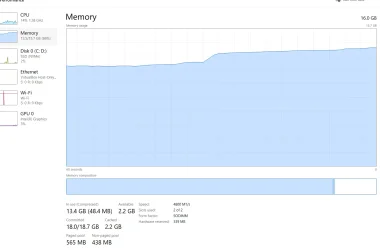
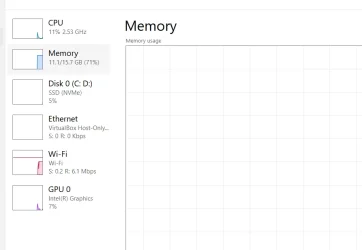
I have installed a virtual machine on this laptop and allocated only 2 cores out of 20 and 4 GB RAM out of 16 GB. However, the system becomes slow and memory usage increases to around 72%. This is unusual because the Intel i7 processor has 20 cores and 16 GB RAM, and I have allocated only 25% of the total memory. The virtual machine is running Windows 7 with only a few high-performance tasks or applications installed.
 
Windows Build/Version
Version 24H2 ( OS Build 26100. 3323)

Attachments
  • Screenshot 2026-03-21 185111.webp
    Screenshot 2026-03-21 185111.webp
    15.7 KB · Views: 1

My Computer

System One

  • OS
    Win 11
    Computer type
    Laptop
    Manufacturer/Model
    DELL VOSTRO 3515
    CPU
    AMD RYZEN 5
    Memory
    8 GB
    Graphics Card(s)
    AMD RADEON
I have installed a virtual machine on this laptop and allocated only 2 cores out of 20 and 4 GB RAM out of 16 GB. However, the system becomes slow and memory usage increases to around 72%. This is unusual because the Intel i7 processor has 20 cores and 16 GB RAM, and I have allocated only 25% of the total memory. The virtual machine is running Windows 7 with only a few high-performance tasks or applications installed.
What HOST are you running the VM on, what's the VM software and what's the GUEST you are running and how much RAM and vCPU's have you allocated. Note that for VM's there isn't a 1 :1 relationship between RAM requirements for Physical and Virtual machines.

An i7 of any sort can easily run a whole slew of VM's even concurrently - note though any W11 guest needs a 4GB RAM allocation as a bare minimum - so if you allocate 8GB for a W11 VM that should be more than enough. The other issue is decent HDD / SSD performance. So you need to ensure that the disk device where your VM is on is not "over committed" with being used for other Host processes.

An i7 running W7 as a VM should hardly know that it's running anything extra !!!!

Cheers
jimbo
 

My Computer

System One

  • OS
    Windows XP,11 Linux Fedora Rawhide pre-release 45
    Computer type
    PC/Desktop
    CPU
    2 X Intel i7
    Screen Resolution
    4KUHD X 2
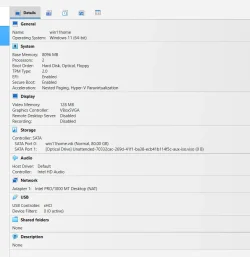
The VM software is the virtualbox, windows 11 is installed on both HOST and GUEST, A screenshot is attached herein for the deatils information.
 

Attachments

  • Screenshot 2026-03-20 121648.webp
    Screenshot 2026-03-20 121648.webp
    46.6 KB · Views: 1

My Computer

System One

  • OS
    Win 11
    Computer type
    Laptop
    Manufacturer/Model
    DELL VOSTRO 3515
    CPU
    AMD RYZEN 5
    Memory
    8 GB
    Graphics Card(s)
    AMD RADEON

My Computers

System One System Two

  • OS
    Windows 11 Home
    Computer type
    PC/Desktop
    Manufacturer/Model
    HP 24" AiO
    CPU
    Ryzen 7 5825u
    Motherboard
    HP
    Memory
    64GB DDR4 3200
    Graphics Card(s)
    Ryzen 7 5825u
    Sound Card
    RealTek
    Monitor(s) Displays
    24" HP AiO
    Screen Resolution
    1920 x 1080 @60 Hz
    Hard Drives
    1TB WD Blue SN580 M2 SSD Partitioned.
    2x 1TB USB HDD External Backup/Storage.
    PSU
    90W external power brick
    Case
    24" All in One
    Cooling
    Default Air Cooling
    Keyboard
    HP WiFi UK extended
    Mouse
    HP WiFi 3 Button
    Internet Speed
    1GB full fibre
    Browser
    Edge & Firefox
    Antivirus
    AVG Internet Security/Windows Defender
    Other Info
    Mainly Open Source Software
  • Operating System
    Ubuntu 22.04.5 LTS
    Computer type
    Laptop
    Manufacturer/Model
    Dell 13" Latitude 2017
    CPU
    i5 7200u
    Motherboard
    Dell
    Memory
    16GB DDR4
    Graphics card(s)
    Intel
    Sound Card
    Intel
    Monitor(s) Displays
    13" Dell Laptop
    Hard Drives
    250GB Crucial 2.5" SSD
    Mouse
    Generic WiFi 3 button
    Internet Speed
    WiFi only
    Browser
    Firefox
    Antivirus
    ClamAV TK
    Other Info
    Mainly Open Source Software
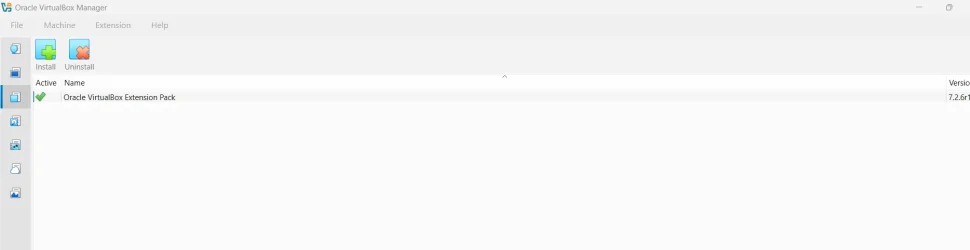
Yes extension pack installed within VirtualBox but the issue is still exist
 

Attachments

  • Screenshot 2026-03-23 101702.webp
    Screenshot 2026-03-23 101702.webp
    40.4 KB · Views: 1
  • Screenshot 2026-03-23 101906.webp
    Screenshot 2026-03-23 101906.webp
    12.1 KB · Views: 2

My Computer

System One

  • OS
    Win 11
    Computer type
    Laptop
    Manufacturer/Model
    DELL VOSTRO 3515
    CPU
    AMD RYZEN 5
    Memory
    8 GB
    Graphics Card(s)
    AMD RADEON
@asadermo

I'd get rid of "nested paging and virtualisation" and turn off HYPER-V if you aren't using it. Plus with that i7 up the vCPU count for the VM to something like 8.

I'd also disable secure boot for the VM assuming you are using it (From the VM's BIOS NOT THE HOST'S if you can) and disable any sort of bit locker / other encryption on the VM as well. As for paging - better to dedicate specific fast devices as well if you can both for HOST and GUEST - avoid sharing. Slow I/O or over committed I/O will kill any system, real or virtual and for ANY OS !!. On the VM i'd turn of indexing too if you've enabled that -- not sure why you'd need it on the type of VM you are running.

Cheers
jimbo
 

My Computer

System One

  • OS
    Windows XP,11 Linux Fedora Rawhide pre-release 45
    Computer type
    PC/Desktop
    CPU
    2 X Intel i7
    Screen Resolution
    4KUHD X 2
It seems to me that you are misunderstanding the memory it takes to run the guest OS.

Your pc needs around 4GB just to run host Windows, then some memory say 2 to 3 GB to run the virtualbox app and then 4GB to run yiur Windows 7 host within virtualbox, so to use 10 or 11 GB seems pretty reasonable to me. As @jimbo45 says, you should probably increase cores to around 8.

Note: if your guest OS needs more than 4GB RAM, it will use "virtual" pagefiling and that will be another memory overhead at the host level. It is more efficient to increase the RAM in the guest OS rather than relying on virtual pagefiling.

Frankly, you will get significantly better performance using Hyper-V provided you do not need sound in your Windows 7 guest.
 

My Computer

System One

  • OS
    Windows 11 Pro + Win11 Canary VM.
    Computer type
    Laptop
    Manufacturer/Model
    ASUS Zenbook 14
    CPU
    I9 13th gen i9-13900H 2.60 GHZ
    Motherboard
    Yep, Laptop has one.
    Memory
    16 GB soldered
    Graphics Card(s)
    Integrated Intel Iris XE
    Sound Card
    Realtek built in
    Monitor(s) Displays
    laptop OLED screen
    Screen Resolution
    2880x1800 touchscreen
    Hard Drives
    1 TB NVME SSD (only weakness is only one slot)
    PSU
    Internal + 65W thunderbolt USB4 charger
    Case
    Yep, got one
    Cooling
    Stella Artois (UK pint cans - 568 ml) - extra cost.
    Keyboard
    Built in UK keybd
    Mouse
    Bluetooth , wireless dongled, wired
    Internet Speed
    900 mbs (ethernet), wifi 6 typical 350-450 mb/s both up and down
    Browser
    Edge
    Antivirus
    Defender
    Other Info
    TPM 2.0, 2xUSB4 thunderbolt, 1xUsb3 (usb a), 1xUsb-c, hdmi out, 3.5 mm audio out/in combo, ASUS backlit trackpad (inc. switchable number pad)

    Macrium Reflect Home V8
    Office 365 Family (6 users each 1TB onedrive space)
    Hyper-V (a vm runs almost as fast as my older laptop)
According to his system specs, he’s running an AMD Ryzen with 11 Home, so Hyper-V would not be an option.
 

My Computers

System One System Two

  • OS
    Windows 11 build 26200.7296 / WSL 2 running Ubuntu
    Computer type
    Laptop
    Manufacturer/Model
    Dell Inspiron 14 5430
    CPU
    Intel i7-1355U
    Motherboard
    Dell 0GMW80
    Memory
    16GB
    Graphics Card(s)
    Intel Iris XE
    Sound Card
    Realtek
    Monitor(s) Displays
    Dell 14", LG 32" Curved Wide screen monitor and LG Ultrawide 26"
    Screen Resolution
    1920 x 1200 @ 60Hz, 1920 x 1080 @ 100Hz and 2560 x 1080 @ 60Hz
    Hard Drives
    Samsung 990 Pro 1TB NVME Gen 4 M.2 SSD
    PSU
    Dell
    Case
    Dell
    Cooling
    Dell
    Keyboard
    Dell KM3322W
    Mouse
    Dell Trackpad or Dell KM3322W
    Internet Speed
    900mb down / 400mb up FTTP
    Browser
    Edge 142.0.3595.90
    Antivirus
    Windows Defender
    Other Info
    Windows 365
    1TB OneDrive
    Outlook Classic
    Visual Studio Code running in WSL
    Python 3.14
    Samsung Magician
    Garmin Express
    Dell TB16 Thunderbolt dock
    WSL
    WEI Score: 8.3
  • Operating System
    Windows 11
    Computer type
    Tablet
    Manufacturer/Model
    Microsoft Surface Pro 7
    CPU
    Core i5 - 1035G4
    Motherboard
    Microsoft
    Memory
    8GB
    Graphics card(s)
    Intel Iris Plus
    Monitor(s) Displays
    Surface touch
    Screen Resolution
    2736 x 1824
    Hard Drives
    128GB
    PSU
    Microsoft
    Case
    Microsoft Keyboard
    Cooling
    None
    Keyboard
    Microsoft Surface Keyboard
    Mouse
    Microsoft Arc Intellimouse
    Internet Speed
    900mb / 400mb FTTP
    Browser
    Edge
    Antivirus
    Windows Defender

Latest Support Threads

Back
Top Bottom