Solved Visual C++ installation failure


Bug locker

Well-known member
Member
VIP
Local time
4:41 AM
Posts
644
Location
Athens
OS
Windows 11 Pro
Hey all.

I try to install battlefield via the EA app. The download is ended but it cant install it cause of the following error , when it tries to install Visual C++ :
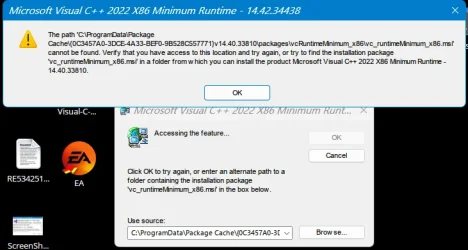
1766430200845.webp


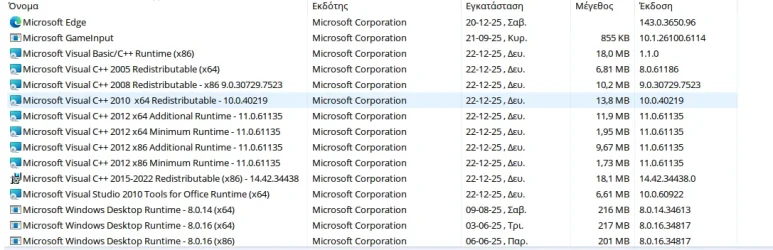
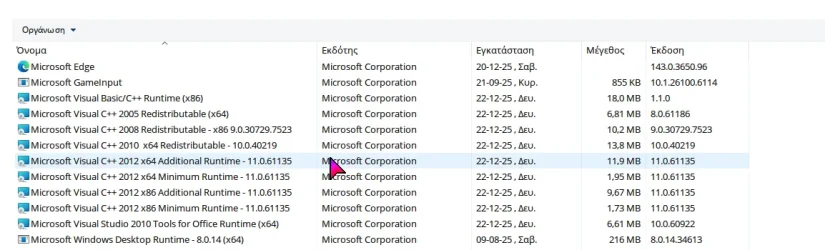
C++ state at control panel :
1766430361415.webp

Any suggestions ?

Thanks.
 

My Computer

System One

  • OS
    Windows 11 Pro
    Computer type
    Laptop
    Manufacturer/Model
    HP Pavilion 17 cd2205nw
    CPU
    Intel 113700H
    Memory
    16GB
    Graphics Card(s)
    NVIDIA RTX 3050 ti
    Screen Resolution
    1980x1020
    Hard Drives
    Micron 512GB
    Mouse
    Logitech
    Internet Speed
    100Mbs
    Browser
    Vivaldi , Edge
    Antivirus
    Windows defender

Try installing the Visual C++ 2022 file from Microsoft.

Here is the download link for Microsoft Visual C++ 2022 Redistributable (x64)


My Computer

System One

  • OS
    Windows 11
    Computer type
    PC/Desktop
    Manufacturer/Model
    HP Pavilion
    CPU
    AMD Ryzen 7 5700G
    Motherboard
    Erica6
    Memory
    Micron Technology DDR4-3200 16GB
    Graphics Card(s)
    NVIDIA GeForce RTX 3060
    Sound Card
    Realtek ALC671
    Monitor(s) Displays
    Samsung SyncMaster U28E590
    Screen Resolution
    3840 x 2160
    Hard Drives
    SAMSUNG MZVLQ1T0HALB-000H1
Try installing the Visual C++ 2022 file from Microsoft.

Here is the download link for Microsoft Visual C++ 2022 Redistributable (x64)


1766433396119.webp

Its also at the control panel list...
 

My Computer

System One

  • OS
    Windows 11 Pro
    Computer type
    Laptop
    Manufacturer/Model
    HP Pavilion 17 cd2205nw
    CPU
    Intel 113700H
    Memory
    16GB
    Graphics Card(s)
    NVIDIA RTX 3050 ti
    Screen Resolution
    1980x1020
    Hard Drives
    Micron 512GB
    Mouse
    Logitech
    Internet Speed
    100Mbs
    Browser
    Vivaldi , Edge
    Antivirus
    Windows defender
Then you have the other problem, what happens when you start the game?
 

My Computer

System One

  • OS
    Windows 11
    Computer type
    PC/Desktop
    Manufacturer/Model
    HP Pavilion
    CPU
    AMD Ryzen 7 5700G
    Motherboard
    Erica6
    Memory
    Micron Technology DDR4-3200 16GB
    Graphics Card(s)
    NVIDIA GeForce RTX 3060
    Sound Card
    Realtek ALC671
    Monitor(s) Displays
    Samsung SyncMaster U28E590
    Screen Resolution
    3840 x 2160
    Hard Drives
    SAMSUNG MZVLQ1T0HALB-000H1
Cant start the game , because it cant end the installation.
 

My Computer

System One

  • OS
    Windows 11 Pro
    Computer type
    Laptop
    Manufacturer/Model
    HP Pavilion 17 cd2205nw
    CPU
    Intel 113700H
    Memory
    16GB
    Graphics Card(s)
    NVIDIA RTX 3050 ti
    Screen Resolution
    1980x1020
    Hard Drives
    Micron 512GB
    Mouse
    Logitech
    Internet Speed
    100Mbs
    Browser
    Vivaldi , Edge
    Antivirus
    Windows defender
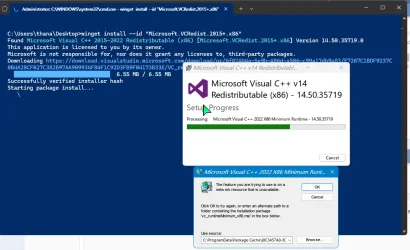
The link provided is for the 64-bit runtime, but the application is complaining about the 32-bit runtime. winget install --id "Microsoft.VCRedist.2015+.x86" should install the latest 2015-2022 32-bit runtime. Hopefully the app doesn't want a specific version, as badly-written apps sometimes do.
 

My Computer

System One

  • OS
    Windows 11 Pro 25H2
    Computer type
    PC/Desktop
    Manufacturer/Model
    Intel NUC12WSHi7
    CPU
    12th Gen Core i7-1260P
    Motherboard
    NUC12WSBi7
    Memory
    64 GB Micron PC4-25600
    Graphics Card(s)
    Intel Iris Xe Graphics
    Sound Card
    on-board Realtek HD Audio
    Monitor(s) Displays
    Dell U3219Q
    Screen Resolution
    3840 x 2160
    Hard Drives
    Samsung SSD 990 PRO 1TB
    Crucial MX500 2 TB
    Antivirus
    Microsoft Defender
The link provided is for the 64-bit runtime, but the application is complaining about the 32-bit runtime. winget install --id "Microsoft.VCRedist.2015+.x86" should install the latest 2015-2022 32-bit runtime. Hopefully the app doesn't want a specific version, as badly-written apps sometimes do.

1766436814842.webp


.......
 

My Computer

System One

  • OS
    Windows 11 Pro
    Computer type
    Laptop
    Manufacturer/Model
    HP Pavilion 17 cd2205nw
    CPU
    Intel 113700H
    Memory
    16GB
    Graphics Card(s)
    NVIDIA RTX 3050 ti
    Screen Resolution
    1980x1020
    Hard Drives
    Micron 512GB
    Mouse
    Logitech
    Internet Speed
    100Mbs
    Browser
    Vivaldi , Edge
    Antivirus
    Windows defender
Are you able to remove the 2015-2022 x86 runtime that's already installed?
 

My Computer

System One

  • OS
    Windows 11 Pro 25H2
    Computer type
    PC/Desktop
    Manufacturer/Model
    Intel NUC12WSHi7
    CPU
    12th Gen Core i7-1260P
    Motherboard
    NUC12WSBi7
    Memory
    64 GB Micron PC4-25600
    Graphics Card(s)
    Intel Iris Xe Graphics
    Sound Card
    on-board Realtek HD Audio
    Monitor(s) Displays
    Dell U3219Q
    Screen Resolution
    3840 x 2160
    Hard Drives
    Samsung SSD 990 PRO 1TB
    Crucial MX500 2 TB
    Antivirus
    Microsoft Defender
Hey all.

I try to install battlefield via the EA app. The download is ended but it cant install it cause of the following error , when it tries to install Visual C++ :

View attachment 157774


C++ state at control panel :
View attachment 157775

Any suggestions ?

Thanks.

If its an orphan file, you have to purge all instances of it from the registry BEFORE you can upgrade Visual C++.

Here you have to find and delete all references to 14.40.338 from the registry. With an orphan, there may be no viable installer packages to reinstall it available on the Internet.

This includes both x64 and x86 versions.
 
Last edited:

My Computers

System One System Two

  • OS
    Windows 11 Education For 25H2
    Computer type
    Laptop
    Manufacturer/Model
    HP ZBook G2
    CPU
    Intel® Core i7 5500u
    Motherboard
    HP
    Memory
    8 GB
    Graphics Card(s)
    Intel HD Family Graphics 5500 AMD Firepro 4150M
    Sound Card
    Realtek High Audio
    Hard Drives
    1 TB SSD
    Mouse
    HP USB Mouse
    Antivirus
    Windows Defender
  • Operating System
    Windows 11 Pro For Workstations 25H2
    Computer type
    Laptop
    Manufacturer/Model
    HP Zbook G4
    CPU
    Xeon 1535m v6
    Motherboard
    HP
    Memory
    32 GB
    Graphics card(s)
    AMD Quadro Pro 4100
    Sound Card
    Bang and Olufson Audio
    Hard Drives
    1TB SSD
    Mouse
    HP USB Mouse
    Antivirus
    Windows Defender

My Computer

System One

  • OS
    Windows 11 Pro
    Computer type
    Laptop
    Manufacturer/Model
    HP Pavilion 17 cd2205nw
    CPU
    Intel 113700H
    Memory
    16GB
    Graphics Card(s)
    NVIDIA RTX 3050 ti
    Screen Resolution
    1980x1020
    Hard Drives
    Micron 512GB
    Mouse
    Logitech
    Internet Speed
    100Mbs
    Browser
    Vivaldi , Edge
    Antivirus
    Windows defender
If its an orphan file, you have to purge all instances of it from the registry BEFORE you can upgrade Visual C++.

How ?
 

My Computer

System One

  • OS
    Windows 11 Pro
    Computer type
    Laptop
    Manufacturer/Model
    HP Pavilion 17 cd2205nw
    CPU
    Intel 113700H
    Memory
    16GB
    Graphics Card(s)
    NVIDIA RTX 3050 ti
    Screen Resolution
    1980x1020
    Hard Drives
    Micron 512GB
    Mouse
    Logitech
    Internet Speed
    100Mbs
    Browser
    Vivaldi , Edge
    Antivirus
    Windows defender

Look at my revised post. I had the same issue and after deleting ALL registry entries that listed 14.40.338, I was able to finally upgrade Visual C++. You may not have removed any installed redistributable but sometimes they can get corrupted.

And that can prevent you from upgrading your Visual C++ Redistributables.
 

My Computers

System One System Two

  • OS
    Windows 11 Education For 25H2
    Computer type
    Laptop
    Manufacturer/Model
    HP ZBook G2
    CPU
    Intel® Core i7 5500u
    Motherboard
    HP
    Memory
    8 GB
    Graphics Card(s)
    Intel HD Family Graphics 5500 AMD Firepro 4150M
    Sound Card
    Realtek High Audio
    Hard Drives
    1 TB SSD
    Mouse
    HP USB Mouse
    Antivirus
    Windows Defender
  • Operating System
    Windows 11 Pro For Workstations 25H2
    Computer type
    Laptop
    Manufacturer/Model
    HP Zbook G4
    CPU
    Xeon 1535m v6
    Motherboard
    HP
    Memory
    32 GB
    Graphics card(s)
    AMD Quadro Pro 4100
    Sound Card
    Bang and Olufson Audio
    Hard Drives
    1TB SSD
    Mouse
    HP USB Mouse
    Antivirus
    Windows Defender
I've seen that error a few times over the years. I think I usually completely uninstall it with Revo Uninstaller, then try installing it again. I think I've even cleaned it up manually in the past.
 

My Computers

System One System Two

  • OS
    Windows 11 Pro
    Computer type
    PC/Desktop
    Manufacturer/Model
    Stigg's Build
    CPU
    Intel Core i9-10900X
    Motherboard
    GIGABYTE X299X DESIGNARE 10G
    Memory
    Corsair 64 GB (4 x 16 GB) CMW64GX4M4C3000C15 Vengeance RGB Pro 3000Mhz DDR4
    Graphics Card(s)
    GIGABYTE GeForce GTX 1660 Super Mini ITX 6 GB OC
    Sound Card
    Realtek ALC1220
    Monitor(s) Displays
    Samsung 27" FHD LED FreeSync Gaming Monitor (LS27F350FHEXXY)
    Screen Resolution
    1920 x 1080
    Hard Drives
    Samsung 970 Pro Series 1TB M.2 2280 NVMe SSD
    Western Digital Red Pro WD8003FFBX-68B9AN0 8 TB, 7200 RPM, SATA-III
    Western Digital Red Pro WD8003FFBX-68B9AN0 8 TB, 7200 RPM, SATA-III
    PSU
    Corsair HX1200 1200W 80 Plus Platinum
    Case
    Fractal Design Define 7 Black Solid Case
    Cooling
    Noctua NH-D15 Chromax Black
    Keyboard
    Razer Ornata V2
    Mouse
    Razer DeathAdder Essential
    Internet Speed
    FTTN 100Mbps / 40Mbps
    Browser
    Mozilla Firefox
    Antivirus
    N/A
    Other Info
    Logitech BRIO 4k Ultra HD USB-C Webcam
  • Operating System
    Windows 10 Pro
    Computer type
    Laptop
    Manufacturer/Model
    ASUS ROG Zephyrus M GM501GS
    CPU
    Core i7-8750H
    Motherboard
    Zephyrus M GM501GS
    Memory
    SK Hynix 32 GB (2 x 16 GB) HMA82GS6CJR8N-VK 16 GB DDR4-2666 DDR4 SDRAM
    Graphics card(s)
    NVIDIA GeForce GTX 1070
    Sound Card
    Realtek ALC294
    Monitor(s) Displays
    AU Optronics B156HAN07.1 [15.6" LCD]
    Screen Resolution
    1920 x 1080
    Hard Drives
    Samsung MZVKW512HMJP-00000 512 GB, PCI-E 3.0 x4
    Samsung SSD 860 QVO 4TB 4 TB, SATA-III
    PSU
    N/A
    Case
    N/A
    Cooling
    N/A
    Keyboard
    PC/AT Enhanced PS2 Keyboard (101/102-Key)
    Mouse
    Razer DeathAdder Essential
    Internet Speed
    FTTN 100Mbps / 40Mbps
    Browser
    Mozilla Firefox
    Antivirus
    N/A
    Other Info
    USB2.0 HD UVC Webcam
I've seen that error a few times over the years. I think I usually completely uninstall it with Revo Uninstaller, then try installing it again. I think I've even cleaned it up manually in the past.

14.x version isnt installed so it not appears at control panel or Revo UI.
 

My Computer

System One

  • OS
    Windows 11 Pro
    Computer type
    Laptop
    Manufacturer/Model
    HP Pavilion 17 cd2205nw
    CPU
    Intel 113700H
    Memory
    16GB
    Graphics Card(s)
    NVIDIA RTX 3050 ti
    Screen Resolution
    1980x1020
    Hard Drives
    Micron 512GB
    Mouse
    Logitech
    Internet Speed
    100Mbs
    Browser
    Vivaldi , Edge
    Antivirus
    Windows defender
I played that game without Visual C++ 2022 i think problem is EA app needing this Visual C++ then the game.
 

My Computer

System One

  • OS
    Windows 11
    Computer type
    PC/Desktop
    Manufacturer/Model
    HP Pavilion
    CPU
    AMD Ryzen 7 5700G
    Motherboard
    Erica6
    Memory
    Micron Technology DDR4-3200 16GB
    Graphics Card(s)
    NVIDIA GeForce RTX 3060
    Sound Card
    Realtek ALC671
    Monitor(s) Displays
    Samsung SyncMaster U28E590
    Screen Resolution
    3840 x 2160
    Hard Drives
    SAMSUNG MZVLQ1T0HALB-000H1
It solved , but i am not sure how. Thas what i did with that order :

1) Tried all the solutions posted here and restart.
2) Tried to install : failed.
3) I uninstalled all 14.xx c++ versions (2015-2022) with the Microsoft's uninstall troubleshooter.
4) Restart
5) Tried to install : success
6) Finally i can see c++ 2015-2022 at the control panel :

1766488320915.webp

Thanks all for the help.
 

My Computer

System One

  • OS
    Windows 11 Pro
    Computer type
    Laptop
    Manufacturer/Model
    HP Pavilion 17 cd2205nw
    CPU
    Intel 113700H
    Memory
    16GB
    Graphics Card(s)
    NVIDIA RTX 3050 ti
    Screen Resolution
    1980x1020
    Hard Drives
    Micron 512GB
    Mouse
    Logitech
    Internet Speed
    100Mbs
    Browser
    Vivaldi , Edge
    Antivirus
    Windows defender

Latest Support Threads

Back
Top Bottom