Vivaldi 8.0 browser now available: biggest design overhaul, ever


 Vivaldi Blog:

More than thirteen years in, and I am still as excited about building this browser as I was on day one. Maybe more.

That excitement comes from a genuine belief that the people who use Vivaldi deserve a browser that takes them seriously. We respect your time, your privacy, your preferences, your intelligence. Every release we ship is another expression of that belief.

Vivaldi 8.0 is the biggest expression of that idea we have shipped in years. A new design direction that makes the browser feel more alive and more unified than any version before it.

In other words: there is more control, more capability, more choice. And a brand new look.

A new look for a new era

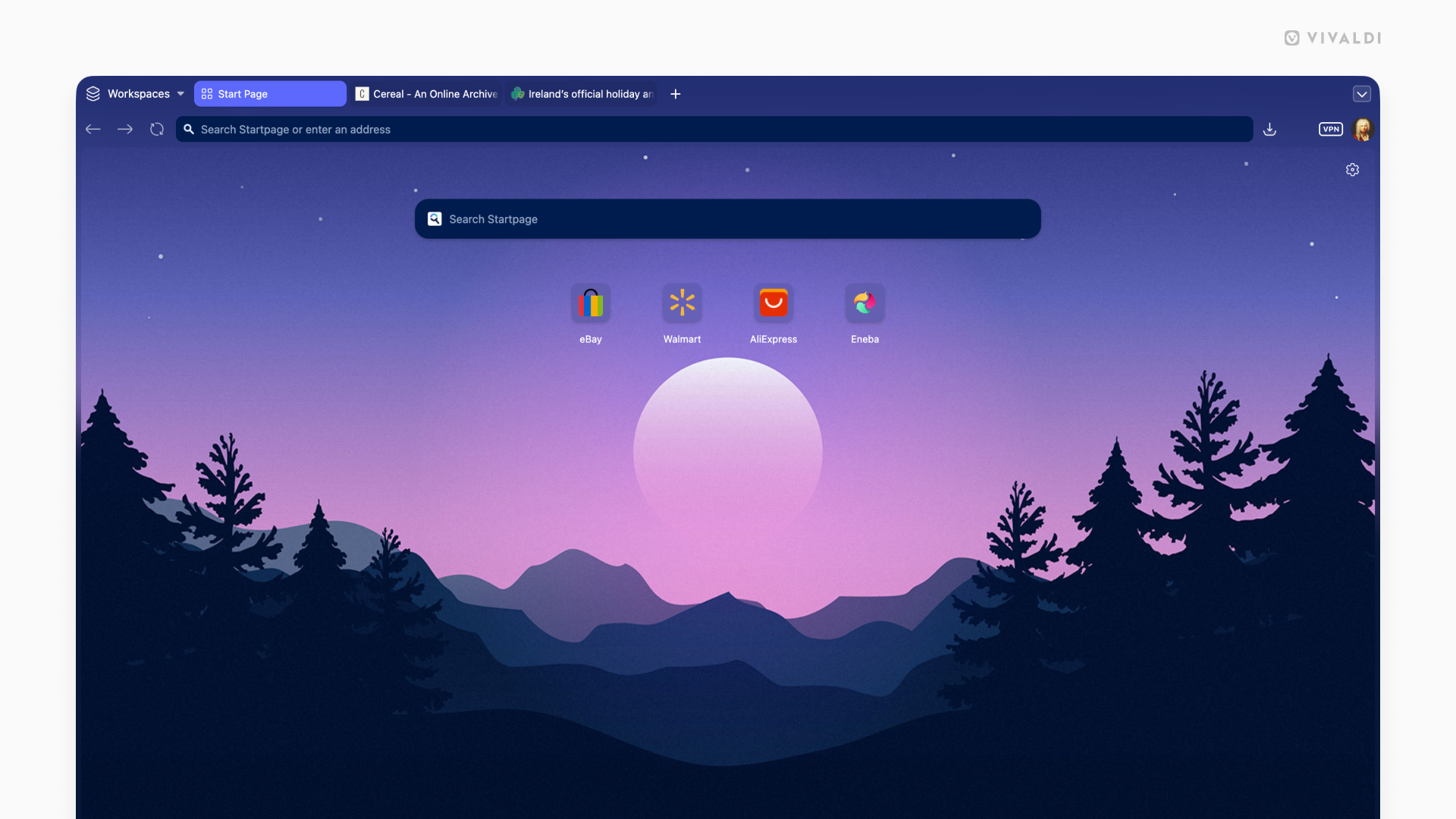
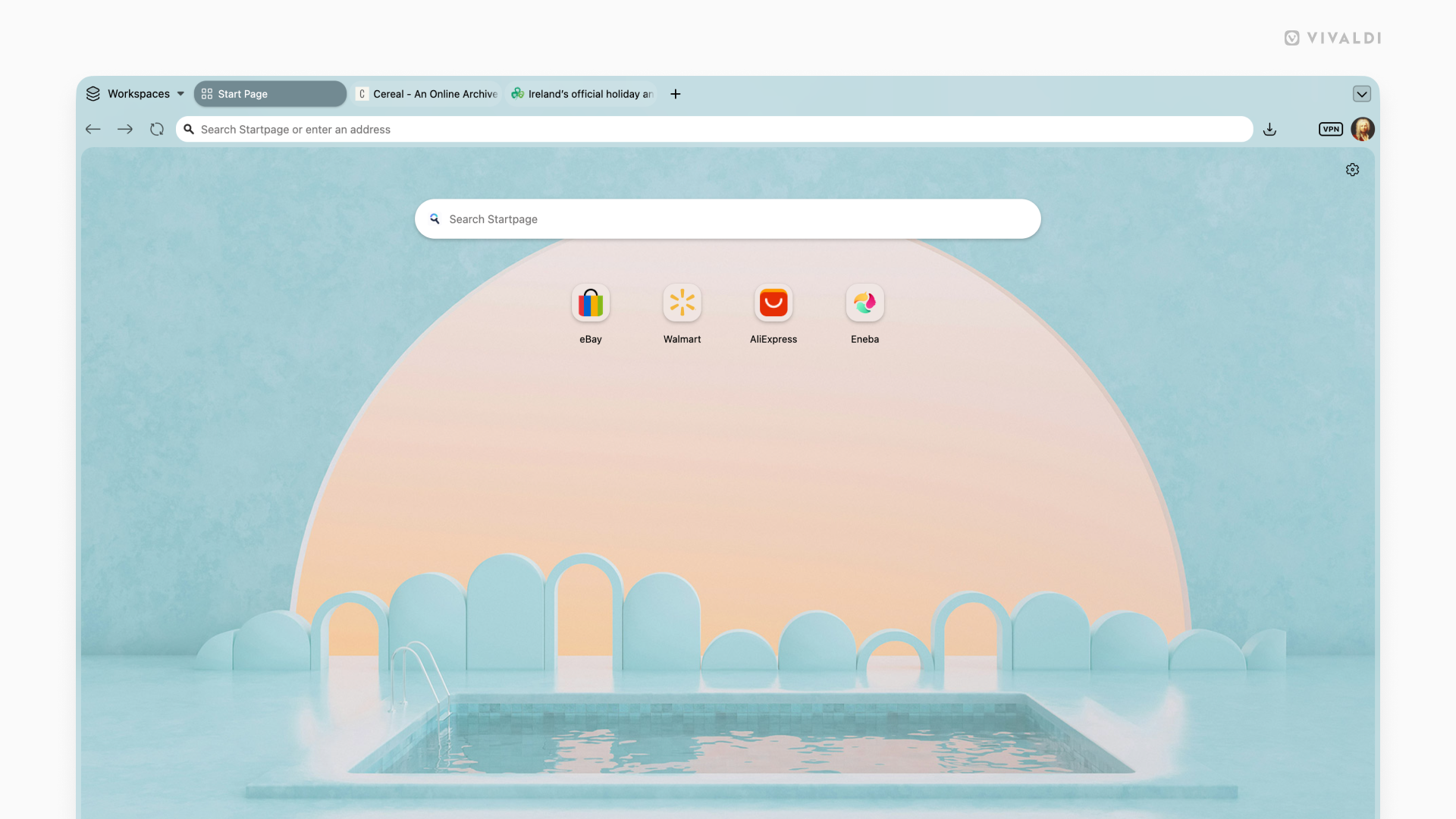
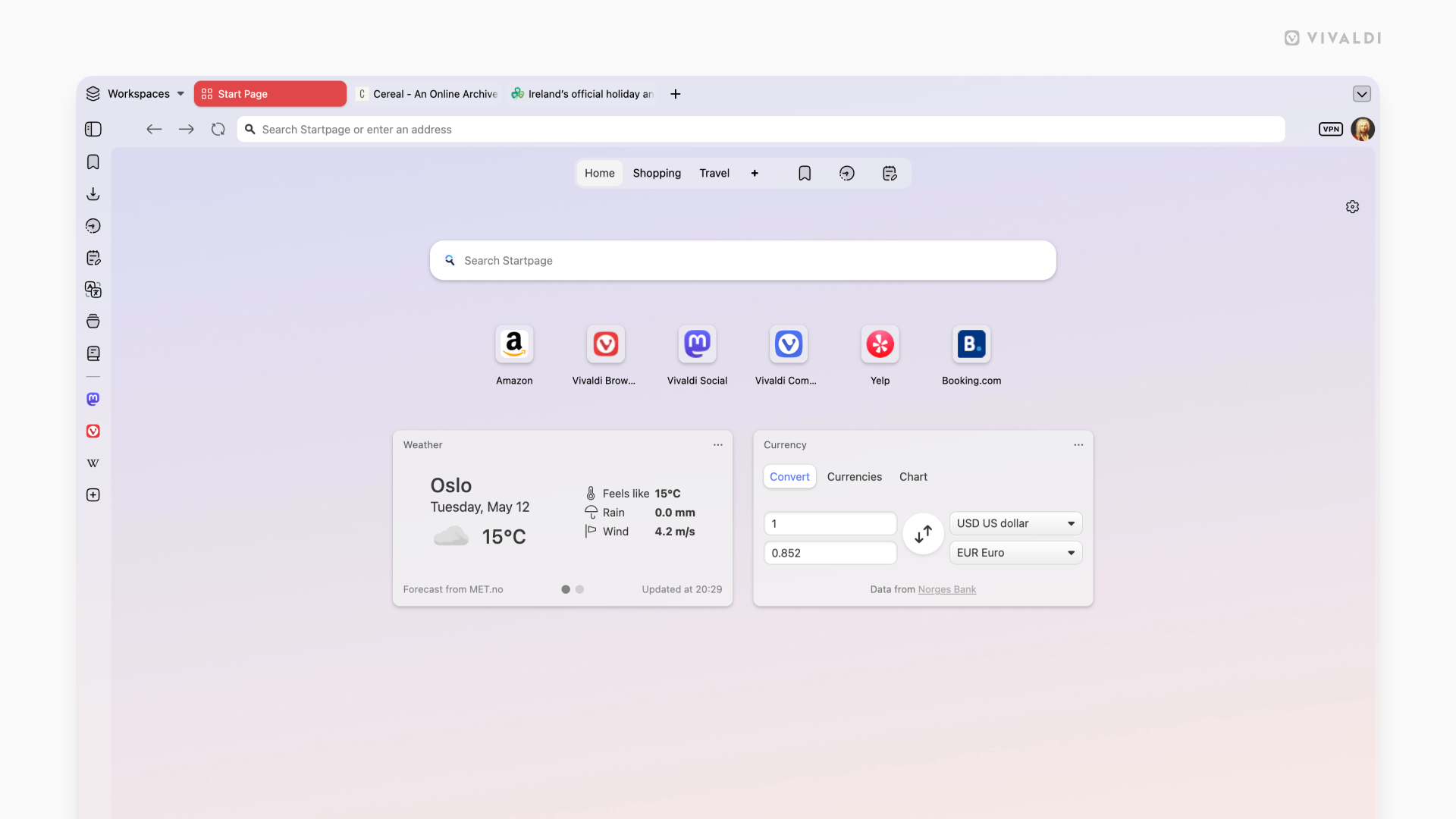
With 8.0, Vivaldi has a new look. We call it “Unified”.

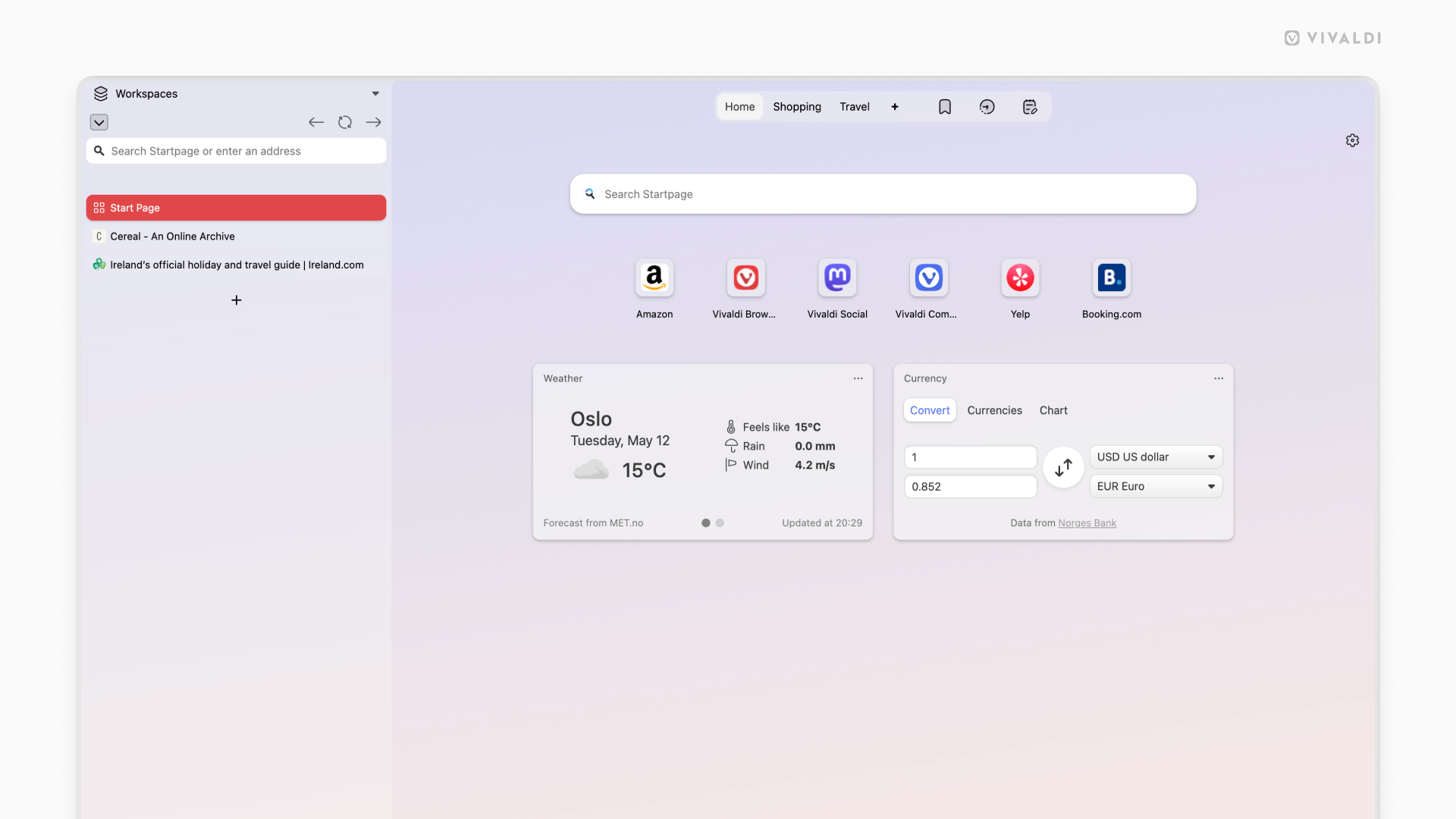
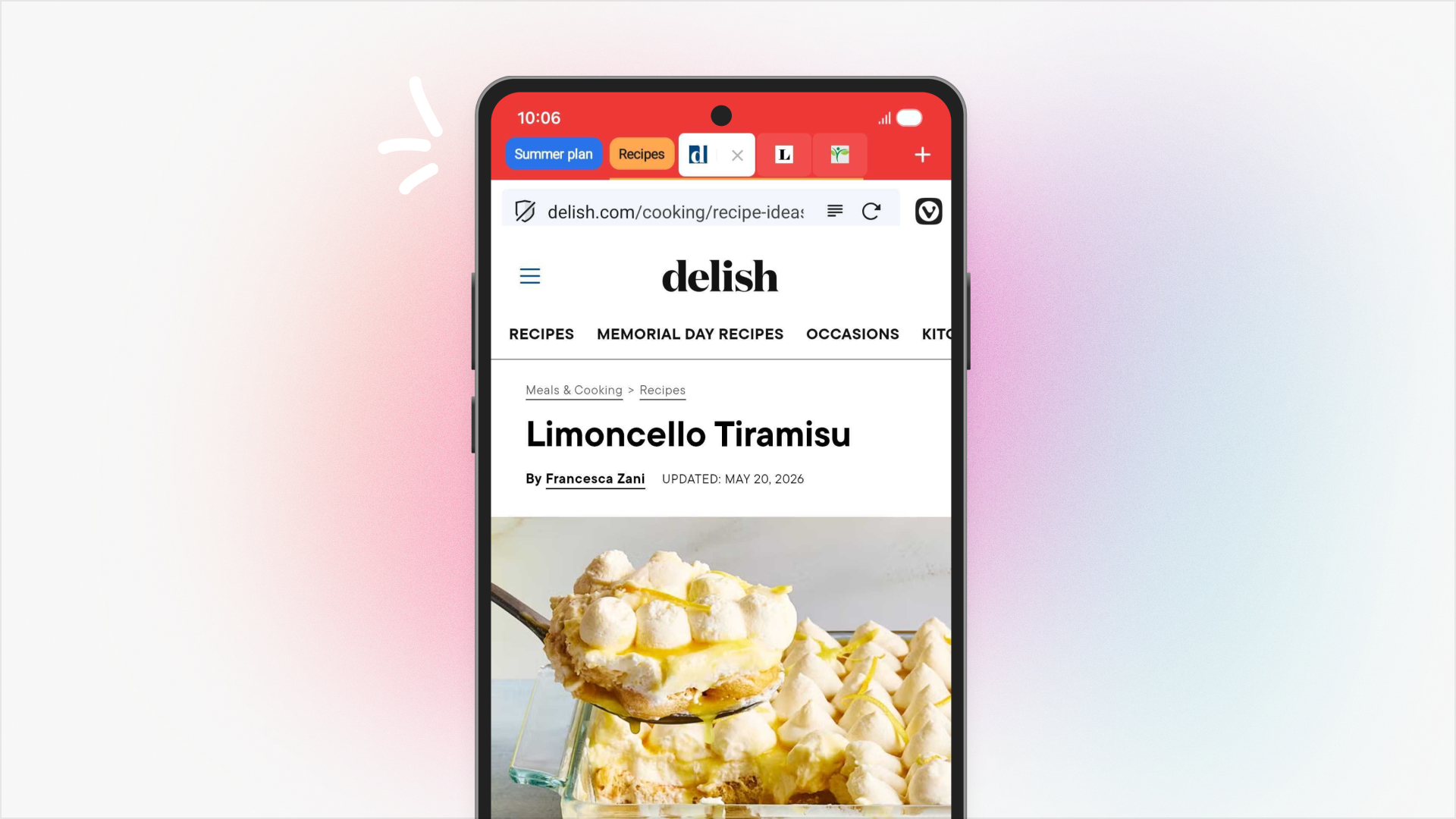
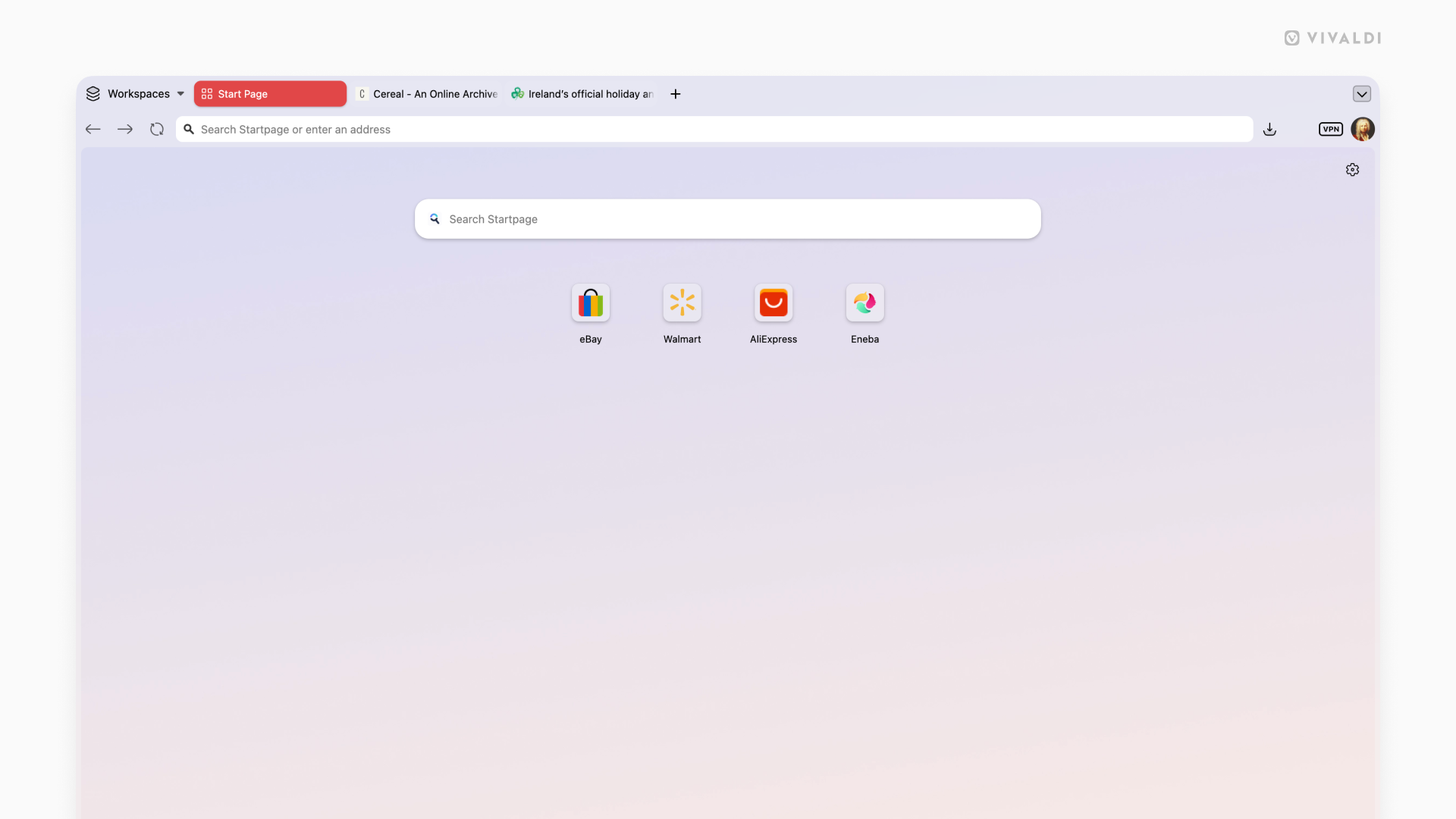
We have approached the Vivaldi interface less as a collection of components, and more as a layered system. Previously, those layers (tabs, toolbars, panels and content) have had subtle separations. This was useful, but also a bit fragmented. With Unified, those boundaries are removed.
8.0_desktop_unified_theme.png
8.0_desktop_unified_theme_2.png


8.0_desktop_unified_theme_3.png
8.0_desktop_unified_theme_1.png


All toolbars now live on a single, continuous surface: a Unified frame that wraps the entire browser. Instead of stacked regions, everything is composed within the same visual plane. That shift makes the interface feel more cohesive and easier to read. Alignment becomes more precise, spacing more intentional, and interaction more direct, because elements no longer sit in isolated layers.

When you pick a theme, it flows through everything. A dark theme is dark, all the way through. A warm theme carries that warmth into every corner. All elements of the browser belong together in a way that immediately feels… well … Unified.

It also changes how themes work.

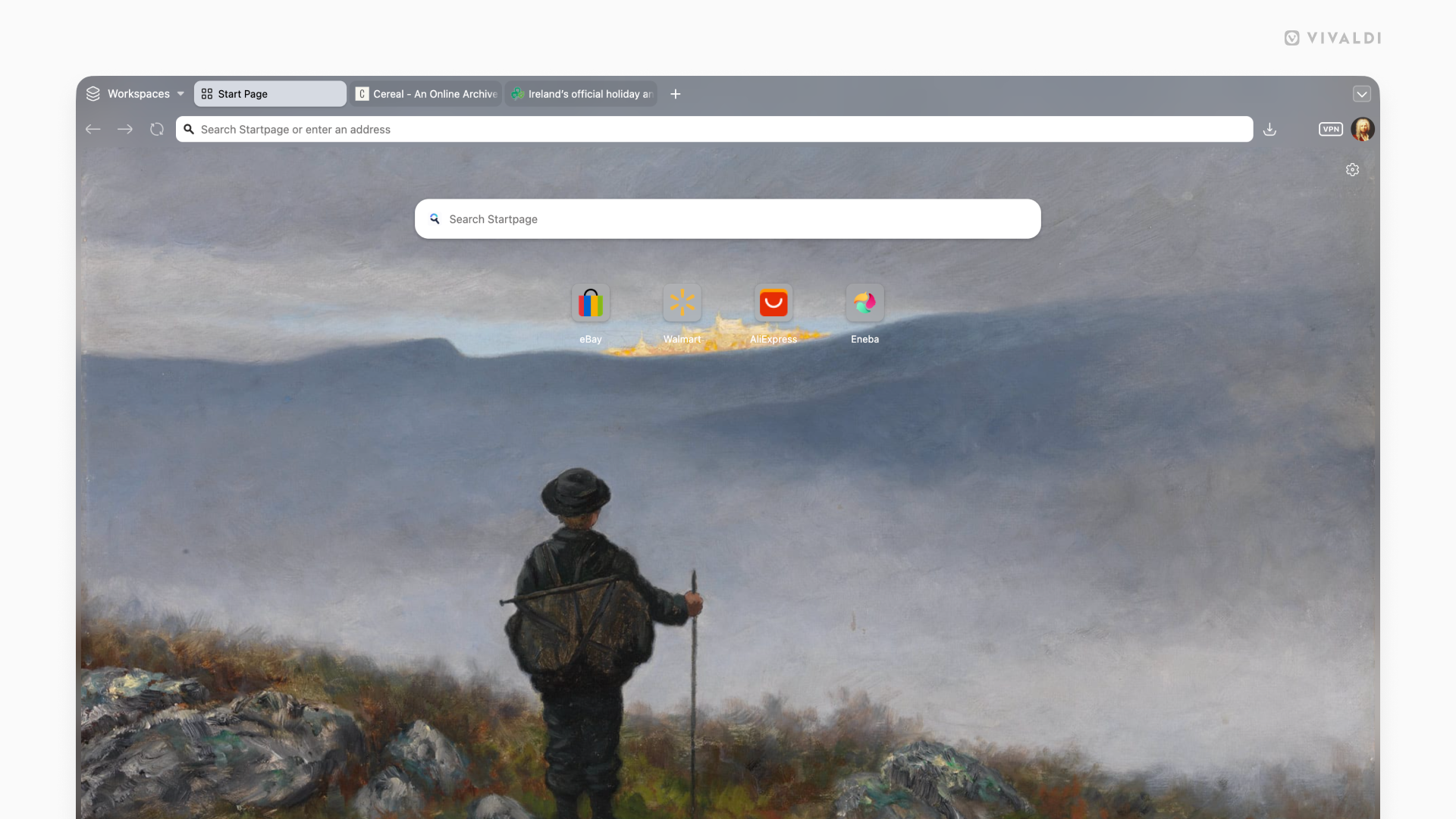
With a single surface, your theme can flow across the entire window. Backgrounds are no longer confined; they can extend from the tab bar through panels and edges without interruption. Wallpapers feel less like decoration and more like part of the environment, especially when combined with translucency and blur. From a system perspective, this reduces complexity. Fewer layers, fewer exceptions and a more consistent foundation to build on.

This isn’t about making the browser look simpler. It’s about making the structure behind it more coherent. This makes everything you see feel like part of the same system.

You can see the new UI’s possibilities with our new default themes, such as Zen, Soria Moria, Sunset Forest and Kawaii Clouds, and our updated light and dark themes. If you can’t find something that hits the right spot for default, there are more than 7000 to choose from at themes.vivaldi.net. And if you have built a custom theme you love, you’re free to decide if you want the new look, or keep your own (Settings →Themes → Editor → Coloring mode). Of course; this is Vivaldi.

Start exactly where you need to be

One of the things that makes Vivaldi special is also one of the things that can feel like a lot on day one: the sheer range of settings you can configure. If you have been using Vivaldi for years, you have your setup exactly as you want it and you would not trade it for anything. If you are brand new, figuring out where to start can be a real question.

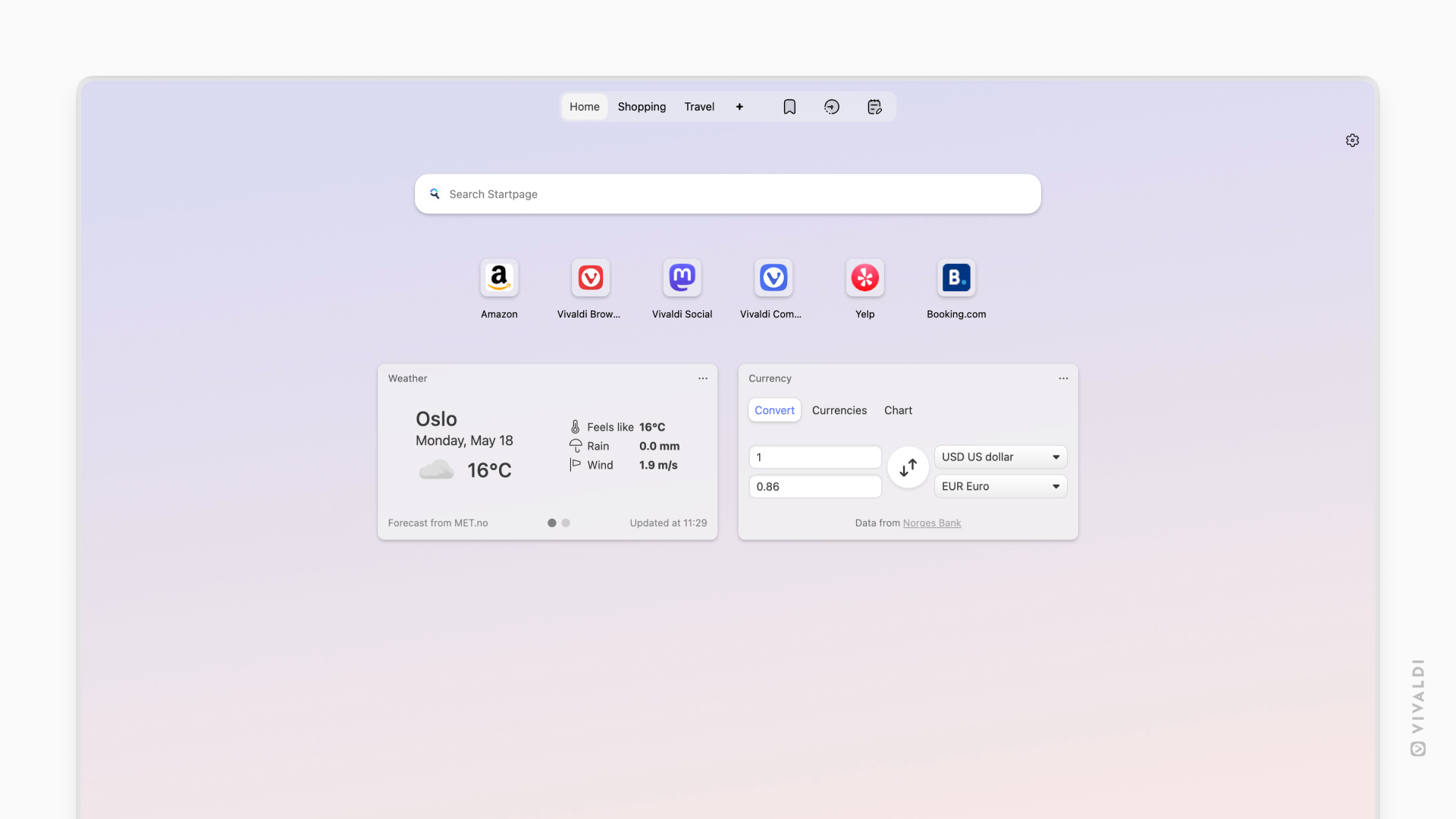
Vivaldi 8.0 answers it with six preset layouts, available right from onboarding (and from Settings → Appearance → Layout whenever you feel like a change). Each one is a thoughtfully curated starting point.
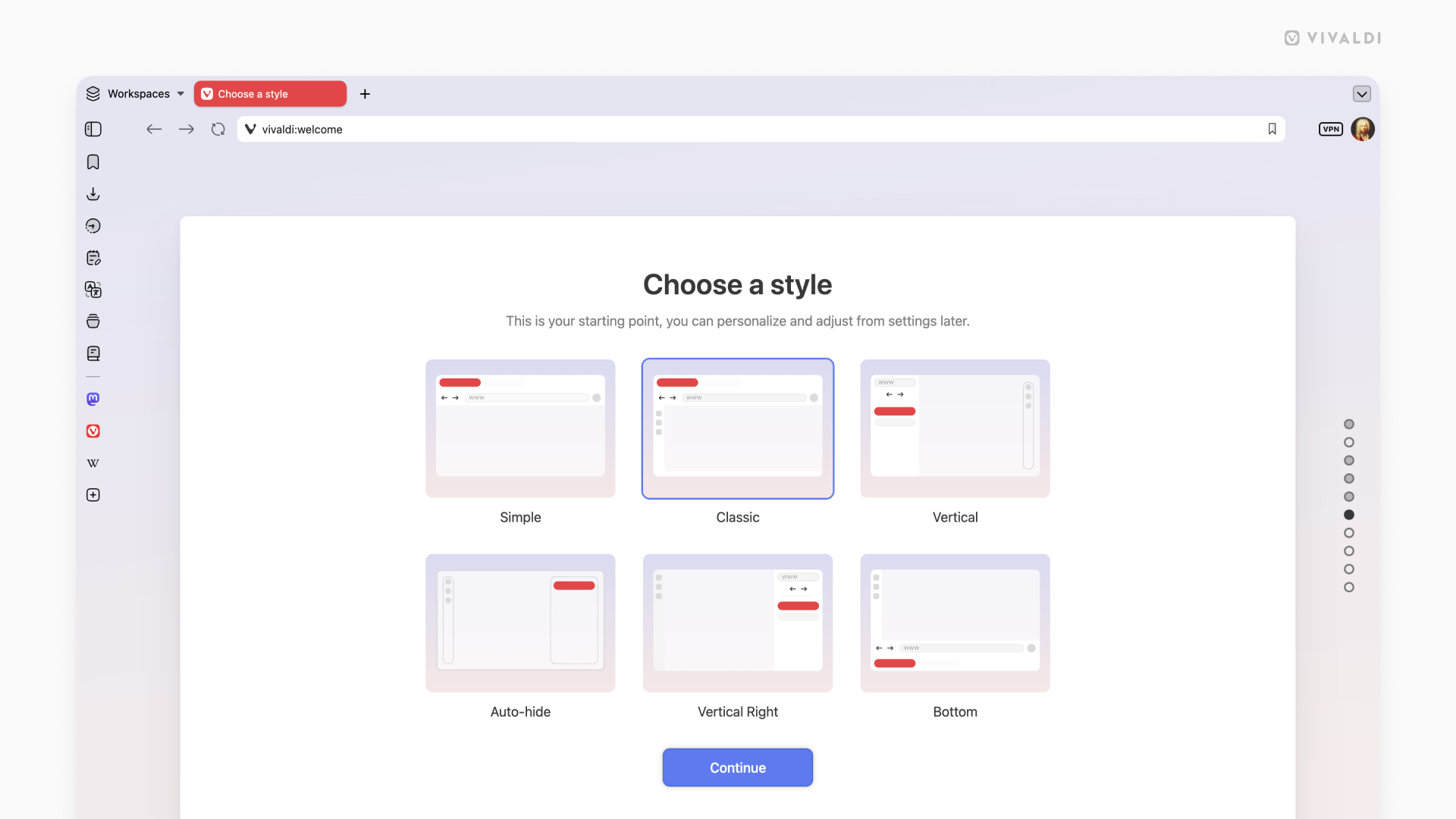
8.0_desktop_layouts_onoarding.png

  • Simple gives you a clean, focused experience: tabs on top, nothing in the way, everything ready to go. It is Vivaldi in its purest form and it is already more capable than anything the mainstream browsers will offer.
  • Classic is the Vivaldi you know and love. Toolbar, panels, all the controls in their natural places, now wearing the new Unified look. This is home for a lot of you, and it is as good as it has ever been.
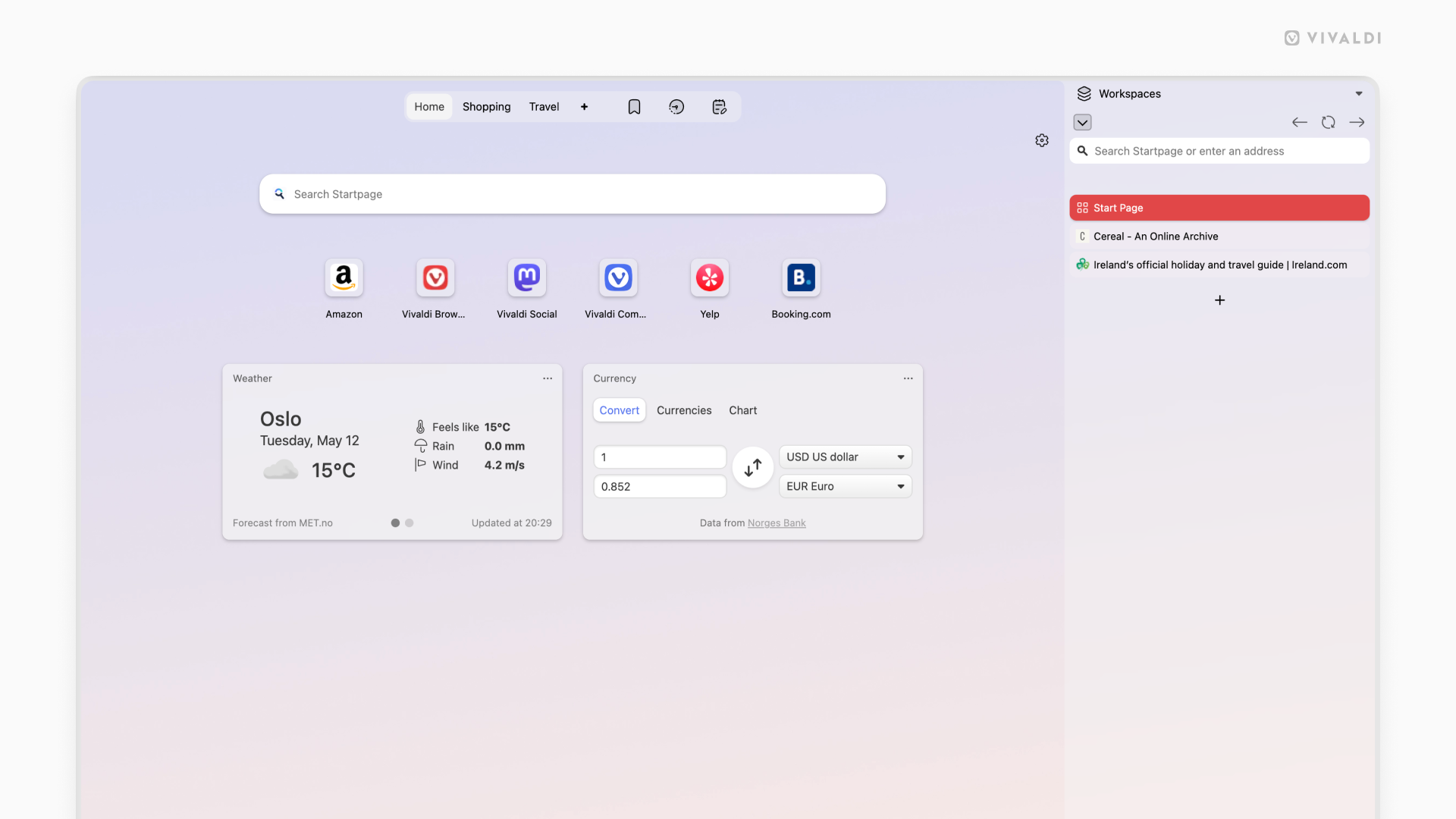
  • Vertical Right is similar to our classic look, but for people who prefer to have their tabs on the right. You’ll find the URL field on top, and panels on the left, as usual.
  • Vertical Left puts your tabs and address bar on the left side of the screen. Once you try this on a wide monitor, it tends to become permanent. It uses your horizontal screen space in ways that a top tab bar simply cannot. With Panels available on hover from the right side of your screen, it changes how browsing feels.
  • Auto Hide is built for users who want the web to fill their entire screen. Your toolbar, tab bar, panel, and address bar step aside while you read, watch, or work, and reappear the moment your cursor reaches for any edge of the screen. It is edge to edge content with full Vivaldi capability sitting right behind it, and it is a way of experiencing the web that the other browsers have not figured out.
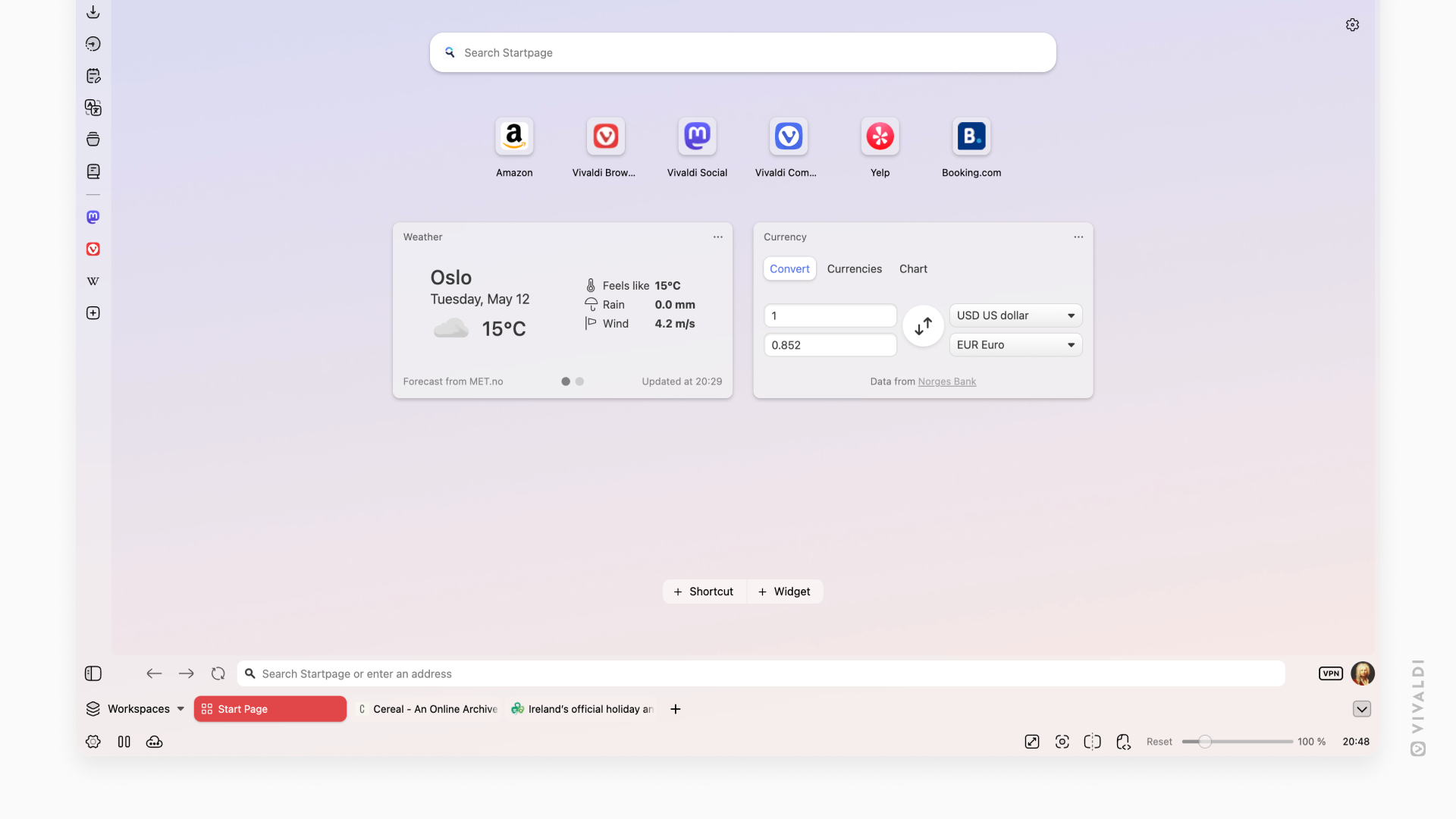
  • Bottom moves your tab bar and address bar to the bottom of the screen. Your eye travels down naturally as you read, and your navigation is already there waiting. More people work this way than you might expect, and Vivaldi has always been happy to accommodate them.
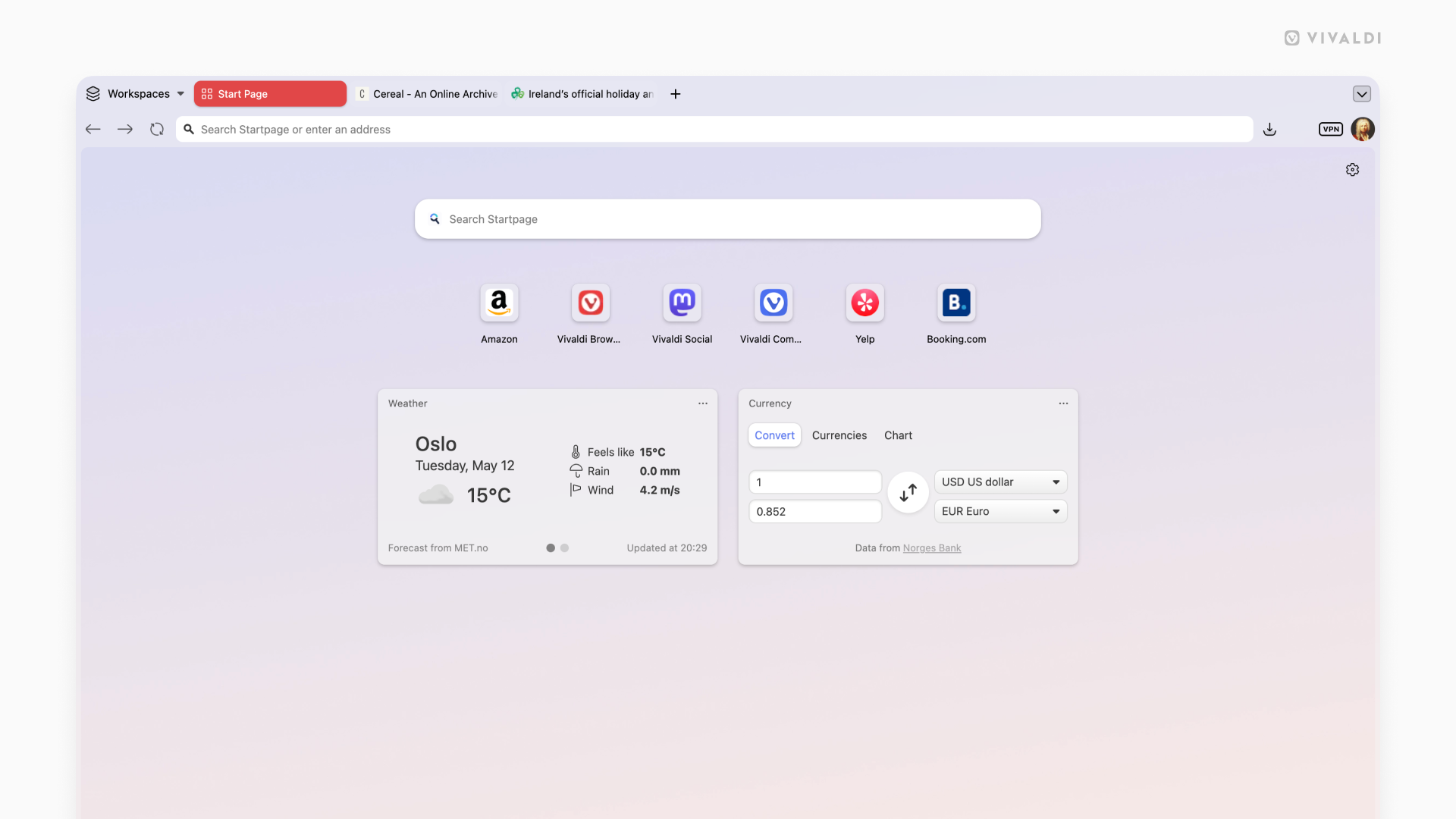
Click on each of the layouts to make them bigger:

8.0_desktop_layout_simple.png
8.0_desktop_layout_classic.png


8.0_desktop_layout_auto_hide.png
8.0_desktop_layout_vertical.png


8.0_desktop_layout_vertical_right.png
8.0_desktop_layout_vertical_right-1.png


Each of these layouts is a launchpad, not a limit. With all the powerful features and tools in Vivaldi, you have everything you need to make the web work exactly the way you want it to.

Vivaldi has a tab management system unlike any other browser. Tile as many pages as you want, just how you want. Use Follower Tab to explore links from an article without ever losing your place in it. Stack your tabs into named, colour-coded groups. Use the Tab Button to search everything at once: open tabs, synced tabs from your other devices, recently closed tabs. Your mail, your calendar, your notes, your reading list: all of it lives inside Vivaldi, organised on your terms, always within reach.

Vivaldi is truly the browser that adapts to you. We’ve proven this with every release. We even go as far as getting completely out of your way. With UI Auto-hide, even the interface itself knows when to let the content take centre stage. Vivaldi bends to how you work. It always has and always will.

This is Vivaldi. It always has been.

We do not answer to investors telling us which features to build. We do not track your behaviour or treat your data as inventory. Other browsers are adding AI to decide what you see. Vivaldi adds tools that give you more power when deciding for yourself. That has always been the difference. We build Vivaldi because we believe you deserve a better browser.

Download it today. Take your time with it. Come find us in the Forum if there is anything, we read everything.

Download it now

As always, thank you for being part of the Vivaldi community. Together, we’re fighting for a better web, one release at a time.

Changelog​

Check the changelog with the full list of changes from Vivaldi 7.9 to 8.0.


 Source:
 
Vivaldi just updated to version 8 on Ubuntu as well. Vivaldi for the desktop has got to be one of the best browsers i have used.
i have installed it on my desktop and laptop and you can do just about everything in it browse, email and have it synced with your online calendar. its a bit resource heavy on my phone but its still very good.

well done the Vivaldi team
best of luck Steve ..
edit spelling and i forgot i replaced FF with Vivaldi, oops
 
Last edited:

My Computers

System One System Two

  • OS
    Windows 11 Home
    Computer type
    PC/Desktop
    Manufacturer/Model
    HP 24" AiO
    CPU
    Ryzen 7 5825u
    Motherboard
    HP
    Memory
    64GB DDR4 3200
    Graphics Card(s)
    Ryzen 7 5825u
    Sound Card
    RealTek
    Monitor(s) Displays
    24" HP AiO
    Screen Resolution
    1920 x 1080 @60 Hz
    Hard Drives
    1TB WD Blue SN580 M2 SSD Partitioned.
    2x 1TB USB HDD External Backup/Storage.
    PSU
    90W external power brick
    Case
    24" All in One
    Cooling
    Default Air Cooling
    Keyboard
    HP WiFi UK extended
    Mouse
    HP WiFi 3 Button
    Internet Speed
    1GB full fibre
    Browser
    Edge & Firefox
    Antivirus
    AVG Internet Security/Windows Defender
    Other Info
    Mainly Open Source Software
  • Operating System
    Ubuntu 22.04.5 LTS
    Computer type
    Laptop
    Manufacturer/Model
    Dell 13" Latitude 2017
    CPU
    i5 7200u
    Motherboard
    Dell
    Memory
    16GB DDR4
    Graphics card(s)
    Intel
    Sound Card
    Intel
    Monitor(s) Displays
    13" Dell Laptop
    Hard Drives
    250GB Crucial 2.5" SSD
    Mouse
    Generic WiFi 3 button
    Internet Speed
    WiFi only
    Browser
    Firefox
    Antivirus
    ClamAV TK
    Other Info
    Mainly Open Source Software
Vivaldi just updated to version 8 on Ubuntu as well. Vivaldi for the desktop has got to be one of the best browsers i have used.
i have installed it on my desktop and laptop and you can do just about everything in it browse, email and have it synced with your online calendar. its a bit resource heavy on my phone so i use Firefox instead.

well done the Vivaldi team
best of luck Steve ..
It replaced Firefox as my go to browser some time ago. I also prefer it on my phone but that's probably because I'm so use to it that it basically mirrors my PC's now lol.
 

My Computers

System One System Two

  • OS
    Windows 11 25H2
    Computer type
    Laptop
    Manufacturer/Model
    Alienware 18 Area-51
    CPU
    Intel Core Ultra 9 275HX (24-Core)
    Motherboard
    Alienware
    Memory
    64GB DDR5 6400MT/s
    Graphics Card(s)
    NVIDIA GeForce RTX 5080 and Intel UHD Graphics
    Sound Card
    Onboard, Realtek high-performance Audio chips (ALC3329 & ALC1708))
    Monitor(s) Displays
    300HZ 18-inch QHD 500 nit Comfort View+
    Screen Resolution
    2560 x 1600
    Hard Drives
    2TB NVMe M.2 PCIe Gen 5 SSD
    Case
    Magnesium Alloy
    Cooling
    Advanced Cryo-Tech Quad-Fan Cooling system & large vapor chamber
    Keyboard
    Cherry MX ultra low profile mechanical keyboard with per key AlienFX RGB lighting
    Mouse
    Logitech MX Master 4
    Browser
    Vivaldi (main), Firefox, Chrome, Edge
    Antivirus
    MS Defender and Malwarebytes Free
  • Operating System
    Windows 11 25H2
    Computer type
    Laptop
    Manufacturer/Model
    Microsoft Surface Laptop 7
    CPU
    Qualcomm Snapdragon X Elite (12 Core) ARM based CPU
    Motherboard
    Microsoft Corp.
    Memory
    16GB LPDDR5
    Graphics card(s)
    Qualcomm Adreno X1-85
    Sound Card
    Omnisonic speakers with Dolby Atmos spatial sound
    Monitor(s) Displays
    120 Hz 13.8-inch 600 nit PixelSense Flow touchscreen
    Screen Resolution
    2304x1536
    Hard Drives
    1TB NVMe Gen 4 SSD
    Case
    Anodized Aluminum
    Cooling
    Traditional active cooling fan system
    Keyboard
    Mechanical QWERTY, backlit when in use
    Mouse
    Logitech MX Master 4 and Surface Arc Mouse
    Browser
    Vivaldi (main), Firefox, Chrome, Edge
    Antivirus
    MS Defender and Malwarebytes Free
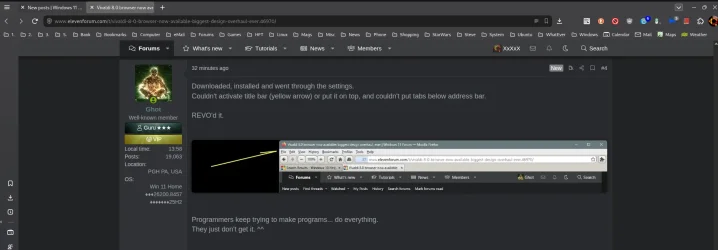
Downloaded, installed and went through the settings.
Couldn't activate title bar (yellow arrow) or put it on top, and couldn't put tabs below address bar.

REVO'd it.


Image1.webp


Programmers keep trying to make programs... do everything.
They just don't get it. ^^


Granted... I had to do a LOT of stuff to make Firefox... "get it". But at least I could.


My Computers

System One System Two

  • OS
    Win 11 Home ♦♦♦26200.8457 ♦♦♦♦♦♦♦25H2
    Computer type
    PC/Desktop
    Manufacturer/Model
    Built by Ghot® [May 2020]
    CPU
    AMD Ryzen 7 3700X
    Motherboard
    Asus Pro WS X570-ACE (BIOS 5302)
    Memory
    G.Skill (F4-3200C14D-16GTZKW)
    Graphics Card(s)
    EVGA RTX 2070 (08G-P4-2171-KR)
    Sound Card
    Realtek ALC1220P / ALC S1220A
    Monitor(s) Displays
    Dell U3011 30"
    Screen Resolution
    2560 x 1600
    Hard Drives
    2x Samsung 860 EVO 500GB,
    WD 4TB Black FZBX - SATA III,
    WD 8TB Black FZBX - SATA III,
    DRW-24B1ST CD/DVD Burner
    PSU
    PC Power & Cooling 750W Quad EPS12V
    Case
    Cooler Master ATCS 840 Tower
    Cooling
    CM Hyper 212 EVO (push/pull)
    Keyboard
    Ducky DK9008 Shine II Blue LED
    Mouse
    Logitech Optical M-100
    Internet Speed
    300/300
    Browser
    Firefox (latest)
    Antivirus
    Bitdefender Total Security
    Other Info
    Speakers: Klipsch Pro Media 2.1
  • Operating System
    Windows XP Pro 32bit w/SP3
    Computer type
    PC/Desktop
    Manufacturer/Model
    Built by Ghot® (not in use)
    CPU
    AMD Athlon 64 X2 5000+ (OC'd @ 3.2Ghz)
    Motherboard
    ASUS M2N32-SLI Deluxe Wireless Edition
    Memory
    TWIN2X2048-6400C4DHX (2 x 1GB, DDR2 800)
    Graphics card(s)
    EVGA 256-P2-N758-TR GeForce 8600GT SSC
    Sound Card
    Onboard
    Monitor(s) Displays
    ViewSonic G90FB Black 19" Professional (CRT)
    Screen Resolution
    up to 2048 x 1536
    Hard Drives
    WD 36GB 10,000rpm Raptor SATA
    Seagate 80GB 7200rpm SATA
    Lite-On LTR-52246S CD/RW
    Lite-On LH-18A1P CD/DVD Burner
    PSU
    PC Power & Cooling Silencer 750 Quad EPS12V
    Case
    Generic Beige case, 80mm fans
    Cooling
    ZALMAN 9500A 92mm CPU Cooler
    Keyboard
    Logitech Classic Keybooard 200
    Mouse
    Logitech Optical M-BT96a
    Internet Speed
    300/300
    Browser
    Firefox 3.x ??
    Antivirus
    Symantec (Norton)
    Other Info
    Still assembled, still runs. Haven't turned it on for 15 years?
here's mine
1779386491557.webp

best of luck Steve ..
 

My Computers

System One System Two

  • OS
    Windows 11 Home
    Computer type
    PC/Desktop
    Manufacturer/Model
    HP 24" AiO
    CPU
    Ryzen 7 5825u
    Motherboard
    HP
    Memory
    64GB DDR4 3200
    Graphics Card(s)
    Ryzen 7 5825u
    Sound Card
    RealTek
    Monitor(s) Displays
    24" HP AiO
    Screen Resolution
    1920 x 1080 @60 Hz
    Hard Drives
    1TB WD Blue SN580 M2 SSD Partitioned.
    2x 1TB USB HDD External Backup/Storage.
    PSU
    90W external power brick
    Case
    24" All in One
    Cooling
    Default Air Cooling
    Keyboard
    HP WiFi UK extended
    Mouse
    HP WiFi 3 Button
    Internet Speed
    1GB full fibre
    Browser
    Edge & Firefox
    Antivirus
    AVG Internet Security/Windows Defender
    Other Info
    Mainly Open Source Software
  • Operating System
    Ubuntu 22.04.5 LTS
    Computer type
    Laptop
    Manufacturer/Model
    Dell 13" Latitude 2017
    CPU
    i5 7200u
    Motherboard
    Dell
    Memory
    16GB DDR4
    Graphics card(s)
    Intel
    Sound Card
    Intel
    Monitor(s) Displays
    13" Dell Laptop
    Hard Drives
    250GB Crucial 2.5" SSD
    Mouse
    Generic WiFi 3 button
    Internet Speed
    WiFi only
    Browser
    Firefox
    Antivirus
    ClamAV TK
    Other Info
    Mainly Open Source Software
Here's mine, I like it simple and fairly clean with all the bookmarks, downloads, mail etc. tucked away in the retractable sidebar I like to keep on the left. One think that never worked very well for me on this is the translator button though, always been disappointed with that.

Screenshot (1).webp
 

My Computers

System One System Two

  • OS
    Windows 11 25H2
    Computer type
    Laptop
    Manufacturer/Model
    Alienware 18 Area-51
    CPU
    Intel Core Ultra 9 275HX (24-Core)
    Motherboard
    Alienware
    Memory
    64GB DDR5 6400MT/s
    Graphics Card(s)
    NVIDIA GeForce RTX 5080 and Intel UHD Graphics
    Sound Card
    Onboard, Realtek high-performance Audio chips (ALC3329 & ALC1708))
    Monitor(s) Displays
    300HZ 18-inch QHD 500 nit Comfort View+
    Screen Resolution
    2560 x 1600
    Hard Drives
    2TB NVMe M.2 PCIe Gen 5 SSD
    Case
    Magnesium Alloy
    Cooling
    Advanced Cryo-Tech Quad-Fan Cooling system & large vapor chamber
    Keyboard
    Cherry MX ultra low profile mechanical keyboard with per key AlienFX RGB lighting
    Mouse
    Logitech MX Master 4
    Browser
    Vivaldi (main), Firefox, Chrome, Edge
    Antivirus
    MS Defender and Malwarebytes Free
  • Operating System
    Windows 11 25H2
    Computer type
    Laptop
    Manufacturer/Model
    Microsoft Surface Laptop 7
    CPU
    Qualcomm Snapdragon X Elite (12 Core) ARM based CPU
    Motherboard
    Microsoft Corp.
    Memory
    16GB LPDDR5
    Graphics card(s)
    Qualcomm Adreno X1-85
    Sound Card
    Omnisonic speakers with Dolby Atmos spatial sound
    Monitor(s) Displays
    120 Hz 13.8-inch 600 nit PixelSense Flow touchscreen
    Screen Resolution
    2304x1536
    Hard Drives
    1TB NVMe Gen 4 SSD
    Case
    Anodized Aluminum
    Cooling
    Traditional active cooling fan system
    Keyboard
    Mechanical QWERTY, backlit when in use
    Mouse
    Logitech MX Master 4 and Surface Arc Mouse
    Browser
    Vivaldi (main), Firefox, Chrome, Edge
    Antivirus
    MS Defender and Malwarebytes Free
I wanted to like it and tried it out a couple of years ago, but it was slow to respond and seemed to take forever to open, even on an SSD. Like 7 or 8 seconds. Too many clunky widgets attached to it that I would never use. And I didn't have any extensions installed. Very resource heavy.

After about week, I REVO'd it too. Have they improved the speed any? How about some widget weight loss?
 

My Computers

System One System Two

  • OS
    Windows 11 Pro 25H2 build: (26200.7623)
    Computer type
    Laptop
    Manufacturer/Model
    Microsoft Surface Pro
    Memory
    32GB
  • Operating System
    Microsoft 25H2 Pro
    Computer type
    Laptop
    Manufacturer/Model
    Dell Pro 14 - PC14250
    CPU
    Intel Core Ultra 7
    Memory
    64GB
    Graphics card(s)
    Intel Integrated Graphics
    Hard Drives
    Micron 1TB SSD
I wanted to like it and tried it out a couple of years ago, but it was slow to respond and seemed to take forever to open, even on an SSD. Like 7 or 8 seconds. Too many clunky widgets attached to it that I would never use. And I didn't have any extensions installed. Very resource heavy.

After about week, I REVO'd it too. Have they improved the speed any? How about some widget weight loss?
Two years is a long time ago, many updates since then. I use it on three machines and honestly can't see any speed difference with the Edge, Chrome, and Firefox browsers on my machines. Course in fairness two of my machines are fast machines but even on the old slower i7 I don't notice a difference. It is on the heavy side with memory use though, I'm about 2.5GB with nine tabs running.
 

My Computers

System One System Two

  • OS
    Windows 11 25H2
    Computer type
    Laptop
    Manufacturer/Model
    Alienware 18 Area-51
    CPU
    Intel Core Ultra 9 275HX (24-Core)
    Motherboard
    Alienware
    Memory
    64GB DDR5 6400MT/s
    Graphics Card(s)
    NVIDIA GeForce RTX 5080 and Intel UHD Graphics
    Sound Card
    Onboard, Realtek high-performance Audio chips (ALC3329 & ALC1708))
    Monitor(s) Displays
    300HZ 18-inch QHD 500 nit Comfort View+
    Screen Resolution
    2560 x 1600
    Hard Drives
    2TB NVMe M.2 PCIe Gen 5 SSD
    Case
    Magnesium Alloy
    Cooling
    Advanced Cryo-Tech Quad-Fan Cooling system & large vapor chamber
    Keyboard
    Cherry MX ultra low profile mechanical keyboard with per key AlienFX RGB lighting
    Mouse
    Logitech MX Master 4
    Browser
    Vivaldi (main), Firefox, Chrome, Edge
    Antivirus
    MS Defender and Malwarebytes Free
  • Operating System
    Windows 11 25H2
    Computer type
    Laptop
    Manufacturer/Model
    Microsoft Surface Laptop 7
    CPU
    Qualcomm Snapdragon X Elite (12 Core) ARM based CPU
    Motherboard
    Microsoft Corp.
    Memory
    16GB LPDDR5
    Graphics card(s)
    Qualcomm Adreno X1-85
    Sound Card
    Omnisonic speakers with Dolby Atmos spatial sound
    Monitor(s) Displays
    120 Hz 13.8-inch 600 nit PixelSense Flow touchscreen
    Screen Resolution
    2304x1536
    Hard Drives
    1TB NVMe Gen 4 SSD
    Case
    Anodized Aluminum
    Cooling
    Traditional active cooling fan system
    Keyboard
    Mechanical QWERTY, backlit when in use
    Mouse
    Logitech MX Master 4 and Surface Arc Mouse
    Browser
    Vivaldi (main), Firefox, Chrome, Edge
    Antivirus
    MS Defender and Malwarebytes Free
Downloaded, installed and went through the settings.
Couldn't activate title bar (yellow arrow) or put it on top, and couldn't put tabs below address bar.

REVO'd it.

View attachment 172202

Granted... I had to do a LOT of stuff to make Firefox... "get it". But at least I could.

Funny that someone would spend all that time CSSing Firefox, but if Vivaldi doesn't have what you want in eight seconds, it goes right in the bin.

Vivaldi-CSS.webp
 

My Computer

System One

  • OS
    Windows 11 Pro 25H2
    Computer type
    PC/Desktop
    Manufacturer/Model
    Intel NUC12WSHi7
    CPU
    12th Gen Core i7-1260P
    Motherboard
    NUC12WSBi7
    Memory
    64 GB Micron PC4-25600
    Graphics Card(s)
    Intel Iris Xe Graphics
    Sound Card
    on-board Realtek HD Audio
    Monitor(s) Displays
    Dell U3219Q
    Screen Resolution
    3840 x 2160
    Hard Drives
    Samsung SSD 990 PRO 1TB
    Crucial MX500 2 TB
    Antivirus
    Microsoft Defender
Two years is a long time ago, many updates since then. I use it on three machines and honestly can't see any speed difference with the Edge, Chrome, and Firefox browsers on my machines. Course in fairness two of my machines are fast machines but even on the old slower i7 I don't notice a difference. It is on the heavy side with memory use though, I'm about 2.5GB with nine tabs running.

It's the only alternative I would consider looking at again.

So is there any chance of removing widgets that I don't use?

Or at the very least, hiding them so I don't have to look at them?
 

My Computers

System One System Two

  • OS
    Windows 11 Pro 25H2 build: (26200.7623)
    Computer type
    Laptop
    Manufacturer/Model
    Microsoft Surface Pro
    Memory
    32GB
  • Operating System
    Microsoft 25H2 Pro
    Computer type
    Laptop
    Manufacturer/Model
    Dell Pro 14 - PC14250
    CPU
    Intel Core Ultra 7
    Memory
    64GB
    Graphics card(s)
    Intel Integrated Graphics
    Hard Drives
    Micron 1TB SSD
It's the only alternative I would consider looking at again.

So is there any chance of removing widgets that I don't use?

Or at the very least, hiding them so I don't have to look at them?
Hmmm, I'm not sure what constitutes widgets that you are referring to but with the huge settings menu on this browser just about everything can be customized, rearranged, hidden, etc.
 

My Computers

System One System Two

  • OS
    Windows 11 25H2
    Computer type
    Laptop
    Manufacturer/Model
    Alienware 18 Area-51
    CPU
    Intel Core Ultra 9 275HX (24-Core)
    Motherboard
    Alienware
    Memory
    64GB DDR5 6400MT/s
    Graphics Card(s)
    NVIDIA GeForce RTX 5080 and Intel UHD Graphics
    Sound Card
    Onboard, Realtek high-performance Audio chips (ALC3329 & ALC1708))
    Monitor(s) Displays
    300HZ 18-inch QHD 500 nit Comfort View+
    Screen Resolution
    2560 x 1600
    Hard Drives
    2TB NVMe M.2 PCIe Gen 5 SSD
    Case
    Magnesium Alloy
    Cooling
    Advanced Cryo-Tech Quad-Fan Cooling system & large vapor chamber
    Keyboard
    Cherry MX ultra low profile mechanical keyboard with per key AlienFX RGB lighting
    Mouse
    Logitech MX Master 4
    Browser
    Vivaldi (main), Firefox, Chrome, Edge
    Antivirus
    MS Defender and Malwarebytes Free
  • Operating System
    Windows 11 25H2
    Computer type
    Laptop
    Manufacturer/Model
    Microsoft Surface Laptop 7
    CPU
    Qualcomm Snapdragon X Elite (12 Core) ARM based CPU
    Motherboard
    Microsoft Corp.
    Memory
    16GB LPDDR5
    Graphics card(s)
    Qualcomm Adreno X1-85
    Sound Card
    Omnisonic speakers with Dolby Atmos spatial sound
    Monitor(s) Displays
    120 Hz 13.8-inch 600 nit PixelSense Flow touchscreen
    Screen Resolution
    2304x1536
    Hard Drives
    1TB NVMe Gen 4 SSD
    Case
    Anodized Aluminum
    Cooling
    Traditional active cooling fan system
    Keyboard
    Mechanical QWERTY, backlit when in use
    Mouse
    Logitech MX Master 4 and Surface Arc Mouse
    Browser
    Vivaldi (main), Firefox, Chrome, Edge
    Antivirus
    MS Defender and Malwarebytes Free
Funny that someone would spend all that time CSSing Firefox, but if Vivaldi doesn't have what you want in eight seconds, it goes right in the bin.

Guess I'm just a FF guy at heart.
Nice job with V though. ^^
 

My Computers

System One System Two

  • OS
    Win 11 Home ♦♦♦26200.8457 ♦♦♦♦♦♦♦25H2
    Computer type
    PC/Desktop
    Manufacturer/Model
    Built by Ghot® [May 2020]
    CPU
    AMD Ryzen 7 3700X
    Motherboard
    Asus Pro WS X570-ACE (BIOS 5302)
    Memory
    G.Skill (F4-3200C14D-16GTZKW)
    Graphics Card(s)
    EVGA RTX 2070 (08G-P4-2171-KR)
    Sound Card
    Realtek ALC1220P / ALC S1220A
    Monitor(s) Displays
    Dell U3011 30"
    Screen Resolution
    2560 x 1600
    Hard Drives
    2x Samsung 860 EVO 500GB,
    WD 4TB Black FZBX - SATA III,
    WD 8TB Black FZBX - SATA III,
    DRW-24B1ST CD/DVD Burner
    PSU
    PC Power & Cooling 750W Quad EPS12V
    Case
    Cooler Master ATCS 840 Tower
    Cooling
    CM Hyper 212 EVO (push/pull)
    Keyboard
    Ducky DK9008 Shine II Blue LED
    Mouse
    Logitech Optical M-100
    Internet Speed
    300/300
    Browser
    Firefox (latest)
    Antivirus
    Bitdefender Total Security
    Other Info
    Speakers: Klipsch Pro Media 2.1
  • Operating System
    Windows XP Pro 32bit w/SP3
    Computer type
    PC/Desktop
    Manufacturer/Model
    Built by Ghot® (not in use)
    CPU
    AMD Athlon 64 X2 5000+ (OC'd @ 3.2Ghz)
    Motherboard
    ASUS M2N32-SLI Deluxe Wireless Edition
    Memory
    TWIN2X2048-6400C4DHX (2 x 1GB, DDR2 800)
    Graphics card(s)
    EVGA 256-P2-N758-TR GeForce 8600GT SSC
    Sound Card
    Onboard
    Monitor(s) Displays
    ViewSonic G90FB Black 19" Professional (CRT)
    Screen Resolution
    up to 2048 x 1536
    Hard Drives
    WD 36GB 10,000rpm Raptor SATA
    Seagate 80GB 7200rpm SATA
    Lite-On LTR-52246S CD/RW
    Lite-On LH-18A1P CD/DVD Burner
    PSU
    PC Power & Cooling Silencer 750 Quad EPS12V
    Case
    Generic Beige case, 80mm fans
    Cooling
    ZALMAN 9500A 92mm CPU Cooler
    Keyboard
    Logitech Classic Keybooard 200
    Mouse
    Logitech Optical M-BT96a
    Internet Speed
    300/300
    Browser
    Firefox 3.x ??
    Antivirus
    Symantec (Norton)
    Other Info
    Still assembled, still runs. Haven't turned it on for 15 years?
i have just been playing around with the new Vivaldi settings and have got it looking like this now.
1779397768000.webp

best of luck Steve ..
 

My Computers

System One System Two

  • OS
    Windows 11 Home
    Computer type
    PC/Desktop
    Manufacturer/Model
    HP 24" AiO
    CPU
    Ryzen 7 5825u
    Motherboard
    HP
    Memory
    64GB DDR4 3200
    Graphics Card(s)
    Ryzen 7 5825u
    Sound Card
    RealTek
    Monitor(s) Displays
    24" HP AiO
    Screen Resolution
    1920 x 1080 @60 Hz
    Hard Drives
    1TB WD Blue SN580 M2 SSD Partitioned.
    2x 1TB USB HDD External Backup/Storage.
    PSU
    90W external power brick
    Case
    24" All in One
    Cooling
    Default Air Cooling
    Keyboard
    HP WiFi UK extended
    Mouse
    HP WiFi 3 Button
    Internet Speed
    1GB full fibre
    Browser
    Edge & Firefox
    Antivirus
    AVG Internet Security/Windows Defender
    Other Info
    Mainly Open Source Software
  • Operating System
    Ubuntu 22.04.5 LTS
    Computer type
    Laptop
    Manufacturer/Model
    Dell 13" Latitude 2017
    CPU
    i5 7200u
    Motherboard
    Dell
    Memory
    16GB DDR4
    Graphics card(s)
    Intel
    Sound Card
    Intel
    Monitor(s) Displays
    13" Dell Laptop
    Hard Drives
    250GB Crucial 2.5" SSD
    Mouse
    Generic WiFi 3 button
    Internet Speed
    WiFi only
    Browser
    Firefox
    Antivirus
    ClamAV TK
    Other Info
    Mainly Open Source Software
Here's the CSS I used for the changes above, if anyone wants to tinker. I only inspected the Vivaldi window a little, and then whipped this up over like 15 minutes. Don't use it in production or on your friends' computers. :LOL:

CSS:
/* 1. Top menu */
#browser .toolbar-mainbar {
  position: fixed !important;
  top: 0 !important;
  width: 100% !important;
  z-index: 100 !important;
}

/* 2. Mainbar (URL bar) */
#browser .toolbar-addressbar {
  position: fixed !important;
  top: 24px !important; /* height of topmenu */
  width: 100% !important;
  z-index: 99 !important;
}

/* 3. Tab bar */
#browser .tabbar-wrapper {
  position: fixed !important;
  top: 58px !important; /* topmenu + mainbar */
  width: 100% !important;
  z-index: 98 !important;

  /* CRITICAL FIX: stop bookmark bar from being treated as a flex child */
  display: block !important;
}

/* 4. Bookmark bar (now independent) */
#browser .bookmark-bar {
  position: fixed !important;
  top: 96px !important; /* topmenu + mainbar + tabbar */
  width: 100% !important;
  z-index: 97 !important;

  /* break out of tabbar-wrapper flexbox */
  flex: none !important;
  order: 999 !important;
}

.bookmark-bar .button-text {
    max-width: none !important;
    width: auto !important;
    white-space: nowrap !important;
}
.bookmark-bar .bookmark {
    max-width: none !important;
}


/* 5. Push page content down */
#webview-container {
  margin-top: 136px !important; /* sum of all four bars */
}
 

My Computer

System One

  • OS
    Windows 11 Pro 25H2
    Computer type
    PC/Desktop
    Manufacturer/Model
    Intel NUC12WSHi7
    CPU
    12th Gen Core i7-1260P
    Motherboard
    NUC12WSBi7
    Memory
    64 GB Micron PC4-25600
    Graphics Card(s)
    Intel Iris Xe Graphics
    Sound Card
    on-board Realtek HD Audio
    Monitor(s) Displays
    Dell U3219Q
    Screen Resolution
    3840 x 2160
    Hard Drives
    Samsung SSD 990 PRO 1TB
    Crucial MX500 2 TB
    Antivirus
    Microsoft Defender
I've used Vivaldi since it came out. I needed a replacement for the original Opera browser and luckily Vivaldi came along. Been my default ever since

A Guy
 

My Computers

System One System Two

  • OS
    Windows 10 Home x64
    Computer type
    PC/Desktop
    Manufacturer/Model
    Custom
    CPU
    INTEL Core i5-11400
    Motherboard
    ASUS PRIME H570-PLUS
    Memory
    KINGSTON HyperX Fury Black DDR4 16GB (2 x 8GB) 3200MHz, CL16
    Graphics Card(s)
    EVGA GeForce GTX 750 Superclocked 1GB 128-Bit GDDR5
    Monitor(s) Displays
    LG 32MA68HY 32" IPS
    Screen Resolution
    1920 x 1080
    Hard Drives
    SAMSUNG 250GB 970 EVO Plus NVMe, M.2 SSD, Crucial 250GB MX500, SEAGATE 500GB Barracuda® 7200.12, SATA 3 Gb/s, 7200 RPM, 16MB cache
    PSU
    CORSAIR RM550x 80 PLUS Gold 550W
    Case
    ANTEC P10 FLUX
    Cooling
    be quiet! Pure Rock 2, 5 x 120 mm Case Fans
    Internet Speed
    480 + Mbps Up/ 12+ Mbps Down
    Browser
    Vivaldi Snapshot
    Antivirus
    Avast
  • Operating System
    Windows 10 Home x64
    Computer type
    PC/Desktop
    Manufacturer/Model
    Custom
    CPU
    Intel Core i5-750
    Motherboard
    ASUS P7P55D
    Memory
    Kingston HyperX Fury Black 8GB (2x4GB) DDR3-1600MHz CL8
    Graphics card(s)
    MSI GeForce GT 240 N240GT-MD1G/D5 1 GB DDR5
    Monitor(s) Displays
    LG 32MA68HY 32" IPS
    Screen Resolution
    1980x1040
    Hard Drives
    Samsung Electronics 840 EVO 120GB, SEAGATE 500GB Barracuda® 7200.12, SATA 3 Gb/s, 7200 RPM, 16MB cache
    PSU
    Antec TruePower New TP-550 550W
    Case
    Antec 300
    Cooling
    Cooler Master Hyper 212+, 4 Noctua NF-P12 120mm, 1 Noctua NF-P14 FLX
    Internet Speed
    480+ Mbps Down/12+Mbps Up
    Browser
    Vivaldi Snapshot
    Antivirus
    Avast

My Computers

System One System Two

  • OS
    Windows 11 Pro for Workstations
    Computer type
    PC/Desktop
    Manufacturer/Model
    Custom self build
    CPU
    Intel i7-8700K 5 GHz
    Motherboard
    ASUS ROG Maximus XI Formula Z390
    Memory
    64 GB (4x16GB) G.SKILL TridentZ RGB DDR4 3600 MHz (F4-3600C18D-32GTZR)
    Graphics Card(s)
    ASUS ROG-STRIX-GTX1080TI-O11G-GAMING (11GB GDDR5X)
    Sound Card
    Integrated Digital Audio (S/PDIF)
    Monitor(s) Displays
    2 x Samsung Odyssey G75 27"
    Screen Resolution
    2560x1440
    Hard Drives
    1TB Samsung 990 PRO M.2,
    4TB Samsung 990 PRO M.2,
    TerraMaster F8 SSD Plus NAS
    PSU
    Seasonic Prime Titanium 850W
    Case
    Thermaltake Core P3 wall mounted
    Cooling
    Corsair Hydro H115i
    Keyboard
    Amazon Basics Wired Full Keyboard MD005
    Mouse
    Logitech MX Master 4
    Internet Speed
    2 Gbps Download and 100 Mbps Upload
    Browser
    Chrome and Edge
    Antivirus
    Microsoft Defender
    Other Info
    Logitech Z625 speaker system,
    Logitech BRIO 4K Pro webcam,
    HP Color LaserJet Pro MFP M477fdn,
    CyberPower CP1500PFCLCD
    Galaxy S23 Plus phone
  • Operating System
    Windows 11 Pro
    Computer type
    Laptop
    Manufacturer/Model
    Surface Laptop 7 Copilot+ PC
    CPU
    Snapdragon X Elite (12 core) 3.42 GHz
    Memory
    16 GB LPDDR5x-7467 MHz
    Monitor(s) Displays
    15" HDR
    Screen Resolution
    2496 x 1664
    Hard Drives
    1 TB SSD
    Internet Speed
    Wi-Fi 7 and Bluetooth 5.4
    Browser
    Chrome and Edge
    Antivirus
    Microsoft Defender
Back
Top Bottom