
W11 25H2 autounattend.xml fails, how to integrate the previous legacy setup


Labomba

Member
Local time
9:52 AM
Posts
4
OS
W11 PRO
Hi Guys,
I have been trying to use a autounattend.xml file, this created with schneegans.de
First I integrated a custom install.wim file, because I want a list of programs to be installed automatically when installing Windows to save time.
When launching the W11 25H2 setup with this custom install.wim I can only install Windows with the previous/legacy setup, if not selected I get a Windows 11 installation has failed error.
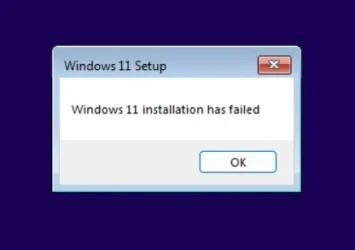
W1125H2_W11_Installation_Failed.webp
The installation can only be done while choosing the option: PREVIOUS VERSION OF SETUP in the Windows 11 setup wizard.
Now I would like to automate the W11 25H2 install with this custom install.wim and I added a autounattend.xml, but I cannot seem to find the solution to load the previous/legacy setup automatically.
In a other tread I saw that adding this the code below to the autounattend.xml should load the previous/legacy setup but all I get is a auto reboot of the installer without any errors what so ever.

Code:
<component name="Microsoft-Windows-Setup" processorArchitecture="amd64" publicKeyToken="31bf3856ad364e35" language="neutral" versionScope="nonSxS">
    <RunSynchronous>
        <!-- Use Classic Setup -->
        <RunSynchronousCommand wcm:action="add">
            <Description>Switch to Legacy Setup</Description>
            <Order>1</Order>
            <Path>cmd /c reg add "HKLM\SYSTEM\Setup" /v CmdLine /t REG_SZ /d "X:\sources\setup.exe" /f</Path>
        </RunSynchronousCommand>
    </RunSynchronous>
</component>

Can somebody give me a clue?
Thank you in advance.
 
Windows Build/Version
Windows 11 25H2

My Computer

System One

  • OS
    W11 PRO
    Computer type
    PC/Desktop
    Manufacturer/Model
    Asus
    CPU
    7900X3D
    Motherboard
    Asus TUF GAMING X670E-PLUS WIFI
    Memory
    Kingston DDR5 Fury Renegade RGB 2x16GB 6000
    Graphics Card(s)
    RTX 3080
This is the simplest method I’ve seen.


Some other threads:


My Computer

System One

  • OS
    Windows 11 Pro 25H2
    Computer type
    PC/Desktop
    Manufacturer/Model
    Intel NUC12WSHi7
    CPU
    12th Gen Core i7-1260P
    Motherboard
    NUC12WSBi7
    Memory
    64 GB Micron PC4-25600
    Graphics Card(s)
    Intel Iris Xe Graphics
    Sound Card
    on-board Realtek HD Audio
    Monitor(s) Displays
    Dell U3219Q
    Screen Resolution
    3840 x 2160
    Hard Drives
    Samsung SSD 990 PRO 1TB
    Crucial MX500 2 TB
    Antivirus
    Microsoft Defender
There is absolutely no reason that you should have to run legacy setup with unattended setup.

A couple of questions:

1) Are you ONLY an autounattend.xml answer file or does you custom install.wim also contain an unattend.xml?

2) Could you post a copy of your autounattend.xml here? I'd like to take a look to see if I can figure out why installation is failing for you.
 

My Computers

System One System Two

  • OS
    Win11 Pro 25H2 (RTM+)
    Computer type
    PC/Desktop
    Manufacturer/Model
    Acemagic
    CPU
    Intel i7-14650HX
    Memory
    32 GB
    Graphics Card(s)
    No GPU - Built-in Intel Graphics
    Sound Card
    Integrated
    Monitor(s) Displays
    Varies as machine will often be moved to locations with different monitors
    Screen Resolution
    Varies
    Hard Drives
    1 x 1TB Gen 4 NVMe SSD
    PSU
    120W Power Brick
    Keyboard
    Corsair K70 Max RGB Magnetic Keyboard
    Mouse
    Logitech MX Master 3
    Internet Speed
    1Gb Up / 1 Gb Down
    Browser
    Edge
    Antivirus
    Windows Defender
  • Operating System
    Win11 Pro 25H2 (RTM+)
    Computer type
    Laptop
    Manufacturer/Model
    Lenovo ThinkBook 13x Gen 2
    CPU
    Intel i7-1255U
    Memory
    16 GB
    Graphics card(s)
    Intel Iris Xe Graphics
    Sound Card
    Realtek® ALC3306-CG codec
    Monitor(s) Displays
    13.3-inch IPS Display
    Screen Resolution
    WQXGA (2560 x 1600)
    Hard Drives
    2 TB 4 x 4 NVMe SSD
    PSU
    USB-C / Thunderbolt 4 Power / Charging
    Keyboard
    Backlit, spill resistant keyboard
    Mouse
    Buttonless Glass Precision Touchpad
    Internet Speed
    1Gb Up / 1Gb Down
    Browser
    Edge
    Antivirus
    Windows Defender
    Other Info
    WiFi 6e / Bluetooth 5.1 / Facial Recognition / Fingerprint Sensor / ToF (Time of Flight) Human Presence Sensor
There is absolutely no reason that you should have to run legacy setup with unattended setup.

A couple of questions:

1) Are you ONLY an autounattend.xml answer file or does you custom install.wim also contain an unattend.xml?

2) Could you post a copy of your autounattend.xml here? I'd like to take a look to see if I can figure out why installation is failing for you.
Hey hsehestedt,

Thnx for the reply!
I checked the Sources directory of my custom iso and it does not contain a unattend.xml, nor did I put one there.
I just found the files: unattend.dll and unattendmgr.dll
Check the content of the default autounattend.xml in attachment I used (to prevent long treads in this post), which I renamed to .txt

The part were I added the previous/legacy installer code is here below (not present in the attachment text file):
I'm not sure if I pasted the part correctly, but check what I did below please:

Code:
<settings pass="specialize">
        <component name="Microsoft-Windows-Deployment" processorArchitecture="amd64" publicKeyToken="31bf3856ad364e35" language="neutral" versionScope="nonSxS">
            <RunSynchronous>
                <!-- Use Classic Setup -->
                <RunSynchronousCommand wcm:action="add">
                    <Description>Switch to Legacy Setup</Description>
                    <Order>1</Order>
                    <Path>cmd /c reg add "HKLM\SYSTEM\Setup" /v CmdLine /t REG_SZ /d "X:\sources\setup.exe" /f</Path>
                </RunSynchronousCommand>
                <RunSynchronousCommand wcm:action="add">
                    <Order>1</Order>
                    <Path>powershell.exe -WindowStyle "Normal" -NoProfile -Command "$xml = [xml]::new(); $xml.Load('C:\Windows\Panther\unattend.xml'); $sb = [scriptblock]::Create( $xml.unattend.Extensions.ExtractScript ); Invoke-Command -ScriptBlock $sb -ArgumentList $xml;"</Path>
                </RunSynchronousCommand>
                <RunSynchronousCommand wcm:action="add">
                    <Order>2</Order>
                    <Path>powershell.exe -WindowStyle "Normal" -ExecutionPolicy "Unrestricted" -NoProfile -File "C:\Windows\Setup\Scripts\Specialize.ps1"</Path>
                </RunSynchronousCommand>
                <RunSynchronousCommand wcm:action="add">
                    <Order>3</Order>
                    <Path>reg.exe load "HKU\DefaultUser" "C:\Users\Default\NTUSER.DAT"</Path>
                </RunSynchronousCommand>
                <RunSynchronousCommand wcm:action="add">
                    <Order>4</Order>
                    <Path>powershell.exe -WindowStyle "Normal" -ExecutionPolicy "Unrestricted" -NoProfile -File "C:\Windows\Setup\Scripts\DefaultUser.ps1"</Path>
                </RunSynchronousCommand>
                <RunSynchronousCommand wcm:action="add">
                    <Order>5</Order>
                    <Path>reg.exe unload "HKU\DefaultUser"</Path>
                </RunSynchronousCommand>
            </RunSynchronous>
        </component>
        <component name="Microsoft-Windows-Shell-Setup" processorArchitecture="amd64" publicKeyToken="31bf3856ad364e35" language="neutral" versionScope="nonSxS">
            <TimeZone>GMT Standard Time</TimeZone>
        </component>
    </settings>
 

Attachments

My Computer

System One

  • OS
    W11 PRO
    Computer type
    PC/Desktop
    Manufacturer/Model
    Asus
    CPU
    7900X3D
    Motherboard
    Asus TUF GAMING X670E-PLUS WIFI
    Memory
    Kingston DDR5 Fury Renegade RGB 2x16GB 6000
    Graphics Card(s)
    RTX 3080
I had forgotten how cryptic answer files generated by that web site are. I'll take a look at this later, but I have to admit that this may be difficult to unravel.

I'll let you know if I manage to find anything.
 

My Computers

System One System Two

  • OS
    Win11 Pro 25H2 (RTM+)
    Computer type
    PC/Desktop
    Manufacturer/Model
    Acemagic
    CPU
    Intel i7-14650HX
    Memory
    32 GB
    Graphics Card(s)
    No GPU - Built-in Intel Graphics
    Sound Card
    Integrated
    Monitor(s) Displays
    Varies as machine will often be moved to locations with different monitors
    Screen Resolution
    Varies
    Hard Drives
    1 x 1TB Gen 4 NVMe SSD
    PSU
    120W Power Brick
    Keyboard
    Corsair K70 Max RGB Magnetic Keyboard
    Mouse
    Logitech MX Master 3
    Internet Speed
    1Gb Up / 1 Gb Down
    Browser
    Edge
    Antivirus
    Windows Defender
  • Operating System
    Win11 Pro 25H2 (RTM+)
    Computer type
    Laptop
    Manufacturer/Model
    Lenovo ThinkBook 13x Gen 2
    CPU
    Intel i7-1255U
    Memory
    16 GB
    Graphics card(s)
    Intel Iris Xe Graphics
    Sound Card
    Realtek® ALC3306-CG codec
    Monitor(s) Displays
    13.3-inch IPS Display
    Screen Resolution
    WQXGA (2560 x 1600)
    Hard Drives
    2 TB 4 x 4 NVMe SSD
    PSU
    USB-C / Thunderbolt 4 Power / Charging
    Keyboard
    Backlit, spill resistant keyboard
    Mouse
    Buttonless Glass Precision Touchpad
    Internet Speed
    1Gb Up / 1Gb Down
    Browser
    Edge
    Antivirus
    Windows Defender
    Other Info
    WiFi 6e / Bluetooth 5.1 / Facial Recognition / Fingerprint Sensor / ToF (Time of Flight) Human Presence Sensor
I was the one who first discovered this hack, but later testing demonstrated it only works where there is NOTHING else in the unattended file. If you mix it with other actions, it will break Setup.
Code:
<Path>cmd /c reg add "HKLM\SYSTEM\Setup" /v CmdLine /t REG_SZ /d "X:\sources\setup.exe" /f</Path>

If you want to force the legacy Setup client, then you should mount boot.wim and update its registry.
24H2 - Unable to install any UUP/DISM ISOs
 

My Computer

System One

  • OS
    Windows 7
I had forgotten how cryptic answer files generated by that web site are. I'll take a look at this later, but I have to admit that this may be difficult to unravel.

I'll let you know if I manage to find anything.
Yes, if you have another/better proposition to get the same result, please share.
And thank you for having a look!
 

My Computer

System One

  • OS
    W11 PRO
    Computer type
    PC/Desktop
    Manufacturer/Model
    Asus
    CPU
    7900X3D
    Motherboard
    Asus TUF GAMING X670E-PLUS WIFI
    Memory
    Kingston DDR5 Fury Renegade RGB 2x16GB 6000
    Graphics Card(s)
    RTX 3080
I was the one who first discovered this hack, but later testing demonstrated it only works where there is NOTHING else in the unattended file. If you mix it with other actions, it will break Setup.
Code:
<Path>cmd /c reg add "HKLM\SYSTEM\Setup" /v CmdLine /t REG_SZ /d "X:\sources\setup.exe" /f</Path>

If you want to force the legacy Setup client, then you should mount boot.wim and update its registry.
24H2 - Unable to install any UUP/DISM ISOs
Thank you, I will have a look!
 

My Computer

System One

  • OS
    W11 PRO
    Computer type
    PC/Desktop
    Manufacturer/Model
    Asus
    CPU
    7900X3D
    Motherboard
    Asus TUF GAMING X670E-PLUS WIFI
    Memory
    Kingston DDR5 Fury Renegade RGB 2x16GB 6000
    Graphics Card(s)
    RTX 3080

Latest Support Threads

Back
Top Bottom


