
Hi Guys,
I have been trying to use a autounattend.xml file, this created with schneegans.de
First I integrated a custom install.wim file, because I want a list of programs to be installed automatically when installing Windows to save time.
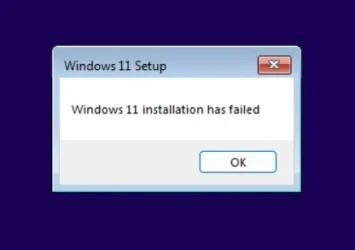
When launching the W11 25H2 setup with this custom install.wim I can only install Windows with the previous/legacy setup, if not selected I get a Windows 11 installation has failed error.
The installation can only be done while choosing the option: PREVIOUS VERSION OF SETUP in the Windows 11 setup wizard.
Now I would like to automate the W11 25H2 install with this custom install.wim and I added a autounattend.xml, but I cannot seem to find the solution to load the previous/legacy setup automatically.
In a other tread I saw that adding this the code below to the autounattend.xml should load the previous/legacy setup but all I get is a auto reboot of the installer without any errors what so ever.
Can somebody give me a clue?
Thank you in advance.
I have been trying to use a autounattend.xml file, this created with schneegans.de
First I integrated a custom install.wim file, because I want a list of programs to be installed automatically when installing Windows to save time.
When launching the W11 25H2 setup with this custom install.wim I can only install Windows with the previous/legacy setup, if not selected I get a Windows 11 installation has failed error.
The installation can only be done while choosing the option: PREVIOUS VERSION OF SETUP in the Windows 11 setup wizard.
Now I would like to automate the W11 25H2 install with this custom install.wim and I added a autounattend.xml, but I cannot seem to find the solution to load the previous/legacy setup automatically.
In a other tread I saw that adding this the code below to the autounattend.xml should load the previous/legacy setup but all I get is a auto reboot of the installer without any errors what so ever.
Code:
<component name="Microsoft-Windows-Setup" processorArchitecture="amd64" publicKeyToken="31bf3856ad364e35" language="neutral" versionScope="nonSxS">
    <RunSynchronous>
        <!-- Use Classic Setup -->
        <RunSynchronousCommand wcm:action="add">
            <Description>Switch to Legacy Setup</Description>
            <Order>1</Order>
            <Path>cmd /c reg add "HKLM\SYSTEM\Setup" /v CmdLine /t REG_SZ /d "X:\sources\setup.exe" /f</Path>
        </RunSynchronousCommand>
    </RunSynchronous>
</component>
Can somebody give me a clue?
Thank you in advance.
- Windows Build/Version
- Windows 11 25H2
My Computer
At a glance
W11 PRO7900X3DKingston DDR5 Fury Renegade RGB 2x16GB 6000RTX 3080
- OS
- W11 PRO
- Computer type
- PC/Desktop
- Manufacturer/Model
- Asus
- CPU
- 7900X3D
- Motherboard
- Asus TUF GAMING X670E-PLUS WIFI
- Memory
- Kingston DDR5 Fury Renegade RGB 2x16GB 6000
- Graphics Card(s)
- RTX 3080






