Solved W11 RP 24H2 26100.2605 - Language Partially Applied?


rtorres

Well-known member
Member
Local time
8:51 PM
Posts
41
Location
California
OS
Windows 11 Enterprise 26H1
Hello everyone,

Has anyone else experienced an issue where Windows only partially applies the selected system language?

I recently downloaded and performed a fresh install of Windows 11 24H2 (build 26100.2605). Unfortunately, the issue persists, and it has been happening since build 26100.2448. This is now the second time I’ve reinstalled Windows, but the problem remains unresolved.

Here's what I’ve tried so far:

I installed Russian and set it as the system-wide language instead of English, but Russian was only partially applied.
I then installed the Russian version of build 26100.2605, added English as the system-wide language, and encountered the same issue—English was only partially applied.
To troubleshoot, I ran a Windows Update post-installation script, which completed without any errors.

Is anyone else encountering this issue or have any suggestions for resolving it? I’d really appreciate any help!
 
Windows Build/Version
24H2 26100.2605

My Computers My Computers

  • At a glance

    Windows 11 Enterprise 26H1Intel Core Ultra 7 (Liquid Metal)32GB DDR5Intel Graphics (Integrated)
    OS
    Windows 11 Enterprise 26H1
    Computer type
    Laptop
    Manufacturer/Model
    Lenovo ThinkPad X1 Carbon Gen 12
    CPU
    Intel Core Ultra 7 (Liquid Metal)
    Motherboard
    OEM
    Memory
    32GB DDR5
    Graphics Card(s)
    Intel Graphics (Integrated)
    Sound Card
    Realtek
    Monitor(s) Displays
    Lenovo OLED
    Screen Resolution
    2880x1800
    Hard Drives
    2TB Samsung 990 Pro
    PSU
    OEM
    Case
    OEM
    Cooling
    OEM
    Keyboard
    ru-RU
    Mouse
    Lenovo Haptic Touchpad
    Internet Speed
    2Gbps (Xfinity ISP)
    Browser
    Chromium, Firefox
    Antivirus
    Windows Security
  • At a glance

    Windows 11 Enterprise 26H1Intel Core i9-13900 (Delidded, Liquid Metal)64GB DDR5EVGA GeForce RTX 3090 FTW3 Ultra
    Operating System
    Windows 11 Enterprise 26H1
    Computer type
    PC/Desktop
    Manufacturer/Model
    Lenovo P3 Ultra
    CPU
    Intel Core i9-13900 (Delidded, Liquid Metal)
    Motherboard
    OEM
    Memory
    64GB DDR5
    Graphics card(s)
    EVGA GeForce RTX 3090 FTW3 Ultra
    Sound Card
    Reaktek
    Monitor(s) Displays
    49" Odyssey OLED G9 (G95SC)
    Screen Resolution
    5120x1440
    Hard Drives
    512GB NVMe (OS), 4TB NVMe (Folders, Games)
    PSU
    Thermaltake Smart M 650W Bronze
    Case
    OEM
    Cooling
    OEM
    Keyboard
    Razer Huntsman V3 Pro 8KHz
    Mouse
    Razer Basilisk V3 Pro 35K
    Internet Speed
    2Gbps (Xfinity ISP)
    Browser
    Chromium, Firefox
    Antivirus
    Windows Security
Have you clean installed Windows 11 with Russian language if you did, which areas are not fully Russian language?
 

My Computer My Computer

At a glance

Windows 11AMD Ryzen 7 5700GMicron Technology DDR4-3200 16GBNVIDIA GeForce RTX 3060
OS
Windows 11
Computer type
PC/Desktop
Manufacturer/Model
HP Pavilion
CPU
AMD Ryzen 7 5700G
Motherboard
Erica6
Memory
Micron Technology DDR4-3200 16GB
Graphics Card(s)
NVIDIA GeForce RTX 3060
Sound Card
Realtek ALC671
Monitor(s) Displays
Samsung SyncMaster U28E590
Screen Resolution
3840 x 2160
Hard Drives
SAMSUNG MZVLQ1T0HALB-000H1
 

My Computer My Computer

At a glance

Microsoft Windows 11 HomeIntel Core i5-13490F2 x 16 Patriot Memory (PDP Systems) PSD516G56...GIGABYTE GeForce RTX 4070 WINDFORCE OC 12G (G...
OS
Microsoft Windows 11 Home
Computer type
PC/Desktop
Manufacturer/Model
MSI MS-7D98
CPU
Intel Core i5-13490F
Motherboard
MSI B760 GAMING PLUS WIFI
Memory
2 x 16 Patriot Memory (PDP Systems) PSD516G560081 6400MT (32-37-37-74); 1.35V)
Graphics Card(s)
GIGABYTE GeForce RTX 4070 WINDFORCE OC 12G (GV-N4070WF3OC-12GD)
Sound Card
Bluetooth Аудио
Monitor(s) Displays
INNOCN 15K1F
Screen Resolution
1920 x 1080
Hard Drives
WD_BLACK SN770 250GB
KINGSTON SNV2S1000G (ELFK0S.6)
PSU
Thermaltake Toughpower GF3 1000W
Case
CG560 - DeepCool
Cooling
ID-COOLING SE-224-XTS / 2 x 140Mm Fan - rear and top; 3 x 120Mm - front
Keyboard
Corsair K70 RGB TKL
Mouse
Corsair KATAR PRO XT
Internet Speed
100 Mbps
Browser
Firefox
Antivirus
Microsoft Defender Antivirus
Other Info
https://www.userbenchmark.com/UserRun/66553205
Have you clean installed Windows 11 with Russian language if you did, which areas are not fully Russian language?
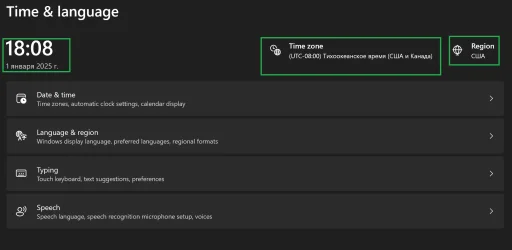
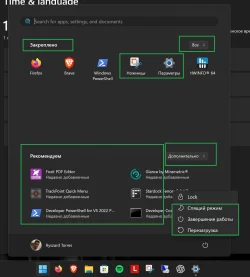
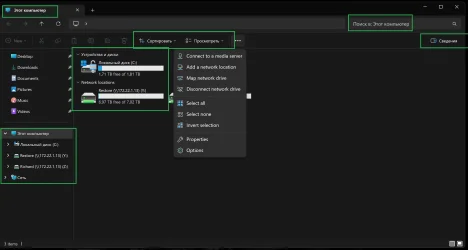
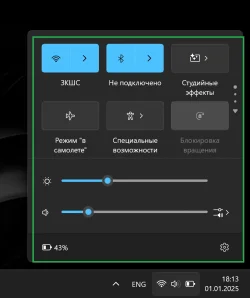
Apologies for the late reply. I installed a clean Windows 11 in English last night (26100.2605) and when switching to Russian, this is what it looks like.

The green boxed items are the only places where Russian is applied to.

So when I apply English on a clean Russian Windows 11 install (26100.2605), the green boxes will be the only place where English is applied.


Снимок экрана 2025-01-01 180745.webpСнимок экрана 2025-01-01 180853.webpСнимок экрана 2025-01-01 181020.webpСнимок экрана 2025-01-01 181134.webpСнимок экрана 2025-01-01 181305.webp
 

My Computers My Computers

  • At a glance

    Windows 11 Enterprise 26H1Intel Core Ultra 7 (Liquid Metal)32GB DDR5Intel Graphics (Integrated)
    OS
    Windows 11 Enterprise 26H1
    Computer type
    Laptop
    Manufacturer/Model
    Lenovo ThinkPad X1 Carbon Gen 12
    CPU
    Intel Core Ultra 7 (Liquid Metal)
    Motherboard
    OEM
    Memory
    32GB DDR5
    Graphics Card(s)
    Intel Graphics (Integrated)
    Sound Card
    Realtek
    Monitor(s) Displays
    Lenovo OLED
    Screen Resolution
    2880x1800
    Hard Drives
    2TB Samsung 990 Pro
    PSU
    OEM
    Case
    OEM
    Cooling
    OEM
    Keyboard
    ru-RU
    Mouse
    Lenovo Haptic Touchpad
    Internet Speed
    2Gbps (Xfinity ISP)
    Browser
    Chromium, Firefox
    Antivirus
    Windows Security
  • At a glance

    Windows 11 Enterprise 26H1Intel Core i9-13900 (Delidded, Liquid Metal)64GB DDR5EVGA GeForce RTX 3090 FTW3 Ultra
    Operating System
    Windows 11 Enterprise 26H1
    Computer type
    PC/Desktop
    Manufacturer/Model
    Lenovo P3 Ultra
    CPU
    Intel Core i9-13900 (Delidded, Liquid Metal)
    Motherboard
    OEM
    Memory
    64GB DDR5
    Graphics card(s)
    EVGA GeForce RTX 3090 FTW3 Ultra
    Sound Card
    Reaktek
    Monitor(s) Displays
    49" Odyssey OLED G9 (G95SC)
    Screen Resolution
    5120x1440
    Hard Drives
    512GB NVMe (OS), 4TB NVMe (Folders, Games)
    PSU
    Thermaltake Smart M 650W Bronze
    Case
    OEM
    Cooling
    OEM
    Keyboard
    Razer Huntsman V3 Pro 8KHz
    Mouse
    Razer Basilisk V3 Pro 35K
    Internet Speed
    2Gbps (Xfinity ISP)
    Browser
    Chromium, Firefox
    Antivirus
    Windows Security

Thank you, I will give this a try.
 

My Computers My Computers

  • At a glance

    Windows 11 Enterprise 26H1Intel Core Ultra 7 (Liquid Metal)32GB DDR5Intel Graphics (Integrated)
    OS
    Windows 11 Enterprise 26H1
    Computer type
    Laptop
    Manufacturer/Model
    Lenovo ThinkPad X1 Carbon Gen 12
    CPU
    Intel Core Ultra 7 (Liquid Metal)
    Motherboard
    OEM
    Memory
    32GB DDR5
    Graphics Card(s)
    Intel Graphics (Integrated)
    Sound Card
    Realtek
    Monitor(s) Displays
    Lenovo OLED
    Screen Resolution
    2880x1800
    Hard Drives
    2TB Samsung 990 Pro
    PSU
    OEM
    Case
    OEM
    Cooling
    OEM
    Keyboard
    ru-RU
    Mouse
    Lenovo Haptic Touchpad
    Internet Speed
    2Gbps (Xfinity ISP)
    Browser
    Chromium, Firefox
    Antivirus
    Windows Security
  • At a glance

    Windows 11 Enterprise 26H1Intel Core i9-13900 (Delidded, Liquid Metal)64GB DDR5EVGA GeForce RTX 3090 FTW3 Ultra
    Operating System
    Windows 11 Enterprise 26H1
    Computer type
    PC/Desktop
    Manufacturer/Model
    Lenovo P3 Ultra
    CPU
    Intel Core i9-13900 (Delidded, Liquid Metal)
    Motherboard
    OEM
    Memory
    64GB DDR5
    Graphics card(s)
    EVGA GeForce RTX 3090 FTW3 Ultra
    Sound Card
    Reaktek
    Monitor(s) Displays
    49" Odyssey OLED G9 (G95SC)
    Screen Resolution
    5120x1440
    Hard Drives
    512GB NVMe (OS), 4TB NVMe (Folders, Games)
    PSU
    Thermaltake Smart M 650W Bronze
    Case
    OEM
    Cooling
    OEM
    Keyboard
    Razer Huntsman V3 Pro 8KHz
    Mouse
    Razer Basilisk V3 Pro 35K
    Internet Speed
    2Gbps (Xfinity ISP)
    Browser
    Chromium, Firefox
    Antivirus
    Windows Security
Looks like this worked!!! Thank you very much!!! Weird that Windows doesn't automatically apply the language like it used to..

This is what I ran:

Powershell:
Install-Language -Language "ru-RU"
Powershell:
Add-WindowsCapability -Online -Name "Language.Handwriting~~~ru-RU~0.0.1.0"
Powershell:
Add-WindowsCapability -Online -Name "Language.Speech~~~ru-RU~0.0.1.0"
Powershell:
Add-WindowsCapability -Online -Name "Language.TextToSpeech~~~ru-RU~0.0.1.0"
Powershell:
Set-WinUILanguageOverride -Language "ru-RU"

#Left this alone, I am in the US and left locale alone.
Powershell:
Copy-UserInternationalSettingsToSystem

#I don't need the Russian keyboard as default, left it en-US.
Powershell:
Set-WinDefaultInputMethodOverride -InputTip "0419:00000419"

Powershell:
Set-WinSystemLocale -SystemLocale "ru-RU"
Powershell:
Restart-Computer
 

My Computers My Computers

  • At a glance

    Windows 11 Enterprise 26H1Intel Core Ultra 7 (Liquid Metal)32GB DDR5Intel Graphics (Integrated)
    OS
    Windows 11 Enterprise 26H1
    Computer type
    Laptop
    Manufacturer/Model
    Lenovo ThinkPad X1 Carbon Gen 12
    CPU
    Intel Core Ultra 7 (Liquid Metal)
    Motherboard
    OEM
    Memory
    32GB DDR5
    Graphics Card(s)
    Intel Graphics (Integrated)
    Sound Card
    Realtek
    Monitor(s) Displays
    Lenovo OLED
    Screen Resolution
    2880x1800
    Hard Drives
    2TB Samsung 990 Pro
    PSU
    OEM
    Case
    OEM
    Cooling
    OEM
    Keyboard
    ru-RU
    Mouse
    Lenovo Haptic Touchpad
    Internet Speed
    2Gbps (Xfinity ISP)
    Browser
    Chromium, Firefox
    Antivirus
    Windows Security
  • At a glance

    Windows 11 Enterprise 26H1Intel Core i9-13900 (Delidded, Liquid Metal)64GB DDR5EVGA GeForce RTX 3090 FTW3 Ultra
    Operating System
    Windows 11 Enterprise 26H1
    Computer type
    PC/Desktop
    Manufacturer/Model
    Lenovo P3 Ultra
    CPU
    Intel Core i9-13900 (Delidded, Liquid Metal)
    Motherboard
    OEM
    Memory
    64GB DDR5
    Graphics card(s)
    EVGA GeForce RTX 3090 FTW3 Ultra
    Sound Card
    Reaktek
    Monitor(s) Displays
    49" Odyssey OLED G9 (G95SC)
    Screen Resolution
    5120x1440
    Hard Drives
    512GB NVMe (OS), 4TB NVMe (Folders, Games)
    PSU
    Thermaltake Smart M 650W Bronze
    Case
    OEM
    Cooling
    OEM
    Keyboard
    Razer Huntsman V3 Pro 8KHz
    Mouse
    Razer Basilisk V3 Pro 35K
    Internet Speed
    2Gbps (Xfinity ISP)
    Browser
    Chromium, Firefox
    Antivirus
    Windows Security
I have seen in in Windows 7 and 10, I had installed the English language and then the Greek language pack. Not everything was in Greek, some texts remained in English. But after installing a few updates it fixed and everything was in Greek. Just install some Windows updates and it will eventually fix.
 

My Computers My Computers

  • At a glance

    Windows 11 Pro 23H2 (7582), 25H2 (9457)Mobile DualCore Intel Core 2 Duo T7250, 2000 MHz4GBMobile Intel(R) GMA 4500M (Mobile 4 series)
    OS
    Windows 11 Pro 23H2 (7582), 25H2 (9457)
    Computer type
    Laptop
    Manufacturer/Model
    Acer Extensa 5630EZ
    CPU
    Mobile DualCore Intel Core 2 Duo T7250, 2000 MHz
    Motherboard
    Acer Extensa 5630
    Memory
    4GB
    Graphics Card(s)
    Mobile Intel(R) GMA 4500M (Mobile 4 series)
    Sound Card
    Realtek ALC268 @ Intel 82801IB ICH9 - High Definition Audio Controller
    Monitor(s) Displays
    1
    Screen Resolution
    1280x800
    Hard Drives
    Samsung SSD 850 EVO 250GB SATA Device (250 GB, SATA-III)
    Internet Speed
    802.11g wireless 54 Mbps
    Browser
    MICROSOFT EDGE
    Antivirus
    WINDOWS DEFENDER
    Other Info
    Legacy MBR installation, no TPM, no Secure Boot, no WDDM 2.0 graphics drivers, no SSE4.2, cannot get more unsupported ;) This is only my test laptop. I had installed Windows 11 here before upgrading my main PC. For my main PC I use everyday see my 2nd system specs.
  • At a glance

    Windows 11 Pro 25H2 (build 26200.9457)Intel Core-i7 3770 3.40GHz s1155 (3rd generat...2x Kingston Hyper-X Blu 8GB DDR3-1600GIGABYTE GeForce RTX 3050 WINDFORCE OC V2 6GB...
    Operating System
    Windows 11 Pro 25H2 (build 26200.9457)
    Computer type
    PC/Desktop
    Manufacturer/Model
    Custom-built PC
    CPU
    Intel Core-i7 3770 3.40GHz s1155 (3rd generation)
    Motherboard
    Asus P8H61 s1155 ATX
    Memory
    2x Kingston Hyper-X Blu 8GB DDR3-1600
    Graphics card(s)
    GIGABYTE GeForce RTX 3050 WINDFORCE OC V2 6GB (GV-N3050WF2OCV2-6GD)
    Sound Card
    Realtek HD audio (ALC887)
    Monitor(s) Displays
    Sony Bravia KDL-19L4000 19" LCD TV via VGA
    Screen Resolution
    1440x900 32-bit 60Hz
    Hard Drives
    WD Blue SA510 2.5 1000GB SSD as system disk, Western Digital Caviar Purple 4TB SATA III (WD40PURZ) as second
    PSU
    Thermaltake Litepower RGB 550W Full Wired
    Case
    SUPERCASE MIDI-TOWER
    Cooling
    Deepcool Gamma Archer CPU cooler, 1x 8cm fan at the back
    Keyboard
    Mitsumi 101-key PS/2
    Mouse
    Microsoft Compact Optical Mouse
    Internet Speed
    802.11ac 5GHz wireless 260Mpbs
    Browser
    Microsoft Edge, Mozilla Firefox
    Antivirus
    Microsoft Windows Defender
    Other Info
    Legacy BIOS (MBR) installation, no TPM, no Secure Boot, WDDM 3.0 graphics drivers, WEI score 7.4
Back
Top Bottom