
Website icons changed to generic white sheets


wewills

New member
Local time
10:17 AM
Posts
2
OS
Windows 11 Home
After a Windows update, all my website icons changed from the website's logo to generic white sheet icons. All icons were ok until a reboot. I have rebuilt the icon cache located under my user profile, tried manually rebuilding the icons by going to the company's website and dragging the website info to the desktop using Edge and Firefox. I even tried rebuilding the icon cache using the commands below with no luck. I even reinstalled the OS with the same result.

Like I said, this did not happen until after the windows update.

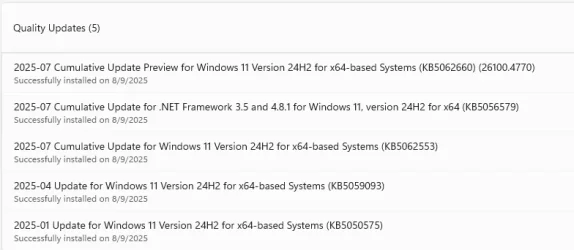
I am running Windows 11 Version 24H2 (OS Build 26100.4770)

Rebuild Icon Cache
Go to search and type:- cmd
Next press the ctrl +shift+enter keys on your keyboard, a cmd prompt as Admin will open. Or Right click the CMD results and Run as Administrator
Copy and paste all the below bold cmds into the command prompt window, one at a time and press enter.
ie4uinit.exe -show
taskkill /IM explorer.exe /F
(your desktop will go blank)
DEL /A /Q "%localappdata%\IconCache.db"
DEL /A /F /Q "%localappdata%\Microsoft\Windows\Explorer\iconcache*"
shutdown /p
(your computer will shutdown completely, after this Restart your computer.
 
Windows Build/Version
24H2 (OS Build 26100.4770)

Attachments
  • Screenshot 2025-08-11 182340.webp
    Screenshot 2025-08-11 182340.webp
    26.2 KB · Views: 2

My Computer

System One

  • OS
    Windows 11 Home
    Computer type
    PC/Desktop
    Manufacturer/Model
    Dell
Welcome to the forum. Just to be sure please download and run the bat file, option 2 here. Run bat as administrator.

Note as mentioned in the tutorial, lf icons for a specific file extension display the wrong icon. This may be due to setting the wrong association for what app to open the file type instead. If so, restoring the default association of the file extension will fix this issue.
Like I said, this did not happen until after the windows update......I even reinstalled the OS with the same result.
Which update?

Did you do a Clean install or a reset? A reset and keep everything WOULD NOT have fixed any corruption in your user account.

Create a new local user account to test with. If the issue does not exist in the new account, that proves your user account is corrupted and it is not a windows issue.
 

My Computers

System One System Two

  • OS
    Windows 11 Pro 25H2
    Computer type
    PC/Desktop
    Manufacturer/Model
    Dell Optiplex 7080
    CPU
    i9-10900 10 core 20 threads
    Motherboard
    DELL 0J37VM
    Memory
    32 gb
    Graphics Card(s)
    none-Intel UHD Graphics 630
    Sound Card
    Integrated Realtek
    Monitor(s) Displays
    Benq 27
    Screen Resolution
    2560x1440
    Hard Drives
    2x1tb Solidigm m.2 nvme /External drives 512gb Samsung m.2 sata+2tb Kingston m2.nvme
    PSU
    500w
    Case
    MT
    Cooling
    Dell Premium
    Keyboard
    Logitech wired
    Mouse
    Logitech wireless
    Internet Speed
    so slow I'm too embarrassed to tell
    Browser
    #1 Edge #2 Firefox
    Antivirus
    Defender+MWB Premium
  • Operating System
    Windows 11 Pro 24H2 26200.8457
    Computer type
    PC/Desktop
    Manufacturer/Model
    Beelink Mini PC SER5
    CPU
    AMD Ryzen 7 6800U
    Memory
    32 gb
    Graphics card(s)
    integrated
    Sound Card
    integrated
    Monitor(s) Displays
    Benq 27
    Screen Resolution
    2560x1440
    Hard Drives
    1TB Crucial nvme
    Keyboard
    Logitech wired
    Mouse
    Logitech wireless
    Internet Speed
    still too embarrassed to tell
    Browser
    Firefox
    Antivirus
    Defender
    Other Info
    System 3 is non compliant Dell 9020 i7-4770/24gb ram Win11 PRO 26200.8457
The update that was installed and after a reboot which caused the icons for websites to become generic (white sheets of paper) instead of the websites logo was 2025-07 Cumulative Update Preview for Windows 11 Version 24H2 for x64-based Systems (KB5062660) (26100.4770).

I did a Clean install and DID NOT save/keep any data.

I have created a local profile to test the issue, and the issue still remains.

As I stated, all was good until I installed the update and rebooted than all the icons that were created from websites changed to generic white sheets of paper.
 

My Computer

System One

  • OS
    Windows 11 Home
    Computer type
    PC/Desktop
    Manufacturer/Model
    Dell
did a Clean install and DID NOT save/keep any data.

I have created a local profile to test the issue, and the issue still remains.
Thinking out loud here, but I did not ask what is your default browser? If it's something other than Edge, make Edge your default browser and see if creating a new shortcut works right. If that works please report what browser you have been using.

I'm sorry but other than tell you to uninstall the update(which might not be possible now if other updates have come in)
I do not have any other ideas. TBH how this is happening makes no sense to me if you did a clean install using an official iso.
If you saved no data and did not use a Microsoft account, everything in windows would have been rebuilt as new. Just as your shortcut icons to websites would have to have been created as new.
 

My Computers

System One System Two

  • OS
    Windows 11 Pro 25H2
    Computer type
    PC/Desktop
    Manufacturer/Model
    Dell Optiplex 7080
    CPU
    i9-10900 10 core 20 threads
    Motherboard
    DELL 0J37VM
    Memory
    32 gb
    Graphics Card(s)
    none-Intel UHD Graphics 630
    Sound Card
    Integrated Realtek
    Monitor(s) Displays
    Benq 27
    Screen Resolution
    2560x1440
    Hard Drives
    2x1tb Solidigm m.2 nvme /External drives 512gb Samsung m.2 sata+2tb Kingston m2.nvme
    PSU
    500w
    Case
    MT
    Cooling
    Dell Premium
    Keyboard
    Logitech wired
    Mouse
    Logitech wireless
    Internet Speed
    so slow I'm too embarrassed to tell
    Browser
    #1 Edge #2 Firefox
    Antivirus
    Defender+MWB Premium
  • Operating System
    Windows 11 Pro 24H2 26200.8457
    Computer type
    PC/Desktop
    Manufacturer/Model
    Beelink Mini PC SER5
    CPU
    AMD Ryzen 7 6800U
    Memory
    32 gb
    Graphics card(s)
    integrated
    Sound Card
    integrated
    Monitor(s) Displays
    Benq 27
    Screen Resolution
    2560x1440
    Hard Drives
    1TB Crucial nvme
    Keyboard
    Logitech wired
    Mouse
    Logitech wireless
    Internet Speed
    still too embarrassed to tell
    Browser
    Firefox
    Antivirus
    Defender
    Other Info
    System 3 is non compliant Dell 9020 i7-4770/24gb ram Win11 PRO 26200.8457

Latest Support Threads

Back
Top Bottom





