
After a Windows update, all my website icons changed from the website's logo to generic white sheet icons. All icons were ok until a reboot. I have rebuilt the icon cache located under my user profile, tried manually rebuilding the icons by going to the company's website and dragging the website info to the desktop using Edge and Firefox. I even tried rebuilding the icon cache using the commands below with no luck. I even reinstalled the OS with the same result.
Like I said, this did not happen until after the windows update.
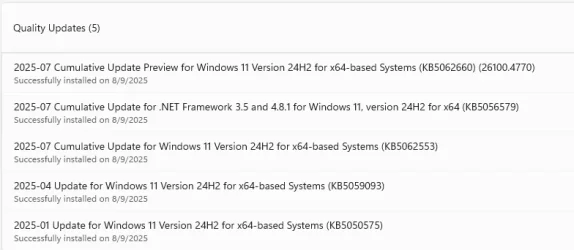
I am running Windows 11 Version 24H2 (OS Build 26100.4770)
Rebuild Icon Cache
Go to search and type:- cmd
Next press the ctrl +shift+enter keys on your keyboard, a cmd prompt as Admin will open. Or Right click the CMD results and Run as Administrator
Copy and paste all the below bold cmds into the command prompt window, one at a time and press enter.
ie4uinit.exe -show
taskkill /IM explorer.exe /F (your desktop will go blank)
DEL /A /Q "%localappdata%\IconCache.db"
DEL /A /F /Q "%localappdata%\Microsoft\Windows\Explorer\iconcache*"
shutdown /p (your computer will shutdown completely, after this Restart your computer.
Like I said, this did not happen until after the windows update.
I am running Windows 11 Version 24H2 (OS Build 26100.4770)
Rebuild Icon Cache
Go to search and type:- cmd
Next press the ctrl +shift+enter keys on your keyboard, a cmd prompt as Admin will open. Or Right click the CMD results and Run as Administrator
Copy and paste all the below bold cmds into the command prompt window, one at a time and press enter.
ie4uinit.exe -show
taskkill /IM explorer.exe /F (your desktop will go blank)
DEL /A /Q "%localappdata%\IconCache.db"
DEL /A /F /Q "%localappdata%\Microsoft\Windows\Explorer\iconcache*"
shutdown /p (your computer will shutdown completely, after this Restart your computer.
- Windows Build/Version
- 24H2 (OS Build 26100.4770)
Attachments
My Computer
At a glance
Windows 11 Home
- OS
- Windows 11 Home
- Computer type
- PC/Desktop
- Manufacturer/Model
- Dell








