Weird Incorrect Behavior when making shortcuts to apps


Shadly

New member
Local time
7:59 PM
Posts
7
OS
Windows 11
I have a gaming frontend that I am trying to launch the XBox app from. I went to the Apps folder from the Start menu, right clicked "Create Shortcut", and made a shortcut on the desktop.

First bit of weird behavior: I can't right click/properties on the shortcut. Just why???

Second bit of weird behavior: I can't launch the shortcut through the frontend software no matter what I try. I've tried giving it the command start "path\to\shortcut.lnk", it tells me the shortcut "doesn't have a defined path". I've made a .cmd file and just type in the start "path\to\shortcut.lnk". I then launch the .cmd file from the frontend software and it's the same thing. Here is the weird, incorrect part - if I click on the shortcut directly, it launches XBox; if I click on the .cmd file it launches XBox. The frontend software can't though. I know it's running the .cmd file because it throws the error for the .lnk file. But it's like if you try to activate the frontend, all of a sudden, that shortcut is blank. Weird!!!!!

Anyway, how do I program a program to launch a Windows App??? In Windows 10, this would work: start shell:AppsFolder\Microsoft.XboxGamingServices_8wekyb3d8bbwe!App. Making the shortcut on the desktop would also work.

1749614879162.webp
 
Windows Build/Version
W11, 24H2
Last edited:

My Computer My Computer

At a glance

Windows 11
OS
Windows 11
Computer type
PC/Desktop
Manufacturer/Model
Custom
I can answer your first question.
I went to the Apps folder from the Start menu, right clicked "Create Shortcut", and made a shortcut on the desktop.
If you mean you right clicked on XBox and chose "create shortcut" I do not know how you did that. I do not have "create shortcut" as an option for Xbox
XBox is a UWP app. You CAN pin it to the start menu or taskbar. If you want it on your desktop, just find XBox in the all apps list and drag it to the desktop to create a shortcut. Once you do that your right click will work.

Here is what I get when right clicking on XBOX after creating the shortcut created using this method.
 

Attachments

  • Screenshot 2025-06-10 230853.webp
    Screenshot 2025-06-10 230853.webp
    22.6 KB · Views: 1

My Computers My Computers

  • At a glance

    Windows 11 Pro 25H2 26200.8655i9-10900 10 core 20 threads32 gbnone-Intel UHD Graphics 630
    OS
    Windows 11 Pro 25H2 26200.8655
    Computer type
    PC/Desktop
    Manufacturer/Model
    Dell Optiplex 7080
    CPU
    i9-10900 10 core 20 threads
    Motherboard
    DELL 0J37VM
    Memory
    32 gb
    Graphics Card(s)
    none-Intel UHD Graphics 630
    Sound Card
    Integrated Realtek
    Monitor(s) Displays
    Benq 27
    Screen Resolution
    2560x1440
    Hard Drives
    2x1tb Solidigm m.2 nvme /External drives 512gb Samsung m.2 sata+2tb Kingston m2.nvme
    PSU
    500w
    Case
    MT
    Cooling
    Dell Premium
    Keyboard
    Logitech wired
    Mouse
    Logitech wireless
    Internet Speed
    so slow I'm too embarrassed to tell
    Browser
    #1 Edge #2 Firefox
    Antivirus
    Defender+MWB Premium
  • At a glance

    Windows 11 Pro 24H2 26200.8457AMD Ryzen 7 6800U32 gbintegrated
    Operating System
    Windows 11 Pro 24H2 26200.8457
    Computer type
    PC/Desktop
    Manufacturer/Model
    Beelink Mini PC SER5
    CPU
    AMD Ryzen 7 6800U
    Memory
    32 gb
    Graphics card(s)
    integrated
    Sound Card
    integrated
    Monitor(s) Displays
    Benq 27
    Screen Resolution
    2560x1440
    Hard Drives
    1TB Crucial nvme
    Keyboard
    Logitech wired
    Mouse
    Logitech wireless
    Internet Speed
    still too embarrassed to tell
    Browser
    Firefox
    Antivirus
    Defender
    Other Info
    System 3 is non compliant Dell 9020 i7-4770/24gb ram Win11 PRO 26200.8457
I can answer your first question.

If you mean you right clicked on XBox and chose "create shortcut" I do not know how you did that. I do not have "create shortcut" as an option for Xbox
XBox is a UWP app. You CAN pin it to the start menu or taskbar. If you want it on your desktop, just find XBox in the all apps list and drag it to the desktop to create a shortcut. Once you do that your right click will work.

Here is what I get when right clicking on XBOX after creating the shortcut created using this method.
See, that properties window won't open for me when I right click on the shortcut. It doesn't matter how I make the shortcut. Can you post the "Target" field here? I can try just launching that directly.
 

My Computer My Computer

At a glance

Windows 11
OS
Windows 11
Computer type
PC/Desktop
Manufacturer/Model
Custom
See, that properties window won't open for me when I right click on the shortcut. It doesn't matter how I make the shortcut. Can you post the "Target" field here? I can try just launching that directly.
Just create your shortcut using the apps folder by running the command below:

Code:
%windir%\explorer.exe shell:AppsFolder
 

My Computers My Computers

  • At a glance

    All Branches but ReleaseAMD Ryzen 7 7735HS 3200-4500 Mhz 8 cores x 232 GB DDR5Radeon Graphic / NVIDIA GeForce RTX 4060 8 GB...
    OS
    All Branches but Release
    Computer type
    Laptop
    Manufacturer/Model
    Acer Nitro ANV15-51
    CPU
    AMD Ryzen 7 7735HS 3200-4500 Mhz 8 cores x 2
    Motherboard
    Sportage_RBH
    Memory
    32 GB DDR5
    Graphics Card(s)
    Radeon Graphic / NVIDIA GeForce RTX 4060 8 GB GDDR6
    Sound Card
    AMD/Realtek(R) Audio
    Monitor(s) Displays
    Integrated Monitor (15.3"vis)
    Screen Resolution
    FHD 1920X1080 16:9 144Hz
    Hard Drives
    KINGSTON OM8SEP4512Q-AA 1TB
    Western Digital 256GB
    PSU
    19V DC 6.32 A 120 W
    Cooling
    Dual Fans
    Mouse
    MS Bluetooth
    Internet Speed
    Fiber 1GB Cox -us & 1GB Orange-fr
    Browser
    Edge Canary- Firefox Nightly-Chrome Dev-Chrome Dev
    Antivirus
    Windows Defender
  • At a glance

    Windows 11 BetaAMD A9-94208 GB of DDR4AMD Radeon R5
    Operating System
    Windows 11 Beta
    Computer type
    Laptop
    Manufacturer/Model
    Asus X751BP
    CPU
    AMD A9-9420
    Memory
    8 GB of DDR4
    Graphics card(s)
    AMD Radeon R5
    Screen Resolution
    1600x900
    Hard Drives
    Seagate 1 TB

My Computers My Computers

  • At a glance

    Windows 11 Pro 25H2 26200.8655i9-10900 10 core 20 threads32 gbnone-Intel UHD Graphics 630
    OS
    Windows 11 Pro 25H2 26200.8655
    Computer type
    PC/Desktop
    Manufacturer/Model
    Dell Optiplex 7080
    CPU
    i9-10900 10 core 20 threads
    Motherboard
    DELL 0J37VM
    Memory
    32 gb
    Graphics Card(s)
    none-Intel UHD Graphics 630
    Sound Card
    Integrated Realtek
    Monitor(s) Displays
    Benq 27
    Screen Resolution
    2560x1440
    Hard Drives
    2x1tb Solidigm m.2 nvme /External drives 512gb Samsung m.2 sata+2tb Kingston m2.nvme
    PSU
    500w
    Case
    MT
    Cooling
    Dell Premium
    Keyboard
    Logitech wired
    Mouse
    Logitech wireless
    Internet Speed
    so slow I'm too embarrassed to tell
    Browser
    #1 Edge #2 Firefox
    Antivirus
    Defender+MWB Premium
  • At a glance

    Windows 11 Pro 24H2 26200.8457AMD Ryzen 7 6800U32 gbintegrated
    Operating System
    Windows 11 Pro 24H2 26200.8457
    Computer type
    PC/Desktop
    Manufacturer/Model
    Beelink Mini PC SER5
    CPU
    AMD Ryzen 7 6800U
    Memory
    32 gb
    Graphics card(s)
    integrated
    Sound Card
    integrated
    Monitor(s) Displays
    Benq 27
    Screen Resolution
    2560x1440
    Hard Drives
    1TB Crucial nvme
    Keyboard
    Logitech wired
    Mouse
    Logitech wireless
    Internet Speed
    still too embarrassed to tell
    Browser
    Firefox
    Antivirus
    Defender
    Other Info
    System 3 is non compliant Dell 9020 i7-4770/24gb ram Win11 PRO 26200.8457
First bit of weird behavior: I can't right click/properties on the shortcut. Just why???
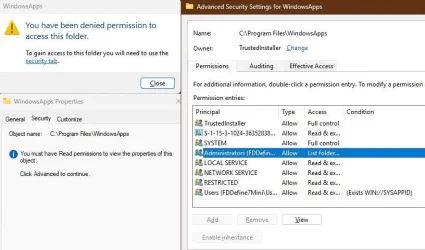
WindowsApps folder or UWP apps have limited permissions for security, even admin can not open them directly.
But you can start the app, right click on it in task manager, open location and create a shortcut from exe there.

capture_06112025_160151.webp capture_06112025_160247.webp
 

My Computer My Computer

At a glance

Home26H2CanAMD Ryzen 5 8600G (07/24)2x32GB Kingston FURY DDR5 5600 MHz CL36 @5200...ASROCK Radeon RX 6600 Challenger D 8G @48FPS ...
OS
Home26H2Can
Computer type
PC/Desktop
CPU
AMD Ryzen 5 8600G (07/24)
Motherboard
ASROCK B650M-HDV/M.2 (07/24) BIOS 4.21 AGESA ComboAM5 1.3.0.1 (04/26)
Memory
2x32GB Kingston FURY DDR5 5600 MHz CL36 @5200 CL36 (07/24)
Graphics Card(s)
ASROCK Radeon RX 6600 Challenger D 8G @48FPS (08/24)
Sound Card
Creative Sound BlasterX AE-5 Plus (05/24)
Monitor(s) Displays
24" Philips 24M1N3200ZS/00 (05/24)
Screen Resolution
1920×1080@165Hz via DP1.4
Hard Drives
Kingston KC3000 NVMe 2TB (05/24)
ADATA XPG GAMMIX S11 Pro 512GB (07/19)
PSU
Seasonic Core GM 550 Gold (04/24)
Case
Fractal Design Define 7 Mini with 3x Noctua NF-P14s/12@555rpm (04/24)
Cooling
Noctua NH-U12S with Noctua NF-P12 (04/24)
Keyboard
HP Pavilion Wired Keyboard 300 (07/24) + Rabalux 76017 Parker (01/24)
Mouse
Logitech M330 Silent Plus (01/26)
Internet Speed
500/100 Mbps via RouterOS (05/21) & TCP Optimizer
Browser
Edge, Brave for YouTube, LibreWolf for FB
Antivirus
NextDNS blocking 1/3 Traffic
Other Info
Phone: Motorola Moto G86 (02/26)
Backup: Hasleo Backup Suite (PreOS)
Headphones: Sennheiser RS170 (09/10)
Chair: Huzaro Force 4.4 Grey Mesh (05/24)
Notifier: Xiaomi Mi Band 9 Milanese (10/24)
FlexCore USB-C 3.2 Gen 1 (M) to LAN (F) (08/25)
For W11, the Xbox app alias is:
Microsoft.GamingApp_8wekyb3d8bbwe!Microsoft.Xbox.App

MS doesn't use the same Appx Package name as W10 did before. You can search for current Store app aliases using:
Code:
powershell -C "Get-StartApps | where { $_.Name -match 'Xbox' }"
 

My Computer My Computer

At a glance

Windows 7
OS
Windows 7
WindowsApps folder or UWP apps have limited permissions for security, even admin can not open them directly.
But you can start the app, right click on it in task manager, open location and create a shortcut from exe there.

View attachment 136567 View attachment 136566
So this kind of worked, but not really. I did what you said and made the shortcut on the Desktop. The shortcut works and opens XBox. If I call the shortcut in a batch or cmd file, it works. But, if I program my frontend to fire the shortcut, batch or cmd file, it still doesn't work. I get the same error about how the target doesn't exist.

This time, though, I was able to open the properties menu for the shortcut. I grabbed the target from the target field:

"C:\Program Files\WindowsApps\Microsoft.GamingApp_2505.1001.9.0_x64__8wekyb3d8bbwe\XboxPcApp.exe"

...and, when I programed my frontend to launch this file directly (no shortcut, batch or cmd involved) ... it worked.

I don't know why this worked and the other ways didn't and I likely will never know.

Still weird. But fixed. Thank you.
 

My Computer My Computer

At a glance

Windows 11
OS
Windows 11
Computer type
PC/Desktop
Manufacturer/Model
Custom

Latest Support Threads

Back
Top Bottom