Solved Weird right mouse click issue


Frecklesnoot

"That Repair Guy"
Member
Local time
4:13 AM
Posts
26
Location
Mildura, Australia
OS
Windows 11 Pro 25H2 Build 26200.7623
Hey all, I usually can fix my own issues with this system but this is a weird issue.

When I right click on certain files e.g. media file or batch file every second right click will bring up the classic menu and not the standard windows 11 menu.

I did have Directory Opus installed to see if it could do what I was needing, it didn't so uninstalled via Revo (my go to to uninstall all software). Opus was uninstalled a couple of weeks ago and removed same day was installed.

The first time i noticed this was a night ago, I right click a lot when doing things on the system.

This is my media PC (See My Computer for specs). It's not a huge / major issue just annoying. I do have a system image but it was well before I played with Opus. It's also no biggie to either clean install windows or repair install (just need to back Kodi and a couple of things first).

I'm more interest in the how or why this happened, it's differently something I have never come across in my over 25 years as the tech.

Thanks in advance for any clues on the how or why (maybe a fix)

Cheers Freck
 

Attachments
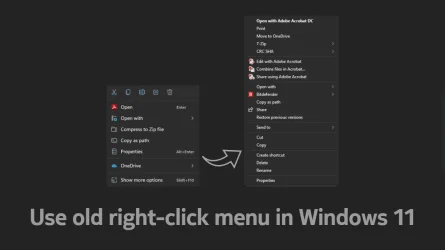
  • Use-old-right-click-menu-in-Windows-11.webp
    Use-old-right-click-menu-in-Windows-11.webp
    23.4 KB · Views: 2

My Computer My Computer

At a glance

Windows 11 Pro 25H2 Build 26200.7623AMD Ryzen 5 1600 Six-Core Processorx2 Capacity: 4 GB Type: DDR4-2933 PC4-23466 S...NVIDIA GeForce GTX 980 VRAM: 3.99 GB
OS
Windows 11 Pro 25H2 Build 26200.7623
Computer type
PC/Desktop
Manufacturer/Model
Custom
CPU
AMD Ryzen 5 1600 Six-Core Processor
Motherboard
MSI B350M MORTAR ARCTIC (MS-7A37) 2.0
Memory
x2 Capacity: 4 GB Type: DDR4-2933 PC4-23466 Speed: 2800MT/s Model: TEAMGROUP-UD4-3000
Graphics Card(s)
NVIDIA GeForce GTX 980 VRAM: 3.99 GB
Sound Card
Realtek High Definition Audio
Monitor(s) Displays
Samsung 75 inch QLED 4K
Screen Resolution
3840x2160
Hard Drives
PC601 NVMe SK hynix 256GB Size: 256GB Partitions: 4 (Windows Installed)
ST4000VN000-1H4168 Size: 4TB Partitions: 1
WDC WD40EFRX-68WT0N0 Size: 4TB Partitions: 1
ST8000AS0002-1NA17Z Size: 8TB Partitions: 2
WDC WD40EFRX-68WT0N0 Size: 4TB Partitions: 1
WDC WD30EZRX-00MMMB0 Size: 3TB Partitions: 1
TOSHIBA DT01ACA300 Size: 3TB Partitions: 1
ST2000DM001-1ER164 Size: 2TB Partitions: 1
ST3000DM001-1CH166 Size: 3TB Partitions: 2
PSU
Corsair 850W RM850x 80+ Gold Fully Modular ATX
Case
N/A
Cooling
N/A
Keyboard
N/A
Mouse
N/A
Internet Speed
800mbps Down, 40mbps up, HFC Cable
Browser
Chrome / Firefox / Edge(not used, installed only)
Antivirus
Defender
Other Info
This machine is used as a media pc for watching tv shows and movies.

Kodi is installed and used for media.

This windows install is completely stock, not running any start menu or any other type of program to modify windows explorer or start menus. Only uninstalled pre installed apps.
I think it might be a Windows 11 24H2 thing, but I may be wrong - I have occasionally had that since upgrading. I've also occasionally found the top of the right click menu goes off screen at the top so I can't select delete. A second right click and it's in the right place. Despite it sometimes being the classic menu it still has the new labels at the top for delete, rename etc (except when they are off screen!).
 

My Computers My Computers

  • At a glance

    Windows 11 Home 25H2Core i5-1035G132gb
    OS
    Windows 11 Home 25H2
    Computer type
    Laptop
    Manufacturer/Model
    HP Pavilion 14-ce3606sa
    CPU
    Core i5-1035G1
    Memory
    32gb
    Hard Drives
    Samsung 870 evo sata ssd
    Cooling
    Could be better
    Internet Speed
    50 mbps Starlink
    Browser
    Firefox
    Other Info
    Originally came installed with a 500gb H10 Optane ssd
  • At a glance

    Windows 11 HomeIntel Core i5-1035G116gb
    Operating System
    Windows 11 Home
    Computer type
    Laptop
    Manufacturer/Model
    HP Pavilion ce3606sa
    CPU
    Intel Core i5-1035G1
    Memory
    16gb
    Hard Drives
    Hynix Gold P31 2TB
    Internet Speed
    200mbps Starlink
    Browser
    Firefox
    Antivirus
    Defender
When you uninstalled, did you use the Revo Advanced method? This will remove any remaining files in the Registry?

If you have remaining files in the Registry, Go to search and type Registry Editor and press Enter.

First backup the Registry.
Go to the toolbar to Edit/Find. In the Find What box type the name of the app
Directory Opus and press Find Next.
It will stop on an entry.
1. Press the Del key on the keyboard,
2. Press Enter to accept the deletion.
3. Press F3 to continue searching the Registry.
Do these last 3 steps until you see the message
Finished Searching the Registry. Restart the coomputer
 

My Computer My Computer

At a glance

Windows 11 Pro Insider 64 bit 25H2 26200.5742Intel Core i7 9700K 3.6016 GBnVidia GEForce RTX 2060 Super
OS
Windows 11 Pro Insider 64 bit 25H2 26200.5742
Computer type
PC/Desktop
Manufacturer/Model
Gigabyte Z390 UD
CPU
Intel Core i7 9700K 3.60
Motherboard
Gigabyte Z390 UD
Memory
16 GB
Graphics Card(s)
nVidia GEForce RTX 2060 Super
Sound Card
onboard
Monitor(s) Displays
Two 27" Dell 4K monitors
Screen Resolution
3840 x 2160
Hard Drives
M.2 NVME SSD, 500 GB; Two 2TB Mechanical HDD's
PSU
850w PSU
Case
Cyberpower PC
Cooling
Water cooled
Keyboard
Backlit Cyberpower gaming keyboard
Mouse
Backlit Cyberpower gaming mouse
Internet Speed
1 GB mbps
Browser
Brave
Antivirus
Windows Security
this is not to show how to do anything but you can use this as a reference to check your registry settings.

this way you can see if anything has been altered and revert anything to the way you want it.
best of luck, Steve ..
 

My Computers My Computers

  • At a glance

    Windows 11 HomeRyzen 7 5825u64GB DDR4 3200Ryzen 7 5825u
    OS
    Windows 11 Home
    Computer type
    PC/Desktop
    Manufacturer/Model
    HP 24" AiO
    CPU
    Ryzen 7 5825u
    Motherboard
    HP
    Memory
    64GB DDR4 3200
    Graphics Card(s)
    Ryzen 7 5825u
    Sound Card
    RealTek
    Monitor(s) Displays
    24" HP AiO
    Screen Resolution
    1920 x 1080 @60 Hz
    Hard Drives
    1TB WD Blue SN580 M2 SSD Partitioned.
    2x 1TB USB HDD External Backup/Storage.
    PSU
    90W external power brick
    Case
    24" All in One
    Cooling
    Default Air Cooling
    Keyboard
    HP WiFi UK extended
    Mouse
    HP WiFi 3 Button
    Internet Speed
    1GB full fibre
    Browser
    Edge & Firefox
    Antivirus
    AVG Internet Security/Windows Defender
    Other Info
    Mainly Open Source Software
  • At a glance

    Ubuntu 22.04.5 LTSi5 7200u16GB DDR4Intel
    Operating System
    Ubuntu 22.04.5 LTS
    Computer type
    Laptop
    Manufacturer/Model
    Dell 13" Latitude 2017
    CPU
    i5 7200u
    Motherboard
    Dell
    Memory
    16GB DDR4
    Graphics card(s)
    Intel
    Sound Card
    Intel
    Monitor(s) Displays
    13" Dell Laptop
    Hard Drives
    250GB Crucial 2.5" SSD
    Mouse
    Generic WiFi 3 button
    Internet Speed
    WiFi only
    Browser
    Firefox
    Antivirus
    ClamAV TK
    Other Info
    Mainly Open Source Software
When you uninstalled, did you use the Revo Advanced method? This will remove any remaining files in the Registry?

If you have remaining files in the Registry, Go to search and type Registry Editor and press Enter.

First backup the Registry.
Go to the toolbar to Edit/Find. In the Find What box type the name of the app
Directory Opus and press Find Next.
It will stop on an entry.
1. Press the Del key on the keyboard,
2. Press Enter to accept the deletion.
3. Press F3 to continue searching the Registry.
Do these last 3 steps until you see the message
Finished Searching the Registry. Restart the coomputer
Thanks for that mate, yeah I did use advanced method in revo. Just checked the registry and found a couple of bit there, now gone.

Cheers Freck
 

My Computer My Computer

At a glance

Windows 11 Pro 25H2 Build 26200.7623AMD Ryzen 5 1600 Six-Core Processorx2 Capacity: 4 GB Type: DDR4-2933 PC4-23466 S...NVIDIA GeForce GTX 980 VRAM: 3.99 GB
OS
Windows 11 Pro 25H2 Build 26200.7623
Computer type
PC/Desktop
Manufacturer/Model
Custom
CPU
AMD Ryzen 5 1600 Six-Core Processor
Motherboard
MSI B350M MORTAR ARCTIC (MS-7A37) 2.0
Memory
x2 Capacity: 4 GB Type: DDR4-2933 PC4-23466 Speed: 2800MT/s Model: TEAMGROUP-UD4-3000
Graphics Card(s)
NVIDIA GeForce GTX 980 VRAM: 3.99 GB
Sound Card
Realtek High Definition Audio
Monitor(s) Displays
Samsung 75 inch QLED 4K
Screen Resolution
3840x2160
Hard Drives
PC601 NVMe SK hynix 256GB Size: 256GB Partitions: 4 (Windows Installed)
ST4000VN000-1H4168 Size: 4TB Partitions: 1
WDC WD40EFRX-68WT0N0 Size: 4TB Partitions: 1
ST8000AS0002-1NA17Z Size: 8TB Partitions: 2
WDC WD40EFRX-68WT0N0 Size: 4TB Partitions: 1
WDC WD30EZRX-00MMMB0 Size: 3TB Partitions: 1
TOSHIBA DT01ACA300 Size: 3TB Partitions: 1
ST2000DM001-1ER164 Size: 2TB Partitions: 1
ST3000DM001-1CH166 Size: 3TB Partitions: 2
PSU
Corsair 850W RM850x 80+ Gold Fully Modular ATX
Case
N/A
Cooling
N/A
Keyboard
N/A
Mouse
N/A
Internet Speed
800mbps Down, 40mbps up, HFC Cable
Browser
Chrome / Firefox / Edge(not used, installed only)
Antivirus
Defender
Other Info
This machine is used as a media pc for watching tv shows and movies.

Kodi is installed and used for media.

This windows install is completely stock, not running any start menu or any other type of program to modify windows explorer or start menus. Only uninstalled pre installed apps.
this is not to show how to do anything but you can use this as a reference to check your registry settings.

this way you can see if anything has been altered and revert anything to the way you want it.
best of luck, Steve ..
Thanks mate for that, I applied the enable reg file and rebooted the system. Seems to be back to normal.

Thank you all for your amazing guidance with this issue. This is why I come here, although I do read a lot and learn a ton from some very smart people who are willing to give their time and expertise to help other people.

Keep up the great support everyone (y)

Cheers Freck
 

My Computer My Computer

At a glance

Windows 11 Pro 25H2 Build 26200.7623AMD Ryzen 5 1600 Six-Core Processorx2 Capacity: 4 GB Type: DDR4-2933 PC4-23466 S...NVIDIA GeForce GTX 980 VRAM: 3.99 GB
OS
Windows 11 Pro 25H2 Build 26200.7623
Computer type
PC/Desktop
Manufacturer/Model
Custom
CPU
AMD Ryzen 5 1600 Six-Core Processor
Motherboard
MSI B350M MORTAR ARCTIC (MS-7A37) 2.0
Memory
x2 Capacity: 4 GB Type: DDR4-2933 PC4-23466 Speed: 2800MT/s Model: TEAMGROUP-UD4-3000
Graphics Card(s)
NVIDIA GeForce GTX 980 VRAM: 3.99 GB
Sound Card
Realtek High Definition Audio
Monitor(s) Displays
Samsung 75 inch QLED 4K
Screen Resolution
3840x2160
Hard Drives
PC601 NVMe SK hynix 256GB Size: 256GB Partitions: 4 (Windows Installed)
ST4000VN000-1H4168 Size: 4TB Partitions: 1
WDC WD40EFRX-68WT0N0 Size: 4TB Partitions: 1
ST8000AS0002-1NA17Z Size: 8TB Partitions: 2
WDC WD40EFRX-68WT0N0 Size: 4TB Partitions: 1
WDC WD30EZRX-00MMMB0 Size: 3TB Partitions: 1
TOSHIBA DT01ACA300 Size: 3TB Partitions: 1
ST2000DM001-1ER164 Size: 2TB Partitions: 1
ST3000DM001-1CH166 Size: 3TB Partitions: 2
PSU
Corsair 850W RM850x 80+ Gold Fully Modular ATX
Case
N/A
Cooling
N/A
Keyboard
N/A
Mouse
N/A
Internet Speed
800mbps Down, 40mbps up, HFC Cable
Browser
Chrome / Firefox / Edge(not used, installed only)
Antivirus
Defender
Other Info
This machine is used as a media pc for watching tv shows and movies.

Kodi is installed and used for media.

This windows install is completely stock, not running any start menu or any other type of program to modify windows explorer or start menus. Only uninstalled pre installed apps.

Latest Support Threads

Back
Top Bottom