What is "Input Switch Notifications" ?


pacificSurf

Well-known member
Member
Local time
11:42 PM
Posts
168
OS
windwos 11 pro
I have the settings brought up, I got a pop up reminder asking me if I wanted to turn it on or something, and it looks to already be on.

But it just looks like standard toast notifications to me, what is exactly "Input", input of what? "Switch"? What does it mean by switch?

I googled "input switch windows 11" but none of it seems to be about this, its about keyboard stuff.

Screenshot 2024-01-03 182849.png
 
Windows Build/Version
22h2 / 22621.2861

My Computer My Computer

At a glance

windwos 11 pro
OS
windwos 11 pro
The Input Switch Notification refers to the Language bar and the ability to switch language, keyboards, etc.

If you have not turned off the Language bar, then you may find another on/off toggle for Input Switch in Personalization > Taskbar > Other system tray icons.

You may disable them completely if you wish to, but if you don't regularly switch languages or keyboards etc. then you wont see any notifications regarding those activities.

If you do switch languages and keyboards, then you may want to configure the notifications to your liking.
 

My Computer My Computer

At a glance

Windows 11 ProRyzen 9 3900XG-Skill RipjawsV F4-3600C18 (16GB x 2)Gigabyte RX 5700 XT Gaming OC
OS
Windows 11 Pro
Computer type
PC/Desktop
CPU
Ryzen 9 3900X
Motherboard
ASUS ROG Strix X570-E Gaming
Memory
G-Skill RipjawsV F4-3600C18 (16GB x 2)
Graphics Card(s)
Gigabyte RX 5700 XT Gaming OC
Sound Card
Realtek ALC1220P
Monitor(s) Displays
ASUS VE278 (x 2)
Screen Resolution
1920x1080
Hard Drives
Samsung 850 Pro 256GB
Samsung 970 Pro NVMe 512GB (x 2)
ST10000VN0004 10TB (x 2)
ST10000VN0008 10TB (x 2)
ST4000VN000 4TB (x 2)
PSU
Corsair HX1000
Case
Corsair Carbide 400R
Cooling
AMD Wraith Prism (Stock)
Keyboard
Logitech G213
Mouse
Logitech G502
Internet Speed
100Mbps down / 40Mbps up
Browser
Firefox - Chrome - Edge
Antivirus
Windows Defender - Clamwin
The Input Switch Notification refers to the Language bar and the ability to switch language, keyboards, etc.

If you have not turned off the Language bar, then you may find another on/off toggle for Input Switch in Personalization > Taskbar > Other system tray icons.

You may disable them completely if you wish to, but if you don't regularly switch languages or keyboards etc. then you wont see any notifications regarding those activities.

If you do switch languages and keyboards, then you may want to configure the notifications to your liking.

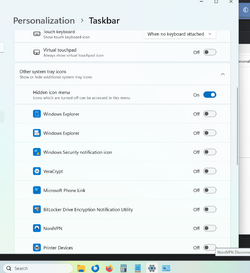
Hmm sorry Im confused. So going to Personalization > Taskbar > Other system tray icons. should give me an on/off toggle for "Input switch"?
I dont have anything named that in the list.

So you have to turn on the INPUT SWITCH, to then turn on the LANGUAGE BAR ?

Also, I read the tutorial on how to add or remove language bar, it goes into a totally different section, I tried enabling it, nothing seems to happen.


Attachments

  • Screenshot 2024-01-05 123849.png
    Screenshot 2024-01-05 123849.png
    142.8 KB · Views: 1

My Computer My Computer

At a glance

windwos 11 pro
OS
windwos 11 pro
Please go back and read my post again. Please read it slowly and carefully.

I would also suggest you read the instructions to turn the language bar on/off once again, step 4 in particular.
 

My Computer My Computer

At a glance

Windows 11 ProRyzen 9 3900XG-Skill RipjawsV F4-3600C18 (16GB x 2)Gigabyte RX 5700 XT Gaming OC
OS
Windows 11 Pro
Computer type
PC/Desktop
CPU
Ryzen 9 3900X
Motherboard
ASUS ROG Strix X570-E Gaming
Memory
G-Skill RipjawsV F4-3600C18 (16GB x 2)
Graphics Card(s)
Gigabyte RX 5700 XT Gaming OC
Sound Card
Realtek ALC1220P
Monitor(s) Displays
ASUS VE278 (x 2)
Screen Resolution
1920x1080
Hard Drives
Samsung 850 Pro 256GB
Samsung 970 Pro NVMe 512GB (x 2)
ST10000VN0004 10TB (x 2)
ST10000VN0008 10TB (x 2)
ST4000VN000 4TB (x 2)
PSU
Corsair HX1000
Case
Corsair Carbide 400R
Cooling
AMD Wraith Prism (Stock)
Keyboard
Logitech G213
Mouse
Logitech G502
Internet Speed
100Mbps down / 40Mbps up
Browser
Firefox - Chrome - Edge
Antivirus
Windows Defender - Clamwin
Please go back and read my post again. Please read it slowly and carefully.

I would also suggest you read the instructions to turn the language bar on/off once again, step 4 in particular.

lol I did multiple times. Last night and this morning before replying. Im not understanding it.

1) The Input Switch Notification refers to the Language bar and the ability to switch language, keyboards, etc.
So the the input switch allows you to change things with the langue bar, they are related. But I dont see anything called Input switch anywhere. You have to turn on the Input Switch to change stuff in the language bar.

2) If you have not turned off the Language bar, then you may find another on/off toggle for Input Switch in Personalization > Taskbar > Other system tray icons.
I have not turned off the language bar, I followed the Eleven forums tutorial to turn on the language bar, and I still find no "Input Switch" option showing up in "Personalization > Taskbar > Other system tray icons. "

I think I get what the language bar is now, allows you to switch digital keyboards, but not sure what that has to do with Input Switch, or how to get input switch options, or turn input switch on.

Screenshot 2024-01-05 131009.png
 

My Computer My Computer

At a glance

windwos 11 pro
OS
windwos 11 pro
1) The Input Switch Notification refers to the Language bar and the ability to switch language, keyboards, etc.
So the the input switch allows you to change things with the langue bar, they are related. But I dont see anything called Input switch anywhere. You have to turn on the Input Switch to change stuff in the language bar.
The language bar allows you to change the language and/or keyboard. The keyboard is an INPUT device, when you SWITCH it to another keyboard layout or change languages, it will send a NOTIFICATION, hence the notification settings that you posted for INPUT SWITCH Notifications.

2) If you have not turned off the Language bar, then you may find another on/off toggle for Input Switch in Personalization > Taskbar > Other system tray icons.
I have not turned off the language bar, I followed the Eleven forums tutorial to turn on the language bar, and I still find no "Input Switch" option showing up in "Personalization > Taskbar > Other system tray icons. "
This is why I stated that you MAY see another toggle for Input Switch. I did not state that you WOULD see that toggle, but you MAY.
 

My Computer My Computer

At a glance

Windows 11 ProRyzen 9 3900XG-Skill RipjawsV F4-3600C18 (16GB x 2)Gigabyte RX 5700 XT Gaming OC
OS
Windows 11 Pro
Computer type
PC/Desktop
CPU
Ryzen 9 3900X
Motherboard
ASUS ROG Strix X570-E Gaming
Memory
G-Skill RipjawsV F4-3600C18 (16GB x 2)
Graphics Card(s)
Gigabyte RX 5700 XT Gaming OC
Sound Card
Realtek ALC1220P
Monitor(s) Displays
ASUS VE278 (x 2)
Screen Resolution
1920x1080
Hard Drives
Samsung 850 Pro 256GB
Samsung 970 Pro NVMe 512GB (x 2)
ST10000VN0004 10TB (x 2)
ST10000VN0008 10TB (x 2)
ST4000VN000 4TB (x 2)
PSU
Corsair HX1000
Case
Corsair Carbide 400R
Cooling
AMD Wraith Prism (Stock)
Keyboard
Logitech G213
Mouse
Logitech G502
Internet Speed
100Mbps down / 40Mbps up
Browser
Firefox - Chrome - Edge
Antivirus
Windows Defender - Clamwin

Latest Support Threads

Back
Top Bottom