What is LTSC and how do you get it?


They do have about 10 years of support, but they keep massively changing it annually! It's like a new Windows annually.
I guess I just don't feel that the feature releases are really "massive changes". It's like a service pack used to be. In most respects, I struggle to even find the changes, and instead have to hit a review site or YouTube video to ascertain what is new.

It's all commercial competitiveness and not providing a stable system for people to just use and get work done. 23H2 is fine but - I wish they'd stop tinkering.
Lot's of people seem to like change. Look at the people who clamor to get the update, outside of normal channels because it wasn't being offered to them via Windows update. And people upgrade not only their OS in the Mac space when new releases come out, but sometimes when their current computers don't run the new releases, they get a new Mac itself to run the latest MacOS.

I don't want my OS to get super stagnant either. And I certainly don't want a new Windows OS release every 2-3 years. So, i feel the once per year feature updates seem like a nice compromise.

Stability has never seemed that bad to me. My company upgraded my work laptop from Windows 10 to 11. We happen to still be on release 23H2, but we have tens of thousands of devices that we support. I wouldn't say we have experienced massive issues with stability. I certainly haven't experienced stability problems at home.


I get what you are saying. My desktop, that I mainly game on and run VM's on, is running Windows 10 still. It's not broke in any way, so I just leave well enough alone. I'll get it updated before October rolls around. I've got 11 installed in a native book .vmdk file...so my license is registered, active and won't be an issue.
 

My Computers My Computers

  • At a glance

    Windows 11 ProIntel Core i5-8279u32GB DDR4 2666MhzIntel Iris Plus 655
    OS
    Windows 11 Pro
    Computer type
    PC/Desktop
    Manufacturer/Model
    Beelink SEI8
    CPU
    Intel Core i5-8279u
    Motherboard
    AZW SEI
    Memory
    32GB DDR4 2666Mhz
    Graphics Card(s)
    Intel Iris Plus 655
    Sound Card
    Intel SST
    Monitor(s) Displays
    Asus ProArt PA278QV
    Screen Resolution
    2560x1440
    Hard Drives
    512GB NVMe
    PSU
    NA
    Case
    NA
    Cooling
    NA
    Keyboard
    NA
    Mouse
    NA
    Internet Speed
    500/50
    Browser
    Edge
    Antivirus
    Defender
    Other Info
    Mini PC used for testing Windows 11.
  • At a glance

    Windows 10 ProRyzen 9 5900x64GB DDR4-3600EVGA GeForce 3080 FT3 Ultra
    Operating System
    Windows 10 Pro
    Computer type
    PC/Desktop
    Manufacturer/Model
    Custom
    CPU
    Ryzen 9 5900x
    Motherboard
    Asus Rog Strix X570-E Gaming
    Memory
    64GB DDR4-3600
    Graphics card(s)
    EVGA GeForce 3080 FT3 Ultra
    Sound Card
    Onboard
    Monitor(s) Displays
    ASUS TUF Gaming VG27AQ. ASUS ProArt Display PA278QV 27” WQHD
    Screen Resolution
    2560x1440
    Hard Drives
    2TB WD SN850 PCI-E Gen 4 NVMe
    2TB Sandisk Ultra 2.5" SATA SSD
    PSU
    Seasonic Focus 850
    Case
    Fractal Meshify S2 in White
    Cooling
    Dark Rock Pro CPU cooler, 3 x 140mm case fans
    Keyboard
    Corsiar K65 RGB Lux
    Mouse
    Logitech G9 Laser Mouse
    Internet Speed
    500/50
    Browser
    Chrome
    Antivirus
    Defender.
Ok so not available to just anyone then :-) It was the LT bit that interested me - long term? Does this mean their version will be long term support for up to 10 years by the look of it? Because I am fed up with annual major feature upgrades. Too many changes all the time. I just want something I like and can use and stays the same for as long as possible!

ok i got bored today so put together an autounattended.xml file

  1. download the newest 24h2 iso:
    .https://www.microsoft.com/en-us/software-download/windows11
  2. burn it to usb with Rufus *DO NOT CHECK ANY OPTION BOXES - everything is baked into the xml*
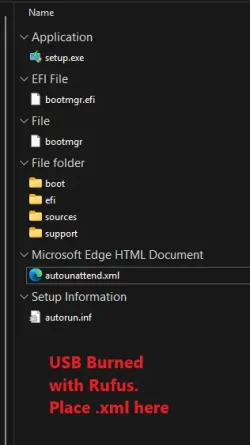
  3. open usb (just to the root - shows setup.exe, etc)
  4. drag and drop the attached xml to the root
  5. boot from usb
  6. click "i dont have a product key"
  7. choose version (Home, Pro, etc)
  8. install

* installs with a local admin named "Owner" - you can setup internet and change to microsoft account post-install if desired
* applies dark theme by default
* places shortcuts to download Google Chrome, RevoUninstaller Portable and WinaeroTweaker on desktop
* sets windows update to notify prior to download and install for updates
* turns off device encryption by default
* turns off widgets service by default
* optimizes microsoft edge (turns off sidebar, etc - look at all the tweaks winaero allows, it's those)
* allows Edge to be uninstalled *i had this work 2x and not work 2x during tests. have attached a txt with powershell commands to make it uninstallable. just launch powershell as admin and copy/paste the commands all at once and press enter (credit: github comment somewhere)*
* disables ads/web in start, settings, search etc.
* adds Disk Cleanup, Restart Explorer, Take Ownership to context menu
* Restores New > Rich Text Format (i have attached wordpad original files if you want it back in 24h2 easily, just extract the files to C:\Program Files\Windows NT\Accessories\ and overwrite the folder "en-US" that is already in there)
* Could not get Focus Assist & Do Not Disturb to turn off programmatically. i have attached 2 ahk scripts i wrote to do those tasks post install, if desired
*IF PowerShell progress hangs at all once on the desktop - just click inside the window and press Enter*

here are screeshots of whats left after the post-installation modifications:

1740015094244.webp 1740015107191.webp
1740015155726.webp
1740023362087.webp
1740023485321.webp 1740023590760.webp
 

Attachments

Last edited:

My Computer My Computer

At a glance

Windows 11 Pro
OS
Windows 11 Pro
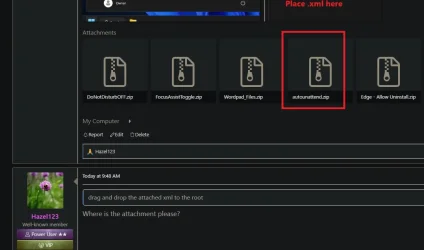
drag and drop the attached xml to the root
Where is the attachment please?
 

My Computers My Computers

  • At a glance

    Windows 11 Home 25H2Core i5-1035G132gb
    OS
    Windows 11 Home 25H2
    Computer type
    Laptop
    Manufacturer/Model
    HP Pavilion 14-ce3606sa
    CPU
    Core i5-1035G1
    Memory
    32gb
    Hard Drives
    Samsung 870 evo sata ssd
    Cooling
    Could be better
    Internet Speed
    50 mbps Starlink
    Browser
    Firefox
    Other Info
    Originally came installed with a 500gb H10 Optane ssd
  • At a glance

    Windows 11 HomeIntel Core i5-1035G116gb
    Operating System
    Windows 11 Home
    Computer type
    Laptop
    Manufacturer/Model
    HP Pavilion ce3606sa
    CPU
    Intel Core i5-1035G1
    Memory
    16gb
    Hard Drives
    Hynix Gold P31 2TB
    Internet Speed
    200mbps Starlink
    Browser
    Firefox
    Antivirus
    Defender
Thank you so much. I've got caught up with other things right now but when I get chance I will try this :-) So is this exactly the same as the LTSC version then? As in support time and other criteria?
 

My Computers My Computers

  • At a glance

    Windows 11 Home 25H2Core i5-1035G132gb
    OS
    Windows 11 Home 25H2
    Computer type
    Laptop
    Manufacturer/Model
    HP Pavilion 14-ce3606sa
    CPU
    Core i5-1035G1
    Memory
    32gb
    Hard Drives
    Samsung 870 evo sata ssd
    Cooling
    Could be better
    Internet Speed
    50 mbps Starlink
    Browser
    Firefox
    Other Info
    Originally came installed with a 500gb H10 Optane ssd
  • At a glance

    Windows 11 HomeIntel Core i5-1035G116gb
    Operating System
    Windows 11 Home
    Computer type
    Laptop
    Manufacturer/Model
    HP Pavilion ce3606sa
    CPU
    Intel Core i5-1035G1
    Memory
    16gb
    Hard Drives
    Hynix Gold P31 2TB
    Internet Speed
    200mbps Starlink
    Browser
    Firefox
    Antivirus
    Defender
Thank you so much. I've got caught up with other things right now but when I get chance I will try this :-) So is this exactly the same as the LTSC version then? As in support time and other criteria?
no, it will still install Pro, Home, or Education (whichever you choose at install) but will debloat the OS to be similar to that of LTSC in terms of apps, etc.
 

My Computer My Computer

At a glance

Windows 11 Pro
OS
Windows 11 Pro
Thank you. So what happens when the next annual feature upgrade comes along, do you think? Will it just add new features? Or will it install all the original Windows 11 features and apps again?
 

My Computers My Computers

  • At a glance

    Windows 11 Home 25H2Core i5-1035G132gb
    OS
    Windows 11 Home 25H2
    Computer type
    Laptop
    Manufacturer/Model
    HP Pavilion 14-ce3606sa
    CPU
    Core i5-1035G1
    Memory
    32gb
    Hard Drives
    Samsung 870 evo sata ssd
    Cooling
    Could be better
    Internet Speed
    50 mbps Starlink
    Browser
    Firefox
    Other Info
    Originally came installed with a 500gb H10 Optane ssd
  • At a glance

    Windows 11 HomeIntel Core i5-1035G116gb
    Operating System
    Windows 11 Home
    Computer type
    Laptop
    Manufacturer/Model
    HP Pavilion ce3606sa
    CPU
    Intel Core i5-1035G1
    Memory
    16gb
    Hard Drives
    Hynix Gold P31 2TB
    Internet Speed
    200mbps Starlink
    Browser
    Firefox
    Antivirus
    Defender
if you have auto updates of store apps disabled, it wont reload the bloat
 

My Computer My Computer

At a glance

Windows 11 Pro
OS
Windows 11 Pro
ok i got bored today so put together an autounattended.xml file
This sounds great!
Two questions:
  1. Changing "Owner" to something else, is it just a matter of changing AccountName0=Owner i the XML file to AccountName0=SomethingElse?
  2. Can the XML be tweaked so the dark theme is not default? This is less easy (for me) to understand from the XML file.
Thanks
// Jocke
 

My Computer My Computer

At a glance

W10, W11AMD Ryzen 5 7600x32 GB DDR5 G.SkillAMD Radeon
OS
W10, W11
Computer type
PC/Desktop
Manufacturer/Model
built@home
CPU
AMD Ryzen 5 7600x
Motherboard
Asus Prime B650M-A II
Memory
32 GB DDR5 G.Skill
Graphics Card(s)
AMD Radeon
Sound Card
Lexicon Lambda
Hard Drives
Samsung EVO, Corsair M700 Pro
Case
Antec
Cooling
Thermalright Phantom Spirit 120
This sounds great!
Two questions:
  1. Changing "Owner" to something else, is it just a matter of changing AccountName0=Owner i the XML file to AccountName0=SomethingElse?
  2. Can the XML be tweaked so the dark theme is not default? This is less easy (for me) to understand from the XML file.
Thanks
// Jocke
check that (i opened this in its own thread)

as for the theme:

1743103061506.webp
 

My Computer My Computer

At a glance

Windows 11 Pro
OS
Windows 11 Pro
no, it will still install Pro, Home, or Education (whichever you choose at install) but will debloat the OS to be similar to that of LTSC in terms of apps, etc.
Reality is bloat is so last decade. Modern drives have vast amounts of storage space, removing a bit of so called bloat is insignificant.

People delude themselves performance is enhanced All you need to do is disable apps from starting up.

My pc idles at around 1% - I tested LTSC against my optimised Pro - benchmarks showed negigible difference.

Why go through hoops and loops for virtually undetectable gain?
 

My Computer My Computer

At a glance

Windows 11 Pro + Win11 Canary VM.I9 13th gen i9-13900H 2.60 GHZ16 GB solderedIntegrated Intel Iris XE
OS
Windows 11 Pro + Win11 Canary VM.
Computer type
Laptop
Manufacturer/Model
ASUS Zenbook 14
CPU
I9 13th gen i9-13900H 2.60 GHZ
Motherboard
Yep, Laptop has one.
Memory
16 GB soldered
Graphics Card(s)
Integrated Intel Iris XE
Sound Card
Realtek built in
Monitor(s) Displays
laptop OLED screen
Screen Resolution
2880x1800 touchscreen
Hard Drives
1 TB NVME SSD (only weakness is only one slot)
PSU
Internal + 65W thunderbolt USB4 charger
Case
Yep, got one
Cooling
Stella Artois (UK pint cans - 568 ml) - extra cost.
Keyboard
Built in UK keybd
Mouse
Bluetooth , wireless dongled, wired
Internet Speed
900 mbs (ethernet), wifi 6 typical 350-450 mb/s both up and down
Browser
Edge
Antivirus
Defender
Other Info
TPM 2.0, 2xUSB4 thunderbolt, 1xUsb3 (usb a), 1xUsb-c, hdmi out, 3.5 mm audio out/in combo, ASUS backlit trackpad (inc. switchable number pad)

Macrium Reflect Home V8
Office 365 Family (6 users each 1TB onedrive space)
Hyper-V (a vm runs almost as fast as my older laptop)
Nobody said it saves any space. Just removes a bunch of garbage nobody wants. If I wanted it, I’d have installed it. Not deluded into thinking anything. I know what I want and I make it so. Debloat = Declutter. Minimalize = Shrink Size. That can be done as well. Different topic, different approach.
 

My Computer My Computer

At a glance

Windows 11 Pro
OS
Windows 11 Pro

My Computers My Computers

  • At a glance

    Windows 11 Education For 25H2Intel® Core i7 5500u8 GBIntel HD Family Graphics 5500 AMD Firepro 4150M
    OS
    Windows 11 Education For 25H2
    Computer type
    Laptop
    Manufacturer/Model
    HP ZBook G2
    CPU
    Intel® Core i7 5500u
    Motherboard
    HP
    Memory
    8 GB
    Graphics Card(s)
    Intel HD Family Graphics 5500 AMD Firepro 4150M
    Sound Card
    Realtek High Audio
    Hard Drives
    1 TB SSD
    Mouse
    HP USB Mouse
    Antivirus
    Windows Defender
  • At a glance

    Windows 11 Pro For Workstations 25H2Xeon 1535m v632 GBAMD Quadro Pro 4100
    Operating System
    Windows 11 Pro For Workstations 25H2
    Computer type
    Laptop
    Manufacturer/Model
    HP Zbook G4
    CPU
    Xeon 1535m v6
    Motherboard
    HP
    Memory
    32 GB
    Graphics card(s)
    AMD Quadro Pro 4100
    Sound Card
    Bang and Olufson Audio
    Hard Drives
    1TB SSD
    Mouse
    HP USB Mouse
    Antivirus
    Windows Defender
Ok so not available to just anyone then :-) It was the LT bit that interested me - long term? Does this mean their version will be long term support for up to 10 years by the look of it? Because I am fed up with annual major feature upgrades. Too many changes all the time. I just want something I like and can use and stays the same for as long as possible!

LTSC offers only security updates, not new features. If you want to latter, you'll have to manually install them. The focus is stability and any changes in Pro that might break your system will never arrive in LTSC.
 

My Computers My Computers

  • At a glance

    Windows 11 Education For 25H2Intel® Core i7 5500u8 GBIntel HD Family Graphics 5500 AMD Firepro 4150M
    OS
    Windows 11 Education For 25H2
    Computer type
    Laptop
    Manufacturer/Model
    HP ZBook G2
    CPU
    Intel® Core i7 5500u
    Motherboard
    HP
    Memory
    8 GB
    Graphics Card(s)
    Intel HD Family Graphics 5500 AMD Firepro 4150M
    Sound Card
    Realtek High Audio
    Hard Drives
    1 TB SSD
    Mouse
    HP USB Mouse
    Antivirus
    Windows Defender
  • At a glance

    Windows 11 Pro For Workstations 25H2Xeon 1535m v632 GBAMD Quadro Pro 4100
    Operating System
    Windows 11 Pro For Workstations 25H2
    Computer type
    Laptop
    Manufacturer/Model
    HP Zbook G4
    CPU
    Xeon 1535m v6
    Motherboard
    HP
    Memory
    32 GB
    Graphics card(s)
    AMD Quadro Pro 4100
    Sound Card
    Bang and Olufson Audio
    Hard Drives
    1TB SSD
    Mouse
    HP USB Mouse
    Antivirus
    Windows Defender

Latest Support Threads

Back
Top Bottom