What is Public user?


hershey4

Active member
Member
Local time
4:05 AM
Posts
73
OS
Windows 11 Pro
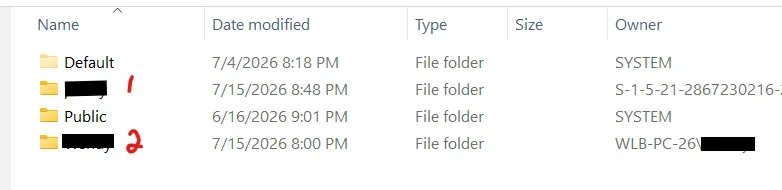
I was poking around advanced system properties (I forget why actually, the domino effect), and I ran into Account Unknown. That led me to look at C:\Users to see if it had that long name S-1-... which indicates Account Unknown is a Windows thing. I didn't see it. But I did see User 1 with a long named owner:
1788964195875.webp

QUESTION1:
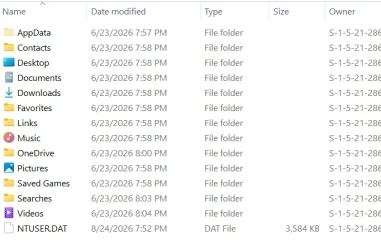
User1 is my dogs name but I have no recollection of creating that account. When I first set up this PC, I had a MS account for a minute (sadly I never saw an option to go straight to Local Account.. I looked). I think my MS account email name starts with the same letters as User1. The only thing in User1 folders is MS Edge in the Desktop folder and AppData with mostly empty folders dated 6-23-2026 Does that seem to align with the fact that User1 is associated with my MS Account somehow? (all MS apps are signed out)
1788964675508.webp

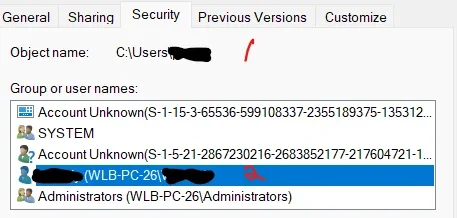
Also properties on User1 folder yields this. There are 2 Account Unknowns. Are they both ok? Why 2?
1788965318863.webp

Now I can't recall where I first saw the single "Account Unknown". If pressed maybe I can.


QUESTION2:
What is the Public account for? Seems some software installs dropped shortcuts there. Can I get rid of this "feature" safely?

1788965054318.webp
 

My Computers My Computers

  • At a glance

    Windows 11 ProIntel Ultra 516GB
    OS
    Windows 11 Pro
    Computer type
    PC/Desktop
    Manufacturer/Model
    Dell Pro Slim QCS1250
    CPU
    Intel Ultra 5
    Memory
    16GB
  • At a glance

    Windows 7 UltimateI78GB
    Operating System
    Windows 7 Ultimate
    Computer type
    PC/Desktop
    Manufacturer/Model
    Dell XPS 8000 Studio
    CPU
    I7
    Memory
    8GB
  • Windows 10 Dell Inspiron laptop (personal mostly unused)
    Windows 11 Home Lenova Ideapad Flex 5 25H2 (ex-Work)
The Windows Public folder is a shared directory located at C:\Users\Public that allows all local user accounts—and optionally other devices on your local network—to easily read, write, and share files.
 

My Computer My Computer

At a glance

Windows 11AMD Ryzen 7 5700GMicron Technology DDR4-3200 16GBNVIDIA GeForce RTX 3060
OS
Windows 11
Computer type
PC/Desktop
Manufacturer/Model
HP Pavilion
CPU
AMD Ryzen 7 5700G
Motherboard
Erica6
Memory
Micron Technology DDR4-3200 16GB
Graphics Card(s)
NVIDIA GeForce RTX 3060
Sound Card
Realtek ALC671
Monitor(s) Displays
Samsung SyncMaster U28E590
Screen Resolution
3840 x 2160
Hard Drives
SAMSUNG MZVLQ1T0HALB-000H1
When you logon do you have have the MS account (1) and the local account (2) as an option to logon?
It seems that you didn't delete the MS account when you created your local account.
If you don't use the MS account (1), you can delete it.
 

My Computers My Computers

  • At a glance

    Windows 11 Pro - Windows 7 HP 64 - Lubuntui5 6600K - 800MHz to 4400MHz4+4G GSkill DDR4 3000IG - Intel 530
    OS
    Windows 11 Pro - Windows 7 HP 64 - Lubuntu
    Computer type
    PC/Desktop
    Manufacturer/Model
    custom build
    CPU
    i5 6600K - 800MHz to 4400MHz
    Motherboard
    GA-Z170-HD3P
    Memory
    4+4G GSkill DDR4 3000
    Graphics Card(s)
    IG - Intel 530
    Monitor(s) Displays
    Samsung 226BW
    Screen Resolution
    1680x1050
    Hard Drives
    (1) -1 SM951 – 128GB M.2 AHCI PCIe SSD drive for Win 11
    (2) -1 WD SATA 3 - 1T for Data
    (3) -1 WD SATA 3 - 1T for backup
    (4) -1 BX500 SSD - 256G for Windows 7 and Lubuntu
    PSU
    Thermaltake 450W TR2 gold
    Keyboard
    Old and good Chicony mechanical keyboard
    Mouse
    Logitech mX performance - 9 buttons (had to disable some)
    Internet Speed
    500 Mb/s
    Browser
    Firefox 64
  • At a glance

    Windows 11 Proi7-4500U 800- 3000MHz(4+4)G DDR3 1600IG intel 4400 + NVIDIA GeForce GT 745M
    Operating System
    Windows 11 Pro
    Computer type
    Laptop
    Manufacturer/Model
    Asus Q550LF
    CPU
    i7-4500U 800- 3000MHz
    Motherboard
    Asus Q550LF
    Memory
    (4+4)G DDR3 1600
    Graphics card(s)
    IG intel 4400 + NVIDIA GeForce GT 745M
    Sound Card
    Realtek
    Monitor(s) Displays
    LG Display LP156WF4-SPH1
    Screen Resolution
    1920 x 1080
    Hard Drives
    BX500 120G SSD for Windows and programs
    & 1T HDD for data
    Internet Speed
    500 Mb/s
    Browser
    Firefox 64
The Windows Public folder is a shared directory located at C:\Users\Public that allows all local user accounts—and optionally other devices on your local network—to easily read, write, and share files.
is that a substitute for shared drives on other devices? Only 1 user on this device so I don't think I need it. Can I remove safely?
 

My Computers My Computers

  • At a glance

    Windows 11 ProIntel Ultra 516GB
    OS
    Windows 11 Pro
    Computer type
    PC/Desktop
    Manufacturer/Model
    Dell Pro Slim QCS1250
    CPU
    Intel Ultra 5
    Memory
    16GB
  • At a glance

    Windows 7 UltimateI78GB
    Operating System
    Windows 7 Ultimate
    Computer type
    PC/Desktop
    Manufacturer/Model
    Dell XPS 8000 Studio
    CPU
    I7
    Memory
    8GB
  • Windows 10 Dell Inspiron laptop (personal mostly unused)
    Windows 11 Home Lenova Ideapad Flex 5 25H2 (ex-Work)

My Computers My Computers

  • At a glance

    Win 11 Home ♦♦♦26300.9550 ♦♦♦♦♦♦♦26H2AMD Ryzen 7 3700XG.Skill (F4-3200C14D-16GTZKW)EVGA RTX 2070 (08G-P4-2171-KR)
    OS
    Win 11 Home ♦♦♦26300.9550 ♦♦♦♦♦♦♦26H2
    Computer type
    PC/Desktop
    Manufacturer/Model
    Built by Ghot® [May 2020]
    CPU
    AMD Ryzen 7 3700X
    Motherboard
    Asus Pro WS X570-ACE (BIOS 5302)
    Memory
    G.Skill (F4-3200C14D-16GTZKW)
    Graphics Card(s)
    EVGA RTX 2070 (08G-P4-2171-KR)
    Sound Card
    Realtek ALC1220P / ALC S1220A
    Monitor(s) Displays
    Dell U3011 30"
    Screen Resolution
    2560 x 1600
    Hard Drives
    2x Samsung 860 EVO 500GB,
    WD 4TB Black FZBX - SATA III,
    WD 8TB Black FZBX - SATA III,
    DRW-24B1ST CD/DVD Burner
    PSU
    PC Power & Cooling 750W Quad EPS12V
    Case
    Cooler Master ATCS 840 Tower
    Cooling
    CM Hyper 212 EVO (push/pull)
    Keyboard
    Ducky DK9008 Shine II Blue LED
    Mouse
    Logitech Optical M-100
    Internet Speed
    300/300
    Browser
    Firefox (latest)
    Antivirus
    Bitdefender Total Security
    Other Info
    Speakers: Klipsch Pro Media 2.1
  • At a glance

    Windows XP Pro 32bit w/SP3AMD Athlon 64 X2 5000+ (OC'd @ 3.2Ghz)TWIN2X2048-6400C4DHX (2 x 1GB, DDR2 800)EVGA 256-P2-N758-TR GeForce 8600GT SSC
    Operating System
    Windows XP Pro 32bit w/SP3
    Computer type
    PC/Desktop
    Manufacturer/Model
    Built by Ghot® (not in use)
    CPU
    AMD Athlon 64 X2 5000+ (OC'd @ 3.2Ghz)
    Motherboard
    ASUS M2N32-SLI Deluxe Wireless Edition
    Memory
    TWIN2X2048-6400C4DHX (2 x 1GB, DDR2 800)
    Graphics card(s)
    EVGA 256-P2-N758-TR GeForce 8600GT SSC
    Sound Card
    Onboard
    Monitor(s) Displays
    ViewSonic G90FB Black 19" Professional (CRT)
    Screen Resolution
    up to 2048 x 1536
    Hard Drives
    WD 36GB 10,000rpm Raptor SATA
    Seagate 80GB 7200rpm SATA
    Lite-On LTR-52246S CD/RW
    Lite-On LH-18A1P CD/DVD Burner
    PSU
    PC Power & Cooling Silencer 750 Quad EPS12V
    Case
    Generic Beige case, 80mm fans
    Cooling
    ZALMAN 9500A 92mm CPU Cooler
    Keyboard
    Logitech Classic Keybooard 200
    Mouse
    Logitech Optical M-BT96a
    Internet Speed
    300/300
    Browser
    Firefox 3.x ??
    Antivirus
    Symantec (Norton)
    Other Info
    Still assembled, still runs. Haven't turned it on for 15 years?
When you logon do you have have the MS account (1)
no. If it even is an MS account. I have no password written down in my special book. I have an email address and a password for logging in -- in the cloud I suppose. What does s-1-5-21... indicate as OWNER?

and the local account (2) as an option to logon?
It seems that you didn't delete the MS account when you created your local account.
If you don't use the MS account (1), you can delete it.

any chance I might need sign in for some reason in the future? I purchased OFFICE 2024 standalone thru my MS account (and promptly signed out of apps)? I hear that unused accounts get purged leaving people in the lurch for potential reactivations.

Would I delete it from Manage Users? Probably more modern interfaces exist. (recent W7 migrant)
 

My Computers My Computers

  • At a glance

    Windows 11 ProIntel Ultra 516GB
    OS
    Windows 11 Pro
    Computer type
    PC/Desktop
    Manufacturer/Model
    Dell Pro Slim QCS1250
    CPU
    Intel Ultra 5
    Memory
    16GB
  • At a glance

    Windows 7 UltimateI78GB
    Operating System
    Windows 7 Ultimate
    Computer type
    PC/Desktop
    Manufacturer/Model
    Dell XPS 8000 Studio
    CPU
    I7
    Memory
    8GB
  • Windows 10 Dell Inspiron laptop (personal mostly unused)
    Windows 11 Home Lenova Ideapad Flex 5 25H2 (ex-Work)
If your computer is working well, I would leave everything alone.
 
Last edited:

My Computer My Computer

At a glance

Windows 11 Pro 25H2
OS
Windows 11 Pro 25H2
Computer type
Laptop
Manufacturer/Model
Toshiba
The two "Unknown Users" are Security Identifiers (SID's) created on behalf of Windows application support. They're normal and expected.

Windows creates a Capabilities SID under S-1-15-3 or S-1-5-21 to sandbox certain application rights for UWP (or Windows Store) apps. UWP apps operate under a distinct security model, and a fake user identity is needed as a go-between when apps request special access to system resources.

Capabilities SID's do not represent real users, so they cannot be removed or managed from the Accounts control panel.

There is no Public User. It's just a shared folder designed so installed apps can create shortcuts that are inherited by newly created user accounts. If you were to create a new user right now, it would have those shortcuts on their desktop. There's no need to remove the folder, but you're free to delete the shortcuts found inside if you don't like them being shown to new users.
 

My Computer My Computer

At a glance

Windows 7
OS
Windows 7
Back
Top Bottom