What is the correct BIOS "Boot Sequence" for smooth operation of a Dell laptop?


_william

Member
Member
Local time
9:09 PM
Posts
148
OS
Windows 11
Whilst Clean-Installing W11 onto my Dell laptop recently I had to alter the "Boot Sequence" in the BIOS, as seen in the picture here:

1.jpeg

i.e., the USB-device I was installing from had to be moved to the top of the "Boot Sequence" list. I'm pretty sure I ended up moving around some of the "Sequence" items that are listed in that picture also. My question is: what is the correct order of the "Sequence" items seen in the picture to ensure smooth running of my computer?

Also, I now have two "Windows Boot Manager" "Sequence" items, as the picture shows. Is this a problem? Perhaps the extra one was created during the re-installation process; I did actually Factory-Reset (twice, actually), rather than Clean-Installing, during this whole re-installation process--does this extra "Windows Boot Manager" "Sequence" item have something to do with that?
 
Windows Build/Version
W11: 23H2

My Computer My Computer

At a glance

Windows 11
OS
Windows 11
Computer type
Laptop
Manufacturer/Model
Dell Latitude 7430
You did not have to alter your boot sequence. You could have hit f12 when you saw the Dell logo and it would have taken you to a boot menu where you could have chosen to boot from your Windows installation media usb device. It will be designated as a UEFI boot device in the boot menu....something like Lexar usb uefi, Sandisk Cruzer usb uefi... or something similar.
 

My Computers My Computers

  • At a glance

    Windows 11 Pro 25H2 26200.8655i9-10900 10 core 20 threads32 gbnone-Intel UHD Graphics 630
    OS
    Windows 11 Pro 25H2 26200.8655
    Computer type
    PC/Desktop
    Manufacturer/Model
    Dell Optiplex 7080
    CPU
    i9-10900 10 core 20 threads
    Motherboard
    DELL 0J37VM
    Memory
    32 gb
    Graphics Card(s)
    none-Intel UHD Graphics 630
    Sound Card
    Integrated Realtek
    Monitor(s) Displays
    Benq 27
    Screen Resolution
    2560x1440
    Hard Drives
    2x1tb Solidigm m.2 nvme /External drives 512gb Samsung m.2 sata+2tb Kingston m2.nvme
    PSU
    500w
    Case
    MT
    Cooling
    Dell Premium
    Keyboard
    Logitech wired
    Mouse
    Logitech wireless
    Internet Speed
    so slow I'm too embarrassed to tell
    Browser
    #1 Edge #2 Firefox
    Antivirus
    Defender+MWB Premium
  • At a glance

    Windows 11 Pro 24H2 26200.8457AMD Ryzen 7 6800U32 gbintegrated
    Operating System
    Windows 11 Pro 24H2 26200.8457
    Computer type
    PC/Desktop
    Manufacturer/Model
    Beelink Mini PC SER5
    CPU
    AMD Ryzen 7 6800U
    Memory
    32 gb
    Graphics card(s)
    integrated
    Sound Card
    integrated
    Monitor(s) Displays
    Benq 27
    Screen Resolution
    2560x1440
    Hard Drives
    1TB Crucial nvme
    Keyboard
    Logitech wired
    Mouse
    Logitech wireless
    Internet Speed
    still too embarrassed to tell
    Browser
    Firefox
    Antivirus
    Defender
    Other Info
    System 3 is non compliant Dell 9020 i7-4770/24gb ram Win11 PRO 26200.8457
@glasskuter Oh. But do you know anything else that could answer my question in the OP though?
 

My Computer My Computer

At a glance

Windows 11
OS
Windows 11
Computer type
Laptop
Manufacturer/Model
Dell Latitude 7430
Hi,
Default would be boot manger
Not sure why you have two but optimize default after removing the installation media should sort out the menu list.
 

My Computer My Computer

At a glance

Win-7-10-11Pro's10900k & 9940x & 5930kTrident-Z Royal 4000c16 2x16gb & Trident-Z 36...Titan Xp & 1080ti FTW3 & evga 980ti gaming
OS
Win-7-10-11Pro's
Computer type
PC/Desktop
Manufacturer/Model
Acer 17" Nitro 7840sn/ 2x16gb 5600c40/ 4060/ stock 1tb-os/ 4tb sn850x
CPU
10900k & 9940x & 5930k
Motherboard
z490-Apex & x299-Apex & x99-Sabertooth
Memory
Trident-Z Royal 4000c16 2x16gb & Trident-Z 3600c16 4x8gb & 3200c14 4x8gb
Graphics Card(s)
Titan Xp & 1080ti FTW3 & evga 980ti gaming
Sound Card
Onboard Realtek x3
Monitor(s) Displays
1-AOC G2460PG 24"G-Sync 144Hz/ 2nd 1-ASUS VG248QE 24"/ 3rd LG 43" series
Screen Resolution
1920-1080 not sure what the t.v is besides 43" class scales from 1920-1080 perfectly
Hard Drives
2-WD-sn850x 4tb/ 970evo+500gb/ 980 pro 2tb.
PSU
1000p2 & 1200p2 & 850p2
Case
D450 x2 & 1 Test bench in cherry Entertainment center
Cooling
Custom water loops x3 with 2x mora 360mm rads only 980ti gaming air cooled
Keyboard
G710+x3
Mouse
Redragon x3
Internet Speed
xfinity gigabyte
Browser
Firefox
Antivirus
mbam pro
External USB devices are ephemeral and typically don't always hold their position in the boot order which is why it's simply a better idea to use the firmware key designated for 'boot menu' this will vary between hardware manufacturers and sometimes (less likely) between models.

UEFI can detect boot firmware across all your devices and is likely picking one up from the system disk as well as your USB (it has one to boot to the install, confusingly with the same name)

You can confirm after install that you only have a single boot entry with the bcdedit /enum command from an elevated terminal
 

My Computer My Computer

At a glance

Linux Mint
OS
Linux Mint
Computer type
Laptop
Manufacturer/Model
System76 Lemur Pro
@neemobeer To be clear, this image was taken when there was no USB-Drive connected to the laptop.
 

My Computer My Computer

At a glance

Windows 11
OS
Windows 11
Computer type
Laptop
Manufacturer/Model
Dell Latitude 7430
Hi,
Default would be boot manger
Not sure why you have two but optimize default after removing the installation media should sort out the menu list.
Sure, I presumed "Windows Boot Manager" should be at the top. It's the other two I'm not sure about. To be clear, this image was taken when there was no USB-Drive connected to the laptop.

Could you just explain what you meant by "optimize default" please?
 

My Computer My Computer

At a glance

Windows 11
OS
Windows 11
Computer type
Laptop
Manufacturer/Model
Dell Latitude 7430
Your BCD is corrupted and contains multiple Boot Devices.
To delete Boot Device(s) that is no longer existed,
Download a portable copy of Disk Genius, extract to desktop then run DiskGenius.exe.
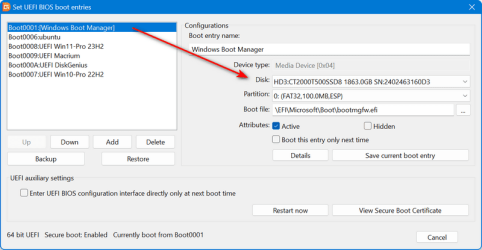
From menu, click on Tools->Set UEFI Bios Boot entries
You should get a screen similar to this:
2024-03-18_051854.png
Select each Item that's no longer existed then delete it.
 
Last edited:

My Computers My Computers

  • At a glance

    Windows 11 Pro 25H2, Linux Mint 21.3Intel Core i9-14900K @5.8GHZ64GB (2XG Skill F5-6400J3239G32G) @6800Radeon (TM) RX 480 Graphics (8 GB)
    OS
    Windows 11 Pro 25H2, Linux Mint 21.3
    Computer type
    PC/Desktop
    Manufacturer/Model
    Self Build Feb.2024
    CPU
    Intel Core i9-14900K @5.8GHZ
    Motherboard
    MSI MAG Z790 Tomahawk Max WiFi 7
    Memory
    64GB (2XG Skill F5-6400J3239G32G) @6800
    Graphics Card(s)
    Radeon (TM) RX 480 Graphics (8 GB)
    Sound Card
    Intergrated Realtek
    Monitor(s) Displays
    Samsung
    Screen Resolution
    3840x2160
    Hard Drives
    1 - Crucial 705 1TB GEN5
    1 - Crucial 705 2TB GEN5
    2 - Crucial T500 2TB Gen4
    PSU
    750W EVGA-G3
    Case
    Antec NX410
    Cooling
    H2O Thermalright
    Keyboard
    Logitech K800
    Mouse
    Logitech Master 2S
    Internet Speed
    600 Mbps
    Browser
    Chrome
    Antivirus
    WD
  • At a glance

    Windows 11 Pro & Linux Mint X64Intel(R) Core(TM) i7-3770K CPU @ 4.20 GHz32.0GB Dual-Channel CMY16GX3M2A1600C9NVIDIA GeForce GT 740
    Operating System
    Windows 11 Pro & Linux Mint X64
    Computer type
    PC/Desktop
    Manufacturer/Model
    MSI Z77 MPower (MS-7751)
    CPU
    Intel(R) Core(TM) i7-3770K CPU @ 4.20 GHz
    Motherboard
    Z77 MPower (MS-7751)
    Memory
    32.0GB Dual-Channel CMY16GX3M2A1600C9
    Graphics card(s)
    NVIDIA GeForce GT 740
    Monitor(s) Displays
    40" Samsung
    Screen Resolution
    1920X1080
    Hard Drives
    WIN10 - 111GB Samsung SSD 840 Series
    WIN11 - 223GB Crucial CT240BX500SSD
    2X931GB Crucial CT1000BX500SSD1
    PSU
    Antec 850W
    Case
    Antec 900
    Cooling
    H20
    Keyboard
    Logitech K800 Wireless
    Mouse
    Logitech MX Master 2S
    Internet Speed
    100 Mbps
    Browser
    Chrome
    Antivirus
    Windows Defender
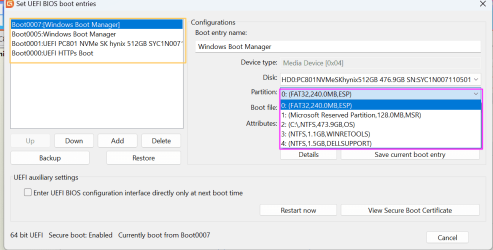
@Topgundcp Thank you so much! Just to be clear: should I erase "Boot0007" or "Boot0005" in the list outlined in orange in the attached image, or does it not matter which?

Also, could you tell me, does it matter which order the other two items in that same list are arranged in?

Finally, just to be clear, I've displayed the Partition drop-down list, outlined in purple; Partition "0" was selected by default, so I guess I just don't touch that.

Screenshot (9).png
 

My Computer My Computer

At a glance

Windows 11
OS
Windows 11
Computer type
Laptop
Manufacturer/Model
Dell Latitude 7430
Boot007 indicates on the purple box HD0 (Disk0) was used to boot Windows from so just delete the other.
 

My Computers My Computers

  • At a glance

    Windows 11 Pro 25H2, Linux Mint 21.3Intel Core i9-14900K @5.8GHZ64GB (2XG Skill F5-6400J3239G32G) @6800Radeon (TM) RX 480 Graphics (8 GB)
    OS
    Windows 11 Pro 25H2, Linux Mint 21.3
    Computer type
    PC/Desktop
    Manufacturer/Model
    Self Build Feb.2024
    CPU
    Intel Core i9-14900K @5.8GHZ
    Motherboard
    MSI MAG Z790 Tomahawk Max WiFi 7
    Memory
    64GB (2XG Skill F5-6400J3239G32G) @6800
    Graphics Card(s)
    Radeon (TM) RX 480 Graphics (8 GB)
    Sound Card
    Intergrated Realtek
    Monitor(s) Displays
    Samsung
    Screen Resolution
    3840x2160
    Hard Drives
    1 - Crucial 705 1TB GEN5
    1 - Crucial 705 2TB GEN5
    2 - Crucial T500 2TB Gen4
    PSU
    750W EVGA-G3
    Case
    Antec NX410
    Cooling
    H2O Thermalright
    Keyboard
    Logitech K800
    Mouse
    Logitech Master 2S
    Internet Speed
    600 Mbps
    Browser
    Chrome
    Antivirus
    WD
  • At a glance

    Windows 11 Pro & Linux Mint X64Intel(R) Core(TM) i7-3770K CPU @ 4.20 GHz32.0GB Dual-Channel CMY16GX3M2A1600C9NVIDIA GeForce GT 740
    Operating System
    Windows 11 Pro & Linux Mint X64
    Computer type
    PC/Desktop
    Manufacturer/Model
    MSI Z77 MPower (MS-7751)
    CPU
    Intel(R) Core(TM) i7-3770K CPU @ 4.20 GHz
    Motherboard
    Z77 MPower (MS-7751)
    Memory
    32.0GB Dual-Channel CMY16GX3M2A1600C9
    Graphics card(s)
    NVIDIA GeForce GT 740
    Monitor(s) Displays
    40" Samsung
    Screen Resolution
    1920X1080
    Hard Drives
    WIN10 - 111GB Samsung SSD 840 Series
    WIN11 - 223GB Crucial CT240BX500SSD
    2X931GB Crucial CT1000BX500SSD1
    PSU
    Antec 850W
    Case
    Antec 900
    Cooling
    H20
    Keyboard
    Logitech K800 Wireless
    Mouse
    Logitech MX Master 2S
    Internet Speed
    100 Mbps
    Browser
    Chrome
    Antivirus
    Windows Defender
Back
Top Bottom