What's the full procedure to turn BitLocker off?


mck

Well-known member
Member
VIP
Local time
10:15 PM
Posts
83
OS
Windows 11
A friend bought a HP PC running Windows 11 Home. I discovered that the system C SSD and the data D HDD have BitLocker turned on.

QUESTION-1: Does Macrium Reflect Free Version 8 do image backup and restore of BitLocked drives successfully? (We backed up both drives using Macrium Reflect Free Version 8 image backups successfully. But I've not tested if Macrium's restore will restore BitLocker encrypted drives to their original BitLocked state.)

QUESTION-2: I want to turn BitLocker off on both drives. Googling, I see how to turn BitLocker off to decrypt the drives. My question is what to do to insure that BitLocker is never turned back on. Is just turning BitLocker off and decrypting the drives all that's needed? Or is there an additional step to insure that BitLocker is never turned back on?

Thanks.
 

My Computer My Computer

At a glance

Windows 11Intel Core Ultra 7, 265K32GBUsing integrated graphics
OS
Windows 11
Computer type
PC/Desktop
Manufacturer/Model
Self Built
CPU
Intel Core Ultra 7, 265K
Motherboard
MSI Pro Z890-P WiFi
Memory
32GB
Graphics Card(s)
Using integrated graphics
Monitor(s) Displays
LG
Screen Resolution
4K
Hard Drives
512 GB SSD, 2TB M.2 SSD and 2TB SATA SSD
PSU
Seasonic Modular 550 watt Focus Plus
Case
Corsair 4000D
Cooling
ThermalRight Phantom Sprit
1/ I use Macrium 8 (paid for version) on my main PC and Macrium Free on my older one. As far as I remember the free version was fine with Bitlocker when I had Bitlocker encryption enabled on the old one. Its seamless, you don't have to even think about it as its all taken care of automatically. Restores work with Bitlocker re-enabled when completed. Nothing to think about.

2/ I'm not sure tbh. Bitlocker is enabled via the BIOS on my main PC and so any clean installs etc that I do automatically have Bitlocker applied. Other PC is older and runs W11 as unsupported hardware. I have to enable Bitlocker via other means on that one when I wanted it. So it might be worth looking in the BIOS for a Bitlocker setting as well as turning it off. If you turn it off it takes quite a while to decrypt a drive.

Fwiw I really like Bitlocker and provided you back the keys up (to your MS account which is offered as an option) and also keep a hard copy somewhere you should never have an issue.
 

My Computer My Computer

At a glance

W11 Pro x64 ongoing Canary 29500 latest buildsIntel i58GbIntel HD Graphics
OS
W11 Pro x64 ongoing Canary 29500 latest builds
Computer type
Laptop
Manufacturer/Model
Dell 7760 Mobile Precision 17"
CPU
Intel i5
Motherboard
Unknown
Memory
8Gb
Graphics Card(s)
Intel HD Graphics
Sound Card
Realtek
Monitor(s) Displays
Internal
Hard Drives
2 x 256Gb SSD
PSU
Dell 240 watt
Mouse
Dell Premier Bluetooth
Internet Speed
50Mbps
Browser
Edge
Antivirus
Default Microsoft Security
  • Like
Reactions: mck
1/ I use Macrium 8 (paid for version) on my main PC and Macrium Free on my older one. As far as I remember the free version was fine with Bitlocker when I had Bitlocker encryption enabled on the old one. Its seamless, you don't have to even think about it as its all taken care of automatically. Restores work with Bitlocker re-enabled when completed. Nothing to think about.

2/ I'm not sure tbh. Bitlocker is enabled via the BIOS on my main PC and so any clean installs etc that I do automatically have Bitlocker applied. Other PC is older and runs W11 as unsupported hardware. I have to enable Bitlocker via other means on that one when I wanted it. So it might be worth looking in the BIOS for a Bitlocker setting as well as turning it off. If you turn it off it takes quite a while to decrypt a drive.

Fwiw I really like Bitlocker and provided you back the keys up (to your MS account which is offered as an option) and also keep a hard copy somewhere you should never have an issue.
@Mooly, thanks for your responses.

1/ Thanks for the confirmation that MRF does image backups and restores of Bitlocked drives, with no issures.

2/ If anyone knows whether an additional step is required to insure that BitLocker is never turned back on, after it is turned off, the info will be greatly appreciated.
 

My Computer My Computer

At a glance

Windows 11Intel Core Ultra 7, 265K32GBUsing integrated graphics
OS
Windows 11
Computer type
PC/Desktop
Manufacturer/Model
Self Built
CPU
Intel Core Ultra 7, 265K
Motherboard
MSI Pro Z890-P WiFi
Memory
32GB
Graphics Card(s)
Using integrated graphics
Monitor(s) Displays
LG
Screen Resolution
4K
Hard Drives
512 GB SSD, 2TB M.2 SSD and 2TB SATA SSD
PSU
Seasonic Modular 550 watt Focus Plus
Case
Corsair 4000D
Cooling
ThermalRight Phantom Sprit
BitLocker doesn't randomly turn itself back on, even in an upgrade scenario. At least not yet.
 

My Computer My Computer

At a glance

Windows 11 Pro 25H212th Gen Core i7-1260P64 GB Micron PC4-25600Intel Iris Xe Graphics
OS
Windows 11 Pro 25H2
Computer type
PC/Desktop
Manufacturer/Model
Intel NUC12WSHi7
CPU
12th Gen Core i7-1260P
Motherboard
NUC12WSBi7
Memory
64 GB Micron PC4-25600
Graphics Card(s)
Intel Iris Xe Graphics
Sound Card
on-board Realtek HD Audio
Monitor(s) Displays
Dell U3219Q
Screen Resolution
3840 x 2160
Hard Drives
Samsung SSD 990 PRO 1TB
Crucial MX500 2 TB
Antivirus
Microsoft Defender
BitLocker doesn't randomly turn itself back on, even in an upgrade scenario. At least not yet.
Thanks for that important info!
 

My Computer My Computer

At a glance

Windows 11Intel Core Ultra 7, 265K32GBUsing integrated graphics
OS
Windows 11
Computer type
PC/Desktop
Manufacturer/Model
Self Built
CPU
Intel Core Ultra 7, 265K
Motherboard
MSI Pro Z890-P WiFi
Memory
32GB
Graphics Card(s)
Using integrated graphics
Monitor(s) Displays
LG
Screen Resolution
4K
Hard Drives
512 GB SSD, 2TB M.2 SSD and 2TB SATA SSD
PSU
Seasonic Modular 550 watt Focus Plus
Case
Corsair 4000D
Cooling
ThermalRight Phantom Sprit
QUESTION-2: I want to turn BitLocker off on both drives. Googling, I see how to turn BitLocker off to decrypt the drives. My question is what to do to insure that BitLocker is never turned back on. Is just turning BitLocker off and decrypting the drives all that's needed? Or is there an additional step to insure that BitLocker is never turned back on?
Maybe this ( at the bottom ) :


My Computer My Computer

At a glance

Windows 11 ProIntel i5 12600KG.Skill Ripjaws V DDR4 3600 MHz / PC4-28800 C...Intel® UHD Graphics 770 (iGPU)
OS
Windows 11 Pro
Computer type
PC/Desktop
Manufacturer/Model
Homemade by me
CPU
Intel i5 12600K
Motherboard
MSI PRO Z690-A DDR4
Memory
G.Skill Ripjaws V DDR4 3600 MHz / PC4-28800 CL16 2x8 GB
Graphics Card(s)
Intel® UHD Graphics 770 (iGPU)
Sound Card
8-Channel (7.1) HD Audio
Monitor(s) Displays
Legion/Lenovo Y25-25
Screen Resolution
Full HD 1920 x 1080
Hard Drives
WD Black NVMe M.2 500 GB (system drive)
Case
Lian-Li
Keyboard
Old solid and heavy IBM🙂
Mouse
Logitech
Internet Speed
1000 mbit
Antivirus
Avast free
Depends on if the user has device encryption (Home)or Bitlocker (Pro)


My Computers My Computers

  • At a glance

    Windows 11 Pro 25H2 26200.8655i9-10900 10 core 20 threads32 gbnone-Intel UHD Graphics 630
    OS
    Windows 11 Pro 25H2 26200.8655
    Computer type
    PC/Desktop
    Manufacturer/Model
    Dell Optiplex 7080
    CPU
    i9-10900 10 core 20 threads
    Motherboard
    DELL 0J37VM
    Memory
    32 gb
    Graphics Card(s)
    none-Intel UHD Graphics 630
    Sound Card
    Integrated Realtek
    Monitor(s) Displays
    Benq 27
    Screen Resolution
    2560x1440
    Hard Drives
    2x1tb Solidigm m.2 nvme /External drives 512gb Samsung m.2 sata+2tb Kingston m2.nvme
    PSU
    500w
    Case
    MT
    Cooling
    Dell Premium
    Keyboard
    Logitech wired
    Mouse
    Logitech wireless
    Internet Speed
    so slow I'm too embarrassed to tell
    Browser
    #1 Edge #2 Firefox
    Antivirus
    Defender+MWB Premium
  • At a glance

    Windows 11 Pro 24H2 26200.8457AMD Ryzen 7 6800U32 gbintegrated
    Operating System
    Windows 11 Pro 24H2 26200.8457
    Computer type
    PC/Desktop
    Manufacturer/Model
    Beelink Mini PC SER5
    CPU
    AMD Ryzen 7 6800U
    Memory
    32 gb
    Graphics card(s)
    integrated
    Sound Card
    integrated
    Monitor(s) Displays
    Benq 27
    Screen Resolution
    2560x1440
    Hard Drives
    1TB Crucial nvme
    Keyboard
    Logitech wired
    Mouse
    Logitech wireless
    Internet Speed
    still too embarrassed to tell
    Browser
    Firefox
    Antivirus
    Defender
    Other Info
    System 3 is non compliant Dell 9020 i7-4770/24gb ram Win11 PRO 26200.8457
The same reg key is used to prevent automatic BitLocker and Device Encryption.
Code:
Windows Registry Editor Version 5.00

[HKEY_LOCAL_MACHINE\SYSTEM\CurrentControlSet\Control\BitLocker]
"PreventDeviceEncryption"=dword:00000001

DE is a simplified version of BitLocker. Same technology, but Home users don't get to fiddle with all the advanced settings.
 

My Computer My Computer

At a glance

Windows 7
OS
Windows 7
And jus a bit more info.

I actually save the disk images to a Bitlocker encrypted drive and there are no issues doing so.

I forget the exact wording but Macrium does give a 'warning' message that such an image is not in itself 'protected' and that you can use Macrium's own encryption to make the image itself 'safe'. None of this makes any difference to making and restoring images though. Also the image file on the Bitlocker drive can be moved as desired to another drive for archiving etc (and that drive can be Bitlocker protected or not).

So I image the C drive and put the image onto the 'Macrium' drive (pc has two internal drives). I also move backup when needed to a 1Tb USB drive that is 'Bitlocker to Go' protected.

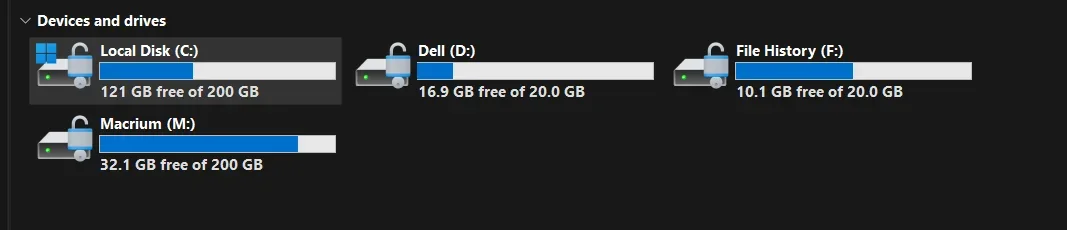
C and D are one 256Gb drive and F and M the other 256Gb drive. All Bitlocker protected. All keys stored on MS account and also printed and squirrelled away safe should they be needed.

Screenshot 2025-09-24 194344.webp
 

My Computer My Computer

At a glance

W11 Pro x64 ongoing Canary 29500 latest buildsIntel i58GbIntel HD Graphics
OS
W11 Pro x64 ongoing Canary 29500 latest builds
Computer type
Laptop
Manufacturer/Model
Dell 7760 Mobile Precision 17"
CPU
Intel i5
Motherboard
Unknown
Memory
8Gb
Graphics Card(s)
Intel HD Graphics
Sound Card
Realtek
Monitor(s) Displays
Internal
Hard Drives
2 x 256Gb SSD
PSU
Dell 240 watt
Mouse
Dell Premier Bluetooth
Internet Speed
50Mbps
Browser
Edge
Antivirus
Default Microsoft Security
I have two systems running W11 Home, and both came with device encryption turned on, which I immediately turned off. Today I noticed my MS account has "BitLocker Keys" saved for both of them. Is there any reason to keep the keys or to delete them? I have no desire to use encryption of any kind.
 

My Computers My Computers

  • At a glance

    Windows 11 25H2Intel Core Ultra 7 26532GBNVIDIA GeForce RTX 3050 6GB
    OS
    Windows 11 25H2
    Computer type
    PC/Desktop
    Manufacturer/Model
    Dell Tower Plus EBT2250
    CPU
    Intel Core Ultra 7 265
    Memory
    32GB
    Graphics Card(s)
    NVIDIA GeForce RTX 3050 6GB
    Monitor(s) Displays
    2x Dell U2419H
    Hard Drives
    NVMe Phison 521GB SSD
    Seagate 2TB HDD
    (Dell installed them RAID enabled using Intel VMD)
  • At a glance

    Windows 11 25H2Intel Core i5-1334U8 GBIntel Raptor Lake-U - Integrated Graphics
    Operating System
    Windows 11 25H2
    Computer type
    Laptop
    Manufacturer/Model
    HP
    CPU
    Intel Core i5-1334U
    Motherboard
    HP 8DD7 - Intel Alder Lake-P PCH
    Memory
    8 GB
    Graphics card(s)
    Intel Raptor Lake-U - Integrated Graphics
    Hard Drives
    512 GB
Maybe this ( at the bottom ) :

I see at the following at the bottom of the link you provided:

1) "Note: If device encryption is turned off, it will no longer automatically enable itself in the future. The user must enable it manually in Settings."

And Googling:
2) "Windows 11 Device Encryption is an automatically enabled, consumer-focused version of BitLocker designed for Windows Home editions that uses a Microsoft account to back up the recovery key. In contrast, BitLocker is the more robust, feature-rich encryption tool available on Windows Pro, Enterprise, and Education editions, offering greater control over which drives are encrypted, the ability to require pre-boot authentication, and more flexible management of recovery keys."

Since my friend's PC is running Win11 Home, it appears that the drives are locked via "Device Encryption". And thus item-1 above applies.

Thanks!
 

My Computer My Computer

At a glance

Windows 11Intel Core Ultra 7, 265K32GBUsing integrated graphics
OS
Windows 11
Computer type
PC/Desktop
Manufacturer/Model
Self Built
CPU
Intel Core Ultra 7, 265K
Motherboard
MSI Pro Z890-P WiFi
Memory
32GB
Graphics Card(s)
Using integrated graphics
Monitor(s) Displays
LG
Screen Resolution
4K
Hard Drives
512 GB SSD, 2TB M.2 SSD and 2TB SATA SSD
PSU
Seasonic Modular 550 watt Focus Plus
Case
Corsair 4000D
Cooling
ThermalRight Phantom Sprit
Depends on if the user has device encryption (Home)or Bitlocker (Pro)

Very informative links. Will refer to them when I turn off Device Encryption on the two drives in my friend's PC.

Thanks much!
 

My Computer My Computer

At a glance

Windows 11Intel Core Ultra 7, 265K32GBUsing integrated graphics
OS
Windows 11
Computer type
PC/Desktop
Manufacturer/Model
Self Built
CPU
Intel Core Ultra 7, 265K
Motherboard
MSI Pro Z890-P WiFi
Memory
32GB
Graphics Card(s)
Using integrated graphics
Monitor(s) Displays
LG
Screen Resolution
4K
Hard Drives
512 GB SSD, 2TB M.2 SSD and 2TB SATA SSD
PSU
Seasonic Modular 550 watt Focus Plus
Case
Corsair 4000D
Cooling
ThermalRight Phantom Sprit
Duplicate post so deleted this one.
 
Last edited:

My Computer My Computer

At a glance

Windows 11Intel Core Ultra 7, 265K32GBUsing integrated graphics
OS
Windows 11
Computer type
PC/Desktop
Manufacturer/Model
Self Built
CPU
Intel Core Ultra 7, 265K
Motherboard
MSI Pro Z890-P WiFi
Memory
32GB
Graphics Card(s)
Using integrated graphics
Monitor(s) Displays
LG
Screen Resolution
4K
Hard Drives
512 GB SSD, 2TB M.2 SSD and 2TB SATA SSD
PSU
Seasonic Modular 550 watt Focus Plus
Case
Corsair 4000D
Cooling
ThermalRight Phantom Sprit
The same reg key is used to prevent automatic BitLocker and Device Encryption.
Code:
Windows Registry Editor Version 5.00

[HKEY_LOCAL_MACHINE\SYSTEM\CurrentControlSet\Control\BitLocker]
"PreventDeviceEncryption"=dword:00000001

DE is a simplified version of BitLocker. Same technology, but Home users don't get to fiddle with all the advanced settings.
Thanks for the additional clarification.
 

My Computer My Computer

At a glance

Windows 11Intel Core Ultra 7, 265K32GBUsing integrated graphics
OS
Windows 11
Computer type
PC/Desktop
Manufacturer/Model
Self Built
CPU
Intel Core Ultra 7, 265K
Motherboard
MSI Pro Z890-P WiFi
Memory
32GB
Graphics Card(s)
Using integrated graphics
Monitor(s) Displays
LG
Screen Resolution
4K
Hard Drives
512 GB SSD, 2TB M.2 SSD and 2TB SATA SSD
PSU
Seasonic Modular 550 watt Focus Plus
Case
Corsair 4000D
Cooling
ThermalRight Phantom Sprit
And jus a bit more info.

I actually save the disk images to a Bitlocker encrypted drive and there are no issues doing so.

I forget the exact wording but Macrium does give a 'warning' message that such an image is not in itself 'protected' and that you can use Macrium's own encryption to make the image itself 'safe'. None of this makes any difference to making and restoring images though. Also the image file on the Bitlocker drive can be moved as desired to another drive for archiving etc (and that drive can be Bitlocker protected or not).

So I image the C drive and put the image onto the 'Macrium' drive (pc has two internal drives). I also move backup when needed to a 1Tb USB drive that is 'Bitlocker to Go' protected.

C and D are one 256Gb drive and F and M the other 256Gb drive. All Bitlocker protected. All keys stored on MS account and also printed and squirrelled away safe should they be needed.

View attachment 146420
Thanks for the confirmation that Macrium will backup and restore Win11 encrypted drives successfully.
Actually, the backups will be done just as a safety measure in case decryption of my friend's drives is unsuccessful for whatever reason.
Thanks.
 

My Computer My Computer

At a glance

Windows 11Intel Core Ultra 7, 265K32GBUsing integrated graphics
OS
Windows 11
Computer type
PC/Desktop
Manufacturer/Model
Self Built
CPU
Intel Core Ultra 7, 265K
Motherboard
MSI Pro Z890-P WiFi
Memory
32GB
Graphics Card(s)
Using integrated graphics
Monitor(s) Displays
LG
Screen Resolution
4K
Hard Drives
512 GB SSD, 2TB M.2 SSD and 2TB SATA SSD
PSU
Seasonic Modular 550 watt Focus Plus
Case
Corsair 4000D
Cooling
ThermalRight Phantom Sprit

I have two systems running W11 Home, and both came with device encryption turned on, which I immediately turned off. Today I noticed my MS account has "BitLocker Keys" saved for both of them. Is there any reason to keep the keys or to delete them? I have no desire to use encryption of any kind.

If you are not using Bitlocker then you can forget about the keys and delete them if you wish. Remember the keys for the C drive change anyway if you reinstall W11 and I think also if you decrypt and re-encrypt.
 

My Computer My Computer

At a glance

W11 Pro x64 ongoing Canary 29500 latest buildsIntel i58GbIntel HD Graphics
OS
W11 Pro x64 ongoing Canary 29500 latest builds
Computer type
Laptop
Manufacturer/Model
Dell 7760 Mobile Precision 17"
CPU
Intel i5
Motherboard
Unknown
Memory
8Gb
Graphics Card(s)
Intel HD Graphics
Sound Card
Realtek
Monitor(s) Displays
Internal
Hard Drives
2 x 256Gb SSD
PSU
Dell 240 watt
Mouse
Dell Premier Bluetooth
Internet Speed
50Mbps
Browser
Edge
Antivirus
Default Microsoft Security
BitLocker doesn't randomly turn itself back on, even in an upgrade scenario. At least not yet.
Well I sure would like to know what happened here then because I sure didn't select anything that said BitLocker. All I did was upgrade to 25H2. :mad:

bitlockerencrptnoconsent.webp
 

My Computer My Computer

At a glance

WIN 11, WIN 10, WIN 8.1, WIN 7 U, WIN 7 PRO, ...Intel i7 6900K and i9-7960X / AMD 3800X (8 core)128 GB CORSAIR DOMINATOR PLATINUM (B DIE)NVIDIA 1070 and RTX 3070
OS
WIN 11, WIN 10, WIN 8.1, WIN 7 U, WIN 7 PRO, WIN 7 HOME (32 Bit), LINUX MINT
Computer type
PC/Desktop
Manufacturer/Model
DIY, ASUS, and DELL
CPU
Intel i7 6900K and i9-7960X / AMD 3800X (8 core)
Motherboard
ASUS X99E-WS USB 3.1 and ASUS X299 SAGE
Memory
128 GB CORSAIR DOMINATOR PLATINUM (B DIE)
Graphics Card(s)
NVIDIA 1070 and RTX 3070
Sound Card
Crystal Sound (onboard)
Monitor(s) Displays
single Samsung 30" 4K and 8" aux monitor
Screen Resolution
4K and something equally attrocious. I'll be working on this.
Hard Drives
A, B, C, D, E, F, G, H, I, J, K, L, M, N, O, P, Q, R, S, T, U, V, W

Ports X, Y, and Z are reserved for USB access and removable drives.

Drive types consist of the following: Various mechanical hard drives bearing the brand names, Seagate, Toshiba, and Western Digital. Various NVMe drives bearing the brand names Kingston, Intel, Silicon Power, Crucial, Western Digital, and Team Group. Various SATA SSDs bearing various different brand names.

RAID arrays included:

LSI RAID 10 (WD Velociraptors) 1115.72 GB
LSI RAID 10 (WD SSDS) 463.80 GB

INTEL RAID 0 (KINGSTON HYPER X) System 447.14 GB
INTEL RAID 1 TOSHIBA ENTERPRIZE class Data 2794.52 GB
INTEL RAID 1 SEAGATE HYBRID 931.51 GB
PSU
SEVERAL. I prefer my Corsair Platinum HX1000i but I also like EVGA power supplies
Case
ThermalTake Level 10 GT (among others)
Cooling
Noctua is my favorite and I use it in my main. I also own various other coolers.
Keyboard
all kinds.
Mouse
all kinds
Internet Speed
360 mbps - 1 gbps (depending)
Browser
FIREFOX
Antivirus
KASPERSKY (no apologies)
Other Info
Gave Dell touch screen with Windows 11 to daughter and got me an OTVOC. Being a PC builder I own many desktop PCs as well. I am a father of five providing PCs, laptops, and tablets for all my family, most of which I have modified, rebuilt, or simply built from scratch. I do not own a cell phone, never have, never will.
Let me tell ya'll a story about a friend of mine. (And yes, he really was a friend of mine and still is. In fact the guy could run circles around me when it comes to both software and hardware. He's only a little younger than me and he was building computers back in the 70's.) Well, to make a long story short he thought he would enable BitLocker. He thought it was a great idea at the time but I was reluctant about the idea of letting some other party encrypt my physical data on my PC. About a month later my friend got ransomwared. That was enough reason for me NOT to enable BitLocker on my PC. Ya'll can do what you like. Personal preference prevails. All I know is I never enabled BitLocker and I never got ransomware. Looks like Mr. Braxman was correct about Win 11 after all.
 

My Computer My Computer

At a glance

WIN 11, WIN 10, WIN 8.1, WIN 7 U, WIN 7 PRO, ...Intel i7 6900K and i9-7960X / AMD 3800X (8 core)128 GB CORSAIR DOMINATOR PLATINUM (B DIE)NVIDIA 1070 and RTX 3070
OS
WIN 11, WIN 10, WIN 8.1, WIN 7 U, WIN 7 PRO, WIN 7 HOME (32 Bit), LINUX MINT
Computer type
PC/Desktop
Manufacturer/Model
DIY, ASUS, and DELL
CPU
Intel i7 6900K and i9-7960X / AMD 3800X (8 core)
Motherboard
ASUS X99E-WS USB 3.1 and ASUS X299 SAGE
Memory
128 GB CORSAIR DOMINATOR PLATINUM (B DIE)
Graphics Card(s)
NVIDIA 1070 and RTX 3070
Sound Card
Crystal Sound (onboard)
Monitor(s) Displays
single Samsung 30" 4K and 8" aux monitor
Screen Resolution
4K and something equally attrocious. I'll be working on this.
Hard Drives
A, B, C, D, E, F, G, H, I, J, K, L, M, N, O, P, Q, R, S, T, U, V, W

Ports X, Y, and Z are reserved for USB access and removable drives.

Drive types consist of the following: Various mechanical hard drives bearing the brand names, Seagate, Toshiba, and Western Digital. Various NVMe drives bearing the brand names Kingston, Intel, Silicon Power, Crucial, Western Digital, and Team Group. Various SATA SSDs bearing various different brand names.

RAID arrays included:

LSI RAID 10 (WD Velociraptors) 1115.72 GB
LSI RAID 10 (WD SSDS) 463.80 GB

INTEL RAID 0 (KINGSTON HYPER X) System 447.14 GB
INTEL RAID 1 TOSHIBA ENTERPRIZE class Data 2794.52 GB
INTEL RAID 1 SEAGATE HYBRID 931.51 GB
PSU
SEVERAL. I prefer my Corsair Platinum HX1000i but I also like EVGA power supplies
Case
ThermalTake Level 10 GT (among others)
Cooling
Noctua is my favorite and I use it in my main. I also own various other coolers.
Keyboard
all kinds.
Mouse
all kinds
Internet Speed
360 mbps - 1 gbps (depending)
Browser
FIREFOX
Antivirus
KASPERSKY (no apologies)
Other Info
Gave Dell touch screen with Windows 11 to daughter and got me an OTVOC. Being a PC builder I own many desktop PCs as well. I am a father of five providing PCs, laptops, and tablets for all my family, most of which I have modified, rebuilt, or simply built from scratch. I do not own a cell phone, never have, never will.
Well I sure would like to know what happened here then because I sure didn't select anything that said BitLocker. All I did was upgrade to 25H2. :mad:
Maybe because Microsoft does not like you. ;-)
Seriously though, I've not seen that happen during an upgrade. But when using a MS account things are getting stranger and stranger about what we, as users, can expect during any given scenario when it comes to stuff Microsoft wants us to have. Bitlocker/device encryption and Onedrive are at the top of MS list and they can force it down our throat at will.

When I'm going to go through the roof and stroke out is when they force me to use secure boot. I want no part of the secure boot key crap just like I want no part of bitlocker. But I know it's a comin' right along with some other stuff that's going to prevent us from changing a lot of stuff we can currently change..... especially in Home. All mine are Pro, but even in Pro, I'm not sure we will be spared from some things MS has in their plan.
 

My Computers My Computers

  • At a glance

    Windows 11 Pro 25H2 26200.8655i9-10900 10 core 20 threads32 gbnone-Intel UHD Graphics 630
    OS
    Windows 11 Pro 25H2 26200.8655
    Computer type
    PC/Desktop
    Manufacturer/Model
    Dell Optiplex 7080
    CPU
    i9-10900 10 core 20 threads
    Motherboard
    DELL 0J37VM
    Memory
    32 gb
    Graphics Card(s)
    none-Intel UHD Graphics 630
    Sound Card
    Integrated Realtek
    Monitor(s) Displays
    Benq 27
    Screen Resolution
    2560x1440
    Hard Drives
    2x1tb Solidigm m.2 nvme /External drives 512gb Samsung m.2 sata+2tb Kingston m2.nvme
    PSU
    500w
    Case
    MT
    Cooling
    Dell Premium
    Keyboard
    Logitech wired
    Mouse
    Logitech wireless
    Internet Speed
    so slow I'm too embarrassed to tell
    Browser
    #1 Edge #2 Firefox
    Antivirus
    Defender+MWB Premium
  • At a glance

    Windows 11 Pro 24H2 26200.8457AMD Ryzen 7 6800U32 gbintegrated
    Operating System
    Windows 11 Pro 24H2 26200.8457
    Computer type
    PC/Desktop
    Manufacturer/Model
    Beelink Mini PC SER5
    CPU
    AMD Ryzen 7 6800U
    Memory
    32 gb
    Graphics card(s)
    integrated
    Sound Card
    integrated
    Monitor(s) Displays
    Benq 27
    Screen Resolution
    2560x1440
    Hard Drives
    1TB Crucial nvme
    Keyboard
    Logitech wired
    Mouse
    Logitech wireless
    Internet Speed
    still too embarrassed to tell
    Browser
    Firefox
    Antivirus
    Defender
    Other Info
    System 3 is non compliant Dell 9020 i7-4770/24gb ram Win11 PRO 26200.8457
Maybe because Microsoft does not like you. ;-)
Seriously though, I've not seen that happen during an upgrade. But when using a MS account things are getting stranger and stranger about what we, as users, can expect during any given scenario when it comes to stuff Microsoft wants us to have. Bitlocker/device encryption and Onedrive are at the top of MS list and they can force it down our throat at will.

When I'm going to go through the roof and stroke out is when they force me to use secure boot. I want no part of the secure boot key crap just like I want no part of bitlocker. But I know it's a comin' right along with some other stuff that's going to prevent us from changing a lot of stuff we can currently change..... especially in Home. All mine are Pro, but even in Pro, I'm not sure we will be spared from some things MS has in their plan.
That happened on a local account. I managed to decrypt but that's not the point. I should not have to decrypt my drives simply because I upgraded my OS to 25H2. The only Home edition of Win 11 I own is in my gaming rig which is slated for disassembly. I have a hunch this is a TPM thing. Linux couldn't ask for a better friend.
 

My Computer My Computer

At a glance

WIN 11, WIN 10, WIN 8.1, WIN 7 U, WIN 7 PRO, ...Intel i7 6900K and i9-7960X / AMD 3800X (8 core)128 GB CORSAIR DOMINATOR PLATINUM (B DIE)NVIDIA 1070 and RTX 3070
OS
WIN 11, WIN 10, WIN 8.1, WIN 7 U, WIN 7 PRO, WIN 7 HOME (32 Bit), LINUX MINT
Computer type
PC/Desktop
Manufacturer/Model
DIY, ASUS, and DELL
CPU
Intel i7 6900K and i9-7960X / AMD 3800X (8 core)
Motherboard
ASUS X99E-WS USB 3.1 and ASUS X299 SAGE
Memory
128 GB CORSAIR DOMINATOR PLATINUM (B DIE)
Graphics Card(s)
NVIDIA 1070 and RTX 3070
Sound Card
Crystal Sound (onboard)
Monitor(s) Displays
single Samsung 30" 4K and 8" aux monitor
Screen Resolution
4K and something equally attrocious. I'll be working on this.
Hard Drives
A, B, C, D, E, F, G, H, I, J, K, L, M, N, O, P, Q, R, S, T, U, V, W

Ports X, Y, and Z are reserved for USB access and removable drives.

Drive types consist of the following: Various mechanical hard drives bearing the brand names, Seagate, Toshiba, and Western Digital. Various NVMe drives bearing the brand names Kingston, Intel, Silicon Power, Crucial, Western Digital, and Team Group. Various SATA SSDs bearing various different brand names.

RAID arrays included:

LSI RAID 10 (WD Velociraptors) 1115.72 GB
LSI RAID 10 (WD SSDS) 463.80 GB

INTEL RAID 0 (KINGSTON HYPER X) System 447.14 GB
INTEL RAID 1 TOSHIBA ENTERPRIZE class Data 2794.52 GB
INTEL RAID 1 SEAGATE HYBRID 931.51 GB
PSU
SEVERAL. I prefer my Corsair Platinum HX1000i but I also like EVGA power supplies
Case
ThermalTake Level 10 GT (among others)
Cooling
Noctua is my favorite and I use it in my main. I also own various other coolers.
Keyboard
all kinds.
Mouse
all kinds
Internet Speed
360 mbps - 1 gbps (depending)
Browser
FIREFOX
Antivirus
KASPERSKY (no apologies)
Other Info
Gave Dell touch screen with Windows 11 to daughter and got me an OTVOC. Being a PC builder I own many desktop PCs as well. I am a father of five providing PCs, laptops, and tablets for all my family, most of which I have modified, rebuilt, or simply built from scratch. I do not own a cell phone, never have, never will.
Back
Top Bottom