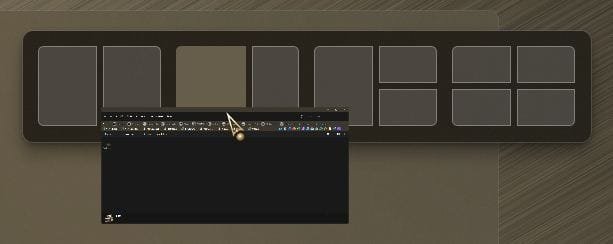
I don't know how to explain what I'm seeing exactly.
When moving a folder and the folder goes near the top of the screen I see what looks like a drop down menu appear, and when I move the folder away from the top of the screen, it disappears.
I have used the snap features before but can't seem to get the action that I used to work, the simple action of moving the folder to either the left or right of the screen and it would snap to that particular side.
I can't seem to get it to work.
Not sure if it is a snap feature. I also get it in the top middle, when I'm dragging a folder near the top. It looks like a pull down bar, and does nothing, I just ignore it. My snap feature only works when I click on the max icon in the top right of the folder.
the simple action of moving the folder to either the left or right of the screen and it would snap to that particular side.
I can't seem to get it to work.
Click on the folder you want to split a screen with.
Hold down the Win Key and then press either the Left Arrow on your keyboard to dock that window to the left, or the Right Arrow to dock that window to the right.
If you have more than one other window open on your taskbar, on the opposite side to where you docked/snapped the above window, a box will show containing all the windows you have available to dock to the opposite half of the screen.
5 x LG 25MS500-B - 1 x 24MK430H-B - 1 x Wacom Pro 22" Touch Screen Tablet
Screen Resolution
All over the place
Hard Drives
Too many to list.
OS on Samsung 1TB 870 QVO SATA
PSU
Silverstone 1500
Case
NZXT Phantom 820 Full-Tower Case
Cooling
Noctua NH-D15 Elite Class Dual Tower CPU Cooler / 6 x EziDIY 120mm / 2 x Corsair 140mm somethings / 1 x 140mm Thermaltake something / 2 x 200mm Corsair.