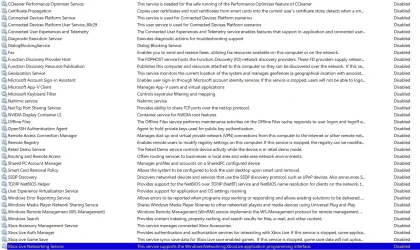
Solved Which services do you recommend to disable? here is my list


@XxXxX And my comment was a response to your comment about backups, immediately preceding, not your post from five hours ago.
 

My Computer My Computer

At a glance

Windows 11 Pro 25H2 (in a VM)12th Gen Core i7-1260P64 GB Micron PC4-25600Intel Iris Xe Graphics
OS
Windows 11 Pro 25H2 (in a VM)
Computer type
PC/Desktop
Manufacturer/Model
Intel NUC12WSHi7
CPU
12th Gen Core i7-1260P
Motherboard
NUC12WSBi7
Memory
64 GB Micron PC4-25600
Graphics Card(s)
Intel Iris Xe Graphics
Sound Card
on-board Realtek HD Audio
Monitor(s) Displays
Dell U3219Q
Screen Resolution
3840 x 2160
Hard Drives
Samsung SSD 990 PRO 1TB
Crucial MX500 2 TB
Keyboard
CODE 104-Key mechanical with Cherry MX Clears
Antivirus
Microsoft Defender
@XxXxX And my comment was a response to your comment about backups, immediately preceding, not your post from five hours ago.
"Yes, you can backup the registry yourself, or you can take a full system image yourself, or you can write down the changes you make on paper. All of those things, while true, entirely miss the point that was being made."

may i enquire about the the bold part highlighted, please.
as i most certainly seem to have missed the point.
best of luck, Steve ..
 

My Computers My Computers

  • At a glance

    Debian 13 KDE .. Windows 11 HomeRyzen 7 5825u64GB DDR4 3200Ryzen 7 5825u
    OS
    Debian 13 KDE .. Windows 11 Home
    Computer type
    PC/Desktop
    Manufacturer/Model
    HP 24" AiO
    CPU
    Ryzen 7 5825u
    Motherboard
    HP
    Memory
    64GB DDR4 3200
    Graphics Card(s)
    Ryzen 7 5825u
    Sound Card
    RealTek
    Monitor(s) Displays
    24" HP AiO
    Screen Resolution
    1920 x 1080 @60 Hz
    Hard Drives
    1TB WD Blue SN580 M2 SSD Partitioned.
    2x 1TB USB HDD External Backup/Storage.
    PSU
    90W external power brick
    Case
    24" All in One
    Cooling
    Default Air Cooling
    Keyboard
    HP WiFi UK extended
    Mouse
    HP WiFi 3 Button
    Internet Speed
    1GB full fibre
    Browser
    Edge & Firefox
    Antivirus
    AVG Internet Security/Windows Defender
    Other Info
    Mainly Open Source Software
  • At a glance

    Ubuntu 22.04.5 LTSi5 7200u16GB DDR4Intel
    Operating System
    Ubuntu 22.04.5 LTS
    Computer type
    Laptop
    Manufacturer/Model
    Dell 13" Latitude 2017
    CPU
    i5 7200u
    Motherboard
    Dell
    Memory
    16GB DDR4
    Graphics card(s)
    Intel
    Sound Card
    Intel
    Monitor(s) Displays
    13" Dell Laptop
    Hard Drives
    250GB Crucial 2.5" SSD
    Mouse
    Generic WiFi 3 button
    Internet Speed
    WiFi only
    Browser
    Firefox
    Antivirus
    ClamAV TK
    Other Info
    Mainly Open Source Software
My laptop only has 4GB of RAM and functions very well with no need to disable services. Windows is doing a thousand things a second and works best if you stop second-guessing it. Would you buy a new car and start ripping out it's electronics?

Registry backups are almost useless today when image backups are so fast and will fix almost any self-inflicted tweaking.
 

My Computers My Computers

  • At a glance

    Windows 11 Pro 25H2 26200.8737AMD Ryzen 7 5825U with Radeon Graphics16GB
    OS
    Windows 11 Pro 25H2 26200.8737
    Computer type
    Laptop
    Manufacturer/Model
    Acemagic LX15PRO
    CPU
    AMD Ryzen 7 5825U with Radeon Graphics
    Motherboard
    BIOS CT_BI_AMI_LX15PRO_AB8139_A-004
    Memory
    16GB
    Screen Resolution
    1920 x 1080
    Hard Drives
    SSD 2TB
    Internet Speed
    30 Mbps
    Browser
    Brave
    Antivirus
    Webroot SecureAnywhere Complete beta
  • At a glance

    Windows 11 Pro 23H2 22631.2506Atom N450 1.66GHz2GB
    Operating System
    Windows 11 Pro 23H2 22631.2506
    Computer type
    Laptop
    Manufacturer/Model
    HP Mini 210-1090NR PC (bought in late 2009!)
    CPU
    Atom N450 1.66GHz
    Memory
    2GB
    Browser
    Brave
    Antivirus
    Webroot
  • Acer Swift SF114-34 laptop
    OS Windows 11 Pro 26200.8737
    CPU Pentium Silver N6000
    RAM 4GB
    BIOS v1.17
    SSD Samsung 970 EVO Plus SSD 2TB (an upgrade)

My Computers My Computers

  • At a glance

    Windows 11 Pro 25H2Ryzen 5 3500U8GBVega 8
    OS
    Windows 11 Pro 25H2
    Computer type
    Laptop
    Manufacturer/Model
    Huawei MateBook D15
    CPU
    Ryzen 5 3500U
    Memory
    8GB
    Graphics Card(s)
    Vega 8
    Screen Resolution
    FHD
    Hard Drives
    256GB Samsung SSD + 1TB HDD
    Browser
    Microsoft Edge
    Antivirus
    ESET Smart Security Premium
  • At a glance

    Windows 10 Enterprise LTSC 21H2intel core i7 6700HQ16GBNvidia Geforce GTX1060 (6GB)
    Operating System
    Windows 10 Enterprise LTSC 21H2
    Computer type
    Laptop
    Manufacturer/Model
    MSI GS73 6RF Stealth Pro
    CPU
    intel core i7 6700HQ
    Memory
    16GB
    Graphics card(s)
    Nvidia Geforce GTX1060 (6GB)
    Screen Resolution
    FHD
    Hard Drives
    128GB SSD + 1TB HDD
    Browser
    Microsoft Edge
    Antivirus
    Windows Defender
The problem is an image backup reverts many changes, and not just what you wanted to fix. It’s like choosing a jackhammer when a screwdriver would suffice. Users should be backing up to preserve user data, but it’s not intended to be a rollback for making a tweak that should have a simple undo logged.

Those of us with IT backgrounds tend to deal with the law of unintended consequences. A guiding principle is to always make the smallest change needed to get something done, and not to create more work for yourself or someone else.

These debates will never end, but reflect why there’s opposing camps.
 

My Computer My Computer

At a glance

Windows 7
OS
Windows 7

My Computer My Computer

At a glance

Windows 11 Pro 24H2Intel Ultra 7 155H16gbIntel Arc integrated
OS
Windows 11 Pro 24H2
Computer type
Laptop
Manufacturer/Model
HP
CPU
Intel Ultra 7 155H
Memory
16gb
Graphics Card(s)
Intel Arc integrated
Hard Drives
SSD
The problem is an image backup reverts many changes, and not just what you wanted to fix. It’s like choosing a jackhammer when a screwdriver would suffice. Users should be backing up to preserve user data, but it’s not intended to be a rollback for making a tweak that should have a simple undo logged.

Those of us with IT backgrounds tend to deal with the law of unintended consequences. A guiding principle is to always make the smallest change needed to get something done, and not to create more work for yourself or someone else.

These debates will never end, but reflect why there’s opposing camps.
If you do daily backups and something then goes wrong, surely restoring from that image is far more effective than trying to diagnose the problem.
 
Last edited:

My Computers My Computers

  • At a glance

    Windows 11 Pro 25H2 26200.8737AMD Ryzen 7 5825U with Radeon Graphics16GB
    OS
    Windows 11 Pro 25H2 26200.8737
    Computer type
    Laptop
    Manufacturer/Model
    Acemagic LX15PRO
    CPU
    AMD Ryzen 7 5825U with Radeon Graphics
    Motherboard
    BIOS CT_BI_AMI_LX15PRO_AB8139_A-004
    Memory
    16GB
    Screen Resolution
    1920 x 1080
    Hard Drives
    SSD 2TB
    Internet Speed
    30 Mbps
    Browser
    Brave
    Antivirus
    Webroot SecureAnywhere Complete beta
  • At a glance

    Windows 11 Pro 23H2 22631.2506Atom N450 1.66GHz2GB
    Operating System
    Windows 11 Pro 23H2 22631.2506
    Computer type
    Laptop
    Manufacturer/Model
    HP Mini 210-1090NR PC (bought in late 2009!)
    CPU
    Atom N450 1.66GHz
    Memory
    2GB
    Browser
    Brave
    Antivirus
    Webroot
  • Acer Swift SF114-34 laptop
    OS Windows 11 Pro 26200.8737
    CPU Pentium Silver N6000
    RAM 4GB
    BIOS v1.17
    SSD Samsung 970 EVO Plus SSD 2TB (an upgrade)
I do not deactivate or remove services. That way my computer doesn't blow up.
 

My Computer My Computer

At a glance

Win 11 Pro 25H2Intel i7 13700KF32 GB Team Group DDR5 - 6000 CL 30ASUS TUF GAMING RTX 3070 Ti
OS
Win 11 Pro 25H2
Computer type
PC/Desktop
Manufacturer/Model
Self build
CPU
Intel i7 13700KF
Motherboard
Gigabyte Z790 UD AC
Memory
32 GB Team Group DDR5 - 6000 CL 30
Graphics Card(s)
ASUS TUF GAMING RTX 3070 Ti
Sound Card
On board Realtek
Monitor(s) Displays
ACER 34 inch
Screen Resolution
4K
Hard Drives
1 TB Samsung 980 Pro Nvme, 1 TB Samsung 970 EVO Nvme, 2 x Samsung 970 2TB SSD SATA
PSU
EVGA 1000Q
Case
Rosewill something or other
Cooling
Noctua NH-D15. A whole schwak of Noctua case fans. $$$
Keyboard
Logitech G815
Mouse
Logitech G502 Hero
Internet Speed
700 up, 600 down
Browser
Firefox
Antivirus
MalwareBytes
To each their own. I definitely deactivate services and scheduled tasks that I find unnecessary for me.

The last two words are important. It's my computer and it should run the way it suits me. The default Windows installation is designed to work in a very large number of scenarios, but it's not optimized for me specifically. For that reason, it includes programs and services, that are not useful to me, although they may be essential to someone else. It is unreasonable to expect Microsoft (or any other vendor) to satisfy every single one of us. I doubt that was ever their purpose (in fact, I am certain it was not, their primary purpose is to make money for their shareholders). If someone is happy with the out-of-the-box experience, great. If I want to trim down the number of programs running on my machine, it's my right to do so. In fact, I found this thread by searching the internet about the MareBackup scheduled task: it appears unnecessary to me, but before disabling it, I still search to find out its purpose and whether disabling it will actually break something. The latter is unfortunately important - Microsoft does not provide adequate documentation. There is no way of simply opening a manual and reading what does the task, e.g. MareBackup do.

So thanks to @Sheikh for starting the thread and providing his list.

Now, to answer his original question, I have the following services as disabled (some of them were disabled to begin with):
 

Attachments

  • Screenshot 2025-06-08 173501.webp
    Screenshot 2025-06-08 173501.webp
    293.3 KB · Views: 11

My Computer My Computer

At a glance

Windows 10i5-10600K16 GBGeForce GTX 1650
OS
Windows 10
Computer type
PC/Desktop
CPU
i5-10600K
Motherboard
Asus Rog Strix Z490-A Gaming
Memory
16 GB
Graphics Card(s)
GeForce GTX 1650
Monitor(s) Displays
Samsung U32J59x 32" 4K
Screen Resolution
3840x2160
I do not deactivate or remove services. That way my computer doesn't blow up.
You gotta love this feline! My sentiments exactly. I buy a computer with enough power and memory that I don't need to cripple anything.
 

My Computers My Computers

  • At a glance

    Windows 11 ProIntel Series 3 Core Ultra X9 388H64GB LPDDR5x 9600 MT/sIntel Arc graphics B390 Panther Lake
    OS
    Windows 11 Pro
    Computer type
    Laptop
    Manufacturer/Model
    Dell XPS 16 DA16260
    CPU
    Intel Series 3 Core Ultra X9 388H
    Memory
    64GB LPDDR5x 9600 MT/s
    Graphics Card(s)
    Intel Arc graphics B390 Panther Lake
    Monitor(s) Displays
    16" 3.2K Tandem OLED Infinity Edge
    Screen Resolution
    3200 x 2000 16:10 236 PPI
    Hard Drives
    1 Terabyte M.2 PCIe NVMe SSD
    Case
    Black Anodized Aluminum
    Cooling
    Vapor Chamber Cooling
    Mouse
    None
    Internet Speed
    942 Mbps Netgear Mesh + 2 Satellites
    Browser
    Microsoft Edge (Chromium)
    Antivirus
    Windows Security (Defender)
    Other Info
    NPU delivering 67 TOPS
    Microsoft 365 subscription
    Microsoft Office 365
    Microsoft OneDrive 1TB Cloud
    Microsoft Visual Studio
    Microsoft Visual Studio Code
    Microsoft Sysinternals Suite
    Microsoft BitLocker
    Microsoft Copilot
    Dell Support Assist
    Dell Command | Update
    Macrium Reflect X subscription
    1Password Password Manager
    Amazon Kindle for PC
    Lightroom/Photoshop subscription
    Interactive Brokers Trader Workstation
  • At a glance

    Windows 11 ProSnapdragon® X Elite (12 Core) with Hexagon NP...32GB LPDDR5x 8448 MT/sIntegrated Adreno GPU
    Operating System
    Windows 11 Pro
    Computer type
    Laptop
    Manufacturer/Model
    Microsoft Surface Laptop 7
    CPU
    Snapdragon® X Elite (12 Core) with Hexagon NPU delivering 45 TOPS
    Memory
    32GB LPDDR5x 8448 MT/s
    Graphics card(s)
    Integrated Adreno GPU
    Sound Card
    Omnisonic speakers with Dolby Atmos spatial sound
    Monitor(s) Displays
    13.8″ PixelSense Flow touchscreen 120 Hz 600 NIT
    Screen Resolution
    2304 × 1536 (201 PPI), 3:2 aspect ratio
    Hard Drives
    1 TB PCIe NVMe Gen 4 SSD
    Case
    Black Anodized Aluminum
    Cooling
    Vapor Chamber Cooling
    Mouse
    None
    Internet Speed
    942 Mbps Netgear Mesh + 2 Satellites
    Browser
    Microsoft Edge (Chromium)
    Antivirus
    Windows Security (Defender)
    Other Info
    Microsoft 365 subscription (Office)
    Microsoft Office 365
    Microsoft OneDrive 1TB Cloud
    Microsoft Visual Studio 2026
    Microsoft Visual Studio Code
    Interactive Brokers Trader Workstation
    Lightroom/Photoshop subscription
    1Password Password Manager
    Microsoft Sysinternals
    Amazon Kindle for PC
    Microsoft BitLocker
    Microsoft Copilot
Many Services have underlying dependencies..., you start messin with them aggressively and some things are bound to go to sh*t.
 

My Computers My Computers

  • At a glance

    Windows 11 Pro
    OS
    Windows 11 Pro
    Computer type
    PC/Desktop
    Manufacturer/Model
    ASUS ROG Strix
  • At a glance

    Windows 11 Pro
    Operating System
    Windows 11 Pro
    Computer type
    Laptop
    Manufacturer/Model
    ASUS VivoBook
  • ASUS VivoBook 'Lite' ~ Windows 11 Home
Yeah, some services have interactions. If in doubt, leave it. But some are unnecessary.

I'm not as aggressive as I was back in the days when we were overclocking 386 chips to eek out a little more performance. But I still trim the fat. I try not to trim too much at one time, so if something goes south, you can reverse it and fix the issue.
 

My Computer My Computer

At a glance

Windows 11 Pro 24H2Intel Ultra 7 155H16gbIntel Arc integrated
OS
Windows 11 Pro 24H2
Computer type
Laptop
Manufacturer/Model
HP
CPU
Intel Ultra 7 155H
Memory
16gb
Graphics Card(s)
Intel Arc integrated
Hard Drives
SSD
after the last Windows preview update which placed 10 extra services in the service menu and 2 extra in the service registry
9x hyper-v and 1x activeX in the service menu .. 1x hyper-v and 1x xboxhib in the service registry which don't show in the service menu.

i know have 70 services disabled via the service menu and 5 services that are related but only in the service registry
making a total now of 75 services disabled.

these services are disabled on 2 home AiO desktops which are both running just fine.
best of luck, Steve ..
 

My Computers My Computers

  • At a glance

    Debian 13 KDE .. Windows 11 HomeRyzen 7 5825u64GB DDR4 3200Ryzen 7 5825u
    OS
    Debian 13 KDE .. Windows 11 Home
    Computer type
    PC/Desktop
    Manufacturer/Model
    HP 24" AiO
    CPU
    Ryzen 7 5825u
    Motherboard
    HP
    Memory
    64GB DDR4 3200
    Graphics Card(s)
    Ryzen 7 5825u
    Sound Card
    RealTek
    Monitor(s) Displays
    24" HP AiO
    Screen Resolution
    1920 x 1080 @60 Hz
    Hard Drives
    1TB WD Blue SN580 M2 SSD Partitioned.
    2x 1TB USB HDD External Backup/Storage.
    PSU
    90W external power brick
    Case
    24" All in One
    Cooling
    Default Air Cooling
    Keyboard
    HP WiFi UK extended
    Mouse
    HP WiFi 3 Button
    Internet Speed
    1GB full fibre
    Browser
    Edge & Firefox
    Antivirus
    AVG Internet Security/Windows Defender
    Other Info
    Mainly Open Source Software
  • At a glance

    Ubuntu 22.04.5 LTSi5 7200u16GB DDR4Intel
    Operating System
    Ubuntu 22.04.5 LTS
    Computer type
    Laptop
    Manufacturer/Model
    Dell 13" Latitude 2017
    CPU
    i5 7200u
    Motherboard
    Dell
    Memory
    16GB DDR4
    Graphics card(s)
    Intel
    Sound Card
    Intel
    Monitor(s) Displays
    13" Dell Laptop
    Hard Drives
    250GB Crucial 2.5" SSD
    Mouse
    Generic WiFi 3 button
    Internet Speed
    WiFi only
    Browser
    Firefox
    Antivirus
    ClamAV TK
    Other Info
    Mainly Open Source Software
I really don't see the point for the most part. I may disable services that actually do things I don't want done, but other than that, I leave them alone.

What's really the point, my processor idles at 2-3%, and I have tons of memory.

1749431820229.webp
 

My Computers My Computers

  • At a glance

    Win 11 Pro 25H2, Build 26200.8737Intel Core i5 1450064GB DDR4GeForce RTX 4060
    OS
    Win 11 Pro 25H2, Build 26200.8737
    Computer type
    PC/Desktop
    Manufacturer/Model
    Home Brew
    CPU
    Intel Core i5 14500
    Motherboard
    Gigabyte B760M G P WIFI
    Memory
    64GB DDR4
    Graphics Card(s)
    GeForce RTX 4060
    Sound Card
    Chipset Realtek
    Monitor(s) Displays
    LG 45" Ultragear, Acer 24" 1080p
    Screen Resolution
    5120x1440, 1920x1080
    Hard Drives
    Crucial P310 2TB 2280 PCIe Gen4 3D NAND NVMe M.2 SSD (O/S)
    Silicon Power 2TB US75 NVMe PCIe Gen4 M.2 2280 SSD (backup)
    Crucial BX500 2TB 3D NAND (2nd backup)
    Seagate 4TB Ironwolf, rotating HDD archive files
    External off-line backup Drives: 2 NVMe 4TB drives in external enclosures
    PSU
    Thermaltake Toughpower GF3 750W
    Case
    LIAN LI LANCOOL 216 E-ATX PC Case
    Cooling
    Lots of fans!
    Keyboard
    Microsoft Comfort Curve 2000
    Mouse
    Logitech G305
    Internet Speed
    Verizon FiOS 1GB
    Browser
    Firefox
    Antivirus
    Malware Bytes & Windows Defender Security
  • At a glance

    Win 11 Pro 25H2, Build 26200.8655Intel Core i5 1440032GB DDR5Intel 700 Embedded GPU
    Operating System
    Win 11 Pro 25H2, Build 26200.8655
    Computer type
    PC/Desktop
    Manufacturer/Model
    Home Brew
    CPU
    Intel Core i5 14400
    Motherboard
    Gigabyte B760M DS3H AX
    Memory
    32GB DDR5
    Graphics card(s)
    Intel 700 Embedded GPU
    Sound Card
    Realtek Embedded
    Monitor(s) Displays
    27" HP 1080p
    Screen Resolution
    1920x1080
    Hard Drives
    Crucial P310 2TB 2280 PCIe Gen4 eD NAND PCIe SSD
    Samsung EVO 990 2TB NVMe Gen4 SSD
    Samsung 2TB SATA SSD
    PSU
    Thermaltake Smart BM3 650W
    Case
    Okinos Micro ATX Case
    Cooling
    Fans
    Keyboard
    Microsoft Comfort Curve 2000
    Mouse
    Logitech G305
    Internet Speed
    Verizon FiOS 1GB
    Browser
    Firefox
    Antivirus
    Malware Bytes & Windows Defender Security
  • Nimo N171 17" Laptop, (Intel i3-1215U, 16GB RAM, 2TB NVMe, Win11 Pro)
    Acemagic Vista Mini PC V1 (Intel N150, 16GB RAM, 1TB NVMe, Win11 Pro)
    HP ENVY h8-1540t, (24GB RAM, 2TB SSD, 2TB HDD, Win11 Pro)
I'm old. MS pushes to much is why many people disable services, not necessarily to gain performance. I use a desktop, and have no need for much of the stuff. I don't want my PC linked to my phone. I don't want apps on my phone and wouldn't miss having it. I have no touch input so why all the tablet features? I don't SSH into anything, that used to be an optional component but not any more. I don't want my PC listening to me and my conversations. And many of the services start regardless of whether your settings should require it to run. It's just adding more vulnerability to your system. And it's getting worse all the time. Seems more GP settings get ignored by MS anyways as time goes on. I tinker with Linux but I'm to old and health problems make it hard for me to pick it up easily. I stayed on 7 until just 2 years ago when it got to be to much trouble keeping browsers working. Simple is better. And I don't want MS controlling my PC.
Tip: Export the services to a text file before you start playing around with them.
 

My Computers My Computers

  • At a glance

    Windows 11 24H25700x3D32GB DDR4 Gskill FlareX 3200RTX 3050
    OS
    Windows 11 24H2
    Computer type
    PC/Desktop
    Manufacturer/Model
    Custom Build
    CPU
    5700x3D
    Motherboard
    ASRock B550M PG Riptide
    Memory
    32GB DDR4 Gskill FlareX 3200
    Graphics Card(s)
    RTX 3050
    Monitor(s) Displays
    2 x 27" Koorui
    Screen Resolution
    1080P, Occasionally change them to 1440
    Hard Drives
    Multiple NVME's, SSD's, & HDD's
    Cooling
    Air
    Internet Speed
    1GB symmetric
    Browser
    FF
    Antivirus
    None
    Other Info
    OLD dude. Don't harp- to each their own.
  • At a glance

    24H2560064GB SP1650
    Operating System
    24H2
    Computer type
    PC/Desktop
    CPU
    5600
    Motherboard
    AsRock B550 Pro
    Memory
    64GB SP
    Graphics card(s)
    1650
    Monitor(s) Displays
    27" Koorui, 27" Asus
    Screen Resolution
    1080P
    Hard Drives
    Multiple NVME's, SSD's, & HDD's
    Cooling
    Air
    Antivirus
    None
    Other Info
    To each their own.
I'm old. MS pushes to much is why many people disable services, not necessarily to gain performance. I use a desktop, and have no need for much of the stuff. I don't want my PC linked to my phone. I don't want apps on my phone and wouldn't miss having it. I have no touch input so why all the tablet features? I don't SSH into anything, that used to be an optional component but not any more. I don't want my PC listening to me and my conversations. And many of the services start regardless of whether your settings should require it to run. It's just adding more vulnerability to your system. And it's getting worse all the time. Seems more GP settings get ignored by MS anyways as time goes on. I tinker with Linux but I'm to old and health problems make it hard for me to pick it up easily. I stayed on 7 until just 2 years ago when it got to be to much trouble keeping browsers working. Simple is better. And I don't want MS controlling my PC.
Tip: Export the services to a text file before you start playing around with them.

tv-simpsons.gif


I'm right there with you, buddy. Stayed on Win 7 forever... until my laptop died and my matching backup laptop wouldn't run more than five minutes. Gave in and bought a new laptop, which pushed me into Win 11. Enter Microsoft's "you need all this slushware and telemetry".

It's nice to be up-to-date on programs and not have to deal with running old versions/avoiding updates. But it took me almost a month to get Win 11 beaten into shape where it made me happy. I know there are remaining MS excesses still in there, but at least I killed the ones that an average former techie can find.
 

My Computer My Computer

At a glance

Windows 11 Pro 24H2Intel Ultra 7 155H16gbIntel Arc integrated
OS
Windows 11 Pro 24H2
Computer type
Laptop
Manufacturer/Model
HP
CPU
Intel Ultra 7 155H
Memory
16gb
Graphics Card(s)
Intel Arc integrated
Hard Drives
SSD
I'm in the group that leaves all of the services as default. Years ago I use to use the recommendations from Black Viper. With the power and speed of todays computers I don't see any benefits of changing any of the settings.
Old thread, I get it.....was just playin' the Services.msc game and got bit in the long run....lot of dependencies can, and will, get mucked up in 25H2.

Yeah, ol' Black Viper....good stuff back in the XP-7 days. He had 3 packages he recommended from mild to wild. The full on wild package would trigger more warnings and errors in Event Viewer. We always used his middle of the road recommendations with zero ill effects.

Thanks!
 

My Computers My Computers

  • At a glance

    Windows 11 Pro 25H2 OS Build 26200.7705Gen 5 Haswell i7-477032 GB G. SKILL DDR-3 Ripjaws X- 8GB x 4Integrated Intel 4600 (112MB)
    OS
    Windows 11 Pro 25H2 OS Build 26200.7705
    Computer type
    PC/Desktop
    Manufacturer/Model
    HP ENVY 700-515xt CTO (mATX platform)
    CPU
    Gen 5 Haswell i7-4770
    Motherboard
    OEM (Asus)
    Memory
    32 GB G. SKILL DDR-3 Ripjaws X- 8GB x 4
    Graphics Card(s)
    Integrated Intel 4600 (112MB)
    Sound Card
    OEM
    Monitor(s) Displays
    HP 27eb
    Screen Resolution
    1920 x 1080
    Hard Drives
    Samsung 860 PRO 256GB, SG ST1000DM003-1CH162, Barracuda 7200.14 Series, 1 TB storage, 64MB cache and a SATA 6Gb/s interface (Hard drive is used for Storage only)
    PSU
    OEM 350W
    Case
    OEM
    Cooling
    OEM (ACPI fans)
    Keyboard
    Logitech K120
    Mouse
    Logitech M100
    Internet Speed
    440.1 Down/ 11.2 Up, 13 ms latency, server based in Chicago, IP- Spectrum in Midland, MI
    Browser
    Google Chrome
    Antivirus
    MS Defender
  • At a glance

    Android 15Qualcomm Snapdragon 8 Gen 28GB LPDDR5X (ramped to 12GB, borrowed from 51...Integrated Adreno 740 GPU
    Operating System
    Android 15
    Manufacturer/Model
    Motorola Edge+ 2023
    CPU
    Qualcomm Snapdragon 8 Gen 2
    Motherboard
    What's that???.....
    Memory
    8GB LPDDR5X (ramped to 12GB, borrowed from 512GB UFS 4.0 storage)
    Graphics card(s)
    Integrated Adreno 740 GPU
    Sound Card
    Dolby Atmos
    Monitor(s) Displays
    Display Technology - pOLED, HDR10+, 10-bit; Over a billion shades of color, DCI-P3 color space, Dolby Vision®, 165Hz refresh rate, Touch rate: 360Hz, Peak Brightness: 1300 nits
    Screen Resolution
    Resolution - FHD+ (2400 x 1080) | 394ppi
    Hard Drives
    UFS 4.0 internal storage, which is the standard type of high-speed flash storage for modern flagship smartphones.
    PSU
    5100mAh Li-Ion, Charging - 68W TurboPower™ charging | 15W wireless charging | 5W wireless power sharing
    Case
    Sandblasted aluminum
    Keyboard
    GBoard and Google Voice typing
    Mouse
    Yep.....primarily rt. index finger
    Internet Speed
    499.23 down, 11.53 up, 12 ms latency
    Browser
    Chrome
    Antivirus
    Nah......built in Motorola Security
    Other Info
    This device smokes the Samsung Galaxy S25 Ultra, for $400-$500 less, except the Camera specs. My eyes can't tell the difference!

Do not disable CaptureService and DevicesFlow if you use Bluetooth.
If you disable DevicesFlow, Settings > Bluetooth Devices > Add device doesn't work
 
Last edited:

My Computer My Computer

At a glance

Microsoft Windows 11 HomeIntel Core i5-13490F2 x 16 Patriot Memory (PDP Systems) PSD516G56...GIGABYTE GeForce RTX 4070 WINDFORCE OC 12G (G...
OS
Microsoft Windows 11 Home
Computer type
PC/Desktop
Manufacturer/Model
MSI MS-7D98
CPU
Intel Core i5-13490F
Motherboard
MSI B760 GAMING PLUS WIFI
Memory
2 x 16 Patriot Memory (PDP Systems) PSD516G560081 6400MT (32-37-37-74); 1.35V)
Graphics Card(s)
GIGABYTE GeForce RTX 4070 WINDFORCE OC 12G (GV-N4070WF3OC-12GD)
Sound Card
Bluetooth Аудио
Monitor(s) Displays
INNOCN 15K1F
Screen Resolution
1920 x 1080
Hard Drives
WD_BLACK SN770 250GB
KINGSTON SNV2S1000G (ELFK0S.6)
PSU
Thermaltake Toughpower GF3 1000W
Case
CG560 - DeepCool
Cooling
ID-COOLING SE-224-XTS / 2 x 140Mm Fan - rear and top; 3 x 120Mm - front
Keyboard
Corsair K70 RGB TKL
Mouse
Corsair KATAR PRO XT
Internet Speed
100 Mbps
Browser
Firefox
Antivirus
Microsoft Defender Antivirus
Other Info
https://www.userbenchmark.com/UserRun/66553205
No windows services. Like others I do not want to deal with even more Windows issues than there already are out of the box,
I disable some third party services like some Asus and Intel that are not necessary or are bloat.
 

My Computers My Computers

  • At a glance

    Windows 11 Pro x64Intel Core i9 14900K96GB (2x48) G.skill Ripjaws 6800 MT/s DDR5Asus ROG Strix 4070 Ti OC
    OS
    Windows 11 Pro x64
    Computer type
    PC/Desktop
    Manufacturer/Model
    DIY Photoshop/Audio/Game/tinker
    CPU
    Intel Core i9 14900K
    Motherboard
    Asus ROG Maximus Z790 Dark Hero
    Memory
    96GB (2x48) G.skill Ripjaws 6800 MT/s DDR5
    Graphics Card(s)
    Asus ROG Strix 4070 Ti OC
    Sound Card
    Bowers & Wilkins 606 S3 speakers; Audiolabs 7000a integrated amp; RSL 10S Mk2 sub; Creative Pebble Pro Minimilist
    Monitor(s) Displays
    Eizo CG2730 ColorEdge, ViewSonic VP2768, i1 Display Pro calibration puck
    Screen Resolution
    2560 x 1440p x 2
    Hard Drives
    WDC SN850X 4TB nvme, SN850 1TB nvme, SK-Hynix 2 TB P41 nvme,. Sabrent USB-C DS-SC5B 5-bay docking station: 6TB WDC Black, 6TB Ironwolf Pro; 2x 2TB WDC Black HDD
    PSU
    850W Seasonic Vertex PX-850 ATX 3.0/PCI-E 5.0
    Case
    Fractal Design North XL Mesh, Black Walnut
    Cooling
    EK Nucleus black 360 AIO w/Phanteks T30-120 fans, 2 Noctua NF-A14 Chromax case fan, 1 T30-120 fan cooling memory
    Keyboard
    Keychron Q3 Max TKL with custom GMK Redsuns Red Samuri keycaps, TX Stabs
    Mouse
    Logitech G305 wireless gaming
    Internet Speed
    500 Mb/s | 12 Mb/s
    Browser
    Firefox
    Antivirus
    Defender, Macrium Reflect X
    Other Info
    Phangkey Amaterasu V2 Desk Mat
  • At a glance

    Apple M1
    Computer type
    Laptop
    Manufacturer/Model
    💻 Apple 13" Macbook Pro 2020 (m1)
    CPU
    Apple M1
    Screen Resolution
    2560x1600
    Browser
    Firefox
No windows services. Like others I do not want to deal with even more Windows issues than there already are out of the box,
I disable some third party services like some Asus and Intel that are not necessary or are bloat.
Yep....in my case, since we're not a gamer, those XBox items were the first services to disable....along with the Connected User Experiences and Telemetry, for me anyway.
 

My Computers My Computers

  • At a glance

    Windows 11 Pro 25H2 OS Build 26200.7705Gen 5 Haswell i7-477032 GB G. SKILL DDR-3 Ripjaws X- 8GB x 4Integrated Intel 4600 (112MB)
    OS
    Windows 11 Pro 25H2 OS Build 26200.7705
    Computer type
    PC/Desktop
    Manufacturer/Model
    HP ENVY 700-515xt CTO (mATX platform)
    CPU
    Gen 5 Haswell i7-4770
    Motherboard
    OEM (Asus)
    Memory
    32 GB G. SKILL DDR-3 Ripjaws X- 8GB x 4
    Graphics Card(s)
    Integrated Intel 4600 (112MB)
    Sound Card
    OEM
    Monitor(s) Displays
    HP 27eb
    Screen Resolution
    1920 x 1080
    Hard Drives
    Samsung 860 PRO 256GB, SG ST1000DM003-1CH162, Barracuda 7200.14 Series, 1 TB storage, 64MB cache and a SATA 6Gb/s interface (Hard drive is used for Storage only)
    PSU
    OEM 350W
    Case
    OEM
    Cooling
    OEM (ACPI fans)
    Keyboard
    Logitech K120
    Mouse
    Logitech M100
    Internet Speed
    440.1 Down/ 11.2 Up, 13 ms latency, server based in Chicago, IP- Spectrum in Midland, MI
    Browser
    Google Chrome
    Antivirus
    MS Defender
  • At a glance

    Android 15Qualcomm Snapdragon 8 Gen 28GB LPDDR5X (ramped to 12GB, borrowed from 51...Integrated Adreno 740 GPU
    Operating System
    Android 15
    Manufacturer/Model
    Motorola Edge+ 2023
    CPU
    Qualcomm Snapdragon 8 Gen 2
    Motherboard
    What's that???.....
    Memory
    8GB LPDDR5X (ramped to 12GB, borrowed from 512GB UFS 4.0 storage)
    Graphics card(s)
    Integrated Adreno 740 GPU
    Sound Card
    Dolby Atmos
    Monitor(s) Displays
    Display Technology - pOLED, HDR10+, 10-bit; Over a billion shades of color, DCI-P3 color space, Dolby Vision®, 165Hz refresh rate, Touch rate: 360Hz, Peak Brightness: 1300 nits
    Screen Resolution
    Resolution - FHD+ (2400 x 1080) | 394ppi
    Hard Drives
    UFS 4.0 internal storage, which is the standard type of high-speed flash storage for modern flagship smartphones.
    PSU
    5100mAh Li-Ion, Charging - 68W TurboPower™ charging | 15W wireless charging | 5W wireless power sharing
    Case
    Sandblasted aluminum
    Keyboard
    GBoard and Google Voice typing
    Mouse
    Yep.....primarily rt. index finger
    Internet Speed
    499.23 down, 11.53 up, 12 ms latency
    Browser
    Chrome
    Antivirus
    Nah......built in Motorola Security
    Other Info
    This device smokes the Samsung Galaxy S25 Ultra, for $400-$500 less, except the Camera specs. My eyes can't tell the difference!

Latest Support Threads

Back
Top Bottom