Whoever solves this Microsoft certificate puzzle, please come forward !!!


If you have separate EFI volumes, and picked a different boot device in the UEFI boot list, then you have to check the other disk's SVN. Only the Secure Boot certs and the SVN is global across all the boot devices on the PC.

Temporarily disable Secure Boot, boot from the other drive, run the check script.
 

My Computer My Computer

At a glance

Windows 7
OS
Windows 7
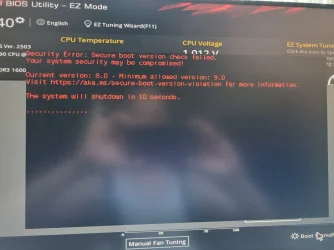
When I try to boot to not-yet-updated Windows, I get this message and PC turns off. SVN mismatch. This is becoming a real pain. I had better start thinking of using the other Windows disk as a data disk.

SB2.webp
 

My Computers My Computers

  • At a glance

    Windows 11 Pro build 26200.8524Intel i7-4790Teams DDR3-1600 4x4 GBMSI Nvidia GeForce GTX 1050Ti
    OS
    Windows 11 Pro build 26200.8524
    Computer type
    PC/Desktop
    Manufacturer/Model
    Home Built
    CPU
    Intel i7-4790
    Motherboard
    Asus H97 Pro Gamer with add-on TPM1.2 module
    Memory
    Teams DDR3-1600 4x4 GB
    Graphics Card(s)
    MSI Nvidia GeForce GTX 1050Ti
    Sound Card
    Realtek ALC1150
    Monitor(s) Displays
    Dell P2425D
    Screen Resolution
    2560 by 1440 pixels
    Hard Drives
    Corsair NVMe M.2 Core XT 1000 GB (Windows 11 v.25H2); Samsung SATA Evo 870 500 GB (Windows 11 v.25H2);
    PSU
    Corsair HX850
    Case
    Gigabyte Solo 210
    Cooling
    Zalman CNPS7X Tower
    Keyboard
    Microsoft AIO Wireless (includes touchpad)
    Mouse
    HP S1000 Plus Wireless
    Internet Speed
    500 Mb fiber optic
    Browser
    Chrome; MS Edge
    Antivirus
    Windows Defender
  • At a glance

    MacOS 12 MontereyIntel Core i58 GBIntel integrated
    Operating System
    MacOS 12 Monterey
    Computer type
    Laptop
    Manufacturer/Model
    Apple Macbook Air
    CPU
    Intel Core i5
    Memory
    8 GB
    Graphics card(s)
    Intel integrated
    Screen Resolution
    1440 by 900 pixels
    Hard Drives
    128 GB
    Keyboard
    Built-in
    Mouse
    Microsoft Wireless
    Internet Speed
    802.11 ac
    Browser
    Chrome; Safari
    Antivirus
    N/A
Disable Secure Boot, boot from the other disk, run the update script.

You only have to do this when the boot manager changes. It's not every month, but the last times were October 2025, April 2026, June 2026.
 

My Computer My Computer

At a glance

Windows 7
OS
Windows 7
Disable Secure Boot, boot from the other disk, run the update script.
I will do that.
You only have to do this when the boot manager changes. It's not every month, but the last times were October 2025, April 2026, June 2026.
That's a load off.
 

My Computers My Computers

  • At a glance

    Windows 11 Pro build 26200.8524Intel i7-4790Teams DDR3-1600 4x4 GBMSI Nvidia GeForce GTX 1050Ti
    OS
    Windows 11 Pro build 26200.8524
    Computer type
    PC/Desktop
    Manufacturer/Model
    Home Built
    CPU
    Intel i7-4790
    Motherboard
    Asus H97 Pro Gamer with add-on TPM1.2 module
    Memory
    Teams DDR3-1600 4x4 GB
    Graphics Card(s)
    MSI Nvidia GeForce GTX 1050Ti
    Sound Card
    Realtek ALC1150
    Monitor(s) Displays
    Dell P2425D
    Screen Resolution
    2560 by 1440 pixels
    Hard Drives
    Corsair NVMe M.2 Core XT 1000 GB (Windows 11 v.25H2); Samsung SATA Evo 870 500 GB (Windows 11 v.25H2);
    PSU
    Corsair HX850
    Case
    Gigabyte Solo 210
    Cooling
    Zalman CNPS7X Tower
    Keyboard
    Microsoft AIO Wireless (includes touchpad)
    Mouse
    HP S1000 Plus Wireless
    Internet Speed
    500 Mb fiber optic
    Browser
    Chrome; MS Edge
    Antivirus
    Windows Defender
  • At a glance

    MacOS 12 MontereyIntel Core i58 GBIntel integrated
    Operating System
    MacOS 12 Monterey
    Computer type
    Laptop
    Manufacturer/Model
    Apple Macbook Air
    CPU
    Intel Core i5
    Memory
    8 GB
    Graphics card(s)
    Intel integrated
    Screen Resolution
    1440 by 900 pixels
    Hard Drives
    128 GB
    Keyboard
    Built-in
    Mouse
    Microsoft Wireless
    Internet Speed
    802.11 ac
    Browser
    Chrome; Safari
    Antivirus
    N/A
"Rufus formats the drive in NTFS" "There were two UEFI OS entries."
"MCT formats the drive in FAT32"
"My Asus M/B (of late 2014) has no problem booting to NTFS formatted drives."
1)
Rufus creates two partitions on the usb flash, one is FAT and the other is NTFS. If UEFI has NTFS support, the user sees two options, one starts efi on the Rufus FAT partition and the other bootx64.efi on the NTFS partition. The cleaner option is bootx64.efi, because efi on the Rufus partition just starts bootx64.efi.

2)
MCT creates a FAT32 partition.
Rufus creates FAT + NTFS partitions on the USB Flash.
You have NTFS support. Me too.
The best option is not to use MCT or Rufus.
Have only one NTFS partition on the USB flash and copy the files there manually, either from the iso or using dism from the esd.
(It is then of course necessary to copy the files signed with the 2023 certificate as bootx64.efi.)
 

My Computer My Computer

At a glance

Windows 11AMD32 GB
OS
Windows 11
Computer type
PC/Desktop
Manufacturer/Model
Gigabyte
CPU
AMD
Motherboard
Gigabyte
Memory
32 GB
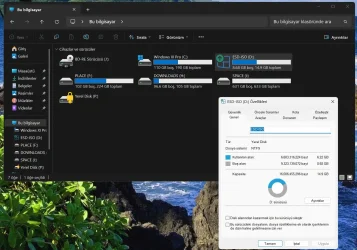
@Monika1491 In my system, Rufus created a single NTFS partition for the bootable USB drive. No other partition. This was a 16 GB USB drive. MCT creates FAT32 partition and splits the install.esd file into install.swm and install2.swm. I don't know how Rufus decides to create two partitions, one in FAT32 and the other in NTFS in some systems.

rufus1.webp
 

My Computers My Computers

  • At a glance

    Windows 11 Pro build 26200.8524Intel i7-4790Teams DDR3-1600 4x4 GBMSI Nvidia GeForce GTX 1050Ti
    OS
    Windows 11 Pro build 26200.8524
    Computer type
    PC/Desktop
    Manufacturer/Model
    Home Built
    CPU
    Intel i7-4790
    Motherboard
    Asus H97 Pro Gamer with add-on TPM1.2 module
    Memory
    Teams DDR3-1600 4x4 GB
    Graphics Card(s)
    MSI Nvidia GeForce GTX 1050Ti
    Sound Card
    Realtek ALC1150
    Monitor(s) Displays
    Dell P2425D
    Screen Resolution
    2560 by 1440 pixels
    Hard Drives
    Corsair NVMe M.2 Core XT 1000 GB (Windows 11 v.25H2); Samsung SATA Evo 870 500 GB (Windows 11 v.25H2);
    PSU
    Corsair HX850
    Case
    Gigabyte Solo 210
    Cooling
    Zalman CNPS7X Tower
    Keyboard
    Microsoft AIO Wireless (includes touchpad)
    Mouse
    HP S1000 Plus Wireless
    Internet Speed
    500 Mb fiber optic
    Browser
    Chrome; MS Edge
    Antivirus
    Windows Defender
  • At a glance

    MacOS 12 MontereyIntel Core i58 GBIntel integrated
    Operating System
    MacOS 12 Monterey
    Computer type
    Laptop
    Manufacturer/Model
    Apple Macbook Air
    CPU
    Intel Core i5
    Memory
    8 GB
    Graphics card(s)
    Intel integrated
    Screen Resolution
    1440 by 900 pixels
    Hard Drives
    128 GB
    Keyboard
    Built-in
    Mouse
    Microsoft Wireless
    Internet Speed
    802.11 ac
    Browser
    Chrome; Safari
    Antivirus
    N/A
When I try to boot to not-yet-updated Windows, I get this message and PC turns off. SVN mismatch. This is becoming a real pain. I had better start thinking of using the other Windows disk as a data disk.

View attachment 175685

you could use a live Linux USB, like linux Lite, and use 'disks'
to copy and paste the EFI/BOOT partition folders from the system that is booting
into the EFI/Boot partition that is not booting.

that will update the boot loader and the SVN so it should boot.
best of luck Steve ..
 

My Computers My Computers

  • At a glance

    Debian 13 KDE .. Windows 11 HomeRyzen 7 5825u64GB DDR4 3200Ryzen 7 5825u
    OS
    Debian 13 KDE .. Windows 11 Home
    Computer type
    PC/Desktop
    Manufacturer/Model
    HP 24" AiO
    CPU
    Ryzen 7 5825u
    Motherboard
    HP
    Memory
    64GB DDR4 3200
    Graphics Card(s)
    Ryzen 7 5825u
    Sound Card
    RealTek
    Monitor(s) Displays
    24" HP AiO
    Screen Resolution
    1920 x 1080 @60 Hz
    Hard Drives
    1TB WD Blue SN580 M2 SSD Partitioned.
    2x 1TB USB HDD External Backup/Storage.
    PSU
    90W external power brick
    Case
    24" All in One
    Cooling
    Default Air Cooling
    Keyboard
    HP WiFi UK extended
    Mouse
    HP WiFi 3 Button
    Internet Speed
    1GB full fibre
    Browser
    Edge & Firefox
    Antivirus
    AVG Internet Security/Windows Defender
    Other Info
    Mainly Open Source Software
  • At a glance

    Ubuntu 22.04.5 LTSi5 7200u16GB DDR4Intel
    Operating System
    Ubuntu 22.04.5 LTS
    Computer type
    Laptop
    Manufacturer/Model
    Dell 13" Latitude 2017
    CPU
    i5 7200u
    Motherboard
    Dell
    Memory
    16GB DDR4
    Graphics card(s)
    Intel
    Sound Card
    Intel
    Monitor(s) Displays
    13" Dell Laptop
    Hard Drives
    250GB Crucial 2.5" SSD
    Mouse
    Generic WiFi 3 button
    Internet Speed
    WiFi only
    Browser
    Firefox
    Antivirus
    ClamAV TK
    Other Info
    Mainly Open Source Software
@Monika1491 In my system, Rufus created a single NTFS partition for the bootable USB drive. No other partition. This was a 16 GB USB drive. MCT creates FAT32 partition and splits the install.esd file into install.swm and install2.swm. I don't know how Rufus decides to create two partitions, one in FAT32 and the other in NTFS in some systems.

View attachment 175687
In your case Rufus created two partitions. If it had only created one, you wouldn't see 2 boot options.
Look in diskpart .-) There will be two partitions.
 

My Computer My Computer

At a glance

Windows 11AMD32 GB
OS
Windows 11
Computer type
PC/Desktop
Manufacturer/Model
Gigabyte
CPU
AMD
Motherboard
Gigabyte
Memory
32 GB
You don't need to boot Linux. Boot from the working Windows.

1. From Disk Manager or diskpart, assign a temporary drive letter to the second disk's EFI volume.

2. Replace the boot manager.
Code:
copy C:\Windows\Boot\EFI_EX\bootmgfw_EX.efi S:\EFI\Boot\Microsoft\bootmgfw.efi
 

My Computer My Computer

At a glance

Windows 7
OS
Windows 7
In your case Rufus created two partitions. If it had only created one, you wouldn't see 2 boot options.
Look in diskpart .-) There will be two partitions.
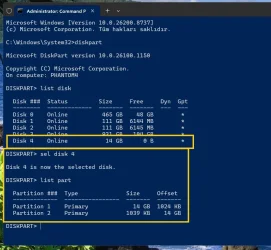
This is the Rufus created boot disk. Disk 4. There are two partitions on disk 4 but one partition is too small (1039 KB) to place any usable boot file on it.

partitions.webp

What do you make of it ?
 

My Computers My Computers

  • At a glance

    Windows 11 Pro build 26200.8524Intel i7-4790Teams DDR3-1600 4x4 GBMSI Nvidia GeForce GTX 1050Ti
    OS
    Windows 11 Pro build 26200.8524
    Computer type
    PC/Desktop
    Manufacturer/Model
    Home Built
    CPU
    Intel i7-4790
    Motherboard
    Asus H97 Pro Gamer with add-on TPM1.2 module
    Memory
    Teams DDR3-1600 4x4 GB
    Graphics Card(s)
    MSI Nvidia GeForce GTX 1050Ti
    Sound Card
    Realtek ALC1150
    Monitor(s) Displays
    Dell P2425D
    Screen Resolution
    2560 by 1440 pixels
    Hard Drives
    Corsair NVMe M.2 Core XT 1000 GB (Windows 11 v.25H2); Samsung SATA Evo 870 500 GB (Windows 11 v.25H2);
    PSU
    Corsair HX850
    Case
    Gigabyte Solo 210
    Cooling
    Zalman CNPS7X Tower
    Keyboard
    Microsoft AIO Wireless (includes touchpad)
    Mouse
    HP S1000 Plus Wireless
    Internet Speed
    500 Mb fiber optic
    Browser
    Chrome; MS Edge
    Antivirus
    Windows Defender
  • At a glance

    MacOS 12 MontereyIntel Core i58 GBIntel integrated
    Operating System
    MacOS 12 Monterey
    Computer type
    Laptop
    Manufacturer/Model
    Apple Macbook Air
    CPU
    Intel Core i5
    Memory
    8 GB
    Graphics card(s)
    Intel integrated
    Screen Resolution
    1440 by 900 pixels
    Hard Drives
    128 GB
    Keyboard
    Built-in
    Mouse
    Microsoft Wireless
    Internet Speed
    802.11 ac
    Browser
    Chrome; Safari
    Antivirus
    N/A
You don't need to boot Linux. Boot from the working Windows.

1. From Disk Manager or diskpart, assign a temporary drive letter to the second disk's EFI volume.

2. Replace the boot manager.
Code:
copy C:\Windows\Boot\EFI_EX\bootmgfw_EX.efi S:\EFI\Boot\Microsoft\bootmgfw.efi
it would be doubtful i would be able to remember the code to write
so i use copy and paste instead. but if the code works then i hope the OP tries it.

best of luck Steve ..
 

My Computers My Computers

  • At a glance

    Debian 13 KDE .. Windows 11 HomeRyzen 7 5825u64GB DDR4 3200Ryzen 7 5825u
    OS
    Debian 13 KDE .. Windows 11 Home
    Computer type
    PC/Desktop
    Manufacturer/Model
    HP 24" AiO
    CPU
    Ryzen 7 5825u
    Motherboard
    HP
    Memory
    64GB DDR4 3200
    Graphics Card(s)
    Ryzen 7 5825u
    Sound Card
    RealTek
    Monitor(s) Displays
    24" HP AiO
    Screen Resolution
    1920 x 1080 @60 Hz
    Hard Drives
    1TB WD Blue SN580 M2 SSD Partitioned.
    2x 1TB USB HDD External Backup/Storage.
    PSU
    90W external power brick
    Case
    24" All in One
    Cooling
    Default Air Cooling
    Keyboard
    HP WiFi UK extended
    Mouse
    HP WiFi 3 Button
    Internet Speed
    1GB full fibre
    Browser
    Edge & Firefox
    Antivirus
    AVG Internet Security/Windows Defender
    Other Info
    Mainly Open Source Software
  • At a glance

    Ubuntu 22.04.5 LTSi5 7200u16GB DDR4Intel
    Operating System
    Ubuntu 22.04.5 LTS
    Computer type
    Laptop
    Manufacturer/Model
    Dell 13" Latitude 2017
    CPU
    i5 7200u
    Motherboard
    Dell
    Memory
    16GB DDR4
    Graphics card(s)
    Intel
    Sound Card
    Intel
    Monitor(s) Displays
    13" Dell Laptop
    Hard Drives
    250GB Crucial 2.5" SSD
    Mouse
    Generic WiFi 3 button
    Internet Speed
    WiFi only
    Browser
    Firefox
    Antivirus
    ClamAV TK
    Other Info
    Mainly Open Source Software
This is the Rufus created boot disk. Disk 4. There are two partitions on disk 4 but one partition is too small (1039 KB) to place any usable boot file on it.

View attachment 175688

What do you make of it ?
It doesn't matter that it's small. On that small partition is the bootable efi from Rufus. :-)
I wrote that the only thing the Rufus efi does is run bootx64.efi on an NTFS partition. The size of the Rufus efi file on the Rufus partition is a few kB.
 

My Computer My Computer

At a glance

Windows 11AMD32 GB
OS
Windows 11
Computer type
PC/Desktop
Manufacturer/Model
Gigabyte
CPU
AMD
Motherboard
Gigabyte
Memory
32 GB
You don't need to boot Linux. Boot from the working Windows.

1. From Disk Manager or diskpart, assign a temporary drive letter to the second disk's EFI volume.

2. Replace the boot manager.
Code:
copy C:\Windows\Boot\EFI_EX\bootmgfw_EX.efi S:\EFI\Boot\Microsoft\bootmgfw.efi

Maybe like this :-)
Code:
mountvol S: /S
xcopy "c:\Windows\Boot\EFI_EX\bootmgfw_EX.efi" "S:\EFI\Microsoft\Boot\bootmgfw.efi" /Y
xcopy "c:\Windows\Boot\EFI_EX\bootmgfw_EX.efi" "S:\EFI\Boot\bootx64.efi" /Y
mountvol S: /D
Note: But AI tells me that other files equivalent to cert 2023 should also be copied there, e.g. fonts.
 
Last edited:

My Computer My Computer

At a glance

Windows 11AMD32 GB
OS
Windows 11
Computer type
PC/Desktop
Manufacturer/Model
Gigabyte
CPU
AMD
Motherboard
Gigabyte
Memory
32 GB
It doesn't matter that it's small. On that small partition is the bootable efi from Rufus. :-)
I wrote that the only thing the Rufus efi does is run bootx64.efi on an NTFS partition. The size of the Rufus efi file on the Rufus partition is a few kB.
O.K. If that's true, I stand corrected.

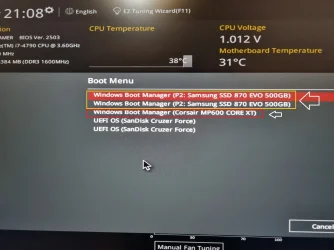
My motherboard sometimes makes two boot entries for some disks.

usb.webp

As you can see from the above screenshot, I have two Windows disks, one is Samsung SATA disk and one is Corsair M.2 NVMe disk. For Samsung SATA disk, I have two boot entries. For Corsair disk, I have one boot entry.

For Rufus disk, I took it to be like Samsung disk, two entries.

Thanks for the info.
 

My Computers My Computers

  • At a glance

    Windows 11 Pro build 26200.8524Intel i7-4790Teams DDR3-1600 4x4 GBMSI Nvidia GeForce GTX 1050Ti
    OS
    Windows 11 Pro build 26200.8524
    Computer type
    PC/Desktop
    Manufacturer/Model
    Home Built
    CPU
    Intel i7-4790
    Motherboard
    Asus H97 Pro Gamer with add-on TPM1.2 module
    Memory
    Teams DDR3-1600 4x4 GB
    Graphics Card(s)
    MSI Nvidia GeForce GTX 1050Ti
    Sound Card
    Realtek ALC1150
    Monitor(s) Displays
    Dell P2425D
    Screen Resolution
    2560 by 1440 pixels
    Hard Drives
    Corsair NVMe M.2 Core XT 1000 GB (Windows 11 v.25H2); Samsung SATA Evo 870 500 GB (Windows 11 v.25H2);
    PSU
    Corsair HX850
    Case
    Gigabyte Solo 210
    Cooling
    Zalman CNPS7X Tower
    Keyboard
    Microsoft AIO Wireless (includes touchpad)
    Mouse
    HP S1000 Plus Wireless
    Internet Speed
    500 Mb fiber optic
    Browser
    Chrome; MS Edge
    Antivirus
    Windows Defender
  • At a glance

    MacOS 12 MontereyIntel Core i58 GBIntel integrated
    Operating System
    MacOS 12 Monterey
    Computer type
    Laptop
    Manufacturer/Model
    Apple Macbook Air
    CPU
    Intel Core i5
    Memory
    8 GB
    Graphics card(s)
    Intel integrated
    Screen Resolution
    1440 by 900 pixels
    Hard Drives
    128 GB
    Keyboard
    Built-in
    Mouse
    Microsoft Wireless
    Internet Speed
    802.11 ac
    Browser
    Chrome; Safari
    Antivirus
    N/A
Maybe like this :-)
Code:
mountvol S: /S
"mountvol [letter] /S" will only mount the EFI volume used by the currently booted system drive. It doesn't mount the separate EFI volume on the other drive. @suatcini54 specifically mentioned he has two "standalone" drives.

While you can find out the other EFI volume's GUID and pass that to mountvol, it's probably simpler to use Disk Manager or diskpart to assign a drive letter.
 

My Computer My Computer

At a glance

Windows 7
OS
Windows 7
"mountvol [letter] /S" will only mount the EFI volume used by the currently booted system drive. It doesn't mount the separate EFI volume on the other drive.

While you can find out the other EFI volume's GUID and pass that to mountvol, it's probably simpler to use Disk Manager or diskpart to assign a drive letter.
Okay, I didn't think of that :-)
 

My Computer My Computer

At a glance

Windows 11AMD32 GB
OS
Windows 11
Computer type
PC/Desktop
Manufacturer/Model
Gigabyte
CPU
AMD
Motherboard
Gigabyte
Memory
32 GB
Thanks for the inputs.

copy command does not work for copying bootmgfw.efi file.

xcopy command works.

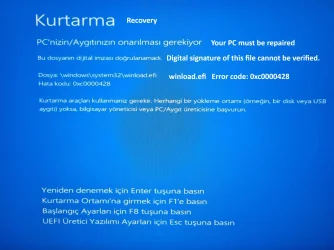
I used correct EFI partition using Diskpart -> List Vol command to copy the files but still I cannot boot to the other Windows. I get this:

WhatsApp Image 2026-07-01 at 19.30.17.webp

winload.efi file is problematic.

I think I have no other choice but to disable Secure Boot and update the non-booting Windows.
 

My Computers My Computers

  • At a glance

    Windows 11 Pro build 26200.8524Intel i7-4790Teams DDR3-1600 4x4 GBMSI Nvidia GeForce GTX 1050Ti
    OS
    Windows 11 Pro build 26200.8524
    Computer type
    PC/Desktop
    Manufacturer/Model
    Home Built
    CPU
    Intel i7-4790
    Motherboard
    Asus H97 Pro Gamer with add-on TPM1.2 module
    Memory
    Teams DDR3-1600 4x4 GB
    Graphics Card(s)
    MSI Nvidia GeForce GTX 1050Ti
    Sound Card
    Realtek ALC1150
    Monitor(s) Displays
    Dell P2425D
    Screen Resolution
    2560 by 1440 pixels
    Hard Drives
    Corsair NVMe M.2 Core XT 1000 GB (Windows 11 v.25H2); Samsung SATA Evo 870 500 GB (Windows 11 v.25H2);
    PSU
    Corsair HX850
    Case
    Gigabyte Solo 210
    Cooling
    Zalman CNPS7X Tower
    Keyboard
    Microsoft AIO Wireless (includes touchpad)
    Mouse
    HP S1000 Plus Wireless
    Internet Speed
    500 Mb fiber optic
    Browser
    Chrome; MS Edge
    Antivirus
    Windows Defender
  • At a glance

    MacOS 12 MontereyIntel Core i58 GBIntel integrated
    Operating System
    MacOS 12 Monterey
    Computer type
    Laptop
    Manufacturer/Model
    Apple Macbook Air
    CPU
    Intel Core i5
    Memory
    8 GB
    Graphics card(s)
    Intel integrated
    Screen Resolution
    1440 by 900 pixels
    Hard Drives
    128 GB
    Keyboard
    Built-in
    Mouse
    Microsoft Wireless
    Internet Speed
    802.11 ac
    Browser
    Chrome; Safari
    Antivirus
    N/A
winload.efi error is because your SkuSiPolicy doesn't match what Windows Update was last applied. This is what I warned about.

This setup can work, but you have to invest extra time to make sure you're updating everything. Windows is applying a layered defense, so a failure in one security feature doesn't allow an attacker to win.

1. UEFI checks boot file (bootmgfw.efi or bootx64.efi) for correct signing cert.
2. Boot manager checks for the minimum SVN version from DBX.
3. SkuSiPolicy checks if your winload.efi's version is blocked or not.

The security model is working as it was designed. A question is can you adapt to the requirements, or is it easier to skip having SkuSiPolicy installed? Having more security means more overhead. In English, the expression is "there is no free lunch".
 

My Computer My Computer

At a glance

Windows 7
OS
Windows 7
@garlin So if I delete SKUSiPolicy file, I will be able to boot or so I understand.

I will do that. I have nothing to lose because that Windows is not booting anyway.
 

My Computers My Computers

  • At a glance

    Windows 11 Pro build 26200.8524Intel i7-4790Teams DDR3-1600 4x4 GBMSI Nvidia GeForce GTX 1050Ti
    OS
    Windows 11 Pro build 26200.8524
    Computer type
    PC/Desktop
    Manufacturer/Model
    Home Built
    CPU
    Intel i7-4790
    Motherboard
    Asus H97 Pro Gamer with add-on TPM1.2 module
    Memory
    Teams DDR3-1600 4x4 GB
    Graphics Card(s)
    MSI Nvidia GeForce GTX 1050Ti
    Sound Card
    Realtek ALC1150
    Monitor(s) Displays
    Dell P2425D
    Screen Resolution
    2560 by 1440 pixels
    Hard Drives
    Corsair NVMe M.2 Core XT 1000 GB (Windows 11 v.25H2); Samsung SATA Evo 870 500 GB (Windows 11 v.25H2);
    PSU
    Corsair HX850
    Case
    Gigabyte Solo 210
    Cooling
    Zalman CNPS7X Tower
    Keyboard
    Microsoft AIO Wireless (includes touchpad)
    Mouse
    HP S1000 Plus Wireless
    Internet Speed
    500 Mb fiber optic
    Browser
    Chrome; MS Edge
    Antivirus
    Windows Defender
  • At a glance

    MacOS 12 MontereyIntel Core i58 GBIntel integrated
    Operating System
    MacOS 12 Monterey
    Computer type
    Laptop
    Manufacturer/Model
    Apple Macbook Air
    CPU
    Intel Core i5
    Memory
    8 GB
    Graphics card(s)
    Intel integrated
    Screen Resolution
    1440 by 900 pixels
    Hard Drives
    128 GB
    Keyboard
    Built-in
    Mouse
    Microsoft Wireless
    Internet Speed
    802.11 ac
    Browser
    Chrome; Safari
    Antivirus
    N/A
After deleting SKUSiPolicy.P7b file, I still get winload.efi digital signature error. I must be able to replace winload.efi file from the working Windows. But this is more work than disabling Secure Boot.
 

My Computers My Computers

  • At a glance

    Windows 11 Pro build 26200.8524Intel i7-4790Teams DDR3-1600 4x4 GBMSI Nvidia GeForce GTX 1050Ti
    OS
    Windows 11 Pro build 26200.8524
    Computer type
    PC/Desktop
    Manufacturer/Model
    Home Built
    CPU
    Intel i7-4790
    Motherboard
    Asus H97 Pro Gamer with add-on TPM1.2 module
    Memory
    Teams DDR3-1600 4x4 GB
    Graphics Card(s)
    MSI Nvidia GeForce GTX 1050Ti
    Sound Card
    Realtek ALC1150
    Monitor(s) Displays
    Dell P2425D
    Screen Resolution
    2560 by 1440 pixels
    Hard Drives
    Corsair NVMe M.2 Core XT 1000 GB (Windows 11 v.25H2); Samsung SATA Evo 870 500 GB (Windows 11 v.25H2);
    PSU
    Corsair HX850
    Case
    Gigabyte Solo 210
    Cooling
    Zalman CNPS7X Tower
    Keyboard
    Microsoft AIO Wireless (includes touchpad)
    Mouse
    HP S1000 Plus Wireless
    Internet Speed
    500 Mb fiber optic
    Browser
    Chrome; MS Edge
    Antivirus
    Windows Defender
  • At a glance

    MacOS 12 MontereyIntel Core i58 GBIntel integrated
    Operating System
    MacOS 12 Monterey
    Computer type
    Laptop
    Manufacturer/Model
    Apple Macbook Air
    CPU
    Intel Core i5
    Memory
    8 GB
    Graphics card(s)
    Intel integrated
    Screen Resolution
    1440 by 900 pixels
    Hard Drives
    128 GB
    Keyboard
    Built-in
    Mouse
    Microsoft Wireless
    Internet Speed
    802.11 ac
    Browser
    Chrome; Safari
    Antivirus
    N/A
Back
Top Bottom