JavaScript is disabled. For a better experience, please enable JavaScript in your browser before proceeding.
You are using an out of date browser. It may not display this or other websites correctly.
You should upgrade or use an
alternative browser .
Whoever solves this Microsoft certificate puzzle, please come forward !!!
Well-known member
Guru
VIP
Which SkuSiPolicy file did you delete? From the EFI volume on the first or second disk? If you made a second disk with its own EFI volume, that is a different copy of SkuSiPolicy than the first one.
If you picked a specific boot manager or specific boot device, then the EFI volume that belongs to that one has the SkuSiPolicy that is enforced.
EFI volume:
- Must have a bootmgfw.efi
- Can have a SkuSiPolicy.p7b in same folder
Well-known member
Power User
VIP
Thread Starter
SKUSiPolicy file which I deleted was in the EFI partition of nonbooting Windows. Its EFI partition size is 200 MB and is easily identifiable. Working Windows EFI partition size is 260 MB.
Windows 11 Pro build 26200.8524 Intel i7-4790 Teams DDR3-1600 4x4 GB MSI Nvidia GeForce GTX 1050Ti
OSWindows 11 Pro build 26200.8524 Computer typePC/Desktop Manufacturer/ModelHome Built CPUIntel i7-4790 MotherboardAsus H97 Pro Gamer with add-on TPM1.2 module MemoryTeams DDR3-1600 4x4 GB Graphics Card(s)MSI Nvidia GeForce GTX 1050Ti Sound CardRealtek ALC1150 Monitor(s) DisplaysDell P2425D Screen Resolution2560 by 1440 pixels Hard DrivesCorsair NVMe M.2 Core XT 1000 GB (Windows 11 v.25H2); Samsung SATA Evo 870 500 GB (Windows 11 v.25H2); PSUCorsair HX850 CaseGigabyte Solo 210 CoolingZalman CNPS7X Tower KeyboardMicrosoft AIO Wireless (includes touchpad) MouseHP S1000 Plus Wireless Internet Speed500 Mb fiber optic BrowserChrome; MS Edge AntivirusWindows Defender
MacOS 12 Monterey Intel Core i5 8 GB Intel integrated
Operating SystemMacOS 12 Monterey Computer typeLaptop Manufacturer/ModelApple Macbook Air CPUIntel Core i5 Memory8 GB Graphics card(s)Intel integrated Screen Resolution1440 by 900 pixels Hard Drives128 GB KeyboardBuilt-in MouseMicrosoft Wireless Internet Speed802.11 ac BrowserChrome; Safari AntivirusN/A
Well-known member
Guru
VIP
Then I used Rufus v4.14. This was able to format and create the USB drive with CA2023 and SKUSiPolicy. CA2023 and SKUSiPolicy options came checked by default.
Have you tried it with SkuSiPolicy unchecked?
Well-known member
Power User
VIP
Thread Starter
Have you tried it with SkuSiPolicy unchecked?
No. This was a test disk. I never used it to repair Windows or anything.
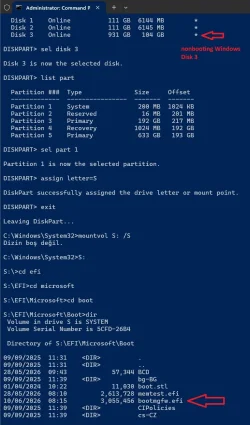
By the way, this is the directory (below screenshot) from which I deleted SkuSiPolicy file. In this directory I also have bootmgfw.efi file. This bootmgfw.efi I just xcopied to this directory today.
Windows 11 Pro build 26200.8524 Intel i7-4790 Teams DDR3-1600 4x4 GB MSI Nvidia GeForce GTX 1050Ti
OSWindows 11 Pro build 26200.8524 Computer typePC/Desktop Manufacturer/ModelHome Built CPUIntel i7-4790 MotherboardAsus H97 Pro Gamer with add-on TPM1.2 module MemoryTeams DDR3-1600 4x4 GB Graphics Card(s)MSI Nvidia GeForce GTX 1050Ti Sound CardRealtek ALC1150 Monitor(s) DisplaysDell P2425D Screen Resolution2560 by 1440 pixels Hard DrivesCorsair NVMe M.2 Core XT 1000 GB (Windows 11 v.25H2); Samsung SATA Evo 870 500 GB (Windows 11 v.25H2); PSUCorsair HX850 CaseGigabyte Solo 210 CoolingZalman CNPS7X Tower KeyboardMicrosoft AIO Wireless (includes touchpad) MouseHP S1000 Plus Wireless Internet Speed500 Mb fiber optic BrowserChrome; MS Edge AntivirusWindows Defender
MacOS 12 Monterey Intel Core i5 8 GB Intel integrated
Operating SystemMacOS 12 Monterey Computer typeLaptop Manufacturer/ModelApple Macbook Air CPUIntel Core i5 Memory8 GB Graphics card(s)Intel integrated Screen Resolution1440 by 900 pixels Hard Drives128 GB KeyboardBuilt-in MouseMicrosoft Wireless Internet Speed802.11 ac BrowserChrome; Safari AntivirusN/A
Well-known member
Guru
VIP
You didn't follow the instructions correctly.
1. From diskpart, you assigned the 104 MB EFI volume to drive letter S. The volume is readable now from S:
2. From "mountvol S: /s", you asked Windows to re-assign S: to
your active EFI volume. Don't use "mountvol /S" for the
other volume .
mountvol
/s Mounts the EFI system partition on the specified drive.