
Why can't Ms release "Nightly Builds" for Dev testing - would work great as VM's on HYPER-V e.g Linux FedoraF43 (next release)


jimbo45

Well-known member
Pro User
VIP
Local time
6:32 AM
Posts
5,784
Location
Hafnarfjörður IS
OS
Windows XP,11 Linux Fedora Rawhide pre-release 45
Hi folks
@Scannerman

seems to me rather than the haphazard way Windows updates are rolled out -- why not have a decent "nightly build" availability with a log of what's still broken (or at least what they know about that's broken) and then it's less of this absurd lottery that is now "Windows Update".

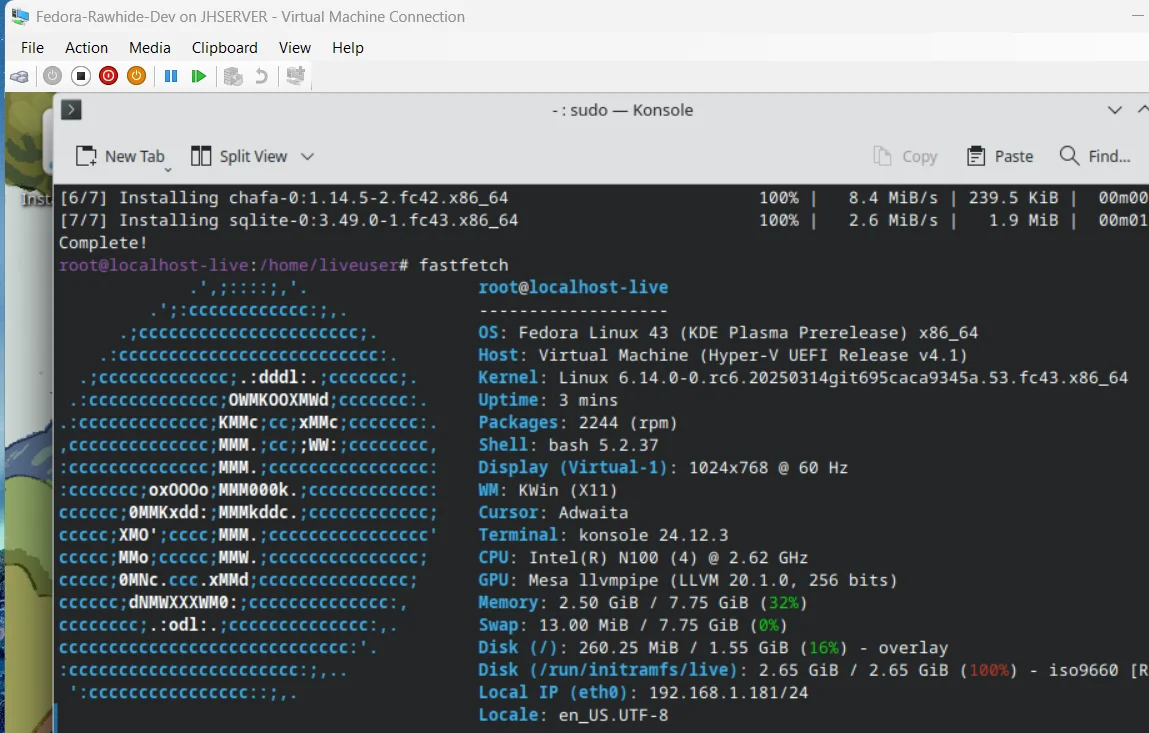
Here's the Dev test version of Fedora F43 -- running a Live disro version on HYPER-V -- F43 is the next release AFTER the upcoming F42, -- F41 is the current stable release.
fed43.webp


It's available from the nightly builds archives and status is shown quite clearly by just clicking on the embedded links . The latest (Fedora 43) are on the Rawhide side, next release is the F42 on the left.

So you can have "Up to the second" leading edge stuff if you want -- I'm impressed with this methodology - and since Fedora is "owned" by RedHat/IBM it's not a "fly by night" system and is properly resourced. Eventually some of this stuff goes into the commercial server offering so before being released as stable it's decently tested.


Just download the appropriate "Live version" - create your Hyper-V VM and simply test away.

Cheers
jimbo
 
Last edited:

My Computer

System One

  • OS
    Windows XP,11 Linux Fedora Rawhide pre-release 45
    Computer type
    PC/Desktop
    CPU
    2 X Intel i7
    Screen Resolution
    4KUHD X 2
A thousand times no - this would cause chaos!

Linux nightly builds are for reallly experienced users.

I see no benefit for incremental changes that have not been remotely tested.

I can see the posts now from Joe Public - build 12345xxx is crashing - what do I do?
 

My Computer

System One

  • OS
    Windows 11 Pro + Win11 Canary VM.
    Computer type
    Laptop
    Manufacturer/Model
    ASUS Zenbook 14
    CPU
    I9 13th gen i9-13900H 2.60 GHZ
    Motherboard
    Yep, Laptop has one.
    Memory
    16 GB soldered
    Graphics Card(s)
    Integrated Intel Iris XE
    Sound Card
    Realtek built in
    Monitor(s) Displays
    laptop OLED screen
    Screen Resolution
    2880x1800 touchscreen
    Hard Drives
    1 TB NVME SSD (only weakness is only one slot)
    PSU
    Internal + 65W thunderbolt USB4 charger
    Case
    Yep, got one
    Cooling
    Stella Artois (UK pint cans - 568 ml) - extra cost.
    Keyboard
    Built in UK keybd
    Mouse
    Bluetooth , wireless dongled, wired
    Internet Speed
    900 mbs (ethernet), wifi 6 typical 350-450 mb/s both up and down
    Browser
    Edge
    Antivirus
    Defender
    Other Info
    TPM 2.0, 2xUSB4 thunderbolt, 1xUsb3 (usb a), 1xUsb-c, hdmi out, 3.5 mm audio out/in combo, ASUS backlit trackpad (inc. switchable number pad)

    Macrium Reflect Home V8
    Office 365 Family (6 users each 1TB onedrive space)
    Hyper-V (a vm runs almost as fast as my older laptop)
MS is not that good at Monthly Builds, I can't imagine what a Nightly build would be good for.
 

My Computers

System One System Two

  • OS
    Windows11 Pro 26200.8524
    Computer type
    PC/Desktop
    Manufacturer/Model
    Dell Alienware Aurora R16
    CPU
    Intel Core i9 14900F (24 -Core, 68 MB Total Cache)
    Motherboard
    Dell Alienware
    Memory
    32GB DDR5
    Graphics Card(s)
    RTX 4080 Super w/581.95
    Sound Card
    Realtec
    Monitor(s) Displays
    Corsair XENEON 32QHD165
    Screen Resolution
    2560 X 1440
    Hard Drives
    1-2TB Samsung 990 Pro PCIe NVMe M2 SSD
    1-4TB Samsung 990 Pro PCIe NVMe M2 SSD
    PSU
    1000 Watt Platinum Dell
    Case
    Alienware
    Cooling
    Liquid Closed Loop
    Keyboard
    Logitech MK270 Wireless Keyboard
    Mouse
    Logitech MK270 Wireless
    Internet Speed
    100Gb's Down-20 Up
    Browser
    Firefox 151.0.2
    Antivirus
    Defender
    Other Info
    Very Quiet And Fast
    CyberPower UPS CP1500PFCLCD
  • Operating System
    PClinuxOS Mate (2025.7)
    Computer type
    PC/Desktop
    Manufacturer/Model
    Intel
    CPU
    13th Gen Inter(R) Core(TM) i3-1315U
    Motherboard
    Intel
    Memory
    64 GB DDR4 @3200 MHz.
    Graphics card(s)
    Internal
    Sound Card
    None
    Monitor(s) Displays
    Dell 2419HGCF
    Screen Resolution
    1920 X 1080
    Hard Drives
    SAMSUNG 980 PRO SSD 2TB, PCIe 4.0 M.2 2280
    PSU
    Chicony 30 Watt
    Case
    Small
    Keyboard
    Dell
    Mouse
    Razor
    Internet Speed
    1GB
    Browser
    Slimjet
Time? resources?
 

My Computers

System One System Two

  • OS
    Windows 11 Enterprise 25H2 26200 7462
    Computer type
    PC/Desktop
    Manufacturer/Model
    Custom Build
    CPU
    Intel XEON E5-2699 v3
    Motherboard
    ASUS X99-A
    Memory
    64GB Teamgroup UD4-3600
    Graphics Card(s)
    NVIDIA GeForce GTX 1080 Ti
    Sound Card
    Integrated
    Monitor(s) Displays
    ACER X34 Predator
    Screen Resolution
    3440 x 1440
    Hard Drives
    Crucial CT1000P 3P SSD8 1TB
    Crucial CT1000 BX500 SSD 1TB
    PSU
    GameMax Pro
    Case
    Fractal Design
    Cooling
    Corsair H110iGT + 6 140mm Fans
    Keyboard
    Corsair K4
    Mouse
    G-Skill G502
    Internet Speed
    300MBs
    Browser
    Chrome
    Antivirus
    OEM
    Other Info
    ASUS RT-AC87U Router
  • Operating System
    25H2 26200.5074
    Computer type
    Laptop
    Manufacturer/Model
    ASUS X555LA
    Memory
    8GB
    Browser
    Chrome
    Antivirus
    OEM
Back
Top Bottom




