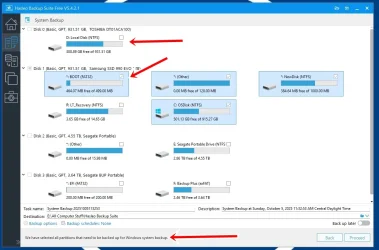
Why doesn't Hasleo include Drive D (SATA internal) in the back up?


therealsimpsons

Active member
Member
Local time
9:55 AM
Posts
66
OS
Win 11 64-Bit Home
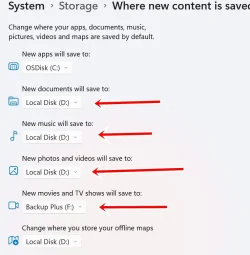
I use Hasleo Backup, and each time I use it, it shows Drive D, with the amount of used space, but I can't check it to include it in the backup. I'm attaching pictures that show my storage settings, and the screen when I start Hasleo.

Also, is there a reason I can't change the Downloads file in C: to go into D: like the others?

Thank you for any suggestions.

TRS
 
Windows Build/Version
24H2 26.100.6584

Attachments

  • Hasleo Set Up.webp
    Hasleo Set Up.webp
    57.9 KB · Views: 3
  • Storage Info.webp
    Storage Info.webp
    41.1 KB · Views: 3

My Computer

System One

  • OS
    Win 11 64-Bit Home
    Computer type
    PC/Desktop
    Manufacturer/Model
    Custom Build
    CPU
    12 Gen Intel i7-12700K 360 GHz
    Motherboard
    Gigabyte B760M
    Memory
    32 GB
    Graphics Card(s)
    EVGA Nividia GeForce RTX 3060 12GB
    Sound Card
    None
    Monitor(s) Displays
    Dell 32in curved
    Screen Resolution
    2560 x 1440
    Hard Drives
    Samsung 1 TB SSD M.2 970 EVO Nvme PicIe 3.0 x 4
    Seagate 2 TB SATA 7200 RPM 64MB
    PSU
    Apevia 800W GOLD
    Case
    Apevia ENZO
    Cooling
    2 Case Fans, ZeroTherm ZT100 Thermal Grease
    Keyboard
    Logitech K360
    Mouse
    Logitech GS 502 Hero
    Internet Speed
    650 mbps
    Browser
    Duck Duck Go
    Antivirus
    Webroot Anywhere
A system backup makes an image of all partitions that are neccesary for rebuilding the system. A data partition does not belong to that.
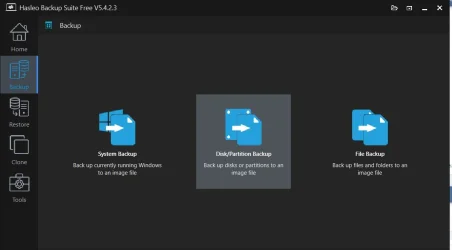
If you want to backup (any) partitions, you'l have to use the Disk/Partition backup:

000701.webp
 

My Computer

System One

  • OS
    Windows 11 Pro 25H2 26200.8457
    Computer type
    PC/Desktop
    Manufacturer/Model
    Build by vendor to my specs
    CPU
    AMD Ryzen 7 5700G
    Motherboard
    MSI PRO B550M-P Gen3
    Memory
    Kingston FURY Beast 2x16GB DIMM DDR4 2666 CL16
    Graphics Card(s)
    MSI GeForce GT 730 2GB LP V1
    Sound Card
    Creative Sound Blaster Audigy FX
    Monitor(s) Displays
    Samsung S24E450F 24"
    Screen Resolution
    1920 x 1080
    Hard Drives
    1. SSD Crucial P5 Plus 500GB PCIe M.2
    2. SSD-SATA Crucial MX500-2TB
    PSU
    Corsair CV650W
    Case
    Cooler Master Silencio S400
    Cooling
    Cooler Master Hyper H412R with Be Quiet Pure Wings 2 PWM BL038 fan
    Keyboard
    Cherry Stream (wired, scissor keys)
    Mouse
    Asus WT465 (wireless)
    Internet Speed
    70 Mbps down / 80 Mbps up
    Browser
    Firefox 130.0
    Antivirus
    F-Secure (Internetprovider version)
    Other Info
    Router: FRITZBox 7490
    Oracle VirtualBox 7 for testing software on Win 10 or 11
Also, is there a reason I can't change the Downloads file in C: to go into D: like the others?
To change the location of the Downloads folder, please read this tutorial:
 

My Computer

System One

  • OS
    Windows 11 Pro 25H2 26200.8457
    Computer type
    PC/Desktop
    Manufacturer/Model
    Build by vendor to my specs
    CPU
    AMD Ryzen 7 5700G
    Motherboard
    MSI PRO B550M-P Gen3
    Memory
    Kingston FURY Beast 2x16GB DIMM DDR4 2666 CL16
    Graphics Card(s)
    MSI GeForce GT 730 2GB LP V1
    Sound Card
    Creative Sound Blaster Audigy FX
    Monitor(s) Displays
    Samsung S24E450F 24"
    Screen Resolution
    1920 x 1080
    Hard Drives
    1. SSD Crucial P5 Plus 500GB PCIe M.2
    2. SSD-SATA Crucial MX500-2TB
    PSU
    Corsair CV650W
    Case
    Cooler Master Silencio S400
    Cooling
    Cooler Master Hyper H412R with Be Quiet Pure Wings 2 PWM BL038 fan
    Keyboard
    Cherry Stream (wired, scissor keys)
    Mouse
    Asus WT465 (wireless)
    Internet Speed
    70 Mbps down / 80 Mbps up
    Browser
    Firefox 130.0
    Antivirus
    F-Secure (Internetprovider version)
    Other Info
    Router: FRITZBox 7490
    Oracle VirtualBox 7 for testing software on Win 10 or 11
Other than what @Kees has already mentioned, Hasleo cannot do multiple disks in a single task (what you show in your posted pic). You'll need to do a SYSTEM BACKUP for the important required System partitions (like you're already doing) and a separate DISK/PARTITION BACKUP task for your D drive.
 

My Computer

System One

  • OS
    Windows 10, (also 7, 11, Linux <MINT & ZorinOS>)
    Computer type
    PC/Desktop
    Manufacturer/Model
    HP Z2 G5 Workstation
    CPU
    Intel Core i7-10700
    Motherboard
    HP Model# 8751
    Memory
    32gB (DDR4)
    Graphics Card(s)
    Intel UHD Graphics 630
    Sound Card
    Realtek basic audio
    Monitor(s) Displays
    32" (Viewsonic)
    Screen Resolution
    3840 x 2160
    Hard Drives
    (3) NvME SSDs <(1) PCiE v3>, (1) SATA3 SSD
Other than what @Kees has already mentioned, Hasleo cannot do multiple disks in a single task (what you show in your posted pic). You'll need to do a SYSTEM BACKUP for the important required System partitions (like you're already doing) and a separate DISK/PARTITION BACKUP task for your D drive.

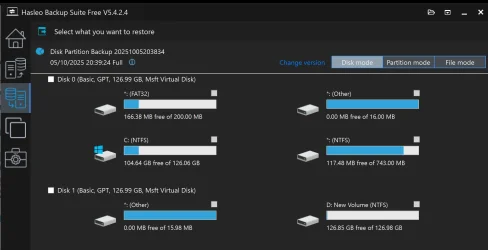
I just tested it and selected the D partition (drive 1 on my pc ) and all drive 0 partitions (C and hidden partitions) using disk/partition backup backing them all to a single backup on drive 2 (E partition).

1759693806642.webp

However, you can only recover one physical disk at a time.

I agree with your point if you do a system backup, you need to do the data partition separately.

I am not suggesting it is a good idea to backup two physical drives to one backup folder BUT it can be done.

Personally, I would backup each physical drive to separate backup folders to avoid confusion.

However, I can see some people may wish to backup everything in one go.
 

My Computer

System One

  • OS
    Windows 11 Pro + Win11 Canary VM.
    Computer type
    Laptop
    Manufacturer/Model
    ASUS Zenbook 14
    CPU
    I9 13th gen i9-13900H 2.60 GHZ
    Motherboard
    Yep, Laptop has one.
    Memory
    16 GB soldered
    Graphics Card(s)
    Integrated Intel Iris XE
    Sound Card
    Realtek built in
    Monitor(s) Displays
    laptop OLED screen
    Screen Resolution
    2880x1800 touchscreen
    Hard Drives
    1 TB NVME SSD (only weakness is only one slot)
    PSU
    Internal + 65W thunderbolt USB4 charger
    Case
    Yep, got one
    Cooling
    Stella Artois (UK pint cans - 568 ml) - extra cost.
    Keyboard
    Built in UK keybd
    Mouse
    Bluetooth , wireless dongled, wired
    Internet Speed
    900 mbs (ethernet), wifi 6 typical 350-450 mb/s both up and down
    Browser
    Edge
    Antivirus
    Defender
    Other Info
    TPM 2.0, 2xUSB4 thunderbolt, 1xUsb3 (usb a), 1xUsb-c, hdmi out, 3.5 mm audio out/in combo, ASUS backlit trackpad (inc. switchable number pad)

    Macrium Reflect Home V8
    Office 365 Family (6 users each 1TB onedrive space)
    Hyper-V (a vm runs almost as fast as my older laptop)
I stand corrected... using old knowledge :oops:
 

My Computer

System One

  • OS
    Windows 10, (also 7, 11, Linux <MINT & ZorinOS>)
    Computer type
    PC/Desktop
    Manufacturer/Model
    HP Z2 G5 Workstation
    CPU
    Intel Core i7-10700
    Motherboard
    HP Model# 8751
    Memory
    32gB (DDR4)
    Graphics Card(s)
    Intel UHD Graphics 630
    Sound Card
    Realtek basic audio
    Monitor(s) Displays
    32" (Viewsonic)
    Screen Resolution
    3840 x 2160
    Hard Drives
    (3) NvME SSDs <(1) PCiE v3>, (1) SATA3 SSD
Back
Top Bottom