JavaScript is disabled. For a better experience, please enable JavaScript in your browser before proceeding.
You are using an out of date browser. It may not display this or other websites correctly.
You should upgrade or use an
alternative browser .
Solved Why is Edge always running in the background? How do I shut it down?
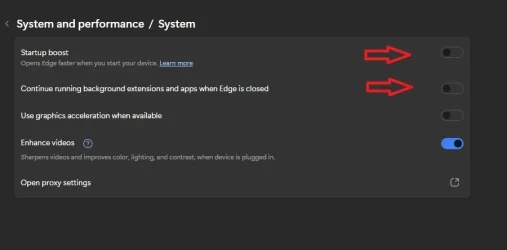
In Edge "Settings>System & Performance" I have shut off "Startup Boost" and "Continue Running background extension and apps when Edge is closed".
In Win 11 "Settings>Accounts>Sign-in Options" I have shut off "Automatically save my restartable apps and restart them when I sign back in".
In Task Manger under "Startup Apps" Edge is not listed so I cannot set to "Disable".
In C:>ProgramData>Microsoft>Windows>StartMenu and C:>ProgramData>Microsoft>Windows>StartMenu>Programs along with any subfolders under Programs there are no Edge shortcuts.
Same thing with C:>Users>MyName>AppData>Roaming>Microsoft>Windows>StartMenu and C:>Users>MyName>AppData>Roaming>Microsoft>Windows>StartMenu>Programs along with any subfolders under Programs there are no Edge shortcuts.
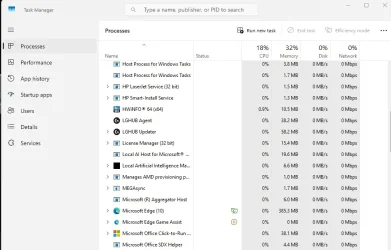
But Edge is still running in Task Manager>Processes, how do I shut Edge down?
Windows 11 9800X3D GSkill Flare DDR5 64GB @ 30-40-40-96 @ 6000 MHz Asus TUF OC Edition RTX 5080 Windows 11 PC/Desktop Custom 9800X3D Asus Crosshair X870E Hero GSkill Flare DDR5 64GB @ 30-40-40-96 @ 6000 MHz Asus TUF OC Edition RTX 5080 Samsung Odyessy G9 49" DQHD (VA Panel) 5120 * 1440 Samsung 990Pro M.2 2280 Corsair HX 1000i Fractal Design Meshify 2XL Thermalright Peerless Assassin 140 Black Corsair K100RGB Logitech G703 1 GB Firefox ESET NOD32
This is under Edge ... Settings/System and performance/System.
I turn all those off as well.
All Branches but Stable AMD Ryzen 7 7735HS 3200-4500 Mhz 8 cores x 2 32 GB DDR5 Radeon Graphic / NVIDIA GeForce RTX 4060 8 GB... All Branches but Stable Laptop Acer Nitro ANV15-51 AMD Ryzen 7 7735HS 3200-4500 Mhz 8 cores x 2 Sportage_RBH 32 GB DDR5 Radeon Graphic / NVIDIA GeForce RTX 4060 8 GB GDDR6 AMD/Realtek(R) Audio Integrated Monitor (15.3"vis) FHD 1920X1080 16:9 144Hz KINGSTON OM8SEP4512Q-AA 1TB 19V DC 6.32 A 120 W Dual Fans MS Bluetooth Fiber 1GB Cox -us & 1GB Orange-fr Edge Canary- Firefox Nightly-Chrome Dev-Chrome Dev Windows Defender
Windows 11 Beta AMD A9-9420 8 GB of DDR4 AMD Radeon R5 Windows 11 Beta Laptop Asus X751BP AMD A9-9420 8 GB of DDR4 AMD Radeon R5 1600x900 Seagate 1 TB
Well-known member
Member
Thread Starter
View attachment 157712
This is under Edge ... Settings/System and performance/System.
As I stated in the first sentence, both of those are already shut off.
Windows 11 9800X3D GSkill Flare DDR5 64GB @ 30-40-40-96 @ 6000 MHz Asus TUF OC Edition RTX 5080 Windows 11 PC/Desktop Custom 9800X3D Asus Crosshair X870E Hero GSkill Flare DDR5 64GB @ 30-40-40-96 @ 6000 MHz Asus TUF OC Edition RTX 5080 Samsung Odyessy G9 49" DQHD (VA Panel) 5120 * 1440 Samsung 990Pro M.2 2280 Corsair HX 1000i Fractal Design Meshify 2XL Thermalright Peerless Assassin 140 Black Corsair K100RGB Logitech G703 1 GB Firefox ESET NOD32
As I stated in the first sentence, both of those are already shut off.
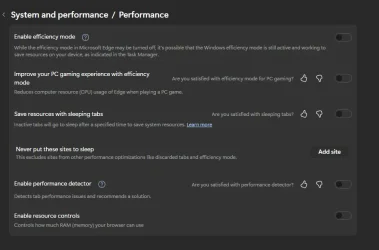
I have added the other pane. Please refresh.
All Branches but Stable AMD Ryzen 7 7735HS 3200-4500 Mhz 8 cores x 2 32 GB DDR5 Radeon Graphic / NVIDIA GeForce RTX 4060 8 GB... All Branches but Stable Laptop Acer Nitro ANV15-51 AMD Ryzen 7 7735HS 3200-4500 Mhz 8 cores x 2 Sportage_RBH 32 GB DDR5 Radeon Graphic / NVIDIA GeForce RTX 4060 8 GB GDDR6 AMD/Realtek(R) Audio Integrated Monitor (15.3"vis) FHD 1920X1080 16:9 144Hz KINGSTON OM8SEP4512Q-AA 1TB 19V DC 6.32 A 120 W Dual Fans MS Bluetooth Fiber 1GB Cox -us & 1GB Orange-fr Edge Canary- Firefox Nightly-Chrome Dev-Chrome Dev Windows Defender
Windows 11 Beta AMD A9-9420 8 GB of DDR4 AMD Radeon R5 Windows 11 Beta Laptop Asus X751BP AMD A9-9420 8 GB of DDR4 AMD Radeon R5 1600x900 Seagate 1 TB
Well-known member
Member
Thread Starter
I have added the other pane. Please refresh.
Thanks! I shut all that off too.
Windows 11 9800X3D GSkill Flare DDR5 64GB @ 30-40-40-96 @ 6000 MHz Asus TUF OC Edition RTX 5080 Windows 11 PC/Desktop Custom 9800X3D Asus Crosshair X870E Hero GSkill Flare DDR5 64GB @ 30-40-40-96 @ 6000 MHz Asus TUF OC Edition RTX 5080 Samsung Odyessy G9 49" DQHD (VA Panel) 5120 * 1440 Samsung 990Pro M.2 2280 Corsair HX 1000i Fractal Design Meshify 2XL Thermalright Peerless Assassin 140 Black Corsair K100RGB Logitech G703 1 GB Firefox ESET NOD32
Well-known member
Member
Thread Starter
I shut all of that off and Edge is still running in Task Manager>Processes.
Windows 11 9800X3D GSkill Flare DDR5 64GB @ 30-40-40-96 @ 6000 MHz Asus TUF OC Edition RTX 5080 Windows 11 PC/Desktop Custom 9800X3D Asus Crosshair X870E Hero GSkill Flare DDR5 64GB @ 30-40-40-96 @ 6000 MHz Asus TUF OC Edition RTX 5080 Samsung Odyessy G9 49" DQHD (VA Panel) 5120 * 1440 Samsung 990Pro M.2 2280 Corsair HX 1000i Fractal Design Meshify 2XL Thermalright Peerless Assassin 140 Black Corsair K100RGB Logitech G703 1 GB Firefox ESET NOD32
Well-known member
Member
Thread Starter
In Task Manger I stopped Edge.
Windows 11 9800X3D GSkill Flare DDR5 64GB @ 30-40-40-96 @ 6000 MHz Asus TUF OC Edition RTX 5080 Windows 11 PC/Desktop Custom 9800X3D Asus Crosshair X870E Hero GSkill Flare DDR5 64GB @ 30-40-40-96 @ 6000 MHz Asus TUF OC Edition RTX 5080 Samsung Odyessy G9 49" DQHD (VA Panel) 5120 * 1440 Samsung 990Pro M.2 2280 Corsair HX 1000i Fractal Design Meshify 2XL Thermalright Peerless Assassin 140 Black Corsair K100RGB Logitech G703 1 GB Firefox ESET NOD32
Well-known member
Power User
VIP
Also disable the
Task Scheduler - start-ups.
WinDOS 25H2 Intel & AMD SO-DIMM SK Hynix 15.8 GB Dual-Channel DDR4-26... nVidia RTX 2060 6GB Mobile GPU (TU106M) WinDOS 25H2 Laptop Intel & AMD SO-DIMM SK Hynix 15.8 GB Dual-Channel DDR4-2666 (2 x 8 GB) 1329MHz (19-19-19-43) nVidia RTX 2060 6GB Mobile GPU (TU106M) Onbord Realtek ALC1220 1920 x 1080 1x Samsung PM981 NVMe PCIe M.2 512GB / 1x Seagate Expansion ST1000LM035 1TB
Well-known member
Member
Thread Starter
Also disable the
Task Scheduler - start-ups.
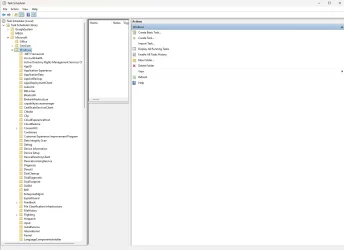
View attachment 157715
Where do I find the tasks, according to google there should be an Edge folder and I don't have one.
Windows 11 9800X3D GSkill Flare DDR5 64GB @ 30-40-40-96 @ 6000 MHz Asus TUF OC Edition RTX 5080 Windows 11 PC/Desktop Custom 9800X3D Asus Crosshair X870E Hero GSkill Flare DDR5 64GB @ 30-40-40-96 @ 6000 MHz Asus TUF OC Edition RTX 5080 Samsung Odyessy G9 49" DQHD (VA Panel) 5120 * 1440 Samsung 990Pro M.2 2280 Corsair HX 1000i Fractal Design Meshify 2XL Thermalright Peerless Assassin 140 Black Corsair K100RGB Logitech G703 1 GB Firefox ESET NOD32
Well-known member
Member
Thread Starter
Never mind, I found them. Isn't google great.
Windows 11 9800X3D GSkill Flare DDR5 64GB @ 30-40-40-96 @ 6000 MHz Asus TUF OC Edition RTX 5080 Windows 11 PC/Desktop Custom 9800X3D Asus Crosshair X870E Hero GSkill Flare DDR5 64GB @ 30-40-40-96 @ 6000 MHz Asus TUF OC Edition RTX 5080 Samsung Odyessy G9 49" DQHD (VA Panel) 5120 * 1440 Samsung 990Pro M.2 2280 Corsair HX 1000i Fractal Design Meshify 2XL Thermalright Peerless Assassin 140 Black Corsair K100RGB Logitech G703 1 GB Firefox ESET NOD32
Well-known member
Power User
VIP
Never mind, I found them. Isn't google great.
Main Task Scheduler Library. No Google is not that great either - but this is Microsoft. You could also open
Services - look for
Microsoft Edge entries - and set them all to Manual.
WinDOS 25H2 Intel & AMD SO-DIMM SK Hynix 15.8 GB Dual-Channel DDR4-26... nVidia RTX 2060 6GB Mobile GPU (TU106M) WinDOS 25H2 Laptop Intel & AMD SO-DIMM SK Hynix 15.8 GB Dual-Channel DDR4-2666 (2 x 8 GB) 1329MHz (19-19-19-43) nVidia RTX 2060 6GB Mobile GPU (TU106M) Onbord Realtek ALC1220 1920 x 1080 1x Samsung PM981 NVMe PCIe M.2 512GB / 1x Seagate Expansion ST1000LM035 1TB
Well-known member
Member
Thread Starter
Main Task Scheduler Library. No Google is not that great either - but this is Microsoft. You could also open Services - look for Microsoft Edge entries - and set them all to Manual.
Done
Windows 11 9800X3D GSkill Flare DDR5 64GB @ 30-40-40-96 @ 6000 MHz Asus TUF OC Edition RTX 5080 Windows 11 PC/Desktop Custom 9800X3D Asus Crosshair X870E Hero GSkill Flare DDR5 64GB @ 30-40-40-96 @ 6000 MHz Asus TUF OC Edition RTX 5080 Samsung Odyessy G9 49" DQHD (VA Panel) 5120 * 1440 Samsung 990Pro M.2 2280 Corsair HX 1000i Fractal Design Meshify 2XL Thermalright Peerless Assassin 140 Black Corsair K100RGB Logitech G703 1 GB Firefox ESET NOD32
Well-known member
Member
Thread Starter
Windows 11 9800X3D GSkill Flare DDR5 64GB @ 30-40-40-96 @ 6000 MHz Asus TUF OC Edition RTX 5080 Windows 11 PC/Desktop Custom 9800X3D Asus Crosshair X870E Hero GSkill Flare DDR5 64GB @ 30-40-40-96 @ 6000 MHz Asus TUF OC Edition RTX 5080 Samsung Odyessy G9 49" DQHD (VA Panel) 5120 * 1440 Samsung 990Pro M.2 2280 Corsair HX 1000i Fractal Design Meshify 2XL Thermalright Peerless Assassin 140 Black Corsair K100RGB Logitech G703 1 GB Firefox ESET NOD32