Why is Microsoft Edge Updater running EVERY day?


desbest

Active member
Local time
10:17 AM
Posts
18
OS
Windows 11 22H2
Yes why? And yes I mean every!
 
Windows Build/Version
23H2 22631.5335

My Computer My Computer

At a glance

Windows 11 22H2Intel i5 10th generation Ice Lake8GBIntel Intregated Graphics
OS
Windows 11 22H2
Computer type
Laptop
Manufacturer/Model
Acer Aspire 315-56
CPU
Intel i5 10th generation Ice Lake
Memory
8GB
Graphics Card(s)
Intel Intregated Graphics
Sound Card
Realtek and Intel Audio
Monitor(s) Displays
Built-in
Screen Resolution
15.6"
Hard Drives
2TB Hard Disk Drive (HDD)
Keyboard
Built-in
Mouse
Built-in
Browser
Arc
Antivirus
Comodo Internet Security
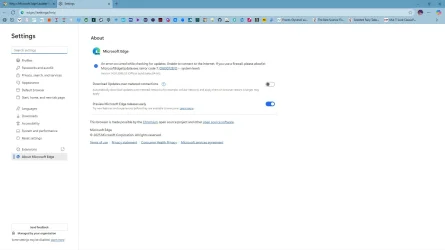
Turn off what is in the image below
 

Attachments

  • Screenshot 2025-07-07 150048.webp
    Screenshot 2025-07-07 150048.webp
    54.3 KB · Views: 8

My Computers My Computers

  • At a glance

    Windows11 Pro 26200.8737Intel Core i9 14900F (24 -Core, 68 MB Total C...32GB DDR5RTX 4080 Super w/610.74
    OS
    Windows11 Pro 26200.8737
    Computer type
    PC/Desktop
    Manufacturer/Model
    Dell Alienware Aurora R16
    CPU
    Intel Core i9 14900F (24 -Core, 68 MB Total Cache)
    Motherboard
    Dell Alienware
    Memory
    32GB DDR5
    Graphics Card(s)
    RTX 4080 Super w/610.74
    Sound Card
    Realtec
    Monitor(s) Displays
    Corsair XENEON 32QHD165
    Screen Resolution
    2560 X 1440
    Hard Drives
    1-2TB Samsung 990 Pro PCIe NVMe M2 SSD
    1-4TB Samsung 990 Pro PCIe NVMe M2 SSD
    PSU
    1000 Watt Platinum Dell
    Case
    Alienware
    Cooling
    Liquid Closed Loop
    Keyboard
    Corsair Strafe RGB
    Mouse
    Logitech MK270 Wireless
    Internet Speed
    100Gb's Down-20 Up
    Browser
    Firefox 152.0.5
    Antivirus
    Defender
    Other Info
    Very Quiet And Fast
    CyberPower UPS CP1500PFCLCD
  • At a glance

    PClinuxOS Mate (2025.7)13th Gen Inter(R) Core(TM) i3-1315U64 GB DDR4 @3200 MHz.Internal
    Operating System
    PClinuxOS Mate (2025.7)
    Computer type
    PC/Desktop
    Manufacturer/Model
    Intel
    CPU
    13th Gen Inter(R) Core(TM) i3-1315U
    Motherboard
    Intel
    Memory
    64 GB DDR4 @3200 MHz.
    Graphics card(s)
    Internal
    Sound Card
    None
    Monitor(s) Displays
    Dell 2419HGCF
    Screen Resolution
    1920 X 1080
    Hard Drives
    SAMSUNG 980 PRO SSD 2TB, PCIe 4.0 M.2 2280
    PSU
    Chicony 30 Watt
    Case
    Small
    Keyboard
    Dell
    Mouse
    Razor
    Internet Speed
    1GB
    Browser
    Slimjet
Yes why? And yes I mean every!
Because it ensures you always have the latest Edge version. Although if you want to disable it (which is Not Recommended), you must go to Task Scheduler, not Edge System Options.
 

My Computer My Computer

At a glance

Windows 11
OS
Windows 11
Computer type
PC/Desktop
It checks for not only Edge updates, but also addon updates.
 

My Computers My Computers

  • At a glance

    Windows 11 Pro 25H2 26200.8655i9-10900 10 core 20 threads32 gbnone-Intel UHD Graphics 630
    OS
    Windows 11 Pro 25H2 26200.8655
    Computer type
    PC/Desktop
    Manufacturer/Model
    Dell Optiplex 7080
    CPU
    i9-10900 10 core 20 threads
    Motherboard
    DELL 0J37VM
    Memory
    32 gb
    Graphics Card(s)
    none-Intel UHD Graphics 630
    Sound Card
    Integrated Realtek
    Monitor(s) Displays
    Benq 27
    Screen Resolution
    2560x1440
    Hard Drives
    2x1tb Solidigm m.2 nvme /External drives 512gb Samsung m.2 sata+2tb Kingston m2.nvme
    PSU
    500w
    Case
    MT
    Cooling
    Dell Premium
    Keyboard
    Logitech wired
    Mouse
    Logitech wireless
    Internet Speed
    so slow I'm too embarrassed to tell
    Browser
    #1 Edge #2 Firefox
    Antivirus
    Defender+MWB Premium
  • At a glance

    Windows 11 Pro 24H2 26200.8457AMD Ryzen 7 6800U32 gbintegrated
    Operating System
    Windows 11 Pro 24H2 26200.8457
    Computer type
    PC/Desktop
    Manufacturer/Model
    Beelink Mini PC SER5
    CPU
    AMD Ryzen 7 6800U
    Memory
    32 gb
    Graphics card(s)
    integrated
    Sound Card
    integrated
    Monitor(s) Displays
    Benq 27
    Screen Resolution
    2560x1440
    Hard Drives
    1TB Crucial nvme
    Keyboard
    Logitech wired
    Mouse
    Logitech wireless
    Internet Speed
    still too embarrassed to tell
    Browser
    Firefox
    Antivirus
    Defender
    Other Info
    System 3 is non compliant Dell 9020 i7-4770/24gb ram Win11 PRO 26200.8457
Because it ensures you always have the latest Edge version. Although if you want to disable it (which is Not Recommended), you must go to Task Scheduler, not Edge System Options.
I do not have it running anywhere. I also do not use it.
 

My Computers My Computers

  • At a glance

    Windows11 Pro 26200.8737Intel Core i9 14900F (24 -Core, 68 MB Total C...32GB DDR5RTX 4080 Super w/610.74
    OS
    Windows11 Pro 26200.8737
    Computer type
    PC/Desktop
    Manufacturer/Model
    Dell Alienware Aurora R16
    CPU
    Intel Core i9 14900F (24 -Core, 68 MB Total Cache)
    Motherboard
    Dell Alienware
    Memory
    32GB DDR5
    Graphics Card(s)
    RTX 4080 Super w/610.74
    Sound Card
    Realtec
    Monitor(s) Displays
    Corsair XENEON 32QHD165
    Screen Resolution
    2560 X 1440
    Hard Drives
    1-2TB Samsung 990 Pro PCIe NVMe M2 SSD
    1-4TB Samsung 990 Pro PCIe NVMe M2 SSD
    PSU
    1000 Watt Platinum Dell
    Case
    Alienware
    Cooling
    Liquid Closed Loop
    Keyboard
    Corsair Strafe RGB
    Mouse
    Logitech MK270 Wireless
    Internet Speed
    100Gb's Down-20 Up
    Browser
    Firefox 152.0.5
    Antivirus
    Defender
    Other Info
    Very Quiet And Fast
    CyberPower UPS CP1500PFCLCD
  • At a glance

    PClinuxOS Mate (2025.7)13th Gen Inter(R) Core(TM) i3-1315U64 GB DDR4 @3200 MHz.Internal
    Operating System
    PClinuxOS Mate (2025.7)
    Computer type
    PC/Desktop
    Manufacturer/Model
    Intel
    CPU
    13th Gen Inter(R) Core(TM) i3-1315U
    Motherboard
    Intel
    Memory
    64 GB DDR4 @3200 MHz.
    Graphics card(s)
    Internal
    Sound Card
    None
    Monitor(s) Displays
    Dell 2419HGCF
    Screen Resolution
    1920 X 1080
    Hard Drives
    SAMSUNG 980 PRO SSD 2TB, PCIe 4.0 M.2 2280
    PSU
    Chicony 30 Watt
    Case
    Small
    Keyboard
    Dell
    Mouse
    Razor
    Internet Speed
    1GB
    Browser
    Slimjet
Yes why? And yes I mean every!
Because it doesn't know on which day a new version of Edge gets released.

If you look at the release dates of the previous Stable releases:

2025-06-26 Thursday
2025-05-29 Thursday
2025-05-01 Thursday
2025-04-03 Thursday
2025-03-06 Thursday
2025-02-06 Thursday
2025-01-17 Friday
2024-11-14 Thursday
2024-10-17 Thursday
2024-09-19 Thursday
2024-08-22 Thursday
2024-07-25 Thursday
2024-06-13 Thursday
2024-05-17 Friday
2024-04-18 Thursday
2024-03-22 Friday
2024-02-23 Friday
2024-01-25 Thursday
 

My Computer My Computer

At a glance

Windows 7
OS
Windows 7
I do not have it running anywhere. I also do not use it.
That's why I recommended the OP to use Task Scheduler, to allow to him to achieve what he is asking.
 

My Computer My Computer

At a glance

Windows 11
OS
Windows 11
Computer type
PC/Desktop
Turn off what is in the image below

I've done that and it still didn't work
Because it ensures you always have the latest Edge version. Although if you want to disable it (which is Not Recommended), you must go to Task Scheduler, not Edge System Options.
Ditto

However when I delete (not disable) the 2 scheduled tasks, upon restarting my computer, it places them back again, so Microsoft Edge updates the next login session.

Microsoft has a habit for routinely enabling things the user had previously disabled. Rinse and repeat. Grrr! -_-

Microsoft should spend less time shoehorning AI and Edge into windows and more time improving the speed, usability, crashes and backwards compatibility.
 

My Computer My Computer

At a glance

Windows 11 22H2Intel i5 10th generation Ice Lake8GBIntel Intregated Graphics
OS
Windows 11 22H2
Computer type
Laptop
Manufacturer/Model
Acer Aspire 315-56
CPU
Intel i5 10th generation Ice Lake
Memory
8GB
Graphics Card(s)
Intel Intregated Graphics
Sound Card
Realtek and Intel Audio
Monitor(s) Displays
Built-in
Screen Resolution
15.6"
Hard Drives
2TB Hard Disk Drive (HDD)
Keyboard
Built-in
Mouse
Built-in
Browser
Arc
Antivirus
Comodo Internet Security
Block MicrosoftEdgeUpdate.exe in the firewall or deny user's rights to read it (run it).
See you a month later, when your bank account gets hacked due to outdated runtimes.
Code:
netsh advfirewall firewall add rule name="Edge Updater Block" dir=out action=block protocol=TCP program="%ProgramFiles(x86)%\Microsoft\EdgeUpdate\MicrosoftEdgeUpdate.exe"
 

Attachments

  • capture_11052025_140947.webp
    capture_11052025_140947.webp
    71.4 KB · Views: 2

My Computer My Computer

At a glance

Home26H2CanAMD Ryzen 5 8600G (07/24)2x32GB Kingston FURY DDR5 5600 MHz CL36 @5200...ASROCK Radeon RX 6600 Challenger D 8G @48FPS ...
OS
Home26H2Can
Computer type
PC/Desktop
CPU
AMD Ryzen 5 8600G (07/24)
Motherboard
ASROCK B650M-HDV/M.2 (07/24) BIOS 4.21 AGESA ComboAM5 1.3.0.1 (04/26)
Memory
2x32GB Kingston FURY DDR5 5600 MHz CL36 @5200 CL36 (07/24)
Graphics Card(s)
ASROCK Radeon RX 6600 Challenger D 8G @48FPS (08/24)
Sound Card
Creative Sound BlasterX AE-5 Plus (05/24)
Monitor(s) Displays
24" Philips 24M1N3200ZS/00 (05/24)
Screen Resolution
1920×1080@165Hz via DP1.4
Hard Drives
Kingston KC3000 NVMe 2TB (05/24)
ADATA XPG GAMMIX S11 Pro 512GB (07/19)
PSU
Seasonic Core GM 550 Gold (04/24)
Case
Fractal Design Define 7 Mini with 3x Noctua NF-P14s/12@555rpm (04/24)
Cooling
Noctua NH-U12S with Noctua NF-P12 (04/24)
Keyboard
HP Pavilion Wired Keyboard 300 (07/24) + Rabalux 76017 Parker (01/24)
Mouse
Logitech M330 Silent Plus (01/26)
Internet Speed
500/100 Mbps via RouterOS (05/21) & TCP Optimizer
Browser
Edge, Brave for YouTube, LibreWolf for FB
Antivirus
NextDNS blocking 1/3 Traffic
Other Info
Phone: Motorola Moto G86 (02/26)
Backup: Hasleo Backup Suite (PreOS)
Headphones: Sennheiser RS170 (09/10)
Chair: Huzaro Force 4.4 Grey Mesh (05/24)
Notifier: Xiaomi Mi Band 9 Milanese (10/24)
FlexCore USB-C 3.2 Gen 1 (M) to LAN (F) (08/25)
Because "You Allow it". :P

It's optional, definitely not mandatory. I prefer to update it Manually - using WinGet (or UniGetUi). Except for Security Definitions - nothing else on my PC updates automatically.
 

My Computer My Computer

At a glance

WinDOS 25H2Intel & AMDSO-DIMM SK Hynix 15.8 GB Dual-Channel DDR4-26...nVidia RTX 2060 6GB Mobile GPU (TU106M)
OS
WinDOS 25H2
Computer type
Laptop
CPU
Intel & AMD
Memory
SO-DIMM SK Hynix 15.8 GB Dual-Channel DDR4-2666 (2 x 8 GB) 1329MHz (19-19-19-43)
Graphics Card(s)
nVidia RTX 2060 6GB Mobile GPU (TU106M)
Sound Card
Onbord Realtek ALC1220
Screen Resolution
1920 x 1080
Hard Drives
1x Samsung PM981 NVMe PCIe M.2 512GB / 1x Seagate Expansion ST1000LM035 1TB
I've done that and it still didn't work

Ditto

However when I delete (not disable) the 2 scheduled tasks, upon restarting my computer, it places them back again, so Microsoft Edge updates the next login session.

Microsoft has a habit for routinely enabling things the user had previously disabled. Rinse and repeat. Grrr! -_-

Microsoft should spend less time shoehorning AI and Edge into windows and more time improving the speed, usability, crashes and backwards compatibility.
That argument is basically saying you should make modern Ferrari cars compatible with Horse and buggies.

What's MORE important surely is that the BASE functions of the OS work properly before adding new features. Ensure also that the OS on update continues working on brand new hardware. On Insider builds there's nothing wrong in trying new ideas out -- these are TESTING builds so people who use these should expect the odd defect or so.

But what always seems lacking currently in these new builds is the lack of REGRESSION TESTING -- i.e an old defect that was fixrd re-occurs after an update.


I wonder if the so called current modern day I.T experts (who seem to come overwhelmingly from one particular city in one particular asian country and are often employees of a particular off shore company) actually understand regression.


Cheers
jimbo
 

My Computer My Computer

At a glance

Windows XP,11 Linux Fedora Rawhide pre-releas...2 X Intel i7
OS
Windows XP,11 Linux Fedora Rawhide pre-release 45
Computer type
PC/Desktop
CPU
2 X Intel i7
Screen Resolution
4KUHD X 2
See you a month later, when your bank account gets hacked due to outdated runtimes.
I can see your point lol but the scheduled task makes Edge update EVERY HOUR.

Also as I run Mirekusoft Install Monitor and IOBit Uninstaller on my computer. So as it watches what activity my software is doing in the background, while it's running, to make it easier to remove traces lying around when I possibly uninstall whatever software.

[insert image here later about SQL Server with "switch to" "retry" "cancel" buttons]

If I do too many things at once on my computer, it makes it harder for Mirekusoft Install Monitor to keep a "ledger" as the disk usage is consistently 100% with the queued logging being too backlogged, stealing disk usage which could be used elsewhere, for the sake of, muh updating Edge every hour
 

My Computer My Computer

At a glance

Windows 11 22H2Intel i5 10th generation Ice Lake8GBIntel Intregated Graphics
OS
Windows 11 22H2
Computer type
Laptop
Manufacturer/Model
Acer Aspire 315-56
CPU
Intel i5 10th generation Ice Lake
Memory
8GB
Graphics Card(s)
Intel Intregated Graphics
Sound Card
Realtek and Intel Audio
Monitor(s) Displays
Built-in
Screen Resolution
15.6"
Hard Drives
2TB Hard Disk Drive (HDD)
Keyboard
Built-in
Mouse
Built-in
Browser
Arc
Antivirus
Comodo Internet Security

@TairikuOkami 's suggestion helps somewhat to help speed up my computer but does anyone have any other ideas to stop the Scheduled Task from running EVERY hour after restarting my computer?
 

My Computer My Computer

At a glance

Windows 11 22H2Intel i5 10th generation Ice Lake8GBIntel Intregated Graphics
OS
Windows 11 22H2
Computer type
Laptop
Manufacturer/Model
Acer Aspire 315-56
CPU
Intel i5 10th generation Ice Lake
Memory
8GB
Graphics Card(s)
Intel Intregated Graphics
Sound Card
Realtek and Intel Audio
Monitor(s) Displays
Built-in
Screen Resolution
15.6"
Hard Drives
2TB Hard Disk Drive (HDD)
Keyboard
Built-in
Mouse
Built-in
Browser
Arc
Antivirus
Comodo Internet Security

Because you disable the tasks, and not delete them. Deleting them will cause Windows to "repair" them.
 

My Computer My Computer

At a glance

Windows 7
OS
Windows 7
Hello I’ve tried both disabling and deleting to then restart my computer and it still doesn't work.

The scheduled task just re-creates/re-enables itself. If not within the first hour upon reaching the login screen, then at least 6 or 12 hours later.
 

My Computer My Computer

At a glance

Windows 11 22H2Intel i5 10th generation Ice Lake8GBIntel Intregated Graphics
OS
Windows 11 22H2
Computer type
Laptop
Manufacturer/Model
Acer Aspire 315-56
CPU
Intel i5 10th generation Ice Lake
Memory
8GB
Graphics Card(s)
Intel Intregated Graphics
Sound Card
Realtek and Intel Audio
Monitor(s) Displays
Built-in
Screen Resolution
15.6"
Hard Drives
2TB Hard Disk Drive (HDD)
Keyboard
Built-in
Mouse
Built-in
Browser
Arc
Antivirus
Comodo Internet Security

MS wants you to have the latest and greatest spyware available.
Disable all of the Edge services.
 

My Computer My Computer

At a glance

Win 10 Pro 19045.6937 Win 11 25H2 VMXeon W-10885M64GB ECC DDR4 128GB maxIntel 1080p + Quadro RTX 5000 Max-Q 16GB 4K
OS
Win 10 Pro 19045.6937 Win 11 25H2 VM
Computer type
Laptop
Manufacturer/Model
Dell Precicion 15 Workstation
CPU
Xeon W-10885M
Motherboard
Dell
Memory
64GB ECC DDR4 128GB max
Graphics Card(s)
Intel 1080p + Quadro RTX 5000 Max-Q 16GB 4K
Sound Card
onboard Realtec
Monitor(s) Displays
NA
Screen Resolution
1080p to 4k
Hard Drives
1 TB Samsung 9100 M2 SSD main
2 TB Samsung 9100 M2 SSD storage
500 GB Corsair T500 storage M2 SSD (6 TB max)
PSU
NA
Case
NA
Cooling
NA
Keyboard
backlit
Mouse
Logitec M720 Bluetooth Free scroll
Internet Speed
slow
Browser
Pale Moon 33.9.x.x - x64 AVX2 build
Antivirus
Windows Defender
Block MicrosoftEdgeUpdate.exe in the firewall or deny user's rights to read it (run it).
See you a month later, when your bank account gets hacked due to outdated runtimes.

Not really, especially when one doesn't use Edge to begin with. I consider Edge to be adware, anyway.
 

My Computers My Computers

  • At a glance

    Windows 11 Pro 25H2 build: (26200.7623)32GB
    OS
    Windows 11 Pro 25H2 build: (26200.7623)
    Computer type
    Laptop
    Manufacturer/Model
    Microsoft Surface Pro
    Memory
    32GB
  • At a glance

    Microsoft 25H2 ProIntel Core Ultra 764GBIntel Integrated Graphics
    Operating System
    Microsoft 25H2 Pro
    Computer type
    Laptop
    Manufacturer/Model
    Dell Pro 14 - PC14250
    CPU
    Intel Core Ultra 7
    Memory
    64GB
    Graphics card(s)
    Intel Integrated Graphics
    Hard Drives
    Micron 1TB SSD

Latest Support Threads

Back
Top Bottom