Solved Why is x86 Distributable Failing???


orlando1974

Well-known member
Local time
10:45 AM
Posts
59
OS
Windows 10 Pro
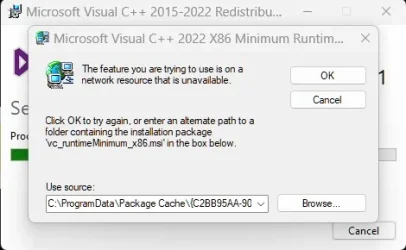
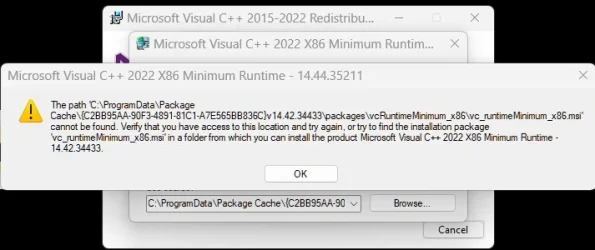
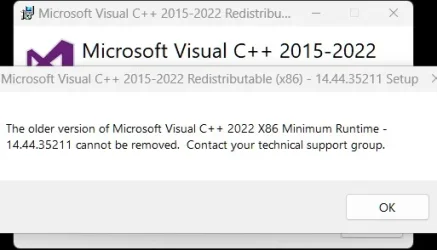
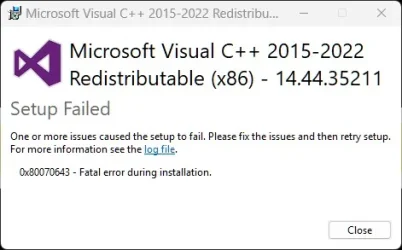
Hi, I'm having a new issue - I noticed that the latest driver install to my Focusrite audio interface is partially failing (or at least encountering a hiccup) due to failure to install a Visual C++ Redistributable x86. Around the same time I noticed that another music/audio app called Melodics no longer runs when I launch it - doesn't even show up in the Task Manager. I've reached out to support from both companies. In the meantime, I tried manually installing the problematic files straight from the source and as Administrator. Nothing is working. THe x64 is fine but the x86 always gives the same error. Is anyone able to spot the issue and provide a solution please? I can provide the log file too if necessary.
 
Windows Build/Version
24H2 (Build 26100.4946)

Attachments

  • Same Error Trying to Install the Downloaded Missing Resource.webp
    Same Error Trying to Install the Downloaded Missing Resource.webp
    19.6 KB · Views: 1
  • Same Error Trying to Install the Downloaded Missing Resource b.webp
    Same Error Trying to Install the Downloaded Missing Resource b.webp
    27.1 KB · Views: 1
  • Same Error Trying to Install the Downloaded Missing Resource c - after clicking Cancel.webp
    Same Error Trying to Install the Downloaded Missing Resource c - after clicking Cancel.webp
    16.9 KB · Views: 1
  • Same Error Trying to Install the Downloaded Missing Resource d.webp
    Same Error Trying to Install the Downloaded Missing Resource d.webp
    17.8 KB · Views: 1

My Computer My Computer

At a glance

Windows 10 ProIntel i7-9700K64GBNvidia GTX 760
OS
Windows 10 Pro
Computer type
PC/Desktop
Manufacturer/Model
ASUS
CPU
Intel i7-9700K
Motherboard
ASUS
Memory
64GB
Graphics Card(s)
Nvidia GTX 760
Screen Resolution
4K
I use Melodics, no issues. Do you use any kind of 3rd party cleaning/tuning tools? If yes, you might have wiped out some needed cached content.

You tried just downloading a new copy and install over the existing?
 

My Computer My Computer

At a glance

Linux Mint
OS
Linux Mint
Computer type
Laptop
Manufacturer/Model
System76 Lemur Pro
  • Like
Reactions: OAT
Yes, I tried resintalling. Installation of Melodics doesn't trigger the missing distributable file warning - just no longer runs. This warning is triggered by trying to reinstall Focusrite drivers - or just trying to install on their own. Not sure why the x86 isn't successfully completing installation.
 

My Computer My Computer

At a glance

Windows 10 ProIntel i7-9700K64GBNvidia GTX 760
OS
Windows 10 Pro
Computer type
PC/Desktop
Manufacturer/Model
ASUS
CPU
Intel i7-9700K
Motherboard
ASUS
Memory
64GB
Graphics Card(s)
Nvidia GTX 760
Screen Resolution
4K
The vc++ package should have a repair switch, have you tried that?
 

My Computer My Computer

At a glance

Linux Mint
OS
Linux Mint
Computer type
Laptop
Manufacturer/Model
System76 Lemur Pro
It didn't off me that option. I ran it and clicked accept terms to install. Ran into the error before that point I guess?
 

My Computer My Computer

At a glance

Windows 10 ProIntel i7-9700K64GBNvidia GTX 760
OS
Windows 10 Pro
Computer type
PC/Desktop
Manufacturer/Model
ASUS
CPU
Intel i7-9700K
Motherboard
ASUS
Memory
64GB
Graphics Card(s)
Nvidia GTX 760
Screen Resolution
4K
The switches are only available if you run it from a terminal
/? or /help should give you options
 

My Computer My Computer

At a glance

Linux Mint
OS
Linux Mint
Computer type
Laptop
Manufacturer/Model
System76 Lemur Pro
The switches are only available if you run it from a terminal
/? or /help should give you options
Hmmm, I'm afraid that's beyond my knowledge! How do I run that from a terminal?
 

My Computer My Computer

At a glance

Windows 10 ProIntel i7-9700K64GBNvidia GTX 760
OS
Windows 10 Pro
Computer type
PC/Desktop
Manufacturer/Model
ASUS
CPU
Intel i7-9700K
Motherboard
ASUS
Memory
64GB
Graphics Card(s)
Nvidia GTX 760
Screen Resolution
4K
<path_to_vc++.exe> /repair /install
 

My Computer My Computer

At a glance

Linux Mint
OS
Linux Mint
Computer type
Laptop
Manufacturer/Model
System76 Lemur Pro
Maybe I'm missing something, but why would you install the x86 version? Windows 11 is x64 so you should install only the x64 version.
 

My Computers My Computers

  • At a glance

    Win11 Pro 25H2 (RTM+)Intel i7-14650HX32 GBNo GPU - Built-in Intel Graphics
    OS
    Win11 Pro 25H2 (RTM+)
    Computer type
    PC/Desktop
    Manufacturer/Model
    Acemagic
    CPU
    Intel i7-14650HX
    Memory
    32 GB
    Graphics Card(s)
    No GPU - Built-in Intel Graphics
    Sound Card
    Integrated
    Monitor(s) Displays
    Varies as machine will often be moved to locations with different monitors
    Screen Resolution
    Varies
    Hard Drives
    1 x 1TB Gen 4 NVMe SSD
    PSU
    120W Power Brick
    Keyboard
    Corsair K70 Max RGB Magnetic Keyboard
    Mouse
    Logitech MX Master 3
    Internet Speed
    1Gb Up / 1 Gb Down
    Browser
    Edge
    Antivirus
    Windows Defender
  • At a glance

    Win11 Pro 25H2 (RTM+)Intel i7-1255U16 GBIntel Iris Xe Graphics
    Operating System
    Win11 Pro 25H2 (RTM+)
    Computer type
    Laptop
    Manufacturer/Model
    Lenovo ThinkBook 13x Gen 2
    CPU
    Intel i7-1255U
    Memory
    16 GB
    Graphics card(s)
    Intel Iris Xe Graphics
    Sound Card
    Realtek® ALC3306-CG codec
    Monitor(s) Displays
    13.3-inch IPS Display
    Screen Resolution
    WQXGA (2560 x 1600)
    Hard Drives
    2 TB 4 x 4 NVMe SSD
    PSU
    USB-C / Thunderbolt 4 Power / Charging
    Keyboard
    Backlit, spill resistant keyboard
    Mouse
    Buttonless Glass Precision Touchpad
    Internet Speed
    1Gb Up / 1Gb Down
    Browser
    Edge
    Antivirus
    Windows Defender
    Other Info
    WiFi 6e / Bluetooth 5.1 / Facial Recognition / Fingerprint Sensor / ToF (Time of Flight) Human Presence Sensor
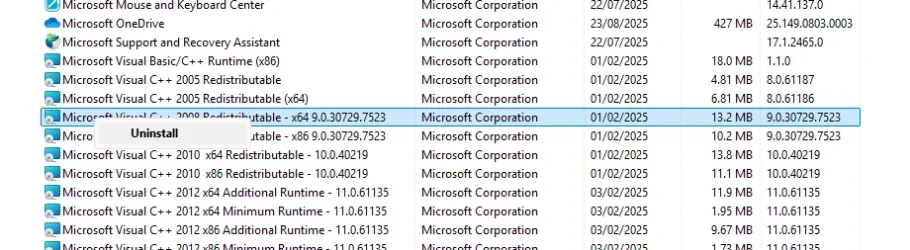
In 'Contol Panel => Programs and Features,', right-click each re-distributable in turn & select uninstall -

2.webp

and then re-install them from here
 

My Computer My Computer

At a glance

Windows 11 Pro 25H2 (Build 26200.8728)Intel Core Ultra 9 285 5.6 GHz32.00 GBIntel Integrated Graphics (128 MB)
OS
Windows 11 Pro 25H2 (Build 26200.8728)
Computer type
PC/Desktop
Manufacturer/Model
Dell Pro Max Tower T2 FCT2250
CPU
Intel Core Ultra 9 285 5.6 GHz
Motherboard
64-bit operating system, x64-based processor
Memory
32.00 GB
Graphics Card(s)
Intel Integrated Graphics (128 MB)
Sound Card
Realtek Audio
Monitor(s) Displays
Dell P2714H Monitor
Screen Resolution
1920 x 1080
Hard Drives
1 x 512GB M.2 XG10d SED KIOXIA PCIe solid state drive (Internal)
1 x 2TB Seagate ST2000DM008-2UB102 HDD (Internal)
1 x 1TB Seagate STGX4000400 External HDD
1 x 4TB Seagate STGX4000400 External HDD
1 x 6TB WD Elements AE 2689 External HDD
PSU
500 Watts
Cooling
Air
Keyboard
Microsoft Wired Keyboard 600
Mouse
Microsoft USB Basic Optical Mouse v2.0
Browser
Firefox
Antivirus
Windows Defender + Malwarebytes Premium
Other Info
BaseBoard Manufacturer Dell Inc.
BaseBoard Product 022RY57
BaseBoard Version A01
Maybe I'm missing something, but why would you install the x86 version? Windows 11 is x64 so you should install only the x64 version.
I've always wondered the same to. In fact, I've also wondered why there's a Program Files x86 on Windows 11 since its x64!
 

My Computer My Computer

At a glance

Windows 10 ProIntel i7-9700K64GBNvidia GTX 760
OS
Windows 10 Pro
Computer type
PC/Desktop
Manufacturer/Model
ASUS
CPU
Intel i7-9700K
Motherboard
ASUS
Memory
64GB
Graphics Card(s)
Nvidia GTX 760
Screen Resolution
4K
In 'Contol Panel => Programs and Features,', right-click each re-distributable in turn & select uninstall -

View attachment 143341

and then re-install them from here
Thank you - unfortunately it did not work. I got the exact same problematic popups when I got to x86 14.44.35211 file
 

My Computer My Computer

At a glance

Windows 10 ProIntel i7-9700K64GBNvidia GTX 760
OS
Windows 10 Pro
Computer type
PC/Desktop
Manufacturer/Model
ASUS
CPU
Intel i7-9700K
Motherboard
ASUS
Memory
64GB
Graphics Card(s)
Nvidia GTX 760
Screen Resolution
4K
Some programs still use the 32-bit SDKs which is why you still see them as dependencies. Lazy devs
🤷‍♂️
 

My Computer My Computer

At a glance

Linux Mint
OS
Linux Mint
Computer type
Laptop
Manufacturer/Model
System76 Lemur Pro
<path_to_vc++.exe> /repair /install
I was able to run from terminal but got the exact same error boxes. It 's not finding whatever it needs to install x86 14.44.35211 successfully !
 

My Computer My Computer

At a glance

Windows 10 ProIntel i7-9700K64GBNvidia GTX 760
OS
Windows 10 Pro
Computer type
PC/Desktop
Manufacturer/Model
ASUS
CPU
Intel i7-9700K
Motherboard
ASUS
Memory
64GB
Graphics Card(s)
Nvidia GTX 760
Screen Resolution
4K
Do you use any kind of 3rd party cleaning/tuning tools? If yes, you might have wiped out some needed cached content.
@neemobeer is correct.
The error is usually triggered if C:\ProgramData\Package Cache has been tampered with, or content has been deleted or overwritten with a lower version. As a result, you get the error that the previous version of the .msi package is missing.
Unless registry entries from the previous version are deleted, you can't install the new one or uninstall the current one using conventional methods.
 

My Computers My Computers

  • At a glance

    All Branches but ReleaseAMD Ryzen 7 7735HS 3200-4500 Mhz 8 cores x 232 GB DDR5Radeon Graphic / NVIDIA GeForce RTX 4060 8 GB...
    OS
    All Branches but Release
    Computer type
    Laptop
    Manufacturer/Model
    Acer Nitro ANV15-51
    CPU
    AMD Ryzen 7 7735HS 3200-4500 Mhz 8 cores x 2
    Motherboard
    Sportage_RBH
    Memory
    32 GB DDR5
    Graphics Card(s)
    Radeon Graphic / NVIDIA GeForce RTX 4060 8 GB GDDR6
    Sound Card
    AMD/Realtek(R) Audio
    Monitor(s) Displays
    Integrated Monitor (15.3"vis)
    Screen Resolution
    FHD 1920X1080 16:9 144Hz
    Hard Drives
    KINGSTON OM8SEP4512Q-AA 1TB
    Western Digital 256GB
    PSU
    19V DC 6.32 A 120 W
    Cooling
    Dual Fans
    Mouse
    MS Bluetooth
    Internet Speed
    Fiber 1GB Cox -us & 1GB Orange-fr
    Browser
    Edge Canary- Firefox Nightly-Chrome Dev-Chrome Dev
    Antivirus
    Windows Defender
  • At a glance

    Windows 11 BetaAMD A9-94208 GB of DDR4AMD Radeon R5
    Operating System
    Windows 11 Beta
    Computer type
    Laptop
    Manufacturer/Model
    Asus X751BP
    CPU
    AMD A9-9420
    Memory
    8 GB of DDR4
    Graphics card(s)
    AMD Radeon R5
    Screen Resolution
    1600x900
    Hard Drives
    Seagate 1 TB
You can try with /layout that should download the content to the current working directory there should be a installer which should allow you to install offline, hopefully it won't try to hit the package cache
 

My Computer My Computer

At a glance

Linux Mint
OS
Linux Mint
Computer type
Laptop
Manufacturer/Model
System76 Lemur Pro
You can try with /layout that should download the content to the current working directory there should be a installer which should allow you to install offline, hopefully it won't try to hit the package cache
Sadly there are a lot of references in the registry.
Screenshot 2025-08-25 193812.webp
 

My Computers My Computers

  • At a glance

    All Branches but ReleaseAMD Ryzen 7 7735HS 3200-4500 Mhz 8 cores x 232 GB DDR5Radeon Graphic / NVIDIA GeForce RTX 4060 8 GB...
    OS
    All Branches but Release
    Computer type
    Laptop
    Manufacturer/Model
    Acer Nitro ANV15-51
    CPU
    AMD Ryzen 7 7735HS 3200-4500 Mhz 8 cores x 2
    Motherboard
    Sportage_RBH
    Memory
    32 GB DDR5
    Graphics Card(s)
    Radeon Graphic / NVIDIA GeForce RTX 4060 8 GB GDDR6
    Sound Card
    AMD/Realtek(R) Audio
    Monitor(s) Displays
    Integrated Monitor (15.3"vis)
    Screen Resolution
    FHD 1920X1080 16:9 144Hz
    Hard Drives
    KINGSTON OM8SEP4512Q-AA 1TB
    Western Digital 256GB
    PSU
    19V DC 6.32 A 120 W
    Cooling
    Dual Fans
    Mouse
    MS Bluetooth
    Internet Speed
    Fiber 1GB Cox -us & 1GB Orange-fr
    Browser
    Edge Canary- Firefox Nightly-Chrome Dev-Chrome Dev
    Antivirus
    Windows Defender
  • At a glance

    Windows 11 BetaAMD A9-94208 GB of DDR4AMD Radeon R5
    Operating System
    Windows 11 Beta
    Computer type
    Laptop
    Manufacturer/Model
    Asus X751BP
    CPU
    AMD A9-9420
    Memory
    8 GB of DDR4
    Graphics card(s)
    AMD Radeon R5
    Screen Resolution
    1600x900
    Hard Drives
    Seagate 1 TB
I've always wondered the same to. In fact, I've also wondered why there's a Program Files x86 on Windows 11 since its x64!
Tons of applications still run in 32-bit mode. Just look at the C:\Program Files (x86) folder and see all the applications that still run in 32 bit mode, including a lot of Microsoft stuff!
 

My Computers My Computers

  • At a glance

    Win 11 Pro 25H2, Build 26200.8655Intel Core i5 1450064GB DDR4GeForce RTX 4060
    OS
    Win 11 Pro 25H2, Build 26200.8655
    Computer type
    PC/Desktop
    Manufacturer/Model
    Home Brew
    CPU
    Intel Core i5 14500
    Motherboard
    Gigabyte B760M G P WIFI
    Memory
    64GB DDR4
    Graphics Card(s)
    GeForce RTX 4060
    Sound Card
    Chipset Realtek
    Monitor(s) Displays
    LG 45" Ultragear, Acer 24" 1080p
    Screen Resolution
    5120x1440, 1920x1080
    Hard Drives
    Crucial P310 2TB 2280 PCIe Gen4 3D NAND NVMe M.2 SSD (O/S)
    Silicon Power 2TB US75 NVMe PCIe Gen4 M.2 2280 SSD (backup)
    Crucial BX500 2TB 3D NAND (2nd backup)
    Seagate 4TB Ironwolf, rotating HDD archive files
    External off-line backup Drives: 2 NVMe 4TB drives in external enclosures
    PSU
    Thermaltake Toughpower GF3 750W
    Case
    LIAN LI LANCOOL 216 E-ATX PC Case
    Cooling
    Lots of fans!
    Keyboard
    Microsoft Comfort Curve 2000
    Mouse
    Logitech G305
    Internet Speed
    Verizon FiOS 1GB
    Browser
    Firefox
    Antivirus
    Malware Bytes & Windows Defender Security
  • At a glance

    Win 11 Pro 25H2, Build 26200.8524Intel Core i5 1440032GB DDR5Intel 700 Embedded GPU
    Operating System
    Win 11 Pro 25H2, Build 26200.8524
    Computer type
    PC/Desktop
    Manufacturer/Model
    Home Brew
    CPU
    Intel Core i5 14400
    Motherboard
    Gigabyte B760M DS3H AX
    Memory
    32GB DDR5
    Graphics card(s)
    Intel 700 Embedded GPU
    Sound Card
    Realtek Embedded
    Monitor(s) Displays
    27" HP 1080p
    Screen Resolution
    1920x1080
    Hard Drives
    Crucial P310 2TB 2280 PCIe Gen4 eD NAND PCIe SSD
    Samsung EVO 990 2TB NVMe Gen4 SSD
    Samsung 2TB SATA SSD
    PSU
    Thermaltake Smart BM3 650W
    Case
    Okinos Micro ATX Case
    Cooling
    Fans
    Keyboard
    Microsoft Comfort Curve 2000
    Mouse
    Logitech G305
    Internet Speed
    Verizon FiOS 1GB
    Browser
    Firefox
    Antivirus
    Malware Bytes & Windows Defender Security
Have you tried DISM SFC repairs?
 

My Computers My Computers

  • At a glance

    Windows 11 Enterprise 25H2 26200 7462Intel XEON E5-2699 v364GB Teamgroup UD4-3600NVIDIA GeForce GTX 1080 Ti
    OS
    Windows 11 Enterprise 25H2 26200 7462
    Computer type
    PC/Desktop
    Manufacturer/Model
    Custom Build
    CPU
    Intel XEON E5-2699 v3
    Motherboard
    ASUS X99-A
    Memory
    64GB Teamgroup UD4-3600
    Graphics Card(s)
    NVIDIA GeForce GTX 1080 Ti
    Sound Card
    Integrated
    Monitor(s) Displays
    ACER X34 Predator
    Screen Resolution
    3440 x 1440
    Hard Drives
    Crucial CT1000P 3P SSD8 1TB
    Crucial CT1000 BX500 SSD 1TB
    PSU
    GameMax Pro
    Case
    Fractal Design
    Cooling
    Corsair H110iGT + 6 140mm Fans
    Keyboard
    Corsair K4
    Mouse
    G-Skill G502
    Internet Speed
    300MBs
    Browser
    Chrome
    Antivirus
    OEM
    Other Info
    ASUS RT-AC87U Router
  • At a glance

    25H2 26200.50748GB
    Operating System
    25H2 26200.5074
    Computer type
    Laptop
    Manufacturer/Model
    ASUS X555LA
    Memory
    8GB
    Browser
    Chrome
    Antivirus
    OEM
I always go to TechPowerup and download the utility they provide...."Visual C++ Redistributable Runtimes All-In-One"

I assume the x86 files are still there for backwards compatibility for certain apps/programs. After all there are 2 Program Files folders under a normal Windows install. One being Program Files (x86).
 

My Computer My Computer

At a glance

Win 7/10/11
OS
Win 7/10/11
Computer type
PC/Desktop
Other Info
I'm a computer enthusiast so have quite a few systems that I run. More like an advanced hobby.
Back
Top Bottom