Just got a new Mini PC yesterday (system #1 on my profile). It had a MediaTek WiFi adapter in it, but I replaced it with an intel BE200 WiFi 7 adapter.
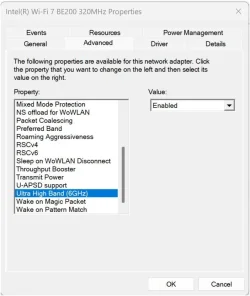
With that adapter, I found that I cannot connect to my wireless network at all if the 6GHz band is enabled on the adapter. As soon as I disable 6GHz, everything works fine.
To eliminate all other possibilities, I reinstall Windows 11 25H2 from scratch. The same exact problem persists.
Note too that I have other WiFi 7 devices on the same network using the exact same adapter and they all work perfectly.
Anyone have thoughts on what I might look at?
EDIT: I should add that I am using an EERO MAX 7 router.
With that adapter, I found that I cannot connect to my wireless network at all if the 6GHz band is enabled on the adapter. As soon as I disable 6GHz, everything works fine.
To eliminate all other possibilities, I reinstall Windows 11 25H2 from scratch. The same exact problem persists.
Note too that I have other WiFi 7 devices on the same network using the exact same adapter and they all work perfectly.
Anyone have thoughts on what I might look at?
EDIT: I should add that I am using an EERO MAX 7 router.
My Computers
-
At a glance
Win11 Pro 26H2 (Release Preview)Intel i7-14650HX32 GBNo GPU - Built-in Intel Graphics- OS
- Win11 Pro 26H2 (Release Preview)
- Computer type
- PC/Desktop
- Manufacturer/Model
- Acemagic Matrix M5
- CPU
- Intel i7-14650HX
- Memory
- 32 GB
- Graphics Card(s)
- No GPU - Built-in Intel Graphics
- Sound Card
- Integrated
- Monitor(s) Displays
- Varies as machine will often be moved to locations with different monitors
- Screen Resolution
- Varies
- Hard Drives
- 1 x 1TB Gen 4 NVMe SSD
- PSU
- 120W Power Brick
- Keyboard
- Corsair K70 Max RGB Magnetic Keyboard
- Mouse
- Logitech MX Master 3
- Internet Speed
- 1Gb Up / 1 Gb Down
- Browser
- Edge
- Antivirus
- Windows Defender
-
At a glance
Win11 Pro 26H2 (Release Preview)Intel i7-1255U16 GBIntel Iris Xe Graphics- Operating System
- Win11 Pro 26H2 (Release Preview)
- Computer type
- Laptop
- Manufacturer/Model
- Lenovo ThinkBook 13x Gen 2
- CPU
- Intel i7-1255U
- Memory
- 16 GB
- Graphics card(s)
- Intel Iris Xe Graphics
- Sound Card
- Realtek® ALC3306-CG codec
- Monitor(s) Displays
- 13.3-inch IPS Display
- Screen Resolution
- WQXGA (2560 x 1600)
- Hard Drives
- 4 TB 4 x 4 NVMe SSD
- PSU
- USB-C / Thunderbolt 4 Power / Charging Using an Anker 160W Charger
- Keyboard
- Backlit, spill resistant keyboard
- Mouse
- Buttonless Glass Precision Touchpad
- Internet Speed
- 1Gb Up / 1Gb Down
- Browser
- Edge
- Antivirus
- Windows Defender
- Other Info
- WiFi 6e / Bluetooth 5.1 / Facial Recognition / Fingerprint Sensor / ToF (Time of Flight) Human Presence Sensor