Win 11 - BSOD


dansk_84

New member
Local time
8:50 AM
Posts
8
OS
Windows 11 Pro
My PC started to have BSOD during start up a few days after a fresh install. Once the BSOD started becoming regular i did another fresh install of Win 11 and after a few days it started happening again. This time it has only happened when shutting down a program.

have attached the the log file below.

I hope someone can shed some light on what might be causing the issue. If you need any further details please let me know.
 
Windows Build/Version
26100.2033

Attachments

My Computer My Computer

At a glance

Windows 11 Pro
OS
Windows 11 Pro
Computer type
PC/Desktop
The findings were typical of malfunctioning hardware.


Please perform the following steps: (in sequence)


1) Post a link for the motherboard website


2) Run Tuneup plus > post a share link


3) Turn off Windows fast startup:


4) Create a new restore point:


5) Run the crucial scanner > post a link


6) Run Sea Tools Long generic test (all drives) > post images or share links

https://www.seagate.com/content/dam...ds/seatools/_shared/downloads/100869623_B.pdf

https://www.seagate.com/content/dam...shared/downloads/SeaToolsWindowsInstaller.exe


7) Run HD Tune (all drives) (run a non-trial or older version so that it produces results for the whole drive)
a) Health
b) Full error scan


8) Open administrative command prompt and copy and paste:

chkdsk /b /v

Run these chkdsk switches on all drives using the syntax: chkdsk /b /v C: or chkdsk /b /v D: or chkdsk /b /v E: etc.

Make sure that the windows drive runs overnight while sleeping.

C:\WINDOWS\system32>chkdsk /b /v
The type of the file system is NTFS.
Cannot lock current drive.

Chkdsk cannot run because the volume is in use by another
process. Would you like to schedule this volume to be
checked the next time the system restarts? (Y/N)

Type: Y

Reboot as needed.


9) After completing all chkdsk /b /v run:

https://www.tenforums.com/attachmen...-files-use-bsod-debugging-chkdskfromevent.bat

Batch files for use in BSOD debugging - Windows 10 Help Forums

Batch files for use in BSOD debugging - Windows 10 Help Forums


Make sure that this runs only after the prior three steps for each drive.

10) Run HD Sentinel (all drives) > post images or share links (do not run until posting results for each steps 1, 2, and 3)
a) Overview
b) Temperature
c) SMART


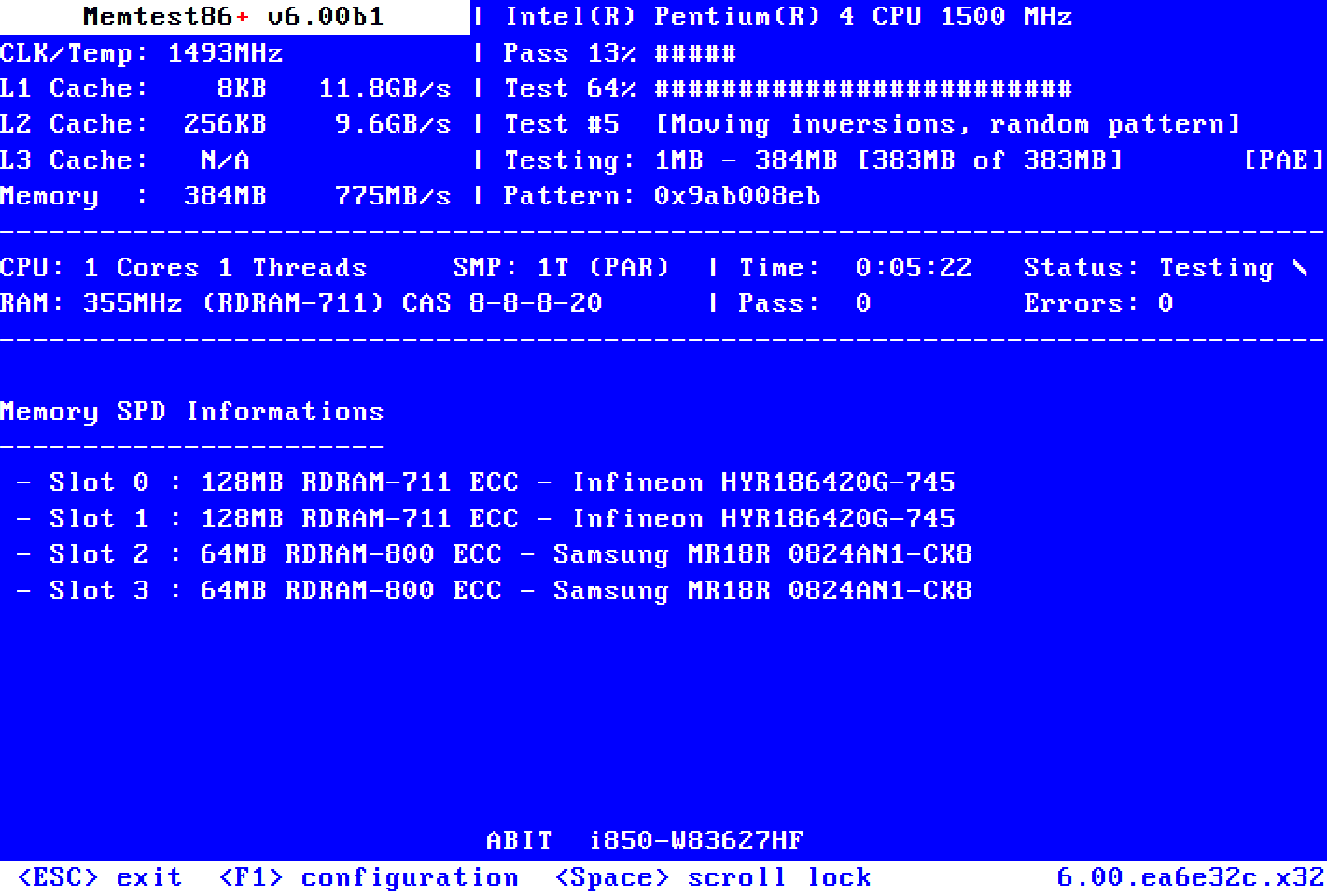
11) Run Memtest86+ for 8 or more passes > take pictures > post images or share links

Just 1 error is a test fail and testing can be aborted.

The more the passes the better the testing conditions.

It sometimes takes passes into the 20's to detect malfunctioning RAM.

The RAM can be tested all at one time or one at a time in the same DIMM.


12) The BIOS Version/Date American Megatrends International, LLC. F37e, 09/08/2023

Upgrade the BIIOS to the most up to date non-beta BIOS


13) These steps can be performed overnight while sleeping:
a) Sea Tools Long generic test (all drives)
b) HD Tune Full error scan (all drives)
c) chkdsk /b /v (all drives)
d) Memtest86+ for 8 or more passes


Code:
------------------------
Disk & DVD/CD-ROM Drives
------------------------
      Drive: C:
 Free Space: 1032.3 GB
Total Space: 1907.0 GB
File System: NTFS
      Model: WD_BLACK SN770 2TB

      Drive: D:
 Free Space: 186.7 GB
Total Space: 953.9 GB
File System: NTFS
      Model: CT1000P5SSD8

      Drive: G:
 Free Space: 980.7 GB
Total Space: 1907.0 GB
File System: FAT32
      Model: n/a

 

My Computer My Computer

At a glance

Windows 10Intel(R) Core(TM) i7-4800MQ CPU @ 2.70GHz16 GB Total: Manufacturer : Samsung MemoryTyp...NVIDIA Quadro K3100M; Intel(R) HD Graphics 4600
OS
Windows 10
Computer type
Laptop
Manufacturer/Model
HP
CPU
Intel(R) Core(TM) i7-4800MQ CPU @ 2.70GHz
Motherboard
Product : 190A Version : KBC Version 94.56
Memory
16 GB Total: Manufacturer : Samsung MemoryType : DDR3 FormFactor : SODIMM Capacity : 8GB Speed : 1600
Graphics Card(s)
NVIDIA Quadro K3100M; Intel(R) HD Graphics 4600
Sound Card
IDT High Definition Audio CODEC; PNP Device ID HDAUDIO\FUNC_01&VEN_111D&DEV_76E0
Hard Drives
Model Hitachi HTS727575A9E364
Antivirus
Microsoft Defender
Other Info
Mobile Workstation
See my responses below

1) Post a link for the motherboard website

X570 I AORUS PRO WIFI (rev. 1.0) Key Features | Motherboard - GIGABYTE Global


2) Run Tuneup plus > post a share link

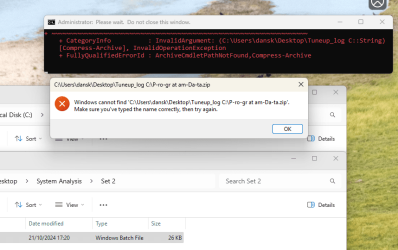
This batch file did not work and i received the following messages

Google Drive: Sign-in


3) Turn off Windows fast startup:

Done


4) Create a new restore point:

Done


5) Run the crucial scanner > post a link

GIGABYTE X570 I AORUS PRO WIFI | Memory RAM & SSD Upgrades | Crucial.com


6) Run Sea Tools Long generic test (all drives) > post images or share links

Google Drive: Sign-in


7) Run HD Tune (all drives) (run a non-trial or older version so that it produces results for the whole drive)

I did this test on both SSDs and the test came back all fine with no errors. I forgot to upload the outputs to google drive but i can do when i get home from work.


8) Open administrative command prompt and copy and paste:

Done


9) After completing all chkdsk /b /v run:

Done no errors


10) Run HD Sentinel (all drives) > post images or share links (do not run until posting results for each steps 1, 2, and 3)

I have not run this test as step 2 batch file failed to output any results


11) Run Memtest86+ for 8 or more passes > take pictures > post images or share links

Google Drive: Sign-in


12) The BIOS Version/Date American Megatrends International, LLC. F37e, 09/08/2023

Done

Bios Version F39d Sep 02 2024 Installed
 

My Computer My Computer

At a glance

Windows 11 Pro
OS
Windows 11 Pro
Computer type
PC/Desktop
Please make sure that links are available without sign in.


Sign in​

to continue to Google Drive


Please post a new V2 share link into the newest post.
 

My Computer My Computer

At a glance

Windows 10Intel(R) Core(TM) i7-4800MQ CPU @ 2.70GHz16 GB Total: Manufacturer : Samsung MemoryTyp...NVIDIA Quadro K3100M; Intel(R) HD Graphics 4600
OS
Windows 10
Computer type
Laptop
Manufacturer/Model
HP
CPU
Intel(R) Core(TM) i7-4800MQ CPU @ 2.70GHz
Motherboard
Product : 190A Version : KBC Version 94.56
Memory
16 GB Total: Manufacturer : Samsung MemoryType : DDR3 FormFactor : SODIMM Capacity : 8GB Speed : 1600
Graphics Card(s)
NVIDIA Quadro K3100M; Intel(R) HD Graphics 4600
Sound Card
IDT High Definition Audio CODEC; PNP Device ID HDAUDIO\FUNC_01&VEN_111D&DEV_76E0
Hard Drives
Model Hitachi HTS727575A9E364
Antivirus
Microsoft Defender
Other Info
Mobile Workstation
The links should now be unrestricted
 

My Computer My Computer

At a glance

Windows 11 Pro
OS
Windows 11 Pro
Computer type
PC/Desktop
Download everything.


Run Tuneup plus again > search using everything
 

My Computer My Computer

At a glance

Windows 10Intel(R) Core(TM) i7-4800MQ CPU @ 2.70GHz16 GB Total: Manufacturer : Samsung MemoryTyp...NVIDIA Quadro K3100M; Intel(R) HD Graphics 4600
OS
Windows 10
Computer type
Laptop
Manufacturer/Model
HP
CPU
Intel(R) Core(TM) i7-4800MQ CPU @ 2.70GHz
Motherboard
Product : 190A Version : KBC Version 94.56
Memory
16 GB Total: Manufacturer : Samsung MemoryType : DDR3 FormFactor : SODIMM Capacity : 8GB Speed : 1600
Graphics Card(s)
NVIDIA Quadro K3100M; Intel(R) HD Graphics 4600
Sound Card
IDT High Definition Audio CODEC; PNP Device ID HDAUDIO\FUNC_01&VEN_111D&DEV_76E0
Hard Drives
Model Hitachi HTS727575A9E364
Antivirus
Microsoft Defender
Other Info
Mobile Workstation

My Computer My Computer

At a glance

Windows 10Intel(R) Core(TM) i7-4800MQ CPU @ 2.70GHz16 GB Total: Manufacturer : Samsung MemoryTyp...NVIDIA Quadro K3100M; Intel(R) HD Graphics 4600
OS
Windows 10
Computer type
Laptop
Manufacturer/Model
HP
CPU
Intel(R) Core(TM) i7-4800MQ CPU @ 2.70GHz
Motherboard
Product : 190A Version : KBC Version 94.56
Memory
16 GB Total: Manufacturer : Samsung MemoryType : DDR3 FormFactor : SODIMM Capacity : 8GB Speed : 1600
Graphics Card(s)
NVIDIA Quadro K3100M; Intel(R) HD Graphics 4600
Sound Card
IDT High Definition Audio CODEC; PNP Device ID HDAUDIO\FUNC_01&VEN_111D&DEV_76E0
Hard Drives
Model Hitachi HTS727575A9E364
Antivirus
Microsoft Defender
Other Info
Mobile Workstation
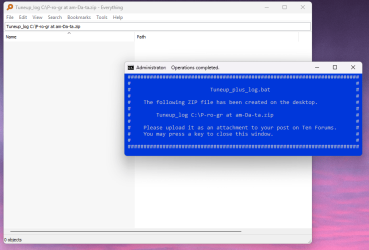
I run Tuneup_Plus_Log.bat again, got the same error message. I then searched for the output using Download Everything and it doesn't exist.

See screen shot below

Step 2 - Screenshot 2024-10-21 174118.png

Screenshot 2024-10-23 182242.png
 

My Computer My Computer

At a glance

Windows 11 Pro
OS
Windows 11 Pro
Computer type
PC/Desktop
List any installed non-microsoft antivirus and firewall software.

Boot into safe mode with networking (shift + restart) > run tuneup plus while in safe mode
 

My Computer My Computer

At a glance

Windows 10Intel(R) Core(TM) i7-4800MQ CPU @ 2.70GHz16 GB Total: Manufacturer : Samsung MemoryTyp...NVIDIA Quadro K3100M; Intel(R) HD Graphics 4600
OS
Windows 10
Computer type
Laptop
Manufacturer/Model
HP
CPU
Intel(R) Core(TM) i7-4800MQ CPU @ 2.70GHz
Motherboard
Product : 190A Version : KBC Version 94.56
Memory
16 GB Total: Manufacturer : Samsung MemoryType : DDR3 FormFactor : SODIMM Capacity : 8GB Speed : 1600
Graphics Card(s)
NVIDIA Quadro K3100M; Intel(R) HD Graphics 4600
Sound Card
IDT High Definition Audio CODEC; PNP Device ID HDAUDIO\FUNC_01&VEN_111D&DEV_76E0
Hard Drives
Model Hitachi HTS727575A9E364
Antivirus
Microsoft Defender
Other Info
Mobile Workstation
I have no non Microsoft antivirus or firewall installed.

I just tried the tuneup plus in safemode with networking and got the same result

I ran the Tuneup.bat and that seem to work, its just Tuneup_Plus_Log.

I just realised Tuneup Plus Log is from the Win 10 forum, will this work on Win 11?
 

My Computer My Computer

At a glance

Windows 11 Pro
OS
Windows 11 Pro
Computer type
PC/Desktop
Tuneup plus works on windows 11 and 10.

These are some commands that you can run manually now. Others I'll provide at a later time

Administrative command prompt:

Sfc /scannow
Dism /online /cleanup-image / sharehealth
Dism /online /cleanup-image /restorehealth
Sfc /scannow
Chkdsk /scan

Please post images displaying the comnands with results
 

My Computer My Computer

At a glance

Windows 10Intel(R) Core(TM) i7-4800MQ CPU @ 2.70GHz16 GB Total: Manufacturer : Samsung MemoryTyp...NVIDIA Quadro K3100M; Intel(R) HD Graphics 4600
OS
Windows 10
Computer type
Laptop
Manufacturer/Model
HP
CPU
Intel(R) Core(TM) i7-4800MQ CPU @ 2.70GHz
Motherboard
Product : 190A Version : KBC Version 94.56
Memory
16 GB Total: Manufacturer : Samsung MemoryType : DDR3 FormFactor : SODIMM Capacity : 8GB Speed : 1600
Graphics Card(s)
NVIDIA Quadro K3100M; Intel(R) HD Graphics 4600
Sound Card
IDT High Definition Audio CODEC; PNP Device ID HDAUDIO\FUNC_01&VEN_111D&DEV_76E0
Hard Drives
Model Hitachi HTS727575A9E364
Antivirus
Microsoft Defender
Other Info
Mobile Workstation
not trying to interfere here as most of this is above my head, but.
you are have a WD SN770 2TB which using HMB (Host Memory Bus)
there is a problem with the HMB on the 2TB M2 type SSD's
there maybe a firmware update or this reg change can be used.

as stated i am really not trying to interfere but just pointing out a problem with WD and HMB.
best of luck, Steve ..
 

My Computers My Computers

  • At a glance

    Windows 11 HomeRyzen 7 5825u64GB DDR4 3200Ryzen 7 5825u
    OS
    Windows 11 Home
    Computer type
    PC/Desktop
    Manufacturer/Model
    HP 24" AiO
    CPU
    Ryzen 7 5825u
    Motherboard
    HP
    Memory
    64GB DDR4 3200
    Graphics Card(s)
    Ryzen 7 5825u
    Sound Card
    Realtek External 5w speaker bar.
    Monitor(s) Displays
    24" HP AiO
    Screen Resolution
    1920 x 1080 @60 Hz
    Hard Drives
    1TB WD Blue SN580 M2 SSD Partitioned C:/D: drives.
    2x 1TB USB HDD External Backup/Storage.
    all VeraCrypt encrypted.
    PSU
    90W external power brick
    Case
    24" All in One
    Cooling
    Default Air Cooling
    Keyboard
    Dell WiFi UK extended
    Mouse
    Dell WiFi 3 Button
    Internet Speed
    1GB full fibre
    Browser
    Vivaldi Browser/Email/Calendar
    Antivirus
    AVG Internet Security/Windows Defender
    Other Info
    Mainly Open Source Software
  • At a glance

    Ubuntu 22.04.5 LTSi5 7200u16GB DDR4Intel
    Operating System
    Ubuntu 22.04.5 LTS
    Computer type
    Laptop
    Manufacturer/Model
    Dell 13" Latitude 2017
    CPU
    i5 7200u
    Motherboard
    Dell
    Memory
    16GB DDR4
    Graphics card(s)
    Intel
    Sound Card
    Intel
    Monitor(s) Displays
    13" Dell Laptop
    Hard Drives
    250GB Crucial 2.5" SSD
    Mouse
    Generic WiFi 3 button
    Internet Speed
    WiFi only
    Browser
    Firefox
    Antivirus
    ClamAV TK
    Other Info
    Mainly Open Source Software

My Computer My Computer

At a glance

Windows 11 Pro
OS
Windows 11 Pro
Computer type
PC/Desktop
Thanks for you input as well XxXxX

I tried the fix suggested in the link you provided.

I'm not sure if it has worked as I'm not quite sure how the BSOD happens so I cant induce a BSOD to check,
 

My Computer My Computer

At a glance

Windows 11 Pro
OS
Windows 11 Pro
Computer type
PC/Desktop
HD Sentinel: Both drives were at maximum lifetime temperatures.

Scannow: Corrupt files and successfully repaired.

Chkdsk C: corrections were made to the file system


1) Provide better computer cooling


2) Run chkdsk /b /v D:


3) After completing the new chkdsk /b / v D: > run the V2 log collector > post a share link into the newest post


4) Post new HD Sentinel results after improving computer cooling


5) Download and install one or more:


6) Run each of these bat scripts: > post images for any errors > run as needed again in safe mode with networking

(make sure extract all is clicked and that the only installed non-Microsoft AV software is Microsoft defender)


Code:
Windows resource protection found corrupt files and successfully repaired them.


Code:
21/10/2024 23:18:17           
Checking file system on C:
Windows has made corrections to the file system.
 

My Computer My Computer

At a glance

Windows 10Intel(R) Core(TM) i7-4800MQ CPU @ 2.70GHz16 GB Total: Manufacturer : Samsung MemoryTyp...NVIDIA Quadro K3100M; Intel(R) HD Graphics 4600
OS
Windows 10
Computer type
Laptop
Manufacturer/Model
HP
CPU
Intel(R) Core(TM) i7-4800MQ CPU @ 2.70GHz
Motherboard
Product : 190A Version : KBC Version 94.56
Memory
16 GB Total: Manufacturer : Samsung MemoryType : DDR3 FormFactor : SODIMM Capacity : 8GB Speed : 1600
Graphics Card(s)
NVIDIA Quadro K3100M; Intel(R) HD Graphics 4600
Sound Card
IDT High Definition Audio CODEC; PNP Device ID HDAUDIO\FUNC_01&VEN_111D&DEV_76E0
Hard Drives
Model Hitachi HTS727575A9E364
Antivirus
Microsoft Defender
Other Info
Mobile Workstation
When you say that the SSDs have reached their maximum lifetime temperatures do you mean that the total cumulative temperature that has been recorded over the time period the SSDs have been in use has reached cumulative temperature that is to be expected during the average life time of the units?
 

My Computer My Computer

At a glance

Windows 11 Pro
OS
Windows 11 Pro
Computer type
PC/Desktop
When you say that the SSDs have reached their maximum lifetime temperatures do you mean that the total cumulative temperature that has been recorded over the time period the SSDs have been in use has reached cumulative temperature that is to be expected during the average life time of the units?

Please see the HD Sentinel results link: Step 10 - Google Drive

This software (temperature tab) reported the T max.
 

My Computer My Computer

At a glance

Windows 10Intel(R) Core(TM) i7-4800MQ CPU @ 2.70GHz16 GB Total: Manufacturer : Samsung MemoryTyp...NVIDIA Quadro K3100M; Intel(R) HD Graphics 4600
OS
Windows 10
Computer type
Laptop
Manufacturer/Model
HP
CPU
Intel(R) Core(TM) i7-4800MQ CPU @ 2.70GHz
Motherboard
Product : 190A Version : KBC Version 94.56
Memory
16 GB Total: Manufacturer : Samsung MemoryType : DDR3 FormFactor : SODIMM Capacity : 8GB Speed : 1600
Graphics Card(s)
NVIDIA Quadro K3100M; Intel(R) HD Graphics 4600
Sound Card
IDT High Definition Audio CODEC; PNP Device ID HDAUDIO\FUNC_01&VEN_111D&DEV_76E0
Hard Drives
Model Hitachi HTS727575A9E364
Antivirus
Microsoft Defender
Other Info
Mobile Workstation
'2033 SFC is broken. SFC will just show the same message over and over again.
 

My Computers My Computers

  • At a glance

    Windows 11 Pro x64 25H2Ryzen 9 5900X64 GB G.Skill RipJaws V F4-3200C16D-64GVKASRock Steel Legend Arc B580 12 GB
    OS
    Windows 11 Pro x64 25H2
    Computer type
    PC/Desktop
    CPU
    Ryzen 9 5900X
    Motherboard
    ASRock B550 PG Velocita (UEFI-BIOS 3.90)
    Memory
    64 GB G.Skill RipJaws V F4-3200C16D-64GVK
    Graphics Card(s)
    ASRock Steel Legend Arc B580 12 GB
    Monitor(s) Displays
    Alienware AW3423DWF OLED ultrawide
    Hard Drives
    Samsung 990 Pro 1 TB NVMe SSD
    PSU
    eVGA Supernova 750 G3
    Case
    Corsair 275R
    Internet Speed
    VTel FTTH 1 Gb down and 1 Gb up
  • At a glance

    Windows 11 Home x64 25H2Ryzen 7 5800X3D32 GB (2x16 GB G.Skill TridentZ Neo)Sapphire Nitro+ Radeon RX 6750 XT
    Operating System
    Windows 11 Home x64 25H2
    Computer type
    PC/Desktop
    CPU
    Ryzen 7 5800X3D
    Motherboard
    Asus ROG Strix B550-F Gaming (UEFI-BIOS version 3644)
    Memory
    32 GB (2x16 GB G.Skill TridentZ Neo)
    Graphics card(s)
    Sapphire Nitro+ Radeon RX 6750 XT
    Hard Drives
    Samsung 970 Pro 512 GB NVMe SSD
    PSU
    Corsair RM850x
    Case
    Fractal Focus G
Thanks for you input as well XxXxX

I tried the fix suggested in the link you provided.

I'm not sure if it has worked as I'm not quite sure how the BSOD happens so I cant induce a BSOD to check,
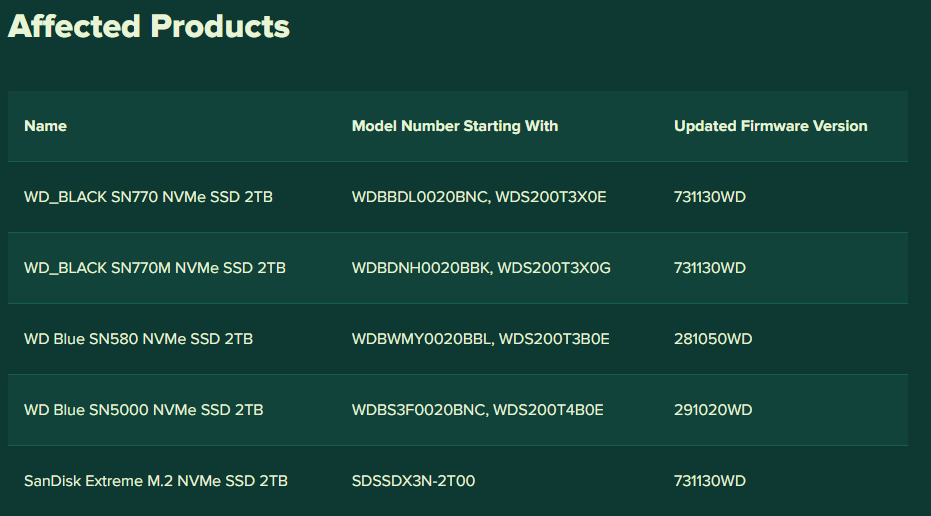
Critical Update for Western Digital and SanDisk Internal SSDs That Can Cause BSOD on Windows 11 24H2
You have SN770 and firmware version 731030WD. Last one is 731130WD. Download WD Dashboard and install the latest firmware for WD drives.

I'm not sure that is the culprit, but you can try it :) I got bsods when installed 24H2, but after firmware update and clean install of Windows 11 24H2 my pc run flawless.

PFC5O7V.png
 

My Computer My Computer

At a glance

Windows 11 24H2Ryzen 7 77002x32 GB IRDM 6000 CL30Asus Dual RTX 4070 Super OC
OS
Windows 11 24H2
Computer type
PC/Desktop
Manufacturer/Model
Custom build
CPU
Ryzen 7 7700
Motherboard
Gigabyte B650 Gaming X rev.1.3
Memory
2x32 GB IRDM 6000 CL30
Graphics Card(s)
Asus Dual RTX 4070 Super OC
Monitor(s) Displays
Aopen 32HC1QUR
Screen Resolution
2560x1440
Hard Drives
WD SN580 2TB
Kingston A400 960GB
WD Blue 3D 1TB
PSU
MSI MPG A850G
Case
Zalman Z10 Plus
Cooling
Deepcool AK500 ZD
Keyboard
Redragon Varuna
Mouse
SteelSeries Rival 3
Browser
Edge
Antivirus
Microsoft Defender

Latest Support Threads

Back
Top Bottom