WIN 11 Game Controller Calibration


ECS4001

Member
Local time
3:43 PM
Posts
3
OS
Windows 10/11
I upgraded to WIN 11 from WIN 10. Only issue is when trying to calibrate my joystick, the calibration wizard is not there. It should be in the same location as WIN 10. Control Panel/Hardware and Sound/Devices and printers/Devices. When I right click on my joystick icon, then Game Controller Settings/Properties - there should be a tab for "Settings", that's where the calibration wizard should be. I've searched high and low and cannot find an answer anywhere. My joystick needs to be calibrated to use MSFS 2020. Thanks for any help!
 

My Computer My Computer

At a glance

Windows 10/11I716GBRTX3090 6MB
OS
Windows 10/11
Computer type
Laptop
Manufacturer/Model
Acer Nitro 5
CPU
I7
Motherboard
?
Memory
16GB
Graphics Card(s)
RTX3090 6MB
Sound Card
?
Monitor(s) Displays
15"
Screen Resolution
1920x1080
Hard Drives
500SSD
PSU
?
Case
n/a
Cooling
built in
Keyboard
LED backlit
Mouse
Logitech
Internet Speed
? (fibre optic)
Browser
Chrone
Antivirus
Kaspersky
Other Info
Saitek AV8R-01 joystick, Saitek Throttle & Pedals
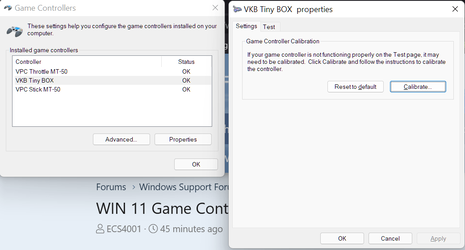
This is what I get:
1633831306609.png
 

My Computer My Computer

At a glance

Windows 11 ProAMD 9700X32 gb5050
OS
Windows 11 Pro
Computer type
PC/Desktop
CPU
AMD 9700X
Motherboard
ASUS B650E
Memory
32 gb
Graphics Card(s)
5050
Sound Card
On-board realtech
That's exactly what I was looking for and for some reason it doesn't show in 11 for me. I will reinstall 11 tomorrow and see what happens. Thanks.
 

My Computer My Computer

At a glance

Windows 10/11I716GBRTX3090 6MB
OS
Windows 10/11
Computer type
Laptop
Manufacturer/Model
Acer Nitro 5
CPU
I7
Motherboard
?
Memory
16GB
Graphics Card(s)
RTX3090 6MB
Sound Card
?
Monitor(s) Displays
15"
Screen Resolution
1920x1080
Hard Drives
500SSD
PSU
?
Case
n/a
Cooling
built in
Keyboard
LED backlit
Mouse
Logitech
Internet Speed
? (fibre optic)
Browser
Chrone
Antivirus
Kaspersky
Other Info
Saitek AV8R-01 joystick, Saitek Throttle & Pedals
This is what I have in WIN 11

Untitled.png
 

My Computer My Computer

At a glance

Windows 10/11I716GBRTX3090 6MB
OS
Windows 10/11
Computer type
Laptop
Manufacturer/Model
Acer Nitro 5
CPU
I7
Motherboard
?
Memory
16GB
Graphics Card(s)
RTX3090 6MB
Sound Card
?
Monitor(s) Displays
15"
Screen Resolution
1920x1080
Hard Drives
500SSD
PSU
?
Case
n/a
Cooling
built in
Keyboard
LED backlit
Mouse
Logitech
Internet Speed
? (fibre optic)
Browser
Chrone
Antivirus
Kaspersky
Other Info
Saitek AV8R-01 joystick, Saitek Throttle & Pedals
Only info I could find was that it is possibly related to the joystick driver. Might want to try deleting the driver and then reinstalling.
 

My Computer My Computer

At a glance

Windows 11 ProAMD 9700X32 gb5050
OS
Windows 11 Pro
Computer type
PC/Desktop
CPU
AMD 9700X
Motherboard
ASUS B650E
Memory
32 gb
Graphics Card(s)
5050
Sound Card
On-board realtech
🤔 ...usually all these things are calibrated within the gaming peripheral software. The calibration through that Windows UI rarely works/exists.

I base this information on experience of testing and calibrating hundreds of different gaming peripherals...
 

My Computers My Computers

  • At a glance

    Win 11 Pro 25H2 26200.8457 / Linux Mint 22.3Ryzen 7 2700U Pro32GBiGPU Vega 10
    OS
    Win 11 Pro 25H2 26200.8457 / Linux Mint 22.3
    Computer type
    Laptop
    Manufacturer/Model
    Lenovo A485
    CPU
    Ryzen 7 2700U Pro
    Motherboard
    Lenovo (WiFi/BT module upgraded to Intel Wireless-AC-9260)
    Memory
    32GB
    Graphics Card(s)
    iGPU Vega 10
    Sound Card
    Realtek
    Monitor(s) Displays
    14" FHD (built-in) + 14" Lenovo Thinkvision M14t (touch+pen) + 32" Asus PB328
    Screen Resolution
    FHD + FHD + 1440p
    Hard Drives
    Intel 660p m.2 nVME PCIe3.0 x2 512GB
    PSU
    125W(Dock)/65W(Travel Adapter)
    Keyboard
    Thinkpad / Logitech MX Keys
    Mouse
    Logitech MX Master 2S
    Internet Speed
    1/1Gbit
    Browser
    Firefox
    Antivirus
    Windows Defender
    Other Info
    SecureBoot: Enabled
    TPM2.0: Enabled
    AMD-V: Enabled
  • At a glance

    Win 11 Pro 25H2 26200.8521(RP)i7-7700k @4.8GHz32GB 2x16GB 2133MHz CL15EVGA GTX1080Ti FTW 11GB
    Operating System
    Win 11 Pro 25H2 26200.8521(RP)
    Computer type
    PC/Desktop
    Manufacturer/Model
    Custom
    CPU
    i7-7700k @4.8GHz
    Motherboard
    Asus PRIME Z270-A
    Memory
    32GB 2x16GB 2133MHz CL15
    Graphics card(s)
    EVGA GTX1080Ti FTW 11GB
    Sound Card
    Integrated
    Monitor(s) Displays
    32" 10-bit Asus PB328Q
    Screen Resolution
    WQHD 2560x1440
    Hard Drives
    512GB ADATA SX8000NP NVMe PCIe Gen 3 x4
    PSU
    850W
    Case
    Fractal Design Define 7
    Cooling
    Noctua NH-D15 chromax.black
    Keyboard
    Logitech MX Keys
    Mouse
    Logitech MX Master 2S
    Internet Speed
    1/1Gbit
    Browser
    Firefox
    Antivirus
    Windows Defender
    Other Info
    AC WiFi Card
If you want to calibrate a Saitek AV8R-01 under W10/W11 you should add the following registry keys, and you will get the classic joystick setup menu with "Calibrate" option.
Before:
1657361648283.png
After:
1657361740153.png1657361879386.png

Important: You must to check the Hardware ID of "Saitek Aviator Stick (HID)" in device manager (the second line)! In my case, it's "VID_06A3&PID_0461". If you have different Hardware ID, you have to change it at the end of each 4 registry lines.

In Device Manager:
1657360485288.png

You need the following line without "HID\":
1657360346221.png

1657360809410.png
Open the Notepad, Copy+Paste the following lines (correct the Hardware Ids, if you need) and save it as a ".reg" file.
For example Joystick.reg or AV8R.reg. I attached the file as "AV8R-01 Calibrate W10 & W11.reg", you can also download it. After this you have to run the .reg file, and it will add the keys to your system's registry.
Last step, you have to disconnect and reconnect your joystick. Now, you can run the calibration wizard.


Windows Registry Editor Version 5.00

[-HKEY_CURRENT_USER\System\CurrentControlSet\Control\MediaProperties\PrivateProperties\DirectInput\VID_06A3&PID_0461]

[-HKEY_CURRENT_USER\System\CurrentControlSet\Control\MediaProperties\PrivateProperties\Joystick\OEM\VID_06A3&PID_0461]

[-HKEY_LOCAL_MACHINE\System\CurrentControlSet\Control\MediaProperties\PrivateProperties\DirectInput\VID_06A3&PID_0461]

[-HKEY_LOCAL_MACHINE\System\CurrentControlSet\Control\MediaProperties\PrivateProperties\Joystick\OEM\VID_06A3&PID_0461]
 

Attachments

My Computer My Computer

At a glance

Windows 11Intel Core i7-2640M8 GB DDR3-1333Intel HD Graphics 3000 / nVIDIA NVS 4200M
OS
Windows 11
Computer type
Laptop
Manufacturer/Model
Lenovo ThinkPad T520
CPU
Intel Core i7-2640M
Memory
8 GB DDR3-1333
Graphics Card(s)
Intel HD Graphics 3000 / nVIDIA NVS 4200M
Screen Resolution
1600x900
Hard Drives
KINGSTON SA400S37240G
In Windows search type joy.cpl in the search bar this will bring up Games controller window
  1. In the Game Controllers window, select XNA Gamepad, and then select Properties.
  2. Select the Settings tab, and then select Calibrate.
  3. Follow the steps in the Device Calibration Wizard
  4. Important When you're prompted to use the directional pad (D-pad), use the left stick instead. If you use the D-pad, the left stick configuration may be incorrect.
  5. To save the new calibration settings, select Finish, and then select Apply.
  6. Test the operation of the controller. If you're satisfied with the new settings, select OK, and then select OK again.
 

My Computer My Computer

At a glance

Windows 11AQMD Ryzen 7 5800X32 GBNvidia Geforce RTX 3060
OS
Windows 11
Computer type
PC/Desktop
Manufacturer/Model
Alienware R10
CPU
AQMD Ryzen 7 5800X
Memory
32 GB
Graphics Card(s)
Nvidia Geforce RTX 3060
Monitor(s) Displays
Dell 42 inch Curved Gaming
Back
Top Bottom