Solved Win 11 Pro PC randomly locking up


BarryGuff

Active member
Member
Local time
10:07 AM
Posts
107
OS
Windows 11 Pro

Hi guys. In the last two weeks or so, my Win 11 Pro PC has been locking up,, seemingly at random. The mouse can be moved around the desktop, but clicking won't do anything. Alt+Tab doesn't work, and I can't type anything if an open doc had the focus at the lock-up moment. Shift+Ctrl+Win+B to reset the graphics drivers does nothing. I end up having to forcibly shut down using the physical power button on my PC's case.

I have no malware according to both Defender and Malwarebytes (which I knew because I don't download much stuff, nor visit dodgy websites). All my drivers are up to date.

[Edit] I opened up the case and there some mild areas of dust on the motherboard, CPU, and fans, nothing thick, but I've cleaned all that in case overheating was the cause. Is there an app that can tell me if a PC is running too hot, in case that was the cause? But I guess if it doesn't lock up anymore after this dust clean, then that must've been it.
 
Last edited:

My Computer My Computer

At a glance

Windows 11 Pro

OS
Windows 11 Pro

How do I start to diagnose this without doing a full OS reset?


First, list your computer specs...


Then, I would download and run: HWMonitor and see what temperatures you have.
Check the power supply voltages and see if they are in or out of tolerance.

We can't help very much without know what hardware you have.
 

My Computers My Computers

  • At a glance

    Win 11 Home ♦♦♦26200.9168 ♦♦♦♦♦♦♦25H2AMD Ryzen 7 3700XG.Skill (F4-3200C14D-16GTZKW)EVGA RTX 2070 (08G-P4-2171-KR)
    OS
    Win 11 Home ♦♦♦26200.9168 ♦♦♦♦♦♦♦25H2
    Computer type
    PC/Desktop
    Manufacturer/Model
    Built by Ghot® [May 2020]
    CPU
    AMD Ryzen 7 3700X
    Motherboard
    Asus Pro WS X570-ACE (BIOS 5302)
    Memory
    G.Skill (F4-3200C14D-16GTZKW)
    Graphics Card(s)
    EVGA RTX 2070 (08G-P4-2171-KR)
    Sound Card
    Realtek ALC1220P / ALC S1220A
    Monitor(s) Displays
    Dell U3011 30"
    Screen Resolution
    2560 x 1600
    Hard Drives
    2x Samsung 860 EVO 500GB,
    WD 4TB Black FZBX - SATA III,
    WD 8TB Black FZBX - SATA III,
    DRW-24B1ST CD/DVD Burner
    PSU
    PC Power & Cooling 750W Quad EPS12V
    Case
    Cooler Master ATCS 840 Tower
    Cooling
    CM Hyper 212 EVO (push/pull)
    Keyboard
    Ducky DK9008 Shine II Blue LED
    Mouse
    Logitech Optical M-100
    Internet Speed
    300/300
    Browser
    Firefox (latest)
    Antivirus
    Bitdefender Total Security
    Other Info
    Speakers: Klipsch Pro Media 2.1
  • At a glance

    Windows XP Pro 32bit w/SP3AMD Athlon 64 X2 5000+ (OC'd @ 3.2Ghz)TWIN2X2048-6400C4DHX (2 x 1GB, DDR2 800)EVGA 256-P2-N758-TR GeForce 8600GT SSC
    Operating System
    Windows XP Pro 32bit w/SP3
    Computer type
    PC/Desktop
    Manufacturer/Model
    Built by Ghot® (not in use)
    CPU
    AMD Athlon 64 X2 5000+ (OC'd @ 3.2Ghz)
    Motherboard
    ASUS M2N32-SLI Deluxe Wireless Edition
    Memory
    TWIN2X2048-6400C4DHX (2 x 1GB, DDR2 800)
    Graphics card(s)
    EVGA 256-P2-N758-TR GeForce 8600GT SSC
    Sound Card
    Onboard
    Monitor(s) Displays
    ViewSonic G90FB Black 19" Professional (CRT)
    Screen Resolution
    up to 2048 x 1536
    Hard Drives
    WD 36GB 10,000rpm Raptor SATA
    Seagate 80GB 7200rpm SATA
    Lite-On LTR-52246S CD/RW
    Lite-On LH-18A1P CD/DVD Burner
    PSU
    PC Power & Cooling Silencer 750 Quad EPS12V
    Case
    Generic Beige case, 80mm fans
    Cooling
    ZALMAN 9500A 92mm CPU Cooler
    Keyboard
    Logitech Classic Keybooard 200
    Mouse
    Logitech Optical M-BT96a
    Internet Speed
    300/300
    Browser
    Firefox 3.x ??
    Antivirus
    Symantec (Norton)
    Other Info
    Still assembled, still runs. Haven't turned it on for 15 years?
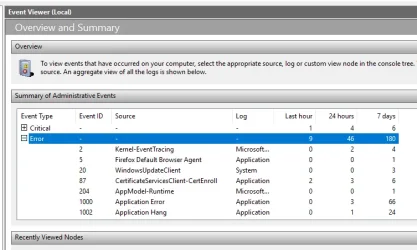
First you will want to check Event Viewer by Win Key + Search > Event Viewer. Then at the left pane, click on Event Viewer (Local). Click on Error under Critical.
You can also check for WHEA errors by downloading HWinfo and scrolling to the very bottom of the Sensor list.

Choose the portable version (doesn't require an install).

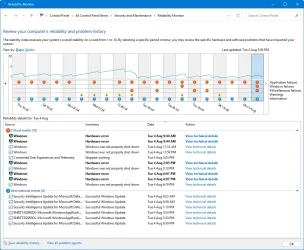
Also try Win Key + Search reliability Monitor to see any red X's.
 
Last edited:

My Computer My Computer

At a glance

Windows 11 Pro 25H2i7 12700k64GB DDR5 [CMK64GX5M2B5200C40]MSI 4060 2x Ventus 8G
OS
Windows 11 Pro 25H2
Computer type
PC/Desktop
Manufacturer/Model
DIY
CPU
i7 12700k
Motherboard
7E07vM9 [Z790 Pro Max Wifi]
Memory
64GB DDR5 [CMK64GX5M2B5200C40]
Graphics Card(s)
MSI 4060 2x Ventus 8G
Sound Card
Realtek® ALC4080 Codec
Monitor(s) Displays
ASUS VA24DQSB
Screen Resolution
1920x1080 @ 75hz
Hard Drives
Samsung 980 Pro 1TB (OS Drive)
Samsung 980 Pro 2TB (Secondary Drive)
Samsung 980 Pro 1TB (Other)
Samsung 860 Pro 512 (Other)
WD6400AAKS (Other)
PSU
Corsair 850x
Cooling
Noctua NH-D15
Mouse
G502 X Lightspeed
Browser
Chrome, Firefox
Antivirus
Malwarebytes Premium, Defender

I would gather logfiles to see if they point to a cause. Though you are not having BSOD, do this according to the above instructions.
Upload the files to any cloud provider. Post a SHARE link to the file here. @zbook will analyze at them when he comes online.
 

My Computers My Computers

  • At a glance

    Windows 11 Pro 25H2 26200.9168i9-10900 10 core 20 threads32 gbnone-Intel UHD Graphics 630
    OS
    Windows 11 Pro 25H2 26200.9168
    Computer type
    PC/Desktop
    Manufacturer/Model
    Dell Optiplex 7080
    CPU
    i9-10900 10 core 20 threads
    Motherboard
    DELL 0J37VM
    Memory
    32 gb
    Graphics Card(s)
    none-Intel UHD Graphics 630
    Sound Card
    Integrated Realtek
    Monitor(s) Displays
    Benq 27
    Screen Resolution
    2560x1440
    Hard Drives
    2x1tb Solidigm m.2 nvme /External drives 512gb Samsung m.2 sata+2tb Kingston m2.nvme
    PSU
    500w
    Case
    MT
    Cooling
    Dell Premium
    Keyboard
    Logitech wired
    Mouse
    Logitech wireless
    Internet Speed
    so slow I'm too embarrassed to tell
    Browser
    #1 Edge #2 Firefox
    Antivirus
    Defender+MWB Premium
  • At a glance

    Windows 11 Pro 24H2 26200.9168AMD Ryzen 7 6800U32 gbintegrated
    Operating System
    Windows 11 Pro 24H2 26200.9168
    Computer type
    PC/Desktop
    Manufacturer/Model
    Beelink Mini PC SER5
    CPU
    AMD Ryzen 7 6800U
    Memory
    32 gb
    Graphics card(s)
    integrated
    Sound Card
    integrated
    Monitor(s) Displays
    Benq 27
    Screen Resolution
    2560x1440
    Hard Drives
    1TB Crucial nvme
    Keyboard
    Logitech wired
    Mouse
    Logitech wireless
    Internet Speed
    still too embarrassed to tell
    Browser
    Firefox
    Antivirus
    Defender
  • System 3 is non compliant Dell 9020 i7-4770/24gb ram Win11 PRO 26200.9168
Hi again. :)

I've uploaded a zip file here (valid 6 days): Please read

It's the results of CPU-Z, HWMonitor, and Event Viewer. Reliability Monitor is not found on my PC, and I couldn't find it to add from "Turn Windows features on or off" in the Control Panel. (It's there; I must've mistyped it).

I didn't run the BSOD PowerShell scripts (yet) because I think the problem might be my PC's TPM chip, according to the Event Viewer item shot in the zip file? It says for "TMP-WMI":

"Pre-attestation health checks confirm a critical component has failed, and the device is not expected to pass attestation.
Please see C:\WINDOWS\Logs\MeasuredBoot\0000000078-0000000000.json for detailed information on what checks were made."


I included that log file for you to see.

There are no WHEA errors shown at the very bottom of the Sensors list in the HWiNFO app.
 
Last edited:

My Computer My Computer

At a glance

Windows 11 Pro
OS
Windows 11 Pro
Reliability Monitor is not found on my PC

Open admin powershell or admin command prompt and put this in then press enter.

Code:
C:\Windows\System32\perfmon.exe /rel
 

My Computer My Computer

At a glance

Windows 11 Pro
OS
Windows 11 Pro
For share links please use:

drop box
google drive
GoFile.io


Filebin is a file sharing service built to make it easy to share files with other people on the Internet or between your own devices.

Malicious actors can abuse Filebin to spread files containing malware and other illegal content.
You are one click away from downloading content that was shared via Filebin. This content may be dangerous.

You must decide if you want to proceed to download the content or not. If you did not expect to end up here, it may be a good idea to not proceed.
 

My Computer My Computer

At a glance

Windows 10Intel(R) Core(TM) i7-4800MQ CPU @ 2.70GHz16 GB Total: Manufacturer : Samsung MemoryTyp...NVIDIA Quadro K3100M; Intel(R) HD Graphics 4600
OS
Windows 10
Computer type
Laptop
Manufacturer/Model
HP
CPU
Intel(R) Core(TM) i7-4800MQ CPU @ 2.70GHz
Motherboard
Product : 190A Version : KBC Version 94.56
Memory
16 GB Total: Manufacturer : Samsung MemoryType : DDR3 FormFactor : SODIMM Capacity : 8GB Speed : 1600
Graphics Card(s)
NVIDIA Quadro K3100M; Intel(R) HD Graphics 4600
Sound Card
IDT High Definition Audio CODEC; PNP Device ID HDAUDIO\FUNC_01&VEN_111D&DEV_76E0
Hard Drives
Model Hitachi HTS727575A9E364
Antivirus
Microsoft Defender
Other Info
Mobile Workstation
Updated the share link: Gofile - Cloud Storage Made Simple

I noticed in the BIOS that XMP wasn't enabled for RAM, and I googled it and one result said that disabling XMP can cause issues and that it's best to enable it, so I did.

Also did the PerfMon thing and got this:

PerfMon.webp
 

My Computer My Computer

At a glance

Windows 11 Pro
OS
Windows 11 Pro
Updated the share link: Gofile - Cloud Storage Made Simple

I noticed in the BIOS that XMP wasn't enabled for RAM, and I googled it and one result said that disabling XMP can cause issues and that it's best to enable it, so I did.

Also did the PerfMon thing and got this:

View attachment 178500

So this very event will also show if a person uses

Ctrl + Shift + Windows + B​

which will cause the beep when the GPU drivers reset.

Can you screenshot your Event Viewer Errors?

XMP = overclocking your RAM based on the advertised OC speed.
 

My Computer My Computer

At a glance

Windows 11 Pro 25H2i7 12700k64GB DDR5 [CMK64GX5M2B5200C40]MSI 4060 2x Ventus 8G
OS
Windows 11 Pro 25H2
Computer type
PC/Desktop
Manufacturer/Model
DIY
CPU
i7 12700k
Motherboard
7E07vM9 [Z790 Pro Max Wifi]
Memory
64GB DDR5 [CMK64GX5M2B5200C40]
Graphics Card(s)
MSI 4060 2x Ventus 8G
Sound Card
Realtek® ALC4080 Codec
Monitor(s) Displays
ASUS VA24DQSB
Screen Resolution
1920x1080 @ 75hz
Hard Drives
Samsung 980 Pro 1TB (OS Drive)
Samsung 980 Pro 2TB (Secondary Drive)
Samsung 980 Pro 1TB (Other)
Samsung 860 Pro 512 (Other)
WD6400AAKS (Other)
PSU
Corsair 850x
Cooling
Noctua NH-D15
Mouse
G502 X Lightspeed
Browser
Chrome, Firefox
Antivirus
Malwarebytes Premium, Defender
I would like to have you run a Clean Boot.

How to perform a Clean Boot.

Warning: Disabling items in Services or Startup may leave your antivirus disabled until the process is ended. For this reason I would suggest that you perform this process off line.

Press the
7W6b39o.png
keys to open Run, then type msconfig in the search box. This will open System Configuration.

If you are prompted for an administrator password or for confirmation, you should enter the password or provide confirmation.

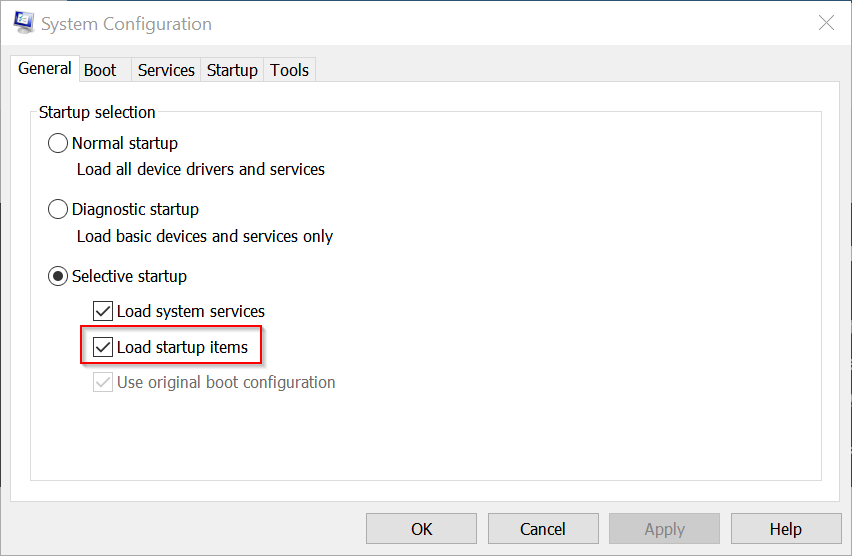
(1) Click/tap on the General tab.

(2) Click/tap on the Selective startup option.

(3) Remove the check mark in the Load startup items check box.

0JgaJnG.png


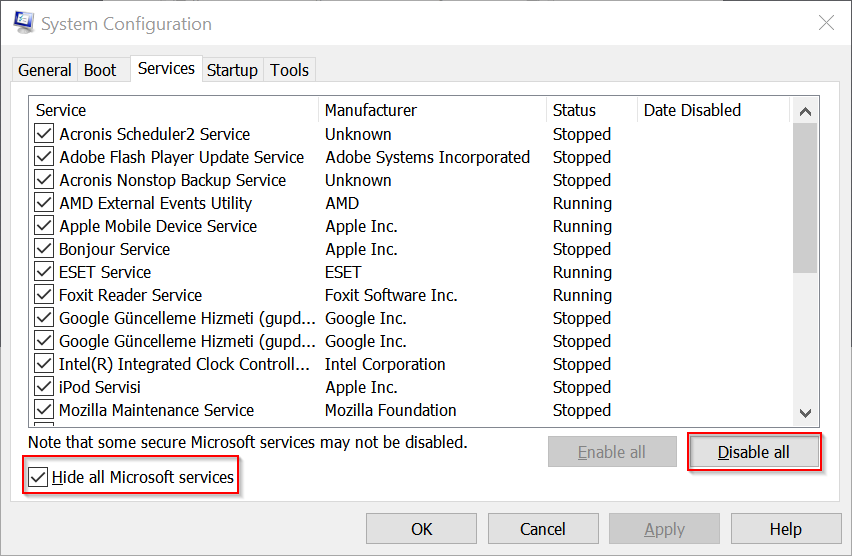
4. Click on the Services tab.

5. Place a check mark in the Hide all Microsoft services check box, this will remove the Microsoft Services from the list but will still be running.

6. Click Disable all, this will remove all of the check marks in the Services list.

yIKrmLs.png


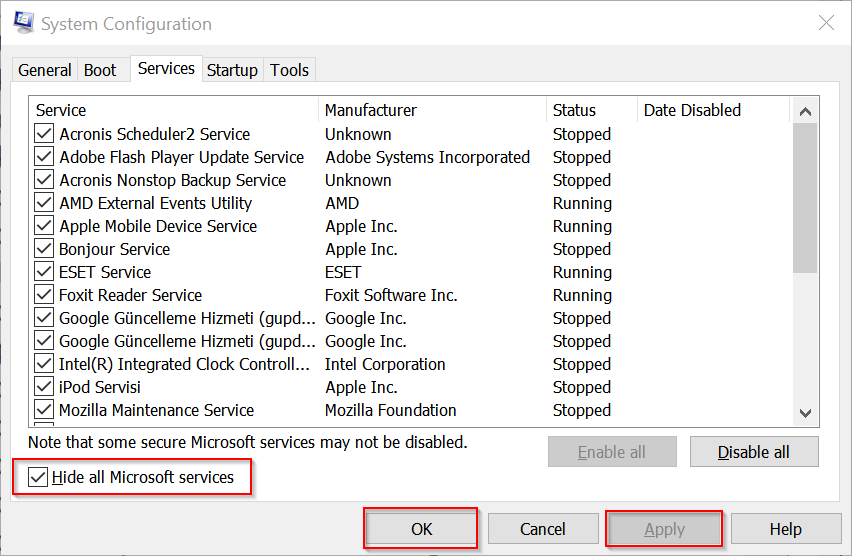
7. Click on Apply then OK

ljHR4ZW.png


Click on Restart in the window that opens.

When the computer is restarted it will boot normally.

If the problem does not continue after the restart please do the following.

8. Divide the number of these startup services and programs by two and you place checks in the first half of these, then restart the computer.

9. If the problem doesn't return in those services and programs remove the checks and place checks in the remaining services and programs and restart the computer.

10. When you find which half the service or program is in go on to the next step.

11. The half which has the service causing this problem remove half of the checks as you did previously to see which half has this service. Do the same for the programs. Restart the computer.

12. If it isn't in the first half of these services and programs, do the same with the last half of the services and programs.

13. Once you have narrowed it down to the last three or four services and programs remove the checks one at a time till you find the service or program at fault.

Once you have found the service or program post it in your topic. Do not take any action until I suggest the next step.
 

My Computer My Computer

At a glance

Windows 11AMD Ryzen 7 5700GMicron Technology DDR4-3200 16GBNVIDIA GeForce RTX 3060
OS
Windows 11
Computer type
PC/Desktop
Manufacturer/Model
HP Pavilion
CPU
AMD Ryzen 7 5700G
Motherboard
Erica6
Memory
Micron Technology DDR4-3200 16GB
Graphics Card(s)
NVIDIA GeForce RTX 3060
Sound Card
Realtek ALC671
Monitor(s) Displays
Samsung SyncMaster U28E590
Screen Resolution
3840 x 2160
Hard Drives
SAMSUNG MZVLQ1T0HALB-000H1
In the Search box,type in ---reliability---which will give you Reliability History ----and look for red-flagged entries.
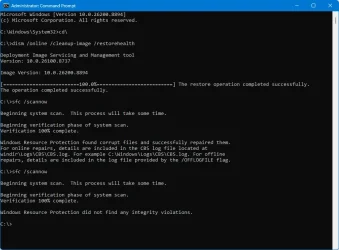
If Reliability History is not presented then you have a serious malfunction with Win 11 and the first action to take is in Terminal [admin ] type in and run---dism /online /cleanup-image /restorehealth ---when completed then type in ---sfc /scannow ---and continue to run it until a clean report is given.
 

My Computer My Computer

At a glance

win 10amd ryzen 5-2600ng skill sniper x 16gbnvidea gtx 1050
OS
win 10
Computer type
PC/Desktop
Manufacturer/Model
home built
CPU
amd ryzen 5-2600
Motherboard
gigabyte b450m-ds3h
Memory
ng skill sniper x 16gb
Graphics Card(s)
nvidea gtx 1050
Monitor(s) Displays
benq fp 92
Hard Drives
samsung 860 evo 500gb m2 ssd
PSU
antec ea550g
Case
nzxt noctis 450
Browser
edge

My Computer My Computer

At a glance

Windows 10Intel(R) Core(TM) i7-4800MQ CPU @ 2.70GHz16 GB Total: Manufacturer : Samsung MemoryTyp...NVIDIA Quadro K3100M; Intel(R) HD Graphics 4600
OS
Windows 10
Computer type
Laptop
Manufacturer/Model
HP
CPU
Intel(R) Core(TM) i7-4800MQ CPU @ 2.70GHz
Motherboard
Product : 190A Version : KBC Version 94.56
Memory
16 GB Total: Manufacturer : Samsung MemoryType : DDR3 FormFactor : SODIMM Capacity : 8GB Speed : 1600
Graphics Card(s)
NVIDIA Quadro K3100M; Intel(R) HD Graphics 4600
Sound Card
IDT High Definition Audio CODEC; PNP Device ID HDAUDIO\FUNC_01&VEN_111D&DEV_76E0
Hard Drives
Model Hitachi HTS727575A9E364
Antivirus
Microsoft Defender
Other Info
Mobile Workstation
Reliability Monitor showed some errors. The DISM and SFC combo found some corrupted files but repaired them. The improper shutdowns were me forcibly shutting down the PC due to the lockups. Haven't done the Services checks yet in case the SFC repair did the job.
 

Attachments

  • SFC.webp
    SFC.webp
    50.9 KB · Views: 1
  • Reliability.webp
    Reliability.webp
    120.8 KB · Views: 1
  • EventViewer.webp
    EventViewer.webp
    30.9 KB · Views: 1

My Computer My Computer

At a glance

Windows 11 Pro
OS
Windows 11 Pro
Like I've stated in other board, this kind of problem appear to be the health of your hub or computer.
 

My Computer My Computer

At a glance

Windows 11Intel Core i7DDR4RTX 4060 Ti
OS
Windows 11
Computer type
PC/Desktop
Manufacturer/Model
i7 RTX
CPU
Intel Core i7
Motherboard
Prime B660M
Memory
DDR4
Graphics Card(s)
RTX 4060 Ti
Sound Card
board
Monitor(s) Displays
Asus
Screen Resolution
2560x1440
Hard Drives
SSD 1T
Cooling
Water
Keyboard
Steekseries
Mouse
Logitech G502
Internet Speed
60mbps
Browser
Chrome
Antivirus
Windows defender
Other Info
I have neat case with color and I think the PSU is mid-high.
In Reliability History,select the Critical Events line,then RIGHT click it and then select the ---View tech ---box which gives the Report Sent page.
The first few lines should identify the problem cause.
You mentioned ---some errors ---perhaps "humungous" is more appropriate! !
 

My Computer My Computer

At a glance

win 10amd ryzen 5-2600ng skill sniper x 16gbnvidea gtx 1050
OS
win 10
Computer type
PC/Desktop
Manufacturer/Model
home built
CPU
amd ryzen 5-2600
Motherboard
gigabyte b450m-ds3h
Memory
ng skill sniper x 16gb
Graphics Card(s)
nvidea gtx 1050
Monitor(s) Displays
benq fp 92
Hard Drives
samsung 860 evo 500gb m2 ssd
PSU
antec ea550g
Case
nzxt noctis 450
Browser
edge
I included that log file for you to see.
I looked at it. Secure Boot disabled: The secure boot feature is disabled in the BIOS, which automatically reduces the level of trust in the system.

+ The motherboard PRIME H610M-A WIFI D4 BIOS is two years out of date.
 
Last edited:

My Computer My Computer

At a glance

Windows 11 Insider Experimental (26H2)Intel Core i5-1140032Gb (DDR4 SDRAM)Intel(R) UHD Graphics 730
OS
Windows 11 Insider Experimental (26H2)
Computer type
PC/Desktop
Manufacturer/Model
Gigabyte Technology Co., Ltd.
CPU
Intel Core i5-11400
Motherboard
Z590 AORUS PRO AX
Memory
32Gb (DDR4 SDRAM)
Graphics Card(s)
Intel(R) UHD Graphics 730
Sound Card
Realtek USB Audio
Monitor(s) Displays
LG 27US500-W 4K UHD UltraFine™
Screen Resolution
3840x2160
Hard Drives
Samsung SSD 980 PRO 1TB
WDC WD7501AALS
PSU
Montech CENTURY, 650W, 80+ Gold
Case
Cougar Airface ECO RGB
Cooling
ID-COOLING SE-224-XTS BLACK
Keyboard
Microsoft SideWinder X6 Keyboard
Mouse
Microsoft SideWinder Mouse
Internet Speed
Internet speed of 1 Gbit/s
Browser
Vivaldi browser
Antivirus
Windows Defender
Reliability Monitor showed some errors. The DISM and SFC combo found some corrupted files but repaired them. The improper shutdowns were me forcibly shutting down the PC due to the lockups. Haven't done the Services checks yet in case the SFC repair did the job.

Can you click on both Application Hang and Application Error, as well as Kernel-Event tracing and post those images here? You can alternatively copy the text from each "Event" in Event Viewer and paste it.
 

My Computer My Computer

At a glance

Windows 11 Pro 25H2i7 12700k64GB DDR5 [CMK64GX5M2B5200C40]MSI 4060 2x Ventus 8G
OS
Windows 11 Pro 25H2
Computer type
PC/Desktop
Manufacturer/Model
DIY
CPU
i7 12700k
Motherboard
7E07vM9 [Z790 Pro Max Wifi]
Memory
64GB DDR5 [CMK64GX5M2B5200C40]
Graphics Card(s)
MSI 4060 2x Ventus 8G
Sound Card
Realtek® ALC4080 Codec
Monitor(s) Displays
ASUS VA24DQSB
Screen Resolution
1920x1080 @ 75hz
Hard Drives
Samsung 980 Pro 1TB (OS Drive)
Samsung 980 Pro 2TB (Secondary Drive)
Samsung 980 Pro 1TB (Other)
Samsung 860 Pro 512 (Other)
WD6400AAKS (Other)
PSU
Corsair 850x
Cooling
Noctua NH-D15
Mouse
G502 X Lightspeed
Browser
Chrome, Firefox
Antivirus
Malwarebytes Premium, Defender
I ended up doing a clean reinstall of Win 11, and the locking up hasn't occurred since.
 

My Computer My Computer

At a glance

Windows 11 Pro
OS
Windows 11 Pro

Latest Support Threads

Back
Top Bottom