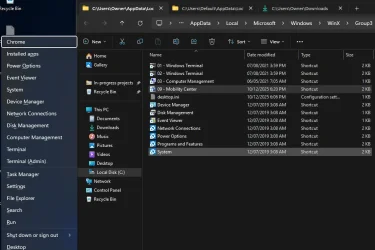
Win + X Key Menu.


Arraial

New member
Local time
2:52 AM
Posts
3
OS
Windows 11 24H2
Windows 11 Version 24H2

The 3 Group folders are located in:
C:\Users\Username\AppData\Local\Microsoft\Windows\WinX
C:\Users\Default\AppData\Local\Microsoft\Windows\WinX

I can't believe that I can delete shortcuts in these folders, but I can't add any.
 

My Computer

System One

  • OS
    Windows 11 24H2
    Computer type
    Laptop
    Manufacturer/Model
    Hewlett-Packard HP 250 15.6 inch G10HP
    Motherboard
    Hewlett-Packard 8B34
    Memory
    32 GB
you can only edit the target field of some. cannot rename or replace them completely.. see my example here:

you can also use SAB or EP and restore the classic taskbar to re-enable editing of the WinX menu (for ease you can use Winaero's WinX Editor too)
 

My Computer

System One

  • OS
    Windows 11 Pro
Microsoft uses an undocumented hashing function to effectively sign the shortcuts that make up the WinX menu, so if there's no hash Windows won't display items added
 

My Computer

System One

  • OS
    Linux Mint
    Computer type
    Laptop
    Manufacturer/Model
    System76 Lemur Pro

My Computer

System One

  • OS
    Windows 11 Pro
Unfortunately, hashlink no longer works to add custom shortcuts in the Win+X menu.


My Computers

System One System Two

  • OS
    Windows 11 Pro for Workstations
    Computer type
    PC/Desktop
    Manufacturer/Model
    Custom self build
    CPU
    Intel i7-8700K 5 GHz
    Motherboard
    ASUS ROG Maximus XI Formula Z390
    Memory
    64 GB (4x16GB) G.SKILL TridentZ RGB DDR4 3600 MHz (F4-3600C18D-32GTZR)
    Graphics Card(s)
    ASUS ROG-STRIX-GTX1080TI-O11G-GAMING (11GB GDDR5X)
    Sound Card
    Integrated Digital Audio (S/PDIF)
    Monitor(s) Displays
    2 x Samsung Odyssey G75 27"
    Screen Resolution
    2560x1440
    Hard Drives
    1TB Samsung 990 PRO M.2,
    4TB Samsung 990 PRO M.2,
    TerraMaster F8 SSD Plus NAS
    PSU
    Seasonic Prime Titanium 850W
    Case
    Thermaltake Core P3 wall mounted
    Cooling
    Corsair Hydro H115i
    Keyboard
    Amazon Basics Wired Full Keyboard MD005
    Mouse
    Logitech MX Master 4
    Internet Speed
    2 Gbps Download and 100 Mbps Upload
    Browser
    Chrome and Edge
    Antivirus
    Microsoft Defender
    Other Info
    Logitech Z625 speaker system,
    Logitech BRIO 4K Pro webcam,
    HP Color LaserJet Pro MFP M477fdn,
    CyberPower CP1500PFCLCD
    Galaxy S23 Plus phone
  • Operating System
    Windows 11 Pro
    Computer type
    Laptop
    Manufacturer/Model
    Surface Laptop 7 Copilot+ PC
    CPU
    Snapdragon X Elite (12 core) 3.42 GHz
    Memory
    16 GB LPDDR5x-7467 MHz
    Monitor(s) Displays
    15" HDR
    Screen Resolution
    2496 x 1664
    Hard Drives
    1 TB SSD
    Internet Speed
    Wi-Fi 7 and Bluetooth 5.4
    Browser
    Chrome and Edge
    Antivirus
    Microsoft Defender
Unfortunately, hashlink no longer works to add custom shortcuts in the Win+X menu.

ahh.. oh well. but this still works as a semi-way of adding desired by replacing a current unneeded shortcut:

just an update.. this menu can still 100% be edited. i opened

C:\Users\myname\AppData\Local\Microsoft\Windows\WinX

went to Group 2, edited the "File Explorer" shortcut.
i replaced the default target:
%windir%\explorer.exe shell:::{52205fd8-5dfb-447d-801a-d0b52f2e83e1}
with
%windir%\explorer.exe shell:::{025A5937-A6BE-4686-A844-36FE4BEC8B6D}

and restarted Explorer. When i used winx menu to launch "File Explorer", it instead launched Power Options.
renaming the shortcut didnt work, but i'll figure it out.


*Still toying with it. ive replaced explorer with power options and search with control panel, so i know the shell commands work for any of them. i have tried Power renaming the shortcuts & modifying properties but no dice yet.
 

My Computer

System One

  • OS
    Windows 11 Pro
ahh.. oh well. but this still works as a semi-way of adding desired by replacing a current unneeded shortcut:

just an update.. this menu can still 100% be edited. i opened

C:\Users\myname\AppData\Local\Microsoft\Windows\WinX

went to Group 2, edited the "File Explorer" shortcut.
i replaced the default target:
%windir%\explorer.exe shell:::{52205fd8-5dfb-447d-801a-d0b52f2e83e1}
with
%windir%\explorer.exe shell:::{025A5937-A6BE-4686-A844-36FE4BEC8B6D}

and restarted Explorer. When i used winx menu to launch "File Explorer", it instead launched Power Options.
renaming the shortcut didnt work, but i'll figure it out.


*Still toying with it. ive replaced explorer with power options and search with control panel, so i know the shell commands work for any of them. i have tried Power renaming the shortcuts & modifying properties but no dice yet.
 

My Computer

System One

  • OS
    Windows 11 24H2
    Computer type
    Laptop
    Manufacturer/Model
    Hewlett-Packard HP 250 15.6 inch G10HP
    Motherboard
    Hewlett-Packard 8B34
    Memory
    32 GB
btw.
The path:
"C:\Users\myname\AppData\Local\Microsoft\Windows\WinX"
doesn't change anything on my computer.
I can even delete the 3 Group directories.

Only:
"C:\Users\Default\AppData\Local\Microsoft\Windows\WinX"
seems to be important.
 

My Computer

System One

  • OS
    Windows 11 24H2
    Computer type
    Laptop
    Manufacturer/Model
    Hewlett-Packard HP 250 15.6 inch G10HP
    Motherboard
    Hewlett-Packard 8B34
    Memory
    32 GB
For some versions, you can modify the Win+X menu through Group Policy or registry edits instead of direct file manipulation.
 

My Computer

System One

  • OS
    Windows 11
    Computer type
    PC/Desktop
with the combination of an ahk script used to redirect and winx editor to rename, i can modify the winx menu on windows 11 with no other mods (no ep or sab, etc to replace the taskbar). i'll get the redirect script to have a gui so users can do it without coding. the only caveat to this method is that you will be swapping the entries and not adding new ones entirely

ie - if you wanted control panel instead of settings, you can do that, but you cant keep everything currently and add control panel (make sense?). in this example i renamed and redirect Mobility Center to Google Chrome. works with no issues.

1760312479398.webp
 

My Computer

System One

  • OS
    Windows 11 Pro
Back
Top Bottom