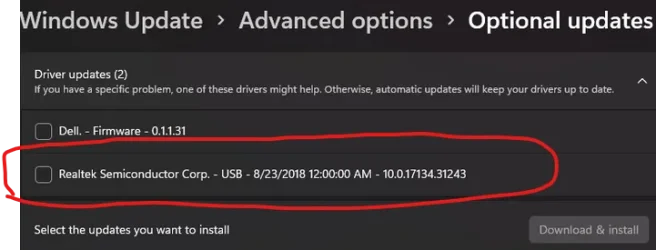
The problems appear to be related to the Qualcom Wifi / Bluetooth combination card.
bluetooth: USB\VID_0CF3&PID_E009
Device Name : Port_#0008.Hub_#0002
Description : Unknown USB Device (Device Descriptor Request Failed)
Device Name : Port_#0008.Hub_#0002
Description : Qualcomm QCA9377 Bluetooth
When it fails: USB\VID_0000&PID_0002
When it works: USB\VID_0CF3&PID_E009
Both have the same instance ID: 5&1b43c3ee&0&8
Both have the same USB Port / Hub: Port_#0008.Hub_#0002
Some possible trial and error steps:
a) find a better driver?
b) Disable USB selective suspend
 www.elevenforum.com
c) Uncheck: Allow the computer to turn off this device to save power" on all USB Controllers
 www.tenforums.com
bluetooth: USB\VID_0CF3&PID_E009
Device Name : Port_#0008.Hub_#0002
Description : Unknown USB Device (Device Descriptor Request Failed)
Device Name : Port_#0008.Hub_#0002
Description : Qualcomm QCA9377 Bluetooth
When it fails: USB\VID_0000&PID_0002
When it works: USB\VID_0CF3&PID_E009
Both have the same instance ID: 5&1b43c3ee&0&8
Both have the same USB Port / Hub: Port_#0008.Hub_#0002
Code:
Driver Description: Unknown USB Device (Device Descriptor Request Failed)
Driver Version    : 10.0.26100.8328
Driver InfSection : BADDEVICE.Dev.NT
Driver InfPath    : usb.inf
Instance ID       : USB\VID_0000&PID_0002\5&1b43c3ee&0&8
Code:
ParentId Prefix   : 6&1249bbc&7
Service Name      : BTHUSB
Service Description: @bth.inf,%BTHUSB.SvcDesc%;Bluetooth Radio USB Driver
Driver Filename   : BTHUSB.sys
Device Class      :
Device Mfg        : Qualcomm
Friendly Name     :
Power             : 100 mA
USB Version       : 2.01
Driver Description: Qualcomm QCA9377 Bluetooth
Driver Version    : 10.0.0.1238
Driver InfSection : QCABTUSB
Driver InfPath    : oem52.inf
Instance ID       : USB\VID_0CF3&PID_E009\5&1b43c3ee&0&8
Some possible trial and error steps:
a) find a better driver?
b) Disable USB selective suspend
Enable or Disable USB Selective Suspend in Windows 11
This tutorial will show you how to turn on or off USB selective suspend for a power plan in Windows 10 and Windows 11. USB selective suspend is the ability to power down and later resume an idle USB device while the computer to which it is attached remains in the working state (S0). For...
www.elevenforum.com
c) Uncheck: Allow the computer to turn off this device to save power" on all USB Controllers
Disable USB Hub/Host Controller Power Management with Powershell? - Windows 10 Help Forums
Hey all, I'm looking for a way to disable the setting "Allow the computer to turn off this device to save power" on all USB Hubs and Host Controllers in Device Manager (under Universal Serial Bus controllers). I need to do this on many PCs so I'
www.tenforums.com
My Computer
At a glance
Windows 10Intel(R) Core(TM) i7-4800MQ CPU @ 2.70GHz16 GB Total: Manufacturer : Samsung MemoryTyp...NVIDIA Quadro K3100M; Intel(R) HD Graphics 4600
- OS
- Windows 10
- Computer type
- Laptop
- Manufacturer/Model
- HP
- CPU
- Intel(R) Core(TM) i7-4800MQ CPU @ 2.70GHz
- Motherboard
- Product : 190A Version : KBC Version 94.56
- Memory
- 16 GB Total: Manufacturer : Samsung MemoryType : DDR3 FormFactor : SODIMM Capacity : 8GB Speed : 1600
- Graphics Card(s)
- NVIDIA Quadro K3100M; Intel(R) HD Graphics 4600
- Sound Card
- IDT High Definition Audio CODEC; PNP Device ID HDAUDIO\FUNC_01&VEN_111D&DEV_76E0
- Hard Drives
- Model Hitachi HTS727575A9E364
- Antivirus
- Microsoft Defender
- Other Info
- Mobile Workstation