Solved Win10 to Win11 fails with 0xC1900101 - 0x40017 on second reboot


The problems appear to be related to the Qualcom Wifi / Bluetooth combination card.


bluetooth: USB\VID_0CF3&PID_E009


Device Name : Port_#0008.Hub_#0002
Description : Unknown USB Device (Device Descriptor Request Failed)

Device Name : Port_#0008.Hub_#0002
Description : Qualcomm QCA9377 Bluetooth


When it fails: USB\VID_0000&PID_0002

When it works: USB\VID_0CF3&PID_E009


Both have the same instance ID: 5&1b43c3ee&0&8

Both have the same USB Port / Hub: Port_#0008.Hub_#0002


Code:
Driver Description: Unknown USB Device (Device Descriptor Request Failed)
Driver Version    : 10.0.26100.8328
Driver InfSection : BADDEVICE.Dev.NT
Driver InfPath    : usb.inf
Instance ID       : USB\VID_0000&PID_0002\5&1b43c3ee&0&8


Code:
ParentId Prefix   : 6&1249bbc&7
Service Name      : BTHUSB
Service Description: @bth.inf,%BTHUSB.SvcDesc%;Bluetooth Radio USB Driver
Driver Filename   : BTHUSB.sys
Device Class      :
Device Mfg        : Qualcomm
Friendly Name     :
Power             : 100 mA
USB Version       : 2.01
Driver Description: Qualcomm QCA9377 Bluetooth
Driver Version    : 10.0.0.1238
Driver InfSection : QCABTUSB
Driver InfPath    : oem52.inf
Instance ID       : USB\VID_0CF3&PID_E009\5&1b43c3ee&0&8


Some possible trial and error steps:

a) find a better driver?

b) Disable USB selective suspend

c) Uncheck: Allow the computer to turn off this device to save power" on all USB Controllers


My Computer

System One

  • OS
    Windows 10
    Computer type
    Laptop
    Manufacturer/Model
    HP
    CPU
    Intel(R) Core(TM) i7-4800MQ CPU @ 2.70GHz
    Motherboard
    Product : 190A Version : KBC Version 94.56
    Memory
    16 GB Total: Manufacturer : Samsung MemoryType : DDR3 FormFactor : SODIMM Capacity : 8GB Speed : 1600
    Graphics Card(s)
    NVIDIA Quadro K3100M; Intel(R) HD Graphics 4600
    Sound Card
    IDT High Definition Audio CODEC; PNP Device ID HDAUDIO\FUNC_01&VEN_111D&DEV_76E0
    Hard Drives
    Model Hitachi HTS727575A9E364
    Antivirus
    Microsoft Defender
    Other Info
    Mobile Workstation
Hi zbook, things are looking better

1. the stuck Selective Restart is no longer stuck. Normal startup can now be selected and the setting sticks betewwn selectiny apply and subsequent reboots. I'm not sure what fixed that but it's resolved

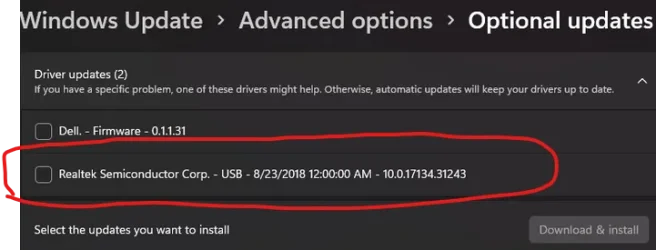
2. I went ahead and installed the the new Realtek driver that was offered after the WU reset.


1779300952580.webp

3. I haven't decided what action I'm going to try regarding the Firmware update that's being offered but already installed. I'm going to look more deeply into this thread that you mentioned


4. As far as the unknown USB driver. I concur with your additional analysis that it refers to the Qualcomm WiFi/Bluetooth combo card. Here's what I did with this:
a) I checked Qualcomm for an updated driver, they have drivers available, but you have to be a registered OEM vendor to download their drivers.
b) I rechecked Dell for an updated driver, I am already using what they list as latest
c) so to see if it would help I went ahead and downloaded the same driver and installed it again. Since it was already installed it did a "repair" install. After this completed I rebooted the pc. The unkown device was still present, I didn't really thing it would now be gone, but you never know.
d) so I went ahead and uninstalled the unknown device successfully and then did a "Scan for hardware changes" The unknown device was not rediscovered
e) I have rebooted 3 additional times and the unknown device has not returned

At at this point I think I'm good with where we at. I would like to keep this thread open for another day or two to confirm Window 11 stability if that is okay

Here is one last V2 log in case you wanted to have one last look at things


Thanks for all your help and expertise with all this
Barry
 

Attachments

  • 1779301136115.webp
    1779301136115.webp
    20.4 KB · Views: 1

My Computer

System One

  • OS
    Windows 11
    Computer type
    PC/Desktop
    Manufacturer/Model
    Dell XPS 8930
    CPU
    Intel(R) Core(TM) i7-9700 CPU @ 3.00GHz, 3000
    Memory
    16G
    Graphics Card(s)
    NVIDIA GeForce GTX 1050Ti, Intel(R) UHD Graphics 630
    Sound Card
    Creative Sound Blaster Z SE
    Screen Resolution
    1920 x 1080
    Antivirus
    MS Defender
I went ahead and installed the the new Realtek driver that was offered after the WU reset.


The latest log files reported disabled Qualcom Wireless and Killer Ethernet


There are multiple active EF on upgrading secure boot:


Frequently asked questions about the Secure Boot update process - Microsoft Support
Secure Boot playbook for certificates expiring in 2026
Windows Secure Boot Key Creation and Management Guidance
Registry key updates for Secure Boot: Windows devices with IT-managed updates - Microsoft Support
Updating Microsoft Secure Boot keys before expiration in June 2026 | Windows 11 Forum
Secure boot update HowTo | Windows 11 Forum


Code:
Qualcomm QCA9377 802.11ac Wireless Adapter    PCI\VEN_168C&DEV_0042&SUBSYS_18101028&REV_31\4&2C6D63FE&0&00E2    This device is disabled.

Killer E2400 Gigabit Ethernet Controller    PCI\VEN_1969&DEV_E0A1&SUBSYS_08591028&REV_10\4&641E26A&0&00E3    This device is disabled.


Code:
Event[10648]
  Log Name: System
  Source: Microsoft-Windows-TPM-WMI
  Date: 2026-05-20T14:09:01.9440000Z
  Event ID: 1796
  Task: N/A
  Level: Error
  Opcode: Info
  Keyword: N/A
  User: S-1-5-18
  User Name: NT AUTHORITY\SYSTEM
  Computer: TopFuel
  Description:
The Secure Boot update failed to update Windows UEFI CA 2023 (DB) with error The process cannot access the file because it is being used by another process.. For more information, please see https://go.microsoft.com/fwlink/?linkid=2169931

Event[10649]
  Log Name: System
  Source: Microsoft-Windows-TPM-WMI
  Date: 2026-05-20T14:09:01.9520000Z
  Event ID: 1796
  Task: N/A
  Level: Error
  Opcode: Info
  Keyword: N/A
  User: S-1-5-18
  User Name: NT AUTHORITY\SYSTEM
  Computer: TopFuel
  Description:
The Secure Boot update failed to update Option ROM CA 2023 (DB) with error The process cannot access the file because it is being used by another process.. For more information, please see https://go.microsoft.com/fwlink/?linkid=2169931

Event[10650]
  Log Name: System
  Source: Microsoft-Windows-TPM-WMI
  Date: 2026-05-20T14:09:01.9610000Z
  Event ID: 1796
  Task: N/A
  Level: Error
  Opcode: Info
  Keyword: N/A
  User: S-1-5-18
  User Name: NT AUTHORITY\SYSTEM
  Computer: TopFuel
  Description:
The Secure Boot update failed to update 3P UEFI CA 2023 (DB) with error The process cannot access the file because it is being used by another process.. For more information, please see https://go.microsoft.com/fwlink/?linkid=2169931

Event[10651]
  Log Name: System
  Source: Microsoft-Windows-TPM-WMI
  Date: 2026-05-20T14:09:01.9750000Z
  Event ID: 1801
  Task: N/A
  Level: Error
  Opcode: Info
  Keyword: N/A
  User: S-1-5-18
  User Name: NT AUTHORITY\SYSTEM
  Computer: TopFuel
  Description:
Updated Secure Boot certificates are available on this device but have not yet been applied to the firmware. Review the published guidance to complete the update and maintain full protection. This device signature information is included here.
DeviceAttributes: FirmwareManufacturer:Dell Inc.;FirmwareVersion:1.1.31;OEMManufacturerName:Dell Inc.;OEMModelSKU:0859;OSArchitecture:amd64;
BucketId: 20b053aa5ab91c5a11490dea87f49522aa09ffaa65d03a1a24eb8d73cfd89c4d
BucketConfidenceLevel: Under Observation - More Data Needed
UpdateType:
For more information, please see https://go.microsoft.com/fwlink/?linkid=2301018.


Code:
Event[10127]
  Log Name: System
  Source: Microsoft-Windows-TPM-WMI
  Date: 2026-05-20T13:40:40.1620000Z
  Event ID: 1796
  Task: N/A
  Level: Error
  Opcode: Info
  Keyword: N/A
  User: S-1-5-18
  User Name: NT AUTHORITY\SYSTEM
  Computer: TopFuel
  Description:
The Secure Boot update failed to update Windows UEFI CA 2023 (DB) with error The process cannot access the file because it is being used by another process.. For more information, please see https://go.microsoft.com/fwlink/?linkid=2169931

Event[10128]
  Log Name: System
  Source: Microsoft-Windows-TPM-WMI
  Date: 2026-05-20T13:40:40.1700000Z
  Event ID: 1796
  Task: N/A
  Level: Error
  Opcode: Info
  Keyword: N/A
  User: S-1-5-18
  User Name: NT AUTHORITY\SYSTEM
  Computer: TopFuel
  Description:
The Secure Boot update failed to update Option ROM CA 2023 (DB) with error The process cannot access the file because it is being used by another process.. For more information, please see https://go.microsoft.com/fwlink/?linkid=2169931

Event[10129]
  Log Name: System
  Source: Microsoft-Windows-TPM-WMI
  Date: 2026-05-20T13:40:40.1780000Z
  Event ID: 1796
  Task: N/A
  Level: Error
  Opcode: Info
  Keyword: N/A
  User: S-1-5-18
  User Name: NT AUTHORITY\SYSTEM
  Computer: TopFuel
  Description:
The Secure Boot update failed to update 3P UEFI CA 2023 (DB) with error The process cannot access the file because it is being used by another process.. For more information, please see https://go.microsoft.com/fwlink/?linkid=2169931

Event[10130]
  Log Name: System
  Source: Microsoft-Windows-TPM-WMI
  Date: 2026-05-20T13:40:40.1890000Z
  Event ID: 1801
  Task: N/A
  Level: Error
  Opcode: Info
  Keyword: N/A
  User: S-1-5-18
  User Name: NT AUTHORITY\SYSTEM
  Computer: TopFuel
  Description:
Updated Secure Boot certificates are available on this device but have not yet been applied to the firmware. Review the published guidance to complete the update and maintain full protection. This device signature information is included here.
DeviceAttributes: FirmwareManufacturer:Dell Inc.;FirmwareVersion:1.1.31;OEMManufacturerName:Dell Inc.;OEMModelSKU:0859;OSArchitecture:amd64;
BucketId: 20b053aa5ab91c5a11490dea87f49522aa09ffaa65d03a1a24eb8d73cfd89c4d
BucketConfidenceLevel: Under Observation - More Data Needed
UpdateType:
For more information, please see https://go.microsoft.com/fwlink/?linkid=2301018.
 

My Computer

System One

  • OS
    Windows 10
    Computer type
    Laptop
    Manufacturer/Model
    HP
    CPU
    Intel(R) Core(TM) i7-4800MQ CPU @ 2.70GHz
    Motherboard
    Product : 190A Version : KBC Version 94.56
    Memory
    16 GB Total: Manufacturer : Samsung MemoryType : DDR3 FormFactor : SODIMM Capacity : 8GB Speed : 1600
    Graphics Card(s)
    NVIDIA Quadro K3100M; Intel(R) HD Graphics 4600
    Sound Card
    IDT High Definition Audio CODEC; PNP Device ID HDAUDIO\FUNC_01&VEN_111D&DEV_76E0
    Hard Drives
    Model Hitachi HTS727575A9E364
    Antivirus
    Microsoft Defender
    Other Info
    Mobile Workstation
The latest log files reported disabled Qualcom Wireless and Killer Ethernet
Hi zbook, I am not using these adapters so I disabled them via Device Manager

In regard to the CA-2023 Certificates issues I am currently working with Garlin in this thread


I think at this point I am ready to close this Win11 update failure thread

Please let me know if you concur and I will close this thread.

Thanks for all your help and assistance with this issue -

Barry
 

My Computer

System One

  • OS
    Windows 11
    Computer type
    PC/Desktop
    Manufacturer/Model
    Dell XPS 8930
    CPU
    Intel(R) Core(TM) i7-9700 CPU @ 3.00GHz, 3000
    Memory
    16G
    Graphics Card(s)
    NVIDIA GeForce GTX 1050Ti, Intel(R) UHD Graphics 630
    Sound Card
    Creative Sound Blaster Z SE
    Screen Resolution
    1920 x 1080
    Antivirus
    MS Defender
Yes.

Agree.


You're welcome.


Glad to help.
 

My Computer

System One

  • OS
    Windows 10
    Computer type
    Laptop
    Manufacturer/Model
    HP
    CPU
    Intel(R) Core(TM) i7-4800MQ CPU @ 2.70GHz
    Motherboard
    Product : 190A Version : KBC Version 94.56
    Memory
    16 GB Total: Manufacturer : Samsung MemoryType : DDR3 FormFactor : SODIMM Capacity : 8GB Speed : 1600
    Graphics Card(s)
    NVIDIA Quadro K3100M; Intel(R) HD Graphics 4600
    Sound Card
    IDT High Definition Audio CODEC; PNP Device ID HDAUDIO\FUNC_01&VEN_111D&DEV_76E0
    Hard Drives
    Model Hitachi HTS727575A9E364
    Antivirus
    Microsoft Defender
    Other Info
    Mobile Workstation
Back
Top Bottom