Solved Win10 to Win11 fails with 0xC1900101 - 0x40017 on second reboot


Okay, I think I solved part of the network issue. When both adapters are enabled the local network is reachable but not the internet. If I disable one of them the other can reach the internet and vice versa. However, neither adapter can reach the windows update server
 

My Computer

System One

  • OS
    Windows 11
    Computer type
    PC/Desktop
    Manufacturer/Model
    Dell XPS 8930
    CPU
    Intel(R) Core(TM) i7-9700 CPU @ 3.00GHz, 3000
    Memory
    16G
    Graphics Card(s)
    NVIDIA GeForce GTX 1050Ti, Intel(R) UHD Graphics 630
    Sound Card
    Creative Sound Blaster Z SE
    Screen Resolution
    1920 x 1080
    Antivirus
    MS Defender
Hi zbook, the wireless connection is now able to reach the windows update server. It just started to work, I will be switching back to the wired connection shortly to confirm that it can reach the update server
 

My Computer

System One

  • OS
    Windows 11
    Computer type
    PC/Desktop
    Manufacturer/Model
    Dell XPS 8930
    CPU
    Intel(R) Core(TM) i7-9700 CPU @ 3.00GHz, 3000
    Memory
    16G
    Graphics Card(s)
    NVIDIA GeForce GTX 1050Ti, Intel(R) UHD Graphics 630
    Sound Card
    Creative Sound Blaster Z SE
    Screen Resolution
    1920 x 1080
    Antivirus
    MS Defender
Okay, I think I solved part of the network issue. When both adapters are enabled the local network is reachable but not the internet. If I disable one of them the other can reach the internet and vice versa. However, neither adapter can reach the windows update server
 

My Computer

System One

  • OS
    Windows 11
    Computer type
    PC/Desktop
    Manufacturer/Model
    Dell XPS 8930
    CPU
    Intel(R) Core(TM) i7-9700 CPU @ 3.00GHz, 3000
    Memory
    16G
    Graphics Card(s)
    NVIDIA GeForce GTX 1050Ti, Intel(R) UHD Graphics 630
    Sound Card
    Creative Sound Blaster Z SE
    Screen Resolution
    1920 x 1080
    Antivirus
    MS Defender
Hi ebook, one last update for today. I did one more check on the internet access via the wired network adapter. I cannot reach the internet using this adapter. I have no issue reaching the local network

Thanks
Barry
 

My Computer

System One

  • OS
    Windows 11
    Computer type
    PC/Desktop
    Manufacturer/Model
    Dell XPS 8930
    CPU
    Intel(R) Core(TM) i7-9700 CPU @ 3.00GHz, 3000
    Memory
    16G
    Graphics Card(s)
    NVIDIA GeForce GTX 1050Ti, Intel(R) UHD Graphics 630
    Sound Card
    Creative Sound Blaster Z SE
    Screen Resolution
    1920 x 1080
    Antivirus
    MS Defender
With Windows 10 this was one of the drivers that blocked Windows upgrades (it did not pass Windows memory integrity):

remoteusblan.inf_amd64_f78905a23bcbcce5\amd64\rcblan.sys"

It may be related.


Memory integrity can be temporarily turned off as a trial and error step.


On a working Windows computer download network drivers from the Dell website to a flash drive.

Move the flash drive with the network drivers to the problematic computer > reinstall network drivers


(These may or may not work for Windows 11)


Alternatives for Killer E2400 Gigabit Ethernet Controller

Driver C:\WINDOWS\SYSTEM32\DRIVERS\E2XW10X64.SYS (9.0.0.50, 160.76 KB (164,616 bytes), 5/19/2020 2:23 PM)
This driver was for Windows 10.

Killer no longer makes these drivers and was purchased by Intel.

Intel may or may not have continued to support the Killer hardware.


1)Possible Microsoft Windows catalog supported drivers:

a)
b)pnputil /add-driver "C:\Users\BarryD\Downloads\KillerE2400.cab" /install


2)Wifi:

a)
Qualcomm Atheros Communications Inc. - Net - 12.0.0.1159
379c8727-3c13-4ac0-920d-0d8346eb2e00_294b35e974548debb94b271d24db536bf0ba0cf7.cab

b)pnputil /add-driver "C:\Users\BarryD\Downloads\379c8727-3c13-4ac0-920d-0d8346eb2e00_294b35e974548debb94b271d24db536bf0ba0cf7.cab" /install


3) Run > post a share link

netsh winsock reset
netsh int ip reset
ipconfig /flushdns


4) For Windows 11 add WMIC: (as needed post upgrade)


5) For Windows 11 enable regback: (as needed post upgrade)


6) Rerun Tuneup plus > post a share link into the newest post


7) For Windows 11 create a new restore point:


8) Backup Windows 11 drivers:


Code:
Name    [00000001] VirtualBox Host-Only Ethernet Adapter
Adapter Type    Ethernet 802.3
Product Type    VirtualBox Host-Only Ethernet Adapter
Installed    Yes
PNP Device ID    ROOT\NET\0000
Last Reset    5/11/2026 6:12 PM
Index    1
Service Name    VBoxNetAdp
Driver    C:\WINDOWS\SYSTEM32\DRIVERS\VBOXNETADP6.SYS (7.1.0.14728, 240.44 KB (246,208 bytes), 9/6/2024 9:54 AM)
 
Name    [00000002] Killer E2400 Gigabit Ethernet Controller
Adapter Type    Ethernet 802.3
Product Type    Killer E2400 Gigabit Ethernet Controller
Installed    Yes
PNP Device ID    PCI\VEN_1969&DEV_E0A1&SUBSYS_08591028&REV_10\4&641E26A&0&00E3
Last Reset    5/11/2026 6:12 PM
Index    2
Service Name    e2xw10x64
Driver    C:\WINDOWS\SYSTEM32\DRIVERS\E2XW10X64.SYS (9.0.0.50, 160.76 KB (164,616 bytes), 5/19/2020 2:23 PM)
 
Name    [00000003] Qualcomm QCA9377 802.11ac Wireless Adapter
Adapter Type    Ethernet 802.3
Product Type    Qualcomm QCA9377 802.11ac Wireless Adapter
Installed    Yes
PNP Device ID    PCI\VEN_168C&DEV_0042&SUBSYS_18101028&REV_31\4&2C6D63FE&0&00E2
Last Reset    5/11/2026 6:12 PM
Index    3
Service Name    Qcamain10x64
Driver    C:\WINDOWS\SYSTEM32\DRIVERS\QCAMAIN10X64.SYS (12.0.0.1118, 2.34 MB (2,457,416 bytes), 1/23/2022 11:01 PM)
 
Last edited:

My Computer

System One

  • OS
    Windows 10
    Computer type
    Laptop
    Manufacturer/Model
    HP
    CPU
    Intel(R) Core(TM) i7-4800MQ CPU @ 2.70GHz
    Motherboard
    Product : 190A Version : KBC Version 94.56
    Memory
    16 GB Total: Manufacturer : Samsung MemoryType : DDR3 FormFactor : SODIMM Capacity : 8GB Speed : 1600
    Graphics Card(s)
    NVIDIA Quadro K3100M; Intel(R) HD Graphics 4600
    Sound Card
    IDT High Definition Audio CODEC; PNP Device ID HDAUDIO\FUNC_01&VEN_111D&DEV_76E0
    Hard Drives
    Model Hitachi HTS727575A9E364
    Antivirus
    Microsoft Defender
    Other Info
    Mobile Workstation
Hi zbook, everything is going well at this point. I am currently connected to the internet via the Killer wired ethernet connection.

I thought your user name was familiar, you helped me win a BSOD issue via TenForums incident: 149736-intermittent-driver_power_state_failure-bsod-when-going-sleep back in Feb 2020

And guess where the problem was - Killer e2400 Killer Utilities which included a few enhancers for the Killer nic.

XXXXXXXXXXXXXXXXXXXXXXXXXXXXXXXXXXXXXXXXXXXXXXXXXXXXXXXXXX
After looking around for updated drivers for both adapters I decided to leave things alone for now. I did update the wireless adapter using the latest from dell a few days before I attempted the upgrade.

The Killer e2400 has no support from Rivet Networks or the new owner Intel. So I am using the latest available driver

Since I didn't mess with the drivers I skipped this step:
Memory integrity can be temporarily turned off as a trial and error step.

As per above I didn't do these steps for both the wired and wireless adapters
1)Possible Microsoft Windows catalog supported drivers:
a)
Microsoft Update Catalog
2)Wifi:

a)
Microsoft Update Catalog


3) Run > post a share link

I ran these commands with the wifi adapter enabled and wired disabled

netsh winsock reset
netsh int ip reset
ipconfig /flushdns


Microsoft Windows [Version 10.0.26200.8457]
(c) Microsoft Corporation. All rights reserved.

C:\Windows\System32>netsh winsock reset

Sucessfully reset the Winsock Catalog.
You must restart the computer in order to complete the reset.


C:\Windows\System32>netsh int ip reset
Resetting Compartment Forwarding, OK!
Resetting Compartment, OK!
Resetting Control Protocol, OK!
Resetting Echo Sequence Request, OK!
Resetting Global, OK!
Resetting Interface, OK!
Resetting Anycast Address, OK!
Resetting Multicast Address, OK!
Resetting Unicast Address, OK!
Resetting Neighbor, OK!
Resetting Path, OK!
Resetting Potential, OK!
Resetting Prefix Policy, OK!
Resetting Proxy Neighbor, OK!
Resetting Route, OK!
Resetting Site Prefix, OK!
Resetting Subinterface, OK!
Resetting Wakeup Pattern, OK!
Resetting Resolve Neighbor, OK!
Resetting , OK!
Resetting , OK!
Resetting , OK!
Resetting , OK!
Resetting , failed.
Access is denied.

Resetting , OK!
Resetting , OK!
Resetting , OK!
Resetting , OK!
Resetting , OK!
Resetting , OK!
Resetting , OK!
Resetting , OK!
Resetting , OK!
Resetting , OK!
Restart the computer to complete this action.


C:\Windows\System32>ipconfig /flushdns

Windows IP Configuration

Successfully flushed the DNS Resolver Cache.

C:\Windows\System32>


After rebooting the wired Killer adapter is now working! So the above commands fixed the inability of this adapter to access the internet.


4) For Windows 11 add WMIC: (as needed post upgrade)
I found WMIC was enabled so I left it that way


5) For Windows 11 enable regback: (as needed post upgrade)
This change was lost accros the win11 upgrade so I enabled it again

6) Rerun Tuneup plus > post a share link into the newest post
Output attached


7) For Windows 11 create a new restore point:
completed.

As a side note I figured out why I couldn't find the Restore Points I created while troubleshooting the upgrade failure. Somewhere in the past (probably years ago since I don't remember doing it) I disabled System Protection! You would think when saving a restore point that you would get a WARING that you have System Protection disabled. Even though it appears it saved a restore point it certainly doesn't.
Maybe in you doc you might want to add a step to check that System Protection is not disabled


8) Backup Windows 11 drivers:
completed

At this point things are looking good. Here's what I still need to do:
1. create a Macrium Windows image
2. install Norton 360
3. Install Malwarebytes
4. Re-enable my Retrospect backups
5. etc

So at this point I would like to leave this ticket open for a few days to confirm the stability of my Win11

I may just eliminate the Killer nic and purchase an 2.5 G nic

Thanks for all your help with this
Barry



Attachments

Last edited:

My Computer

System One

  • OS
    Windows 11
    Computer type
    PC/Desktop
    Manufacturer/Model
    Dell XPS 8930
    CPU
    Intel(R) Core(TM) i7-9700 CPU @ 3.00GHz, 3000
    Memory
    16G
    Graphics Card(s)
    NVIDIA GeForce GTX 1050Ti, Intel(R) UHD Graphics 630
    Sound Card
    Creative Sound Blaster Z SE
    Screen Resolution
    1920 x 1080
    Antivirus
    MS Defender
Nice progress.

Tuneup plus results were excellent.

Some computer users stop making restore points when making backup images.
However the belt and suspenders approach at times is useful.

What is the wireless status?
 

My Computer

System One

  • OS
    Windows 10
    Computer type
    Laptop
    Manufacturer/Model
    HP
    CPU
    Intel(R) Core(TM) i7-4800MQ CPU @ 2.70GHz
    Motherboard
    Product : 190A Version : KBC Version 94.56
    Memory
    16 GB Total: Manufacturer : Samsung MemoryType : DDR3 FormFactor : SODIMM Capacity : 8GB Speed : 1600
    Graphics Card(s)
    NVIDIA Quadro K3100M; Intel(R) HD Graphics 4600
    Sound Card
    IDT High Definition Audio CODEC; PNP Device ID HDAUDIO\FUNC_01&VEN_111D&DEV_76E0
    Hard Drives
    Model Hitachi HTS727575A9E364
    Antivirus
    Microsoft Defender
    Other Info
    Mobile Workstation
Hi Zbook, the wireless is working fine using the drivers I installed from dell.com as I prepared for the win11 upgrade.
Also, I don't use the wireless adapter so I disabled it in Device Manager. Thats how I always had this pc configured.

Any ideas on this: if I select Normal startup, the radio button will turn blue and the others will turn off. When you then hit "Apply" it will revert to the Selective startup as shown below. Is this possible caued by a system service that should be running but isn't?

1778781239443.webp

Also, about a week before I tried to upgrade from 10 to 11, I downloaded the latest BIOS firmware from Dell and installed it. I updated from 1.1.30 to 1.1.31. When I do a Windows update up and have it look for downlevel drivers, both win10 and win11 indicate that 1.1.31 is available. I don't think it's necessary to install 1.1.31 again. Is there any way to hide this indication so I am not offered this when checking for driver updates? I know using Windows update is not best practices for downloading and installing driver updates, but it is useful to indicating downlevel drivers and I would search elsewhere for the downloads, i.e. Dell, the manufacturer etc

Thanks
Barry
 

My Computer

System One

  • OS
    Windows 11
    Computer type
    PC/Desktop
    Manufacturer/Model
    Dell XPS 8930
    CPU
    Intel(R) Core(TM) i7-9700 CPU @ 3.00GHz, 3000
    Memory
    16G
    Graphics Card(s)
    NVIDIA GeForce GTX 1050Ti, Intel(R) UHD Graphics 630
    Sound Card
    Creative Sound Blaster Z SE
    Screen Resolution
    1920 x 1080
    Antivirus
    MS Defender
Hi Zbook, the wireless is working fine using the drivers I installed from dell.com as I prepared for the win11 upgrade.
Also, I don't use the wireless adapter so I disabled it in Device Manager. Thats how I always had this pc configured.

Any ideas on this: if I select Normal startup, the radio button will turn blue and the others will turn off. When you then hit "Apply" it will revert to the Selective startup as shown below. Is this possible caued by a system service that should be running but isn't?

Please open a new thread to troubleshoot selective startup.
Also, about a week before I tried to upgrade from 10 to 11, I downloaded the latest BIOS firmware from Dell and installed it. I updated from 1.1.30 to 1.1.31. When I do a Windows update up and have it look for downlevel drivers, both win10 and win11 indicate that 1.1.31 is available. I don't think it's necessary to install 1.1.31 again. Is there any way to hide this indication so I am not offered this when checking for driver updates? I know using Windows update is not best practices for downloading and installing driver updates, but it is useful to indicating downlevel drivers and I would search elsewhere for the downloads, i.e. Dell, the manufacturer etc

This link may be useful:


This is another method for checking BIOS / driver updates but there were recent BSODs:


My Computer

System One

  • OS
    Windows 10
    Computer type
    Laptop
    Manufacturer/Model
    HP
    CPU
    Intel(R) Core(TM) i7-4800MQ CPU @ 2.70GHz
    Motherboard
    Product : 190A Version : KBC Version 94.56
    Memory
    16 GB Total: Manufacturer : Samsung MemoryType : DDR3 FormFactor : SODIMM Capacity : 8GB Speed : 1600
    Graphics Card(s)
    NVIDIA Quadro K3100M; Intel(R) HD Graphics 4600
    Sound Card
    IDT High Definition Audio CODEC; PNP Device ID HDAUDIO\FUNC_01&VEN_111D&DEV_76E0
    Hard Drives
    Model Hitachi HTS727575A9E364
    Antivirus
    Microsoft Defender
    Other Info
    Mobile Workstation
Hi zbook, Thanks for the update
1. Please open a new thread to troubleshoot selective startup.
I will open a new thread regarding this nuisance problem in a few days

2. In regard to enable or disable drivers with windows update.
I would still like to see the "missing drivers" during a windows update, I was curious as to why Update is flagging this BIOS firmware. Is Update just dumb and really doesn't know that the the firmware is at the current level? Is there a way to edit some hardware database (registry) that thinks it's not installed? If I let Update do the BIOS update on top of the same firmware and something goes wrong that wouldn't be a good thing. Is Update working as designed, that is, if it flags any downlevel driver(s) and I install them from another source doesn't Update know that the driver(s) are updated and no longer offer them for updating. I believe best practice is to go to the pc maker of hardware manufacturer for the most recent driver updates

3. This is another method for checking BIOS / driver updates but there were recent BSODs
I saw info regarding this on the issue the other day. I am not using the faulty version of Dell SupportAssist.

4. I am still having intermittent internet connection issues with my wired adapter. I have ordered a new 2.5GB nic that is Win11 compatible. When that arrives I will disable the onboard nic and install the new one

Thanks
Barry
 

My Computer

System One

  • OS
    Windows 11
    Computer type
    PC/Desktop
    Manufacturer/Model
    Dell XPS 8930
    CPU
    Intel(R) Core(TM) i7-9700 CPU @ 3.00GHz, 3000
    Memory
    16G
    Graphics Card(s)
    NVIDIA GeForce GTX 1050Ti, Intel(R) UHD Graphics 630
    Sound Card
    Creative Sound Blaster Z SE
    Screen Resolution
    1920 x 1080
    Antivirus
    MS Defender
curious as to why Update is flagging this BIOS firmware.

Please post images or share link.


Post a new V2 share link into the newest post.
 

My Computer

System One

  • OS
    Windows 10
    Computer type
    Laptop
    Manufacturer/Model
    HP
    CPU
    Intel(R) Core(TM) i7-4800MQ CPU @ 2.70GHz
    Motherboard
    Product : 190A Version : KBC Version 94.56
    Memory
    16 GB Total: Manufacturer : Samsung MemoryType : DDR3 FormFactor : SODIMM Capacity : 8GB Speed : 1600
    Graphics Card(s)
    NVIDIA Quadro K3100M; Intel(R) HD Graphics 4600
    Sound Card
    IDT High Definition Audio CODEC; PNP Device ID HDAUDIO\FUNC_01&VEN_111D&DEV_76E0
    Hard Drives
    Model Hitachi HTS727575A9E364
    Antivirus
    Microsoft Defender
    Other Info
    Mobile Workstation
Hi zbook, here is the screenshot of the so called missing BIOS firmware
1778949109084.webp

From msinfo32

1778949551640.webp


Post a new V2 share link into the newest post.


Thanks
Barry
 

My Computer

System One

  • OS
    Windows 11
    Computer type
    PC/Desktop
    Manufacturer/Model
    Dell XPS 8930
    CPU
    Intel(R) Core(TM) i7-9700 CPU @ 3.00GHz, 3000
    Memory
    16G
    Graphics Card(s)
    NVIDIA GeForce GTX 1050Ti, Intel(R) UHD Graphics 630
    Sound Card
    Creative Sound Blaster Z SE
    Screen Resolution
    1920 x 1080
    Antivirus
    MS Defender
2. In regard to enable or disable drivers with windows update.
I would still like to see the "missing drivers" during a windows update, I was curious as to why Update is flagging this BIOS firmware. Is Update just dumb and really doesn't know that the the firmware is at the current level? Is there a way to edit some hardware database (registry) that thinks it's not installed? If I let Update do the BIOS update on top of the same firmware and something goes wrong that wouldn't be a good thing. Is Update working as designed, that is, if it flags any downlevel driver(s) and I install them from another source doesn't Update know that the driver(s) are updated and no longer offer them for updating. I believe best practice is to go to the pc maker of hardware manufacturer for the most recent driver updates


This link is similar:


Maybe reinstall the BIOS via USB?


Please open a new thread asking if anyone found a solution.


Open device manager > click view > click show hidden devices > manually expand all rows > look for any row displaying a yellow triangle with black exclamation mark or unknown device > post images or share links >
In Device Manager, right-click on the device, choose Properties, then in the Details tab set Property to Hardware Ids and copy the displayed id.


Code:
Event[4979]
  Log Name: System
  Source: Microsoft-Windows-Kernel-Boot
  Date: 2026-05-14T16:08:03.9540000Z
  Event ID: 247
  Task: N/A
  Level: Information
  Opcode: N/A
  Keyword: N/A
  User: S-1-5-18
  User Name: NT AUTHORITY\SYSTEM
  Computer: TopFuel
  Description:
Unable to load Pluton-Windows firmware. StatusCode: STATUS_SUCCESS, Reason: Failed to apply firmware.


Code:
Event[5177]
  Log Name: System
  Source: Microsoft-Windows-TPM-WMI
  Date: 2026-05-14T16:13:23.3940000Z
  Event ID: 1801
  Task: N/A
  Level: Error
  Opcode: Info
  Keyword: N/A
  User: S-1-5-18
  User Name: NT AUTHORITY\SYSTEM
  Computer: TopFuel
  Description:
Updated Secure Boot certificates are available on this device but have not yet been applied to the firmware. Review the published guidance to complete the update and maintain full protection. This device signature information is included here.
DeviceAttributes: FirmwareManufacturer:Dell Inc.;FirmwareVersion:1.1.31;OEMManufacturerName:Dell Inc.;OEMModelSKU:0859;OSArchitecture:amd64;
BucketId: 20b053aa5ab91c5a11490dea87f49522aa09ffaa65d03a1a24eb8d73cfd89c4d
BucketConfidenceLevel: Under Observation - More Data Needed
UpdateType:
For more information, please see https://go.microsoft.com/fwlink/?linkid=2301018.


Code:
Interface List
Killer E2400 Gigabit Ethernet Controller
VirtualBox Host-Only Ethernet Adapter


Code:
Qualcomm QCA9377 802.11ac Wireless Adapter    PCI\VEN_168C&DEV_0042&SUBSYS_18101028&REV_31\4&2C6D63FE&0&00E2    This device is disabled.
Unknown USB Device (Device Descriptor Request Failed)    USB\VID_0000&PID_0002\5&1B43C3EE&0&8    43


Microsoft:
Code:
Code 43 "Windows has stopped this device because it has reported problems. (Code 43)"
Cause

One of the drivers controlling the device notified the operating system that the device failed in some manner.

Recommended Resolution

If you have already tried the "Try these steps first" section, check the hardware documentation or contact the manufacturer for more information about diagnosing the problem.

Reinstall the device driver manually

From Start, search for device manager and select Device Manager from the results.

Right-click the device in the list.

Select Uninstall from the menu that appears.

After the device is uninstalled, choose Action on the menu bar.

Select Scan for hardware changes to reinstall the driver.

Note You may be prompted to provide the path of the driver.  

If you are asked for the driver and you do not have it, you can try to download the latest driver from the hardware vendor’s website.
 
Last edited:

My Computer

System One

  • OS
    Windows 10
    Computer type
    Laptop
    Manufacturer/Model
    HP
    CPU
    Intel(R) Core(TM) i7-4800MQ CPU @ 2.70GHz
    Motherboard
    Product : 190A Version : KBC Version 94.56
    Memory
    16 GB Total: Manufacturer : Samsung MemoryType : DDR3 FormFactor : SODIMM Capacity : 8GB Speed : 1600
    Graphics Card(s)
    NVIDIA Quadro K3100M; Intel(R) HD Graphics 4600
    Sound Card
    IDT High Definition Audio CODEC; PNP Device ID HDAUDIO\FUNC_01&VEN_111D&DEV_76E0
    Hard Drives
    Model Hitachi HTS727575A9E364
    Antivirus
    Microsoft Defender
    Other Info
    Mobile Workstation
Hi zbook, I've been busy with other things but I had some time to day to try some of your suggestions.

This link is similar:

I followed part of this link. I started with trying the Reset Windows Update procedure.

But the "Reset_Reregister_Windows_Update_Components_for_Windows11.bat" fails with the following errors:
The Background Intelligent Transfer Service service is stopping..
The Background Intelligent Transfer Service service was stopped successfully.

Checking the bits service status.
STATE : 1 STOPPED
The Windows Update service is stopping.
The Windows Update service was stopped successfully.

Checking the wuauserv service status.
STATE : 1 STOPPED
The following services are dependent on the Cryptographic Services service.
Stopping the Cryptographic Services service will also stop these services.

Norton Tools
Norton Antivirus

Do you want to continue this operation? (Y/N) [N]: Y
The requested pause, continue, or stop is not valid for this service.

More help is available by typing NET HELPMSG 2191.

Checking the cryptsvc service status.
The following services are dependent on the Cryptographic Services service.
Stopping the Cryptographic Services service will also stop these services.

Norton Tools
Norton Antivirus

Do you want to continue this operation? (Y/N) [N]: Y


Cannot reset Windows Update since "Cryptographic Services" (cryptsvc) service failed to stop. Please restart the computer, and try again.

Press any key to continue . . .

So at the very beginning Norton is preventing this script from running. I disabled the Norton Protection and tried to manually stop the Norton services mentioned. But as I figured they are protected and can't be stopped manually etc. So I guess the only way around this would be to uninstall Norton? And if that doesn't allow the script to run I guess I will have to run the Norton removal tool. I hate to have to less all my custom settings in Norton since I just had to do this. I suspect I may run into the script not running because of Malwarebytes.

I really don't want to try the any other firmware update procedures via the usb update procedure or WU yet, I want to complete the WU reset first.

Open device manager > click view > click show hidden devices > manually expand all rows > look for any row displaying a yellow triangle with black exclamation mark or unknown device > post images or share links >
In Device Manager, right-click on the device, choose Properties, then in the Details tab set Property to Hardware Ids and copy the displayed id.

I completed the above, there were no "unknown devices"

I not sure what I need to do with the 5 code snippets you provided at the bottom of your response.

Thanks
Barry
 

My Computer

System One

  • OS
    Windows 11
    Computer type
    PC/Desktop
    Manufacturer/Model
    Dell XPS 8930
    CPU
    Intel(R) Core(TM) i7-9700 CPU @ 3.00GHz, 3000
    Memory
    16G
    Graphics Card(s)
    NVIDIA GeForce GTX 1050Ti, Intel(R) UHD Graphics 630
    Sound Card
    Creative Sound Blaster Z SE
    Screen Resolution
    1920 x 1080
    Antivirus
    MS Defender
It's best to use only defender while troubleshooting.


The posted logs reported.

Code:
Unknown USB Device (Device Descriptor Request Failed)    USB\VID_0000&PID_0002\5&1B43C3EE&0&8    43

If you're not seeing Unknown USB Device in device manager then it may be fixed.


Please post a new V2 share link into the newest post.
 

My Computer

System One

  • OS
    Windows 10
    Computer type
    Laptop
    Manufacturer/Model
    HP
    CPU
    Intel(R) Core(TM) i7-4800MQ CPU @ 2.70GHz
    Motherboard
    Product : 190A Version : KBC Version 94.56
    Memory
    16 GB Total: Manufacturer : Samsung MemoryType : DDR3 FormFactor : SODIMM Capacity : 8GB Speed : 1600
    Graphics Card(s)
    NVIDIA Quadro K3100M; Intel(R) HD Graphics 4600
    Sound Card
    IDT High Definition Audio CODEC; PNP Device ID HDAUDIO\FUNC_01&VEN_111D&DEV_76E0
    Hard Drives
    Model Hitachi HTS727575A9E364
    Antivirus
    Microsoft Defender
    Other Info
    Mobile Workstation
The posted logs reported.

Unknown USB Device (Device Descriptor Request Failed) USB\VID_0000&PID_0002\5&1B43C3EE&0&8 43
If you're not seeing Unknown USB Device in device manager then it may be fixed.

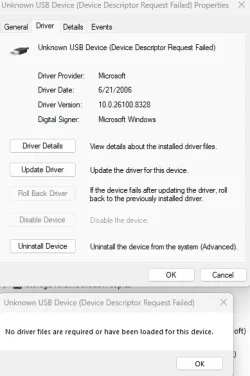
I just doubled checked the device manager and I found an "unknown" device. I missed it the first time. I was looking for an explanation mark and there isn't one.


1779195241570.webp

And the descriptor matches the error message

1779195348533.webp


Here is driver details info:

1779195428094.webp


If I select update driver it replies I am using the most recent driver for this device.

I did a google search on the descriptor as per the doc you suggested for identifying the unknown device. No google results for that descriptor.

Is it safe to uninstall the device?

It's best to use only defender while troubleshooting.

I will uninstall/remove Norton and Malwarebytes again. I will not reinstall them until all troubleshooting is done. When this is done I will run WU reset again.


Please post a new V2 share link into the newest post.


Thanks
Barry
 

Attachments

  • 1779196286106.webp
    1779196286106.webp
    25.5 KB · Views: 1

My Computer

System One

  • OS
    Windows 11
    Computer type
    PC/Desktop
    Manufacturer/Model
    Dell XPS 8930
    CPU
    Intel(R) Core(TM) i7-9700 CPU @ 3.00GHz, 3000
    Memory
    16G
    Graphics Card(s)
    NVIDIA GeForce GTX 1050Ti, Intel(R) UHD Graphics 630
    Sound Card
    Creative Sound Blaster Z SE
    Screen Resolution
    1920 x 1080
    Antivirus
    MS Defender
The unknown device was no longer reported in the latest collected log files.


Currently:


Code:
Qualcomm QCA9377 802.11ac Wireless Adapter    PCI\VEN_168C&DEV_0042&SUBSYS_18101028&REV_31\4&2C6D63FE&0&00E2    This device is disabled.

Killer E2400 Gigabit Ethernet Controller    PCI\VEN_1969&DEV_E0A1&SUBSYS_08591028&REV_10\4&641E26A&0&00E3    This device is disabled.


These are Microsoft drivers:

Please make restore points before testing:


Third party website drivers may be needed when they are no longer found at computer and component manufacturer and Microsoft websites.


EF has a forum room for drivers.

Consider opening a new thread as needed:


My Computer

System One

  • OS
    Windows 10
    Computer type
    Laptop
    Manufacturer/Model
    HP
    CPU
    Intel(R) Core(TM) i7-4800MQ CPU @ 2.70GHz
    Motherboard
    Product : 190A Version : KBC Version 94.56
    Memory
    16 GB Total: Manufacturer : Samsung MemoryType : DDR3 FormFactor : SODIMM Capacity : 8GB Speed : 1600
    Graphics Card(s)
    NVIDIA Quadro K3100M; Intel(R) HD Graphics 4600
    Sound Card
    IDT High Definition Audio CODEC; PNP Device ID HDAUDIO\FUNC_01&VEN_111D&DEV_76E0
    Hard Drives
    Model Hitachi HTS727575A9E364
    Antivirus
    Microsoft Defender
    Other Info
    Mobile Workstation
The unknown device was no longer reported in the latest collected log files.

I was able to run WU reset script to completion. I ran WU and now it offers 2 driver updates - the usual firmware 1.31.1 and a new one -
Realtek

1779216168847.webp

I notice it mentions USB in the title and my unknown device is USB related
After running WU reset I still have an unknown USB device. I don't know why this wasn't reported in the V2 log I uploaded earlier.

I'm not sure what this device is but do you think I should install the Realtek driver being offered in WU?

1779216380085.webp


As far as these network adapters are concerned I have them disabled in Device. I am satisfied with this and I don't plan on pursuing these.

Qualcomm QCA9377 802.11ac Wireless Adapter PCI\VEN_168C&DEV_0042&SUBSYS_18101028&REV_31\4&2C6D63FE&0&00E2 This device is disabled. Killer E2400 Gigabit Ethernet Controller PCI\VEN_1969&DEV_E0A1&SUBSYS_08591028&REV_10\4&641E26A&0&00E3 This device is disabled.

Thanks
Barry
 

My Computer

System One

  • OS
    Windows 11
    Computer type
    PC/Desktop
    Manufacturer/Model
    Dell XPS 8930
    CPU
    Intel(R) Core(TM) i7-9700 CPU @ 3.00GHz, 3000
    Memory
    16G
    Graphics Card(s)
    NVIDIA GeForce GTX 1050Ti, Intel(R) UHD Graphics 630
    Sound Card
    Creative Sound Blaster Z SE
    Screen Resolution
    1920 x 1080
    Antivirus
    MS Defender
This software may provide information about what was connected and led to the device manager report:


My Computer

System One

  • OS
    Windows 10
    Computer type
    Laptop
    Manufacturer/Model
    HP
    CPU
    Intel(R) Core(TM) i7-4800MQ CPU @ 2.70GHz
    Motherboard
    Product : 190A Version : KBC Version 94.56
    Memory
    16 GB Total: Manufacturer : Samsung MemoryType : DDR3 FormFactor : SODIMM Capacity : 8GB Speed : 1600
    Graphics Card(s)
    NVIDIA Quadro K3100M; Intel(R) HD Graphics 4600
    Sound Card
    IDT High Definition Audio CODEC; PNP Device ID HDAUDIO\FUNC_01&VEN_111D&DEV_76E0
    Hard Drives
    Model Hitachi HTS727575A9E364
    Antivirus
    Microsoft Defender
    Other Info
    Mobile Workstation
Hi zbook, I took a look at USBDeview. I can see the "unknown" device but looking at all the fields doesn't help determine what device this is.
I did notice this - Can 2 devices have the same Port and Hub number?

1779222155126.webp

Also I used Search PCI & USB Hardware Devices — DeviceHunt to search for the device using the "instance id" but the unknown device instance id is invalid (I assume this must be why this device is unknown). I do notice the last field in the instance id is identical between these 2 devices. I don't know if that is significant.

1779222451018.webp

I also attached:
Port 8 Hub 0 Bluetooth device USBDeview.txt
Port 8 Hub 0 unknown device USBDeview.txt

What do you think.
1. Uninstall the unknown device and then scan for hardware changes, maybe that may cause the device to be identified properly
2. Uninstall the unknown device and the bluetooth device then scan for hardware changes? Shouldn't this cause a re-scan of the hardware and maybe this device will now be identified properly or the problem returns.


Thanks
Barry


Thanks
Barry
 

Attachments

My Computer

System One

  • OS
    Windows 11
    Computer type
    PC/Desktop
    Manufacturer/Model
    Dell XPS 8930
    CPU
    Intel(R) Core(TM) i7-9700 CPU @ 3.00GHz, 3000
    Memory
    16G
    Graphics Card(s)
    NVIDIA GeForce GTX 1050Ti, Intel(R) UHD Graphics 630
    Sound Card
    Creative Sound Blaster Z SE
    Screen Resolution
    1920 x 1080
    Antivirus
    MS Defender
Back
Top Bottom