Win11 24H2 Installed, now no network sharing


But I don't need a test to know that on a clean system it is going to work! Of course millions of people have perfectly working setups... it's my particular hardware and software configuration that borks it all (and / or the downgrade from 24 to 23 leaving stuff behind) - so even if I lost one week to reinstall and reconfigure it all, I'd only come back to this unworking combination. My point is to find a fix for this specific configuration.
Uh-huh. That said, you did state that it used to work so the scientific approach to rule out that it isn't the hardware is to duplicate the working scenario. That way you can rule out the remotest possibility that nothing went awry in the hardware. If 24 still won't work after that then you can reinstall 23 on that test drive and if it works well then you have your answer. Myself I have no recollection of Windows asking me if I would be networking with other PCs as it did with Windows 10 and I'm pretty sure 23H2 asked me if I would be sharing publicly or privately but I could be having false memories. Definitely have no recollection of this with 24H2. Perhaps the issue is somewhere there, where you initially set up your internet connection. How can we test this? I'm sure you've already gone through the msconfig route and you've likely tried to re-activate through services. Doubtless you have already done all the DISM commands so what's left? I wish I could be more help but I only have two PCs running 24H2 and both of them see the network. *:confused:


*They don't see the entire network like my wife's Windows 10 (via MS account) does but they see enough. Maybe avoid using a local account? Blah. I feel like I just gave you bad advice.
 

My Computer My Computer

At a glance

WIN 11, WIN 10, WIN 8.1, WIN 7 U, WIN 7 PRO, ...Intel i7 6900K and i9-7960X / AMD 3800X (8 core)128 GB CORSAIR DOMINATOR PLATINUM (B DIE)NVIDIA 1070 and RTX 3070
OS
WIN 11, WIN 10, WIN 8.1, WIN 7 U, WIN 7 PRO, WIN 7 HOME (32 Bit), LINUX MINT
Computer type
PC/Desktop
Manufacturer/Model
DIY, ASUS, and DELL
CPU
Intel i7 6900K and i9-7960X / AMD 3800X (8 core)
Motherboard
ASUS X99E-WS USB 3.1 and ASUS X299 SAGE
Memory
128 GB CORSAIR DOMINATOR PLATINUM (B DIE)
Graphics Card(s)
NVIDIA 1070 and RTX 3070
Sound Card
Crystal Sound (onboard)
Monitor(s) Displays
single Samsung 30" 4K and 8" aux monitor
Screen Resolution
4K and something equally attrocious. I'll be working on this.
Hard Drives
A, B, C, D, E, F, G, H, I, J, K, L, M, N, O, P, Q, R, S, T, U, V, W

Ports X, Y, and Z are reserved for USB access and removable drives.

Drive types consist of the following: Various mechanical hard drives bearing the brand names, Seagate, Toshiba, and Western Digital. Various NVMe drives bearing the brand names Kingston, Intel, Silicon Power, Crucial, Western Digital, and Team Group. Various SATA SSDs bearing various different brand names.

RAID arrays included:

LSI RAID 10 (WD Velociraptors) 1115.72 GB
LSI RAID 10 (WD SSDS) 463.80 GB

INTEL RAID 0 (KINGSTON HYPER X) System 447.14 GB
INTEL RAID 1 TOSHIBA ENTERPRIZE class Data 2794.52 GB
INTEL RAID 1 SEAGATE HYBRID 931.51 GB
PSU
SEVERAL. I prefer my Corsair Platinum HX1000i but I also like EVGA power supplies
Case
ThermalTake Level 10 GT (among others)
Cooling
Noctua is my favorite and I use it in my main. I also own various other coolers.
Keyboard
all kinds.
Mouse
all kinds
Internet Speed
360 mbps - 1 gbps (depending)
Browser
FIREFOX
Antivirus
KASPERSKY (no apologies)
Other Info
Gave Dell touch screen with Windows 11 to daughter and got me an OTVOC. Being a PC builder I own many desktop PCs as well. I am a father of five providing PCs, laptops, and tablets for all my family, most of which I have modified, rebuilt, or simply built from scratch. I do not own a cell phone, never have, never will.
After more days (and nights) of attempting everything and their dog, I came to the conclusion that my specific issue isn't even rooted in authentication, but in network discoverability issues: no matter what, the Network Discoverability toggle reverts to off as soon as I close the relevant Options panel :cautious:

Of course I tried following every tutorial I could find about that specific matter, but once again... no joy at all. If you have any fix that you think might work (short of changing OS, factory reinstalling, and similarly humorous suggestions), I'm all ears.
You are not alone. Here's a thread about the same build 26100.5074 networking mess.


My Computer My Computer

At a glance

Windows 11 25H212th Gen i9 -12900K64GBIntel UHD Graphics
OS
Windows 11 25H2
Computer type
PC/Desktop
Manufacturer/Model
Dell
CPU
12th Gen i9 -12900K
Memory
64GB
Graphics Card(s)
Intel UHD Graphics
Monitor(s) Displays
Dual Dell U2717D
Screen Resolution
2560x1440
Hard Drives
2TB Lexar SSD, 2TB Crucial SSD, 2TB Kingston SSD
mmm mine has, finally, been working fine with both my Main PC and the NUC with a DAS connected to it, after a LOT of effort and work to restore functionality.

For some reason my NUC can no longer access the Main PC, but works the other way around. It was fine. Windows 11 is just getting so difficult....

Network path not found.webp

the above is using the NUC, in the loft, trying to access the Main PC on the LAN, it worked ok up to this afternoon.
 

My Computers My Computers

  • At a glance

    Windows 11 Pro build 25H2Intel 265k32GB DDR5 Corsair Dominator 7200MhzFE Edition 4080
    OS
    Windows 11 Pro build 25H2
    Computer type
    PC/Desktop
    Manufacturer/Model
    Home brew
    CPU
    Intel 265k
    Motherboard
    Gigabyte Z890 Aorus Elite
    Memory
    32GB DDR5 Corsair Dominator 7200Mhz
    Graphics Card(s)
    FE Edition 4080
    Sound Card
    onboard
    Monitor(s) Displays
    Acer 32" 4k IPS monitor
    Screen Resolution
    4k
    Hard Drives
    Various NVME and two SSD's
    PSU
    Antec ATX 3.1 1200w
    Case
    Meshify 2 XL
    Cooling
    Corsair Nautilus 360 AIO
    Keyboard
    Mechanical blue switch
    Mouse
    G502 Lightspeed Wireless
    Internet Speed
    FTTP 500Mb
    Browser
    Edge
    Antivirus
    Microsoft
  • At a glance

    Windows 11 Pro 24h2Alder Lake 3.4Ghz 4 Core16GB DDR4 3200GhzInternal GPU to the CPU
    Operating System
    Windows 11 Pro 24h2
    Computer type
    PC/Desktop
    Manufacturer/Model
    NUC N100 type model and System 3 but an N150 CPU
    CPU
    Alder Lake 3.4Ghz 4 Core
    Motherboard
    built in SOC
    Memory
    16GB DDR4 3200Ghz
    Graphics card(s)
    Internal GPU to the CPU
    Sound Card
    nah
    Monitor(s) Displays
    Samsung Syncmaster 913n VGA but used headless mainly.
    Screen Resolution
    1280x1024
    Hard Drives
    NVME 512GB and a SATA SSD at 1TB
    PSU
    I reckon so, external type
    Case
    yup it has one of those
    Cooling
    probably
    Keyboard
    only attached for rare local access
    Mouse
    not really needed but attached. Old Logitech, with a ball...!
    Internet Speed
    FTTC 500GB.
    Browser
    Edge
I'll throw my hat into the ring here and yes, each update with Win seems to introduce new problems especially on the network front but it doesn't affect the majority or so it would seem. My other PC's/Laptops could access the main PC but I had one that wouldn't - it had the dreaded 0x80070035

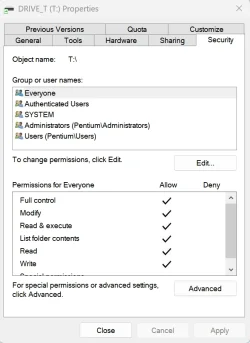
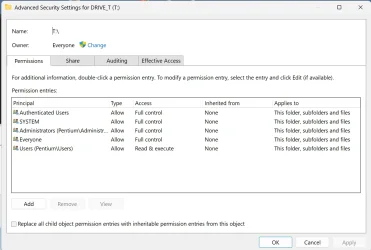
It was to do with the security. All the shares on the main PC were there including 'everyone'. On the main PC on the right of Disk Sharing within Properties is Security - click on Advanced and mine was showing Owner as System. I changed this to Everyone and hey presto the thing suddenly worked. Now not advisable to leave as Everyone but if you can then access the main PC you are narrowing down the options. Why the other satellite PC's/Laptops were finding the main PC I have no idea - but the one stubborn one well.......

All I was trying to do was isolate the 'problem'.

It may work for you and may not but good luck.
 

Attachments

  • 2025-09-06 22-12-34.webp
    2025-09-06 22-12-34.webp
    43.2 KB · Views: 7
  • 2025-09-06 22-13-19.webp
    2025-09-06 22-13-19.webp
    76.5 KB · Views: 8

My Computers My Computers

  • At a glance

    Win11 Pro 24H2i5 1250032GBIntel CPU integrated
    OS
    Win11 Pro 24H2
    Computer type
    PC/Desktop
    Manufacturer/Model
    Lenovo M90q
    CPU
    i5 12500
    Motherboard
    Lenovo
    Memory
    32GB
    Graphics Card(s)
    Intel CPU integrated
    Sound Card
    Intel MB intergrated
    Monitor(s) Displays
    Dell 4k IPS
    Screen Resolution
    3840 x 2160
    Hard Drives
    500GB NVMe Samsung 980 Pro
    2 TB NVMe Samsung 990 Pro
    1 TB Crucial MX500
    PSU
    Lenovo
    Case
    Lenovo
    Cooling
    Air
    Keyboard
    Logitech BT
    Mouse
    Logitech BT
    Internet Speed
    FTTP
    Browser
    Firefox
    Antivirus
    MS Defender and Malwarebytes
  • At a glance

    Win 11 Proi5-1135G716GBIntel Iris XE
    Operating System
    Win 11 Pro
    Computer type
    Laptop
    Manufacturer/Model
    Surface Pro 8
    CPU
    i5-1135G7
    Motherboard
    MS
    Memory
    16GB
    Graphics card(s)
    Intel Iris XE
    Sound Card
    ATI/AMD Renoir
    Monitor(s) Displays
    UHD
    Screen Resolution
    2880 x 1920
    Hard Drives
    2TB NVMe
    PSU
    MS
    Case
    Microsoft
    Cooling
    Air
    Keyboard
    Built In
    Mouse
    Touchpad
    Internet Speed
    FTTP
    Browser
    Firefox
    Antivirus
    MS Defender and Malwarebytes
I'll throw my hat into the ring here and yes, each update with Win seems to introduce new problems especially on the network front but it doesn't affect the majority or so it would seem. My other PC's/Laptops could access the main PC but I had one that wouldn't - it had the dreaded 0x80070035

It was to do with the security. All the shares on the main PC were there including 'everyone'. On the main PC on the right of Disk Sharing within Properties is Security - click on Advanced and mine was showing Owner as System. I changed this to Everyone and hey presto the thing suddenly worked. Now not advisable to leave as Everyone but if you can then access the main PC you are narrowing down the options. Why the other satellite PC's/Laptops were finding the main PC I have no idea - but the one stubborn one well.......

All I was trying to do was isolate the 'problem'.

It may work for you and may not but good luck.
You might be onto something. Only problem is: I cannot access the Properties of the NAS. The best I can do is to have it listed under Network - anything past that returns an error message.
 

My Computer My Computer

At a glance

Windows 1112th Gen Intel(R) Core(TM) i5-12400F 2.50 GHz64,0 GB
OS
Windows 11
Computer type
PC/Desktop
Manufacturer/Model
Custom
CPU
12th Gen Intel(R) Core(TM) i5-12400F 2.50 GHz
Motherboard
Asustek PRIME H610M-A D4
Memory
64,0 GB
Internet Speed
1Gb
Browser
Chrome
Antivirus
Windows Defender
Other Info
Processore 12th Gen Intel(R) Core(TM) i5-12400F 2.50 GHz
RAM installata 64,0 GB (63,8 GB utilizzabile)
Tipo sistema Sistema operativo a 64 bit, processore basato su x64
Penna e tocco Nessun input penna o tocco disponibile per questo schermo

Edizione Windows 11 Home
Versione 23H2
Data installazione: ‎28/‎04/‎2025
Build sistema operativo 22631.5768
Esperienza Pacchetto di esperienze per funzionalità Windows 1000.22700.1106.0
What format is the NAS. Is it Linux or Windows based. On my stubborn problem I had to carry out the changes on a drive inside the main PC which is Win. If you've got Linux then it's outside of my pay grade.
 

My Computers My Computers

  • At a glance

    Win11 Pro 24H2i5 1250032GBIntel CPU integrated
    OS
    Win11 Pro 24H2
    Computer type
    PC/Desktop
    Manufacturer/Model
    Lenovo M90q
    CPU
    i5 12500
    Motherboard
    Lenovo
    Memory
    32GB
    Graphics Card(s)
    Intel CPU integrated
    Sound Card
    Intel MB intergrated
    Monitor(s) Displays
    Dell 4k IPS
    Screen Resolution
    3840 x 2160
    Hard Drives
    500GB NVMe Samsung 980 Pro
    2 TB NVMe Samsung 990 Pro
    1 TB Crucial MX500
    PSU
    Lenovo
    Case
    Lenovo
    Cooling
    Air
    Keyboard
    Logitech BT
    Mouse
    Logitech BT
    Internet Speed
    FTTP
    Browser
    Firefox
    Antivirus
    MS Defender and Malwarebytes
  • At a glance

    Win 11 Proi5-1135G716GBIntel Iris XE
    Operating System
    Win 11 Pro
    Computer type
    Laptop
    Manufacturer/Model
    Surface Pro 8
    CPU
    i5-1135G7
    Motherboard
    MS
    Memory
    16GB
    Graphics card(s)
    Intel Iris XE
    Sound Card
    ATI/AMD Renoir
    Monitor(s) Displays
    UHD
    Screen Resolution
    2880 x 1920
    Hard Drives
    2TB NVMe
    PSU
    MS
    Case
    Microsoft
    Cooling
    Air
    Keyboard
    Built In
    Mouse
    Touchpad
    Internet Speed
    FTTP
    Browser
    Firefox
    Antivirus
    MS Defender and Malwarebytes
I'll throw my hat into the ring here and yes, each update with Win seems to introduce new problems especially on the network front but it doesn't affect the majority or so it would seem. My other PC's/Laptops could access the main PC but I had one that wouldn't - it had the dreaded 0x80070035

It was to do with the security. All the shares on the main PC were there including 'everyone'. On the main PC on the right of Disk Sharing within Properties is Security - click on Advanced and mine was showing Owner as System. I changed this to Everyone and hey presto the thing suddenly worked. Now not advisable to leave as Everyone but if you can then access the main PC you are narrowing down the options. Why the other satellite PC's/Laptops were finding the main PC I have no idea - but the one stubborn one well.......

All I was trying to do was isolate the 'problem'.

It may work for you and may not but good luck.

Thanks for posting that :)

That was one amongst a whole load of things that I had changed, perhaps forgetting some, that did help. But not getting access at all to something that had worked fine, and is there to be seen under the networks is most baffling.

I did delete the credentials and remade those, so now instead of no longer being able to get access to "Main" I now get......

Main.webp

The credentials entered are correct, my MS online account, the only account and password used. It had worked previously and does work in the other direction, for the MAIN to connect to the NUC. It is the NUC that can no longer connect to the MAIN.

I would not mind but password sharing is disabled. I did try turning off the firewall for the Private Network, no joy.

It does note a security issue, not sure what had changed though to make that no longer work, in one direction.
 
Last edited:

My Computers My Computers

  • At a glance

    Windows 11 Pro build 25H2Intel 265k32GB DDR5 Corsair Dominator 7200MhzFE Edition 4080
    OS
    Windows 11 Pro build 25H2
    Computer type
    PC/Desktop
    Manufacturer/Model
    Home brew
    CPU
    Intel 265k
    Motherboard
    Gigabyte Z890 Aorus Elite
    Memory
    32GB DDR5 Corsair Dominator 7200Mhz
    Graphics Card(s)
    FE Edition 4080
    Sound Card
    onboard
    Monitor(s) Displays
    Acer 32" 4k IPS monitor
    Screen Resolution
    4k
    Hard Drives
    Various NVME and two SSD's
    PSU
    Antec ATX 3.1 1200w
    Case
    Meshify 2 XL
    Cooling
    Corsair Nautilus 360 AIO
    Keyboard
    Mechanical blue switch
    Mouse
    G502 Lightspeed Wireless
    Internet Speed
    FTTP 500Mb
    Browser
    Edge
    Antivirus
    Microsoft
  • At a glance

    Windows 11 Pro 24h2Alder Lake 3.4Ghz 4 Core16GB DDR4 3200GhzInternal GPU to the CPU
    Operating System
    Windows 11 Pro 24h2
    Computer type
    PC/Desktop
    Manufacturer/Model
    NUC N100 type model and System 3 but an N150 CPU
    CPU
    Alder Lake 3.4Ghz 4 Core
    Motherboard
    built in SOC
    Memory
    16GB DDR4 3200Ghz
    Graphics card(s)
    Internal GPU to the CPU
    Sound Card
    nah
    Monitor(s) Displays
    Samsung Syncmaster 913n VGA but used headless mainly.
    Screen Resolution
    1280x1024
    Hard Drives
    NVME 512GB and a SATA SSD at 1TB
    PSU
    I reckon so, external type
    Case
    yup it has one of those
    Cooling
    probably
    Keyboard
    only attached for rare local access
    Mouse
    not really needed but attached. Old Logitech, with a ball...!
    Internet Speed
    FTTC 500GB.
    Browser
    Edge
Guys, I gotta tell you - you are more chaotic than a bunch of monkeys on crack.
This is supposed to be about one (or more) person asking for a solution, and another providing it. Maybe the first solution offered is not working, so someone else offers another. Repeat until it works.

Here I'm seeing people throwing half-remembered non-solutions around, irrelevant stuff (dude, no offense but you mentioned your wife's PC a hundred times. Nobody cares: this is about solutions, not personal problems), pointless complications ("try another PC", "if it's Linux I don't know" - let's please stick to the reality at hand), repetitions... Seriously, this has become impossible to follow.

So I'm flying my white flag here. Please stop "helping", unless anyone can state in a brief, complete and concise way how to make the Network Discovery toggle stay on. It's (probably) as simple as that.
 

My Computer My Computer

At a glance

Windows 1112th Gen Intel(R) Core(TM) i5-12400F 2.50 GHz64,0 GB
OS
Windows 11
Computer type
PC/Desktop
Manufacturer/Model
Custom
CPU
12th Gen Intel(R) Core(TM) i5-12400F 2.50 GHz
Motherboard
Asustek PRIME H610M-A D4
Memory
64,0 GB
Internet Speed
1Gb
Browser
Chrome
Antivirus
Windows Defender
Other Info
Processore 12th Gen Intel(R) Core(TM) i5-12400F 2.50 GHz
RAM installata 64,0 GB (63,8 GB utilizzabile)
Tipo sistema Sistema operativo a 64 bit, processore basato su x64
Penna e tocco Nessun input penna o tocco disponibile per questo schermo

Edizione Windows 11 Home
Versione 23H2
Data installazione: ‎28/‎04/‎2025
Build sistema operativo 22631.5768
Esperienza Pacchetto di esperienze per funzionalità Windows 1000.22700.1106.0
Guys, I gotta tell you - you are more chaotic than a bunch of monkeys on crack.
This is supposed to be about one (or more) person asking for a solution, and another providing it. Maybe the first solution offered is not working, so someone else offers another. Repeat until it works.

Here I'm seeing people throwing half-remembered non-solutions around, irrelevant stuff (dude, no offense but you mentioned your wife's PC a hundred times. Nobody cares: this is about solutions, not personal problems), pointless complications ("try another PC", "if it's Linux I don't know" - let's please stick to the reality at hand), repetitions... Seriously, this has become impossible to follow.

So I'm flying my white flag here. Please stop "helping", unless anyone can state in a brief, complete and concise way how to make the Network Discovery toggle stay on. It's (probably) as simple as that.
Tracian. Criticizing people who are trying to help you is bad form. When working with tech part of the trouble shooting process involves establishing controls.
By establishing controls you can eke out the variables and work with each variable at a time until the issue is solved. If this has become "impossible to follow" as you say, then I advise you pack up your PC and take it to a technician. I would also advise brushing up on your reading skills and it wouldn't hurt to work on your comprehension while you're at it.

I mentioned my wife's PC on this thread what — twice? Why do you suppose I did that. A: Because she was doing something with her PC that evidently you were not. Her PC sees the entire home network and your PC is blind. Evidently you are the one with the "personal problem" here. I also mentioned something else about her PC that I think you haven't done. It isn't that nobody cares. It is more like you don't care to try taking the steps that just might fix your issue. Evidently this is not your only issue.

Stepping into a forum and mowing everyone down with an AK47 and waiving a white flag afterward will definitely get you less results. Frankly it is laughable. It would make for a great cartoon. You want short, simple, and concise? Try this:

Reinstall your operating system.

I realize you're frustrated but sometimes there are no quick fixes. Sometimes you have to try different things until you find something that works. The people in this forum volunteer their time and energy because they care. So please don't say nobody cares. That said, I'm not nobody and now I no longer care.
 

My Computer My Computer

At a glance

WIN 11, WIN 10, WIN 8.1, WIN 7 U, WIN 7 PRO, ...Intel i7 6900K and i9-7960X / AMD 3800X (8 core)128 GB CORSAIR DOMINATOR PLATINUM (B DIE)NVIDIA 1070 and RTX 3070
OS
WIN 11, WIN 10, WIN 8.1, WIN 7 U, WIN 7 PRO, WIN 7 HOME (32 Bit), LINUX MINT
Computer type
PC/Desktop
Manufacturer/Model
DIY, ASUS, and DELL
CPU
Intel i7 6900K and i9-7960X / AMD 3800X (8 core)
Motherboard
ASUS X99E-WS USB 3.1 and ASUS X299 SAGE
Memory
128 GB CORSAIR DOMINATOR PLATINUM (B DIE)
Graphics Card(s)
NVIDIA 1070 and RTX 3070
Sound Card
Crystal Sound (onboard)
Monitor(s) Displays
single Samsung 30" 4K and 8" aux monitor
Screen Resolution
4K and something equally attrocious. I'll be working on this.
Hard Drives
A, B, C, D, E, F, G, H, I, J, K, L, M, N, O, P, Q, R, S, T, U, V, W

Ports X, Y, and Z are reserved for USB access and removable drives.

Drive types consist of the following: Various mechanical hard drives bearing the brand names, Seagate, Toshiba, and Western Digital. Various NVMe drives bearing the brand names Kingston, Intel, Silicon Power, Crucial, Western Digital, and Team Group. Various SATA SSDs bearing various different brand names.

RAID arrays included:

LSI RAID 10 (WD Velociraptors) 1115.72 GB
LSI RAID 10 (WD SSDS) 463.80 GB

INTEL RAID 0 (KINGSTON HYPER X) System 447.14 GB
INTEL RAID 1 TOSHIBA ENTERPRIZE class Data 2794.52 GB
INTEL RAID 1 SEAGATE HYBRID 931.51 GB
PSU
SEVERAL. I prefer my Corsair Platinum HX1000i but I also like EVGA power supplies
Case
ThermalTake Level 10 GT (among others)
Cooling
Noctua is my favorite and I use it in my main. I also own various other coolers.
Keyboard
all kinds.
Mouse
all kinds
Internet Speed
360 mbps - 1 gbps (depending)
Browser
FIREFOX
Antivirus
KASPERSKY (no apologies)
Other Info
Gave Dell touch screen with Windows 11 to daughter and got me an OTVOC. Being a PC builder I own many desktop PCs as well. I am a father of five providing PCs, laptops, and tablets for all my family, most of which I have modified, rebuilt, or simply built from scratch. I do not own a cell phone, never have, never will.
I'll throw my hat into the ring here and yes, each update with Win seems to introduce new problems especially on the network front but it doesn't affect the majority or so it would seem. My other PC's/Laptops could access the main PC but I had one that wouldn't - it had the dreaded 0x80070035

It was to do with the security. All the shares on the main PC were there including 'everyone'. On the main PC on the right of Disk Sharing within Properties is Security - click on Advanced and mine was showing Owner as System. I changed this to Everyone and hey presto the thing suddenly worked. Now not advisable to leave as Everyone but if you can then access the main PC you are narrowing down the options. Why the other satellite PC's/Laptops were finding the main PC I have no idea - but the one stubborn one well.......

All I was trying to do was isolate the 'problem'.

It may work for you and may not but good luck.
Did you consider trying an owner with some authority such as Administrator first or was Everyone the first thing that you tried that worked?
 

My Computers My Computers

  • At a glance

    Windows 11 Enterprise 25H2 26200 7462Intel XEON E5-2699 v364GB Teamgroup UD4-3600NVIDIA GeForce GTX 1080 Ti
    OS
    Windows 11 Enterprise 25H2 26200 7462
    Computer type
    PC/Desktop
    Manufacturer/Model
    Custom Build
    CPU
    Intel XEON E5-2699 v3
    Motherboard
    ASUS X99-A
    Memory
    64GB Teamgroup UD4-3600
    Graphics Card(s)
    NVIDIA GeForce GTX 1080 Ti
    Sound Card
    Integrated
    Monitor(s) Displays
    ACER X34 Predator
    Screen Resolution
    3440 x 1440
    Hard Drives
    Crucial CT1000P 3P SSD8 1TB
    Crucial CT1000 BX500 SSD 1TB
    PSU
    GameMax Pro
    Case
    Fractal Design
    Cooling
    Corsair H110iGT + 6 140mm Fans
    Keyboard
    Corsair K4
    Mouse
    G-Skill G502
    Internet Speed
    300MBs
    Browser
    Chrome
    Antivirus
    OEM
    Other Info
    ASUS RT-AC87U Router
  • At a glance

    25H2 26200.50748GB
    Operating System
    25H2 26200.5074
    Computer type
    Laptop
    Manufacturer/Model
    ASUS X555LA
    Memory
    8GB
    Browser
    Chrome
    Antivirus
    OEM
Did you consider trying an owner with some authority such as Administrator first or was Everyone the first thing that you tried that worked?
Yes I did but that didn't work. Everyone did so it was just a case of isolating. Weird but after deleting Administrator and Everyone I added back Administrator, rebooted and all was good.
 

My Computers My Computers

  • At a glance

    Win11 Pro 24H2i5 1250032GBIntel CPU integrated
    OS
    Win11 Pro 24H2
    Computer type
    PC/Desktop
    Manufacturer/Model
    Lenovo M90q
    CPU
    i5 12500
    Motherboard
    Lenovo
    Memory
    32GB
    Graphics Card(s)
    Intel CPU integrated
    Sound Card
    Intel MB intergrated
    Monitor(s) Displays
    Dell 4k IPS
    Screen Resolution
    3840 x 2160
    Hard Drives
    500GB NVMe Samsung 980 Pro
    2 TB NVMe Samsung 990 Pro
    1 TB Crucial MX500
    PSU
    Lenovo
    Case
    Lenovo
    Cooling
    Air
    Keyboard
    Logitech BT
    Mouse
    Logitech BT
    Internet Speed
    FTTP
    Browser
    Firefox
    Antivirus
    MS Defender and Malwarebytes
  • At a glance

    Win 11 Proi5-1135G716GBIntel Iris XE
    Operating System
    Win 11 Pro
    Computer type
    Laptop
    Manufacturer/Model
    Surface Pro 8
    CPU
    i5-1135G7
    Motherboard
    MS
    Memory
    16GB
    Graphics card(s)
    Intel Iris XE
    Sound Card
    ATI/AMD Renoir
    Monitor(s) Displays
    UHD
    Screen Resolution
    2880 x 1920
    Hard Drives
    2TB NVMe
    PSU
    MS
    Case
    Microsoft
    Cooling
    Air
    Keyboard
    Built In
    Mouse
    Touchpad
    Internet Speed
    FTTP
    Browser
    Firefox
    Antivirus
    MS Defender and Malwarebytes
Yes I did but that didn't work. Everyone did so it was just a case of isolating. Weird but after deleting Administrator and Everyone I added back Administrator, rebooted and all was good.


Good result there.


This morning I continued with what I was trying, to get the NUC in the loft to connect to the MAIC PC. I simply repeated what I had previously tried, then trying a Remote Connection. The RC worked, saves the credentials separately.
However, the connection to the MAIN then started to work with the previously made credentials that would fail....

shares to Main.webp

The above shows the NUC, via Remote Desktop, being able to access the MAIN.

Whilst I am most pleased with that it seems somewhat of a hollow victory. I do not really know whey it is now working, nor why it failed previously after working.
So much was tried to resolve I am no longer sure of any one single thing that could have resolved it, or if it will continue to work.

I have created a restore point for both PC's, hoping they will not be needed. I have also deferred updates on both, might look at stopping feature updates for a couple of years and just allowing security ones.

Networking, for me anyway, is akin to alchemy.

Going back to coaxial cable and BNC type connectors, it did seem much easier then, lol...!
 

My Computers My Computers

  • At a glance

    Windows 11 Pro build 25H2Intel 265k32GB DDR5 Corsair Dominator 7200MhzFE Edition 4080
    OS
    Windows 11 Pro build 25H2
    Computer type
    PC/Desktop
    Manufacturer/Model
    Home brew
    CPU
    Intel 265k
    Motherboard
    Gigabyte Z890 Aorus Elite
    Memory
    32GB DDR5 Corsair Dominator 7200Mhz
    Graphics Card(s)
    FE Edition 4080
    Sound Card
    onboard
    Monitor(s) Displays
    Acer 32" 4k IPS monitor
    Screen Resolution
    4k
    Hard Drives
    Various NVME and two SSD's
    PSU
    Antec ATX 3.1 1200w
    Case
    Meshify 2 XL
    Cooling
    Corsair Nautilus 360 AIO
    Keyboard
    Mechanical blue switch
    Mouse
    G502 Lightspeed Wireless
    Internet Speed
    FTTP 500Mb
    Browser
    Edge
    Antivirus
    Microsoft
  • At a glance

    Windows 11 Pro 24h2Alder Lake 3.4Ghz 4 Core16GB DDR4 3200GhzInternal GPU to the CPU
    Operating System
    Windows 11 Pro 24h2
    Computer type
    PC/Desktop
    Manufacturer/Model
    NUC N100 type model and System 3 but an N150 CPU
    CPU
    Alder Lake 3.4Ghz 4 Core
    Motherboard
    built in SOC
    Memory
    16GB DDR4 3200Ghz
    Graphics card(s)
    Internal GPU to the CPU
    Sound Card
    nah
    Monitor(s) Displays
    Samsung Syncmaster 913n VGA but used headless mainly.
    Screen Resolution
    1280x1024
    Hard Drives
    NVME 512GB and a SATA SSD at 1TB
    PSU
    I reckon so, external type
    Case
    yup it has one of those
    Cooling
    probably
    Keyboard
    only attached for rare local access
    Mouse
    not really needed but attached. Old Logitech, with a ball...!
    Internet Speed
    FTTC 500GB.
    Browser
    Edge
As noted. I have two machines on Home 24H2 26100.4946 and one legacy machine on Win 11 Lite 23H2.

The 26100.4946 MSU that I downloaded and installed did not contain the MS code that destroys Home networks that had no previous need of individual "credentials" for trusted network members. Upgrading to 26100.5074 found that nastiness for me. No suggested solutions worked to restore the network on 26100.5074 - not using gpedit.msc to enable "insecure logons", nor assigning "credentials" to each individual 24H2 machine. A lengthy internet search simply found these experiences repeated across the spectrum. [The Lite machine maintained normal two-way traffic with both 24H2 machines, as did my two Poco phones, no problems].

MS may eventually re-enable gpedit.msc's "insecure logons" function, but I doubt it.

I have no intention of re-installing the 26100.5074 version as a new OS and then going through the drudgery of recovering the full installations when 26100.4946 works perfectly as is. My gratitude to Macrium for reliable incremental full disc backups.

Given that, plus the fact I have no use for CoPilot (using Grok 2 is prefectly ok), updates are now paused for 20 years. (I won't last that long). Only security backups are to be considered. Seems a reasonable resolution.
 

My Computer My Computer

At a glance

Windows 11Intel i5 10210U16GbIntel UHD
OS
Windows 11
Computer type
Laptop
Manufacturer/Model
HP 15s_du1xxx
CPU
Intel i5 10210U
Motherboard
85F1
Memory
16Gb
Graphics Card(s)
Intel UHD
Sound Card
Realtek
Screen Resolution
1920 x 1080
Given that, plus the fact I have no use for CoPilot (using Grok 2 is prefectly ok), updates are now paused for 20 years. (I won't last that long). Only security backups are to be considered. Seems a reasonable resolution.
I totally relate.
 

My Computer My Computer

At a glance

WIN 11, WIN 10, WIN 8.1, WIN 7 U, WIN 7 PRO, ...Intel i7 6900K and i9-7960X / AMD 3800X (8 core)128 GB CORSAIR DOMINATOR PLATINUM (B DIE)NVIDIA 1070 and RTX 3070
OS
WIN 11, WIN 10, WIN 8.1, WIN 7 U, WIN 7 PRO, WIN 7 HOME (32 Bit), LINUX MINT
Computer type
PC/Desktop
Manufacturer/Model
DIY, ASUS, and DELL
CPU
Intel i7 6900K and i9-7960X / AMD 3800X (8 core)
Motherboard
ASUS X99E-WS USB 3.1 and ASUS X299 SAGE
Memory
128 GB CORSAIR DOMINATOR PLATINUM (B DIE)
Graphics Card(s)
NVIDIA 1070 and RTX 3070
Sound Card
Crystal Sound (onboard)
Monitor(s) Displays
single Samsung 30" 4K and 8" aux monitor
Screen Resolution
4K and something equally attrocious. I'll be working on this.
Hard Drives
A, B, C, D, E, F, G, H, I, J, K, L, M, N, O, P, Q, R, S, T, U, V, W

Ports X, Y, and Z are reserved for USB access and removable drives.

Drive types consist of the following: Various mechanical hard drives bearing the brand names, Seagate, Toshiba, and Western Digital. Various NVMe drives bearing the brand names Kingston, Intel, Silicon Power, Crucial, Western Digital, and Team Group. Various SATA SSDs bearing various different brand names.

RAID arrays included:

LSI RAID 10 (WD Velociraptors) 1115.72 GB
LSI RAID 10 (WD SSDS) 463.80 GB

INTEL RAID 0 (KINGSTON HYPER X) System 447.14 GB
INTEL RAID 1 TOSHIBA ENTERPRIZE class Data 2794.52 GB
INTEL RAID 1 SEAGATE HYBRID 931.51 GB
PSU
SEVERAL. I prefer my Corsair Platinum HX1000i but I also like EVGA power supplies
Case
ThermalTake Level 10 GT (among others)
Cooling
Noctua is my favorite and I use it in my main. I also own various other coolers.
Keyboard
all kinds.
Mouse
all kinds
Internet Speed
360 mbps - 1 gbps (depending)
Browser
FIREFOX
Antivirus
KASPERSKY (no apologies)
Other Info
Gave Dell touch screen with Windows 11 to daughter and got me an OTVOC. Being a PC builder I own many desktop PCs as well. I am a father of five providing PCs, laptops, and tablets for all my family, most of which I have modified, rebuilt, or simply built from scratch. I do not own a cell phone, never have, never will.
I thought I'd post a reply here with my fix! (i'm super excited)

so it seems that when the computers are cloned, with the latest update, they can no longer talk to each other because the similar SID confuses windows. I found the fix on microsoft's forums:

in short, I had to run a SIDchg.exe program to change the SID id of one of my machines, and everything started working again!
 

My Computer My Computer

At a glance

Win11
OS
Win11
Computer type
PC/Desktop
I thought I'd post a reply here with my fix! (i'm super excited)

so it seems that when the computers are cloned, with the latest update, they can no longer talk to each other because the similar SID confuses windows. I found the fix on microsoft's forums:

in short, I had to run a SIDchg.exe program to change the SID id of one of my machines, and everything started working again!
Yep that's why my network fell on it's face.
 

My Computers My Computers

  • At a glance

    Windows 11 Enterprise 25H2 26200 7462Intel XEON E5-2699 v364GB Teamgroup UD4-3600NVIDIA GeForce GTX 1080 Ti
    OS
    Windows 11 Enterprise 25H2 26200 7462
    Computer type
    PC/Desktop
    Manufacturer/Model
    Custom Build
    CPU
    Intel XEON E5-2699 v3
    Motherboard
    ASUS X99-A
    Memory
    64GB Teamgroup UD4-3600
    Graphics Card(s)
    NVIDIA GeForce GTX 1080 Ti
    Sound Card
    Integrated
    Monitor(s) Displays
    ACER X34 Predator
    Screen Resolution
    3440 x 1440
    Hard Drives
    Crucial CT1000P 3P SSD8 1TB
    Crucial CT1000 BX500 SSD 1TB
    PSU
    GameMax Pro
    Case
    Fractal Design
    Cooling
    Corsair H110iGT + 6 140mm Fans
    Keyboard
    Corsair K4
    Mouse
    G-Skill G502
    Internet Speed
    300MBs
    Browser
    Chrome
    Antivirus
    OEM
    Other Info
    ASUS RT-AC87U Router
  • At a glance

    25H2 26200.50748GB
    Operating System
    25H2 26200.5074
    Computer type
    Laptop
    Manufacturer/Model
    ASUS X555LA
    Memory
    8GB
    Browser
    Chrome
    Antivirus
    OEM

Latest Support Threads

Back
Top Bottom