Win11 24H2 Installed, now no network sharing


sorry if I missed this, but do you have assigned static IP's to local, or are they dhcp? I have found that trouble can be had if you assign IP's as static, even though they are suppose to work, .. just networks still get complicated..
 

My Computer My Computer

At a glance

Win11i9-1390064 GBNvidia RTX 5070 TI OC
OS
Win11
Computer type
PC/Desktop
Manufacturer/Model
Asus Home built
CPU
i9-13900
Motherboard
ASUS Strix Z790-H
Memory
64 GB
Graphics Card(s)
Nvidia RTX 5070 TI OC
Monitor(s) Displays
Sony 55"
Hard Drives
SSD
PSU
850 watt EVGA
Case
Cooler Master Haf 932
Cooling
CoolerMaster
Keyboard
RedDragon
Mouse
CoolerMaster
Internet Speed
300/300
Antivirus
Defender
Other Info
VR, Virtual Reality

My Computer My Computer

At a glance

Windows 1112th Gen Intel(R) Core(TM) i5-12400F 2.50 GHz64,0 GB
OS
Windows 11
Computer type
PC/Desktop
Manufacturer/Model
Custom
CPU
12th Gen Intel(R) Core(TM) i5-12400F 2.50 GHz
Motherboard
Asustek PRIME H610M-A D4
Memory
64,0 GB
Internet Speed
1Gb
Browser
Chrome
Antivirus
Windows Defender
Other Info
Processore 12th Gen Intel(R) Core(TM) i5-12400F 2.50 GHz
RAM installata 64,0 GB (63,8 GB utilizzabile)
Tipo sistema Sistema operativo a 64 bit, processore basato su x64
Penna e tocco Nessun input penna o tocco disponibile per questo schermo

Edizione Windows 11 Home
Versione 23H2
Data installazione: ‎28/‎04/‎2025
Build sistema operativo 22631.5768
Esperienza Pacchetto di esperienze per funzionalità Windows 1000.22700.1106.0
sorry if I missed this, but do you have assigned static IP's to local, or are they dhcp? I have found that trouble can be had if you assign IP's as static, even though they are suppose to work, .. just networks still get complicated..
I set static IP's based on mac numbers in my router.
 

My Computers My Computers

  • At a glance

    Windows 11 Enterprise 25H2 26200 7462Intel XEON E5-2699 v364GB Teamgroup UD4-3600NVIDIA GeForce GTX 1080 Ti
    OS
    Windows 11 Enterprise 25H2 26200 7462
    Computer type
    PC/Desktop
    Manufacturer/Model
    Custom Build
    CPU
    Intel XEON E5-2699 v3
    Motherboard
    ASUS X99-A
    Memory
    64GB Teamgroup UD4-3600
    Graphics Card(s)
    NVIDIA GeForce GTX 1080 Ti
    Sound Card
    Integrated
    Monitor(s) Displays
    ACER X34 Predator
    Screen Resolution
    3440 x 1440
    Hard Drives
    Crucial CT1000P 3P SSD8 1TB
    Crucial CT1000 BX500 SSD 1TB
    PSU
    GameMax Pro
    Case
    Fractal Design
    Cooling
    Corsair H110iGT + 6 140mm Fans
    Keyboard
    Corsair K4
    Mouse
    G-Skill G502
    Internet Speed
    300MBs
    Browser
    Chrome
    Antivirus
    OEM
    Other Info
    ASUS RT-AC87U Router
  • At a glance

    25H2 26200.50748GB
    Operating System
    25H2 26200.5074
    Computer type
    Laptop
    Manufacturer/Model
    ASUS X555LA
    Memory
    8GB
    Browser
    Chrome
    Antivirus
    OEM
Hi guys! As they say... you are my last hope!

Briefly put:
- I updated to 24H2. All network functionality broke
- I tried every fix known, including every single one listed in this thread. No joy....
The tighter security in 24H2 is what catches most people out, particularly if you like to use local accounts with no password. See post #2

.... I harbor a faint hope that 25H2 might fix this - but would it be possible to skip 24H2 at all when updating?
25H2 will be an enablement package which I believe 24H2 needs to be installed to use. @Bree or another member may have the answer to that.
Correct. 25H2 ans 24H2 share a common set of system files. The dormant 25H2 features in 24H2 will be turned on by a small enablement package.
 

My Computers My Computers

  • At a glance

    Windows 11 HomeAMD Athlon Silver 3050U8GBRadeon Graphics
    OS
    Windows 11 Home
    Computer type
    Laptop
    Manufacturer/Model
    Acer Aspire 3 A315-23-R9VY
    CPU
    AMD Athlon Silver 3050U
    Memory
    8GB
    Graphics Card(s)
    Radeon Graphics
    Monitor(s) Displays
    laptop screen
    Screen Resolution
    1366x768 native resolution, up to 2560x1440 with Radeon Virtual Super Resolution
    Hard Drives
    1TB Samsung EVO 870 SSD (from April 2026: 250GB EVO 850)
    Internet Speed
    150 Mbps
    Browser
    Edge, Firefox
    Antivirus
    Defender
    Other Info
    fully 'Windows 11 ready' laptop. Windows 10 C: partition migrated from my old unsupported 'main machine' then upgraded to 11. A test migration ran Insider builds for 2 months. When 11 was released on 5th October 2021 it was re-imaged back to 10 and was offered the upgrade in Windows Update on 20th October. Windows Update offered the 22H2 Feature Update on 20th September 2022. It got the 23H2 Feature Update on 4th November 2023 through Windows Update, 24H2 on 3rd October 2024 through Windows Update by setting the Target Release Version for 24H2, and 25H2 on 30th September 2025 through Windows Update by setting the Target Release Version for 25H2.

    UPDATE - 11 April 2026: due to mechanical deterioration this PC has been retired from active duty. The OS with all software and files has been migrated to my System Seven in 'Other systems' to carry on as my general purpose 'main machine'.

    I've now clean installed 25H2 and used Garlin's scripts to update Secure Boot to CA 2023 and revoke the PCA 2011 certificates. It's new role is to test secure boot issues.
  • At a glance

    Windows 11 ProIntel® Core™ i5-520M8GB(integrated graphics) Intel HD Graphics
    Operating System
    Windows 11 Pro
    Computer type
    Laptop
    Manufacturer/Model
    Dell Latitude E4310
    CPU
    Intel® Core™ i5-520M
    Motherboard
    0T6M8G
    Memory
    8GB
    Graphics card(s)
    (integrated graphics) Intel HD Graphics
    Screen Resolution
    1366x768
    Hard Drives
    500GB Crucial MX500 SSD
    Browser
    Firefox, Edge
    Antivirus
    Defender
    Other Info
    unsupported machine: Legacy bios, MBR, TPM 1.2, upgraded from W10 to W11 using W10/W11 hybrid install media workaround.

    In-place upgrade to 22H2 using ISO and a workaround.
    Feature Update to 23H2 by manually installing the Enablement Package.
    In-place upgrade to 24H2 using hybrid 23H2/24H2 install media.
    Upgraded to 25H2 by Enablement Package.

    Also running Insider Dev, and Canary builds and Windows 10 as native boot .vhdx.
  • My SYSTEM THREE is a Dell Latitude 5410, i7-10610U, 32GB RAM, 512GB NVMe ssd, supported device running Windows 11 Pro.

    My SYSTEM FOUR is a 2-in-1 convertible Lenovo Yoga 11e 20DA, Celeron N2930, 8GB RAM, 256GB ssd. Unsupported device: currently running Win10 Pro, plus Win11 Pro RTM and Insider Dev, Beta, and RP 24H2 as native boot vhdx.

    My SYSTEM FIVE is a Dell Latitude 3190 2-in-1, Pentium Silver N5030, 8GB RAM, 1TB NVMe ssd, supported device running Windows 11 Pro, plus Insider Beta, Dev, and Canary builds (and a few others) as a native boot .vhdx.

    My SYSTEM SIX is a Dell Latitude 5550, Core Ultra 7 165H, 64GB RAM, 1TB NVMe SSD, supported device, Windows 11 Pro 24H2, Hyper-V host machine. Updated to 25H2 on 30th September 2025.

    My SYSTEM SEVEN is a Lenovo Thinkpad T580, Intel Core i7-8650U, 16GB RAM, 512GB NVMe SSD + 2nd 512GB NVMe SSD, a supported device for Windows 11. This is my current general purpose 'main machine'. The installed Windows 11 Home from my System One has been migrated to this machine.
The tighter security in 24H2 is what catches most people out, particularly if you like to use local accounts with no password.
I might be mistaken, but as I understand it, this means that you are supposed to log in to the device you want to access. In my case, that would be the NAS (which, when working, cannot be accessed without providing its set of username/password).

Or does your statement refer to the desktop PC I am using to access the NAS? Being a home computer, I access it as admin without having to provide a full login every time I boot it up. Please don't tell me that this entire ballyhoo is about forcing every single user on the planet to type a password whenever they use a device...!
 

My Computer My Computer

At a glance

Windows 1112th Gen Intel(R) Core(TM) i5-12400F 2.50 GHz64,0 GB
OS
Windows 11
Computer type
PC/Desktop
Manufacturer/Model
Custom
CPU
12th Gen Intel(R) Core(TM) i5-12400F 2.50 GHz
Motherboard
Asustek PRIME H610M-A D4
Memory
64,0 GB
Internet Speed
1Gb
Browser
Chrome
Antivirus
Windows Defender
Other Info
Processore 12th Gen Intel(R) Core(TM) i5-12400F 2.50 GHz
RAM installata 64,0 GB (63,8 GB utilizzabile)
Tipo sistema Sistema operativo a 64 bit, processore basato su x64
Penna e tocco Nessun input penna o tocco disponibile per questo schermo

Edizione Windows 11 Home
Versione 23H2
Data installazione: ‎28/‎04/‎2025
Build sistema operativo 22631.5768
Esperienza Pacchetto di esperienze per funzionalità Windows 1000.22700.1106.0
...as I understand it, this means that you are supposed to log in to the device you want to access. In my case, that would be the NAS (which, when working, cannot be accessed without providing its set of username/password).

Or does your statement refer to the desktop PC I am using to access the NAS? Being a home computer, I access it as admin without having to provide a full login every time I boot it up.
Sound like you use a local account on the desktop PC that has no password. When Windows tries to connect to a network device it will initially try with the name and password that you are signed in with. If that is rejected by the device you are connecting to you'll be challenged to provide name/password credentials that the device will accept.

Starting with Windows 11 24H2 by default it will not let you use a insecure connection, incoming or outgoing. An account with a blank password will not be allowed to connect to a network device like your NAS. This means you'll never get as far as being challenged for the NAS name/password.

You could just give your account on the PC a password. But if you want to keep using your PC's account without a password, then the alternative is to use the Credential Manager to add a Windows Credential with name and password to use when connecting to the NAS. Windows will now use this to connect to the NAS, rather than trying (and failing) to use your signed in account that has no password.
 

My Computers My Computers

  • At a glance

    Windows 11 HomeAMD Athlon Silver 3050U8GBRadeon Graphics
    OS
    Windows 11 Home
    Computer type
    Laptop
    Manufacturer/Model
    Acer Aspire 3 A315-23-R9VY
    CPU
    AMD Athlon Silver 3050U
    Memory
    8GB
    Graphics Card(s)
    Radeon Graphics
    Monitor(s) Displays
    laptop screen
    Screen Resolution
    1366x768 native resolution, up to 2560x1440 with Radeon Virtual Super Resolution
    Hard Drives
    1TB Samsung EVO 870 SSD (from April 2026: 250GB EVO 850)
    Internet Speed
    150 Mbps
    Browser
    Edge, Firefox
    Antivirus
    Defender
    Other Info
    fully 'Windows 11 ready' laptop. Windows 10 C: partition migrated from my old unsupported 'main machine' then upgraded to 11. A test migration ran Insider builds for 2 months. When 11 was released on 5th October 2021 it was re-imaged back to 10 and was offered the upgrade in Windows Update on 20th October. Windows Update offered the 22H2 Feature Update on 20th September 2022. It got the 23H2 Feature Update on 4th November 2023 through Windows Update, 24H2 on 3rd October 2024 through Windows Update by setting the Target Release Version for 24H2, and 25H2 on 30th September 2025 through Windows Update by setting the Target Release Version for 25H2.

    UPDATE - 11 April 2026: due to mechanical deterioration this PC has been retired from active duty. The OS with all software and files has been migrated to my System Seven in 'Other systems' to carry on as my general purpose 'main machine'.

    I've now clean installed 25H2 and used Garlin's scripts to update Secure Boot to CA 2023 and revoke the PCA 2011 certificates. It's new role is to test secure boot issues.
  • At a glance

    Windows 11 ProIntel® Core™ i5-520M8GB(integrated graphics) Intel HD Graphics
    Operating System
    Windows 11 Pro
    Computer type
    Laptop
    Manufacturer/Model
    Dell Latitude E4310
    CPU
    Intel® Core™ i5-520M
    Motherboard
    0T6M8G
    Memory
    8GB
    Graphics card(s)
    (integrated graphics) Intel HD Graphics
    Screen Resolution
    1366x768
    Hard Drives
    500GB Crucial MX500 SSD
    Browser
    Firefox, Edge
    Antivirus
    Defender
    Other Info
    unsupported machine: Legacy bios, MBR, TPM 1.2, upgraded from W10 to W11 using W10/W11 hybrid install media workaround.

    In-place upgrade to 22H2 using ISO and a workaround.
    Feature Update to 23H2 by manually installing the Enablement Package.
    In-place upgrade to 24H2 using hybrid 23H2/24H2 install media.
    Upgraded to 25H2 by Enablement Package.

    Also running Insider Dev, and Canary builds and Windows 10 as native boot .vhdx.
  • My SYSTEM THREE is a Dell Latitude 5410, i7-10610U, 32GB RAM, 512GB NVMe ssd, supported device running Windows 11 Pro.

    My SYSTEM FOUR is a 2-in-1 convertible Lenovo Yoga 11e 20DA, Celeron N2930, 8GB RAM, 256GB ssd. Unsupported device: currently running Win10 Pro, plus Win11 Pro RTM and Insider Dev, Beta, and RP 24H2 as native boot vhdx.

    My SYSTEM FIVE is a Dell Latitude 3190 2-in-1, Pentium Silver N5030, 8GB RAM, 1TB NVMe ssd, supported device running Windows 11 Pro, plus Insider Beta, Dev, and Canary builds (and a few others) as a native boot .vhdx.

    My SYSTEM SIX is a Dell Latitude 5550, Core Ultra 7 165H, 64GB RAM, 1TB NVMe SSD, supported device, Windows 11 Pro 24H2, Hyper-V host machine. Updated to 25H2 on 30th September 2025.

    My SYSTEM SEVEN is a Lenovo Thinkpad T580, Intel Core i7-8650U, 16GB RAM, 512GB NVMe SSD + 2nd 512GB NVMe SSD, a supported device for Windows 11. This is my current general purpose 'main machine'. The installed Windows 11 Home from my System One has been migrated to this machine.
the alternative is to use the Credential Manager to add a Windows Credential with name and password to use when connecting to the NAS. Windows will now use this to connect to the NAS, rather than trying (and failing) to use your signed in account that has no password.
This sounds sensible! Just one snag, though... How do I even do that? Can you please point me to a tutorial?
 

My Computer My Computer

At a glance

Windows 1112th Gen Intel(R) Core(TM) i5-12400F 2.50 GHz64,0 GB
OS
Windows 11
Computer type
PC/Desktop
Manufacturer/Model
Custom
CPU
12th Gen Intel(R) Core(TM) i5-12400F 2.50 GHz
Motherboard
Asustek PRIME H610M-A D4
Memory
64,0 GB
Internet Speed
1Gb
Browser
Chrome
Antivirus
Windows Defender
Other Info
Processore 12th Gen Intel(R) Core(TM) i5-12400F 2.50 GHz
RAM installata 64,0 GB (63,8 GB utilizzabile)
Tipo sistema Sistema operativo a 64 bit, processore basato su x64
Penna e tocco Nessun input penna o tocco disponibile per questo schermo

Edizione Windows 11 Home
Versione 23H2
Data installazione: ‎28/‎04/‎2025
Build sistema operativo 22631.5768
Esperienza Pacchetto di esperienze per funzionalità Windows 1000.22700.1106.0
You could just give your account on the PC a password. But if you want to keep using your PC's account without a password, then the alternative is to use the Credential Manager to add a Windows Credential with name and password to use when connecting to the NAS. Windows will now use this to connect to the NAS, rather than trying (and failing) to use your signed in account that has no password.
All my systems have password protected account, i get the password challenge, enter the details and then rinse and repeat.
 

My Computers My Computers

  • At a glance

    Windows 11 Enterprise 25H2 26200 7462Intel XEON E5-2699 v364GB Teamgroup UD4-3600NVIDIA GeForce GTX 1080 Ti
    OS
    Windows 11 Enterprise 25H2 26200 7462
    Computer type
    PC/Desktop
    Manufacturer/Model
    Custom Build
    CPU
    Intel XEON E5-2699 v3
    Motherboard
    ASUS X99-A
    Memory
    64GB Teamgroup UD4-3600
    Graphics Card(s)
    NVIDIA GeForce GTX 1080 Ti
    Sound Card
    Integrated
    Monitor(s) Displays
    ACER X34 Predator
    Screen Resolution
    3440 x 1440
    Hard Drives
    Crucial CT1000P 3P SSD8 1TB
    Crucial CT1000 BX500 SSD 1TB
    PSU
    GameMax Pro
    Case
    Fractal Design
    Cooling
    Corsair H110iGT + 6 140mm Fans
    Keyboard
    Corsair K4
    Mouse
    G-Skill G502
    Internet Speed
    300MBs
    Browser
    Chrome
    Antivirus
    OEM
    Other Info
    ASUS RT-AC87U Router
  • At a glance

    25H2 26200.50748GB
    Operating System
    25H2 26200.5074
    Computer type
    Laptop
    Manufacturer/Model
    ASUS X555LA
    Memory
    8GB
    Browser
    Chrome
    Antivirus
    OEM
  • Like
Reactions: HTA
This sounds sensible! Just one snag, though... How do I even do that? Can you please point me to a tutorial?
Credential Manager is in the Control Panel. You could just click Start and type credential manager to find and open it.

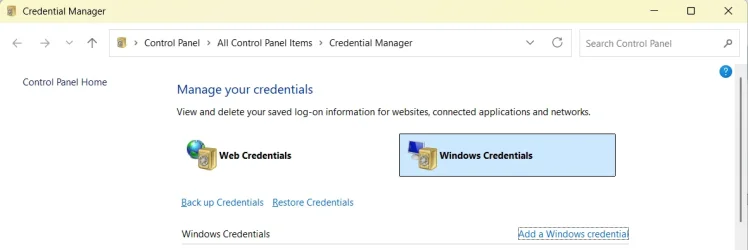
In Credential Manger click on 'Windows Credentials', then click 'Add a Windows credential'.

1757014279057.webp

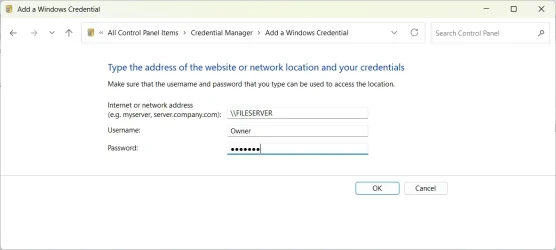
Fill in the details, server, username, and password, then click OK.

Screenshot 2025-09-04 202431.webp
 

My Computers My Computers

  • At a glance

    Windows 11 HomeAMD Athlon Silver 3050U8GBRadeon Graphics
    OS
    Windows 11 Home
    Computer type
    Laptop
    Manufacturer/Model
    Acer Aspire 3 A315-23-R9VY
    CPU
    AMD Athlon Silver 3050U
    Memory
    8GB
    Graphics Card(s)
    Radeon Graphics
    Monitor(s) Displays
    laptop screen
    Screen Resolution
    1366x768 native resolution, up to 2560x1440 with Radeon Virtual Super Resolution
    Hard Drives
    1TB Samsung EVO 870 SSD (from April 2026: 250GB EVO 850)
    Internet Speed
    150 Mbps
    Browser
    Edge, Firefox
    Antivirus
    Defender
    Other Info
    fully 'Windows 11 ready' laptop. Windows 10 C: partition migrated from my old unsupported 'main machine' then upgraded to 11. A test migration ran Insider builds for 2 months. When 11 was released on 5th October 2021 it was re-imaged back to 10 and was offered the upgrade in Windows Update on 20th October. Windows Update offered the 22H2 Feature Update on 20th September 2022. It got the 23H2 Feature Update on 4th November 2023 through Windows Update, 24H2 on 3rd October 2024 through Windows Update by setting the Target Release Version for 24H2, and 25H2 on 30th September 2025 through Windows Update by setting the Target Release Version for 25H2.

    UPDATE - 11 April 2026: due to mechanical deterioration this PC has been retired from active duty. The OS with all software and files has been migrated to my System Seven in 'Other systems' to carry on as my general purpose 'main machine'.

    I've now clean installed 25H2 and used Garlin's scripts to update Secure Boot to CA 2023 and revoke the PCA 2011 certificates. It's new role is to test secure boot issues.
  • At a glance

    Windows 11 ProIntel® Core™ i5-520M8GB(integrated graphics) Intel HD Graphics
    Operating System
    Windows 11 Pro
    Computer type
    Laptop
    Manufacturer/Model
    Dell Latitude E4310
    CPU
    Intel® Core™ i5-520M
    Motherboard
    0T6M8G
    Memory
    8GB
    Graphics card(s)
    (integrated graphics) Intel HD Graphics
    Screen Resolution
    1366x768
    Hard Drives
    500GB Crucial MX500 SSD
    Browser
    Firefox, Edge
    Antivirus
    Defender
    Other Info
    unsupported machine: Legacy bios, MBR, TPM 1.2, upgraded from W10 to W11 using W10/W11 hybrid install media workaround.

    In-place upgrade to 22H2 using ISO and a workaround.
    Feature Update to 23H2 by manually installing the Enablement Package.
    In-place upgrade to 24H2 using hybrid 23H2/24H2 install media.
    Upgraded to 25H2 by Enablement Package.

    Also running Insider Dev, and Canary builds and Windows 10 as native boot .vhdx.
  • My SYSTEM THREE is a Dell Latitude 5410, i7-10610U, 32GB RAM, 512GB NVMe ssd, supported device running Windows 11 Pro.

    My SYSTEM FOUR is a 2-in-1 convertible Lenovo Yoga 11e 20DA, Celeron N2930, 8GB RAM, 256GB ssd. Unsupported device: currently running Win10 Pro, plus Win11 Pro RTM and Insider Dev, Beta, and RP 24H2 as native boot vhdx.

    My SYSTEM FIVE is a Dell Latitude 3190 2-in-1, Pentium Silver N5030, 8GB RAM, 1TB NVMe ssd, supported device running Windows 11 Pro, plus Insider Beta, Dev, and Canary builds (and a few others) as a native boot .vhdx.

    My SYSTEM SIX is a Dell Latitude 5550, Core Ultra 7 165H, 64GB RAM, 1TB NVMe SSD, supported device, Windows 11 Pro 24H2, Hyper-V host machine. Updated to 25H2 on 30th September 2025.

    My SYSTEM SEVEN is a Lenovo Thinkpad T580, Intel Core i7-8650U, 16GB RAM, 512GB NVMe SSD + 2nd 512GB NVMe SSD, a supported device for Windows 11. This is my current general purpose 'main machine'. The installed Windows 11 Home from my System One has been migrated to this machine.
Credential Manager is in the Control Panel. You could just click Start and type credential manager to find and open it.

In Credential Manger click on 'Windows Credentials', then click 'Add a Windows credential'.

View attachment 144397

Fill in the details, server, username, and password, then click OK.

View attachment 144398
Thanks! Please allow me just one more stupid question: what am I supposed to enter in the first field, given that I have nothing like that set up?


[Edit] - I did set up a password, restarted the PC, entered the password, logged in correctly. ...but while the NAS is seen among the connected items (as it was before), clicking on it just sends Explorer in a long search ending with a "device not found" error. Clicking on diagnostics provides a "Predefined gateway not available" message. (I'm translating the error messages from Italian, so they might not be completely accurate).
 
Last edited:

My Computer My Computer

At a glance

Windows 1112th Gen Intel(R) Core(TM) i5-12400F 2.50 GHz64,0 GB
OS
Windows 11
Computer type
PC/Desktop
Manufacturer/Model
Custom
CPU
12th Gen Intel(R) Core(TM) i5-12400F 2.50 GHz
Motherboard
Asustek PRIME H610M-A D4
Memory
64,0 GB
Internet Speed
1Gb
Browser
Chrome
Antivirus
Windows Defender
Other Info
Processore 12th Gen Intel(R) Core(TM) i5-12400F 2.50 GHz
RAM installata 64,0 GB (63,8 GB utilizzabile)
Tipo sistema Sistema operativo a 64 bit, processore basato su x64
Penna e tocco Nessun input penna o tocco disponibile per questo schermo

Edizione Windows 11 Home
Versione 23H2
Data installazione: ‎28/‎04/‎2025
Build sistema operativo 22631.5768
Esperienza Pacchetto di esperienze per funzionalità Windows 1000.22700.1106.0
Thanks! Please allow me just one more stupid question: what am I supposed to enter in the first field....
That should be the network name of the NAS as you see it in File Explorer, preceded by \\

like this: \\My-NAS-name
 

My Computers My Computers

  • At a glance

    Windows 11 HomeAMD Athlon Silver 3050U8GBRadeon Graphics
    OS
    Windows 11 Home
    Computer type
    Laptop
    Manufacturer/Model
    Acer Aspire 3 A315-23-R9VY
    CPU
    AMD Athlon Silver 3050U
    Memory
    8GB
    Graphics Card(s)
    Radeon Graphics
    Monitor(s) Displays
    laptop screen
    Screen Resolution
    1366x768 native resolution, up to 2560x1440 with Radeon Virtual Super Resolution
    Hard Drives
    1TB Samsung EVO 870 SSD (from April 2026: 250GB EVO 850)
    Internet Speed
    150 Mbps
    Browser
    Edge, Firefox
    Antivirus
    Defender
    Other Info
    fully 'Windows 11 ready' laptop. Windows 10 C: partition migrated from my old unsupported 'main machine' then upgraded to 11. A test migration ran Insider builds for 2 months. When 11 was released on 5th October 2021 it was re-imaged back to 10 and was offered the upgrade in Windows Update on 20th October. Windows Update offered the 22H2 Feature Update on 20th September 2022. It got the 23H2 Feature Update on 4th November 2023 through Windows Update, 24H2 on 3rd October 2024 through Windows Update by setting the Target Release Version for 24H2, and 25H2 on 30th September 2025 through Windows Update by setting the Target Release Version for 25H2.

    UPDATE - 11 April 2026: due to mechanical deterioration this PC has been retired from active duty. The OS with all software and files has been migrated to my System Seven in 'Other systems' to carry on as my general purpose 'main machine'.

    I've now clean installed 25H2 and used Garlin's scripts to update Secure Boot to CA 2023 and revoke the PCA 2011 certificates. It's new role is to test secure boot issues.
  • At a glance

    Windows 11 ProIntel® Core™ i5-520M8GB(integrated graphics) Intel HD Graphics
    Operating System
    Windows 11 Pro
    Computer type
    Laptop
    Manufacturer/Model
    Dell Latitude E4310
    CPU
    Intel® Core™ i5-520M
    Motherboard
    0T6M8G
    Memory
    8GB
    Graphics card(s)
    (integrated graphics) Intel HD Graphics
    Screen Resolution
    1366x768
    Hard Drives
    500GB Crucial MX500 SSD
    Browser
    Firefox, Edge
    Antivirus
    Defender
    Other Info
    unsupported machine: Legacy bios, MBR, TPM 1.2, upgraded from W10 to W11 using W10/W11 hybrid install media workaround.

    In-place upgrade to 22H2 using ISO and a workaround.
    Feature Update to 23H2 by manually installing the Enablement Package.
    In-place upgrade to 24H2 using hybrid 23H2/24H2 install media.
    Upgraded to 25H2 by Enablement Package.

    Also running Insider Dev, and Canary builds and Windows 10 as native boot .vhdx.
  • My SYSTEM THREE is a Dell Latitude 5410, i7-10610U, 32GB RAM, 512GB NVMe ssd, supported device running Windows 11 Pro.

    My SYSTEM FOUR is a 2-in-1 convertible Lenovo Yoga 11e 20DA, Celeron N2930, 8GB RAM, 256GB ssd. Unsupported device: currently running Win10 Pro, plus Win11 Pro RTM and Insider Dev, Beta, and RP 24H2 as native boot vhdx.

    My SYSTEM FIVE is a Dell Latitude 3190 2-in-1, Pentium Silver N5030, 8GB RAM, 1TB NVMe ssd, supported device running Windows 11 Pro, plus Insider Beta, Dev, and Canary builds (and a few others) as a native boot .vhdx.

    My SYSTEM SIX is a Dell Latitude 5550, Core Ultra 7 165H, 64GB RAM, 1TB NVMe SSD, supported device, Windows 11 Pro 24H2, Hyper-V host machine. Updated to 25H2 on 30th September 2025.

    My SYSTEM SEVEN is a Lenovo Thinkpad T580, Intel Core i7-8650U, 16GB RAM, 512GB NVMe SSD + 2nd 512GB NVMe SSD, a supported device for Windows 11. This is my current general purpose 'main machine'. The installed Windows 11 Home from my System One has been migrated to this machine.
one more victim of the 24H2 abrupt changes... except, my local accounts do have passwords - yet they are being rejected.
I have 3 machines: 2 x win11 24H2 home, one win10 home. all of the machines have the same local user with the same password locally.

The win10 user can access both win11 drives with no issues.
The win11 machines refuse to map each other's drives. (i've tried everything in this thread - and more!) when I type the \\nameofpc i get asked for a username/password and althought i enter the correct name - it says password is not correct. (i even tried ./username and machine\username)

I created new users with password on each computer, and same behaviour.

I did not make any registry editor changes (but all the private/public netowrk, allow no password, SMB on, credentials reset has been tried)

being a home edition, i don't have access to the groups.

thoughts?
 

My Computer My Computer

At a glance

Win11
OS
Win11
Computer type
PC/Desktop
one more victim of the 24H2 abrupt changes...
Welcome to Eleven Forum.

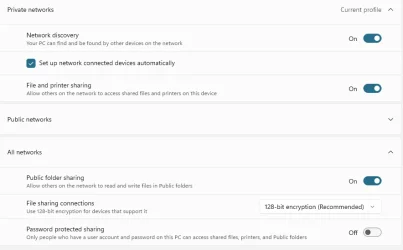
Turn off Password Protected Sharing on each machine.


My Computers My Computers

  • At a glance

    Windows 11 HomeAMD Athlon Silver 3050U8GBRadeon Graphics
    OS
    Windows 11 Home
    Computer type
    Laptop
    Manufacturer/Model
    Acer Aspire 3 A315-23-R9VY
    CPU
    AMD Athlon Silver 3050U
    Memory
    8GB
    Graphics Card(s)
    Radeon Graphics
    Monitor(s) Displays
    laptop screen
    Screen Resolution
    1366x768 native resolution, up to 2560x1440 with Radeon Virtual Super Resolution
    Hard Drives
    1TB Samsung EVO 870 SSD (from April 2026: 250GB EVO 850)
    Internet Speed
    150 Mbps
    Browser
    Edge, Firefox
    Antivirus
    Defender
    Other Info
    fully 'Windows 11 ready' laptop. Windows 10 C: partition migrated from my old unsupported 'main machine' then upgraded to 11. A test migration ran Insider builds for 2 months. When 11 was released on 5th October 2021 it was re-imaged back to 10 and was offered the upgrade in Windows Update on 20th October. Windows Update offered the 22H2 Feature Update on 20th September 2022. It got the 23H2 Feature Update on 4th November 2023 through Windows Update, 24H2 on 3rd October 2024 through Windows Update by setting the Target Release Version for 24H2, and 25H2 on 30th September 2025 through Windows Update by setting the Target Release Version for 25H2.

    UPDATE - 11 April 2026: due to mechanical deterioration this PC has been retired from active duty. The OS with all software and files has been migrated to my System Seven in 'Other systems' to carry on as my general purpose 'main machine'.

    I've now clean installed 25H2 and used Garlin's scripts to update Secure Boot to CA 2023 and revoke the PCA 2011 certificates. It's new role is to test secure boot issues.
  • At a glance

    Windows 11 ProIntel® Core™ i5-520M8GB(integrated graphics) Intel HD Graphics
    Operating System
    Windows 11 Pro
    Computer type
    Laptop
    Manufacturer/Model
    Dell Latitude E4310
    CPU
    Intel® Core™ i5-520M
    Motherboard
    0T6M8G
    Memory
    8GB
    Graphics card(s)
    (integrated graphics) Intel HD Graphics
    Screen Resolution
    1366x768
    Hard Drives
    500GB Crucial MX500 SSD
    Browser
    Firefox, Edge
    Antivirus
    Defender
    Other Info
    unsupported machine: Legacy bios, MBR, TPM 1.2, upgraded from W10 to W11 using W10/W11 hybrid install media workaround.

    In-place upgrade to 22H2 using ISO and a workaround.
    Feature Update to 23H2 by manually installing the Enablement Package.
    In-place upgrade to 24H2 using hybrid 23H2/24H2 install media.
    Upgraded to 25H2 by Enablement Package.

    Also running Insider Dev, and Canary builds and Windows 10 as native boot .vhdx.
  • My SYSTEM THREE is a Dell Latitude 5410, i7-10610U, 32GB RAM, 512GB NVMe ssd, supported device running Windows 11 Pro.

    My SYSTEM FOUR is a 2-in-1 convertible Lenovo Yoga 11e 20DA, Celeron N2930, 8GB RAM, 256GB ssd. Unsupported device: currently running Win10 Pro, plus Win11 Pro RTM and Insider Dev, Beta, and RP 24H2 as native boot vhdx.

    My SYSTEM FIVE is a Dell Latitude 3190 2-in-1, Pentium Silver N5030, 8GB RAM, 1TB NVMe ssd, supported device running Windows 11 Pro, plus Insider Beta, Dev, and Canary builds (and a few others) as a native boot .vhdx.

    My SYSTEM SIX is a Dell Latitude 5550, Core Ultra 7 165H, 64GB RAM, 1TB NVMe SSD, supported device, Windows 11 Pro 24H2, Hyper-V host machine. Updated to 25H2 on 30th September 2025.

    My SYSTEM SEVEN is a Lenovo Thinkpad T580, Intel Core i7-8650U, 16GB RAM, 512GB NVMe SSD + 2nd 512GB NVMe SSD, a supported device for Windows 11. This is my current general purpose 'main machine'. The installed Windows 11 Home from my System One has been migrated to this machine.
Thank you for the welcome :)

I wish it was that simple!
 

Attachments

  • Screenshot 2025-09-05 192100.webp
    Screenshot 2025-09-05 192100.webp
    22.4 KB · Views: 4

My Computer My Computer

At a glance

Win11
OS
Win11
Computer type
PC/Desktop
This issue is all over the internet. I appreciate Bree's suggestions and help but none of these actually work. So I went on a long hunt through the net to glean information. (I'm trying to get 26100.5074 to behave itself. 26100.4946 is ok for the update I received).

The best analysis I've found doing that is the fault appears to lie in 24H2's miscoded inability to "pass on" the IP addresses dynamically assigned by the DHCP function in the home network router. So irrespective of whether "insecure guest logon" is enabled, or whether the nitpicky "credentials" have been assigned, logging onto a machine on one's network is hit and miss. That information came from a particularly annoyed network administrator about 5 weeks ago - her final comment was she had retreated to 23H2 untill MS fixed this.

Now I'm experimenting with static versus dynamic network assignments. The issue with static addresses is that if one of the machines on the network is turned off, that IP address becomes vacant and the Master Browser may reallocate what it sees as a vacancy. Avoiding this then requires static allocation by MAC address. Well, we'll see, I suppose.

Still, there is one fact I've encountered in this mess that absolutely flummoxes all these ifs and buts. Using 26100.5074 on 2 machines in a 3 machine network, without "insecure logons" enabled, or network "credentials" assigned, sure results in both machines seeing each other but refusing to talk; both machines, however, have no trouble at all in talking with a 3rd networked machine on Win11 Lite. Nor does the Lite machine have any trouble in talking to both the 24H2 machines. That's with standard DHCP allocation from the router. I'm yet to try static IP address allocations with this.

Perhaps all this helps someone.
 

My Computer My Computer

At a glance

Windows 11Intel i5 10210U16GbIntel UHD
OS
Windows 11
Computer type
Laptop
Manufacturer/Model
HP 15s_du1xxx
CPU
Intel i5 10210U
Motherboard
85F1
Memory
16Gb
Graphics Card(s)
Intel UHD
Sound Card
Realtek
Screen Resolution
1920 x 1080
After more days (and nights) of attempting everything and their dog, I came to the conclusion that my specific issue isn't even rooted in authentication, but in network discoverability issues: no matter what, the Network Discoverability toggle reverts to off as soon as I close the relevant Options panel :cautious:

Of course I tried following every tutorial I could find about that specific matter, but once again... no joy at all. If you have any fix that you think might work (short of changing OS, factory reinstalling, and similarly humorous suggestions), I'm all ears.
 

My Computer My Computer

At a glance

Windows 1112th Gen Intel(R) Core(TM) i5-12400F 2.50 GHz64,0 GB
OS
Windows 11
Computer type
PC/Desktop
Manufacturer/Model
Custom
CPU
12th Gen Intel(R) Core(TM) i5-12400F 2.50 GHz
Motherboard
Asustek PRIME H610M-A D4
Memory
64,0 GB
Internet Speed
1Gb
Browser
Chrome
Antivirus
Windows Defender
Other Info
Processore 12th Gen Intel(R) Core(TM) i5-12400F 2.50 GHz
RAM installata 64,0 GB (63,8 GB utilizzabile)
Tipo sistema Sistema operativo a 64 bit, processore basato su x64
Penna e tocco Nessun input penna o tocco disponibile per questo schermo

Edizione Windows 11 Home
Versione 23H2
Data installazione: ‎28/‎04/‎2025
Build sistema operativo 22631.5768
Esperienza Pacchetto di esperienze per funzionalità Windows 1000.22700.1106.0
After more days (and nights) of attempting everything and their dog, I came to the conclusion that my specific issue isn't even rooted in authentication, but in network discoverability issues: no matter what, the Network Discoverability toggle reverts to off as soon as I close the relevant Options panel :cautious:

Of course I tried following every tutorial I could find about that specific matter, but once again... no joy at all. If you have any fix that you think might work (short of changing OS, factory reinstalling, and similarly humorous suggestions), I'm all ears.
I suppose you could always test it with a fresh install on a fresh drive. I could be entirely mistaken but I keep thinking it might be a third party thing such as your router settings or switch settings or something of that nature. This is not to say that I haven't encountered this issue before with Windows. I still have PCs that refuse to see other PCs for no discernible reason but I have so many PCs that I use the ones that "see" each other for networking. Sometimes certain security suites also interfere with networking.
 

My Computer My Computer

At a glance

WIN 11, WIN 10, WIN 8.1, WIN 7 U, WIN 7 PRO, ...Intel i7 6900K and i9-7960X / AMD 3800X (8 core)128 GB CORSAIR DOMINATOR PLATINUM (B DIE)NVIDIA 1070 and RTX 3070
OS
WIN 11, WIN 10, WIN 8.1, WIN 7 U, WIN 7 PRO, WIN 7 HOME (32 Bit), LINUX MINT
Computer type
PC/Desktop
Manufacturer/Model
DIY, ASUS, and DELL
CPU
Intel i7 6900K and i9-7960X / AMD 3800X (8 core)
Motherboard
ASUS X99E-WS USB 3.1 and ASUS X299 SAGE
Memory
128 GB CORSAIR DOMINATOR PLATINUM (B DIE)
Graphics Card(s)
NVIDIA 1070 and RTX 3070
Sound Card
Crystal Sound (onboard)
Monitor(s) Displays
single Samsung 30" 4K and 8" aux monitor
Screen Resolution
4K and something equally attrocious. I'll be working on this.
Hard Drives
A, B, C, D, E, F, G, H, I, J, K, L, M, N, O, P, Q, R, S, T, U, V, W

Ports X, Y, and Z are reserved for USB access and removable drives.

Drive types consist of the following: Various mechanical hard drives bearing the brand names, Seagate, Toshiba, and Western Digital. Various NVMe drives bearing the brand names Kingston, Intel, Silicon Power, Crucial, Western Digital, and Team Group. Various SATA SSDs bearing various different brand names.

RAID arrays included:

LSI RAID 10 (WD Velociraptors) 1115.72 GB
LSI RAID 10 (WD SSDS) 463.80 GB

INTEL RAID 0 (KINGSTON HYPER X) System 447.14 GB
INTEL RAID 1 TOSHIBA ENTERPRIZE class Data 2794.52 GB
INTEL RAID 1 SEAGATE HYBRID 931.51 GB
PSU
SEVERAL. I prefer my Corsair Platinum HX1000i but I also like EVGA power supplies
Case
ThermalTake Level 10 GT (among others)
Cooling
Noctua is my favorite and I use it in my main. I also own various other coolers.
Keyboard
all kinds.
Mouse
all kinds
Internet Speed
360 mbps - 1 gbps (depending)
Browser
FIREFOX
Antivirus
KASPERSKY (no apologies)
Other Info
Gave Dell touch screen with Windows 11 to daughter and got me an OTVOC. Being a PC builder I own many desktop PCs as well. I am a father of five providing PCs, laptops, and tablets for all my family, most of which I have modified, rebuilt, or simply built from scratch. I do not own a cell phone, never have, never will.
I suppose you could always test it with a fresh install on a fresh drive. I could be entirely mistaken but I keep thinking it might be a third party thing such as your router settings or switch settings or something of that nature. This is not to say that I haven't encountered this issue before with Windows. I still have PCs that refuse to see other PCs for no discernible reason but I have so many PCs that I use the ones that "see" each other for networking. Sometimes certain security suites also interfere with networking.
I see your point, but:
- The system worked fine with all of its software before 24H2
- Any security suite, VPN, router, etc. is there for a reason. I'm pretty sure Windows would work wonders by itself, but the fact of the matter is that it must work along with all its nice little helpers
 

My Computer My Computer

At a glance

Windows 1112th Gen Intel(R) Core(TM) i5-12400F 2.50 GHz64,0 GB
OS
Windows 11
Computer type
PC/Desktop
Manufacturer/Model
Custom
CPU
12th Gen Intel(R) Core(TM) i5-12400F 2.50 GHz
Motherboard
Asustek PRIME H610M-A D4
Memory
64,0 GB
Internet Speed
1Gb
Browser
Chrome
Antivirus
Windows Defender
Other Info
Processore 12th Gen Intel(R) Core(TM) i5-12400F 2.50 GHz
RAM installata 64,0 GB (63,8 GB utilizzabile)
Tipo sistema Sistema operativo a 64 bit, processore basato su x64
Penna e tocco Nessun input penna o tocco disponibile per questo schermo

Edizione Windows 11 Home
Versione 23H2
Data installazione: ‎28/‎04/‎2025
Build sistema operativo 22631.5768
Esperienza Pacchetto di esperienze per funzionalità Windows 1000.22700.1106.0
  • Like
Reactions: HTA
I see your point, but:
- The system worked fine with all of its software before 24H2
- Any security suite, VPN, router, etc. is there for a reason. I'm pretty sure Windows would work wonders by itself, but the fact of the matter is that it must work along with all its nice little helpers
I hear you but for as long as I've used Windows (admittedly this only goes as far back as Windows 95) every time a new OS comes onto the scene issues with networking make an appearance. It can be any number of variables. So yes, one might say we're shooting in the dark but this is part and parcel where trouble shooting is involved. Sometimes we find what went sideways, other times Microsoft fixes it with an update, and sadly, sometimes we are left in the dark. Myself, I'd try a fresh install because it doesn't take long to install an operating system these days. Of course I wouldn't destroy what I have already installed but to test the problem I'd install on a fresh drive.

What I find especially frustrating is that my wife has her OS installed with a MS account as opposed to a local account and she can network practically all the PCs in the house. I can't do this with a local account. Not sure why this should be the case but fortunately the PCs I need to network with I can access (so far).
 

My Computer My Computer

At a glance

WIN 11, WIN 10, WIN 8.1, WIN 7 U, WIN 7 PRO, ...Intel i7 6900K and i9-7960X / AMD 3800X (8 core)128 GB CORSAIR DOMINATOR PLATINUM (B DIE)NVIDIA 1070 and RTX 3070
OS
WIN 11, WIN 10, WIN 8.1, WIN 7 U, WIN 7 PRO, WIN 7 HOME (32 Bit), LINUX MINT
Computer type
PC/Desktop
Manufacturer/Model
DIY, ASUS, and DELL
CPU
Intel i7 6900K and i9-7960X / AMD 3800X (8 core)
Motherboard
ASUS X99E-WS USB 3.1 and ASUS X299 SAGE
Memory
128 GB CORSAIR DOMINATOR PLATINUM (B DIE)
Graphics Card(s)
NVIDIA 1070 and RTX 3070
Sound Card
Crystal Sound (onboard)
Monitor(s) Displays
single Samsung 30" 4K and 8" aux monitor
Screen Resolution
4K and something equally attrocious. I'll be working on this.
Hard Drives
A, B, C, D, E, F, G, H, I, J, K, L, M, N, O, P, Q, R, S, T, U, V, W

Ports X, Y, and Z are reserved for USB access and removable drives.

Drive types consist of the following: Various mechanical hard drives bearing the brand names, Seagate, Toshiba, and Western Digital. Various NVMe drives bearing the brand names Kingston, Intel, Silicon Power, Crucial, Western Digital, and Team Group. Various SATA SSDs bearing various different brand names.

RAID arrays included:

LSI RAID 10 (WD Velociraptors) 1115.72 GB
LSI RAID 10 (WD SSDS) 463.80 GB

INTEL RAID 0 (KINGSTON HYPER X) System 447.14 GB
INTEL RAID 1 TOSHIBA ENTERPRIZE class Data 2794.52 GB
INTEL RAID 1 SEAGATE HYBRID 931.51 GB
PSU
SEVERAL. I prefer my Corsair Platinum HX1000i but I also like EVGA power supplies
Case
ThermalTake Level 10 GT (among others)
Cooling
Noctua is my favorite and I use it in my main. I also own various other coolers.
Keyboard
all kinds.
Mouse
all kinds
Internet Speed
360 mbps - 1 gbps (depending)
Browser
FIREFOX
Antivirus
KASPERSKY (no apologies)
Other Info
Gave Dell touch screen with Windows 11 to daughter and got me an OTVOC. Being a PC builder I own many desktop PCs as well. I am a father of five providing PCs, laptops, and tablets for all my family, most of which I have modified, rebuilt, or simply built from scratch. I do not own a cell phone, never have, never will.
I hear you but for as long as I've used Windows (admittedly this only goes as far back as Windows 95) every time a new OS comes onto the scene issues with networking make an appearance. It can be any number of variables. So yes, one might say we're shooting in the dark but this is part and parcel where trouble shooting is involved. Sometimes we find what went sideways, other times Microsoft fixes it with an update, and sadly, sometimes we are left in the dark. Myself, I'd try a fresh install because it doesn't take long to install an operating system these days. Of course I wouldn't destroy what I have already installed but to test the problem I'd install on a fresh drive.

What I find especially frustrating is that my wife has her OS installed with a MS account as opposed to a local account and she can network practically all the PCs in the house. I can't do this with a local account. Not sure why this should be the case but fortunately the PCs I need to network with I can access (so far).
But I don't need a test to know that on a clean system it is going to work! Of course millions of people have perfectly working setups... it's my particular hardware and software configuration that borks it all (and / or the downgrade from 24 to 23 leaving stuff behind) - so even if I lost one week to reinstall and reconfigure it all, I'd only come back to this unworking combination. My point is to find a fix for this specific configuration.
 

My Computer My Computer

At a glance

Windows 1112th Gen Intel(R) Core(TM) i5-12400F 2.50 GHz64,0 GB
OS
Windows 11
Computer type
PC/Desktop
Manufacturer/Model
Custom
CPU
12th Gen Intel(R) Core(TM) i5-12400F 2.50 GHz
Motherboard
Asustek PRIME H610M-A D4
Memory
64,0 GB
Internet Speed
1Gb
Browser
Chrome
Antivirus
Windows Defender
Other Info
Processore 12th Gen Intel(R) Core(TM) i5-12400F 2.50 GHz
RAM installata 64,0 GB (63,8 GB utilizzabile)
Tipo sistema Sistema operativo a 64 bit, processore basato su x64
Penna e tocco Nessun input penna o tocco disponibile per questo schermo

Edizione Windows 11 Home
Versione 23H2
Data installazione: ‎28/‎04/‎2025
Build sistema operativo 22631.5768
Esperienza Pacchetto di esperienze per funzionalità Windows 1000.22700.1106.0

Latest Support Threads

Back
Top Bottom