Win11 - Settings says "Not Connected", but I am connected to the internet?


RedFox24

Member
Local time
4:30 AM
Posts
2
OS
Windows 11
Hi, I've been encountering a strange issue with the network on my Windows 11 PC recently, I'm not exactly sure what caused it.

My taskbar indicates that I have a working ethernet connection, and internet on my PC mostly works fine, browsers work, steam works etc., but the modern style settings app shows "Not connected, you aren't connected to any networks", and this seems to cause certain apps to also assume I have no internet connection (e.g. Spotify, Nvidia GeForce Experience), and therefore not work correctly or start in offline mode. The status of the network adapter in control panel's network and sharing centre shows that IPv4 connectivity is fine (no IPv6 though, but this doesn't seem to be an issue on any other devices on the network - I think this is a limitation of my router).

I don't think that this is an issue with my ethernet adapter driver, since I also have a WiFi dongle installed that faces the same problem. I have also tried uninstalling the driver from device manager and reinstalling the driver from Realtek's website.

Anyone have any idea what's going on or how to fix this? Any help or advice would be greatly appreciated. Thanks.
 
Windows Build/Version
11

My Computer My Computer

At a glance

Windows 11Ryzen 7 5800X16Gb Kingston Hyperx FuryGTX 3060Ti
OS
Windows 11
Computer type
PC/Desktop
CPU
Ryzen 7 5800X
Motherboard
Gigabyte B550 Aorus Pro V2
Memory
16Gb Kingston Hyperx Fury
Graphics Card(s)
GTX 3060Ti
PSU
Cougar CMX1000W
Case
Fractal Meshify Compact 2
Cooling
NZXT Kraken X63
Are you using any 3rd party apps related to the network or firewall?
 

My Computer My Computer

At a glance

Windows 11 - Release Preview channelIntel 13900KCorsair Dominator Platinum RGB 32GB DDR5 6000MHzGigabyte 4090 Gaming OC
OS
Windows 11 - Release Preview channel
Computer type
PC/Desktop
Manufacturer/Model
Kol's custom ROG
CPU
Intel 13900K
Motherboard
Asus ROG Maximus Hero Z790
Memory
Corsair Dominator Platinum RGB 32GB DDR5 6000MHz
Graphics Card(s)
Gigabyte 4090 Gaming OC
Sound Card
SoundBlaster X-AE5
Monitor(s) Displays
Dell Alienware AW3821DW
Screen Resolution
3840x1600 144hz
Hard Drives
Samsung 980 Pro 500GB
860 EVO's
Samsung 990 Pro 2TB
External RAID enclosure - 2x Seagate 3TB HDD
PSU
Seasonic Prime Ultra 1300W Platinum
Case
Phanteks Eclipse P600S
Cooling
Custom water cooling. EK Velocity (CPU), EK Quantum Vector2 (GPU), EK Quantum D5 Pump, 360mm radiator in case + 560mm external radiator
Keyboard
Corsair K100
Mouse
Logitech G502X
Antivirus
Windows Defender, VBS
You say recently. So you've had Windows 11 installed for a while now and no issue?
How long has it been an issue?
Do you recall any security software you may have installed or tested lately?


What is the router make and model number?

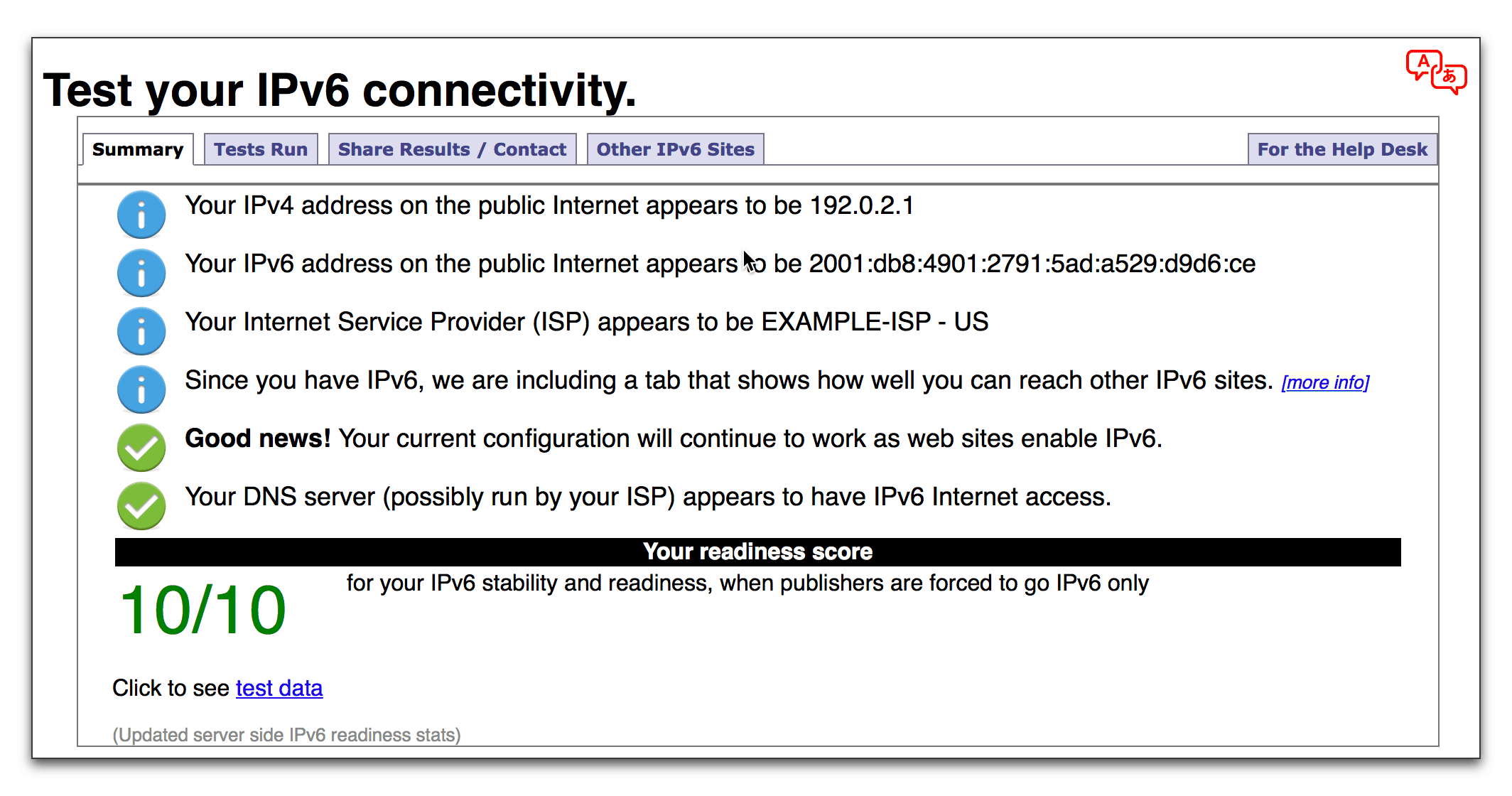
Does this site also say you don't have IPv6 connection?


My Computer My Computer

At a glance

Windows 11 Pro build 25H2 x64Intel i9-13900K64GBNvidia GeForce RTX-3090 Ti
OS
Windows 11 Pro build 25H2 x64
Computer type
PC/Desktop
Manufacturer/Model
ASUS Custom build
CPU
Intel i9-13900K
Motherboard
Asus ROG STRIX Z790 E GAMING WIFI 11
Memory
64GB
Graphics Card(s)
Nvidia GeForce RTX-3090 Ti
Internet Speed
1 Gbps
Browser
Firefox
Antivirus
Malwarebytes
This will be long, so settle in.
Since the problem is happening on both wired & wireless, you have to prove if the problem is caused by your hardware or Windows by process of elimination. I would suggest these steps. Anywhere you see the word CHECK means to see if “Not Connected” is still being indicated.

If you haven’t already done it, before you start, reset your router and restart computer and CHECK. This could fix the issue.

First, we'll check the wired side of your connections.

1. Connect with wired ethernet cable and keep dongle inserted.

2. Reset your network components to factory default using this tutorial.

3. CHECK - If you no longer see "not connected", go to step 5.

If you still see it, remove dongle and CHECK. If still "not connected", open a command prompt as administrator and type sfc /scannow

This is where it gets kind of tricky. After system file checker completes, make note of whether it found and corrected any problems. If found and corrected, restart and CHECK. If that fixed the problem on the wired side continue to step 4.
If it found problems it could not correct, in command window type dism /online /cleanup-image /restorehealth.
Restart and CHECK.

If there's still a problem after running dism using wired internet and dongle removed, it proves either your ethernet adapter is causing the problem (which I doubt) or there's an erroneous flag set somewhere in Windows that a repair install might fix. (You can eliminate the adapter being the problem by disabling it in device manager, plugging in the dongle, and establishing wireless connection-CHECK)

4. Plug in the dongle. CHECK

5. IF no "not connected" indicated, the wired side is good. Disconnect your ethernet cable and establish a wireless connection. CHECK.

6. If still none, you're ALL good, so stop here.


7.But if you see "not connected" at this point, your wireless side has issues we need to work on.
It's probably the dongle causing the problem, but you can try one more step. Open a command prompt as administrator. Run the following commands one at a time to reset wireless. Let each one complete. You can copy and paste the commands.

netsh int ip reset c:\resetlog.txt
ipconfig /flushdns
netsh winsock reset
ipconfig /release
ipconfig /renew
netsh winsock reset catalog
netsh int ipv4 reset reset.log
netsh advfirewall reset

Restart computer

8. After all that, CHECK -if you still see the "not connected" when you connect wirelessly, you have a bad dongle. Uninstall it in device manager, unplug it, and reconnect ethernet cable .CHECK
It’s possible but not likely you may see the issue has come back using only wired ethernet. You may have to do step 2 again to get it to go away.

Whew!! That was a long one. Hope it helps.
 
Last edited:

My Computers My Computers

  • At a glance

    Windows 11 Pro 25H2 26200.8875i9-10900 10 core 20 threads32 gbnone-Intel UHD Graphics 630
    OS
    Windows 11 Pro 25H2 26200.8875
    Computer type
    PC/Desktop
    Manufacturer/Model
    Dell Optiplex 7080
    CPU
    i9-10900 10 core 20 threads
    Motherboard
    DELL 0J37VM
    Memory
    32 gb
    Graphics Card(s)
    none-Intel UHD Graphics 630
    Sound Card
    Integrated Realtek
    Monitor(s) Displays
    Benq 27
    Screen Resolution
    2560x1440
    Hard Drives
    2x1tb Solidigm m.2 nvme /External drives 512gb Samsung m.2 sata+2tb Kingston m2.nvme
    PSU
    500w
    Case
    MT
    Cooling
    Dell Premium
    Keyboard
    Logitech wired
    Mouse
    Logitech wireless
    Internet Speed
    so slow I'm too embarrassed to tell
    Browser
    #1 Edge #2 Firefox
    Antivirus
    Defender+MWB Premium
  • At a glance

    Windows 11 Pro 24H2 26200.8875AMD Ryzen 7 6800U32 gbintegrated
    Operating System
    Windows 11 Pro 24H2 26200.8875
    Computer type
    PC/Desktop
    Manufacturer/Model
    Beelink Mini PC SER5
    CPU
    AMD Ryzen 7 6800U
    Memory
    32 gb
    Graphics card(s)
    integrated
    Sound Card
    integrated
    Monitor(s) Displays
    Benq 27
    Screen Resolution
    2560x1440
    Hard Drives
    1TB Crucial nvme
    Keyboard
    Logitech wired
    Mouse
    Logitech wireless
    Internet Speed
    still too embarrassed to tell
    Browser
    Firefox
    Antivirus
    Defender
    Other Info
    System 3 is non compliant Dell 9020 i7-4770/24gb ram Win11 PRO 26200.8875
The firewall was not reset in your above. That should be reset too if you're going to reset everything.
From an elevated admin command prompt.

netsh advfirewall reset
 

My Computer My Computer

At a glance

Windows 11 Pro build 25H2 x64Intel i9-13900K64GBNvidia GeForce RTX-3090 Ti
OS
Windows 11 Pro build 25H2 x64
Computer type
PC/Desktop
Manufacturer/Model
ASUS Custom build
CPU
Intel i9-13900K
Motherboard
Asus ROG STRIX Z790 E GAMING WIFI 11
Memory
64GB
Graphics Card(s)
Nvidia GeForce RTX-3090 Ti
Internet Speed
1 Gbps
Browser
Firefox
Antivirus
Malwarebytes
Hi all, my apologies for not seeing that people replied to this thread until now.

@AdvancedSetup Yes , I had windows 11 installed for a while before encountering this issue, but I must admit I can't remember what I was doing immediately before this started happening, since it has been quite a while now. I think I had some other network issue, which I tried to fix with a network reset, but then this was the result.

My router is a Hitron CGNV4-BIZ, however I have noticed I still get this problem even if I share my phone's 4G connection over USB.

That website does indeed indicate that I don't have IPV6 support ("No IPv6 address detected"). And it says the same thign on my laptop/phone connected over WiFi.

I have tried all of the steps @glasskuter kindly wrote out, but still no change :/. SFC scannow returned found no issues.

Also, I should mention that as a last ditch attempt I reset my computer using the "Reset this PC" option in settings->system->recovery, choosing to keep my personal files, and even that hasn't fixed the issue. I also tried updating my BIOS and resetting it to its default settings. At this point do you think it is an issue with my motherboard? Everything still works fine on Ubuntu. The next thing I want to try is a fresh windows installation on a different drive/partition.

Thanks so much for your replies, and again sorry I didn't see them sooner.

P.S. one other thing I forgot to mention - whenever I disable then enable the WiFi or ethernet adapters (or reboot), the correct "ethernet/WiFi connected" icon comes up in the taskbar, but only for a few seconds before it goes back to displaying "no internet access".
 

My Computer My Computer

At a glance

Windows 11Ryzen 7 5800X16Gb Kingston Hyperx FuryGTX 3060Ti
OS
Windows 11
Computer type
PC/Desktop
CPU
Ryzen 7 5800X
Motherboard
Gigabyte B550 Aorus Pro V2
Memory
16Gb Kingston Hyperx Fury
Graphics Card(s)
GTX 3060Ti
PSU
Cougar CMX1000W
Case
Fractal Meshify Compact 2
Cooling
NZXT Kraken X63
Two more thing I've thought about. 1) What do you see when you remove the dongle and completely bypass your router by plugging your ethernet directly into your IP's poe?

2) Your specs indicate a later model mobo which usually have a resident wireless adapter. Are you sure by connecting the dongle that you don't have TWO wireless adapters. Verify in device manager.
 

My Computers My Computers

  • At a glance

    Windows 11 Pro 25H2 26200.8875i9-10900 10 core 20 threads32 gbnone-Intel UHD Graphics 630
    OS
    Windows 11 Pro 25H2 26200.8875
    Computer type
    PC/Desktop
    Manufacturer/Model
    Dell Optiplex 7080
    CPU
    i9-10900 10 core 20 threads
    Motherboard
    DELL 0J37VM
    Memory
    32 gb
    Graphics Card(s)
    none-Intel UHD Graphics 630
    Sound Card
    Integrated Realtek
    Monitor(s) Displays
    Benq 27
    Screen Resolution
    2560x1440
    Hard Drives
    2x1tb Solidigm m.2 nvme /External drives 512gb Samsung m.2 sata+2tb Kingston m2.nvme
    PSU
    500w
    Case
    MT
    Cooling
    Dell Premium
    Keyboard
    Logitech wired
    Mouse
    Logitech wireless
    Internet Speed
    so slow I'm too embarrassed to tell
    Browser
    #1 Edge #2 Firefox
    Antivirus
    Defender+MWB Premium
  • At a glance

    Windows 11 Pro 24H2 26200.8875AMD Ryzen 7 6800U32 gbintegrated
    Operating System
    Windows 11 Pro 24H2 26200.8875
    Computer type
    PC/Desktop
    Manufacturer/Model
    Beelink Mini PC SER5
    CPU
    AMD Ryzen 7 6800U
    Memory
    32 gb
    Graphics card(s)
    integrated
    Sound Card
    integrated
    Monitor(s) Displays
    Benq 27
    Screen Resolution
    2560x1440
    Hard Drives
    1TB Crucial nvme
    Keyboard
    Logitech wired
    Mouse
    Logitech wireless
    Internet Speed
    still too embarrassed to tell
    Browser
    Firefox
    Antivirus
    Defender
    Other Info
    System 3 is non compliant Dell 9020 i7-4770/24gb ram Win11 PRO 26200.8875
Hello, I have also been encountering this problem and have spent countless hours looking for any solutions and went through this thread and many more to no luck. This is the only case that is exactly the same as my own, especially because of the short moment it says activated when I plug Ethernet back into my pc, and how only some apps get effected.
If either of you have any other advice I would greatly appreciate it as I am at the point of giving up on this computer completely because nothing seems to work.
 

My Computer My Computer

At a glance

windows 10Intel i5 446016gb Kingston ddr3AMD Sapphire RX480
OS
windows 10
Computer type
PC/Desktop
CPU
Intel i5 4460
Motherboard
ASUS B85M-G
Memory
16gb Kingston ddr3
Graphics Card(s)
AMD Sapphire RX480
Two more thing I've thought about. 1) What do you see when you remove the dongle and completely bypass your router by plugging your ethernet directly into your IP's poe?

2) Your specs indicate a later model mobo which usually have a resident wireless adapter. Are you sure by connecting the dongle that you don't have TWO wireless adapters. Verify in device manager.
And thank you for the steps given but I have tried that and the windows reinstall and rested Redford has tried.
 

My Computer My Computer

At a glance

windows 10Intel i5 446016gb Kingston ddr3AMD Sapphire RX480
OS
windows 10
Computer type
PC/Desktop
CPU
Intel i5 4460
Motherboard
ASUS B85M-G
Memory
16gb Kingston ddr3
Graphics Card(s)
AMD Sapphire RX480
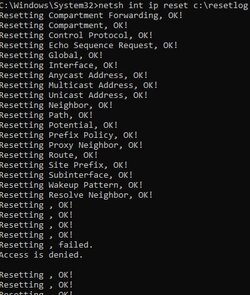
I ran into this problem when I got a great deal on a newish alienware laptop.
I ran all the command prompts and ran into this access denied for two of the commands
 

Attachments

  • Reset.jpg
    Reset.jpg
    18.2 KB · Views: 5
  • Reset 2.jpg
    Reset 2.jpg
    36.6 KB · Views: 6

My Computer My Computer

At a glance

Windows 11I7 8750H16gbNvidia 1070M
OS
Windows 11
Computer type
Laptop
Manufacturer/Model
Alienware
CPU
I7 8750H
Motherboard
Laptop
Memory
16gb
Graphics Card(s)
Nvidia 1070M
Sound Card
?
Monitor(s) Displays
1
Screen Resolution
1080p
Hard Drives
250gb m.2
1tb 7200rpm hd
PSU
powerblock
Case
N/A
Cooling
N/A
Keyboard
N/A
Mouse
Corsair el cheapo
Internet Speed
Fast enough
Browser
Brave
Antivirus
Win Def
I ran into this problem when I got a great deal on a newish alienware laptop.
I ran all the command prompts and ran into this access denied for two of the commands.
Anyone?
 

My Computer My Computer

At a glance

Windows 11I7 8750H16gbNvidia 1070M
OS
Windows 11
Computer type
Laptop
Manufacturer/Model
Alienware
CPU
I7 8750H
Motherboard
Laptop
Memory
16gb
Graphics Card(s)
Nvidia 1070M
Sound Card
?
Monitor(s) Displays
1
Screen Resolution
1080p
Hard Drives
250gb m.2
1tb 7200rpm hd
PSU
powerblock
Case
N/A
Cooling
N/A
Keyboard
N/A
Mouse
Corsair el cheapo
Internet Speed
Fast enough
Browser
Brave
Antivirus
Win Def

My Computer My Computer

At a glance

Windows 11 Pro 23H2Intel i3 8100 @3.6Ghz1 x 16GB DDR4 @2400 MHzNvidia GeForce GT 1030 2GB SDDR4
OS
Windows 11 Pro 23H2
Computer type
PC/Desktop
Manufacturer/Model
MSI / MS-7B29
CPU
Intel i3 8100 @3.6Ghz
Motherboard
H310M PRO-VDH (MS-7B29)
Memory
1 x 16GB DDR4 @2400 MHz
Graphics Card(s)
Nvidia GeForce GT 1030 2GB SDDR4
Sound Card
Realtek VEN_10EC&DEV_0887 / NVIDIA VEN_10DE&DEV_0081
Monitor(s) Displays
Acer V226HQL
Screen Resolution
1920 x 1080
Hard Drives
SSD 500 GB Crucial MX500 / HDD 1 TB TOSHIBA DT01ACA100
PSU
ATX, details unknown
Case
Everest 551B
Cooling
details unknown
Keyboard
Mechanical Gaming Hydra R7 - Rampage
Mouse
Logitech G703
Internet Speed
Down: 28Mbps / Up: 19Mbps
Browser
Microsoft Edge
Antivirus
Microsoft Defender Antivirus
Other Info
Bluetooth: TP Link 5.0 Nano USB adapter UB500
WLAN: D-Link 150 Pico USB adapter, N standard
Web camera: Logitech C270 HD 720p @30fps
Microphone: Trust MICO, model 23790
My taskbar indicates that I have a working ethernet connection, and internet on my PC mostly works fine, browsers work, steam works etc., but the modern style settings app shows "Not connected, you aren't connected to any networks".
The status of the network adapter in control panel's network and sharing centre shows that IPv4 connectivity is fine
To address the orig question, if Data Usage is disabled, it might cause this:

capture_12252023_101001.jpg
Enable and run the service and task manually or run CMD as admin and copy/paste:
Code:
schtasks /Change /TN "Microsoft\Windows\DUSM\dusmtask" /Enable
sc config DusmSvc start= auto
net start DusmSvc
capture_12252023_101332.jpg

I ran all the command prompts and ran into this access denied for two of the commands
Check out this, it will reset network services to default and enable active probing.
 

My Computer My Computer

At a glance

Home26H2CanAMD Ryzen 5 8600G (07/24)2x32GB Kingston FURY DDR5 5600 MHz CL36 @5200...ASROCK Radeon RX 6600 Challenger D 8G @48FPS ...
OS
Home26H2Can
Computer type
PC/Desktop
CPU
AMD Ryzen 5 8600G (07/24)
Motherboard
ASROCK B650M-HDV/M.2 (07/24) BIOS 4.21 AGESA ComboAM5 1.3.0.1 (04/26)
Memory
2x32GB Kingston FURY DDR5 5600 MHz CL36 @5200 CL36 (07/24)
Graphics Card(s)
ASROCK Radeon RX 6600 Challenger D 8G @48FPS (08/24)
Sound Card
Creative Sound BlasterX AE-5 Plus (05/24)
Monitor(s) Displays
24" Philips 24M1N3200ZS/00 (05/24)
Screen Resolution
1920×1080@165Hz via DP1.4
Hard Drives
Kingston KC3000 NVMe 2TB (05/24)
ADATA XPG GAMMIX S11 Pro 512GB (07/19)
PSU
Seasonic Core GM 550 Gold (04/24)
Case
Fractal Design Define 7 Mini with 3x Noctua NF-P14s/12@555rpm (04/24)
Cooling
Noctua NH-U12S with Noctua NF-P12 (04/24)
Keyboard
HP Pavilion Wired Keyboard 300 (07/24) + Rabalux 76017 Parker (01/24)
Mouse
Logitech M330 Silent Plus (01/26)
Internet Speed
500/100 Mbps via RouterOS (05/21) & TCP Optimizer
Browser
Edge, Brave for YouTube, LibreWolf for FB
Antivirus
NextDNS blocking 1/3 Traffic
Other Info
Phone: Motorola Moto G86 (02/26)
Backup: Hasleo Backup Suite (PreOS)
Headphones: Sennheiser RS170 (09/10)
Chair: Huzaro Force 4.4 Grey Mesh (05/24)
Notifier: Xiaomi Mi Band 9 Milanese (10/24)
FlexCore USB-C 3.2 Gen 1 (M) to LAN (F) (08/25)
newish alienware laptop
Where was that computer used before you got it? I saw the same thing several years ago when our church was donated some Notebooks from a company where the employee simply unplugged them without properly disconnecting from the Server-based Network and removing users' passwords. Fortunately I had a disc that allowed me to do a full/clean install and make useful.
 

My Computers My Computers

  • At a glance

    Win11 Pro RTM Version 24H2 Build 26100.4202Intel Core i5 11th Gen. 2.40GHz12GB
    OS
    Win11 Pro RTM Version 24H2 Build 26100.4202
    Computer type
    Laptop
    Manufacturer/Model
    Dell Vostro 3400
    CPU
    Intel Core i5 11th Gen. 2.40GHz
    Memory
    12GB
    Hard Drives
    256GB SSD NVMe M.2
  • At a glance

    Win11 Pro RTM Version 24H2 Build 26100.4202Intel Core i5 10th Gen. 2.90GHz16GBOnboard, no VGA, using a DisplayPort-to-VGA a...
    Operating System
    Win11 Pro RTM Version 24H2 Build 26100.4202
    Computer type
    PC/Desktop
    Manufacturer/Model
    Dell Vostro 5890
    CPU
    Intel Core i5 10th Gen. 2.90GHz
    Memory
    16GB
    Graphics card(s)
    Onboard, no VGA, using a DisplayPort-to-VGA adapter
    Monitor(s) Displays
    24" Dell
    Hard Drives
    512GB SSD NVMe, 4TB Seagate HDD
    Browser
    Firefox, Edge
    Antivirus
    Windows Defender/Microsoft Security
Where was that computer used before you got it? I saw the same thing several years ago when our church was donated some Notebooks from a company where the employee simply unplugged them without properly disconnecting from the Server-based Network and removing users' passwords. Fortunately I had a disc that allowed me to do a full/clean install and make useful.
I bought used from a man, it was his son's. They didn't seem to be very techy.
 

My Computer My Computer

At a glance

Windows 11I7 8750H16gbNvidia 1070M
OS
Windows 11
Computer type
Laptop
Manufacturer/Model
Alienware
CPU
I7 8750H
Motherboard
Laptop
Memory
16gb
Graphics Card(s)
Nvidia 1070M
Sound Card
?
Monitor(s) Displays
1
Screen Resolution
1080p
Hard Drives
250gb m.2
1tb 7200rpm hd
PSU
powerblock
Case
N/A
Cooling
N/A
Keyboard
N/A
Mouse
Corsair el cheapo
Internet Speed
Fast enough
Browser
Brave
Antivirus
Win Def

My Computer My Computer

At a glance

Windows 11I7 8750H16gbNvidia 1070M
OS
Windows 11
Computer type
Laptop
Manufacturer/Model
Alienware
CPU
I7 8750H
Motherboard
Laptop
Memory
16gb
Graphics Card(s)
Nvidia 1070M
Sound Card
?
Monitor(s) Displays
1
Screen Resolution
1080p
Hard Drives
250gb m.2
1tb 7200rpm hd
PSU
powerblock
Case
N/A
Cooling
N/A
Keyboard
N/A
Mouse
Corsair el cheapo
Internet Speed
Fast enough
Browser
Brave
Antivirus
Win Def
To address the orig question, if Data Usage is disabled, it might cause this:

View attachment 82261
Enable and run the service and task manually or run CMD as admin and copy/paste:
Code:
schtasks /Change /TN "Microsoft\Windows\DUSM\dusmtask" /Enable
sc config DusmSvc start= auto
net start DusmSvc
View attachment 82262


Check out this, it will reset network services to default and enable active probing.
On the second set. Where do the Commands actually start? looks to be 100 lines
 

My Computer My Computer

At a glance

Windows 11I7 8750H16gbNvidia 1070M
OS
Windows 11
Computer type
Laptop
Manufacturer/Model
Alienware
CPU
I7 8750H
Motherboard
Laptop
Memory
16gb
Graphics Card(s)
Nvidia 1070M
Sound Card
?
Monitor(s) Displays
1
Screen Resolution
1080p
Hard Drives
250gb m.2
1tb 7200rpm hd
PSU
powerblock
Case
N/A
Cooling
N/A
Keyboard
N/A
Mouse
Corsair el cheapo
Internet Speed
Fast enough
Browser
Brave
Antivirus
Win Def
Back
Top Bottom