Window Search service fails to start with: Error 5: Access Denied


DoctorRashir

New member
Local time
2:57 AM
Posts
7
Location
Portland
OS
Windows 11
I have been chasing this error for months now. Ever since I upgraded to Windows 11 last year Windows Explorer would hang for about 30 seconds repeatedly. After much troubleshooting I discovered that if I disable the Windows Search service then Explorer would no longer hang. But, of course the Windows search features no longer work.
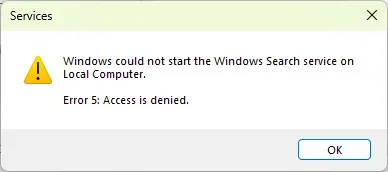

Screenshot 2026-01-31 180421.webp

I have searched extensively for a solution and found some fixes, but nothing has worked. Especially I found this one on MS Learn:

Fix problems in Windows Search

I have tried all the solutions but nothing has worked.

My system is fully up to date. I have a couple of VirtualBox VM running the same OS version. On one of them, Windows Search is running fine but the other one fails the same way as my main host system. On the one that works I did a clean install. The other one and my main system I have not done a clean install since I clean installed Windows 10 many years ago. Doing a clean install on my main system is an absolute last, last resort because of the time and difficulty of getting my system setup again to the state it is. Everything else is working great.

I have repeatedly run the sfc /scannow and DISM /online /Cleanup-Image /RestoreHealth. No issues were found.

I then used ProcMon to run a trace on both the VMs. I can see where the startup deviates on the one that fails But I can't determine why that event is leading to the abort. I can post the ProcMon traces if that would help.

Any and all help with this will be greatly appreciated.

System:
Processor 12th Gen Intel(R) Core(TM) i7-12700K (3.60 GHz)
Installed RAM 32.0 GB (31.7 GB usable)
System type 64-bit operating system, x64-based processor
Pen and touch No pen or touch input is available for this display

Edition Windows 11 Pro
Version 25H2
Installed on ‎6/‎15/‎2025
OS build 26200.7628
Experience Windows Feature Experience Pack 1000.26100.275.0

Disks:
C: 463.99 GB SSD
D: 931.39 GB SSD
E: 1.82 TB HDD
F: 1.82 TB SSD
 

My Computer

System One

  • OS
    Windows 11
    Computer type
    PC/Desktop
    Manufacturer/Model
    Asus
    CPU
    Intel Core(TM) i7-12700K
    Motherboard
    Asus Tuf Gaming H670-Pro
    Memory
    32 GB
Have you changed permission on any system level folder, file, or registry entry? ie "take ownership"
 

My Computers

System One System Two

  • OS
    Windows 11 Pro 25H2
    Computer type
    PC/Desktop
    Manufacturer/Model
    Dell Optiplex 7080
    CPU
    i9-10900 10 core 20 threads
    Motherboard
    DELL 0J37VM
    Memory
    32 gb
    Graphics Card(s)
    none-Intel UHD Graphics 630
    Sound Card
    Integrated Realtek
    Monitor(s) Displays
    Benq 27
    Screen Resolution
    2560x1440
    Hard Drives
    2x1tb Solidigm m.2 nvme /External drives 512gb Samsung m.2 sata+2tb Kingston m2.nvme
    PSU
    500w
    Case
    MT
    Cooling
    Dell Premium
    Keyboard
    Logitech wired
    Mouse
    Logitech wireless
    Internet Speed
    so slow I'm too embarrassed to tell
    Browser
    #1 Edge #2 Firefox
    Antivirus
    Defender+MWB Premium
  • Operating System
    Windows 11 Pro 24H2 26200.8457
    Computer type
    PC/Desktop
    Manufacturer/Model
    Beelink Mini PC SER5
    CPU
    AMD Ryzen 7 6800U
    Memory
    32 gb
    Graphics card(s)
    integrated
    Sound Card
    integrated
    Monitor(s) Displays
    Benq 27
    Screen Resolution
    2560x1440
    Hard Drives
    1TB Crucial nvme
    Keyboard
    Logitech wired
    Mouse
    Logitech wireless
    Internet Speed
    still too embarrassed to tell
    Browser
    Firefox
    Antivirus
    Defender
    Other Info
    System 3 is non compliant Dell 9020 i7-4770/24gb ram Win11 PRO 26200.8457
Welcome

You could try the following tutorial: Option One if your System is a Windows 11 25H2 capable system.
Follow the tutorial with patience, read everything in the Option. If you do so, you will keep all files and apps. It's actually fairly painless.


I can't promise it will repair it, but it's a good start to trying to.
 

My Computers

System One System Two

  • OS
    Windows 11 Pro 25H2 Build 26200.8524
    Computer type
    PC/Desktop
    Manufacturer/Model
    Sin-built 2013
    CPU
    Intel(R) Core(TM) i7-4770K CPU @ 3.50GHz
    Motherboard
    ASUS ROG Maximus VI Formula
    Memory
    32.0 GB of I forget and the box is in storage.
    Graphics Card(s)
    Gigabyte nVidia GeForce GTX 1660 Super OC 6GB
    Sound Card
    Onboard thingy
    Monitor(s) Displays
    5 x LG 25MS500-B - 1 x 24MK430H-B - 1 x Wacom Pro 22" Touch Screen Tablet
    Screen Resolution
    All over the place
    Hard Drives
    Too many to list.
    OS on Samsung 1TB 870 QVO SATA
    PSU
    Silverstone 1500
    Case
    NZXT Phantom 820 Full-Tower Case
    Cooling
    Noctua NH-D15 Elite Class Dual Tower CPU Cooler / 6 x EziDIY 120mm / 2 x Corsair 140mm somethings / 1 x 140mm Thermaltake something / 2 x 200mm Corsair.
    Keyboard
    Corsair K95 / Logitech diNovo Edge Wireless
    Mouse
    Logitech: G402 / G502 / Mx Masters / Mx Air Cordless
    Internet Speed
    2000/500Mbps
    Browser
    All sorts
    Antivirus
    Kaspersky Premium
    Other Info
    ㅤㅤㅤㅤㅤㅤㅤㅤㅤㅤㅤㅤㅤㅤㅤㅤㅤㅤㅤㅤㅤㅤㅤㅤㅤㅤㅤㅤㅤㅤㅤㅤㅤㅤㅤㅤㅤㅤㅤㅤ⠀⠀⠀⠀⠀⠀⠀⠀⠀⠀
    TP-Link BE9300 WiFi 7 Bluetooth 5.4 (Archer TBE550E)
    TP-Link TX201 V1 2.5GB Lan

    Grandstream HT812 - VoIP
    ASUS DSL-AX82U - Mesh
    ASUS RT-AC68U - Mesh
    ASUS RT-BE88U Router

    Brother MFC-L2880DW Printer

    I’m on a horse.
  • Operating System
    Windows 11 Pro 25H2 Build 26200.8524
    Computer type
    Laptop
    Manufacturer/Model
    LENOVO Yoga 7 14IRL8 - 7i EVO OLED 14" Touchscreen i5 12 Core 16GB/512GB
    CPU
    Intel Core 12th Gen i5-1240P Processor (1.7 - 4.4GHz)
    Memory
    16GB LPDDR5 RAM
    Graphics card(s)
    Intel Iris Xe Graphics Processor
    Sound Card
    Optimized with Dolby Atmos®
    Screen Resolution
    QHD 2880 x 1800 OLED
    Hard Drives
    M.2 512GB
    Antivirus
    Defender / Malwarebytes
    Other Info
    …still on a horse.
Since you have done all those things in that Microsoft article as well as the other stuff that was appropriate to try, here's the only other things I would try::

Create another local user account to test with. Make sure you change its account type to "administrator" If it works in this account, it's an indication your user account is corrupted.

Repair install. Repair Install Windows 11 with an In-place Upgrade


If still no joy, bite the bullet, back up your data and clean install. I understand your pain if it comes down to this as I has to do it 4 months ago. It ain't fun, but th result of running a clean system is so well worth it once you finish. The difference is like daylight and dark.
 

My Computers

System One System Two

  • OS
    Windows 11 Pro 25H2
    Computer type
    PC/Desktop
    Manufacturer/Model
    Dell Optiplex 7080
    CPU
    i9-10900 10 core 20 threads
    Motherboard
    DELL 0J37VM
    Memory
    32 gb
    Graphics Card(s)
    none-Intel UHD Graphics 630
    Sound Card
    Integrated Realtek
    Monitor(s) Displays
    Benq 27
    Screen Resolution
    2560x1440
    Hard Drives
    2x1tb Solidigm m.2 nvme /External drives 512gb Samsung m.2 sata+2tb Kingston m2.nvme
    PSU
    500w
    Case
    MT
    Cooling
    Dell Premium
    Keyboard
    Logitech wired
    Mouse
    Logitech wireless
    Internet Speed
    so slow I'm too embarrassed to tell
    Browser
    #1 Edge #2 Firefox
    Antivirus
    Defender+MWB Premium
  • Operating System
    Windows 11 Pro 24H2 26200.8457
    Computer type
    PC/Desktop
    Manufacturer/Model
    Beelink Mini PC SER5
    CPU
    AMD Ryzen 7 6800U
    Memory
    32 gb
    Graphics card(s)
    integrated
    Sound Card
    integrated
    Monitor(s) Displays
    Benq 27
    Screen Resolution
    2560x1440
    Hard Drives
    1TB Crucial nvme
    Keyboard
    Logitech wired
    Mouse
    Logitech wireless
    Internet Speed
    still too embarrassed to tell
    Browser
    Firefox
    Antivirus
    Defender
    Other Info
    System 3 is non compliant Dell 9020 i7-4770/24gb ram Win11 PRO 26200.8457
1) Please run the V2 log collector > post a share link


2) Run Tuneup plus > post a share link


My Computer

System One

  • OS
    Windows 10
    Computer type
    Laptop
    Manufacturer/Model
    HP
    CPU
    Intel(R) Core(TM) i7-4800MQ CPU @ 2.70GHz
    Motherboard
    Product : 190A Version : KBC Version 94.56
    Memory
    16 GB Total: Manufacturer : Samsung MemoryType : DDR3 FormFactor : SODIMM Capacity : 8GB Speed : 1600
    Graphics Card(s)
    NVIDIA Quadro K3100M; Intel(R) HD Graphics 4600
    Sound Card
    IDT High Definition Audio CODEC; PNP Device ID HDAUDIO\FUNC_01&VEN_111D&DEV_76E0
    Hard Drives
    Model Hitachi HTS727575A9E364
    Antivirus
    Microsoft Defender
    Other Info
    Mobile Workstation
Welcome

You could try the following tutorial: Option One if your System is a Windows 11 25H2 capable system.
Follow the tutorial with patience, read everything in the Option. If you do so, you will keep all files and apps. It's actually fairly painless.

I can't promise it will repair it, but it's a good start to trying to.
Create another local user account to test with. Make sure you change its account type to "administrator" If it works in this account, it's an indication your user account is corrupted.

Repair install. Repair Install Windows 11 with an In-place Upgrade
Thanks for all the suggestions. Actually, I upgraded to Windows 11 mid 2024.

Repair install did not fix it. Start of Windows Search service fails on all users and a new administrator user also. I really, really don't want to do a clean install. I've got a number of legacy programs that I'm not sure I could get reinstalled correctly. Not to mention I'd need to find my Product Key, unless I can retrieve it somehow. Usually I'm pretty good at keep these keys, but it's been awhile.
1) Please run the V2 log collector > post a share link

2) Run Tuneup plus > post a share link
I'm not sure how a BSOD capture will be useful.
 

My Computer

System One

  • OS
    Windows 11
    Computer type
    PC/Desktop
    Manufacturer/Model
    Asus
    CPU
    Intel Core(TM) i7-12700K
    Motherboard
    Asus Tuf Gaming H670-Pro
    Memory
    32 GB
The log collector required a name.
The name is not able to be renamed for each purpose.
 

My Computer

System One

  • OS
    Windows 10
    Computer type
    Laptop
    Manufacturer/Model
    HP
    CPU
    Intel(R) Core(TM) i7-4800MQ CPU @ 2.70GHz
    Motherboard
    Product : 190A Version : KBC Version 94.56
    Memory
    16 GB Total: Manufacturer : Samsung MemoryType : DDR3 FormFactor : SODIMM Capacity : 8GB Speed : 1600
    Graphics Card(s)
    NVIDIA Quadro K3100M; Intel(R) HD Graphics 4600
    Sound Card
    IDT High Definition Audio CODEC; PNP Device ID HDAUDIO\FUNC_01&VEN_111D&DEV_76E0
    Hard Drives
    Model Hitachi HTS727575A9E364
    Antivirus
    Microsoft Defender
    Other Info
    Mobile Workstation
I really, really don't want to do a clean install. I've got a number of legacy programs that I'm not sure I could get reinstalled correctly. Not to mention I'd need to find my Product Key, unless I can retrieve it somehow. Usually I'm pretty good at keep these keys, but it's been awhile.
If Windows is activated with a digital license, it is associated with your hardware on MS servers. You should be able to clean install the same version of Windows without a product key and the clean install should activate automatically.

Have you tried a clean boot to eliminate software conflict causing the issue. If it doesn't happen in a clean boot, you have some software conflicting with Windows. You have to use process of elimination to find which one. Perform a Clean Boot in Windows 11 to Troubleshoot Software Conflicts Tutorial

Ever since I upgraded to Windows 11 last year Windows Explorer would hang for about 30 seconds repeatedly. After much troubleshooting I discovered that if I disable the Windows Search service then Explorer would no longer hang. But, of course the Windows search features no longer work.
I have a couple of VirtualBox VM running the same OS version. On one of them, Windows Search is running fine but the other one fails the same way as my main host system. On the one that works I did a clean install.

The prime time to have gotten to the bottom of this would have been then when you should have made an image before the upgrade that could have been restored.
I'm curious about the VM that doesn't work. Was that a Conversion of your physical Windows machine to a VirtualBox VM?


,
 

My Computers

System One System Two

  • OS
    Windows 11 Pro 25H2
    Computer type
    PC/Desktop
    Manufacturer/Model
    Dell Optiplex 7080
    CPU
    i9-10900 10 core 20 threads
    Motherboard
    DELL 0J37VM
    Memory
    32 gb
    Graphics Card(s)
    none-Intel UHD Graphics 630
    Sound Card
    Integrated Realtek
    Monitor(s) Displays
    Benq 27
    Screen Resolution
    2560x1440
    Hard Drives
    2x1tb Solidigm m.2 nvme /External drives 512gb Samsung m.2 sata+2tb Kingston m2.nvme
    PSU
    500w
    Case
    MT
    Cooling
    Dell Premium
    Keyboard
    Logitech wired
    Mouse
    Logitech wireless
    Internet Speed
    so slow I'm too embarrassed to tell
    Browser
    #1 Edge #2 Firefox
    Antivirus
    Defender+MWB Premium
  • Operating System
    Windows 11 Pro 24H2 26200.8457
    Computer type
    PC/Desktop
    Manufacturer/Model
    Beelink Mini PC SER5
    CPU
    AMD Ryzen 7 6800U
    Memory
    32 gb
    Graphics card(s)
    integrated
    Sound Card
    integrated
    Monitor(s) Displays
    Benq 27
    Screen Resolution
    2560x1440
    Hard Drives
    1TB Crucial nvme
    Keyboard
    Logitech wired
    Mouse
    Logitech wireless
    Internet Speed
    still too embarrassed to tell
    Browser
    Firefox
    Antivirus
    Defender
    Other Info
    System 3 is non compliant Dell 9020 i7-4770/24gb ram Win11 PRO 26200.8457
If Windows is activated with a digital license, it is associated with your hardware on MS servers. You should be able to clean install the same version of Windows without a product key and the clean install should activate automatically.

Have you tried a clean boot to eliminate software conflict causing the issue. If it doesn't happen in a clean boot, you have some software conflicting with Windows. You have to use process of elimination to find which one. Perform a Clean Boot in Windows 11 to Troubleshoot Software Conflicts Tutorial

The prime time to have gotten to the bottom of this would have been then when you should have made an image before the upgrade that could have been restored.
I'm curious about the VM that doesn't work. Was that a Conversion of your physical Windows machine to a VirtualBox VM?
That's good to know that the activation should work. I should have realized that since the VM stayed activated after the clean install.

Yes, just tried a Clean Boot. I disabled almost all startup apps and services. It'll take a bit more to shutdown those processes that wouldn't stay shutdown. Such as Antivirus, and a couple others. The failing VM is pretty stripped down and doesn't have those apps installed.

I must have misspoke. I don't remember the Explorer hang being present just after the upgrade was done. I would have noticed it right away. I've been working on this for months so I think it cropped up later, well after the upgrade. Maybe an update applied sometime after the upgrade is involved?

The failing VM started as an install of Windows 7, I then it was cloned and upgraded to Window 10, then cloned again and upgraded to Windows 11. The VM that doesn't have the issue was created the same way and I did a clean install on it, so I know that works.
 

My Computer

System One

  • OS
    Windows 11
    Computer type
    PC/Desktop
    Manufacturer/Model
    Asus
    CPU
    Intel Core(TM) i7-12700K
    Motherboard
    Asus Tuf Gaming H670-Pro
    Memory
    32 GB
The failing VM started as an install of Windows 7, I then it was cloned and upgraded to Window 10, then cloned again and upgraded to Windows 11. The VM that doesn't have the issue was created the same way and I did a clean install on it, so I know that works.
Sorry but I'm not the one to give much decent advice with that. I never clone as I have seen it cause all kinds of stuff to happen. Instead, I make an image and then restore the image. Neither do I upgrade any OS version more than once. IMO there's just too much junk left behind that can stack up over time and muddy the waters later. But that's just me. There are many people here who do both so maybe they have some ideas.

I want to add something to what I said about activation. My statement "If Windows is activated with a digital license, it is associated with your hardware on MS servers." does apply when the install is a standard windows install directlly onto physical hardware. I can not say if that would hold true on virtual hardware. All the VMs I have ever run were clean installs with an appropriate purchased license key. MS may handle licensing differently on virtual hardware and Microsoft no longer accepts Windows 7 license keys to activate Windows 11. @Bree don't you run VMs. Maybe you know for sure.
If not, I know @jimbo45 knows the ins and outs of VMs.

FYI You can always purchase one of the cheap Windows 11 Pro licenses keys floating around on the internet if you have to clean install the VM. (However, not all of the vendors selling them are legitimate.) I purchased one of such licenses that did successfully activate from StackSocial and it activated as retail.. It is now $10 Microsoft Windows 11 Pro | StackSocial


My Computers

System One System Two

  • OS
    Windows 11 Pro 25H2
    Computer type
    PC/Desktop
    Manufacturer/Model
    Dell Optiplex 7080
    CPU
    i9-10900 10 core 20 threads
    Motherboard
    DELL 0J37VM
    Memory
    32 gb
    Graphics Card(s)
    none-Intel UHD Graphics 630
    Sound Card
    Integrated Realtek
    Monitor(s) Displays
    Benq 27
    Screen Resolution
    2560x1440
    Hard Drives
    2x1tb Solidigm m.2 nvme /External drives 512gb Samsung m.2 sata+2tb Kingston m2.nvme
    PSU
    500w
    Case
    MT
    Cooling
    Dell Premium
    Keyboard
    Logitech wired
    Mouse
    Logitech wireless
    Internet Speed
    so slow I'm too embarrassed to tell
    Browser
    #1 Edge #2 Firefox
    Antivirus
    Defender+MWB Premium
  • Operating System
    Windows 11 Pro 24H2 26200.8457
    Computer type
    PC/Desktop
    Manufacturer/Model
    Beelink Mini PC SER5
    CPU
    AMD Ryzen 7 6800U
    Memory
    32 gb
    Graphics card(s)
    integrated
    Sound Card
    integrated
    Monitor(s) Displays
    Benq 27
    Screen Resolution
    2560x1440
    Hard Drives
    1TB Crucial nvme
    Keyboard
    Logitech wired
    Mouse
    Logitech wireless
    Internet Speed
    still too embarrassed to tell
    Browser
    Firefox
    Antivirus
    Defender
    Other Info
    System 3 is non compliant Dell 9020 i7-4770/24gb ram Win11 PRO 26200.8457
....Neither do I upgrade any OS version more than once. IMO there's just too much junk left behind that can stack up over time and muddy the waters later. But that's just me. There are many people here who do both so maybe they have some ideas.
Sometime you have no choice, not if you want to keep installed software that cannot be reinstalled....
My System One started life as an OEM Windows 7, took every Windows 10 upgrade, then got migrated to a new machine to be eligible for its Windows 11 upgrade.
Win 10 even on VM can install in < 10 mins and update to W11 is better - post #8

I want to add something to what I said about activation. My statement "If Windows is activated with a digital license, it is associated with your hardware on MS servers." does apply when the install is a standard windows install directlly onto physical hardware. I can not say if that would hold true on virtual hardware. All the VMs I have ever run were clean installs with an appropriate purchased license key.
A VM is exactly the same as a physical machine, it has its own unique hardware ID. And like a physical machine, once it has a digital license you can clean install without needing a new key. To preserve your digital licence for re-use it is vital that you don't just delete the VM when you've finished with it. Creating a new VM creates a new hardware ID, you need to save its hardware ID for the next time. How you do this varies, depending on what you use for the VM.

For Hyper-V you can export the VM, and import it later, making sure to Restore the virtual machine (use the existing unique ID). As the disk is not part of the hardware ID you can detach it before exporting.


For Virtualbox you just need to save the value of 'Machine UUID' from the VM's .vbox file (it's a text file). When creating a new VM, edit the new VM's .vbox to put back the UUID that has an existing digital license.
The license is linked to the Machine UUID which is held in .vbox file typically in the $HOME/VirtualBox\ VMs/<VM name>/<VM name>.vbox
Can I activate two Windows 10 in the same VirtualBox? - Windows 10 Help Forums - post #2
 
Last edited:

My Computers

System One System Two

  • OS
    Windows 11 Home
    Computer type
    Laptop
    Manufacturer/Model
    Acer Aspire 3 A315-23-R9VY
    CPU
    AMD Athlon Silver 3050U
    Memory
    8GB
    Graphics Card(s)
    Radeon Graphics
    Monitor(s) Displays
    laptop screen
    Screen Resolution
    1366x768 native resolution, up to 2560x1440 with Radeon Virtual Super Resolution
    Hard Drives
    1TB Samsung EVO 870 SSD (from April 2026: 250GB EVO 850)
    Internet Speed
    150 Mbps
    Browser
    Edge, Firefox
    Antivirus
    Defender
    Other Info
    fully 'Windows 11 ready' laptop. Windows 10 C: partition migrated from my old unsupported 'main machine' then upgraded to 11. A test migration ran Insider builds for 2 months. When 11 was released on 5th October 2021 it was re-imaged back to 10 and was offered the upgrade in Windows Update on 20th October. Windows Update offered the 22H2 Feature Update on 20th September 2022. It got the 23H2 Feature Update on 4th November 2023 through Windows Update, 24H2 on 3rd October 2024 through Windows Update by setting the Target Release Version for 24H2, and 25H2 on 30th September 2025 through Windows Update by setting the Target Release Version for 25H2.

    UPDATE - 11 April 2026: due to mechanical deterioration this PC has been retired from active duty. The OS with all software and files has been migrated to my System Seven below to carry on as my general purpose 'main machine'.

    My SYSTEM THREE is a Dell Latitude 5410, i7-10610U, 32GB RAM, 512GB NVMe ssd, supported device running Windows 11 Pro.

    My SYSTEM FOUR is a 2-in-1 convertible Lenovo Yoga 11e 20DA, Celeron N2930, 8GB RAM, 256GB ssd. Unsupported device: currently running Win10 Pro, plus Win11 Pro RTM and Insider Dev, Beta, and RP 24H2 as native boot vhdx.

    My SYSTEM FIVE is a Dell Latitude 3190 2-in-1, Pentium Silver N5030, 8GB RAM, 1TB NVMe ssd, supported device running Windows 11 Pro, plus Insider Beta, Dev, and Canary builds (and a few others) as a native boot .vhdx.

    My SYSTEM SIX is a Dell Latitude 5550, Core Ultra 7 165H, 64GB RAM, 1TB NVMe SSD, supported device, Windows 11 Pro 24H2, Hyper-V host machine. Updated to 25H2 on 30th September 2025.

    My SYSTEM SEVEN is a Lenovo Thinkpad T580, Intel Core i7-8650U, 16GB RAM, 512GB NVMe SSD + 2nd 512GB NVMe SSD, a supported device for Windows 11. This is my current general purpose 'main machine'. The installed Windows 11 Home from my System One has been migrated to this machine.
  • Operating System
    Windows 11 Pro
    Computer type
    Laptop
    Manufacturer/Model
    Dell Latitude E4310
    CPU
    Intel® Core™ i5-520M
    Motherboard
    0T6M8G
    Memory
    8GB
    Graphics card(s)
    (integrated graphics) Intel HD Graphics
    Screen Resolution
    1366x768
    Hard Drives
    500GB Crucial MX500 SSD
    Browser
    Firefox, Edge
    Antivirus
    Defender
    Other Info
    unsupported machine: Legacy bios, MBR, TPM 1.2, upgraded from W10 to W11 using W10/W11 hybrid install media workaround. In-place upgrade to 22H2 using ISO and a workaround. Feature Update to 23H2 by manually installing the Enablement Package. In-place upgrade to 24H2 using hybrid 23H2/24H2 install media. Upgraded to 25H2 by Enablement Package. Also running Insider Dev, and Canary builds and Windows 10 as native boot .vhdx.

    My SYSTEM THREE is a Dell Latitude 5410, i7-10610U, 32GB RAM, 512GB NVMe ssd, supported device running Windows 11 Pro.

    My SYSTEM FOUR is a 2-in-1 convertible Lenovo Yoga 11e 20DA, Celeron N2930, 8GB RAM, 256GB ssd. Unsupported device: currently running Win10 Pro, plus Win11 Pro RTM and Insider Dev, Beta, and RP 24H2 as native boot vhdx.

    My SYSTEM FIVE is a Dell Latitude 3190 2-in-1, Pentium Silver N5030, 8GB RAM, 1TB NVMe ssd, supported device running Windows 11 Pro, plus Insider Beta, Dev, and Canary builds (and a few others) as a native boot .vhdx.

    My SYSTEM SIX is a Dell Latitude 5550, Core Ultra 7 165H, 64GB RAM, 1TB NVMe SSD, supported device, Windows 11 Pro 24H2, Hyper-V host machine. Updated to 25H2 on 30th September 2025.

    My SYSTEM SEVEN is a Lenovo Thinkpad T580, Intel Core i7-8650U, 16GB RAM, 512GB NVMe SSD + 2nd 512GB NVMe SSD, a supported device for Windows 11. This is my current general purpose 'main machine'. The installed Windows 11 Home from my System One has been migrated to this machine.
All the VM talk is informative but the VM is really not the issue. It's only relevant because I have two nearly identical OS installs where one has the issue and one doesn't. Therefore, I can do radical things to try and fix the Windows Search issue and can easily recover any damage to the OS. The real issue is my main host system where the issue is causing a serious loss of functionality. I do have a full system backup so I can recover the host fairly easily.

As far as System Restore, I am almost never successful using it. So never depend on that being my recovery method.

As Bree said:
Sometime you have no choice, not if you want to keep installed software that cannot be reinstalled....
Any thoughts on an update introducing the issue?
 

My Computer

System One

  • OS
    Windows 11
    Computer type
    PC/Desktop
    Manufacturer/Model
    Asus
    CPU
    Intel Core(TM) i7-12700K
    Motherboard
    Asus Tuf Gaming H670-Pro
    Memory
    32 GB
As I posted, I have VM where I where can try radical stuff and, hopefully, get closer to the origins and a solution, of this issue. Therefore, I have been running experiments. To me the results are very interesting, But I'm getting close to another wall.

Here's my results.
Start conditions:
  • Start with a VM running Windows 10 now on 22H2. Based on the update history:
    • Updated continuously from 2020 to though last update to 22H2 on 12/2024.
    • Continuous updates as released to 11/28/2025.
    • Currently on this VM Windows Search is running.
    • Installed apps: Acronis True Image, Bitdefender, Chrome, HP Smart, Firefox, Quicken, Teamviewr,Wireshark.
Test One:
  • Cloned the starting VM and verified Windows Search is running
  • Started upgrade to Windows 11 using current 25H2 *.ISO
    • Selected don't install updates.
    • Upgraded with keep apps and files.
  • At first boot, checked and Windows Search fails: Error 5: Access is denied.
Test Two
  • Cloned the starting VM and verified Windows Search is running
  • Clean install Windows 10 22H2 iso.
    • Selected don't install upates
    • Selected Keep nothing.
    • Verified Window Search is running.
  • Started upgrade to Windows 11 using current 25H2 iso.
    • Selected don't install updates.
    • Upgraded with keep apps and failes.
  • At first boot, checked and Windows Search is successfully running.
This appears to me, that something about the Window 10 existing updates in Test One corrupted something that Window 11 sfc /scannow or DISM restorehealth can not find. And a Repair Install can't correct.

I don't know how widespread this issue is but it seems, at least in my case, this issue was propagated from my Windows 10 environment. It could be one of those apps so maybe I need to do more tests.

Any thoughts or suggestions are very welcome. I am determined to not Clean Install my current system. That would be exteamely painful.
 
Last edited:

My Computer

System One

  • OS
    Windows 11
    Computer type
    PC/Desktop
    Manufacturer/Model
    Asus
    CPU
    Intel Core(TM) i7-12700K
    Motherboard
    Asus Tuf Gaming H670-Pro
    Memory
    32 GB
I ran across another thread of yours Explorer - Navigation Pane - Expand to Current Folder not working

We discovered in that thread you used 3rd party software that altered the GUI. I asked that you completely uninstall the 3rd party app in order to test. You indicated to me you did not even try that suggestion.
Your answer was "You are correct I have a 3rd party app that restores the ability to locate the taskbar on the left and right sides of the screen. It also affects the look and feel of the Start menu and Explorer. But I have also verified that the same behavior occurs on a different user and a different system where this app was never installed."

Then, in my post above (regarding this VM) you answered:
The failing VM started as an install of Windows 7, I then it was cloned and upgraded to Window 10, then cloned again and upgraded to Windows 11. The VM that doesn't have the issue was created the same way and I did a clean install on it, so I know that works.
Is the VM installation you are referring to in this thread the same installation OR A CLONE OF the system you referred to in that other thread?
 

My Computers

System One System Two

  • OS
    Windows 11 Pro 25H2
    Computer type
    PC/Desktop
    Manufacturer/Model
    Dell Optiplex 7080
    CPU
    i9-10900 10 core 20 threads
    Motherboard
    DELL 0J37VM
    Memory
    32 gb
    Graphics Card(s)
    none-Intel UHD Graphics 630
    Sound Card
    Integrated Realtek
    Monitor(s) Displays
    Benq 27
    Screen Resolution
    2560x1440
    Hard Drives
    2x1tb Solidigm m.2 nvme /External drives 512gb Samsung m.2 sata+2tb Kingston m2.nvme
    PSU
    500w
    Case
    MT
    Cooling
    Dell Premium
    Keyboard
    Logitech wired
    Mouse
    Logitech wireless
    Internet Speed
    so slow I'm too embarrassed to tell
    Browser
    #1 Edge #2 Firefox
    Antivirus
    Defender+MWB Premium
  • Operating System
    Windows 11 Pro 24H2 26200.8457
    Computer type
    PC/Desktop
    Manufacturer/Model
    Beelink Mini PC SER5
    CPU
    AMD Ryzen 7 6800U
    Memory
    32 gb
    Graphics card(s)
    integrated
    Sound Card
    integrated
    Monitor(s) Displays
    Benq 27
    Screen Resolution
    2560x1440
    Hard Drives
    1TB Crucial nvme
    Keyboard
    Logitech wired
    Mouse
    Logitech wireless
    Internet Speed
    still too embarrassed to tell
    Browser
    Firefox
    Antivirus
    Defender
    Other Info
    System 3 is non compliant Dell 9020 i7-4770/24gb ram Win11 PRO 26200.8457
Is the VM installation you are referring to in this thread the same installation OR A CLONE OF the system you referred to in that other thread?
Sorry for the long delay. I didn't notice you had replied until now.

All my current Windows VMs started from one Windows 7 VM. That VM was cloned twice. The two cloned VM where then upgraded to Windows 10. And then cloned again and the second Gen clone of each one was upgraded to Windows 11. While working on the Windows Search issue on my main host, I went back to one of the Windows 10 clones, cloned it again and performed a Clean install on the new clone. Then upgraded to Windows 11. In that upgrade Windows Search is running, no Access is denied error. On the clone where I did not perform a clean install, but then upgraded to Windows 11, Windows Search does fail with Access is denied.

On my Main system, I believe I performed a Clean install of Windows 10 on my new system installed in June 2022. On that system I upgraded to Windows 11 in June 2025. That system in encountering the Windows Search failure. I believe I noticed the failure early on but did not appreciate the seriousness of the impact. I've been working on this on and off since.

So my impression is if you have a old installation of Windows 10 with many updates,, then upgrade to Windows 11 the potential for Windows Search to fail is present. I can repeat the upgrade process on the VMs and the result is repeatable. Clean install of Win 10 then upgrade, Search works. Old install of Win 10 then upgrade to Win 11, Search fails.

Oh, these VMs don't have that Window Taskbar app installed. They have minimal apps installed. Browsers, Wireshark, Adobe Reader, I few other standalone tools.
 

My Computer

System One

  • OS
    Windows 11
    Computer type
    PC/Desktop
    Manufacturer/Model
    Asus
    CPU
    Intel Core(TM) i7-12700K
    Motherboard
    Asus Tuf Gaming H670-Pro
    Memory
    32 GB
Back
Top Bottom