Windows 10->11 broke my computer


lbeck

Well-known member
Member
Local time
1:11 AM
Posts
61
OS
Windows 11
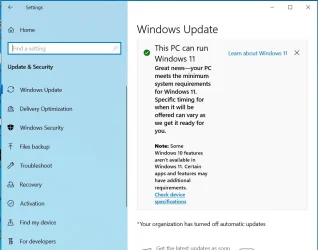
I'm one of the many W11 users that have a "spare" Windows 10 computer that has hardware that won't support W11. I use the W10 computer because I need the optical drives. So I jumped at the opportunity here to upgrade my non-compliant W10 computer. Unfortunately, not only did the upgrade not work, but now my DVD computer doesn't boot. I continue to get the message shown on the image below.

At this point I'm willing to get my W10/DVD players back. How can I do that? I have the file "Win11_24H2_English_Arm64.ISO" but I'm reluctant to mount it fearing that it'll brick my main W11 computer by running the ISO-generated virtual disk. Also, I don't know how to invoke a command prompt on my defunct W10 computer. If I could, I'll mount/run the ISO file there (nothing to lose).

Thanks
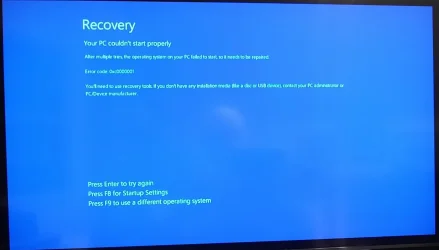
W10 Bluescreen.webp
 

My Computers

System One System Two

  • OS
    Windows 11
    Computer type
    PC/Desktop
    Manufacturer/Model
    Device name CyberPowerPC
    CPU
    13th Gen Intel(R) Core(TM) i5-13400F 2.50 GHz
    Memory
    32.0 GB
    Graphics Card(s)
    NVIDIA Gforce RTX 4060
    Hard Drives
    2 TB ADATA Legend 800 Gold SSD and several HDDs
    PSU
    650W
    Browser
    Chrome
    Other Info
    Windows 11 23H2 10.0.26100 Build 26100
  • Operating System
    Windows 10 Home 22H2 19045.4123
    Computer type
    PC/Desktop
    Manufacturer/Model
    Acer_Desktop
    CPU
    Intel(R) Core(TM) i7-4790 CPU @ 3.60GHz 3.60 GHz
    Memory
    32.0 GB
    Graphics card(s)
    Gforce GTX 745
    Sound Card
    ONN24
    Hard Drives
    Many
    Keyboard
    JLAB supports 2 computers/monitors
    Mouse
    Acer wired USB
    Browser
    Chrome
    Antivirus
    Only what W10 installed
    Other Info
    64-bit operating system, x64-based processor
"Win11_24H2_English_Arm64.ISO
Why the ARM version? I suspect that's the reason the upgrade borked ....

EDIT
Altho I would have thought Windows would have warned about an inappropriate upgrade option ...?

EDIT 2
Or did it? But was overriden?
 

My Computers

System One System Two

  • OS
    Windows 11 2xH2 (latest update ... forever anal)
    Computer type
    PC/Desktop
    Manufacturer/Model
    HP Slim S01
    CPU
    Intel i5-12400
    Memory
    8GB
    Graphics Card(s)
    NVIDIA GeForce GT730
    Sound Card
    OOBE
    Monitor(s) Displays
    Acer 32"
    Screen Resolution
    1920x1080
    Hard Drives
    512GB KIOXIA NVMe
    1TB SATA SSD
    PSU
    OOBE
    Case
    OOBE
    Cooling
    OOBE
    Keyboard
    BT
    Mouse
    BT
    Browser
    Brave FFox Chrome Opera
    Antivirus
    KIS
  • Operating System
    Windows 11 Pro 2xH2 (latest update ... 4ever anal)
    Computer type
    Laptop
    Manufacturer/Model
    HP Pavillion 15
    CPU
    i7-1165G7 @ 2.80GHz
    Graphics card(s)
    Intel Iris Xe Graphics
    Hard Drives
    Samsung NVMe 512GB
    + numerous/multiple SSD Type C USB enclosures
    Internet Speed
    NBN FTTN 50
    Browser
    Brave
    Antivirus
    KIS
At this point you cannot fix Windows 10 anymore. I suggest to backup your data and then wipe the disk and clean-install Windows 11 using the x64 ISO which is compatible with every PC using an Intel/AMD CPU. The ARM64 version is only for tablets and other devices using an ARM CPU, such as Snapdragon. Here is the official download site from Microsoft:


You don't have to download the Installation Assistant or the Media Creation Tool, scroll down to the third option, to download the ISO directly.

To create a bootable USB flash drive from the ISO and bypass compatibility check to install on unsupported computers, use Rufus to create the USB flash drive:


To backup your data before starting, either move the disk to another computer and copy your data from \Users\your_user_name folder, or use a Live Linux USB or a Live Windows (aka WinPE) USB. If you, like me, prefer Windows environment you can use Sergei Strelec WinPE ISO in Rufus to create the Live WinPE USB.


Rufus will bypass compatibility check and let you install Windows 11 25H2, provided the CPU is at least 1st generation Intel Core-i3 or newer. If it is Intel Core 2 Duo or Core 2 Quad, it supports up to 23H2 for which support ends this November. If it is newer and supports SSE4.2, then you can install 24H2 and 25H2. You can configure the settings in Rufus to automatically create a local account (the default is to connect to the internet and use a Microsoft account).
 

My Computers

System One System Two

  • OS
    Windows 11 Pro 23H2 (5699), 25H2 (8457)
    Computer type
    Laptop
    Manufacturer/Model
    Acer Extensa 5630EZ
    CPU
    Mobile DualCore Intel Core 2 Duo T7250, 2000 MHz
    Motherboard
    Acer Extensa 5630
    Memory
    4GB
    Graphics Card(s)
    Mobile Intel(R) GMA 4500M (Mobile 4 series)
    Sound Card
    Realtek ALC268 @ Intel 82801IB ICH9 - High Definition Audio Controller
    Monitor(s) Displays
    1
    Screen Resolution
    1280x800
    Hard Drives
    Samsung SSD 850 EVO 250GB SATA Device (250 GB, SATA-III)
    Internet Speed
    VDSL 50 Mbps
    Browser
    MICROSOFT EDGE
    Antivirus
    WINDOWS DEFENDER
    Other Info
    Legacy MBR installation, no TPM, no Secure Boot, no WDDM 2.0 graphics drivers, no SSE4.2, cannot get more unsupported ;) This is only my test laptop. I had installed Windows 11 here before upgrading my main PC. For my main PC I use everyday see my 2nd system specs.
  • Operating System
    Windows 11 Pro v25H2 (build 26200.8457)
    Computer type
    PC/Desktop
    Manufacturer/Model
    Custom-built PC
    CPU
    Intel Core-i7 3770 3.40GHz s1155 (3rd generation)
    Motherboard
    Asus P8H61 s1155 ATX
    Memory
    2x Kingston Hyper-X Blu 8GB DDR3-1600
    Graphics card(s)
    GIGABYTE GeForce RTX 3050 WINDFORCE OC V2 6GB (GV-N3050WF2OCV2-6GD)
    Sound Card
    Realtek HD audio (ALC887)
    Monitor(s) Displays
    Sony Bravia KDL-19L4000 19" LCD TV via VGA
    Screen Resolution
    1440x900 32-bit 60Hz
    Hard Drives
    WD Blue SA510 2.5 1000GB SSD as system disk, Western Digital Caviar Purple 4TB SATA III (WD40PURZ) as second
    PSU
    Thermaltake Litepower RGB 550W Full Wired
    Case
    SUPERCASE MIDI-TOWER
    Cooling
    Deepcool Gamma Archer CPU cooler, 1x 8cm fan at the back
    Keyboard
    Mitsumi 101-key PS/2
    Mouse
    Sunnyline OptiEye PS/2
    Internet Speed
    100Mbps
    Browser
    Microsoft Edge, Mozilla Firefox
    Antivirus
    Microsoft Windows Defender
    Other Info
    Legacy BIOS (MBR) installation, no TPM, no Secure Boot, WDDM 3.0 graphics drivers, WEI score 7.4
Go to Internet Archive to find your Windows 10 Pro version. Download and extract the iso to a bootable USB disk to do a fresh install. I trust you have your Windows serial number ready.

If you haven’t copied it somewhere, you can use a generic key for now.

hxxps://archive.org/search?query=windows+10+Pro

Once installed, go online and your Windows will be automatically registered. If it isn’t, let us know and we will tell you how you can find your original product key.

Doing a clean install of Windows 11 Pro as spapakons has suggested is another option. However your devices on the pc must meet the following minimum hardware requirements. Otherwise, you can’t install Windows 11 Pro.

I doubt you can install WoA (Windows on Arm) version of Windows 11 Pro. It was only recently introduced.

1760513570161.webp
 
Last edited:

My Computer

System One

  • OS
    Win 7,8.1,10,11, Mint, Kde Plasma, Debian
    Computer type
    Laptop
    Manufacturer/Model
    Dell
    CPU
    Intel(R) Core(TM) i7-6500U CPU @ 2.50GHz
    Memory
    16 GB
    Graphics Card(s)
    Intel(R) HD Graphics 520/Nvidia GeForce 930M
    Sound Card
    Intel(R) Display Audio/RealtekAudio
    Monitor(s) Displays
    Generic Pnp Monitor
    Screen Resolution
    1366 X 768
    Hard Drives
    ST2000LM024-1EJ164
    Keyboard
    Eng (US)
    Mouse
    Sanwa Supply
    Browser
    Firefox
    Antivirus
    Avast One
    Other Info
    Too many laptops with different system specifications.
You can download the Windows 10 Media Creation Tool from here:


Run it and select to download the ISO for installation on another computer. However, I think at this point is much better to install Windows 11 25H2, if your CPU has SSE4.2 instructions, than go back to Windows 10. All the same drivers you would install in 10 also work in 11. Also all the same apps and games work in 11, so you shouldn't have any compatibility issues. All standard updates download and install in all unsupported computers, except the ones to upgrade from an older version to a newer version of Windows 11. To do that, you have to manually download the newer ISO and use Rufus to bypass compatibility check. See my previous post for links.
 

My Computers

System One System Two

  • OS
    Windows 11 Pro 23H2 (5699), 25H2 (8457)
    Computer type
    Laptop
    Manufacturer/Model
    Acer Extensa 5630EZ
    CPU
    Mobile DualCore Intel Core 2 Duo T7250, 2000 MHz
    Motherboard
    Acer Extensa 5630
    Memory
    4GB
    Graphics Card(s)
    Mobile Intel(R) GMA 4500M (Mobile 4 series)
    Sound Card
    Realtek ALC268 @ Intel 82801IB ICH9 - High Definition Audio Controller
    Monitor(s) Displays
    1
    Screen Resolution
    1280x800
    Hard Drives
    Samsung SSD 850 EVO 250GB SATA Device (250 GB, SATA-III)
    Internet Speed
    VDSL 50 Mbps
    Browser
    MICROSOFT EDGE
    Antivirus
    WINDOWS DEFENDER
    Other Info
    Legacy MBR installation, no TPM, no Secure Boot, no WDDM 2.0 graphics drivers, no SSE4.2, cannot get more unsupported ;) This is only my test laptop. I had installed Windows 11 here before upgrading my main PC. For my main PC I use everyday see my 2nd system specs.
  • Operating System
    Windows 11 Pro v25H2 (build 26200.8457)
    Computer type
    PC/Desktop
    Manufacturer/Model
    Custom-built PC
    CPU
    Intel Core-i7 3770 3.40GHz s1155 (3rd generation)
    Motherboard
    Asus P8H61 s1155 ATX
    Memory
    2x Kingston Hyper-X Blu 8GB DDR3-1600
    Graphics card(s)
    GIGABYTE GeForce RTX 3050 WINDFORCE OC V2 6GB (GV-N3050WF2OCV2-6GD)
    Sound Card
    Realtek HD audio (ALC887)
    Monitor(s) Displays
    Sony Bravia KDL-19L4000 19" LCD TV via VGA
    Screen Resolution
    1440x900 32-bit 60Hz
    Hard Drives
    WD Blue SA510 2.5 1000GB SSD as system disk, Western Digital Caviar Purple 4TB SATA III (WD40PURZ) as second
    PSU
    Thermaltake Litepower RGB 550W Full Wired
    Case
    SUPERCASE MIDI-TOWER
    Cooling
    Deepcool Gamma Archer CPU cooler, 1x 8cm fan at the back
    Keyboard
    Mitsumi 101-key PS/2
    Mouse
    Sunnyline OptiEye PS/2
    Internet Speed
    100Mbps
    Browser
    Microsoft Edge, Mozilla Firefox
    Antivirus
    Microsoft Windows Defender
    Other Info
    Legacy BIOS (MBR) installation, no TPM, no Secure Boot, WDDM 3.0 graphics drivers, WEI score 7.4
I trust you have your Windows serial number ready.
Activation should use your digital license. It is tied to the hardware and your MS account on MS servers.

I hope you have made an backup image of your old installation. If so the easiest way to recover is to restore it. Otherwise it's clean install city as @spapakons pointed out.
 

My Computers

System One System Two

  • OS
    Windows 11 Pro 25H2
    Computer type
    PC/Desktop
    Manufacturer/Model
    Dell Optiplex 7080
    CPU
    i9-10900 10 core 20 threads
    Motherboard
    DELL 0J37VM
    Memory
    32 gb
    Graphics Card(s)
    none-Intel UHD Graphics 630
    Sound Card
    Integrated Realtek
    Monitor(s) Displays
    Benq 27
    Screen Resolution
    2560x1440
    Hard Drives
    2x1tb Solidigm m.2 nvme /External drives 512gb Samsung m.2 sata+2tb Kingston m2.nvme
    PSU
    500w
    Case
    MT
    Cooling
    Dell Premium
    Keyboard
    Logitech wired
    Mouse
    Logitech wireless
    Internet Speed
    so slow I'm too embarrassed to tell
    Browser
    #1 Edge #2 Firefox
    Antivirus
    Defender+MWB Premium
  • Operating System
    Windows 11 Pro 24H2 26200.8457
    Computer type
    PC/Desktop
    Manufacturer/Model
    Beelink Mini PC SER5
    CPU
    AMD Ryzen 7 6800U
    Memory
    32 gb
    Graphics card(s)
    integrated
    Sound Card
    integrated
    Monitor(s) Displays
    Benq 27
    Screen Resolution
    2560x1440
    Hard Drives
    1TB Crucial nvme
    Keyboard
    Logitech wired
    Mouse
    Logitech wireless
    Internet Speed
    still too embarrassed to tell
    Browser
    Firefox
    Antivirus
    Defender
    Other Info
    System 3 is non compliant Dell 9020 i7-4770/24gb ram Win11 PRO 26200.8457
If you were recently using the laptop and the backup is not too old (more than 2-3 months), it might be worth to restore it. Otherwise, just backup your data and do a new Windows 11 installation. It will be much faster.
 

My Computers

System One System Two

  • OS
    Windows 11 Pro 23H2 (5699), 25H2 (8457)
    Computer type
    Laptop
    Manufacturer/Model
    Acer Extensa 5630EZ
    CPU
    Mobile DualCore Intel Core 2 Duo T7250, 2000 MHz
    Motherboard
    Acer Extensa 5630
    Memory
    4GB
    Graphics Card(s)
    Mobile Intel(R) GMA 4500M (Mobile 4 series)
    Sound Card
    Realtek ALC268 @ Intel 82801IB ICH9 - High Definition Audio Controller
    Monitor(s) Displays
    1
    Screen Resolution
    1280x800
    Hard Drives
    Samsung SSD 850 EVO 250GB SATA Device (250 GB, SATA-III)
    Internet Speed
    VDSL 50 Mbps
    Browser
    MICROSOFT EDGE
    Antivirus
    WINDOWS DEFENDER
    Other Info
    Legacy MBR installation, no TPM, no Secure Boot, no WDDM 2.0 graphics drivers, no SSE4.2, cannot get more unsupported ;) This is only my test laptop. I had installed Windows 11 here before upgrading my main PC. For my main PC I use everyday see my 2nd system specs.
  • Operating System
    Windows 11 Pro v25H2 (build 26200.8457)
    Computer type
    PC/Desktop
    Manufacturer/Model
    Custom-built PC
    CPU
    Intel Core-i7 3770 3.40GHz s1155 (3rd generation)
    Motherboard
    Asus P8H61 s1155 ATX
    Memory
    2x Kingston Hyper-X Blu 8GB DDR3-1600
    Graphics card(s)
    GIGABYTE GeForce RTX 3050 WINDFORCE OC V2 6GB (GV-N3050WF2OCV2-6GD)
    Sound Card
    Realtek HD audio (ALC887)
    Monitor(s) Displays
    Sony Bravia KDL-19L4000 19" LCD TV via VGA
    Screen Resolution
    1440x900 32-bit 60Hz
    Hard Drives
    WD Blue SA510 2.5 1000GB SSD as system disk, Western Digital Caviar Purple 4TB SATA III (WD40PURZ) as second
    PSU
    Thermaltake Litepower RGB 550W Full Wired
    Case
    SUPERCASE MIDI-TOWER
    Cooling
    Deepcool Gamma Archer CPU cooler, 1x 8cm fan at the back
    Keyboard
    Mitsumi 101-key PS/2
    Mouse
    Sunnyline OptiEye PS/2
    Internet Speed
    100Mbps
    Browser
    Microsoft Edge, Mozilla Firefox
    Antivirus
    Microsoft Windows Defender
    Other Info
    Legacy BIOS (MBR) installation, no TPM, no Secure Boot, WDDM 3.0 graphics drivers, WEI score 7.4
To backup your data before starting, either move the disk to another computer and copy your data from \Users\your_user_name folder, or use a Live Linux USB or a Live Windows (aka WinPE) USB. If you, like me, prefer Windows environment you can use Sergei Strelec WinPE ISO in Rufus to create the Live WinPE USB.


Hahahahaha ... You must be fluent in Russian. I wish I were too.
 

My Computers

System One System Two

  • OS
    win 11 pro, 25H2
    Computer type
    PC/Desktop
    Manufacturer/Model
    Dell 790 (Mt)
    CPU
    i5-2400
    Motherboard
    Dell
    Memory
    32 GB DDR-3
    Graphics Card(s)
    Intel HD Graphics 2000 (on-board)
    Sound Card
    Intel Cougar Point PCH [B2] (On-Board)
    Monitor(s) Displays
    LG 27MN60T
  • Operating System
    Windows 11 home, 25H2
    Computer type
    Laptop
    Manufacturer/Model
    Dell Inspiron 17R SE 7720
    CPU
    Intel I7-3630QM
    Memory
    16GB DDR3
    Hard Drives
    Samsung 500GB SSD
Hahahahaha ... You must be fluent in Russian. I wish I were too.
No, I don't speak Russian. There is an English version.
 

My Computers

System One System Two

  • OS
    Windows 11 Pro 23H2 (5699), 25H2 (8457)
    Computer type
    Laptop
    Manufacturer/Model
    Acer Extensa 5630EZ
    CPU
    Mobile DualCore Intel Core 2 Duo T7250, 2000 MHz
    Motherboard
    Acer Extensa 5630
    Memory
    4GB
    Graphics Card(s)
    Mobile Intel(R) GMA 4500M (Mobile 4 series)
    Sound Card
    Realtek ALC268 @ Intel 82801IB ICH9 - High Definition Audio Controller
    Monitor(s) Displays
    1
    Screen Resolution
    1280x800
    Hard Drives
    Samsung SSD 850 EVO 250GB SATA Device (250 GB, SATA-III)
    Internet Speed
    VDSL 50 Mbps
    Browser
    MICROSOFT EDGE
    Antivirus
    WINDOWS DEFENDER
    Other Info
    Legacy MBR installation, no TPM, no Secure Boot, no WDDM 2.0 graphics drivers, no SSE4.2, cannot get more unsupported ;) This is only my test laptop. I had installed Windows 11 here before upgrading my main PC. For my main PC I use everyday see my 2nd system specs.
  • Operating System
    Windows 11 Pro v25H2 (build 26200.8457)
    Computer type
    PC/Desktop
    Manufacturer/Model
    Custom-built PC
    CPU
    Intel Core-i7 3770 3.40GHz s1155 (3rd generation)
    Motherboard
    Asus P8H61 s1155 ATX
    Memory
    2x Kingston Hyper-X Blu 8GB DDR3-1600
    Graphics card(s)
    GIGABYTE GeForce RTX 3050 WINDFORCE OC V2 6GB (GV-N3050WF2OCV2-6GD)
    Sound Card
    Realtek HD audio (ALC887)
    Monitor(s) Displays
    Sony Bravia KDL-19L4000 19" LCD TV via VGA
    Screen Resolution
    1440x900 32-bit 60Hz
    Hard Drives
    WD Blue SA510 2.5 1000GB SSD as system disk, Western Digital Caviar Purple 4TB SATA III (WD40PURZ) as second
    PSU
    Thermaltake Litepower RGB 550W Full Wired
    Case
    SUPERCASE MIDI-TOWER
    Cooling
    Deepcool Gamma Archer CPU cooler, 1x 8cm fan at the back
    Keyboard
    Mitsumi 101-key PS/2
    Mouse
    Sunnyline OptiEye PS/2
    Internet Speed
    100Mbps
    Browser
    Microsoft Edge, Mozilla Firefox
    Antivirus
    Microsoft Windows Defender
    Other Info
    Legacy BIOS (MBR) installation, no TPM, no Secure Boot, WDDM 3.0 graphics drivers, WEI score 7.4
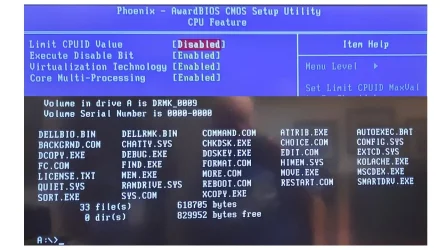
Thanks to everyone for your help. I tried the routines suggested by spapakons but no success. The only thing other than the BIOS blue screens is shown in the B/W part of the image. But at least it appears to be addressable and shows several apparently recognizable commands (but not setup.exe). Is there something shown that can get me to W10 or 11? I may need to use one of the commands offered and follow with some other routines that will get to an OS.

Also, I have found a 25-digit alphanumeric number labeled "Product Key" on a label affixed to the computer. Hopefully that is what I need once I load the operating system.
Dell OS.webp
 

My Computers

System One System Two

  • OS
    Windows 11
    Computer type
    PC/Desktop
    Manufacturer/Model
    Device name CyberPowerPC
    CPU
    13th Gen Intel(R) Core(TM) i5-13400F 2.50 GHz
    Memory
    32.0 GB
    Graphics Card(s)
    NVIDIA Gforce RTX 4060
    Hard Drives
    2 TB ADATA Legend 800 Gold SSD and several HDDs
    PSU
    650W
    Browser
    Chrome
    Other Info
    Windows 11 23H2 10.0.26100 Build 26100
  • Operating System
    Windows 10 Home 22H2 19045.4123
    Computer type
    PC/Desktop
    Manufacturer/Model
    Acer_Desktop
    CPU
    Intel(R) Core(TM) i7-4790 CPU @ 3.60GHz 3.60 GHz
    Memory
    32.0 GB
    Graphics card(s)
    Gforce GTX 745
    Sound Card
    ONN24
    Hard Drives
    Many
    Keyboard
    JLAB supports 2 computers/monitors
    Mouse
    Acer wired USB
    Browser
    Chrome
    Antivirus
    Only what W10 installed
    Other Info
    64-bit operating system, x64-based processor
Looks like you created a bootable USB flash drive with MS-DOS commands.

How to create a bootable Windows 11 Setup USB with Rufus:

1) Connect your USB flash drive to the computer.
2) Load Rufus 4.5 or newer. Make sure you select your USB flash drive in Device section.
3) Click on the Select button at the right to select your Windows 11 ISO.
4) In Partition scheme make sure you select GPT to create an UEFI bootable USB flash drive.
5) In Format Options, File System should be FAT32 by default, don't change it.
6) Click START button to begin the process.
7) At this point Rufus detects it is a Windows 11 ISO and gives you checkboxes to bypass compatibility check. Check them all.
8) If you want to create a local account instead of using a Microsoft account, use the respective option at the bottom.
9) When ready, click the button to proceed creating the USB flash drive.

I recommend using the official ISO from Microsoft (scroll down, third option, download the ISO directly). Any weird third-party modified version might not be detected as Windows 11 and Rufus won't offer to patch compatibility check.


My Computers

System One System Two

  • OS
    Windows 11 Pro 23H2 (5699), 25H2 (8457)
    Computer type
    Laptop
    Manufacturer/Model
    Acer Extensa 5630EZ
    CPU
    Mobile DualCore Intel Core 2 Duo T7250, 2000 MHz
    Motherboard
    Acer Extensa 5630
    Memory
    4GB
    Graphics Card(s)
    Mobile Intel(R) GMA 4500M (Mobile 4 series)
    Sound Card
    Realtek ALC268 @ Intel 82801IB ICH9 - High Definition Audio Controller
    Monitor(s) Displays
    1
    Screen Resolution
    1280x800
    Hard Drives
    Samsung SSD 850 EVO 250GB SATA Device (250 GB, SATA-III)
    Internet Speed
    VDSL 50 Mbps
    Browser
    MICROSOFT EDGE
    Antivirus
    WINDOWS DEFENDER
    Other Info
    Legacy MBR installation, no TPM, no Secure Boot, no WDDM 2.0 graphics drivers, no SSE4.2, cannot get more unsupported ;) This is only my test laptop. I had installed Windows 11 here before upgrading my main PC. For my main PC I use everyday see my 2nd system specs.
  • Operating System
    Windows 11 Pro v25H2 (build 26200.8457)
    Computer type
    PC/Desktop
    Manufacturer/Model
    Custom-built PC
    CPU
    Intel Core-i7 3770 3.40GHz s1155 (3rd generation)
    Motherboard
    Asus P8H61 s1155 ATX
    Memory
    2x Kingston Hyper-X Blu 8GB DDR3-1600
    Graphics card(s)
    GIGABYTE GeForce RTX 3050 WINDFORCE OC V2 6GB (GV-N3050WF2OCV2-6GD)
    Sound Card
    Realtek HD audio (ALC887)
    Monitor(s) Displays
    Sony Bravia KDL-19L4000 19" LCD TV via VGA
    Screen Resolution
    1440x900 32-bit 60Hz
    Hard Drives
    WD Blue SA510 2.5 1000GB SSD as system disk, Western Digital Caviar Purple 4TB SATA III (WD40PURZ) as second
    PSU
    Thermaltake Litepower RGB 550W Full Wired
    Case
    SUPERCASE MIDI-TOWER
    Cooling
    Deepcool Gamma Archer CPU cooler, 1x 8cm fan at the back
    Keyboard
    Mitsumi 101-key PS/2
    Mouse
    Sunnyline OptiEye PS/2
    Internet Speed
    100Mbps
    Browser
    Microsoft Edge, Mozilla Firefox
    Antivirus
    Microsoft Windows Defender
    Other Info
    Legacy BIOS (MBR) installation, no TPM, no Secure Boot, WDDM 3.0 graphics drivers, WEI score 7.4
Back
Top Bottom